
Stop Sending Stupid Emails
The median home price in the US is north of $400,000. Your email automation logic better be worth at least a fraction of that. Most isn’t. It’s built on brittle triggers, dirty data, and a prayer that the CRM API doesn’t change a field name overnight. The result is sending a “Just Listed!” email for a property that went under contract three hours ago, eroding trust with every mistaken send.
This isn’t about subject lines. It’s about the backend architecture that prevents your system from lying to potential clients.
Your Data Ingestion is Probably Broken
Real estate data is a mess. You are likely pulling from multiple MLS feeds, each with its own bizarre conventions for addresses, statuses, and pricing. One feed sends `price` as a clean integer. Another sends it as a formatted string “$1,200,000.00”. A third has a status of “A” for Active while another uses “ACT”. If you pipe this data directly into your automation engine, you’re building on sand.
The first job is to force a unified data model. Build a staging layer where all incoming property data is ruthlessly stripped, validated, and normalized before it ever touches your contact database or triggers a single email. Addresses get parsed into standard components, prices get converted to integers representing cents, and statuses are mapped to a single, authoritative enum. This isn’t glamorous work. It’s painstaking data plumbing.
Without it, your automations are a ticking time bomb of bad data.
Segmentation Beyond a Single Tag
Segmenting contacts into “buyers” and “sellers” is entry-level. True automation requires dynamic segmentation based on behavior and property data, calculated on the fly. A contact who viewed three different 4-bedroom homes in the ‘Northwood’ subdivision over the last 48 hours is a different segment than someone who just saved a search for condos under $500k.
Executing these complex queries in real-time against your production database is a direct path to a performance bottleneck. Every page load, every saved search, and every property view would trigger a resource-heavy re-evaluation of segment membership. Your database will choke, and your application will feel sluggish. Trying to run a complex segmentation engine in real-time is like trying to shove a firehose of data through a needle. The pressure builds until something breaks.
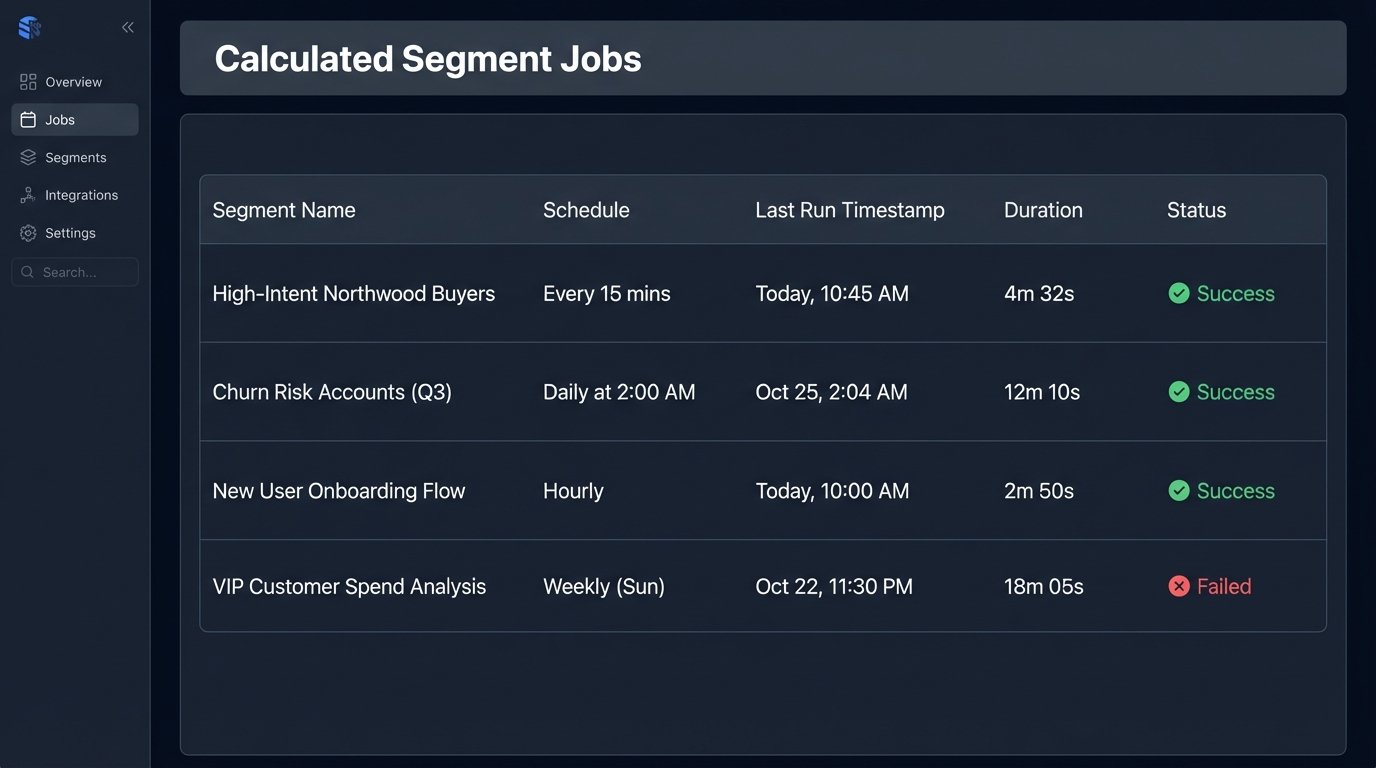
A better approach is to offload this. Run segmentation jobs against a read replica of your database or a data warehouse. Pre-calculate segment membership as a batch process that runs every 15 minutes or every hour. The data is slightly stale, but your system remains stable. This is a direct choice between data freshness and system availability. Pick availability.
Trigger Architecture Needs a Gatekeeper
A new listing in a saved search area. A price drop on a viewed property. A status change from ‘Active’ to ‘Pending’. These are all valid triggers. The problem is they can fire in rapid, overlapping succession for the same user. The result is an infuriated contact getting three separate emails about the same property in a single afternoon.
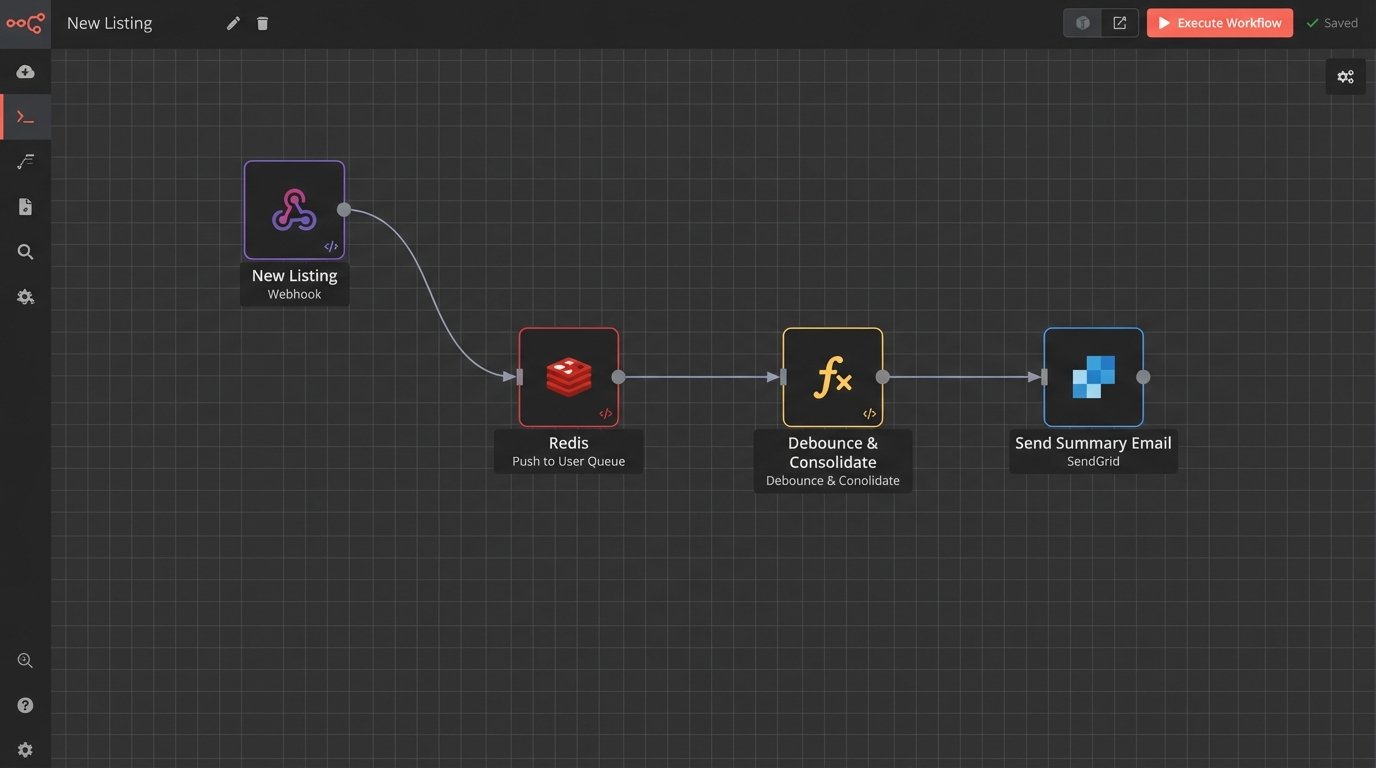
Do not let triggers fire emails directly. Instead, have them push events into a user-specific queue. For example, `UserID-123` gets three events: `NEW_LISTING_MATCH`, `PRICE_DROP`, `STATUS_CHANGE_PENDING`. A separate, scheduled worker process then reads this queue. The worker’s job is to consolidate these raw events into a single, intelligent notification. It sees the new listing and the price drop, and it builds one email titled “Price Drop on New Listing Matching Your Search”. It sees the ‘Pending’ status and suppresses the other notifications entirely. The property is gone.
This “debounce” logic prevents you from spamming your own users. It turns your automation from a series of disjointed reflexes into a coherent communication strategy.
Error Handling for 3 AM Outages
Your email service provider’s API will go down. Your CRM’s rate limit will be hit. A malformed personalization token will cause a template to fail rendering. These are not possibilities. They are certainties. If your code doesn’t account for them, it’s not production-ready.
Every external API call must be wrapped in a try-catch block with a retry mechanism. A simple exponential backoff strategy is a good start. If a send fails after three retries, don’t just discard it. Push the failed job, along with its full payload and the error message, into a dead-letter queue. This gives you a chance to inspect the failure and manually re-queue it later, preventing lead loss.
Logging is non-negotiable. You need to log the exact moment a trigger fired, the data used to build the email, the final rendered payload sent to the ESP, and the success or failure response from their API. When a client claims they never received a critical alert, you need the receipts to prove you sent it, or the logs to show exactly why it failed.
Dynamic Content is a Performance Trap
Personalizing with `{{contact.firstName}}` is trivial. The real work is injecting complex, dynamic data blocks: a market analysis chart for the property’s zip code, a list of comparable sold properties, or an embedded map with nearby schools. These components often require making separate, blocking API calls to other internal services or third-party vendors during the email assembly process.
Your email template becomes a fragile assembly line. If the service that generates the market chart is slow or unresponsive, the entire email send for that user is halted. At scale, a single slow downstream dependency can cascade, backing up your entire email queue. Each dynamic block must be fetched with an aggressive timeout. If the data isn’t returned in, say, 500ms, the system must have a designated fallback. It’s better to send an email with a missing chart than to send no email at all.

This requires building your templates with conditional logic that can handle the absence of data, gracefully hiding a section instead of throwing a fatal rendering error.
Deliverability Is Not a Marketing Function
Getting an email into the inbox is an engineering problem. Before you send a single message, you must have your DNS records configured correctly. This means a proper SPF record that authorizes your sending IPs, a DKIM signature to prove the message hasn’t been tampered with, and a DMARC policy to tell mailbox providers what to do with messages that fail these checks.
If you’re using a new domain or IP address, you can’t just start blasting tens of thousands of emails. You must warm it up. Start by sending a few hundred emails to your most engaged contacts. Gradually increase the volume over several weeks, carefully monitoring your open rates, bounce rates, and complaint rates. Gmail, Microsoft, and others watch sending patterns. A sudden, high-volume spike from a new IP is the classic signature of a spammer.
You must also process feedback loops (FBLs). When a user clicks “Mark as Spam,” their ISP notifies you through the FBL. Your system must be configured to immediately receive this notification and add that user to a suppression list. Continuing to email users who have reported you as spam is the fastest way to destroy your sender reputation.
Here is a barebones Python example using a webhook to handle a complaint from a service like SendGrid. This isn’t complete code, just the logic hook.
python
from flask import Flask, request, abort
app = Flask(__name__)
# This endpoint would be registered with your email service provider
@app.route(‘/webhooks/email-events’, methods=[‘POST’])
def handle_email_events():
events = request.get_json()
for event in events:
if event[‘event’] == ‘spamreport’:
email_address = event[’email’]
# 1. Log the complaint
log_spam_complaint(email_address)
# 2. Add to internal suppression list to prevent future sends
add_to_suppression_list(email_address)
# 3. Optional: Trigger a workflow to also remove from CRM campaigns
update_crm_status(email_address, ‘spam_complaint’)
return ‘OK’, 200
def log_spam_complaint(email):
# Logic to write to your logs
print(f”Spam complaint received for: {email}”)
def add_to_suppression_list(email):
# Logic to update your database/suppression service
print(f”Adding {email} to global suppression list.”)
def update_crm_status(email, status):
# Logic to call your CRM’s API
print(f”Updating CRM status for {email} to {status}.”)
if __name__ == ‘__main__’:
# This is for demonstration. Use a proper WSGI server in production.
app.run(debug=True)
The code itself is simple. The critical part is having the discipline to build and maintain this plumbing.
The Tooling Dilemma: Build vs. Buy
You can use an off-the-shelf marketing automation platform. This gets you running quickly. The trade-off is that you are permanently constrained by their data model, their segmentation capabilities, and the rate limits of their API. When you need a specific type of trigger or a complex data join that their platform doesn’t support, you are stuck.
Building a custom solution gives you absolute control, but it’s a massive undertaking. You are now responsible for the message queue, the worker infrastructure, the logging pipeline, the IP reputation, and every other piece of the system. It is a significant and ongoing engineering investment. Do not choose this path unless email automation is a core, revenue-generating function of your business and you have the engineering headcount to support it.
There is no perfect answer, only a decision about which set of problems you prefer to have.