
Stop Building Templates on a Foundation of Sand
The primary failure point in most real estate SMS automation isn’t the copy. It’s the data. Your CRM is a minefield of null values, user-entered typos, and outdated information. Building a template that blindly trusts `{{contact.city}}` is the fastest route to sending a message that reads “Hi John, interested in properties in null?”.
This is amateur hour. You’re not just annoying a lead, you are eroding the credibility of your entire automated system.
Before a single character is written, you must implement a data sanitation and validation layer. This isn’t a suggestion. It’s a prerequisite. This layer should programmatically check for nulls, format phone numbers to E.164, and standardize address components. Relying on raw CRM data without a sanitation layer is like building a house on a swamp. The foundation looks fine for a week, then everything starts to sink.
A pre-send validation check must be built into the workflow. This logic checks the critical merge fields for a given contact. If `first_name` is missing or the `property_of_interest_url` is invalid, the entire send operation for that contact must be aborted and flagged for manual review. Do not send a broken message. Send nothing.
Conditional Logic is Non-Negotiable
A static template is a dead template. The real work is in building dynamic content blocks that adapt to the data you actually have, not the data you wish you had. This means moving beyond simple variable injection and into conditional logic directly within your messaging architecture.
Your system needs to be smart enough to construct sentences based on available data points.
Implement Fallback Values at the System Level
Every single personalization token needs a fallback. If `{{contact.first_name}}` is null, the template shouldn’t break. It should default to a generic but still functional greeting like “Hi there”. This prevents catastrophic send failures and maintains a baseline of professionalism.
This logic shouldn’t live in a hundred different templates. It should be part of the core sending service. The service requests `first_name`, and if the CRM returns a null or empty string, the service itself substitutes the predetermined fallback value before injecting it into the payload.
Build Logic for Different Lead Segments
A template for a first-time inquiry should be fundamentally different from one for a lead who has favorited five properties. You can control this with conditional blocks. For example, if a custom field `lead_status` equals “New”, the system injects an introductory block. If it equals “Engaged”, it injects a block mentioning their last viewed property.
This requires tight integration with your CRM, but it moves the SMS from a simple notification to a contextual conversation. The goal is to make the message feel like it was sent by a human who just checked the lead’s file, even though it was triggered by a database event.
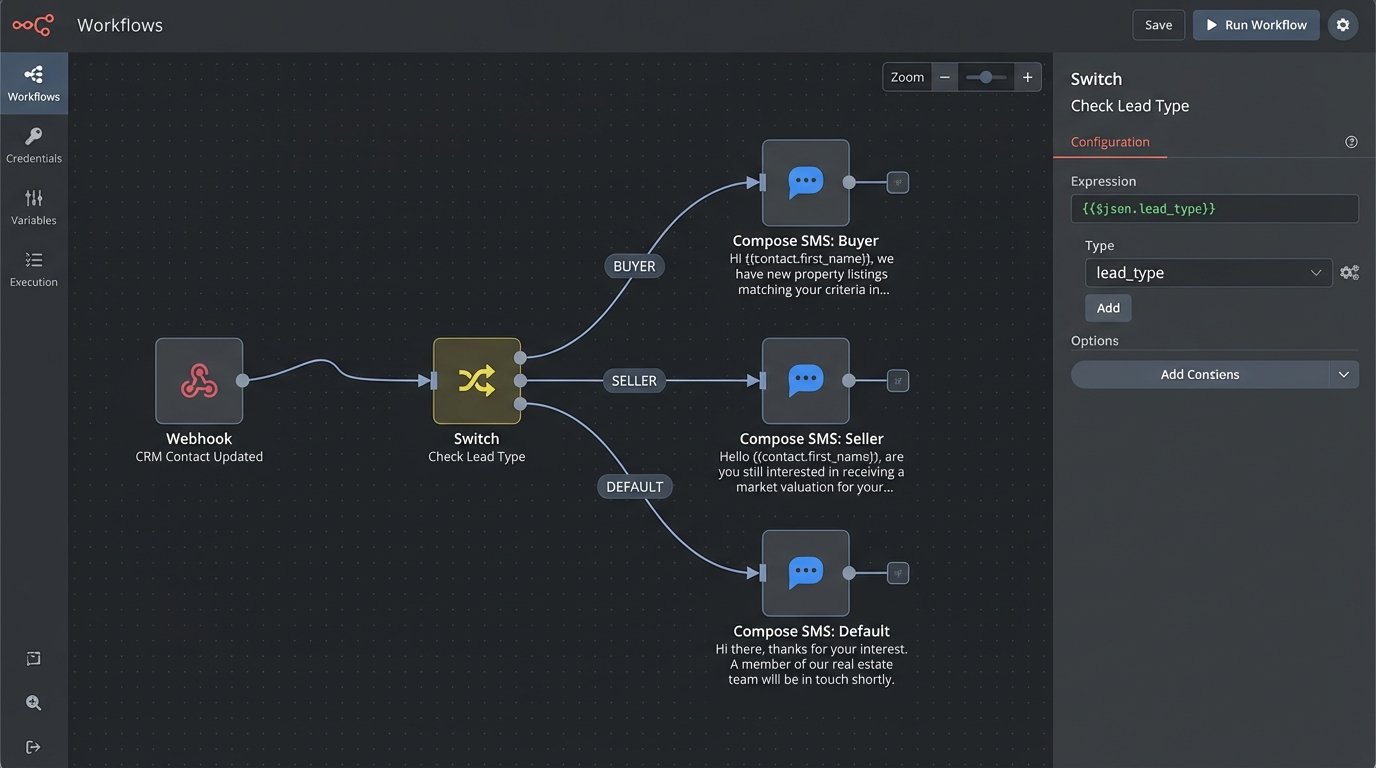
Here is a basic JSON structure representing a payload with conditional logic. The sending service would parse this and select the appropriate text based on the `lead_type` field pulled from the contact record.
{

  "to": "+15551234567",

  "template_id": "real_estate_initial_outreach",

  "data": {

    "first_name": "Jane",

    "lead_type": "Buyer",

    "agent_name": "Bob"

  },

  "logic_map": {

    "greeting": {

      "BUYER": "Hi {{first_name}}, it's {{agent_name}}. Saw you were looking at properties online. Are you available for a quick chat about your search?",

      "SELLER": "Hi {{first_name}}, this is {{agent_name}}. I noticed you were curious about your home's value. I have some fresh comps for your area if you're interested.",

      "DEFAULT": "Hello, this is {{agent_name}} from XYZ Realty. Thanks for your interest."

    }

  }

}
The system would then check `data.lead_type`, find the “Buyer” key in the `logic_map`, and construct the final message from there. The `DEFAULT` provides a safety net if the lead type is missing or doesn’t match a key.
Acknowledge the Existence of Carrier Filtering
Mobile carriers are not your friends. They run aggressive, often opaque filtering algorithms to block what they perceive as spam. Sending the exact same message to 500 different numbers is a massive red flag. Using common URL shorteners like bit.ly is another.
Ignoring this reality will get your number blocked and your deliverability will crater. No amount of clever copy can fix a message that never arrives.
Use Message Spintax and Unique Tracking Links
To bypass basic filtering, you must introduce variation. Spintax is a method of nesting alternative words or phrases within a template. The sending engine randomly picks one option for each message, creating hundreds of unique permutations from a single template.
For example: `{Hi|Hello|Hey}` `{{first_name}}`, `I’m {reaching out|getting in touch}` `about the property on {{address}}.` This minor change is often enough to slip past simple volumetric filters. Combine this with dedicated, branded tracking URLs for each campaign instead of generic shorteners. A URL like `links.youragency.com/123` is far less likely to be flagged than a bit.ly link.
Comply with A2P 10DLC or Suffer the Consequences
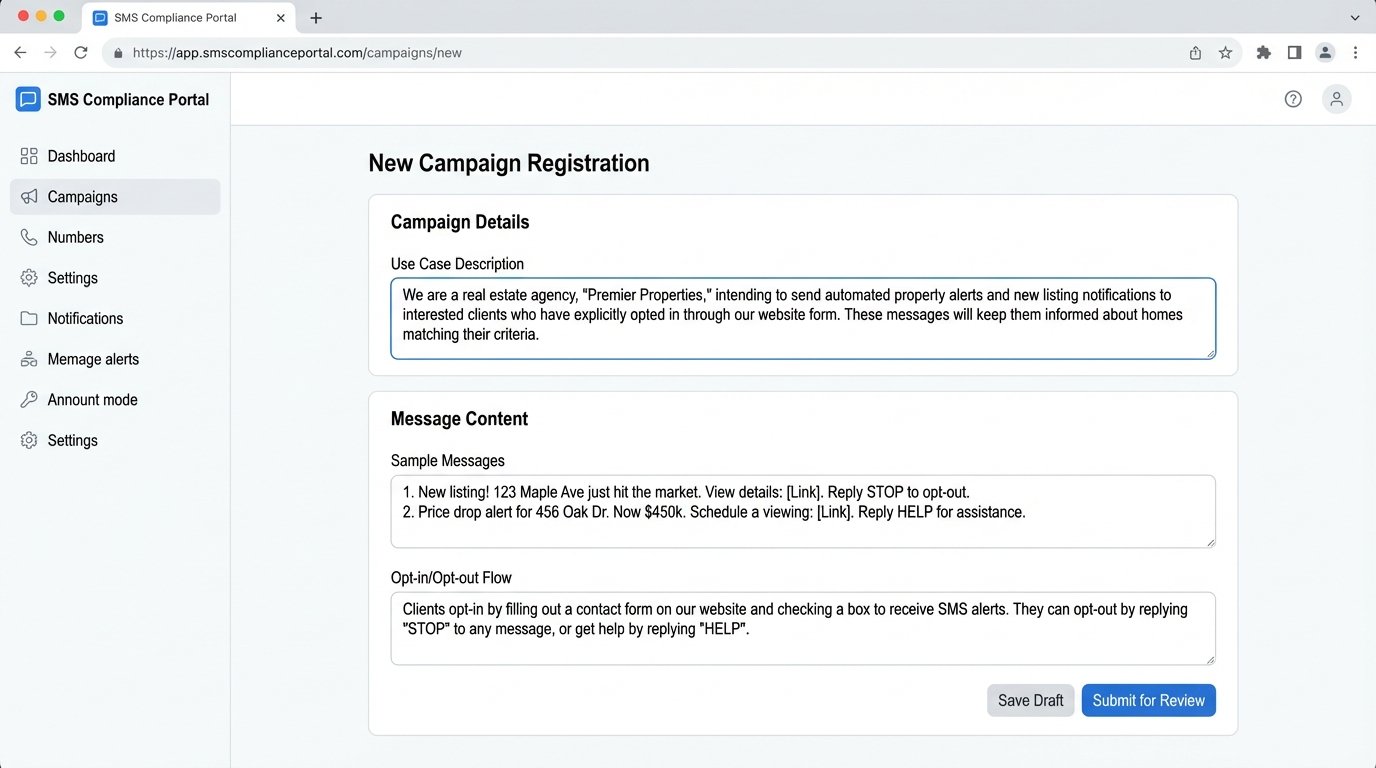
If you’re operating in the US and sending messages from an application to a person (A2P), you must register with The Campaign Registry for 10-digit long code (10DLC) delivery. This is not optional. Unregistered traffic is throttled to a crawl and faces heavy filtering.
The registration process is a bureaucratic headache, requiring you to detail your exact use case, provide sample messages, and explain how you handle opt-ins and opt-outs. It’s a pain, but it’s the cost of doing business. Bypassing it is a short-term strategy that ends with a permanently blocked sending number.
Architect for Two-Way Communication, Not Monologues
An SMS template is the start of a potential conversation. Your automation’s job isn’t done when the message is sent. The real complexity lies in handling the response. If your system can’t intelligently parse and route inbound replies, you’re just creating more manual work for your agents.
Every automated outbound message must be tied to a state machine that anticipates a reply.
Keyword Parsing and Routing
At a minimum, your system must handle `STOP`, `HELP`, and `UNSUBSCRIBE`. This is a legal and technical requirement. Failure to process an opt-out request immediately is a direct violation of TCPA regulations.
Beyond the basics, you can build keyword triggers. A reply containing “more info” or “details” could automatically trigger a second message with a link to the property listing. A reply with “schedule” or “showing” could flag the contact in the CRM and create a task for the assigned agent to call them. This offloads low-level sorting from humans.
Handling Natural Language Replies
Not every lead will use your prescribed keywords. Many will reply with a question like “Is the backyard fenced?” or “What are the school districts?”. Your system needs a default fallback for any message it cannot parse. This fallback should not be silence.
The safest route is to forward the unparsed message directly to the agent’s email or a Slack channel, along with a link to the contact’s CRM record. The automation’s job is to recognize it needs a human, package the context neatly, and hand it off. The agent then takes over the conversation. This human-in-the-loop design prevents leads from falling into a black hole when they deviate from the script.
Respect Timing, Throttling, and Rate Limits
Hitting “send” on a campaign to 10,000 leads at once is how you get your API key suspended. Every SMS provider has rate limits, and blasting a single number with dozens of messages in a short period will get you filtered by carriers. Automation requires mechanical sympathy.
You need to understand the constraints of the system you’re operating within.
Implement a Send Queue with Throttling
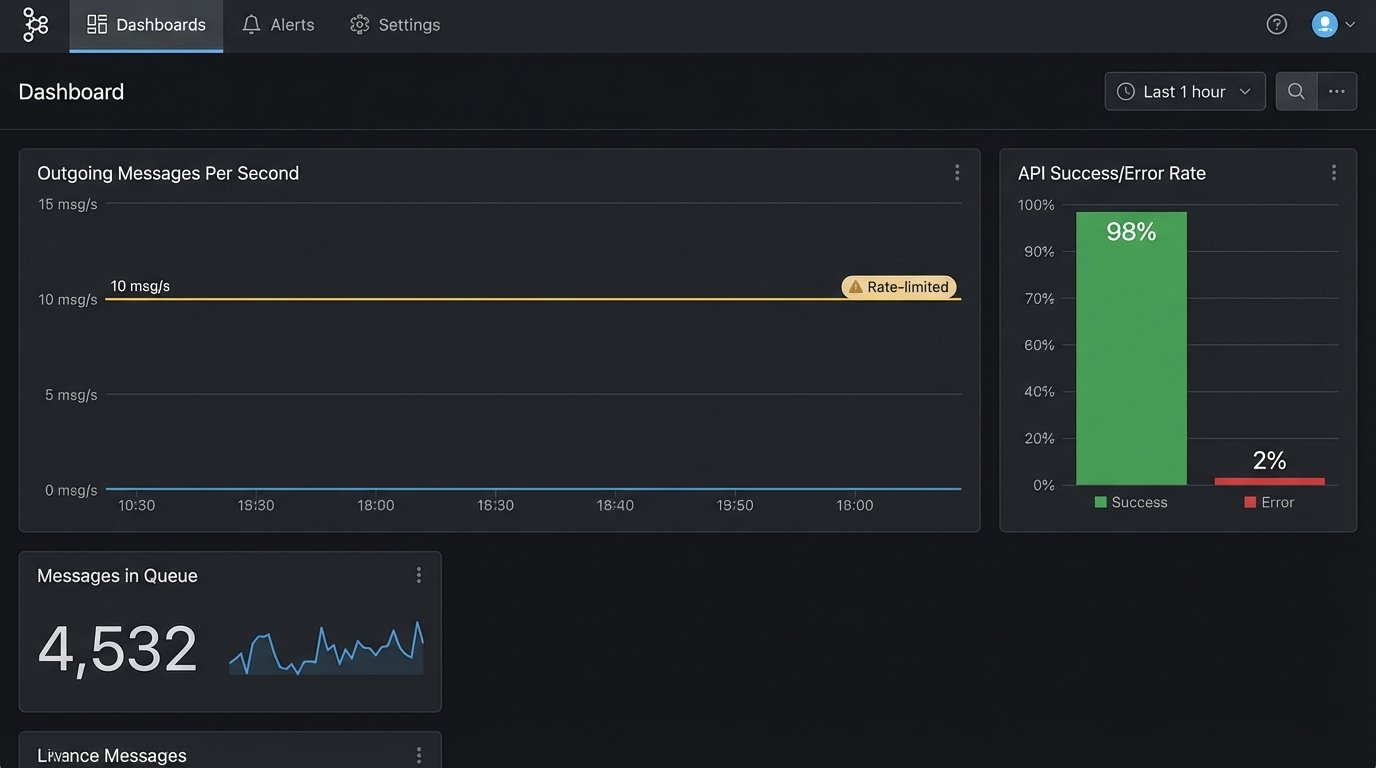
Instead of firing API calls directly from your trigger, push messages into a queue. A separate worker process can then pull messages from this queue at a controlled rate, for example, 10 messages per second. This smooths out send bursts and keeps you safely within your provider’s API limits.
The queue also adds resilience. If the SMS provider’s API has a momentary outage, the messages simply wait in the queue. A direct API call would have failed and the data would have been lost without a complex retry mechanism.
Time Zone Awareness is Mandatory
There is no excuse for sending a marketing text at 3 AM. Your contact database must have a time zone field, and your sending logic must respect it. Before a message is added to the send queue, a function must check the contact’s local time.
If it’s outside of acceptable hours (e.g., 9 AM to 8 PM), the message should be held and re-queued for the next available window. This single piece of logic prevents the vast majority of user complaints and maintains a professional image. It’s not a feature. It is a fundamental requirement for any serious SMS automation platform.