
Stop Wasting Sales Reps’ Time on Junk Leads
The average sales rep spends a fraction of their day actually selling. The rest is consumed by administrative tasks and chasing down leads that go nowhere. The promise of an AI assistant is to automate the top of the funnel, filtering the noise so humans can focus on closing. Most implementations of this are terrible. They feel robotic and drive away serious prospects.
This is not a guide for building a simple keyword-matching chatbot. This is a breakdown of how to construct a proper AI-driven qualification engine that operates continuously, interfaces with your CRM, and doesn’t sound like it was programmed in 1995. The goal is to hand a sales rep a lead that has been vetted, scored, and is ready for a real conversation.
Prerequisites: The Non-Negotiable Foundation
Before you write a single line of code, you need three things in order. Skipping this stage guarantees you will build an expensive, useless toy. First, you need a clearly defined lead qualification framework. This means your sales and marketing teams agree on the exact criteria for a Marketing Qualified Lead (MQL) and a Sales Qualified Lead (SQL). This must be documented and unambiguous.
Second, you need programmatic access to your systems of record. This means a stable API for your CRM, like Salesforce or HubSpot, with credentials and a solid understanding of its rate limits. If your CRM access is limited to CSV exports, stop right now. This project is not for you.
Third, you need a budget. LLM API calls are not free. Every token sent and received adds to a monthly bill. You are trading human hours for compute cycles, and those cycles are metered. Do not proceed without a cost model.
Step 1: Architecting the Qualification Logic Core
The brain of this system is not the chat interface. It is a state machine that tracks the qualification process. You need to translate your MQL/SQL criteria into a structured format. A JSON configuration file is a good starting point because it is machine-readable and can be version controlled. This file defines the questions to ask, the data points to collect, and the logic for scoring the lead.
Each stage in your qualification process becomes a state. For example, a state might be “collecting_contact_info,” “determining_budget,” or “identifying_use_case.” The JSON object for each state should define the specific question, the expected data type for the answer (string, integer, boolean), and the key to store it under (e.g., `lead.budget`).
This configuration-driven approach decouples the business logic from the application code. When the sales team decides to add a new qualification question, you update the JSON file, not the Python or Node.js application. This makes the system maintainable.
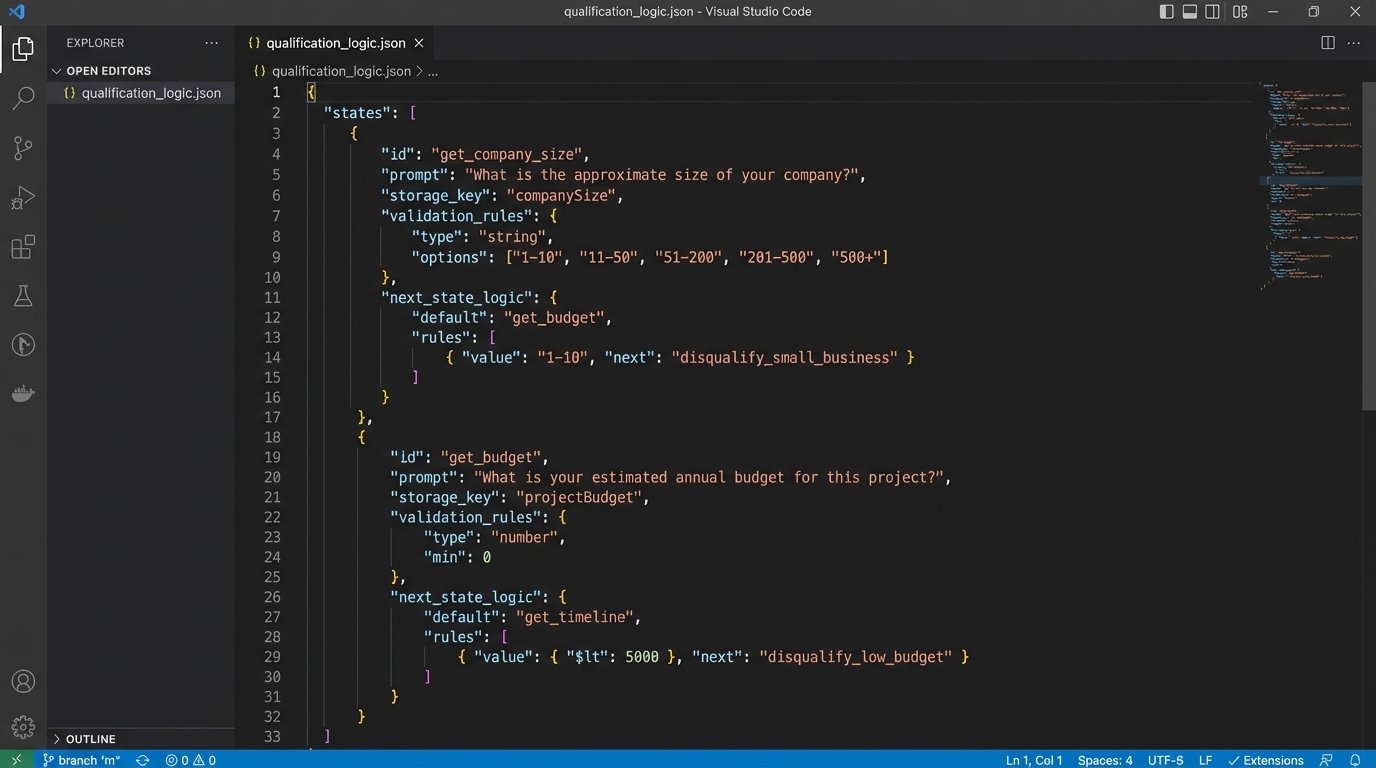
Sample Qualification Stage in JSON
This structure defines a single step in the process. It tells the system what to ask, where to store the answer, and how to validate the input. The `next_state` key dictates the flow of the conversation, building a rudimentary decision tree.
{

  "state_name": "get_company_size",

  "prompt": "To give you the most relevant information, how many employees are at your company?",

  "storage_key": "lead.company_size",

  "validation_rules": {

    "type": "integer",

    "min": 1

  },

  "next_state_logic": [

    {

      "condition": "lead.company_size >= 500",

      "next_state": "assign_to_enterprise_queue"

    },

    {

      "condition": "lead.company_size < 500",
      "next_state": "get_budget"
    }
  ]
}
This logic-check is the skeleton of the entire operation. Without it, you are just having an aimless conversation.
Step 2: Prompt Engineering for Structured Data Extraction
The core challenge with using a Large Language Model (LLM) is its non-deterministic nature. A user is not going to answer "How many employees work at your company?" with a simple integer. They will say, "We have about 250 people, mostly in North America," or "we're a startup, around 50 or so." The LLM's job is to strip the conversational fluff and extract the raw data point: `250` or `50`.
This is where prompt engineering becomes critical. You do not just pass the user's message to the LLM. You wrap it in a system prompt that forces the model to behave like a data extraction tool. The key is to instruct the model to return its output in a specific format, preferably JSON. This avoids the hell of trying to parse unstructured text strings.
Your system prompt should be explicit. Tell the model its role, its goal, and the exact output format you require. Forcing the model to output a JSON object with keys like `extracted_value` and `is_relevant` makes the response predictable and easy to integrate into your application logic.
This is like trying to get water from a firehose through a needle. The user's input is a chaotic blast of natural language. Your prompt is the needle, forcing that chaos into a single, structured stream of data your system can actually use.
Example System Prompt for Data Extraction
This prompt is sent to the LLM API along with the user's message. It strictly defines the expected output, reducing the chances of the model returning conversational garbage.
You are a data extraction assistant. Your sole purpose is to analyze the user's text and extract a specific piece of information based on the user's last question.
The last question asked was: 'What is your annual budget for this project?'
Analyze the following user response and extract only the numerical dollar amount.
User response: "{user_message_here}"
Respond with a JSON object in the following format ONLY. Do not include any other text, explanation, or conversational filler.
{
"value_extracted": <integer_or_null>,
"confidence_score": <float_between_0_and_1>
}
The confidence score is your guardrail. If the model is not confident, you can trigger a re-phrased question to the user.
Step 3: Bridging the AI to Your CRM
Once you have a qualified lead's data, it needs to be injected into your CRM. This requires a direct API integration. Most modern CRMs use OAuth 2.0 for authentication, so your backend will need to handle token acquisition and refresh cycles. Store these credentials securely. Do not hardcode them.
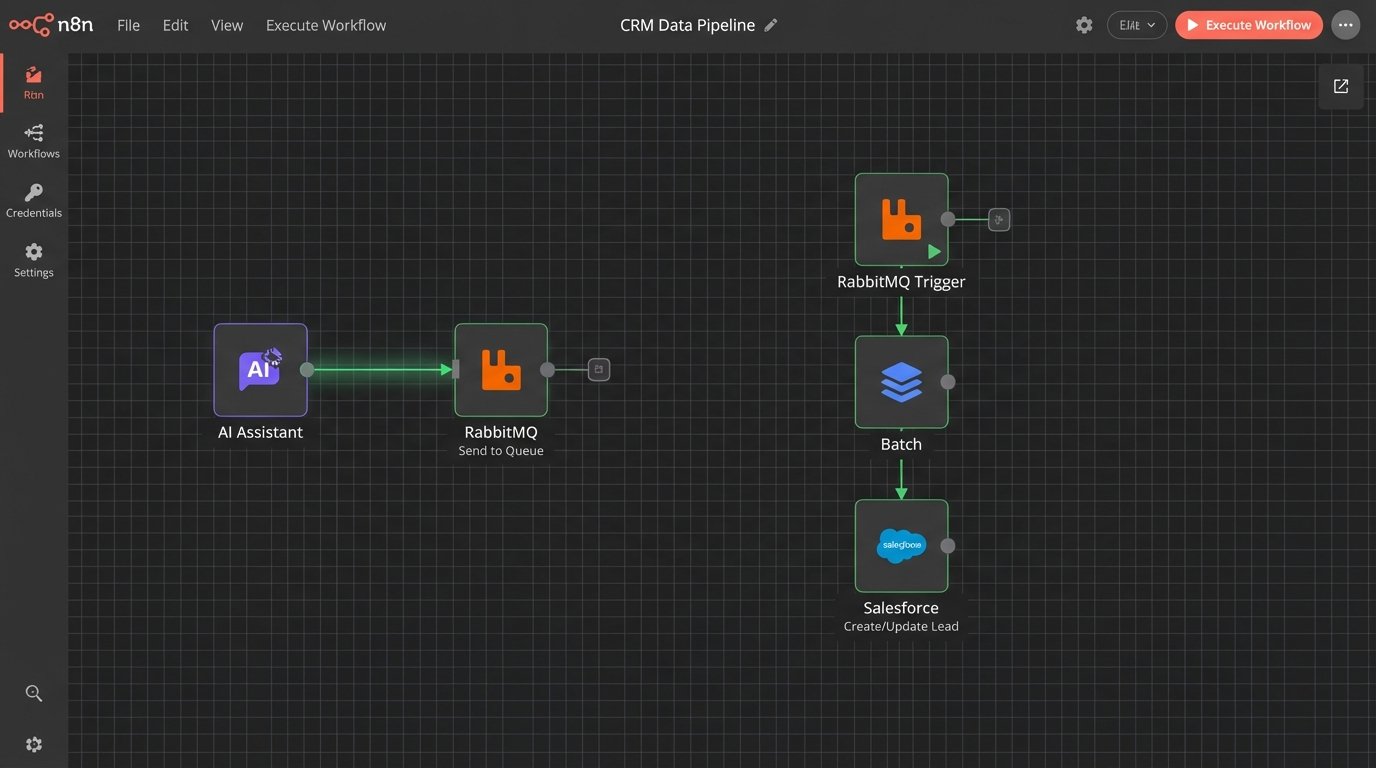
The real problem you will face is API rate limiting. If you have a high volume of leads, your assistant could easily hit the CRM's API call limit, causing the entire system to fail. The solution is to build a queue-based system. Instead of writing to the CRM in real-time after every conversation, the assistant pushes the qualified lead data into a message queue (like RabbitMQ or AWS SQS).
A separate worker process then pulls leads from this queue and writes them to the CRM at a controlled pace, respecting the API's rate limits. This architecture decouples the chatbot from the CRM, making the system more resilient. If the CRM API goes down, leads stack up in the queue instead of being lost forever.
Map your extracted data fields directly to the corresponding fields in your CRM's Lead or Contact object. This sounds simple, but it is often where projects get stuck. Mismatched data types or field names will cause API calls to fail silently. You must implement robust error handling and logging for every CRM write operation.
Step 4: Managing Conversational Flow and Fallbacks
Users will not follow your perfect qualification script. They will ask unrelated questions, change the subject, or provide ambiguous answers. Your assistant must be able to gracefully handle these digressions and steer the conversation back on track. This is done by implementing a fallback mechanism.
When the LLM fails to extract the required data with high confidence, instead of giving up, the system should trigger a clarification state. This state uses a different prompt to re-ask the question in a simpler way. For example, if "What is your budget?" fails, the clarification prompt might be, "Are you working with a budget over $10,000 for this initiative? A simple yes or no is fine."
You also need an intent detection layer. Before processing a user message for data extraction, a preliminary LLM call can classify the user's intent. Is the user answering the question, asking a new question, or expressing frustration? If the intent is "asking_a_question," you can route them to a knowledge base or a different prompt designed to answer FAQs before returning to the qualification flow. This makes the assistant feel less rigid.
Step 5: The Final Hand-off and Data Payload
The assistant's job is complete when all required qualification data points are collected and meet the minimum threshold defined in your logic core. At this point, the system should perform two actions: create the lead record in the CRM and notify the sales team.
The data payload sent to the CRM should be a clean, structured object containing all the information gathered during the conversation. It should also include metadata, such as a link to the full conversation transcript. This gives the sales rep context before they make the first call. They can see exactly what the prospect said, not just the extracted data points.
The notification to the sales team should be immediate. A message in a dedicated Slack channel with a link to the new lead record in the CRM is a common and effective pattern. This closes the loop between the automated qualification and the human follow-up.
Example Lead Payload for CRM
This is the final JSON object that gets pushed to the message queue for the CRM worker. It contains everything a sales rep needs to take over.
{

  "lead_source": "AI_Web_Assistant",

  "qualification_timestamp": "2023-10-27T10:00:00Z",

  "lead_score": 85,

  "contact_info": {

    "first_name": "Jane",

    "last_name": "Doe",

    "email": "jane.doe@example.com",

    "phone": "555-123-4567"

  },

  "company_info": {

    "name": "Acme Corporation",

    "size": 750,

    "industry": "Manufacturing"

  },

  "project_details": {

    "budget": 50000,

    "timeline": "3 months",

    "pain_point": "Inefficient supply chain management"

  },

  "conversation_transcript_url": "https://logs.yourapp.com/transcript/xyz-123"

}
This structured output is the primary deliverable of the entire system.
Step 6: Essential Logging and Performance Monitoring
A "set it and forget it" mentality will kill this system. You must log everything. Every inbound message, every LLM prompt, every extracted data point, and every CRM API call needs to be logged. Without detailed logs, debugging is impossible. When a lead is misqualified, you need to be able to trace the conversation step-by-step to understand why the logic failed.
Use a structured logging format like JSON. This allows you to easily query and analyze the logs in a tool like Datadog, Splunk, or an ELK stack. You should build dashboards to monitor key metrics:
- Qualification Rate: What percentage of conversations result in a qualified lead?
- Drop-off Point: At which question do most users abandon the conversation?
- API Error Rate: How often are calls to the LLM or CRM failing?
- Average Conversation Length: How many turns does it take to qualify a lead?
- Token Consumption: How much is this system costing you per conversation?
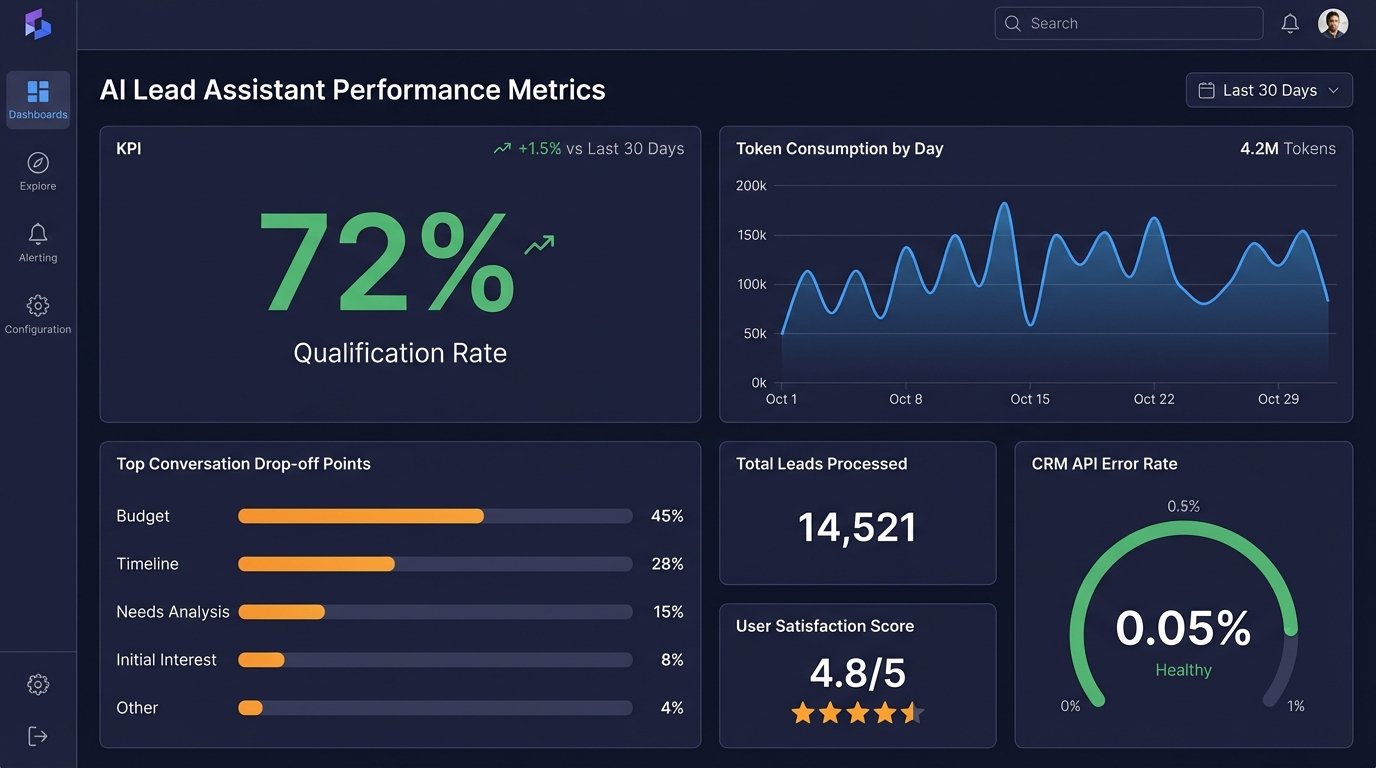
These metrics tell you if the system is actually working. A low qualification rate might mean your questions are too invasive, or your initial targeting is wrong. A high drop-off rate on a specific question indicates it needs to be rephrased. This is not a static system. It requires continuous analysis and tuning based on real-world performance data.