Stop Burning Money on Forms That Don’t Convert
Your lead capture form is a digital relic. It sits on a landing page, begging for an email address with the enthusiasm of a DMV clerk. You spend a fortune on ads to drive traffic to it, only to see conversion rates that would be embarrassing for a lemonade stand. The problem isn’t the traffic. The problem is the friction. A form is a static, one-way interrogation. A chatbot, when engineered correctly, is a dynamic, two-way qualification engine.
We are not building a friendly greeter. We are building a machine to strip mine conversations for qualified leads and inject them directly into a CRM. This process bypasses the form entirely, engages the user immediately, and logic-checks their value to the business in real-time. Forget the marketing fluff about “conversational experiences.” This is about raw, mechanical efficiency.
Prerequisites: The Toolbox and the Mindset
Before writing a single line of logic, you have to select your weapon. The market is flooded with chatbot platforms, and most of them are wallet-drainers wrapped in a slick UI. They promise no-code nirvana but deliver a rigid system that breaks the second you need custom integration. Your choice boils down to a fundamental engineering principle: control versus convenience.
- All-in-One Suites (Drift, Intercom): These are the turnkey options. They offer fast setup, pre-built widgets, and decent analytics dashboards. The catch is the cost and the gilded cage. You operate within their ecosystem. Custom logic is cumbersome, API access can be sluggish, and you will pay a premium for every seat and feature. Use these if you have more budget than engineers and your needs are standard.
- Developer-First Platforms (Botpress, Rasa): These platforms give you the raw framework. You get an NLU (Natural Language Understanding) engine and state management tools, but you are responsible for the hosting, the integrations, and the entire conversation architecture. This path requires actual engineering work but grants you total control over the data flow and logic. It is cheaper in licensing but more expensive in labor.
- Direct LLM APIs (OpenAI, Anthropic): This is the bare-metal approach. You interface directly with a large language model. You are responsible for everything: prompt engineering, state management, API cost control, and building the entire user interface. This offers maximum flexibility but is also the most complex. Trying to manage chat state without a proper finite state machine is like trying to assemble a server rack in zero gravity. Parts float away and nothing connects where it should.
For this guide, we assume a developer-first platform or direct API usage. The all-in-one suites hide the interesting parts behind a GUI, and we are here to wire the system, not just click buttons.
Step 1: Architecting the Qualification Funnel
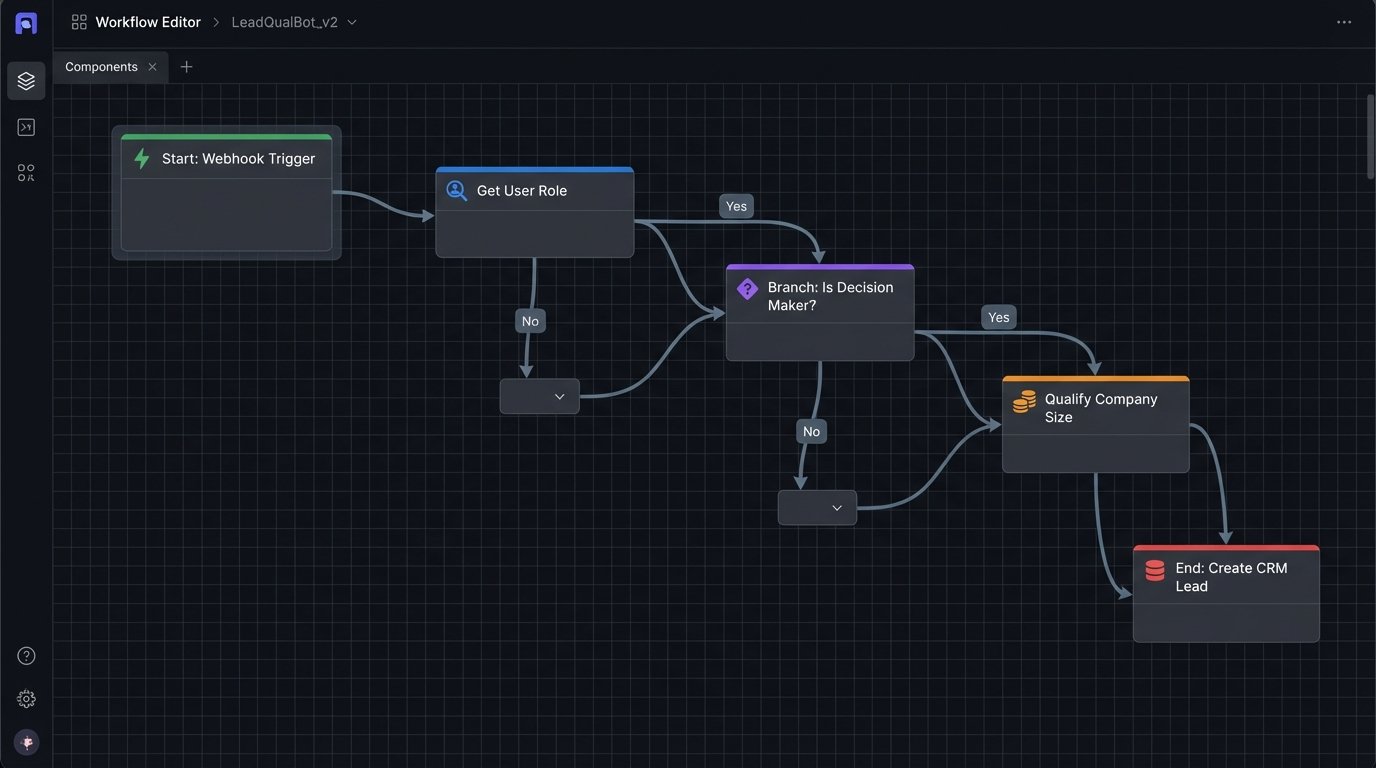
A successful lead-capture bot is not a single conversation. It is a decision tree disguised as a conversation. Your first job is to map out the qualification criteria with your sales team. Do not skip this. If you automate a broken qualification process, you just generate garbage leads faster.
Identify the key data points required to classify a lead. These are your state transitions. A typical B2B funnel might look for:
- Job Title: Is this person a decision-maker or an intern?
- Company Size: Are they in our target market of 50-500 employees?
- Business Email: Can we verify this is a corporate contact, not a freemail address?
- Specific Need: What problem are they trying to solve? Does it match our product offering?
Each question is a branch in your logic. The user’s answer determines the next question. You are building a finite state machine where each state represents a piece of information you need. A user who identifies as a “Student” might be immediately routed to a documentation link and the conversation terminated. A “VP of Engineering” at a target company gets fast-tracked.
Defining the Conversation Flow in Code
Representing this logic visually as a flowchart is useful, but it must be translated into a machine-readable format. JSON is a perfectly good tool for this. You can define a graph of nodes, where each node is a question, and edges are the possible user responses that lead to the next node.
Consider this simplified JSON structure for a single step in the funnel:
{

  "node_id": "ask_role",

  "message": "What is your current role at your company?",

  "type": "multiple_choice",

  "options": [

    { "text": "Executive / C-Level", "next_node": "ask_company_size" },

    { "text": "VP / Director", "next_node": "ask_company_size" },

    { "text": "Manager / Team Lead", "next_node": "ask_specific_need" },

    { "text": "Individual Contributor", "next_node": "offer_resource" },

    { "text": "Student / Researcher", "next_node": "end_conversation_docs" }

  ]

}
This structure is deterministic. Your bot’s engine simply parses this configuration, presents the question, and based on the input, moves to the `next_node`. This approach is testable, version-controllable, and doesn’t require a data scientist to modify the basic flow.
This is where rigid platforms fail. They force you into a clunky drag-and-drop interface that makes managing complex branching logic a nightmare.
Step 2: Data Extraction and Sanitization
Once you ask for information, you have to reliably extract it. Users will not always use your neat multiple-choice buttons. They will type freeform text full of typos and irrelevant chatter. You need tools to gut the input and find the valuable data.
For structured data like email addresses or phone numbers, regular expressions are your first line of defense. They are fast, efficient, and run locally without an API call. Every engineer should have a library of common regex patterns ready.
- Email Regex: `[a-zA-Z0-9._%+-]+@[a-zA-Z0-9.-]+\.[a-zA-Z]{2,}`
- Phone Regex (North America): `\(?[0-9]{3}\)?[-.\s]?[0-9]{3}[-.\s]?[0-9]{4}`
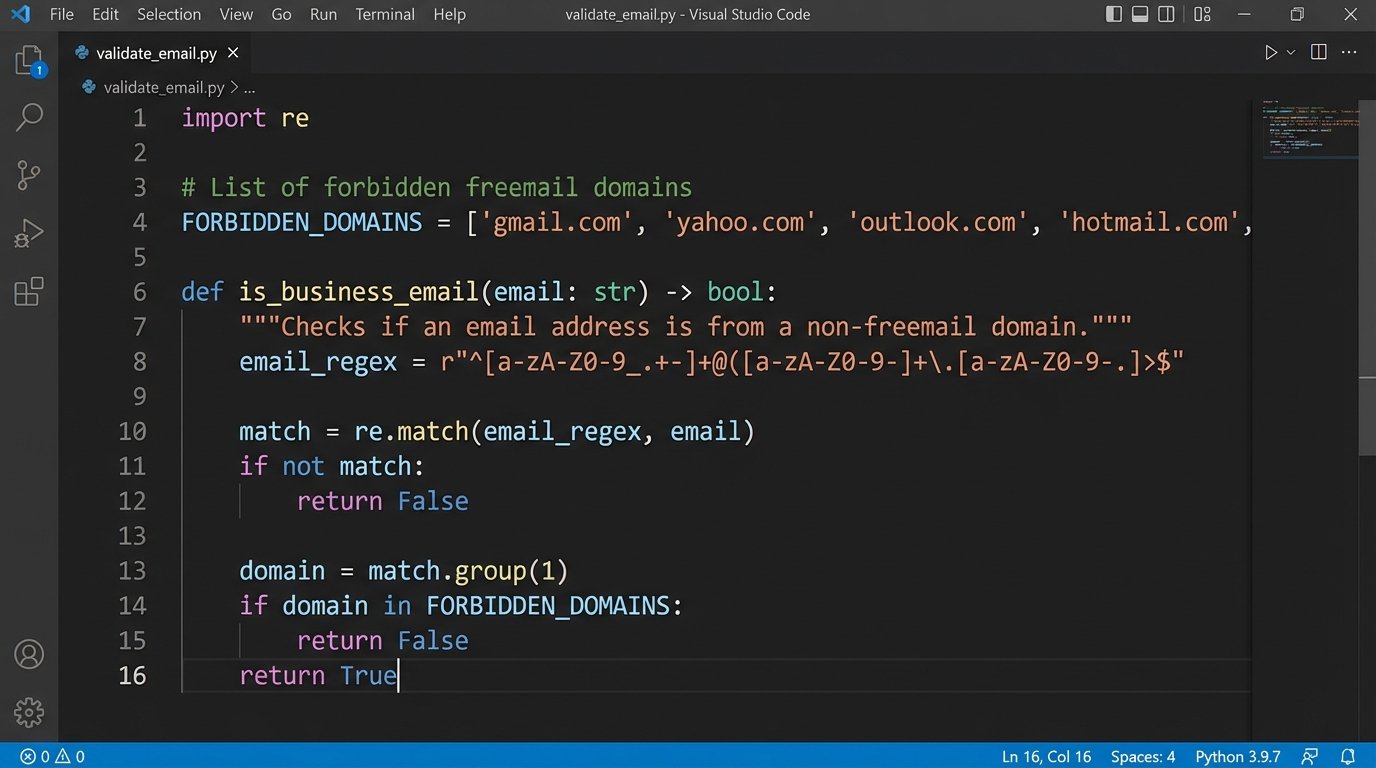
Never trust user input. Validate everything. If you ask for a business email, run a check to filter out `@gmail.com` or `@yahoo.com` domains. If you need a number, strip all non-numeric characters before storing it. Sending unvalidated data to your CRM is like injecting raw, unsanitized SQL into your own database. You are actively asking for corruption and a weekend spent cleaning up the mess.
Handling Unstructured Data
Extracting a company name or a job title from a sentence like “I am the head of engineering over at Acme Corp” requires more than regex. This is where you might need a lightweight Named Entity Recognition (NER) model. Tools like spaCy can be configured to identify entities like `ORG` (Organization) or `PERSON` from text.
This is an area to tread carefully. NER is not foolproof and adds complexity. It can misinterpret entities, and running a full NLP library might be overkill. Often, it is better to force a user to clarify with another question than to guess wrong and pollute your CRM with bad data.
Your goal is to get clean, structured data. If the bot cannot parse the input with high confidence, it must ask again. A slightly annoying bot is better than a bot that creates bad data.
Step 3: CRM Integration and Error Handling
The entire point of this exercise is to get qualified leads into your CRM without manual intervention. This means a direct, server-to-server API call. You will need to build a service that takes the validated data from the bot, formats it for your CRM’s API, and executes a `POST` request to create a new lead or contact.
Let’s say you have collected a name, email, and company, and you need to push it to a generic CRM endpoint. The code, likely running in a serverless function or a microservice, would look something like this in Python:
import requests

import json

import os
def create_crm_lead(lead_data):
api_key = os.environ.get("CRM_API_KEY")
endpoint = "https://api.yourcrm.com/v1/leads"
headers = {
"Authorization": f"Bearer {api_key}",
"Content-Type": "application/json"
}
payload = {
"firstName": lead_data.get("first_name"),
"lastName": lead_data.get("last_name"),
"email": lead_data.get("email"),
"company": lead_data.get("company_name"),
"leadSource": "AI Chatbot"
}
try:
response = requests.post(endpoint, headers=headers, data=json.dumps(payload))
response.raise_for_status() # Raises an HTTPError for bad responses (4xx or 5xx)
print(f"Successfully created lead for {lead_data.get('email')}")
return response.json()
except requests.exceptions.HTTPError as err:
print(f"HTTP error occurred: {err}")
# Implement retry logic or dead-letter queue here
return None
except Exception as err:
print(f"An other error occurred: {err}")
return None
Notice the `try…except` block. APIs fail. They time out, they return `503 Service Unavailable` errors, or your API key gets revoked. Your code must anticipate this. What happens when a `POST` request fails? A naive implementation just drops the lead. A resilient one uses a message queue (like RabbitMQ or AWS SQS) to hold the failed request and retry it later. Launching a chatbot without logging and error queuing is like flying a plane with the cockpit windows blacked out. You might be moving, but you have no idea if it’s towards your destination or a mountain.
The Handover Protocol
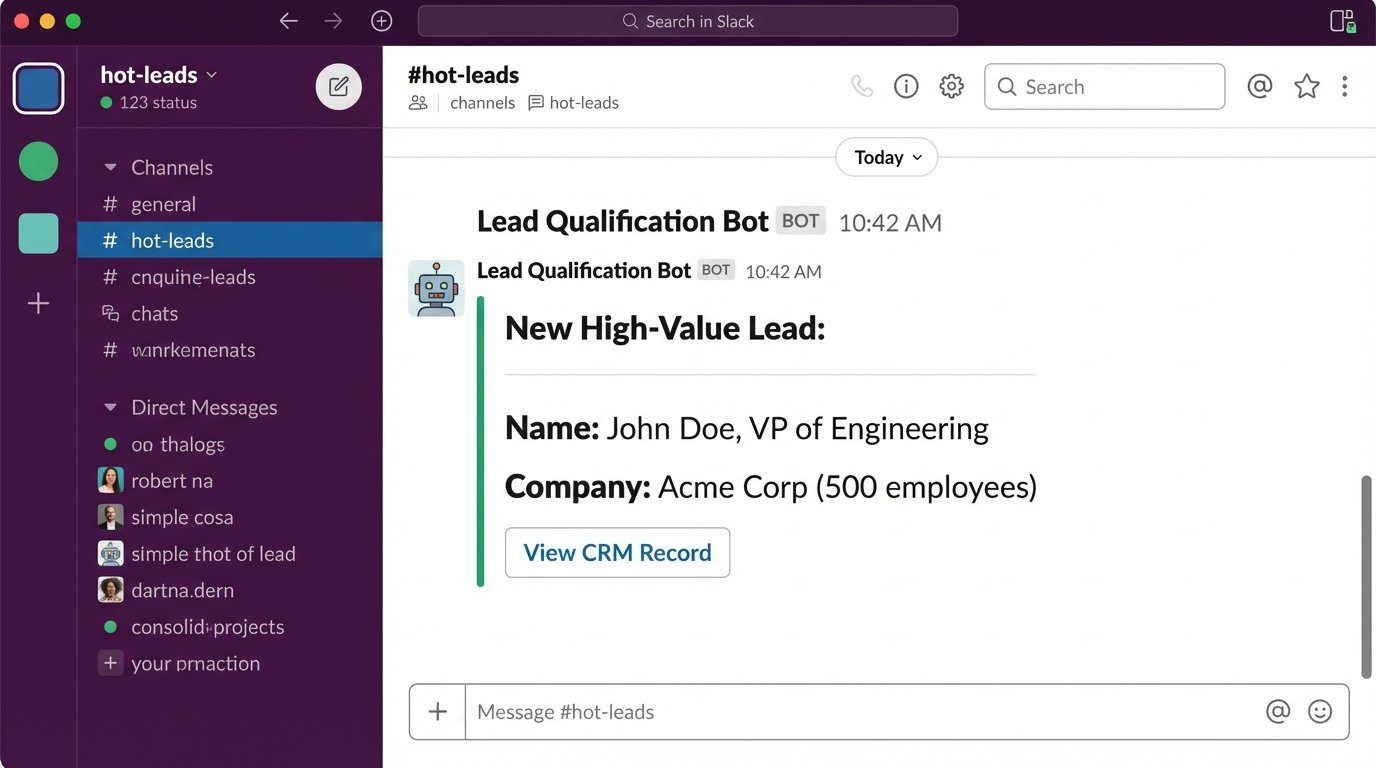
When a lead meets the highest qualification criteria, the automation shouldn’t just stop at a CRM entry. The final step is the “hot handover” protocol. This is an immediate, high-priority notification to the sales team.
The best handovers are actionable. Don’t just send an email. Fire off a webhook to a dedicated Slack channel. The message should be rich with data:
- Lead Name and Title: John Doe, VP of Engineering
- Company: Acme Corp (500 employees)
- Key Information: “Looking to migrate from our legacy system.”
- Direct Link: A deep link straight to the newly created record in the CRM.
This allows a sales rep to click one link and have all the context they need to engage immediately. You can even take it a step further and integrate with a scheduling API like Calendly to have the bot book a meeting directly on the appropriate rep’s calendar. This removes the last piece of friction from the process.
Monitoring, Iteration, and the Inevitable Breakdowns
This system is not a set-it-and-forget-it machine. You must monitor it. Track the conversation funnel just like you would a web analytics funnel. Where are users dropping off? Is a particular question too confusing? Your logs are your source of truth. If 50% of users abandon the chat after you ask for their phone number, that part of your logic is broken.
You will also face technical issues. Your CRM provider will enforce API rate limits. If your bot becomes wildly successful, you could hit those limits and start seeing `429 Too Many Requests` errors. This requires implementing rate-limiting logic on your side, possibly with a token bucket algorithm, to smooth out the calls.
Finally, always provide an escape hatch. Some users will ask questions your decision tree can’t handle. You need a trigger phrase like “talk to a human” that immediately stops the bot and alerts a live agent. Without this, you risk frustrating a high-value prospect who has an edge-case question. The goal is automation, not alienation.
Building this system requires more effort than dropping a JavaScript snippet on your site. It requires treating the chatbot as a real software product with a development lifecycle, testing, and maintenance. The payoff is a lead generation engine that works 24/7, qualifies prospects with perfect consistency, and frees up your sales team to do what they’re paid for: closing deals, not processing forms.