7 Virtual Assistant Apps for Agents Who Actually Build Things
Most “AI assistant” lists are padded with marketing fluff. They promise a seamless utopia where software closes your deals while you sleep. The reality is a mess of mismatched APIs, faulty data syncs, and subscription fees that drain your budget. This is not another one of those lists. We are going to look at the guts of seven tools, focusing on their integration potential and the real-world friction you will encounter when trying to force them into a production workflow. Forget the sales pitch. This is about what works, what breaks, and what you can bend to your will.
The goal is not to eliminate the agent. The goal is to offload the repetitive, low-value tasks that burn cycles and introduce human error. We will inspect tools that can be scripted, chained together, and monitored. If a tool does not have a webhook system or a documented API, it does not belong in a serious agent’s stack. It is a toy.
1. SavvyCal: Scheduling Logic That Respects Both Sides
Standard scheduling tools like Calendly get the basic job done. They expose a calendar and let someone pick a slot. SavvyCal approaches the problem with a different logic. It allows you to overlay your calendar on top of the recipient’s, which reduces the back-and-forth friction of finding a mutual time. Its core value for automation is the fine-grained control over meeting links, which can be generated via its API and embedded directly into outbound sequences. You can pre-fill attendee data and pass custom parameters back to your system via redirects or webhooks.
The API is clean, but you still have to logic-check for edge cases, like last-minute cancellations that do not fire a webhook correctly or time zone mismatches that the front-end masks. Trusting any scheduling tool’s state without a periodic sanity check against your primary calendar is a mistake.
A specific use case involves generating personalized links for a list of leads. You can script a process that queries your CRM for new MQLs, then hits the SavvyCal API to create a unique, single-use scheduling link for each one. This link is then injected into an email template. The webhook listener on your end receives the booking confirmation and updates the lead status in the CRM automatically, bypassing manual data entry.
This is where the real work happens. The webhook payload contains the meeting details, which you must parse and map to your CRM’s object model. You need to handle potential failures, like the CRM API being down or the payload containing unexpected null values. A dead-letter queue for failed webhook events is not optional.
2. Clay: The Data Enrichment Waterfall
Lead enrichment is a notoriously dirty process. You have a name and a company, and you need an email, phone number, and firmographic data. Hitting a single API like Clearbit is expensive and often returns incomplete data. Clay acts as a meta-layer, allowing you to build “waterfalls” of data sources. You can configure it to first try Source A, and if that fails or returns a low-confidence result, try Source B, then Source C, and so on. This drastically improves fill rates without multiplying costs.
Clay presents as a spreadsheet, but its cells can execute code-like functions and API calls. You can chain multiple steps: find a LinkedIn profile, scrape it for a job title, use that title to query an email permutation service, then validate the resulting email with a verification tool. This entire chain runs for each row in your sheet. It is a powerful abstraction for data processing that would otherwise require a significant amount of glue code.
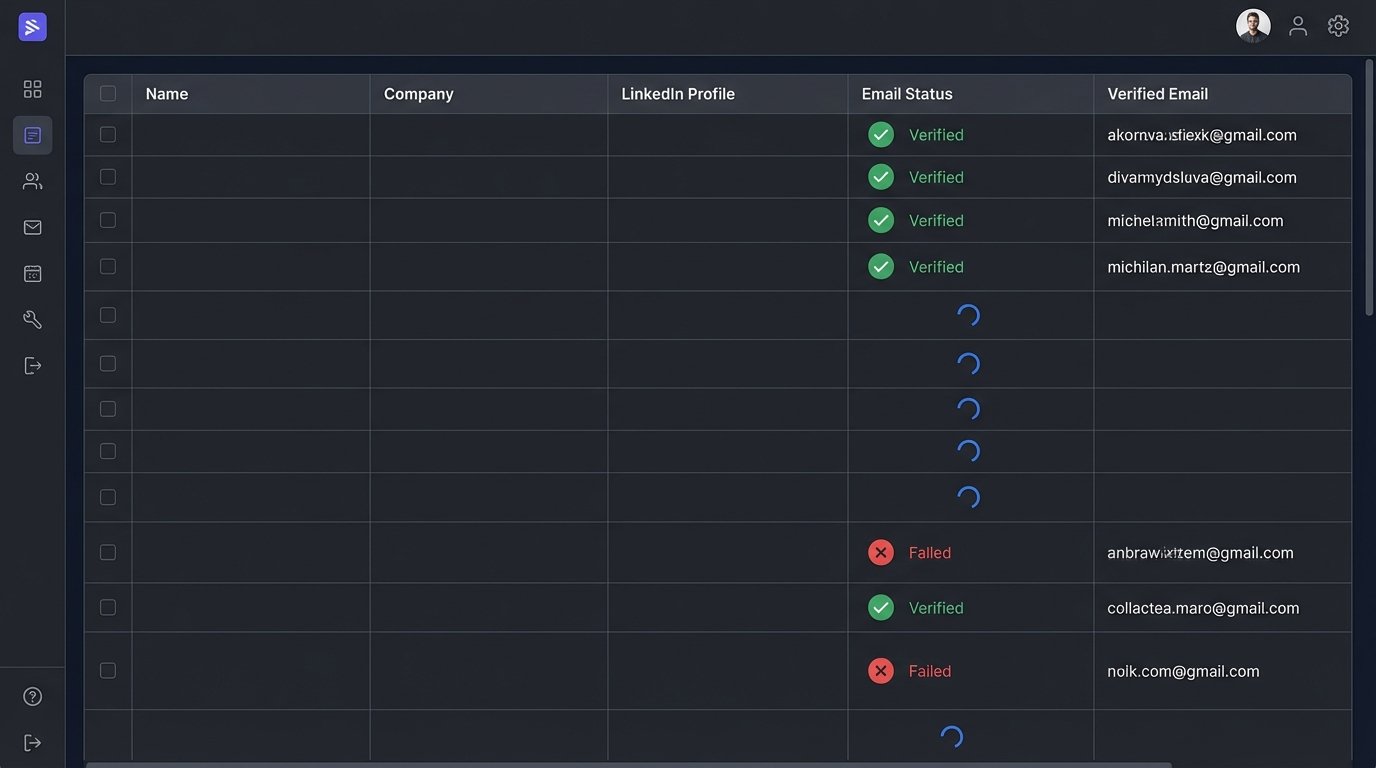
The downside is the debugging. When a complex, multi-step enrichment fails, pinpointing the broken link in the chain can be tedious. The platform has rate limits on certain integrations, and managing credentials for a dozen different data source APIs requires careful handling. It is not a set-and-forget system. You will need to monitor your waterfall’s performance and swap out sources as their data quality or pricing changes.
Consider this workflow: A new lead record is created in HubSpot. A webhook sends the lead’s name and company to a Clay table. Clay runs its waterfall to find a validated work email, title, and company size. On success, it calls the HubSpot API back to update the contact record. The entire process removes the manual drudgery of looking up lead data.
3. Make (Formerly Integromat): The Low-Code Engine for System Bridging
Zapier is for simple A-to-B connections. Make is for building complex, multi-path automations with branching logic, error handling routes, and data manipulation. Its visual interface lets you map out workflows that would otherwise live in a Python script running on a cron job. You can build scenarios that poll APIs, transform the JSON response, loop through arrays, and conditionally execute different actions based on the data.
The key differentiator is its operational control. You can see a log of every single execution, inspect the data bundles that pass between modules, and manually re-run failed operations. This visibility is critical when you are bridging critical systems like a payment processor and an accounting platform. You can build routers to split the workflow based on input values or filters to stop a process if certain conditions are not met. The platform forces you to think about data flow like a developer.
Its primary weakness is performance under load. Executing thousands of complex operations can become sluggish and expensive, as its pricing is tied to the number of operations. For high-volume, real-time data processing, a dedicated service or custom code is still the superior choice. Make is best suited for workflows that run intermittently or handle dozens to hundreds of events per hour, not thousands per second. It is about shoving a firehose of data through a series of garden hose connections.
A practical automation involves watching a specific Slack channel for new messages. When a message containing “urgent ticket” appears, Make triggers. It parses the message text to extract a customer ID, uses that ID to look up the customer’s account level in Salesforce, and if they are a “Platinum” customer, it creates a high-priority ticket in Jira and posts a confirmation back to the Slack thread. This requires an API connection to three separate systems with conditional logic in the middle.
Here is a simplified look at the kind of JSON structure you might need to parse and map from a system like Salesforce before pushing it into Jira. Notice the nested objects and custom fields that your automation logic has to handle.
{
"lead_id": "00Q8d000003sXYZ",
"status": "New",
"customer_details": {
"name": "ACME Corporation",
"account_level": "Platinum",
"region": "NA-WEST"
},
"ticket_info": {
"summary": "API authentication failure",
"description": "User reports 503 error on /v2/auth endpoint.",
"source_channel": "slack-channel-enterprise"
},
"jira_project_key": "SUP"
}
Your Make scenario has to reliably pull `account_level` from the nested `customer_details` object to drive its routing logic. If that key is missing, your process breaks.
4. Cresta: Real-Time Call Transcription and Agent Guidance
This is a different class of tool entirely. Cresta integrates with contact center platforms like Five9 or Talkdesk and provides real-time AI assistance during live phone calls. It transcribes both sides of the conversation as it happens and uses natural language processing to understand intent. Based on the conversation flow, it surfaces real-time suggestions, compliance checklists, and knowledge base articles directly on the agent’s screen. It is designed to reduce agent ramp time and enforce process consistency.
The technical lift is significant. The integration requires deep access to the audio stream from your telephony provider. Latency is the primary enemy. The transcription and analysis must happen in milliseconds for the on-screen guidance to be useful. If the suggestion for handling an objection appears after the agent has already moved on, the tool is worthless. This involves a heavy compute backend, and the pricing reflects that.
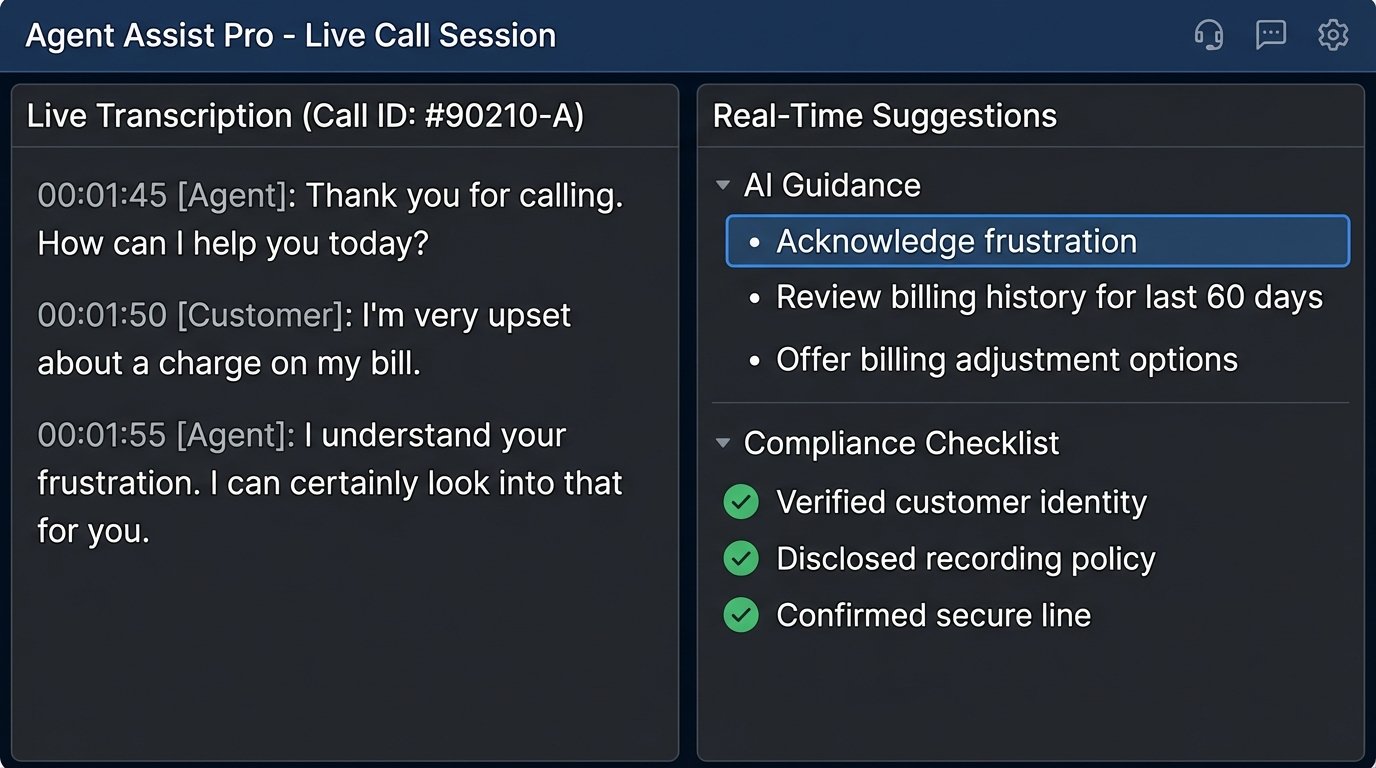
From an automation perspective, the value is in the post-call data. Cresta analyzes every conversation for specific events, such as mentions of a competitor, compliance script adherence, or customer sentiment shifts. This structured data can be exported via API or webhooks to populate analytics dashboards or trigger follow-up workflows. You can build a system that automatically flags calls for manager review if a customer expresses frustration or if an agent fails to read a required legal disclaimer.
This is a wallet-drainer, and it is not for small teams. The implementation is complex, and you are heavily reliant on their professional services team to get the initial models trained and the integrations configured. It is the opposite of a self-serve SaaS tool.
5. PandaDoc: API-Driven Document Generation
Manually creating sales quotes, proposals, and contracts is a massive time sink. PandaDoc and similar tools provide an API to automate this. The core concept is simple: you create a template in their UI with variables for things like client name, address, pricing table items, and legal clauses. Then, your application can hit their API with a JSON payload containing the data for those variables. The service generates a professional-looking document and provides a unique link for the recipient to view, comment on, and e-sign.
The automation hooks are what make it powerful. Webhooks can notify your system at every stage of the document lifecycle: when it is sent, viewed, commented on, and completed. When a document is signed, you receive a webhook payload including the completed PDF. You can then write code to automatically store that signed contract in a specific folder, update the opportunity stage in your CRM to “Closed-Won,” and notify your finance team to generate an invoice.
You need to be careful with template management. If a salesperson changes a variable name in the template UI, it will break your API integration. Versioning your templates and having a clear separation of concerns between what is managed in the UI and what is hard-coded in your application is essential. Error handling is also critical. Your code must be able to gracefully handle API errors from PandaDoc, like an invalid template ID or malformed data payload, without crashing the user-facing process in your own application.
6. Intercom: Chatbot Logic Beyond Keywords
Most chatbots are glorified keyword-matching if-else statements. They are brittle and offer a terrible user experience. More advanced platforms like Intercom (with its “Fin” AI assistant) allow for more sophisticated conversation design. The key is moving beyond simple keywords to intent recognition and slot filling. The bot can understand that “what’s my bill” and “show me my last invoice” are the same intent, and it knows it needs a piece of information (the “slot”), like an account number, before it can proceed.
The real power for a technical agent comes from the API and app framework. You can build custom apps that live inside the Intercom messenger. When a conversation reaches a certain point, the bot can hand off to your custom app. This app can present a rich UI, make authenticated API calls to your backend to fetch or update data, and then pass control back to the bot or a human agent. This turns the chatbot from a simple Q&A machine into an interactive front-end for your internal systems.
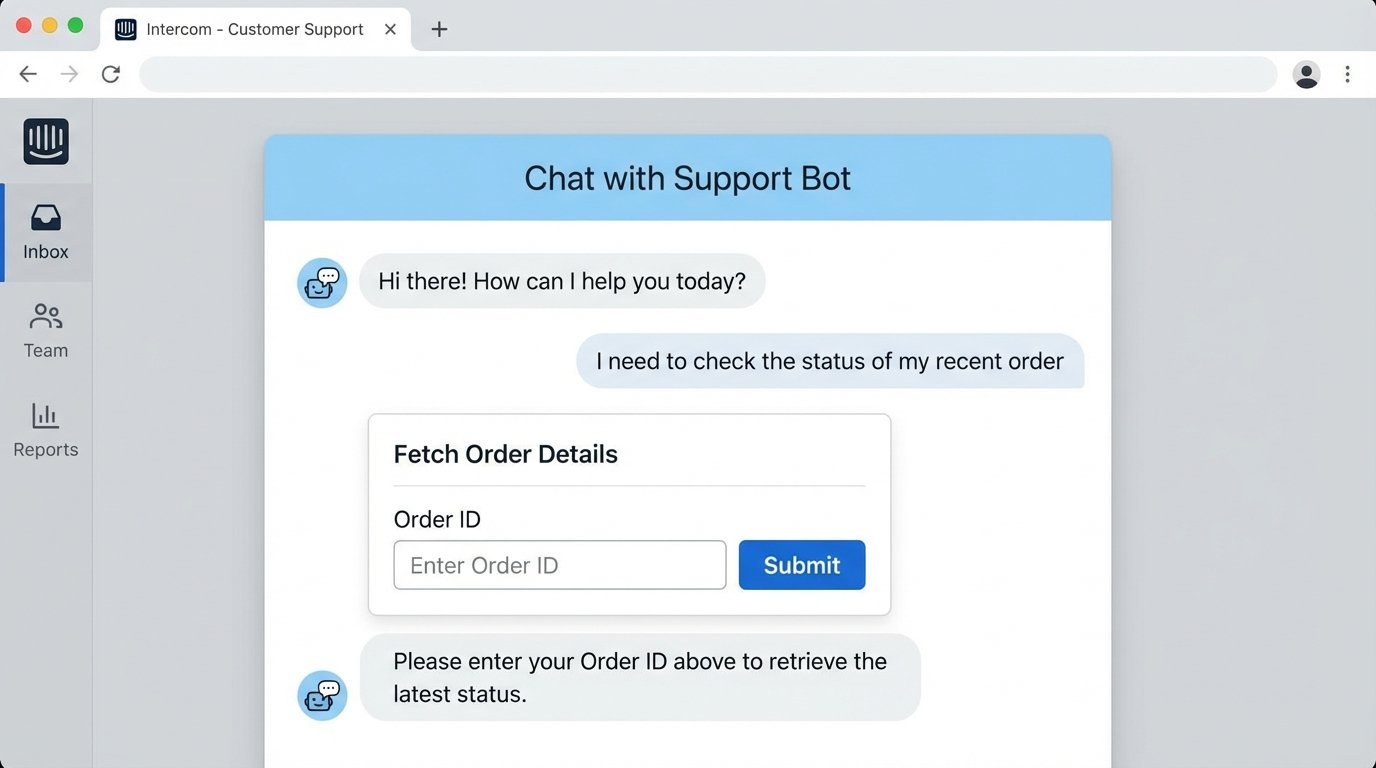
This is not a no-code affair. Building these custom apps requires knowledge of JavaScript and React. Debugging the state transitions between the bot, your app, and a human agent can be complex. You have to manage authentication securely, ensuring the custom app only exposes data relevant to the logged-in user. The potential is huge, but it is a development project, not a simple configuration task.
7. Gong: Conversation Intelligence for Process Mining
Gong records, transcribes, and analyzes sales calls. While Cresta focuses on real-time guidance, Gong is built for post-mortem analysis at scale. It can identify topics discussed, track how much each person spoke, and pinpoint key moments in a conversation. It builds a searchable database of every sales interaction your team has, turning unstructured audio into structured data.
The API allows you to extract this structured data and feed it into other systems. You can pull call transcripts, speaker timelines, and topic analysis for any given meeting. A common use case is to enrich CRM data. After a discovery call, a workflow could automatically pull the Gong analysis, identify that a specific competitor was mentioned 3 times, and add “Competitor_X_Mentioned” as a tag on the opportunity record in Salesforce. This data can then be used for more accurate forecasting and reporting.
The transcription is not perfect. It struggles with heavy accents, industry-specific jargon, and cross-talk. You cannot treat the transcript as a 100% accurate source of truth. The value is in the aggregate analysis. By analyzing thousands of calls, you can identify patterns, like the fact that deals that include a discussion of “integration timelines” are 50% more likely to close. This is process mining for sales conversations.
Getting this data requires dealing with their API, which can be cumbersome and has strict rate limits. You will likely need to build a resilient data pipeline that pulls data incrementally, stores it in an intermediate database or data warehouse, and handles pagination and API errors. You cannot just hit their API from a simple script on demand for every report you want to run.