Personalization is not injecting `{{first_name}}` into a canned response. Most AI chatbot implementations are just glorified interactive FAQs, following rigid decision trees that lead to dead ends. They frustrate users and create more work for human agents who have to clean up the mess. The objective is to use a model’s inference capabilities to create a conversation that is aware of history, context, and intent, not just keywords.
We are moving past the era of pattern matching. True personalization requires hooking into live data streams, running parallel inference models, and treating the conversation as a state machine that evolves with each user input. The following are practical, field-tested methods to force AI to be genuinely helpful, not just responsive.
1. Dynamic Intent Recognition from CRM History
A user typing “order problem” is a low-signal input. A static chatbot maps this to a generic “Orders” topic. An effective system first queries the CRM via API, pulls the user’s last five orders, and sees one was just marked “Delivered” an hour ago. The AI can then infer the probable intent is about that specific delivery, not a general order query. It bypasses the pointless clarification questions and gets straight to the issue.
This requires vectorizing the client’s historical data, things like ticket subjects, purchase notes, and support chat logs. We transform that unstructured text into numerical representations. When a new conversation starts, the initial user query is also vectorized and compared against their historical data to find the closest contextual match. This gives the model a running start on the actual problem.
The cost is pre-processing. Vectorizing your entire CRM history is a compute-heavy, wallet-draining operation. And you better have a bulletproof PII-scrubbing pipeline, or you’re just creating a new class of security risk.
2. Context-Aware Responses from Knowledge Base Vectors
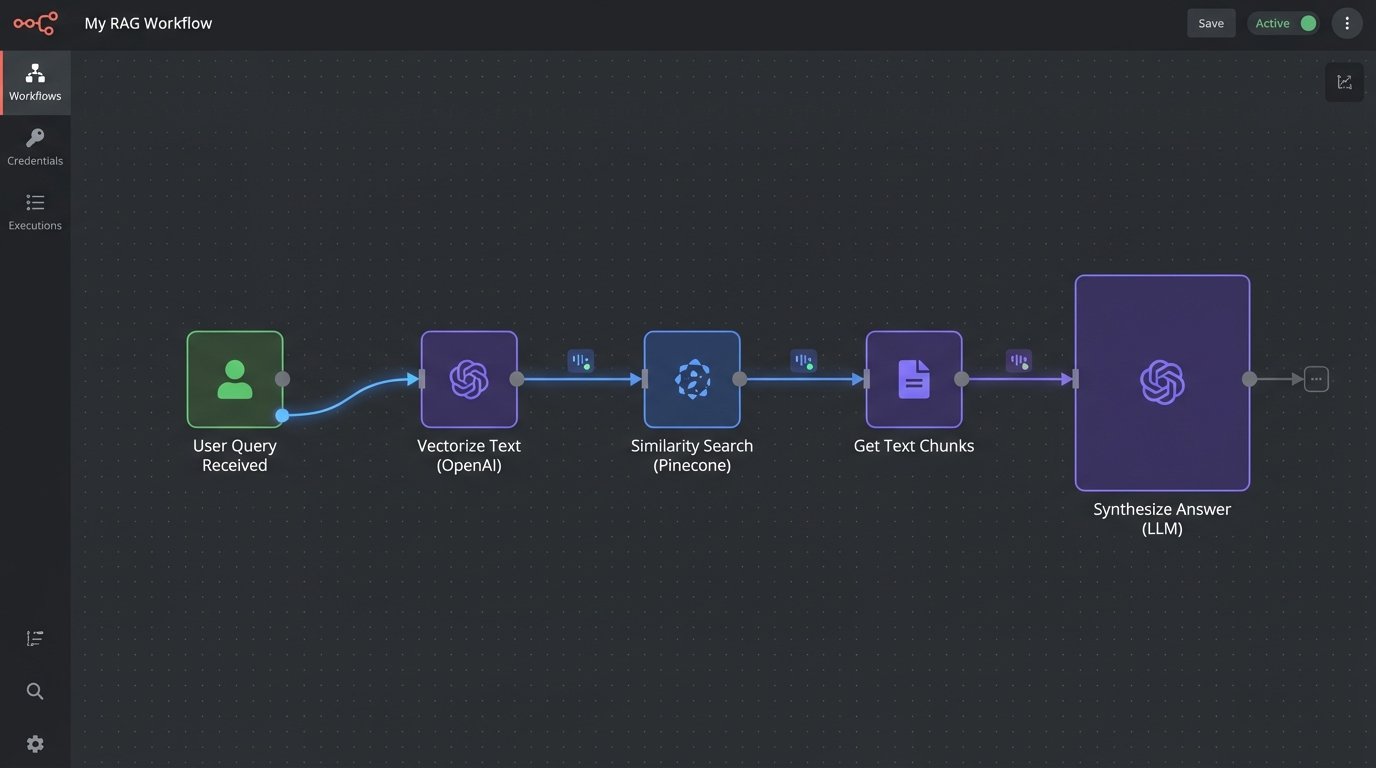
Standard bots perform a keyword search against a knowledge base (KB) and dump a link to an article. This is lazy. The user has to leave the chat, read a document, and try to find their answer. A better architecture uses Retrieval-Augmented Generation (RAG). The entire KB is chunked and converted into vector embeddings, stored in a specialized database like Pinecone, Weaviate, or even Postgres with pgvector.
When a user asks a question, the system performs a similarity search on the vector store to retrieve the most relevant chunks of text from the KB. These chunks are then injected into the prompt along with the original question, instructing the LLM to synthesize a direct answer based *only* on the provided context. The model answers the question in its own words and can even cite the sources it used.
This stops the bot from hallucinating answers and keeps it grounded in your actual documentation. Assuming the documentation wasn’t written five years ago and is completely wrong.
3. Real-Time Sentiment Analysis for Tonal Adjustment
A conversation is more than just words. A user’s frustration level is a critical data point. We can run a smaller, faster sentiment analysis model in parallel to the main language model. Each incoming user message gets tagged with a sentiment score, typically ranging from -1 (highly negative) to +1 (highly positive). This score becomes part of the state managed for the conversation.
If the sentiment score drops below a certain threshold, say -0.5, the system can trigger a state change. The AI’s response prompt can be modified to adopt a more empathetic tone. If the sentiment continues to decline, it can trigger an automated escalation rule, queuing a human agent and passing them the entire conversation history. It’s a circuit breaker for user frustration.
Be careful with this. An AI clumsily trying to mimic empathy can read as condescending and make a bad situation worse. The goal is to de-escalate, not to create a robotic apology loop.
Example Sentiment-Based Logic
- Score > 0.2: Standard, direct responses.
- Score between 0.2 and -0.4: Inject phrases like “I understand this can be difficult” and prioritize solution-oriented language.
- Score < -0.4: Trigger automated handoff to a human agent with a high-priority flag.
4. Proactive Engagement Triggered by User Behavior
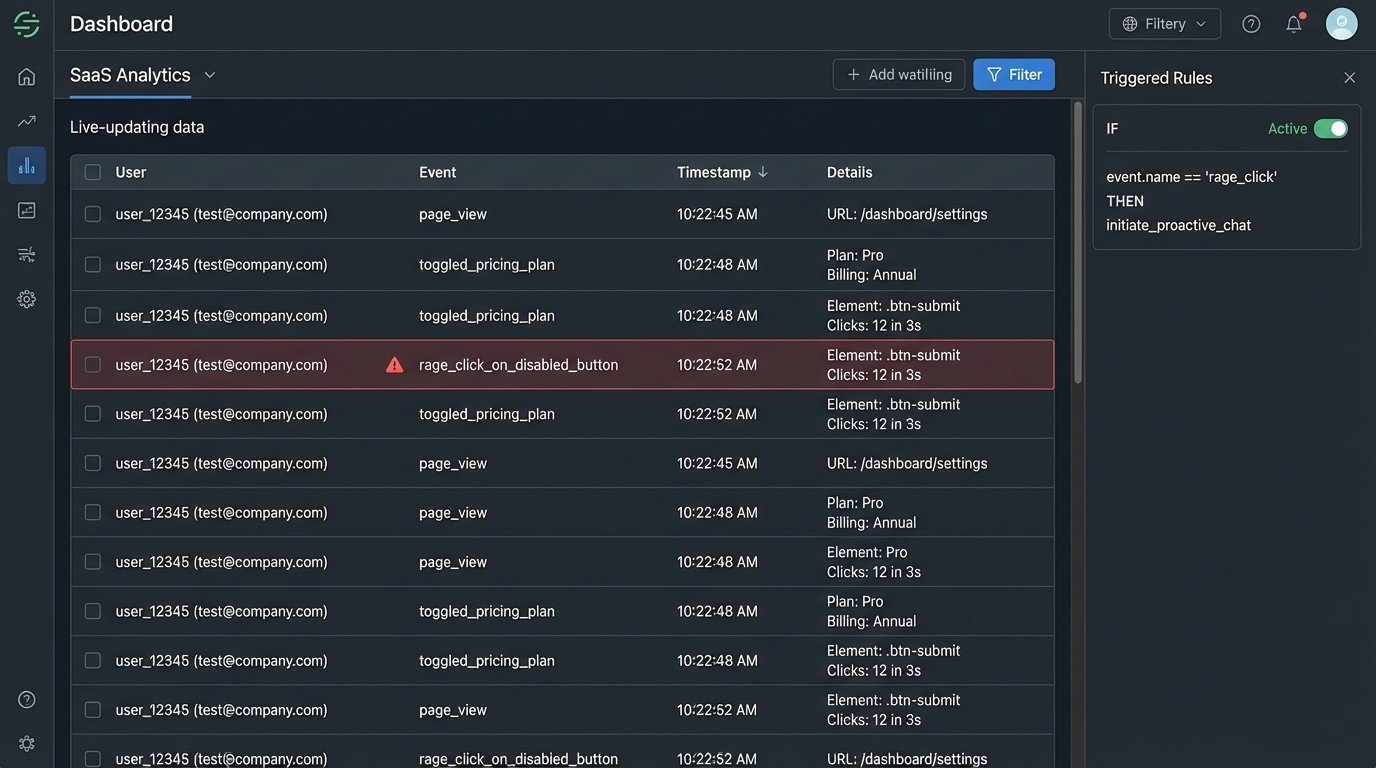
Why wait for the user to admit defeat and open the chat window? Monitoring front-end user behavior provides a rich source of data for proactive engagement. If a user is rapidly clicking a disabled button or switching back and forth between two product comparison pages, these are strong signals of confusion or intent. These events can be tracked and pushed to a backend service.
We can wire up front-end event listeners to fire off a webhook with a payload describing the behavior. An AI agent can then initiate the conversation in context. For example, “I see you’re looking at the Pro and Enterprise plans. Do you have any questions about the differences in their API rate limits?” This is an order of magnitude more effective than a generic “How can I help you?” popup that fires after 30 seconds on the page.
This approach is basically shoving a firehose of user event data through a needle of intelligent triggers. It requires a solid event-streaming architecture (like Segment or a custom Kafka pipeline) and carefully defined rules to avoid annoying the user with constant, unhelpful popups.
5. User-Specific Jargon and Acronym Translation
In B2B support, every client has their own internal language. They talk about “Project Phoenix” or the “Q3 TPS report.” A generic AI has no context for this and will fail. Personalization means teaching the AI the client’s dictionary. We can maintain a simple key-value store or a database table mapping client-specific terms to our internal system’s terminology.
When a conversation starts with a known client, the system pre-loads their specific glossary into the LLM’s context window or system prompt. This can be done with few-shot prompting, where you provide examples. The prompt would include instructions like: “The user is from Client X. In their terminology, ‘TPS report’ refers to our ‘Quarterly Performance Summary’. ‘Project Phoenix’ is our ‘Alpha Integration Module’. Translate their terms before processing the query.”
This makes the AI feel like a knowledgeable part of their team, not an clueless outsider. It is, however, a maintenance burden to keep these glossaries updated.
6. Pre-Handoff Summarization of Interactions
One of the most broken processes in customer support is the human handoff. The user spends 10 minutes explaining their problem to a bot, only to have to repeat everything to the human agent. This is an infuriating waste of time. AI can completely eliminate this by acting as a technical summarizer for the agent.
Before transferring a chat, the system makes a final call to an LLM with a specific summarization prompt. The prompt instructs the model to extract key information from the entire chat transcript: the user’s initially stated problem, troubleshooting steps the bot already attempted, the outcome of those steps, the user’s sentiment trajectory, and any relevant data points like order numbers or account IDs. The output is a clean, bullet-pointed summary injected directly into the top of the agent’s chat window.
The human agent gets full context in seconds. This single function can dramatically cut down average handling time. The quality of the summary, however, is entirely dependent on the quality of the prompt you engineer.
Example of a Summarization Request
Here is a simplified JSON-like structure you might send for summarization, which could be part of a function calling model.
{
"function": "summarize_conversation",
"parameters": {
"transcript": "[...full chat history...]",
"output_format": {
"user_problem": "string",
"bot_actions_taken": ["action1", "action2"],
"user_crm_id": "string",
"final_sentiment_score": "float"
}
}
}
This forces the model to structure the output predictably, making it easy to parse and display in an agent’s UI.
7. Automated CRM Updates from Unstructured Conversation
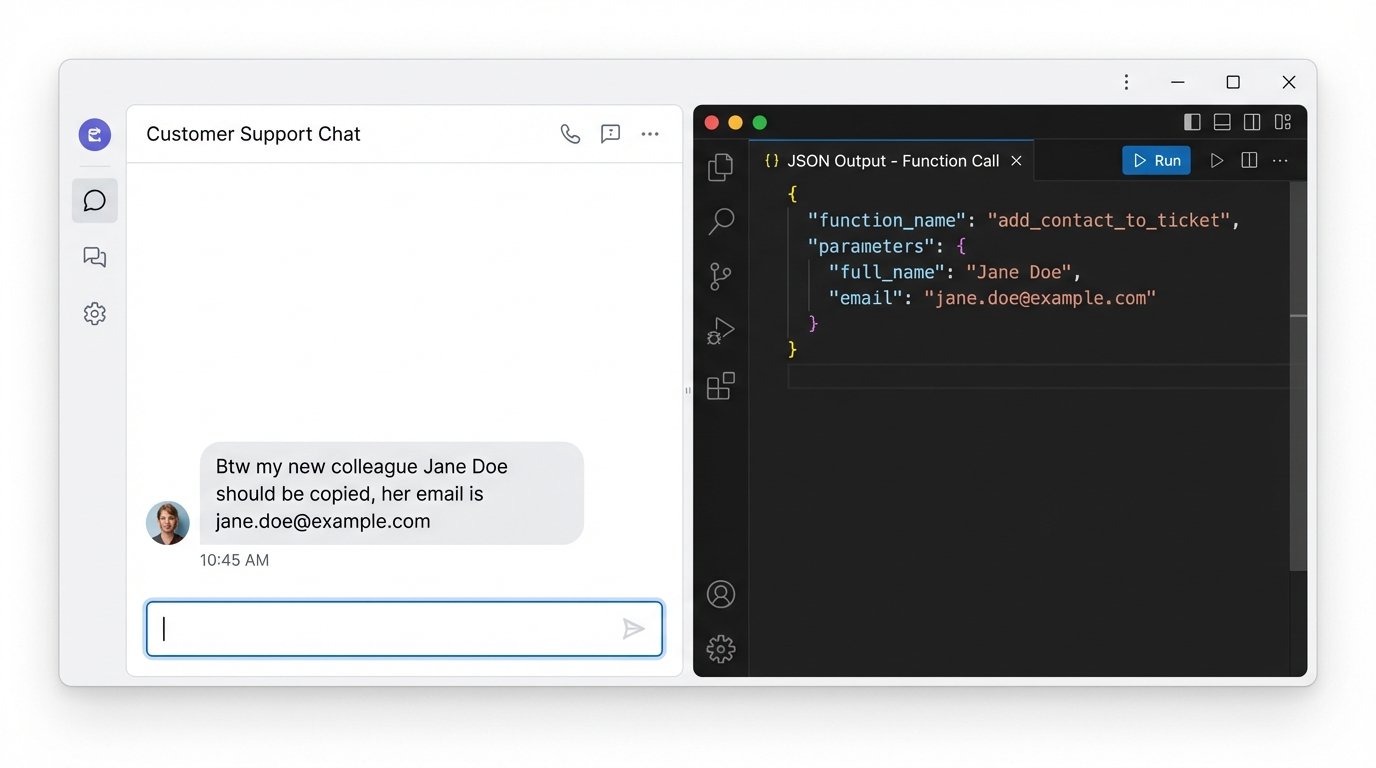
Clients often provide new information conversationally. “My new shipping address is 123 Oak Street,” or “Please copy my colleague Jane Doe on this.” A basic bot ignores this. A smart system uses Named Entity Recognition (NER) to identify these data points as structured information. Modern LLMs are extremely good at this, especially with function calling.
You define a set of functions the model can “call,” like `update_shipping_address` or `add_contact_to_ticket`. When the LLM detects a user input that matches the description of one of these functions, it doesn’t generate a text response. Instead, it outputs a JSON object specifying the function name and the parameters it extracted from the text. Your backend code then executes this function, perhaps after asking the user for a final confirmation.
This turns the chatbot from a simple Q&A machine into an active participant in data management. The main risk is precision. You must have strong validation logic on the backend to sanitize the data extracted by the LLM before you hammer it into your production CRM.
8. Predictive Next-Best-Action Suggestions
The conversation doesn’t have to end when the user’s problem is solved. Based on the context of the solved issue and the user’s profile, the AI can predict a logical next step. This isn’t about upselling. It’s about heading off the next likely support ticket.
If a user just finished a lengthy chat about configuring a complex feature, the AI can suggest a link to a relevant advanced webinar. If they just resolved a failed payment, it can offer a direct link to update their payment method. This is driven by a predictive model, which can be a classic classifier trained on historical user journey data, not necessarily the LLM itself. The LLM is simply the interface for delivering the suggestion in a natural way.
The trick is to make these suggestions genuinely helpful. If your predictive model is off, you’re just generating spam and eroding user trust. This requires constant monitoring and retraining of the underlying model based on whether users actually take the suggested actions.