
Most real estate chatbots are digital scarecrows. They sit on a website, answer three basic questions from a static script, and collect an email address. They fail to perform any meaningful work because they aren’t connected to the core systems that run the business. The value isn’t the chat interface. It’s the plumbing behind it that connects the conversation to a real-world action.
Building a functional chatbot for a real estate team means moving past canned responses and into direct systems integration. The goal is to automate the repetitive, low-value tasks that consume an agent’s day. This requires hooking into MLS data feeds, CRMs, and calendar APIs to create a tool that qualifies leads, books showings, and provides real-time data without human intervention.
1. Bypass Static Listings with Direct MLS Integration
Website listings are almost always stale. The standard process involves a nightly data dump or a third-party IDX plugin that might update every few hours. A serious buyer wants to know what’s available right now, not what was available this morning. A chatbot that relies on scraped website data is just reporting old news.
The correct approach is to bridge the chatbot directly to the Multiple Listing Service using the RESO Web API. This allows the bot to execute live queries against the source of truth. A potential buyer can ask, “Show me three-bedroom homes in the 90210 zip code under $2 million that came on the market today,” and the bot can pull the results directly from the MLS database. This requires parsing the OData query syntax and handling the JSON response from the API endpoint.
Getting direct MLS access is the main obstacle. It’s a political and financial battle. You have to get approval from the local real estate board, which is often a slow, bureaucratic process. The data access fees are not trivial, and you must build a system that respects the specific usage rules and query limits imposed by the MLS provider. Violate the rules, and they will kill your API key without a second thought.
2. Stop Copy-Pasting Leads. Automate CRM Entry.
A lead captured by a basic chatbot is just another piece of manual work. The agent gets an email notification with a name, email, and a transcript of the conversation. They then have to copy that information, open the CRM, create a new contact, and paste the details. This process is slow, inefficient, and full of opportunities for human error.
A properly integrated chatbot injects leads directly into the team’s CRM. When the bot qualifies a lead by collecting key information like budget, desired location, and buying timeline, it should immediately trigger a webhook. This webhook sends a structured JSON payload to the CRM’s API endpoint, creating a new contact and populating the relevant fields automatically. The entire conversation transcript can be attached as a note to the new contact record.
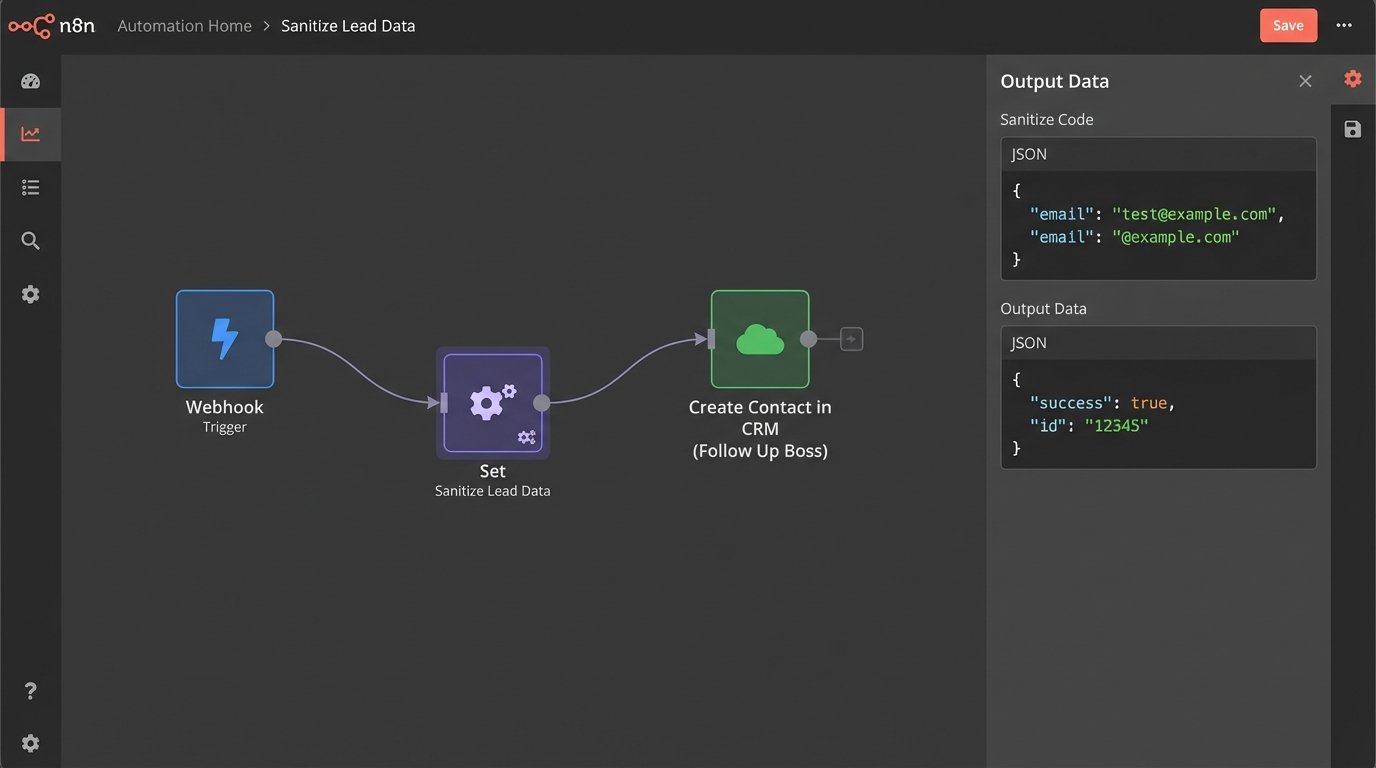
The technical challenge is data mapping and sanitization. You must map the conversational variables from the chatbot platform to the specific field names in the CRM. The real headache is cleaning user input. A user will type “around 500k” or “700,000” when your CRM’s budget field expects a clean integer like `700000`. You have to build logic to strip currency symbols, commas, and text before making the API call. If you don’t, the API will reject the request, and the lead will end up in a digital black hole.
Here is a simplified example of a JSON payload that a bot might send to a CRM like Follow Up Boss. Notice the clean integer for price and the direct mapping of conversational outputs to specific CRM fields.
{
"person": {
"firstName": "John",
"lastName": "Doe",
"emails": [{"value": "johndoe@example.com", "type": "work"}],
"phones": [{"value": "555-123-4567", "type": "cell"}],
"stage": "Lead",
"price": 750000,
"tags": ["Chatbot Lead", "Buyer", "Downtown"]
},
"note": "Conversation Transcript: User is interested in 3-bedroom condos downtown. Buying timeline is 3-6 months. Pre-qualified with Example Bank.",
"source": "Website Chatbot"
}
This single API call eliminates minutes of manual work per lead, which adds up to hours across a team.
3. Kill the Back-and-Forth with a Calendar API Bridge
Scheduling a property showing is a ridiculously inefficient process. It involves a chain of emails and phone calls between the buyer, their agent, and the seller’s agent to find a mutually available time. This is a perfect task to offload to an automated system.
The solution is to give the chatbot programmatic access to the agents’ calendars via the Google Calendar API or Microsoft Graph API. The bot first asks the user for their preferred showing times. Then, it makes an API call to check the agent’s free/busy status for those slots. Once a valid time is found and confirmed by the user, the bot creates the calendar event, invites the user, and sets the location to the property address. This single interaction replaces a dozen emails.
The primary technical hurdle is managing authentication and concurrency. You must use OAuth 2.0 to securely get permission to access and manage an agent’s calendar. This is not a simple API key. It’s a token-based flow that requires user consent. The second problem is concurrency. Two different users could be interacting with the bot simultaneously and attempt to book the same 10:00 AM slot. Handling simultaneous booking requests without a proper locking mechanism is like trying to merge two lanes of traffic into one without any signals. It’s a guaranteed pile-up. You need to logic-check the calendar one final time, millisecond before creating the event, to ensure the slot wasn’t just taken.
4. Filter Tire-Kickers with an Embedded Calculation Engine
Agents spend a massive amount of time talking to people who are not financially ready to buy a home. A chatbot can serve as a first-pass filter by providing a simple mortgage pre-qualification estimate. This helps set realistic expectations for the buyer and saves the agent from having a dozen conversations that go nowhere.
The bot can be programmed to ask for key financial data: annual income, total monthly debts, and the down payment amount. Using standard debt-to-income ratios, the bot can perform the calculation internally and provide an estimated affordability range. No complex external API is needed for the math itself. The integration point is what happens next. The bot should package the user’s financial inputs and the resulting estimate and forward them to a partner loan officer, creating a warm lead for the mortgage team.

The friction here is entirely legal and regulatory. You are dealing with sensitive financial information. You must bake in explicit user consent for sharing their data. The bot must display prominent disclaimers stating that this is an estimate, not a loan offer, and does not constitute financial advice. Failure to build these guardrails can create significant legal exposure for the brokerage.
5. Answer “What’s it like there?” with API-Driven Context
Buyers don’t just purchase a house. They purchase a location. They ask questions that agents are not always equipped to answer instantly, like “How good are the schools in this area?” or “What’s the walkability score for this address?”. An agent has to stop and look this information up manually.
A more intelligent bot can pull this data in real time from third-party APIs. When a user asks about a specific property, the bot can make concurrent API calls to services like GreatSchools for school ratings, Walk Score for walkability, and even local crime data APIs. It can then present this information directly in the chat interface, providing immediate, valuable context that would otherwise require manual research.
This creates a significant dependency problem. Your bot’s functionality is now contingent on the uptime and reliability of several external services you don’t control. If the Walk Score API goes down or changes its authentication method, a key feature of your bot breaks. You must implement robust error handling and caching strategies. Cache common requests to reduce latency and avoid hitting API rate limits. If an API call fails, the bot must fail gracefully instead of crashing the conversation.
6. Automate Reputation Management with Conditional Logic
Asking for reviews is critical for an agent’s business, but it’s often done inconsistently or not at all. Automating this process ensures every client interaction is an opportunity to generate positive social proof or capture negative feedback before it ends up on a public review site.
The integration uses a webhook that fires after a chat conversation is marked as complete. This webhook triggers a workflow that sends an automated follow-up email or SMS. The message asks the user to rate their experience on a scale of 1-10. This is a Net Promoter Score (NPS) survey. The user’s response dictates the next action. If the score is 9 or 10, a second message is triggered with a direct link to the agent’s Zillow or Google Business Profile review page. If the score is 6 or below, a support ticket is automatically created in a system like Zendesk or an alert is sent to the team lead for immediate follow-up.
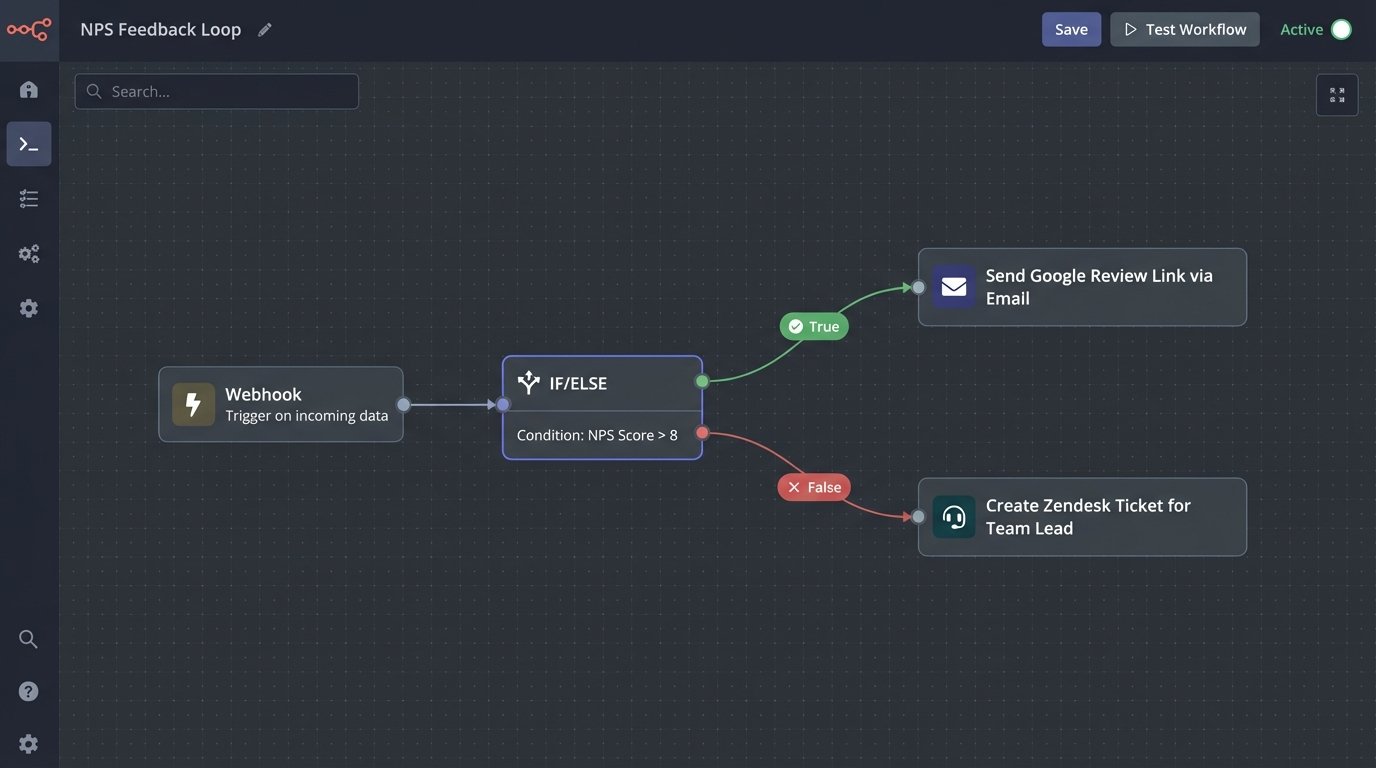
The main challenge is timing and tone. The follow-up request must be sent quickly enough to be relevant but not so quickly that it feels intrusive. The language used must be carefully configured. An automated message that feels robotic or demanding will do more harm than good. The conditional logic is straightforward, but the user experience requires careful tuning to avoid alienating the very people you want to impress.