The Core Failure: Human-Driven Chat Ops Don’t Scale
The operational model for most support chats is broken. It treats human agents as biological middleware, manually bridging the gap between a customer’s question and the data locked away in a CRM, an order management system, or a knowledge base. An agent reads a query, alt-tabs to another system, queries for an order status, copies the result, and pastes it back into the chat window. This pattern is a direct path to unacceptable latencies and spiraling headcount costs.
Every manual query is a point of failure. It introduces the possibility of human error, from simple typos to misinterpreting a request. The model collapses entirely during traffic spikes, creating queues that directly correlate to customer churn. You cannot hire your way out of a structural bottleneck. The problem is not the agent. The problem is the process.
Architecting the Fix: The Automation Assistant
The solution is to build a logical layer that sits between the chat interface and your internal services. This AI assistant is not just a simple keyword-matching chatbot. It is a purpose-built automation engine designed to perform specific, high-volume tasks. Its architecture consists of four primary components: an intent recognition module, an entity extraction engine, a state machine to track conversation context, and an API orchestration layer to execute actions.
Forget the idea of a generalist AI. You are building a specialist that does three things perfectly, not thirty things poorly.
Intent and Entity Logic
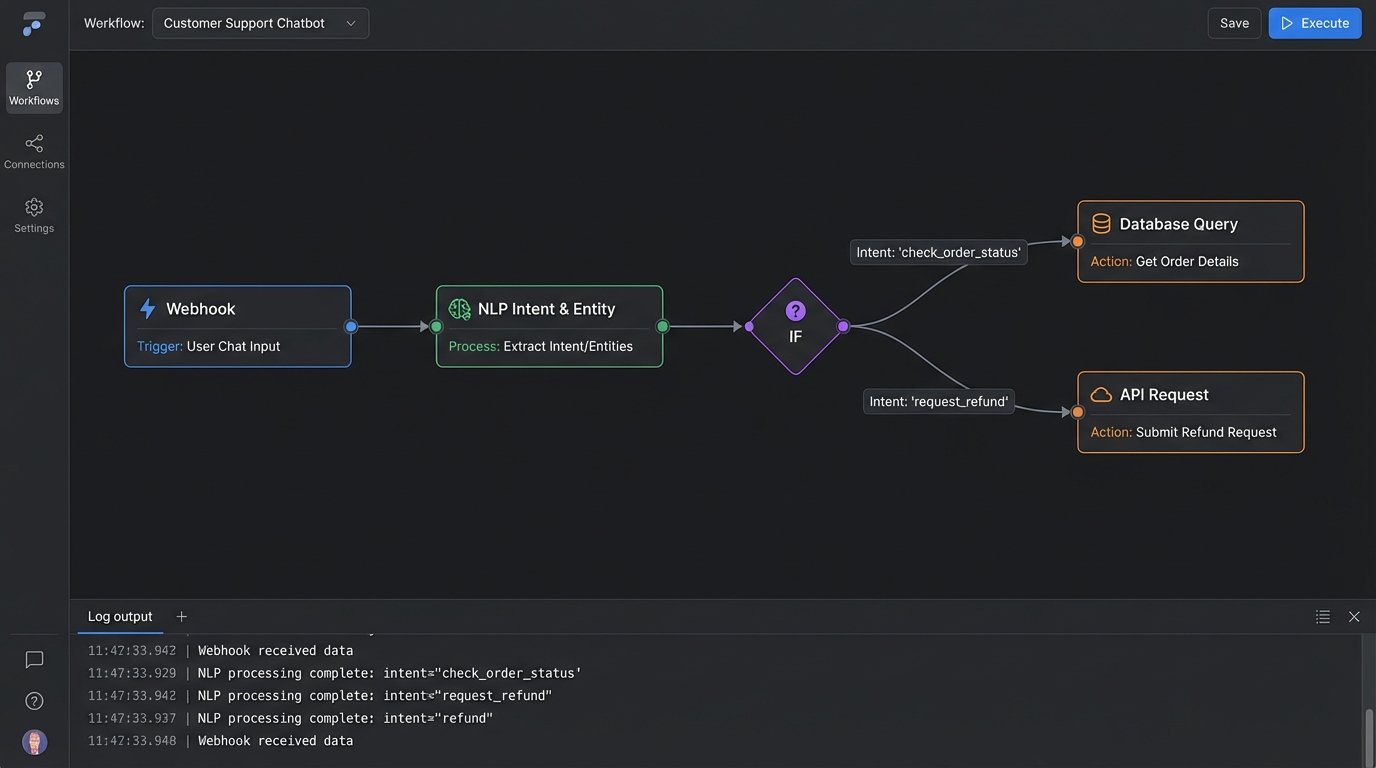
The process starts by deconstructing raw user input. We use a Natural Language Processing (NLP) model to perform two functions. First is intent classification, which determines the user’s goal. Are they trying to “check_order_status,” “request_refund,” or “update_shipping_address”? Second is entity extraction, which pulls out the critical data fragments needed to fulfill that intent, such as an order number, a product SKU, or a zip code.
The choice of model here dictates performance. A large transformer model might yield higher classification accuracy but introduce response latency due to its computational weight. A smaller, distilled model could be faster but might misclassify ambiguous phrasing, forcing an escalation to a human agent. You must benchmark this against your specific traffic patterns and hardware.
The State Machine: Your Conversation’s Brain
Once you have the intent and entities, you need to manage the conversation’s state. An assistant that asks for an order number on every single message has conversational amnesia. A state machine is a simple but effective construct for tracking context. It knows if the user is authenticated, if it has collected the required entities for a specific action, or if it’s waiting for user confirmation.
This is not complex computer science. At its core, it can be a simple dictionary object in your application code that tracks the session ID, the current intent, collected entities, and the next logical step. The state machine is what allows the assistant to have a multi-turn conversation, like asking a clarifying question before executing a destructive action like a cancellation.
A barebones state representation might look like this:
{

    "session_id": "a1b2c3d4-e5f6-7890-g1h2-i3j4k5l6m7n8",

    "current_intent": "request_refund",

    "collected_entities": {

        "order_id": "987654321",

        "reason": null

    },

    "state": "awaiting_entity_reason",

    "history": [

        "user: I want to return order 987654321.",

        "bot: I can help with that. What is the reason for the return?"

    ]

}
This object tells the application everything it needs to know to proceed. It needs to collect the “reason” entity before it can move to the next state, like “awaiting_confirmation.”
The API Orchestration Layer
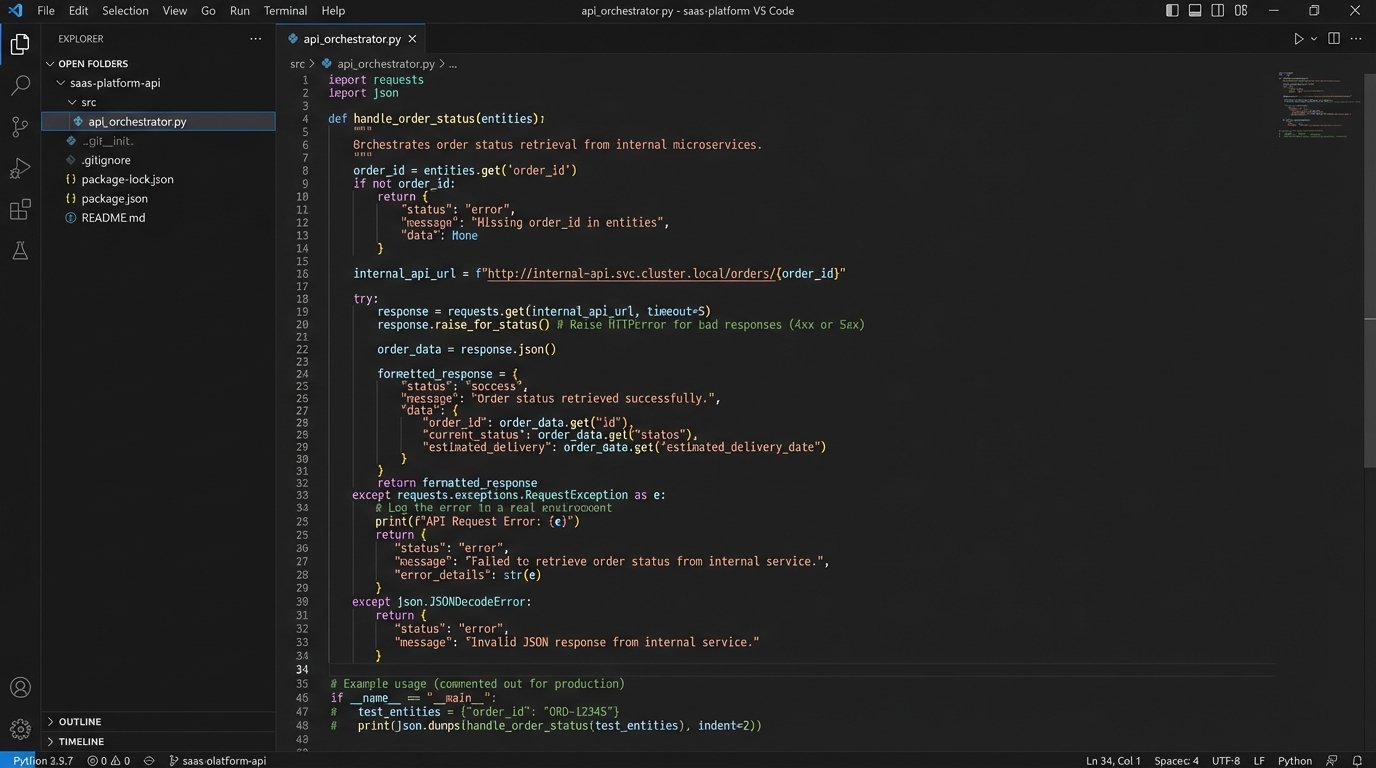
This is where the automation actually happens. The orchestration layer is a set of functions or microservices that map classified intents to specific internal API calls. The “check_order_status” intent triggers a GET request to your OMS API. The “update_shipping_address” intent triggers a PUT request to your CRM. This layer is responsible for authenticating with backend services, formatting the requests with the extracted entities, and parsing the responses.
Robust error handling is the defining characteristic of a production-grade orchestrator. What happens if your OMS API times out? The orchestrator must handle it, perhaps with a retry mechanism using an exponential backoff strategy. If an API returns a 401 Unauthorized, it should trigger a re-authentication flow. Without this resilience, a temporary backend issue will bring down your entire automation front end. The orchestrator effectively acts as a circuit breaker, protecting the user experience from transient backend failures.
Implementation Realities and Unspoken Costs
You face a primary decision: build this system in-house or pay for a third-party platform like Google Dialogflow, Amazon Lex, or Rasa. SaaS platforms provide pre-built NLP models and state management tools, which accelerates initial development. The cost is financial and architectural. These services are wallet-drainers at scale, charging per API call, and they lock you into their ecosystem. You have limited control over the underlying models and their update cycles.
Building in-house requires a dedicated team with NLP and backend engineering skills. You bear the entire infrastructure cost for model training and inference. The benefit is total control. You can fine-tune models on your proprietary data, design the state machine to fit your exact business logic, and integrate with any internal service without restriction. It is a significant upfront investment in exchange for long-term flexibility and lower operational costs per interaction.
Data Validation Is Not Optional
Never trust input. This applies to users and to your own NLP model. Before you let the assistant execute a write operation against a production database, you must force validation. If the entity extractor pulls a 7-digit string for an order ID but your system uses 9-digit integers, the API call should fail before it is ever made. Use schema validation on the extracted entities against what your backend expects.
For destructive actions like canceling an order or processing a refund, build a confirmation loop directly into your state machine. The assistant must present the action and its parameters back to the user and require an explicit confirmation (“Yes,” “confirm,” “proceed”) before executing the API call. Skipping this step turns a helpful assistant into a dangerous liability.
Logging: Your Only Ally at 3 AM
When an automation fails in production, your logs are the only ground truth. Implement structured, verbose logging at every stage of the process. Log the raw user input, the classified intent and its confidence score, all extracted entities, the exact API request sent by the orchestrator (with sensitive data masked), and the full API response received. When a user reports that “the bot didn’t work,” these logs are the difference between a five-minute debug session and a multi-day investigation.
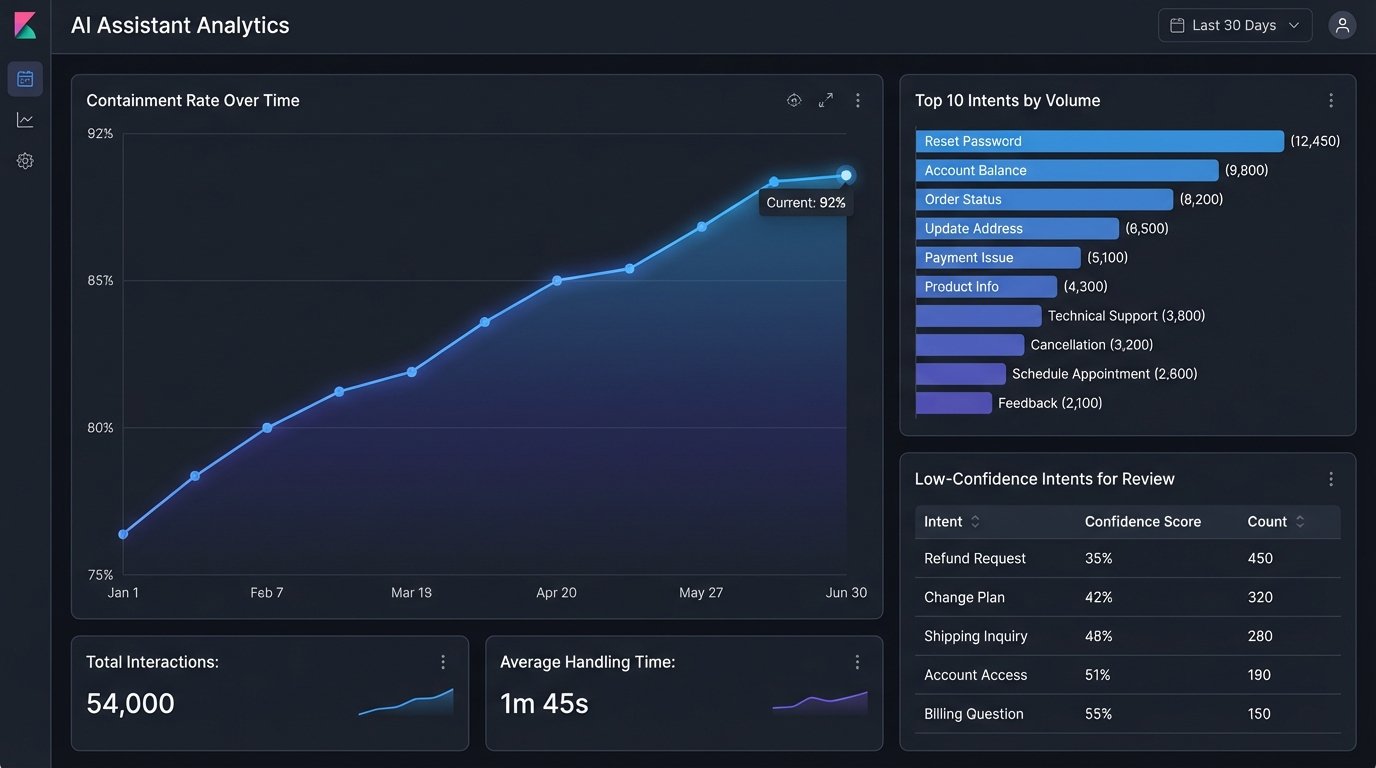
Feed these logs into a system like Elasticsearch or Splunk. This allows you to build dashboards to monitor intent accuracy, API error rates, and average resolution time. The data from your logs is what you will use to identify weaknesses in your NLP model and find new automation opportunities.
Measuring Success Beyond “It Works”
The primary metric for an automation assistant is the containment rate. This is the percentage of conversations that are fully resolved by the assistant without requiring escalation to a human agent. A high containment rate is a direct indicator of reduced operational cost. Track this metric obsessively and break it down by intent. A low containment rate for a specific intent points to a flaw in your conversation design, a gap in your knowledge base, or a failing API.
A secondary metric is intent drift. Your users’ language and needs will change over time. Monitor unclassified or low-confidence intents. A rising number of queries that your model cannot classify with high confidence means your training data is stale. This is a signal that the model needs to be retrained with new data to keep up with how your customers actually speak.
Final Check: When to Escalate
An effective assistant knows its own limits. You must define clear, unambiguous triggers for escalating a conversation to a human. This can be based on several factors: the NLP model returning a low confidence score for an intent, the user typing “talk to a human” or expressing frustration, or the state machine detecting the user is in a repetitive loop.
The handoff process must be seamless. The worst possible user experience is being transferred to an agent and having to repeat the entire problem from the beginning. The escalation trigger should pass the entire conversation history, including the session ID and any collected entities, directly to the agent’s interface. The agent should see exactly what the user was trying to do, allowing them to bypass the basic questions and solve the problem immediately.