Stop Drowning in Notification Noise
Default notification systems are broken. They either blast every user with irrelevant updates or remain silent on critical state changes. The result is a team conditioned to ignore alerts, rendering the entire system useless. We are not building another noise machine. We are building a surgical tool to inject high-signal information into a team’s workflow at the right moment.
This is not about connecting one app to another. It is about building a logical gatekeeper between your task source and your communication channel.
Prerequisites: The Bare Metal Requirements
Before writing a single line of code, you need three components. First, a task management system with outbound webhook capabilities. Think Jira, Asana, or ClickUp. If your platform doesn’t support webhooks, stop now; this guide is not for you. Second, a team communication platform that accepts incoming webhooks, like Slack or Microsoft Teams. Email is a terrible sink for this kind of data. Third, an intermediary service to process the logic.
You have two main paths for the logic layer. The no-code route with tools like Zapier or Make is fast for prototyping but becomes a serious wallet-drainer at scale. The code route involves a serverless function, like AWS Lambda or Google Cloud Functions, which is dirt cheap and infinitely flexible but demands actual engineering.
We will focus on the serverless approach. It offers the control necessary to build a system that doesn’t fall over when a project manager adds a new custom field.
Step 1: Configure the Source Webhook
Your task management tool is the source of truth. The goal here is to make it emit an event when something specific happens. We will use Jira as the example, but the principle is universal. Navigate to your project settings, find the webhooks section, and create a new one. The crucial step is to filter events at the source. Do not subscribe to every event type.
If you only care about tasks moving to “In Review,” then only subscribe to `issue_updated` events. Even then, you want to use JQL (Jira Query Language) to filter further. For instance, `status changed TO “In Review”` is far more efficient than receiving every issue update and filtering it in your function. Sending unfiltered events is like shoving a firehose of data through a needle. You are just creating unnecessary network traffic and compute cycles for your logic layer to discard later.
Point the webhook URL to the API Gateway endpoint that will trigger your serverless function. You will build this in the next step. For now, you can use a temporary endpoint from a service like webhook.site to inspect the payload structure. You must understand the data you are receiving before you can process it.
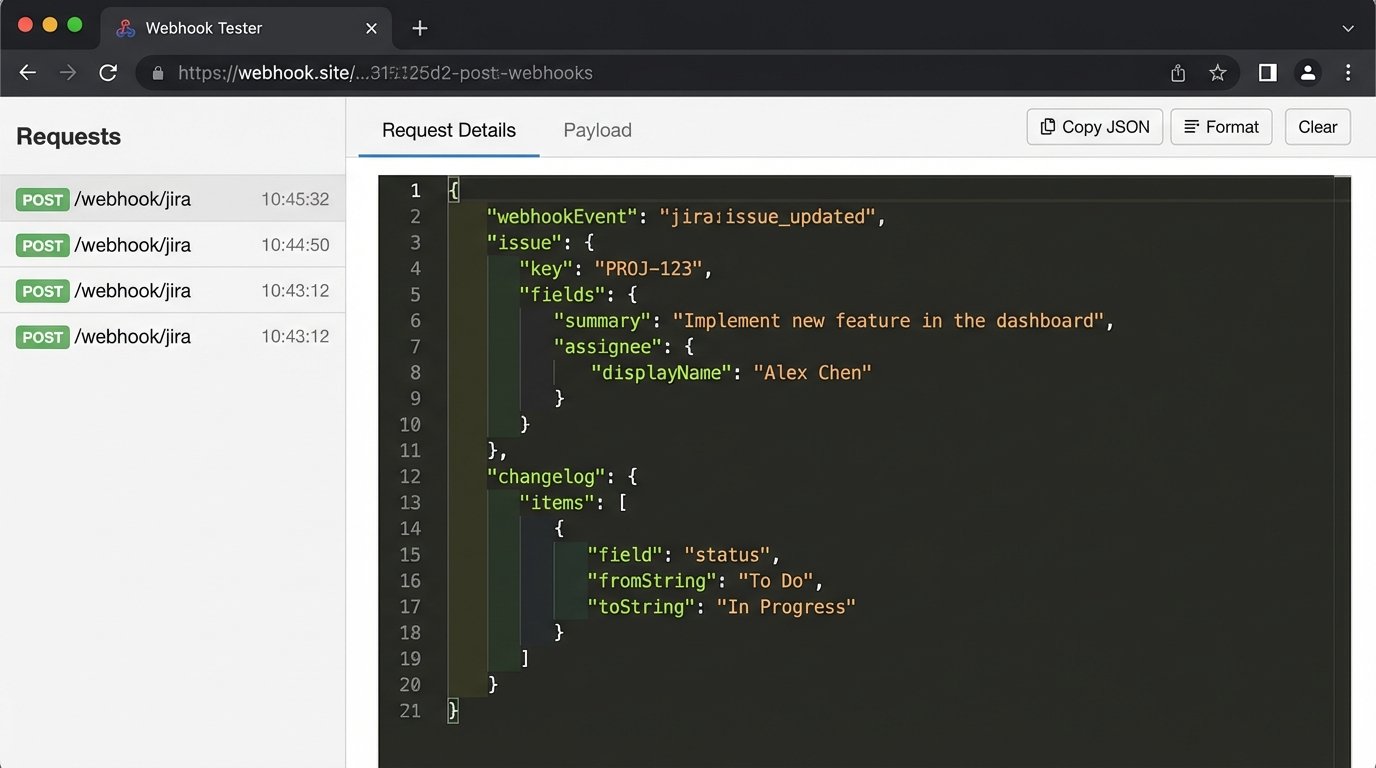
An incoming payload from Jira for an issue update is a dense JSON object. Most of it is garbage you don’t need. The parts you care about are nested deep inside, typically within the `issue` and `changelog` objects. The `changelog` tells you exactly what field was modified, from what value, to what value. This is the key to building context-aware notifications.
Example: A Minimal Jira Webhook Payload
Below is a heavily stripped JSON payload. The real one is ten times larger. Your first job is to identify the critical key-value pairs you need to extract: the issue key, the summary, the assignee’s name, and the specific fields that changed.
{

  "timestamp": 1678886400000,

  "webhookEvent": "jira:issue_updated",

  "issue": {

    "id": "10001",

    "key": "PROJ-123",

    "fields": {

      "summary": "Fix the authentication service bug.",

      "status": {

        "name": "In Review"

      },

      "assignee": {

        "displayName": "Jane Doe"

      },

      "priority": {

        "name": "High"

      }

    }

  },

  "changelog": {

    "id": "10010",

    "items": [

      {

        "field": "status",

        "fromString": "In Progress",

        "toString": "In Review"

      }

    ]

  }

}
Memorize this structure. Your entire logic will depend on parsing it correctly.
Step 2: Build the Logic Layer with a Serverless Function
This is where the real work happens. We will use AWS Lambda with Python, but the code is simple enough to translate to Node.js or Go. The function has a single job: receive the webhook from Jira, decide if it is important enough for a notification, and if so, transform the data into a format that Slack can understand.
First, set up an API Gateway with a POST method that triggers your Lambda function. This gives you a public URL to paste into the Jira webhook configuration. Lock it down. A basic API key is a good start to prevent unauthorized POST requests from hitting your function and burning your budget.
The Core Logic: Filter, Extract, Transform
Your Lambda function’s handler will execute these steps sequentially. First, parse the incoming JSON body. Second, apply filtering logic. This is your business rules engine. For example, a rule might be: “If the issue priority is ‘Highest’ AND the status changed to ‘Blocked’, then send a notification to the #devops-urgent channel.” Another rule could be: “If an issue is assigned to John Doe and he adds a comment, do nothing.”
This logic prevents alert fatigue. Your function acts as a bouncer, only letting the truly important updates through.
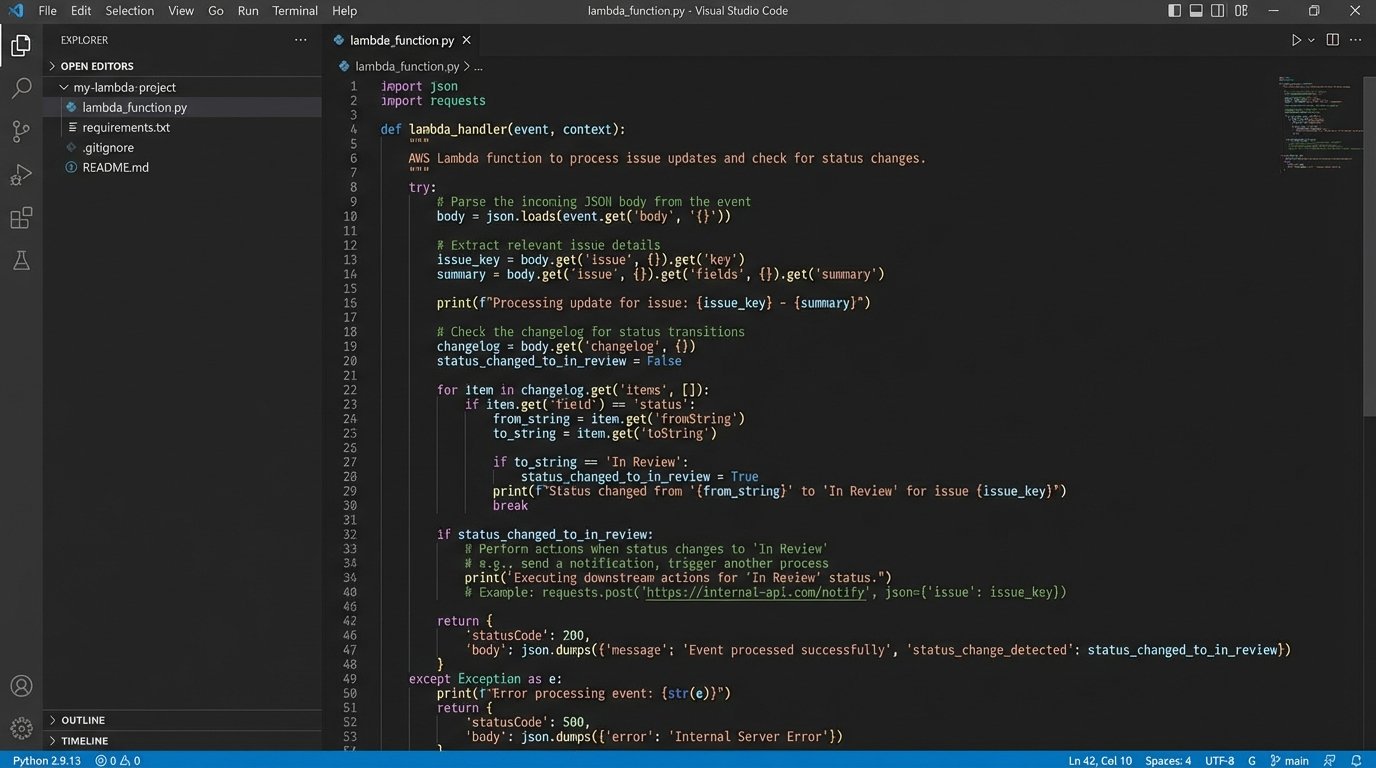
The code below is a simplified Python handler for AWS Lambda. It checks if the status of a task moved to “In Review.” If it did, it extracts the relevant details and prepares a message for Slack. In a real-world scenario, you would externalize the rules into a configuration file or a simple database table instead of hardcoding them.
import json

import os

import requests
# Slack Incoming Webhook URL stored as an environment variable
SLACK_WEBHOOK_URL = os.environ['SLACK_WEBHOOK_URL']
def lambda_handler(event, context):
body = json.loads(event['body'])
# Logic check: Did the status change?
changelog = body.get('changelog', {})
if not changelog or not changelog.get('items'):
return {'statusCode': 200, 'body': 'No changelog items. Ignoring.'}
status_change = next((item for item in changelog['items'] if item.get('field') == 'status'), None)
# We only care about tasks moving to "In Review"
if not status_change or status_change.get('toString') != 'In Review':
return {'statusCode': 200, 'body': 'Status did not change to In Review. Ignoring.'}
# Extract data for the notification
issue = body.get('issue', {})
issue_key = issue.get('key')
summary = issue['fields'].get('summary')
assignee = issue['fields'].get('assignee', {}).get('displayName', 'Unassigned')
project_url = issue['self'].split('/rest/api')[0]
# Construct the Slack message payload
message = {
"blocks": [
{
"type": "section",
"text": {
"type": "mrkdwn",
"text": f":eyes: *Task Ready for Review: <{project_url}/browse/{issue_key}|{issue_key}>*"
}
},
{
"type": "section",
"fields": [
{"type": "mrkdwn", "text": f"*Title:*\n{summary}"},
{"type": "mrkdwn", "text": f"*Assignee:*\n{assignee}"}
]
}
]
}
# Post the message to Slack
try:
requests.post(SLACK_WEBHOOK_URL, json=message, timeout=5)
return {'statusCode': 200, 'body': 'Notification sent.'}
except requests.exceptions.RequestException as e:
print(f"Error sending to Slack: {e}")
return {'statusCode': 500, 'body': 'Failed to send notification.'}
This script is basic. It lacks proper error handling and logging, but it demonstrates the flow: validate, extract, format, and send.
Step 3: Deliver a Formatted Notification to the Sink
Sending a blob of plain text to a Slack channel is lazy. Slack and Teams have rich formatting capabilities using blocks or cards. Use them. A well-formatted message allows engineers to parse the information in seconds. Include the task title, assignee, priority, and a direct link back to the task.
To do this, you create an “Incoming Webhook” integration in your Slack channel’s settings. Slack will provide a unique URL. Treat this URL like a password. Store it securely in your Lambda function’s environment variables, not hardcoded in your script. Anyone with this URL can post messages to your channel.
The Python script above constructs a `blocks` payload for Slack. This structure gives you control over layout, text formatting, and adding elements like buttons. A good notification presents the critical data upfront and provides a clear call to action, which is usually a link to the task itself.
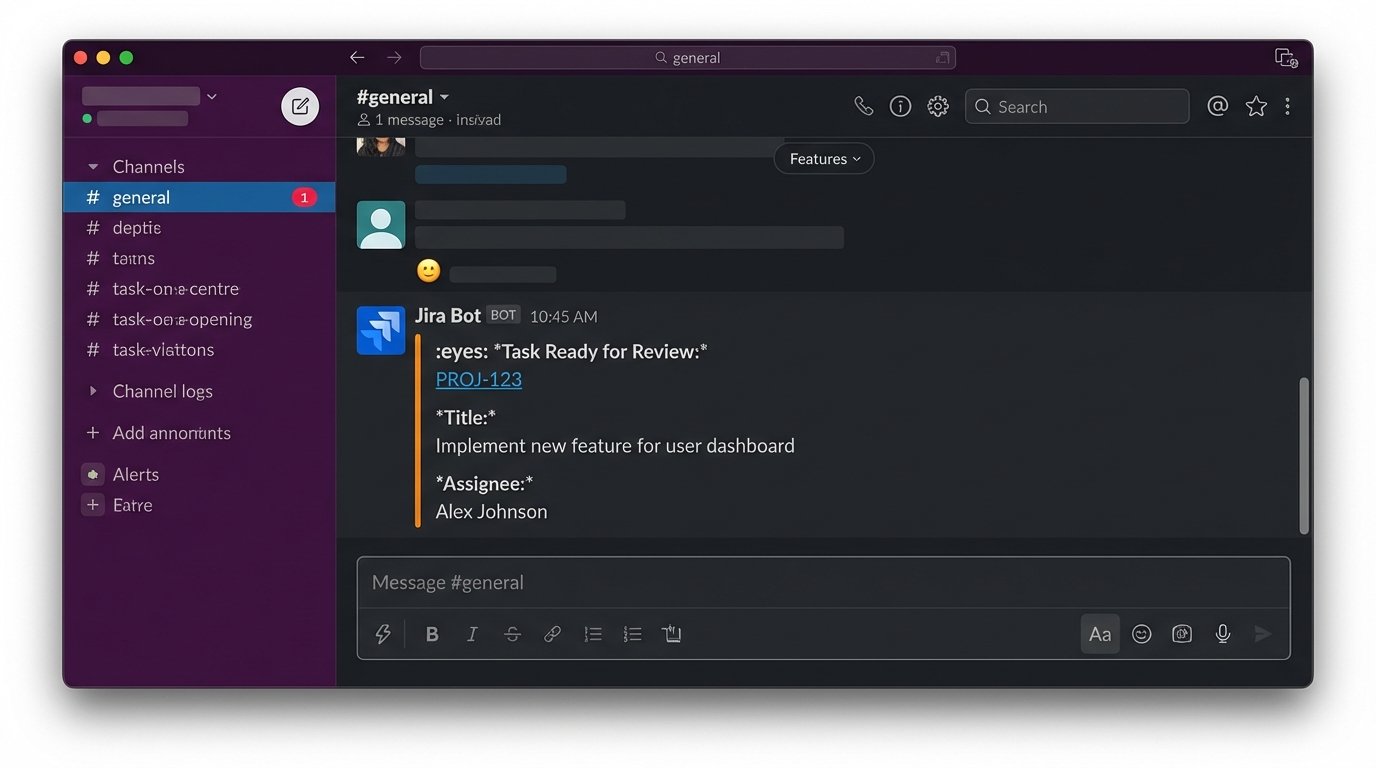
The presentation is as important as the data. A wall of unformatted text will be ignored. A structured message with clear fields for “Title,” “Assignee,” and a clickable link respects the reader’s time.
Validation, Error Handling, and Maintenance
Your shiny new notification system will break. The webhook source API will change its payload structure without notice. The destination API will have an outage. Your logic layer might have a bug. You must plan for failure.
Implement a dead-letter queue (DLQ) for your Lambda function. If the function fails to process an event, AWS can automatically move the failed event to an SQS queue. This allows you to inspect the failed payloads later and re-process them if needed, preventing data loss.
Add structured logging. Log the incoming event ID and the result of your logic checks. When a notification fails to send, you need a clear log trail to debug why. Was the payload malformed? Did the Slack API return a 400 error? Without logs, you are flying blind.
The ultimate goal is to create a system that requires less maintenance than the manual process it replaces. If you spend hours every week debugging your notification bot, you have failed. Start simple, log everything, and build in resilience from day one.