
Internal communication is either a signal or noise. Most of it is noise. Engineering teams drown in a flood of CI/CD pipeline notifications, stale Jira ticket updates, and “urgent” messages that aren’t. Automating communication in Slack isn’t about adding to the firehose. It’s about forging a high-precision scalpel to inject context-aware data directly where a developer is already looking.
Forget the friendly chatbot assistants. We’re building silent, efficient data couriers that bridge disparate systems into a single interface. The goal is to reduce context switching, not create a new digital pet for the team to poke at. Get this right, and you kill a dozen unnecessary browser tabs. Get it wrong, and you’ve just built an enterprise-grade spam cannon that everyone will mute on day one.
Prerequisites: Scopes, Tokens, and Sanity Checks
Before you write a single line of code, you need to navigate Slack’s app management interface. This is where most projects stumble. You need an App, not just a webhook URL. Go to api.slack.com/apps, create a new app from scratch, and install it to your development workspace. Do not start by requesting every scope under the sun. That’s how you get your app flagged or force a painful re-authentication cycle later when you realize you overreached.
Start with the bare minimum. For posting messages, you need `chat:write`. For slash commands, `commands`. For reading channel history, `channels:history`. Each scope is a key that unlocks a specific part of the API. Think of it as requesting specific kernel permissions. You wouldn’t give a simple logging script root access, so don’t give your deployment notifier permission to read user DMs. Your first job is to map your automation’s required actions to the tightest possible set of OAuth scopes. Document why each one is necessary.
Your reward for this is a Bot User OAuth Token, which looks like `xoxb-…`. Guard this token. It is a password. Do not hardcode it in your application’s source. Inject it via an environment variable or a secrets management system like HashiCorp Vault. Committing a token to a public Git repository is a resume-generating event, and not in a good way.
Architecture Decisions: Webhooks vs. Bots
The first fork in the road is deciding between Incoming Webhooks and a full-fledged Slack Bot. They solve different problems. A webhook is a one-way street. You get a unique URL from Slack, you `POST` a JSON payload to it, and a message appears in a pre-configured channel. It’s fast, stateless, and requires zero infrastructure beyond whatever system is sending the `POST` request.
This makes webhooks perfect for simple, fire-and-forget notifications. Think CI build failures, critical exceptions from a production service, or a high-priority ticket creation. The logic is entirely external. Slack is just a dumb terminal for your alert.
A Slack Bot is a different beast entirely. It’s a two-way communication channel. A bot authenticates with the aforementioned `xoxb-` token and can use the entire Web API. More importantly, it can listen for events. Users joining a channel, messages matching a pattern, button clicks in a message, form submissions from a modal. This requires you to run a persistent service that listens for these events from Slack’s Events API. It’s stateful, complex, and powerful. If you need any interactivity, you need a bot. There is no other option.
Incoming Webhooks: The Simple Hammer
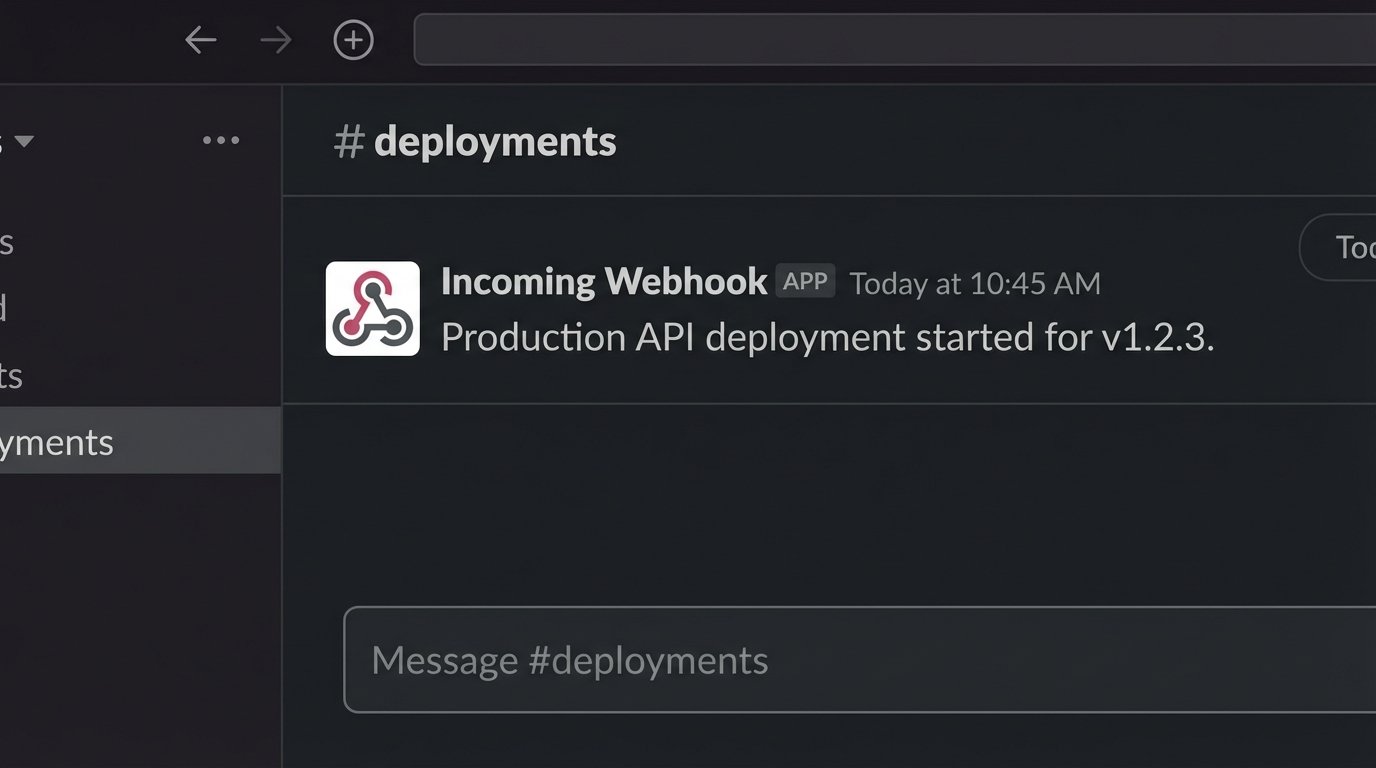
Generating a webhook URL is trivial. In your App settings, activate “Incoming Webhooks,” add a new one, and select a channel. Slack gives you a URL. That URL is now a direct line to posting in that channel. You can test it immediately with `curl` from your terminal. The payload is a simple JSON object.
Here is a basic example:
curl -X POST -H 'Content-type: application/json' --data '{"text":"Production API deployment started for v1.2.3."}' YOUR_WEBHOOK_URL
This is the quick and dirty path to automation. You can stick this `curl` command at the end of a bash script for a deployment and have a basic notification system running in minutes. The downside is its inflexibility. The message format is limited unless you start building complex JSON for Block Kit, the URL is tied to a specific channel, and there is no way for a user to respond or interact. It’s a loudspeaker, not a telephone.
Building a Bot: Event-Driven Logic
This is where the real work begins. A bot operates by subscribing to events. When something happens in your workspace, Slack sends an HTTP POST request with a JSON payload to an endpoint you control. Your application’s job is to receive this request, verify it came from Slack using a signing secret, and then act on it. This means you need a publicly accessible web server.
Forget the old Real Time Messaging (RTM) API that used WebSockets. It’s a legacy system that requires you to manage a persistent connection, which is a nightmare for scaling and resilience. The modern approach is the Events API. Your bot is a standard web service, which is a deployment model every engineer understands. You expose an endpoint, point Slack to it, and subscribe to the events you care about. The `app_mention` event triggers when someone @-mentions your bot. The `message.channels` event triggers on any message in a public channel the bot is in.
Using a library is non-negotiable here. The Slack Bolt framework for Python, JavaScript, or Java handles the low-level mechanics of request verification, event routing, and API client instantiation. It lets you write handler functions instead of boilerplate HTTP plumbing. Trying to build this from scratch is a waste of engineering hours.
A simple Python bot using Bolt that responds to a mention might look like this. It listens on a route, typically `/slack/events`, and the framework maps the event type to the correct function.
import os
from slack_bolt import App
from slack_bolt.adapter.flask import SlackRequestHandler

# Initializes your app with your bot token and signing secret
app = App(
    token=os.environ.get("SLACK_BOT_TOKEN"),
    signing_secret=os.environ.get("SLACK_SIGNING_SECRET")
)

@app.event("app_mention")
def handle_mention(event, say):
    user = event["user"]
    say(f"Hello, <@{user}>! What do you need?")

# This part is just to run it with a basic web server like Flask
from flask import Flask, request
flask_app = Flask(__name__)
handler = SlackRequestHandler(app)

@flask_app.route("/slack/events", methods=["POST"])
def slack_events():
    return handler.handle(request)

if __name__ == "__main__":
    flask_app.run(port=3000)
This code does more than it seems. It handles the initial URL verification challenge from Slack, validates the signature of every incoming request, and provides a simple decorator to bind your logic to a specific event. Your job is to fill in what happens inside `handle_mention`.
Use Case: A Legible Deployment Notification
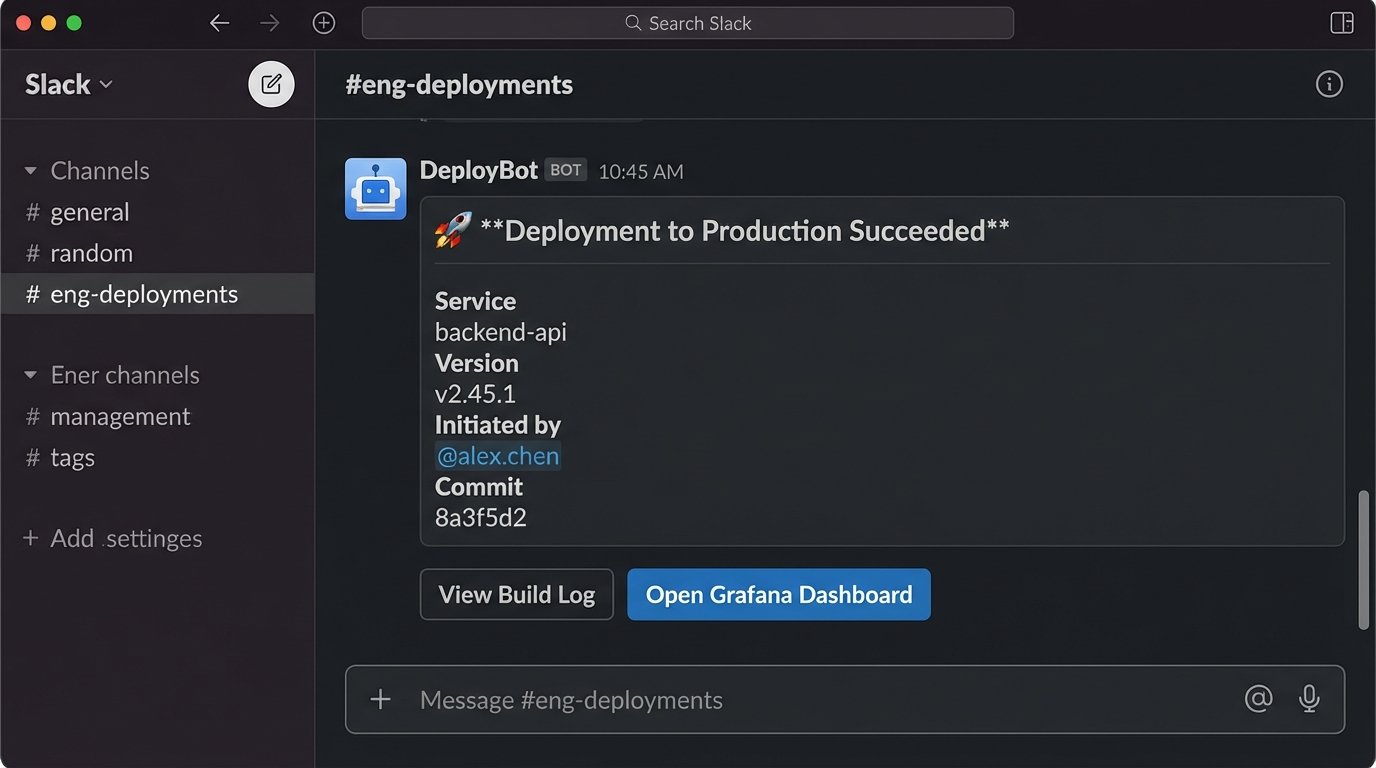
A common first project is to improve pipeline notifications. A simple webhook message saying “Build successful” is low-value. A good notification provides deep links, commit details, and the name of the person who initiated the deployment. This is where you must use Block Kit, Slack’s UI framework for messages.
Block Kit uses a declarative JSON structure to build messages with sections, dividers, buttons, and rich text formatting. You construct this JSON payload in your CI/CD tool and send it via webhook or a bot. The difference in information density is massive. A well-structured block message conveys status, context, and next actions at a glance.
Here’s a JSON payload for a notification. You’re not just sending text, you’re sending a structured document. Trying to pass this much context in a single, unformatted line of text is like shoving a firehose through a garden hose; the pressure builds but the output is a mess.
{
    "blocks": [
        {
            "type": "header",
            "text": {
                "type": "plain_text",
                "text": ":rocket: Deployment to Production Succeeded"
            }
        },
        {
            "type": "section",
            "fields": [
                {
                    "type": "mrkdwn",
                    "text": "*Service:*\nAuth API"
                },
                {
                    "type": "mrkdwn",
                    "text": "*Version:*\nv2.5.1"
                },
                {
                    "type": "mrkdwn",
                    "text": "*Initiated by:*\n<@U024BE7LH>"
                },
                {
                    "type": "mrkdwn",
                    "text": "*Commit:*\n`a1b2c3d` - Fix authentication token refresh logic"
                }
            ]
        },
        {
            "type": "actions",
            "elements": [
                {
                    "type": "button",
                    "text": {
                        "type": "plain_text",
                        "text": "View Build Log"
                    },
                    "url": "https://jenkins.example.com/build/123"
                },
                {
                    "type": "button",
                    "text": {
                        "type": "plain_text",
                        "text": "Open Grafana Dashboard"
                    },
                    "url": "https://grafana.example.com/d/service-dashboard",
                    "style": "primary"
                }
            ]
        }
    ]
}
This payload generates a clean, organized message with clickable buttons that take the engineer directly to the relevant tools. This single message can prevent a half-dozen context switches between Slack, Jenkins, and Grafana. That is the real value of this automation.
Interactivity, Modals, and the Headache of State
Bots become powerful when they stop just talking and start listening. Slash commands are the entry point for user-initiated workflows. A user types `/request-db-access` and your bot doesn’t just respond with text, it opens a modal view. A modal is a pop-up form that can collect user input through text fields, dropdowns, and checkboxes.
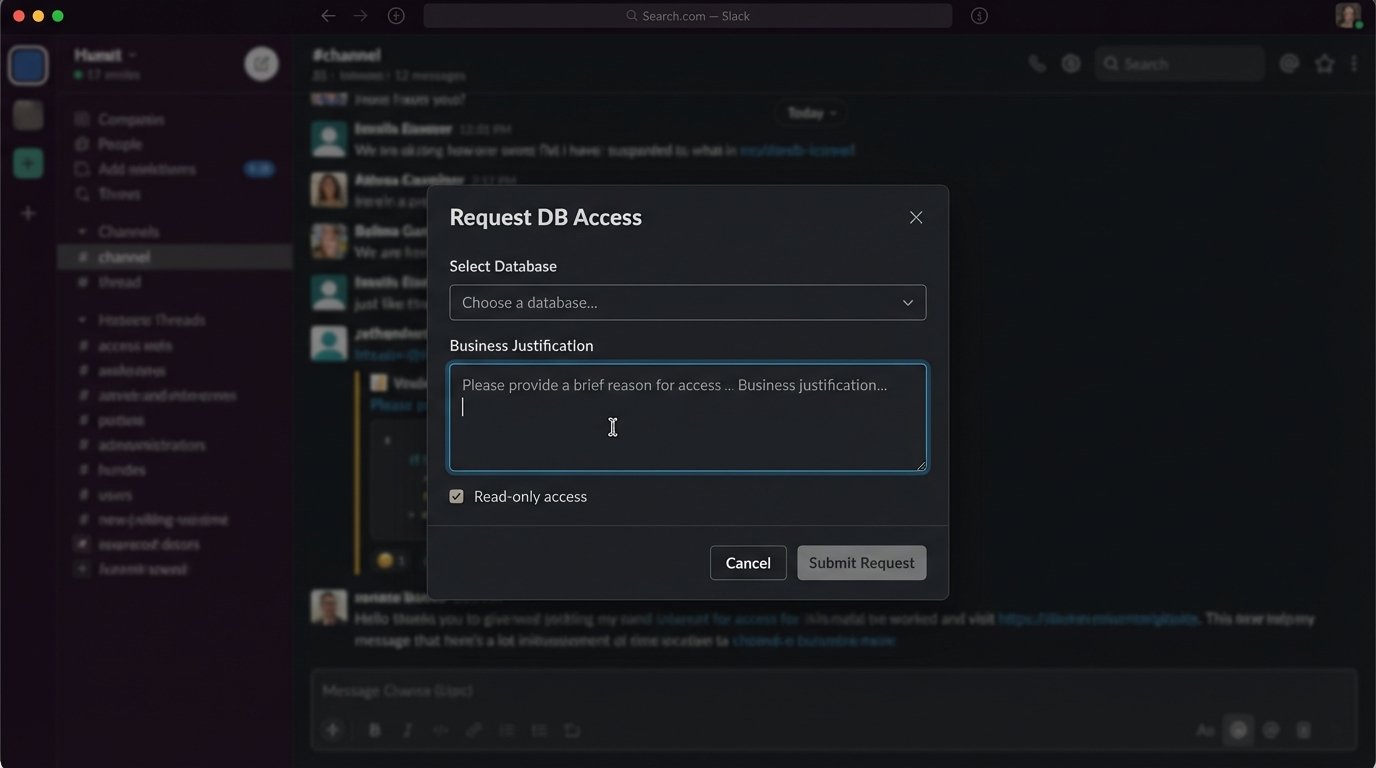
The flow is straightforward. A slash command invocation hits your endpoint. Your bot’s code acknowledges the request and makes an API call to `views.open`, passing the `trigger_id` from the command payload and the Block Kit JSON for the modal. When the user submits the modal, your app receives a `view_submission` event containing the form data. You can then process this data, for example, by creating a Jira ticket or calling a cloud provider API.
The complication is state. HTTP is stateless. If you need to carry information from the initial command into the modal submission logic, you have to pack it somewhere. The `private_metadata` field in the `views.open` call is your lifeline. It’s a string field where you can serialize data, like the original channel ID or a user’s request context. When the `view_submission` event arrives, that metadata is passed back to you, letting you stitch the interaction back together.
Rate Limiting and Failure States
The Slack API is not an infinite resource. It enforces rate limits based on tiers. Posting messages is generally in a high-volume tier, but opening modals or querying user lists is more restricted. If your bot starts getting popular or an automation goes haywire, you will get HTTP 429 `Too Many Requests` responses. Your code must handle this.
A proper API client will inspect the `Retry-After` header in the 429 response and wait that many seconds before retrying. Blindly retrying in a tight loop is the fastest way to get your app temporarily disabled. Implement an exponential backoff strategy for all API calls. Log every 429 event so you can identify which parts of your application are too chatty.
Finally, plan for failure. What happens if your bot’s endpoint goes down? Slack will try to deliver an event a few times, then give up. You need robust logging and monitoring on your bot’s host. If it processes a request to provision a resource but fails before confirming to the user in Slack, you’ve created an inconsistent state. Automating communication demands the same level of reliability as any other piece of production infrastructure.
The ultimate goal is not to fill channels with more messages. The goal is to reduce the human effort required to find and act on critical information. Every automated message must be more valuable than the notification badge it creates. If it isn’t, all you’ve built is a very complicated way to annoy your colleagues.