
6 Best Practices for Remote Collaboration in Real Estate Teams
Remote real estate operations are not a collaboration problem. They are a systems integration and data integrity problem. Your profit margin is bleeding out through disconnected APIs, manual data entry, and a communication stack held together with digital tape. The goal is not to find a magic platform but to build a resilient architecture that assumes failure and enforces a single source of truth.
1. Centralize Document State, Not Just Storage
Using a shared drive like Dropbox or Google Drive for contracts is a recipe for litigation. It’s a digital junk drawer, not a system of record. The core issue is state management. When multiple versions of a purchase agreement exist, the one stored in a generic cloud folder is not authoritative. You need a system that tracks the document’s state: ‘draft’, ‘out for signature’, ‘executed’, ‘archived’.
A proper solution involves a transactional document platform with a coherent API, like DocuSign Rooms or SkySlope. These platforms are built around the transaction, not the file. Every action, from a signature placement to a document approval, is a logged event. You can then use webhooks to broadcast these state changes to other systems. When a contract is executed, a webhook fires, automatically updating the opportunity stage in your CRM and notifying the finance team via a Slack message.
This creates a clear audit trail. You are not guessing who has the latest version. The system is the authority. The trade-off is vendor lock-in and cost. These platforms are wallet-drainers, but the cost of a single lawsuit from a botched contract makes the subscription fee look like a rounding error.
Error handling for this is non-negotiable. Webhooks fail. APIs time out. You must build a small middleware service or use a queueing system like AWS SQS to catch these webhook events. If your CRM is down when DocuSign sends the ‘executed’ payload, the message sits in the queue. A worker process can then retry injecting the update into the CRM every five minutes until it succeeds. Without this buffer, you have a silent failure point that corrupts your entire transaction pipeline.
2. Script the Lead Ingestion Pipeline
Manual lead entry is a slow, expensive human API that introduces errors 100% of the time. Every minute an agent spends copying and pasting a name from a Zillow email into a CRM is a minute they are not closing a deal. The typical first step is to use a connector tool like Zapier. This works for a while, but it’s a brittle, expensive bridge.
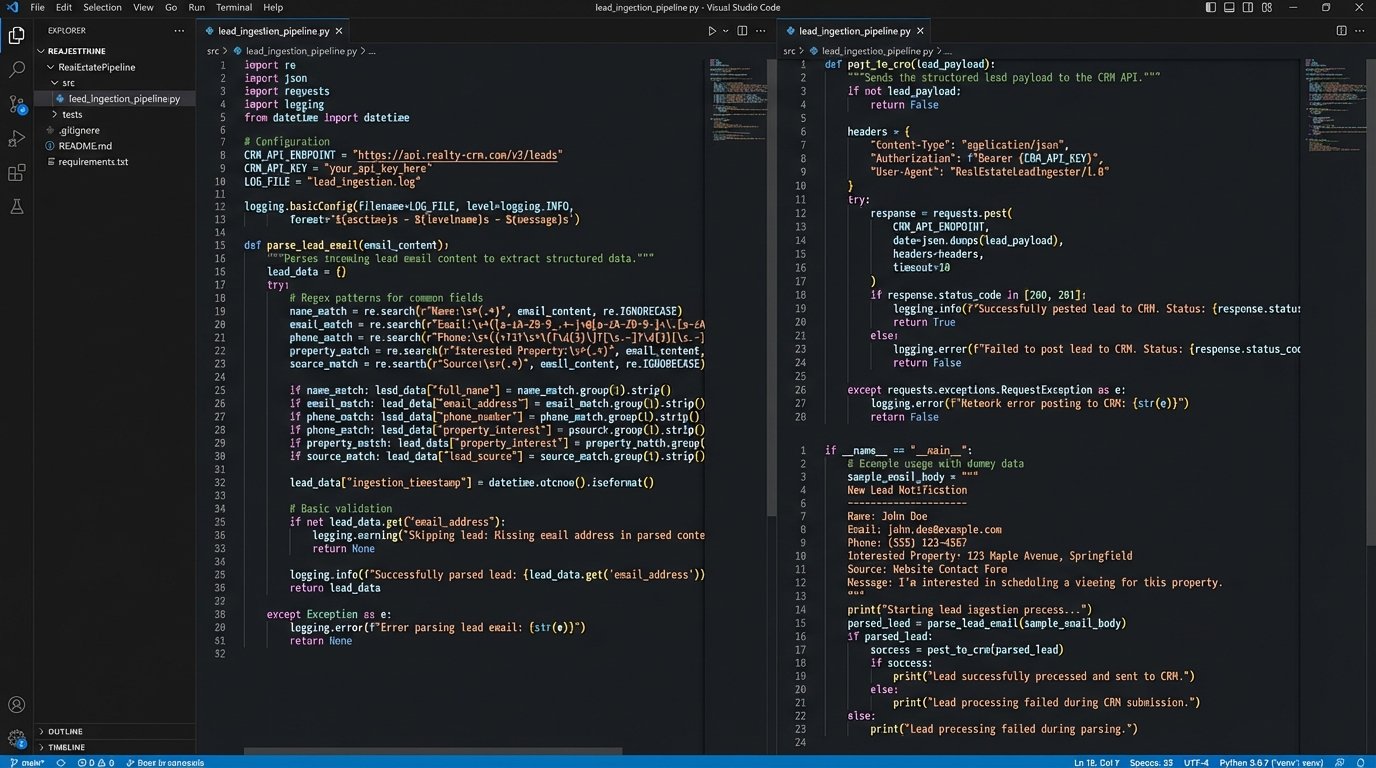
The correct architecture is to script the ingestion process. Most portal leads arrive as structured emails. A simple Python script running on a serverless function (AWS Lambda, Google Cloud Functions) can be triggered by an email forwarding rule. The script’s job is to parse the email body, strip the key data points (name, email, phone, property of interest), and then directly post that data to your CRM’s API. This is faster, cheaper, and infinitely more reliable than a human.
Here’s a conceptual Python snippet using a regular expression to gut the lead’s email from a typical portal notification. It’s not production code, but it shows the logic.
import re

import json

import requests
def parse_lead_email(email_body):
# WARNING: The portal will change its email format without notice.
# This regex will break. Your script needs robust error checking.
email_pattern = re.compile(r"Email: ([\w\.\-]+@[\w\.\-]+)")
match = email_pattern.search(email_body)
if not match:
# Logic to handle parsing failure: log error, notify admin
return None
return match.group(1)
def post_to_crm(lead_data):
crm_api_endpoint = "https://api.yourcrm.com/v1/leads"
api_key = "YOUR_API_KEY"
headers = {"Authorization": f"Bearer {api_key}"}
# Force the data into the CRM's required JSON structure
payload = {
"name": lead_data.get("name"),
"email": lead_data.get("email"),
"source": "Zillow"
}
response = requests.post(crm_api_endpoint, headers=headers, json=payload)
response.raise_for_status() # Will throw an exception for 4xx/5xx errors
return response.json()
# --- Main execution block ---
# email_content = get_email_from_trigger()
# lead_email = parse_lead_email(email_content)
# if lead_email:
# # ... logic to parse other fields ...
# post_to_crm({"email": lead_email, ...})
The maintenance load here is the key. Lead providers will change their email templates without warning, breaking your parsing logic. Your script must have aggressive logging and exception handling. When a parse fails, it needs to dump the raw email body into a quarantine location (like an S3 bucket) and send an alert to an engineering channel. This lets you diagnose the format change and update your script without losing the lead.
3. Build a Unified Communications Bus
Communication about a property is often fragmented across personal text messages, multiple email threads, and CRM notes. This is an operational black hole. When a dispute arises, there is no single place to reconstruct the timeline of events. You need to stop thinking in terms of apps and start thinking in terms of a data bus.
The strategy is to force all system-generated events into a centralized, channel-based chat tool like Slack or Microsoft Teams. For each new property listing, an automation script should create a dedicated channel, for example, `#prop-123-main-st`. Then, you configure webhooks from all your other systems to post notifications into that channel. A new lead from your ingestion script posts a message. A document signed in DocuSign posts a message. A showing scheduled in your calendar app posts a message. This creates a single, chronological, searchable log of the entire transaction.
Your current communication model is likely a point-to-point mesh network of bad ideas. Every system talks to every other system in a brittle, undocumented way. Building a communications bus means every service posts its status to a central channel. This is less about making agents talk to each other and more about making your *systems* report their status in a unified, observable way.
The failure point is the webhook itself. If your Slack endpoint goes down or you hit a rate limit, the notification is lost. For low-priority notifications, this might be acceptable. For critical events like an executed contract, you need the same queue-based buffer system discussed earlier. The event publisher (e.g., your document system) adds the message to a queue, and a separate worker process is responsible for pulling from that queue and posting to the chat API, retrying on failure.
4. Standardize the Virtual Tour and Staging Workflow
Remote teams rely on digital assets like Matterport scans, drone footage, and virtually staged photos. Without a standardized pipeline, you get a mess of inconsistent file formats, resolutions, and naming conventions. Storing multi-gigabyte video files in a generic cloud drive is inefficient and makes asset retrieval a manual, painful process.
Implement a rigid technical specification for all incoming media. Define the required resolution, aspect ratio, bitrate, and codec. Mandate a strict file naming convention that includes the property address and date, like `123-Main-St_exterior-drone_2024-05-21.mp4`. Use a dedicated object storage service like AWS S3 or Wasabi, which is far cheaper and more scalable for large files than Dropbox.
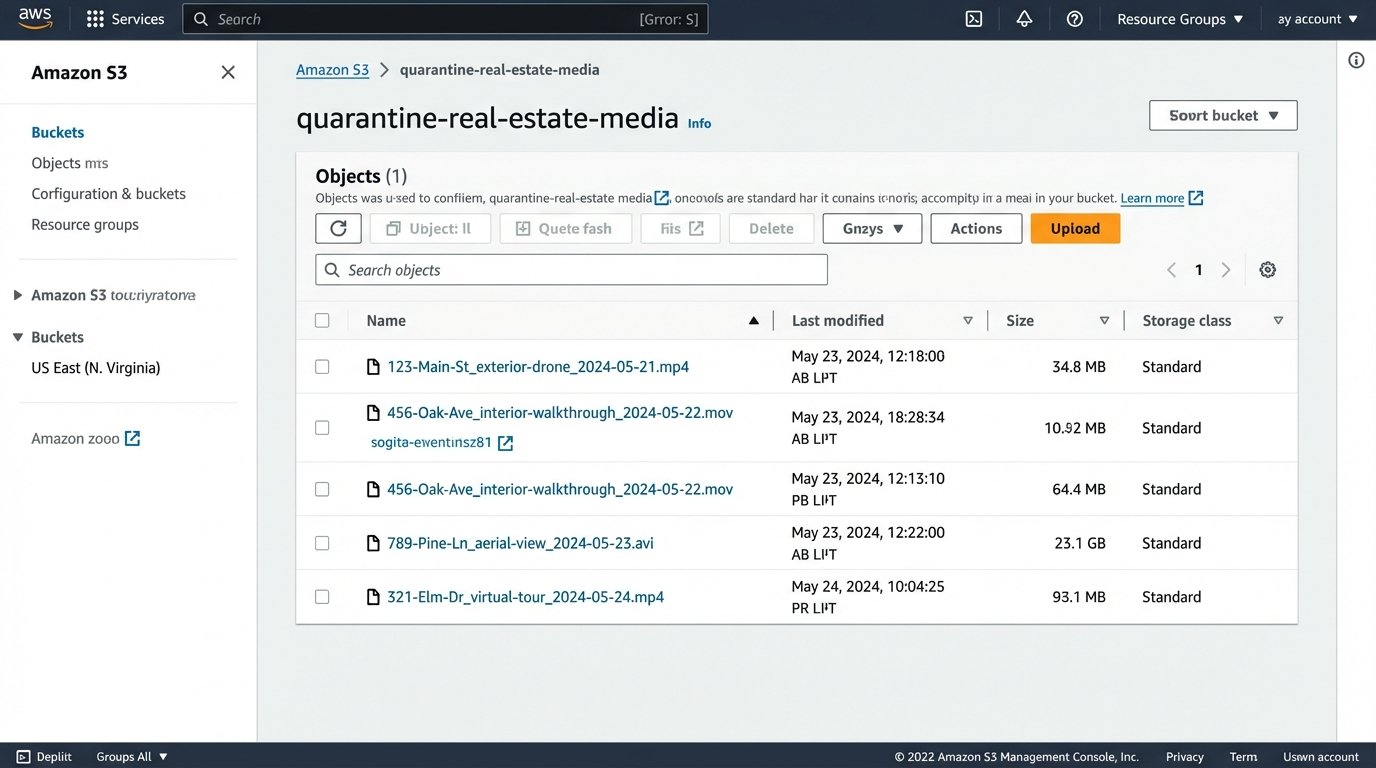
The next step is to automate processing. Set up a trigger so that when a new file is uploaded to a specific “ingest” bucket, a serverless function executes. This function’s job is to validate the file against your technical spec. If it conforms, the script can use a tool like `ffmpeg` to generate standardized web-friendly versions, create thumbnails, and move the processed assets to a “published” bucket. If the uploaded file fails validation, the script should automatically move it to a “quarantine” bucket and notify the team that the vendor submitted a non-compliant file.
This sounds complex, but it forces quality control at the point of ingestion. It prevents low-quality assets from ever entering your primary workflow. You are no longer discovering that a video file is corrupted five minutes before a major digital open house. The system logic-checks the assets for you.
5. Abstract the MLS Data Layer
Most remote teams interact with the Multiple Listing Service (MLS) through a patchwork of clunky web interfaces and third-party tools. This is slow, and the data is often stale. Direct API access to MLS data via RETS or the newer MLS Grid Web API is the solution, but having every agent’s tools hitting the API directly is inefficient and can lead to rate-limiting issues.
The superior architecture is to build a simple, private microservice that acts as your team’s exclusive gateway to the MLS. This service, perhaps a small FastAPI application running on a container, has one job: query the MLS API and cache the results in a fast database like Redis or a local database file. Your internal tools and agent-facing dashboards do not query the MLS. They query your microservice.
This abstraction layer gives you several advantages. First, speed. If five agents search for the same neighborhood data within minutes, the first query hits the slow MLS API, but the next four are served instantly from your cache. Second, resilience. If the MLS API goes down, your service can continue to serve the last known good data from its cache, albeit with a “data may be stale” warning flag in the UI. Your operations are degraded, not dead in the water. Finally, it lets you normalize data from multiple MLS boards into a single, consistent format before it ever reaches your applications.
6. Implement Immutable Transaction Logs
A standard CRM encourages users to overwrite data. A property status changes from `Active` to `Pending`, and the old `Active` value is gone forever. This is a massive compliance and auditing risk. You have no reliable way to answer questions like “Who authorized the price change on May 15th, and at what exact time?”
You need to stop treating your CRM like a whiteboard you can erase. Treat it like a ship’s logbook where you only add new entries. This is the concept of an immutable, append-only log. For every transaction, you create a log that records every single state change as a new, timestamped event. Instead of updating a status field, you insert a new row: `{‘timestamp’: ‘2024-05-21T10:05:00Z’, ‘user’: ‘agent_jane’, ‘event’: ‘status_changed’, ‘from’: ‘Active’, ‘to’: ‘Pending’}`.
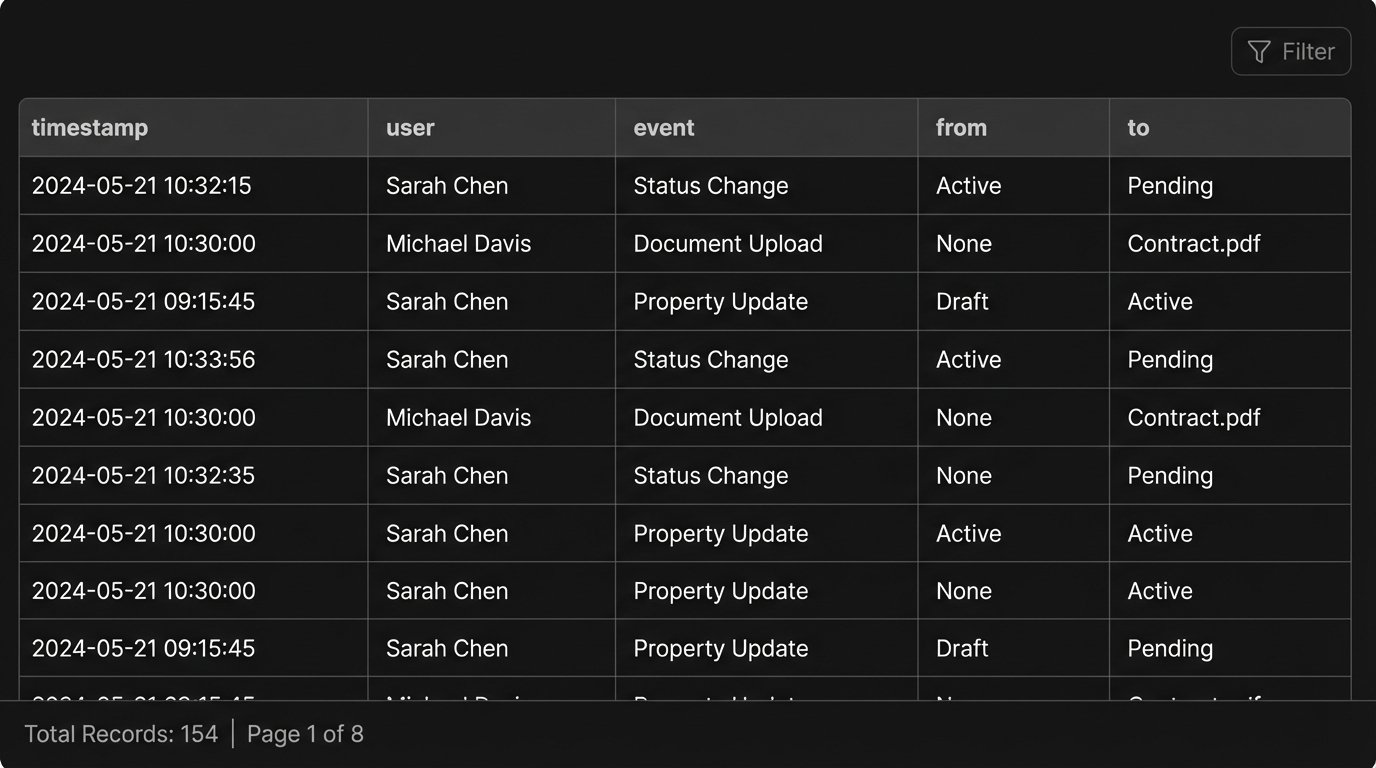
This creates an unimpeachable audit trail for every single deal. The “current” state of a property is simply the result of replaying all its logged events in order. This model is computationally heavier for reads, but it provides perfect historical fidelity. It protects the brokerage from disputes and provides an incredibly rich dataset for analyzing the transaction lifecycle.
The primary challenge is data volume. These logs grow rapidly. You need a database designed for this kind of workload. A document database like MongoDB or even a time-series database could work well. You also need a well-defined archival strategy to move the logs for closed transactions from hot storage to cheaper cold storage after a certain period, as required by compliance regulations.