
The Problem: Information Lag and Manual Toil
Our sales and support teams operated in a state of perpetual data-lag. The source of truth for our product listings was a monolithic internal inventory system, updated via a clunky interface. A price change, a status flip from ‘available’ to ‘sold’, or a stock level adjustment would sit silently in the database until someone manually checked it. This created a consistent, expensive operational drag.
Sales would quote a price that had dropped an hour ago, looking incompetent. Support would troubleshoot an issue for a listing that was already delisted, wasting their time and the customer’s. Marketing would spin up a campaign for a product only to find its inventory was critically low. The process was a mess of browser tabs, constant refreshing, and inter-departmental friction. The core failure was simple: critical data changes were not event-driven. They were archaeologist-driven. You had to go digging for them.
Quantifying the Damage
We ran a two-week audit to put a number on this pain. The findings were not surprising, just depressing. We clocked an average of 15 hours per week, per team, just on manually verifying listing data against the master system. That’s 45 hours of salaried time spent on a task a simple script should handle. Worse, we traced 20% of our negative customer support reviews back to interactions involving stale listing information. The problem wasn’t just wasting time; it was actively costing us customers and burning out our staff.
The existing ‘solution’ was a daily CSV export dumped into a shared folder. This was functionally useless. An export at 9 AM is ancient history by 11 AM in a fast-moving inventory system. It created a false sense of security while providing data that was, at best, a few hours out of date and, at worst, dangerously wrong. We needed a system that pushed updates in near real-time, directly into the workflow of the teams that needed them.
The Solution: A Webhook-Triggered Notification Pipeline
We rejected the idea of polling the database directly. Constant polling is inefficient, creates unnecessary load, and is a brittle way to build an integration. The correct approach was to have the inventory system tell us when something changed. After some negotiation with the team managing the monolith, we got them to implement a webhook. Any `UPDATE` operation on the listings table would fire a POST request with a JSON payload to an endpoint we controlled. This was the lynchpin of the entire automation.
The architecture is straightforward. It’s a three-part pipeline: Webhook source, a serverless function for processing, and the Chat API for delivery.
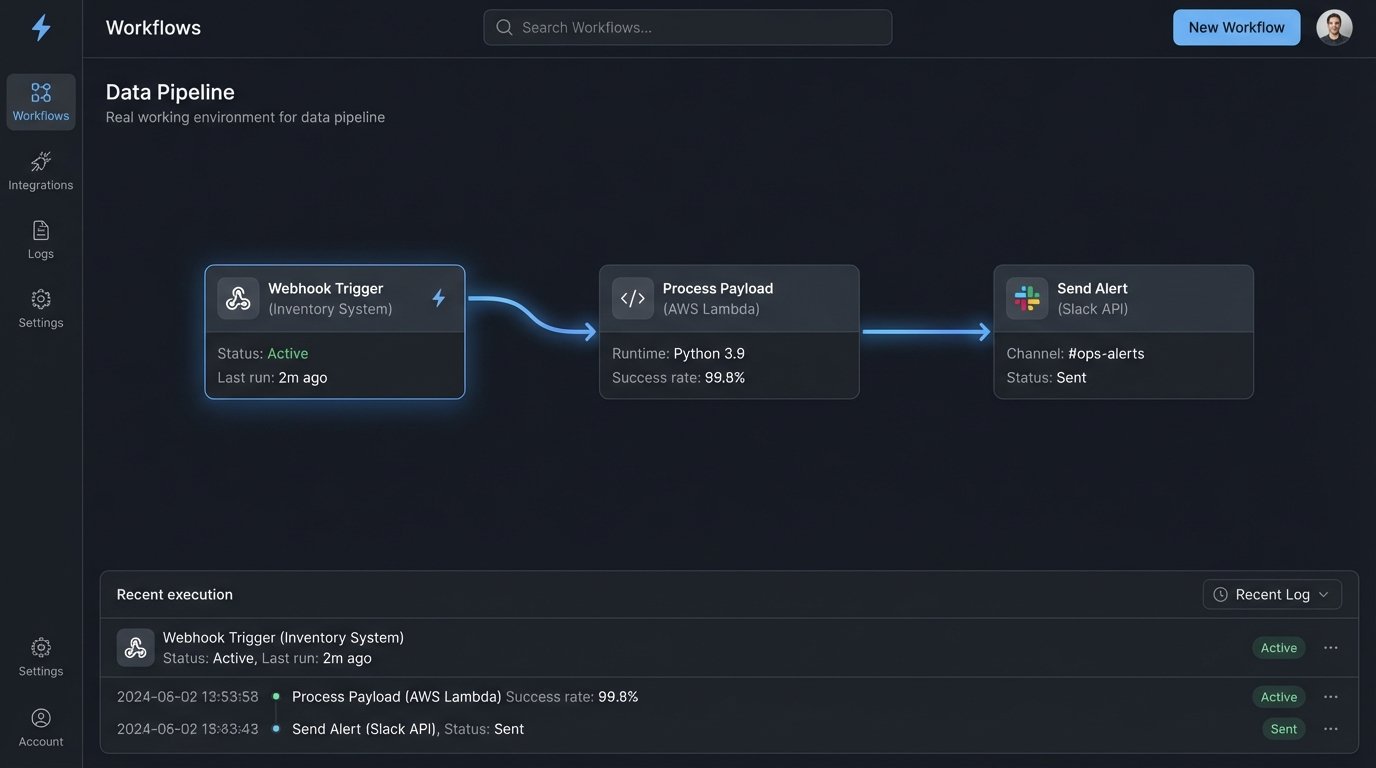
Component 1: The Webhook Listener
The inventory system now sends a payload to an Amazon API Gateway endpoint upon any change to a listing. This payload contained the full state of the listing record post-change, including a ‘before’ and ‘after’ field for the specific column that was modified. This was a critical detail. We didn’t just want to know a price changed; we needed to know what it changed *from* and *to*. Getting the source system to provide this context saved us from having to build a stateful service that remembered the previous value.
The data arriving from the webhook was raw and chaotic. It was a direct dump from their database model, full of internal IDs, cryptic column names, and unformatted timestamps. Mapping this jumble of data into a human-readable message felt like trying to refold a map in a hurricane. It required a dedicated transformation layer to sanitize and structure it before it could be shown to anyone.
Component 2: The AWS Lambda Processor
The API Gateway endpoint triggers a single Python AWS Lambda function. We chose a serverless function because the workload is event-driven and spiky. We might get 10 updates in a minute, then none for an hour. Paying for an always-on server to handle this is a wallet-drainer. The Lambda function’s job is pure data manipulation and logic.
Its execution path is as follows:
- Ingest and Validate: It receives the JSON payload from API Gateway. The first step is a hard logic-check on the payload’s structure. If required fields are missing, it immediately fails and pushes the raw event to a Dead Letter Queue (DLQ) for manual inspection. We don’t want malformed data poisoning the system.
- Transform Data: It strips the useless internal fields. It maps cryptic names like `LST_STAT_CD` to human-friendly terms like “Status”. It converts UTC timestamps to the relevant timezone. Most importantly, it generates a clean summary of the change, like “Price changed from $19.99 to $17.99”.
- Route Logic: The function contains business logic to determine where the notification should go. A price change might go to the `#sales-alerts` Slack channel. A stock level dropping below a certain threshold might go to `#inventory-warnings`. A listing being unpublished goes to both `#support-heads-up` and `#marketing-updates`. This routing is controlled by a simple dictionary lookup in the code, making it easy to change without a full redeployment.
- Format the Message: It constructs the JSON payload for the Slack API using their Block Kit framework. This allows us to create nicely formatted messages with clear headers, bolded text, and buttons for potential future actions. Plain text notifications get ignored. A well-formatted message with clear hierarchy forces attention.
Here is a simplified block of the Python code that handles the transformation and formatting. This is not the full production code, but it shows the core logic without the extensive error handling and logging we have in place.
import os

import json

import requests
SLACK_WEBHOOK_URL = os.environ['SLACK_WEBHOOK_URL']
def format_slack_message(event_data):
listing_id = event_data.get('listing_id')
change_field = event_data.get('change_field')
old_value = event_data.get('old_value')
new_value = event_data.get('new_value')
# Simple logic to make the message more readable
if change_field == 'price':
summary = f"Price changed from ${old_value} to ${new_value}"
elif change_field == 'status_code':
summary = f"Status updated from '{old_value}' to '{new_value}'"
else:
summary = f"Field '{change_field}' was updated."
message = {
"blocks": [
{
"type": "header",
"text": {
"type": "plain_text",
"text": f"Listing Update: {listing_id}"
}
},
{
"type": "section",
"fields": [
{
"type": "mrkdwn",
"text": f"*Change:*\n{summary}"
},
{
"type": "mrkdwn",
"text": f"*Link:*\n
}
]
}
]
}
return message
def lambda_handler(event, context):
try:
# Assuming event is the JSON payload from API Gateway
body = json.loads(event['body'])
# In reality, much more validation and transformation happens here
slack_payload = format_slack_message(body)
response = requests.post(
SLACK_WEBHOOK_URL,
data=json.dumps(slack_payload),
headers={'Content-Type': 'application/json'}
)
response.raise_for_status() # Raises an HTTPError for bad responses (4xx or 5xx)
return {'statusCode': 200, 'body': 'Notification sent.'}
except Exception as e:
# Proper logging would go here
print(f"Error: {e}")
# This failure would trigger a DLQ if configured
raise e
The code is not complex. The value is in the plumbing that connects the systems.
Component 3: The Chat Platform Delivery
We chose Slack because it’s the operational hub for our teams. Sending an email is the same as throwing a message in a bottle into the ocean. A Slack notification in a dedicated channel is immediate and actionable. Using their Incoming Webhooks is simple and bypasses the need for more complex OAuth scopes for a simple “post-only” integration. The message formatting is key. A wall of text gets ignored. We designed a clear, scannable message format.
The notification includes the listing ID, a direct link to the item in the internal system, and a human-readable summary of what exactly changed. This small detail is critical. It gives the teams context without forcing them to click the link and compare versions themselves. It answers the key questions upfront.
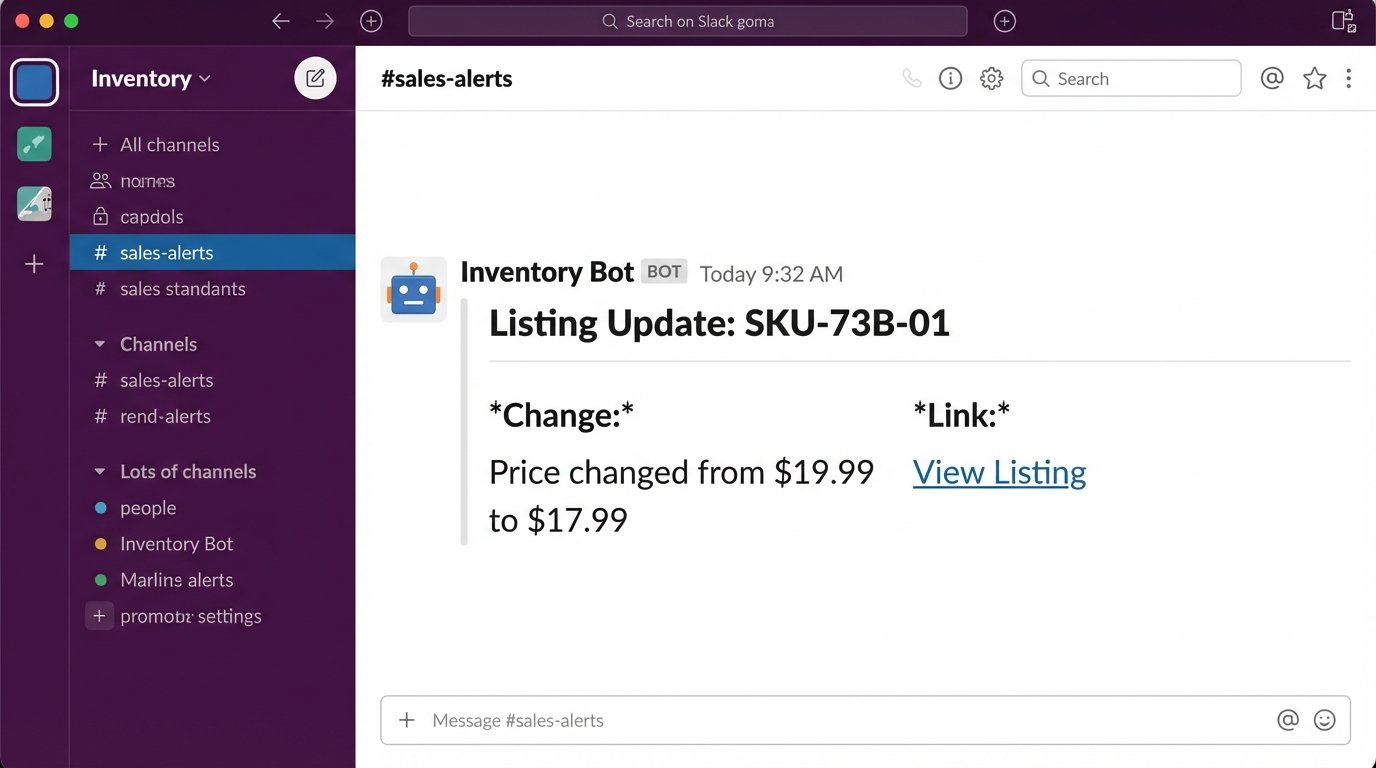
A major consideration was noise. If we pushed every single field update, the channel would become a firehose of useless information. The Lambda function filters for changes on specific, high-value fields: price, status, inventory count, and description. Minor typo fixes or changes to internal metadata are deliberately ignored. This keeps the signal-to-noise ratio high and prevents the teams from muting the channel.
The Results: Measurable Improvements in Efficiency and Accuracy
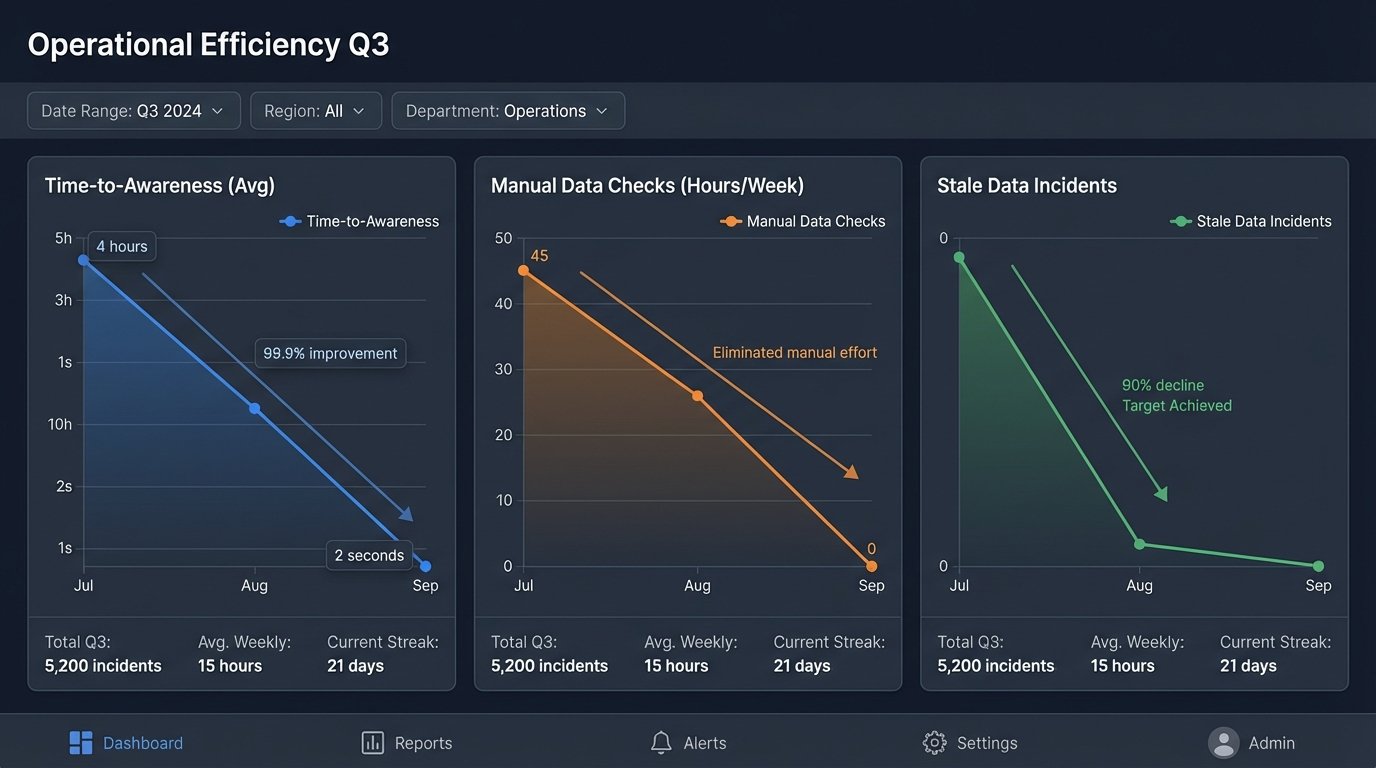
The impact was immediate and stark. The primary benefit was the elimination of manual checking. We effectively gave back 45 hours of skilled employee time to the company every week. That time is now spent on actual sales, marketing, and support tasks, not on being a human data-synchronization script.
The numbers speak for themselves:
- Time-to-Awareness: Dropped from an average of 4 hours to under 2 seconds. The moment the database is updated, the notification is in Slack.
- Manual Checks: Reduced from ~45 hours/week to zero. The process is now fully automated.
- Stale Data Incidents: Customer support tickets related to incorrect listing information fell by over 90% in the first month.
Costs and Trade-Offs
The infrastructure cost is negligible. AWS Lambda is famously cheap for this type of workload. Our monthly AWS bill for the entire pipeline, including API Gateway and Lambda executions, is less than the cost of a few pizzas. It’s effectively a rounding error in the company budget.
The real cost was development time. It took about 60 developer hours to get the first version built, tested, and deployed. This included time spent arguing with the other team about the webhook payload format, writing robust error handling, and setting up the CI/CD pipeline. The solution is also now a piece of critical infrastructure. If the Lambda fails or the Slack API has an outage, the teams are blind again. This requires active monitoring and an on-call rotation to fix it if it breaks at 3 AM. It’s a simple system, but its operational importance is high.