
The Failure Cascade of Manual Task Handoffs
Every engineering team has a graveyard of stale tickets. They represent broken promises, mismatched priorities, and hours of wasted context-switching. The root cause is almost always a failure in the handoff mechanism between systems and people. A task lives in Jira, the conversation about it happens in Slack, the code is in GitHub, and the deployment alert hits PagerDuty. These are disconnected data islands.
This isn’t a process problem. It’s an architectural one. Relying on humans to manually bridge these systems is a direct path to data rot. A developer pushes a fix but forgets to move the ticket. A QA tester finds a bug, mentions it in a channel, but a formal ticket is never created. Each manual step is a potential point of failure, and these failures compound silently until a bad deployment forces them into the light.
The operational drag is immense. Engineers spend cycles asking “what’s the status of this?” instead of writing code. Managers build Gantt charts on top of data they know is at least a day old. We pretend the Jira board is the source of truth, but everyone knows the real status lives in a dozen private conversations and commit logs.
Symptoms of a Broken Workflow Architecture
Before fixing the system, you have to identify the specific failure points. The problem isn’t that “people are disorganized.” The problem is that the system architecture encourages disorganization through friction.
State Desynchronization
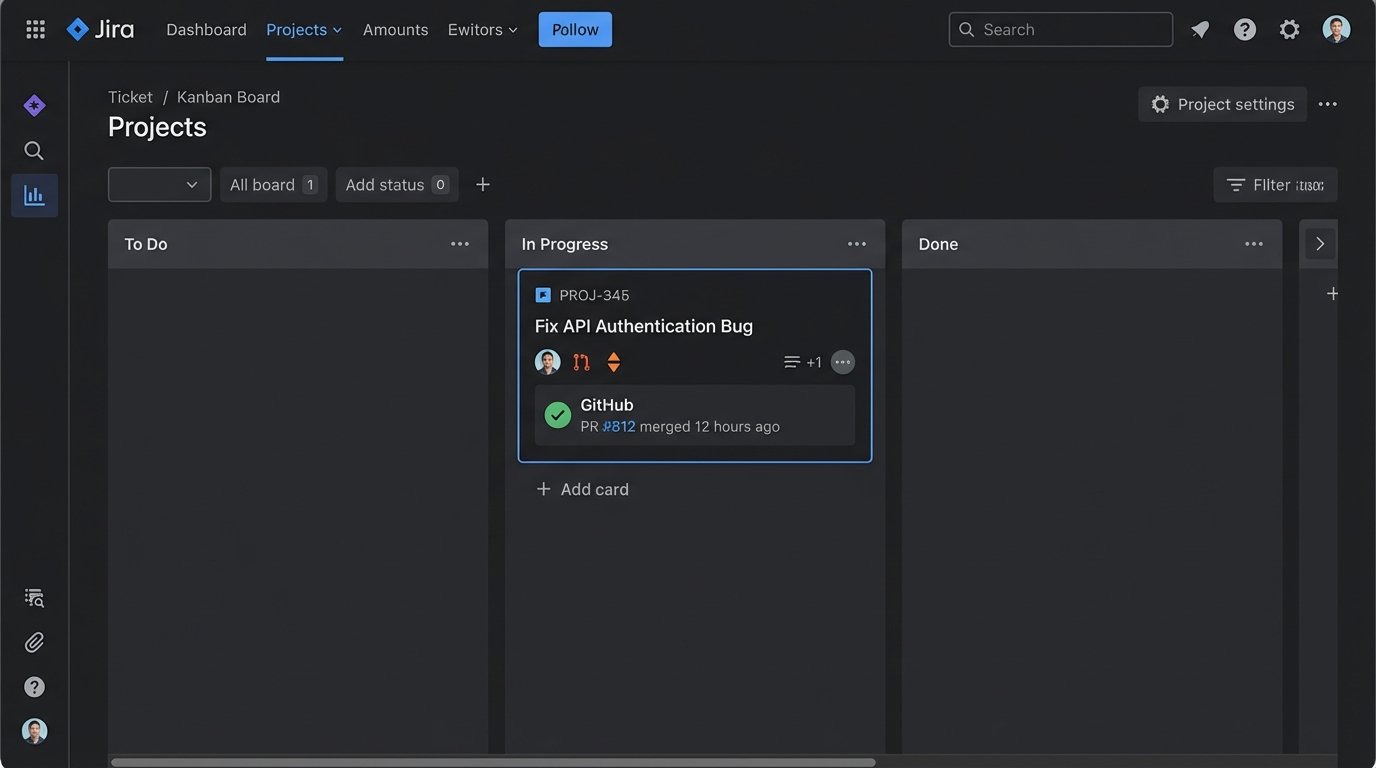
A ticket in the “In Progress” column is useless information if the associated branch was merged 12 hours ago. The state of the work in the repository has diverged from the state of the task in the project management tool. This forces a manual reconciliation process that is both time-consuming and prone to error. Every status meeting becomes an exercise in correcting stale data instead of making decisions.
The consequence is a total loss of trust in the tracking system. It decays into a bureaucratic chore instead of a functional tool for coordinating work. When developers stop believing the board is accurate, they stop updating it, which makes it even less accurate. It’s a feedback loop that ends with the system being abandoned in practice, if not in name.
Orphaned Communication
Key technical decisions get buried in ephemeral chat threads. A conversation about API authentication logic that should be attached to a user story is lost forever after 90 days because of Slack’s retention policy. When a new engineer joins the project, there is no archeological record for them to follow. They are forced to re-litigate old decisions because the context was never captured and linked to the work itself.
This is a direct drain on senior engineer time. They are repeatedly pulled in to explain the history of a feature because the project’s institutional memory is fragmented across platforms that were never designed for permanent record-keeping. The system actively works against knowledge transfer.
The Fix: A Centralized State Machine
The solution is to stop using humans as low-speed, high-error APIs between systems. A dedicated workflow automation platform functions as a centralized state machine. It becomes the single source of truth for the *process*, not just the data. Its only job is to receive signals from other systems and execute a predefined set of logic to pass information and trigger actions in other systems.
Think of it as an event bus for your team’s operations. A git push isn’t just a code change. It’s an event. A new comment on a ticket is an event. A failed CI/CD pipeline is an event. The workflow engine subscribes to these events and executes a directed acyclic graph of operations in response. The human is no longer in the loop for routine state changes.
Example: A Bug Triage Workflow
A typical manual bug triage process is a mess. A user reports a bug via a support ticket in Zendesk. A support agent has to copy-paste the information into a new Jira ticket. They then have to ping an engineering manager in Slack, who then assigns it to a developer. Each step is a delay and a potential mutation of the original data.
An automated workflow architecture guts this process entirely.
- Trigger: A new ticket is created in Zendesk with the tag “bug_report”.
- Action 1: The workflow engine’s webhook listener fires. It pulls the ticket summary, description, and reporter’s email from the Zendesk API.
- Action 2: It then makes a POST request to the Jira API to create a new ticket in the engineering backlog, injecting the Zendesk data directly into the appropriate fields. The new Jira ticket key is stored as a variable.
- Action 3: The engine posts a message to the #dev-triage Slack channel with a link to the new Jira ticket and the original Zendesk ticket.
- Action 4: Finally, it calls the Zendesk API again to post an internal note on the original ticket with the Jira key, closing the loop for the support agent.
The entire sequence executes in under two seconds. It is perfectly repeatable and auditable. The human effort was reduced to applying one tag.
The Mechanics: APIs and Webhooks
This entire architecture hinges on the quality of the APIs for the tools you use. The workflow engine is just the logic controller. The actual work is done through HTTP requests. Webhooks are the nervous system, providing the real-time triggers that kick off the logic. A system without reliable, well-documented webhook support is a dead end for serious automation.
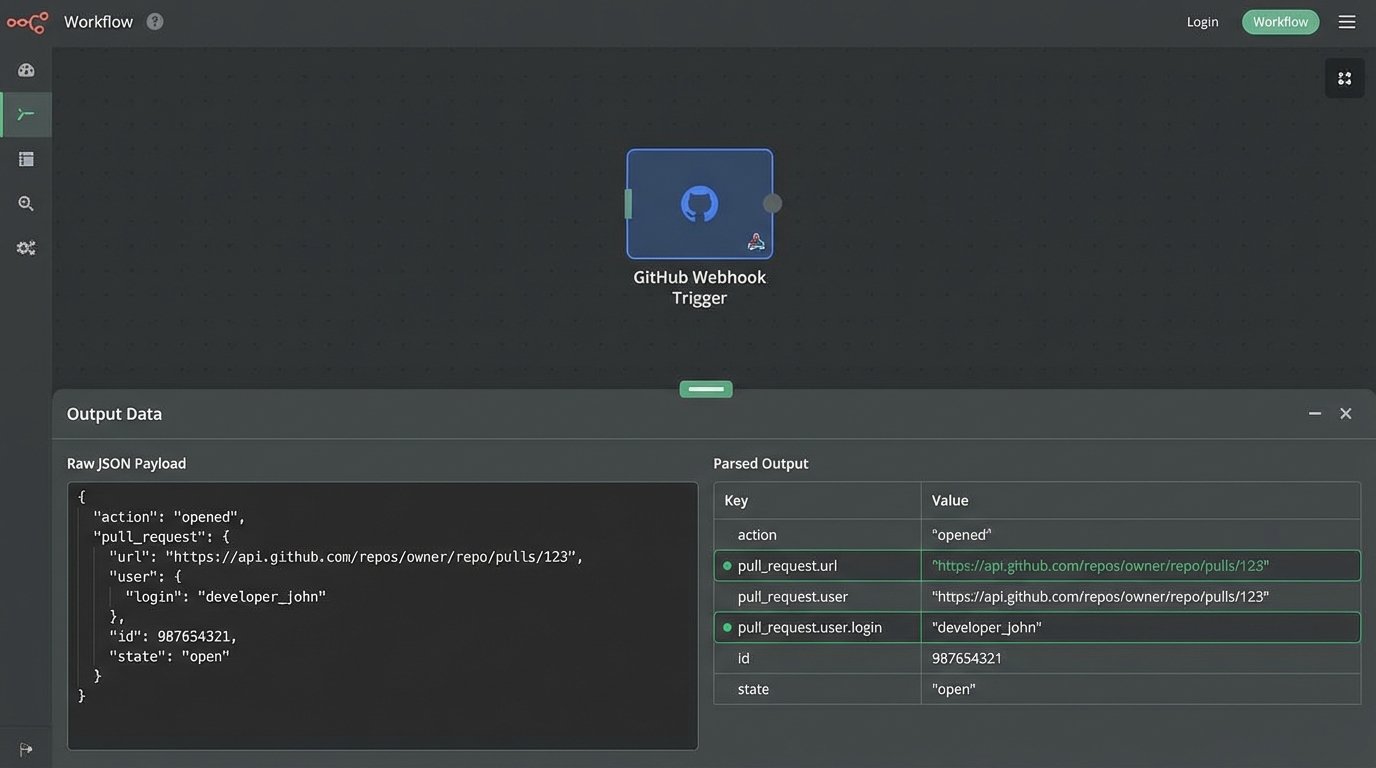
A webhook payload is just a structured JSON object sent to a specific URL. The workflow tool provides the URL, and you configure the source system, like GitHub, to send a POST request to that URL when an event occurs, like a pull request being opened.
The workflow logic then has to parse this JSON to extract the relevant data points: the repository name, the PR number, the author’s username. This is where things get gritty. You are completely dependent on the source system’s data structure. If they change their payload format without warning, your automation breaks. You must build defensive logic checks to handle missing keys or unexpected data types.
This is the automation equivalent of trying to drink from a firehose. The volume of events from an active repository can be massive, and your logic has to be efficient enough to process them without hitting API rate limits on the destination systems. Throwing a thousand API calls a minute at Jira is a good way to get your account temporarily suspended.
Code Example: A Simple GitHub Webhook Payload
When a pull request is opened, GitHub sends a payload that looks something like this. Your workflow code has to strip the data it needs from this structure. For example, `action`, `pull_request.url`, and `pull_request.user.login` are the critical pieces of information for routing and notification.
{

  "action": "opened",

  "number": 42,

  "pull_request": {

    "url": "https://api.github.com/repos/octocat/Hello-World/pulls/42",

    "id": 1,

    "html_url": "https://github.com/octocat/Hello-World/pull/42",

    "state": "open",

    "user": {

      "login": "octocat",

      "id": 1,

      "type": "User"

    },

    "body": "Please pull these awesome changes"

  },

  "repository": {

    "id": 1296269,

    "name": "Hello-World",

    "full_name": "octocat/Hello-World"

  }

}
Your logic must be specific. A check for `action == “opened”` prevents the workflow from running again when a comment is added or the PR is closed.
Conditional Logic is the Real Power
Simple trigger-action chains are useful, but the real value is in building conditional logic branches. The workflow engine can make decisions based on the data it receives. This allows you to encode your team’s standard operating procedures directly into the automation, forcing consistency and eliminating human error from complex processes.
Consider a CI/CD pipeline outcome.
- A webhook from Jenkins or CircleCI fires on a completed build.
- Condition: The workflow checks the ‘status’ field in the payload.
- If `status == “SUCCESS”`:
- Find the associated Jira ticket via the commit message.
- Call the Jira API to transition the ticket from “In Progress” to “Ready for QA”.
- Post a quiet success message in the team’s primary Slack channel.
- If `status == “FAILURE”`:
- Find the associated Jira ticket.
- Re-open the ticket and assign it back to the original developer.
- Post a high-priority, noisy alert in the #build-failures channel, tagging the developer who broke the build.
- Optionally, create a new high-priority incident in PagerDuty if the failure occurred on the `main` branch.
This logic path forces the correct procedure every single time. A developer can’t forget to re-open a ticket for a failed build. The system handles it. This frees up cognitive load to focus on fixing the actual problem, not performing the administrative bookkeeping around it.
The Trade-Offs: Cost, Complexity, and Ownership
This isn’t a free lunch. While workflow automation solves the problem of manual disorganization, it introduces a new class of problems. These platforms are often expensive, with pricing models based on users, connections, or execution volume that can quickly become a significant line item on the budget.
The workflows themselves are code. They need to be designed, built, tested, and maintained. When an API provider deprecates an endpoint, your workflow breaks. Someone has to own this internal automation infrastructure. It requires a specific skill set that bridges the gap between traditional software development and systems administration. Leaving it in the hands of a “process owner” without technical skills is a recipe for building a fragile, unmaintainable Rube Goldberg machine.

You are also creating a new central point of failure. If your workflow automation platform has an outage, your entire team’s operational nervous system is down. Handoffs that were once manual but possible are now completely blocked. You must have a contingency plan for this. You trade the constant friction of manual work for the acute pain of a critical system outage.
Starting Point: Automate the Most Repetitive Task
Do not attempt to automate your entire organization’s process map on day one. That project will fail. The correct approach is to identify the single most annoying, repetitive, and error-prone manual task your team performs and start there. The status update from a git merge is a classic candidate.
Get that one small workflow running reliably. Let the team feel the benefit of not having to manually update tickets. This builds momentum and trust in the system. Use that first success to justify the investment in automating the next-most-painful process. This iterative approach is far more likely to succeed than a massive, top-down process re-engineering initiative that will collapse under its own weight.
The goal is not to build a perfectly automated system. The goal is to claw back engineering hours that are being wasted on low-value administrative tasks and reinvest them into building the actual product. Every manual status update is a tax on productivity. Workflow automation is the tool you use to stop paying it.