
Automated task delegation fails more often from flawed logic than from broken code. The system creates a ticket, assigns it to the void, and marks its own job as complete. The result is a perfectly logged task that no one ever sees, while the production fire it was supposed to signal burns everything down. We are not building notification systems. We are building accountability chains.
The core problem is treating delegation as a single “fire-and-forget” event. It is a stateful process. You must track the task from creation to resolution, accounting for the human element of rejection, confusion, and absence. Anything less is just a script that adds noise to a project board.
Principle 1: The Trigger Dictates the Data Integrity
The source of your automated task determines the quality of the entire workflow. If you are triggering tasks by parsing the subject lines of emails, you have already lost. You are building a fragile system on top of unstructured, human-generated text that changes on a whim. The first line of defense is to force structured data at the point of origin.
A webhook from a monitoring system like Datadog or a form submission from a tool like Jira Service Desk provides a predictable JSON payload. This is your ground truth. You can map fields directly and reliably. An email parser is a liability that will break at 3 AM when a well-meaning colleague changes the alert subject from “CRITICAL” to “URGENT”.
Your goal is to eliminate any interpretive layer between the event and the task. The trigger should be the direct, machine-readable signal, not a human’s summary of it.
Context Injection is Non-Negotiable
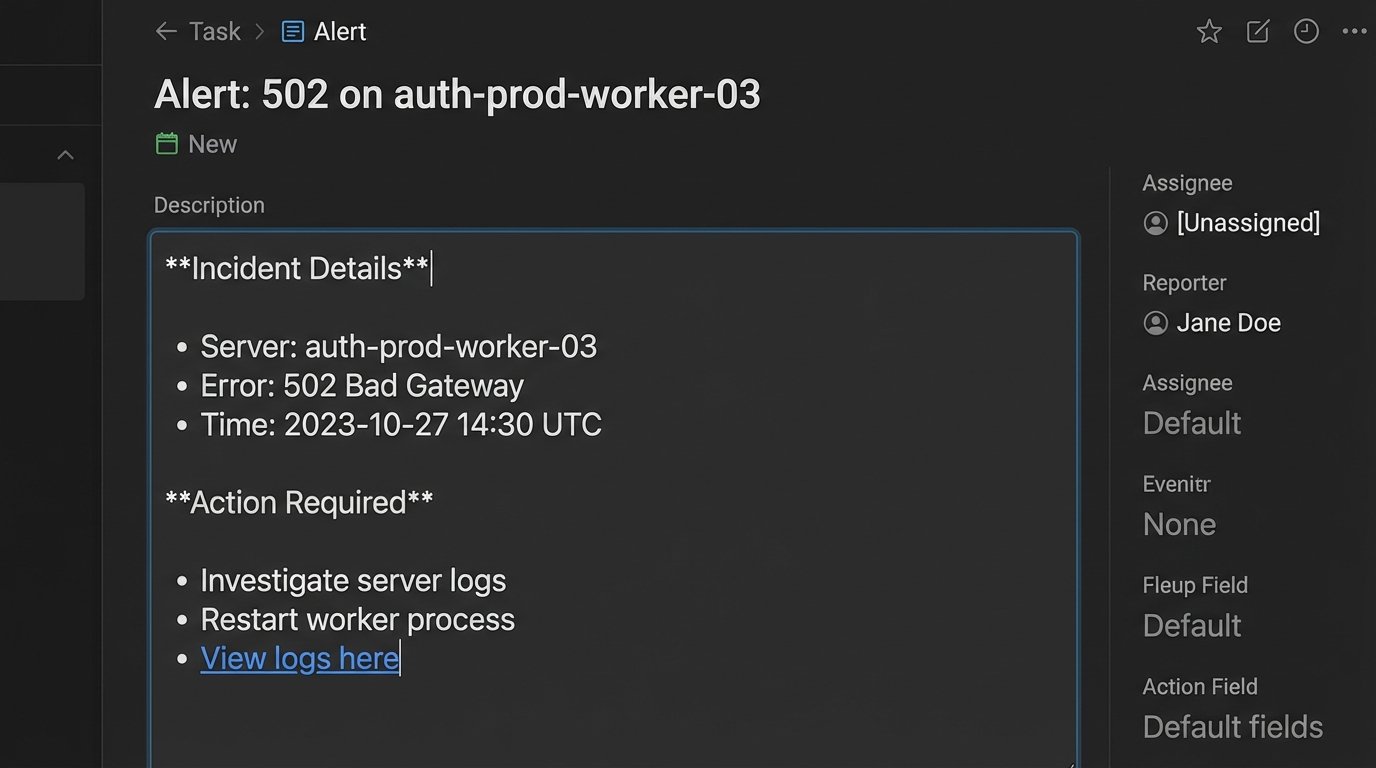
A task that says “Fix server error” is useless. A task that says “Fix 502 Gateway Error on `auth-prod-worker-03`, check logs at `[URL]`, customer impact `[ID]`” is actionable. The automation must be responsible for injecting this context directly into the task description or custom fields. This involves pulling data from multiple sources at the time of creation.
The script should grab the server name from the initial alert payload, query a logging platform for a relevant search URL, and maybe even hit the CRM API to find the affected user’s account level. This enriches the task to the point where the assigned engineer can act immediately without a preliminary investigation phase.
Look at this simple Python example. We are not just passing a title. We are building a body of evidence inside the task itself.
import json
def create_task_payload(alert_data):
"""
Strips data from a webhook payload and builds a formatted task description.
"""
server_name = alert_data.get("hostname", "N/A")
error_code = alert_data.get("error_code", "Unknown")
log_query_url = f"https://splunk.company.com/search?q={server_name}%20error_code={error_code}"
customer_id = alert_data.get("customer_id")
task_title = f"Alert: {error_code} on {server_name}"
description = (
f"**Incident Details**\n"
f"- Host: {server_name}\n"
f"- Error Code: {error_code}\n"
f"- Customer ID: {customer_id}\n\n"
f"**Action Required**\n"
f"1. Investigate logs immediately: {log_query_url}\n"
f"2. Check server status and resource utilization.\n"
f"3. Escalate to on-call SRE if root cause is not identified within 15 minutes."
)
return {"title": task_title, "description": description}
# Example incoming alert
alert = {
"hostname": "auth-prod-worker-03",
"error_code": 502,
"customer_id": "cust_abc123"
}
formatted_task = create_task_payload(alert)
print(json.dumps(formatted_task, indent=2))
This approach transforms the to-do list from a dumb ledger into a dynamic incident report. The engineer gets everything they need in one place.
Principle 2: Build an Explicit State Machine
Once a task is created, it enters a lifecycle. You cannot assume assignment is the final step. A robust delegation system needs a simple, explicit state machine to track the task’s journey. Most project management tools support this through columns on a board or status fields. Your automation must interact with this state.
A minimal viable state machine looks something like this: `New -> Acknowledged -> In Progress -> Blocked -> Resolved`. The transitions between these states are where the real automation happens. If a task sits in `New` for more than 30 minutes, an escalation policy should trigger. This could be a high-priority message in a Slack channel or an automatic reassignment to a secondary on-call engineer.
If a task moves to `Blocked`, the automation could require a comment explaining the blocker. This prevents tasks from rotting in a “blocked” column without any context. You are forcing a paper trail that explains delays.
Assignment Logic Needs Fallbacks
Automated assignment often relies on a simple round-robin or on-call schedule. What happens when the on-call engineer is out sick and forgot to update the schedule? The task is assigned into a black hole. Your assignment logic must have fallbacks.
The first check should be API-driven. Before assigning, query the user’s status in your HR or collaboration tool. If their Slack status is “On Vacation”, do not assign the task. Your script should immediately move to the secondary on-call person. If no secondary exists, the task should be assigned to a team lead or distribution list with a high-visibility alert. Blind assignment is irresponsible.
Principle 3: Design for Idempotency
Distributed systems have a nasty habit of sending the same event twice. A misconfigured webhook, a network hiccup, a clumsy retry mechanism. If your automation receives the same trigger twice, does it create two identical tasks? If so, you have built a spam machine that will erode your team’s trust in the system.
Every task creation request must be idempotent. This means you can send the same request 100 times and the system state will be identical to if you had sent it just once. The standard way to achieve this is with an idempotency key. You construct a unique string from the incoming event data, something that will be identical for duplicate events but unique for new ones.
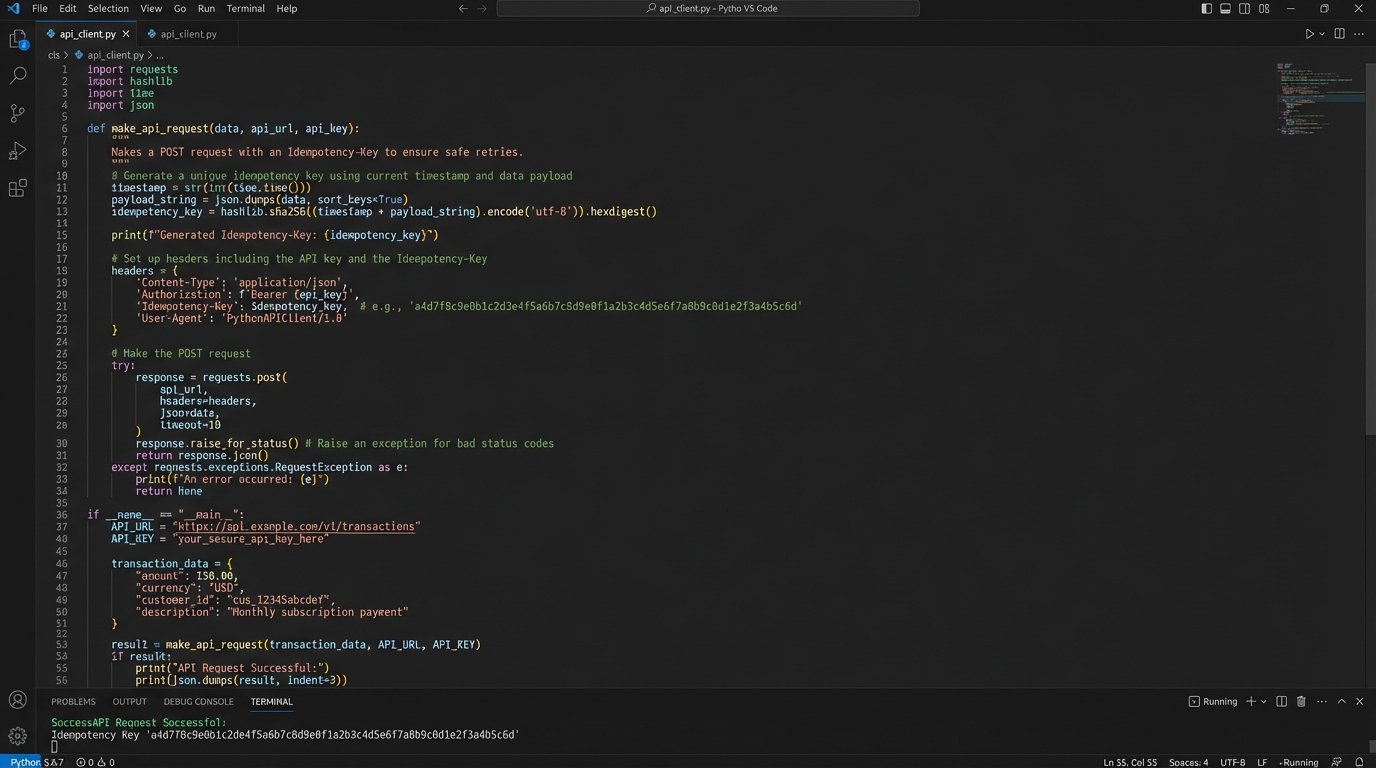
For example, you could hash the combination of the alert timestamp and the server name (`sha256(timestamp + hostname)`). You then pass this hash in the header of your API request to the project management tool. A properly designed API will see this key, check if it has been processed before, and if so, simply return the result of the original request instead of creating a new object.
If your tool’s API does not support idempotency keys, you have to build it yourself. Before creating a task, perform a search query against the API for a task with a matching key stored in a custom field. This is less efficient, adding an extra API call, but it prevents the far worse problem of duplicate work.
Principle 4: Respect API Rate Limits
An automation that works perfectly for a single event can bring down your entire integration when 500 events fire at once during a major outage. Suddenly, your script is trying to hammer the to-do list API with hundreds of requests per second. This will get your API key temporarily or permanently banned.
Running all your automation through a centralized job queue is the professional solution. Instead of your script hitting the API directly, it pushes a job with the task payload onto a queue like RabbitMQ or AWS SQS. A separate pool of workers consumes jobs from this queue at a controlled pace. This lets you smooth out massive spikes in activity, processing tasks at a rate that stays safely under the API limit.
Trying to manage this with `time.sleep()` calls in a script is amateur hour. That approach is brittle and does not scale. It is like trying to control a flood with a single sandbag. You are just waiting for a bigger wave to overwhelm it.
Use Webhooks for Feedback, Not Polling
Do not write a script that asks the API “Is it done yet?” every five minutes. This is called polling, and it is a wallet-drainer in terms of API call usage. It is loud, inefficient, and creates constant, low-value network traffic.
The correct architecture is to use webhooks for feedback. When a task is completed or its state changes in the project management tool, that tool should send a webhook to an endpoint you control. This event-driven approach means you only process data when something actually happens. Your system can remain quiet and efficient until it receives a signal that a task has been resolved, at which point it can trigger the next step in the workflow, like closing the original monitoring alert.

Principle 5: The “Close the Loop” Mandate
Automated delegation is not finished when the task is created. It is finished when the originating system knows the issue is resolved. This “closing the loop” is the most frequently missed step. The original alert must be cleared, the support ticket must be closed, the customer must be notified. The automation that opened the task should be responsible for closing it.
Using the webhooks mentioned previously, a “Task Completed” event from your to-do list should trigger a corresponding action. This requires mapping the task ID back to the original event ID. When you create the task, inject the original alert ID or ticket number into a custom field. When the completion webhook arrives, your script reads that ID and uses it to tell the source system that the work is done.
Without this final step, you leave a trail of stale alerts and open tickets across your infrastructure. It forces engineers to perform double data entry, manually closing the original alert after they have already closed the task. This breeds resentment and encourages people to bypass the very system you built to help them.