Your CRM doesn’t talk to your lead generation platform. Your transaction management software is a data island. This is the standard, broken state of most real estate tech stacks. Zapier is often pitched as the duct tape for these systems. It works, but most applications are superficial. We are not here to discuss piping a new Facebook lead into a Google Sheet. That’s entry-level work.
This is about building multi-step, logic-driven workflows that address genuine operational bottlenecks. These automations assume you understand API limitations, the fragility of webhooks, and that any third-party connector can fail without notice. Every Zap you build is another potential point of failure. Build them with that reality in mind.
1. Aggregate and Normalize Incoming Leads
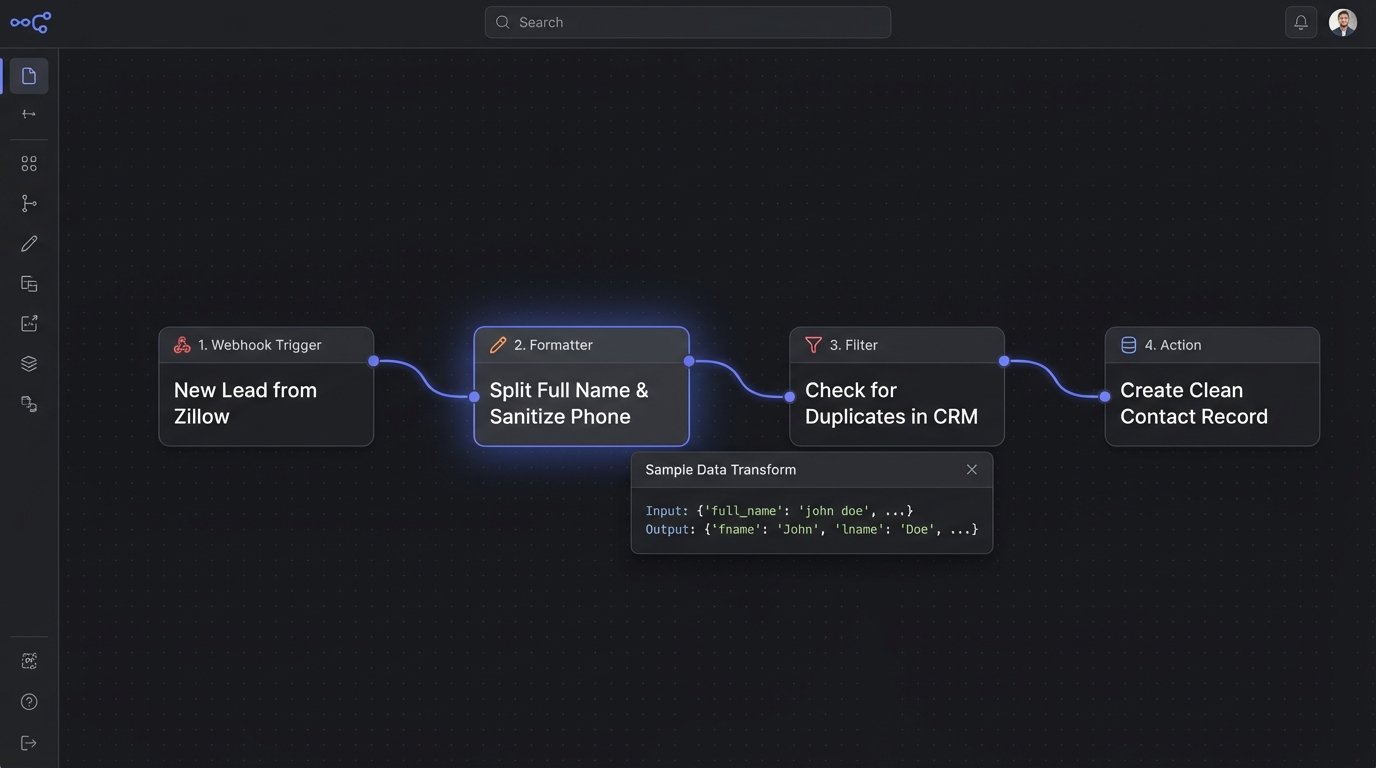
Leads from Zillow, Realtor.com, and your own IDX website arrive in completely different formats. One uses “fname” and “lname” for names, another uses “full_name”. This data inconsistency corrupts your CRM from day one. A Zap can act as a data sanitation layer before the lead ever touches your primary database.
The workflow triggers on a new lead from each source, typically via email parsing or a dedicated webhook. The first action step doesn’t move data, it transforms it. Use Zapier’s Formatter step to split full names, capitalize text correctly, and strip out junk characters from phone numbers. A subsequent filter step checks if the lead already exists in your CRM to prevent duplicates, a common and costly problem. Only then does the Zap create a new, clean contact record.
Trying to force raw lead data from multiple portals directly into a CRM is like trying to fit three different keys into the same lock. You have to file down the edges of each one with a formatter step before the lock will turn.
2. Logic-Based Showing Scheduler
A “Book a Showing” click on your website should not just send you a notification. That creates manual work. A proper automation qualifies the request and interacts with the agent’s actual availability. The trigger is a new form submission from your site containing the property address and desired time.
The Zap first performs a lookup. It checks a Google Sheet or Airtable base that maps property listings to assigned agents and their Calendly links. A filter then logic-checks the requested time against the agent’s general availability rules if possible, or simply routes the lead to the correct agent’s calendar. The final action sends a personalized email to the prospect containing the specific agent’s scheduling link, pre-filled with the property information.
This breaks if an agent forgets to update their calendar. The automation is only as reliable as the data source it queries.
3. Automated Transaction Document Pipeline
Transaction coordination involves hundreds of repetitive file management tasks. When a purchase agreement is signed in DocuSign or PandaDoc, the work is just beginning. A Zap can build the entire digital file structure for you. The trigger is “Envelope Signed/Completed” in your e-signature platform.
The first action creates a new root folder in Google Drive or Dropbox named after the property address. Subsequent actions create specific subfolders: “Inspections,” “Appraisal,” “Loan Documents,” “Closing.” The Zap then downloads the executed agreement from the trigger source and saves it into the appropriate folder. A final step sends a Slack message to the transaction coordinator with a direct link to the newly created folder, eliminating any search time.
This workflow’s main vulnerability is inconsistent naming conventions. If the property address is entered differently in the CRM versus the e-signature tool, the automation fails or creates duplicate, orphaned folders.
4. Multi-Channel Client Onboarding Sequence
When a client signs a representation agreement, they need information. Your job is to provide it without manually sending six different emails over two weeks. This Zap triggers when a contact’s stage is updated to “Active Client” in your CRM (like Follow Up Boss or LionDesk).
This kicks off a sequence. Action one adds the client to a specific audience in Mailchimp or ConvertKit for a long-term newsletter. Action two uses a “Delay by Zapier” step for 24 hours. Action three sends the first email from your own Gmail or Outlook account, introducing them to the team and setting expectations. Further delay steps can trigger follow-up emails, or create tasks in Asana for the agent to make a personal check-in call.
The path looks simple: CRM update triggers email drip. The failure point is the handoff between systems. If the API connection to your email marketing tool fails, the client is added to your CRM but never gets the onboarding sequence, leaving them in silence.
5. Intelligent Listing Syndication and Tracking
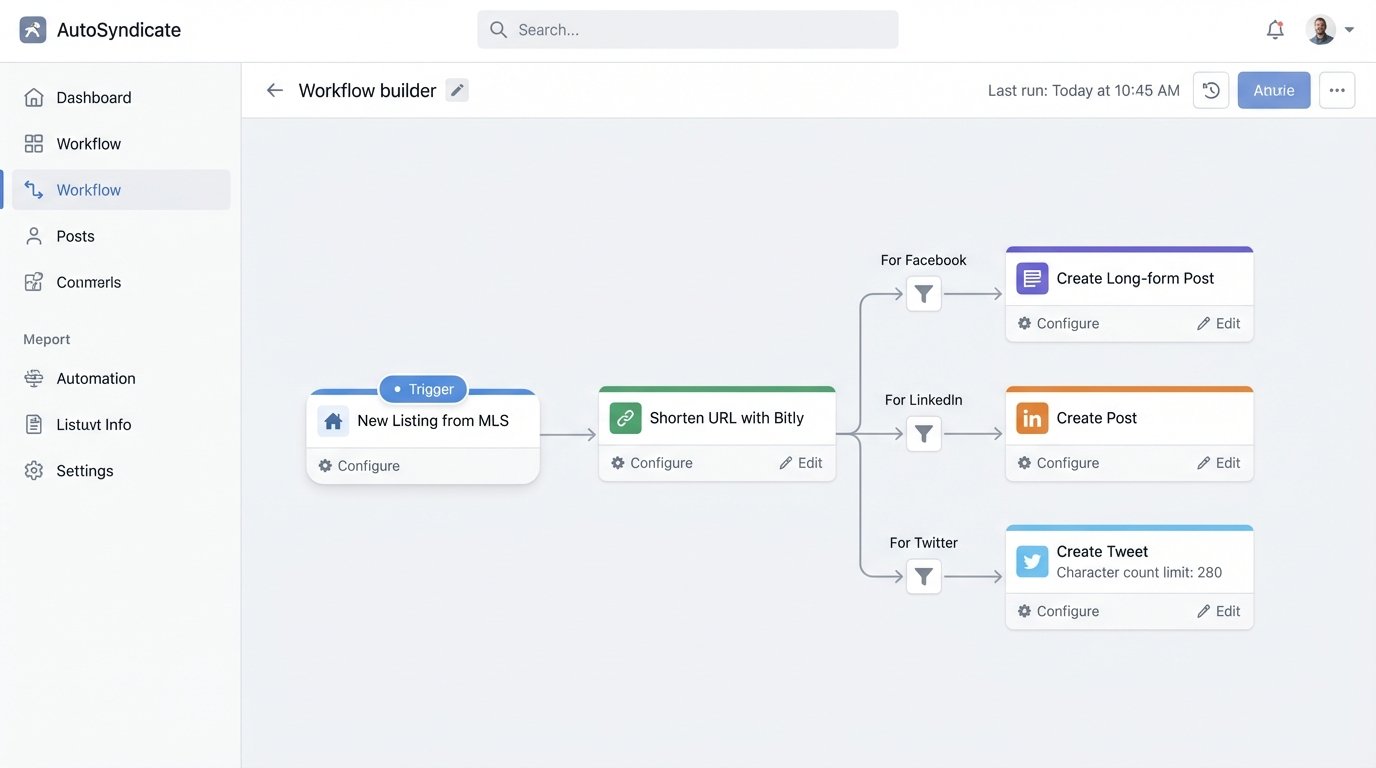
Pushing a new listing to social media is easy. Pushing it with tracking parameters and customized text for each platform is automation. This starts with a webhook from your MLS or a trigger from your listing marketing tool (like ListHub). The trigger fires when a new listing goes live.
The Zap takes the property details and URL. It runs the URL through a shortener like Bitly to create a clean, trackable link. Using separate paths or filter steps, it crafts different post copy for Facebook, LinkedIn, and Twitter, respecting character limits and tone for each. It can even pull the primary photo and attach it to the posts. The final action pushes these unique posts to a scheduler like Buffer or directly to the platforms.
This entire chain is dependent on the quality of the data from the MLS trigger. If the primary photo URL is broken or the property description is full of formatting errors, your social media posts will be a mess.
6. Open House Lead Capture and Incubation
Paper sign-in sheets at an open house are a data entry nightmare. A better method uses a QR code that directs visitors to a simple Typeform or Google Form. The automation begins when that form is submitted.
The Zap immediately adds the prospect to your CRM, tagging them with the property address of the open house and the date. This context is critical. A filter then checks if the visitor indicated they are already working with an agent. If not, a second action adds them to a 14-day email drip campaign specific to buyers in that neighborhood. The final action sends an SMS to the listing agent via Twilio with the prospect’s name and contact info for immediate follow-up while they are still at the property.
A Zap without a filter step is a fire alarm with no ‘off’ switch. It screams at every wisp of smoke, and in this case, would annoy prospects who already have representation.
7. Commission Calculation and Accounting Handoff
Calculating commissions is formulaic, making it a perfect target for automation. The trigger is a deal stage changing to “Closed-Won” or a similar status in your CRM. This trigger should contain the final sale price and the commission percentage.
This is where you inject a Code by Zapier step. The CRM data (sale_price, commission_rate) is passed in as input. A few lines of Python or JavaScript perform the calculation for gross commission, agent split, and broker fees. The output is a clean set of calculated values.
# Python code for a Code by Zapier step
# input_data['sale_price'] and input_data['commission_rate'] are passed in from the trigger
price = float(input_data['sale_price'])
rate = float(input_data['commission_rate']) / 100
agent_split_rate = 0.70 # 70% split
gross_commission = price * rate
agent_commission = gross_commission * agent_split_rate
broker_commission = gross_commission * (1 - agent_split_rate)
return {
'gross_commission': gross_commission,
'agent_commission': agent_commission,
'broker_commission': broker_commission
}
The results from the code block are then used in the final action: creating a draft invoice in QuickBooks or Xero and sending a Slack notification to the accounting channel with a full breakdown. This eliminates manual calculation errors and speeds up payment processing.
8. Categorical Vendor and Contractor Dispatch
For property managers, maintenance requests are a constant inbound stream. This Zap is triggered by a new request submitted through a property management portal or a dedicated form. The key is that the form must include a “Category” field (e.g., Plumbing, Electrical, HVAC).
The Zap uses a “Paths by Zapier” step. Path A triggers if the category is “Plumbing,” Path B if it’s “Electrical,” and so on. Each path is configured to send an SMS via Twilio or an email to a different, pre-determined contractor. The message contains all the necessary details: property address, tenant contact info, and the description of the issue. A final, common action updates a central Google Sheet to log that the request has been dispatched.
This automation’s reliability hinges on the initial request form. If the tenant selects the wrong category or provides a vague description, you’ll be sending the wrong professional to the wrong job.
9. Scheduled Market Data Aggregation
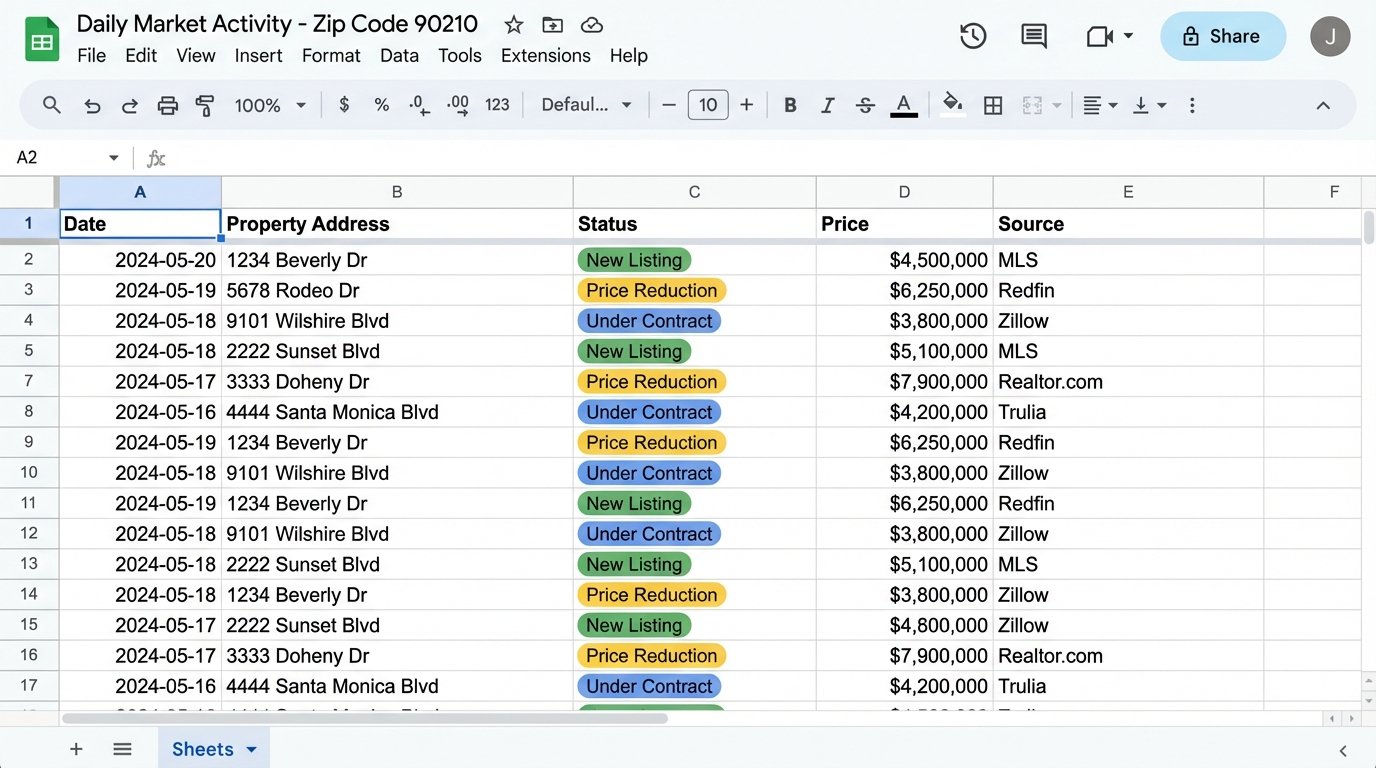
You need to know your market, but manually checking for new listings or price changes in a specific zip code is tedious. This advanced Zap runs on a schedule, not an event. Use the “Schedule by Zapier” trigger to run daily or weekly.
The action is a webhook that makes a GET request to a real estate data API or, if you’re forced to, a “Web Parser by Zapier” step that scrapes a public real estate search results page. The Zap is configured to look for specific data points: new listings, price reductions, or properties that have gone under contract. It then takes this structured data and appends it as a new row in a Google Sheet. Over time, this sheet becomes a historical database of market activity in your target area.
Relying on a web parser for this is like building your house on a foundation of sand. The moment the website’s front-end developers change a CSS class, your parser breaks and the automation halts until you manually fix it.
10. Delayed Post-Closing Review and Referral Funnel
The best time to ask for a review or a referral is not the day of closing. The clients are exhausted and busy. A better approach is a delayed, automated request. The trigger is the deal’s closing date field being populated in your CRM.
The first action is a “Delay by Zapier” step, set to wait for 21 or 30 days. This gives the client time to settle in. After the delay, an action sends a highly personalized email. It should merge in the client’s name and the property address to feel authentic. The email contains direct links to your review profiles on Zillow, Google, and Yelp. A second, delayed follow-up can be scheduled 60 days later to gently ask about potential referrals.
The risk here is automation appearing impersonal. If the email template is too generic or the timing is off, it can backfire. You must fine-tune the copy to sound like it came from a human, not a robot that just woke up after a 30-day nap.