
The market is flooded with monolithic, all-in-one real estate platforms. They promise a seamless experience but deliver a closed ecosystem with stagnant feature sets. They charge a fortune to trap your data and workflows inside their walled garden. A superior approach is to build a custom, composable stack by stitching together specialized APIs. This gives you control, flexibility, and the power to build a real tool instead of using a toy.
Forget the marketing brochures. This is a technical breakdown of seven API categories you need to connect to build a real estate automation engine. Each comes with its own set of problems, costs, and integration headaches. There are no perfect solutions here, only different sets of compromises.
1. The Property Data API: Your Foundation of Truth
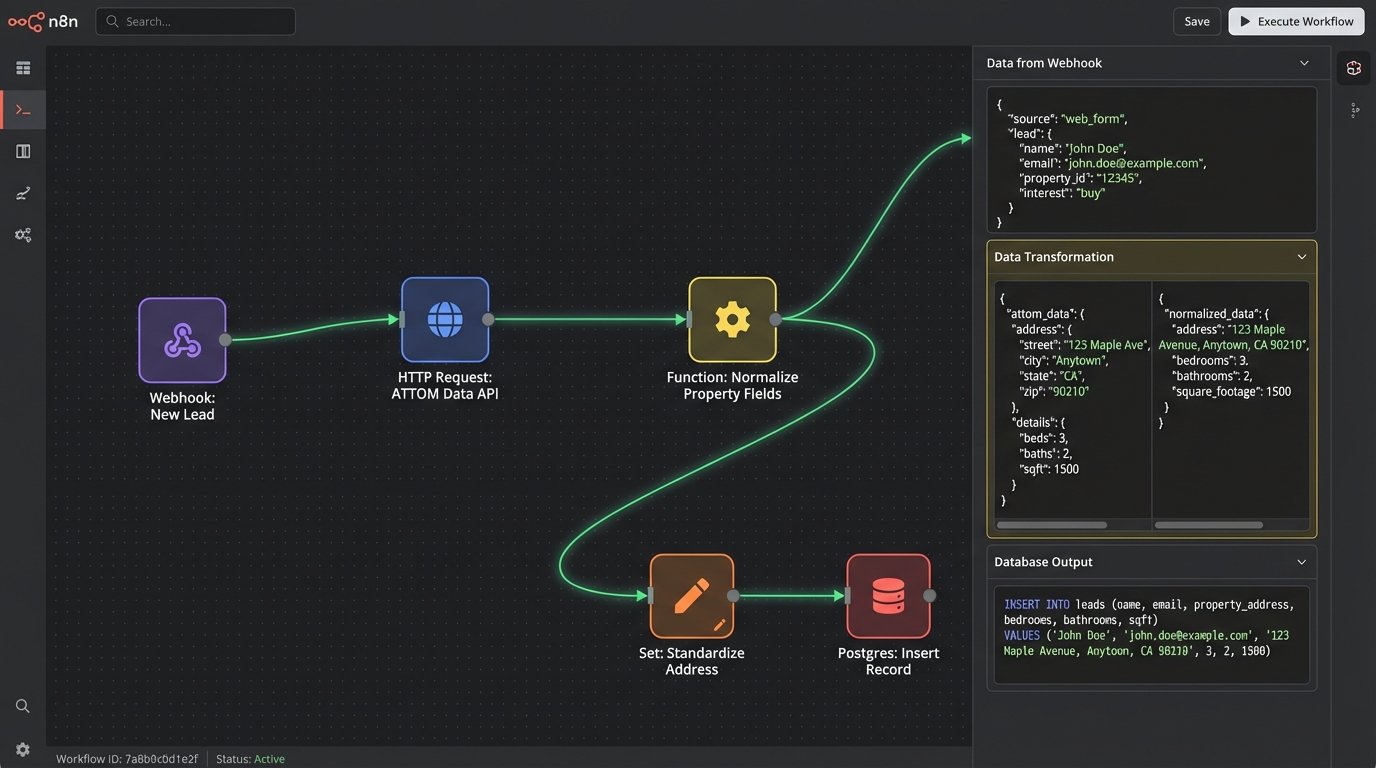
Every real estate application starts with the property itself. Screen-scraping public portals is fragile, unethical, and will get your IP address blocked. A direct API feed is the only professional option. These services aggregate public records data from thousands of county tax assessors, recorders, and other municipal sources. You get raw facts: ownership history, tax assessments, last sale date, and physical characteristics like square footage and year built.
ATTOM Data Solutions and CoreLogic are the two eight-hundred-pound gorillas in this space. They offer massive datasets covering most of the US, but they are wallet-drainers. The sales process is opaque and the contracts are built to lock you in. Smaller players like Estated or DataTree offer more accessible entry points, but you need to vet their data coverage for your specific target markets. No provider has 100% accurate data for 100% of properties.
Primary Use Cases:
- Automated Valuation Models (AVM): Feed property characteristics, transaction history, and tax data into your own pricing models. Stop relying on third-party estimates that you can’t dissect.
- Lead Qualification: When a lead comes in, you can instantly pull the property record. Check for recent sales, existing liens, or ownership discrepancies to filter out bad leads before they waste an agent’s time.
- Data Enrichment: Pre-populate forms and internal dashboards with verified property data. Reduce manual entry and the inevitable typos that corrupt your database.
The core problem is normalization. One county reports “BR” for bedrooms, another uses “Beds”, and a third just provides a number in a cryptic field. You will spend significant engineering effort building a data ingestion pipeline that can clean and standardize this mess before it ever hits your application’s database. Assume nothing and validate everything.
2. The Geospatial API: Context Is Everything
An address is just a string of text until you place it on a map. A geospatial API translates addresses into coordinates (geocoding) and vice versa. It lets you calculate distances, define boundaries, and visualize properties in relation to the world around them. The Google Maps Platform is the default choice, but its billing model is famously complex and can get expensive fast if you are not careful with your client-side and server-side calls.
Mapbox is a strong alternative, offering more control over map styling and often a more predictable pricing structure. The choice depends on your specific needs. If you just need basic geocoding and map tiles, either works. If you’re building complex features like drive-time polygon searches (“show me all properties within a 20-minute commute of downtown”), you need to dig into the documentation for their advanced routing and matrix APIs.
Primary Use Cases:
- Geocoding and Search: Convert user-entered addresses into latitude/longitude pairs to accurately place properties on a map and power radius-based searches.
- Commute Time Analysis: Integrate with routing engines to calculate travel times to key locations like offices, airports, or hospitals. This is a far more useful metric for buyers than simple linear distance.
- Point-of-Interest (POI) Overlays: Visualize nearby schools, parks, grocery stores, and public transit stops to give a complete picture of a property’s location.
Aggressive caching is mandatory. You should never make an API call to geocode the same address twice. Store the result in your local database. For drive-time calculations, cache the results with a reasonable TTL. Traffic patterns change, but the commute from a specific suburb to the city center doesn’t need to be recalculated every five seconds. Fail to do this, and you’ll get a shocking bill at the end of the month.
3. The Demographics API: Quantifying the Neighborhood
The house itself is only half the story. The neighborhood determines the lifestyle. Demographics APIs expose census data, school ratings, crime statistics, and income levels. This allows you to move beyond “3 bed, 2 bath” and provide quantitative insights into the community. Esri is a major player here, providing rich datasets used in enterprise-grade GIS systems. For simpler applications, you can often find smaller, more focused APIs for specific data points like school ratings (e.g., GreatSchools) or crime data.
You can even construct your own basic demographic data pulls directly from the U.S. Census Bureau’s APIs, but they are notoriously clunky and require a deep understanding of statistical areas and data tables. It’s a trade-off. Pay a vendor to clean and package the data for you, or invest the engineering time to gut the raw data yourself.
Trying to model market dynamics with this data alone is a fool’s errand. Census data is a snapshot from years ago. You are always looking backward. This data is for establishing a baseline character of a neighborhood, not for predicting next quarter’s appreciation. It’s like trying to navigate a freeway by only looking in the rearview mirror. You can see where you’ve been, but it doesn’t tell you about the traffic jam up ahead.
Primary Use Cases:
- Neighborhood Profiles: Generate a “scorecard” for any given address, showing median household income, population density, school district scores, and local crime rates.
- Market Targeting: Identify zip codes or census tracts that match an ideal client profile, allowing for highly targeted digital advertising or direct mail campaigns.
- Investor Analysis: Help investors compare submarkets based on population growth, income trends, and other economic indicators.
4. The Mortgage Rate API: Grounding Aspiration in Reality
A property’s price is an abstract number. The monthly payment is what a buyer actually feels. Integrating a mortgage rate API allows you to pull real-time interest rate estimates from various lenders. This lets you build dynamic mortgage calculators that provide a realistic picture of affordability. Some platforms, like Zillow, offer a public-facing API for this, while B2B providers offer more robust solutions for integration into professional tools.
The key function is to inject financial reality directly into the user experience. A user can see a listing price and, right next to it, an estimated monthly payment based on current rates, their down payment, property taxes, and insurance. This immediately frames the property in terms of budget and cash flow.
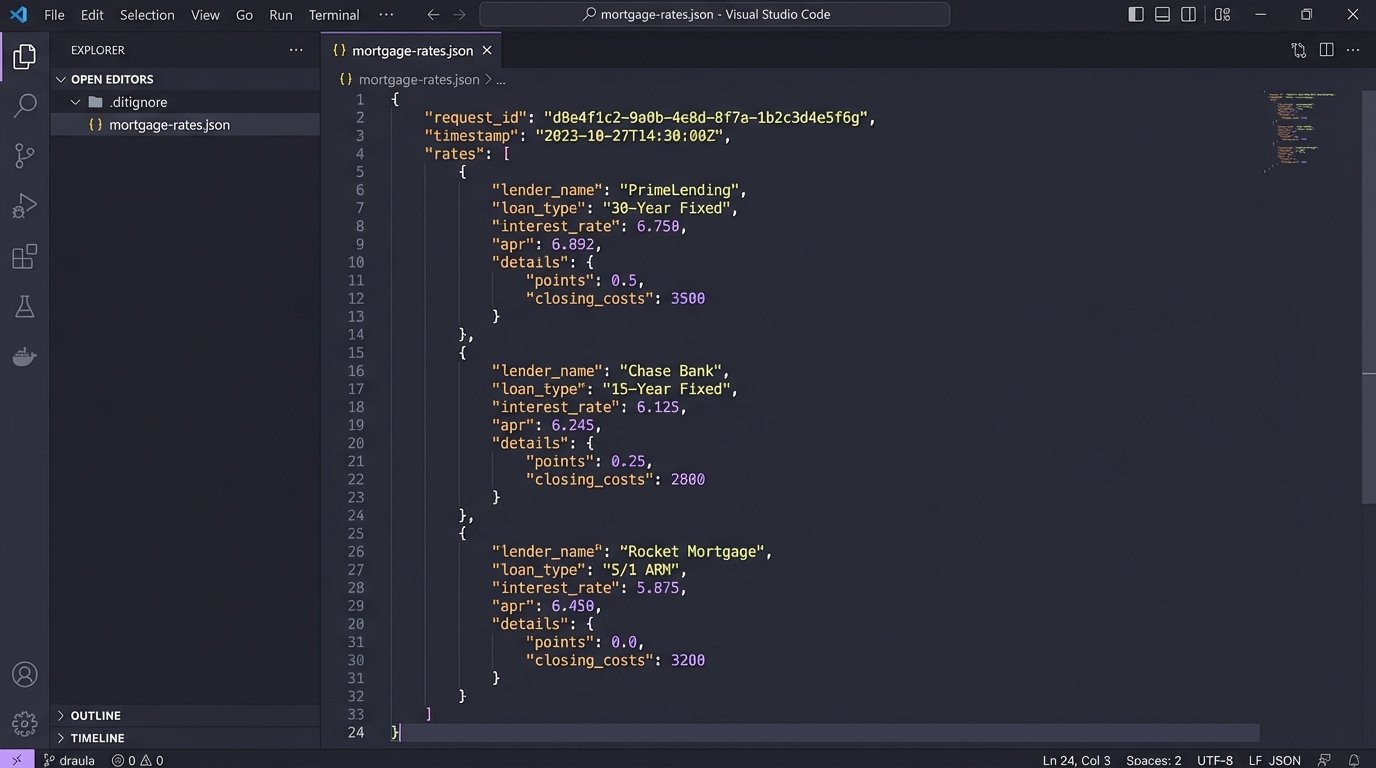
Here is a simplified JSON structure you might get back from a rate query. Note the need to handle different loan types, terms, and the inclusion of PMI for lower down payments.
    {

      "request_id": "req_12345abc",

      "rates": [

        {

          "lender_name": "National Bank",

          "loan_type": "30-Year Fixed",

          "interest_rate": 6.875,

          "apr": 7.012,

          "pmi_required": true,

          "estimated_monthly_payment": 3250.45

        },

        {

          "lender_name": "Credit Union One",

          "loan_type": "15-Year Fixed",

          "interest_rate": 6.125,

          "apr": 6.250,

          "pmi_required": true,

          "estimated_monthly_payment": 4501.12

        }

      ]

    }
The critical friction point is liability. These are estimates, not offers of credit. Your UI must be littered with disclaimers. The actual rate a borrower gets depends on their credit score, debt-to-income ratio, and a full underwriting process that your application knows nothing about. If you present an estimate as a guarantee, you create legal and reputational risk.
5. The e-Signature API: Automating the Paper Trail
Real estate runs on contracts. Purchase offers, listing agreements, disclosures, addendums. It’s a mountain of paperwork. An e-Signature API like Dropbox Sign (formerly HelloSign) or DocuSign lets you programmatically generate these documents, pre-fill them with data, and send them out for legally binding electronic signatures. This is not about just embedding a PDF. It is about automating a critical, time-consuming workflow.
You can connect your web forms directly to the contract generation process. An agent fills out an offer form in your application, hits “submit”, and a webhook triggers an API call that creates the complete purchase agreement and sends it to the buyer for their signature. The API handles the email delivery, the signing interface, and provides a tamper-evident audit trail.
Primary Use Cases:
- Offer Generation: Create a template for a purchase offer and use the API to dynamically inject the property address, buyer names, offer price, and contingency dates.
- Listing Agreements: Digitize the onboarding process for new sellers, allowing them to sign the representation agreement from their phone or computer.
- Status Tracking: Use webhooks to get real-time updates. When a document is viewed, signed, or declined, your application is notified, allowing you to update deal statuses automatically.
Compliance is entirely on you. The API provides the mechanism for a signature, but you are responsible for ensuring your document templates and signing workflow adhere to the ESIGN Act, UETA, and any state-specific real estate regulations. A misconfigured template or a broken workflow could invalidate a multi-million dollar transaction. Test every scenario relentlessly.
6. The CRM API: Bridging Sales and Systems
Every real estate brokerage runs on a CRM. It might be a specialized platform or a customized Salesforce or HubSpot instance. Without an API bridge, your custom applications create data silos. An agent generates a lead on your website, and then has to manually copy-paste that information into the CRM. This is slow, error-prone, and a waste of time.
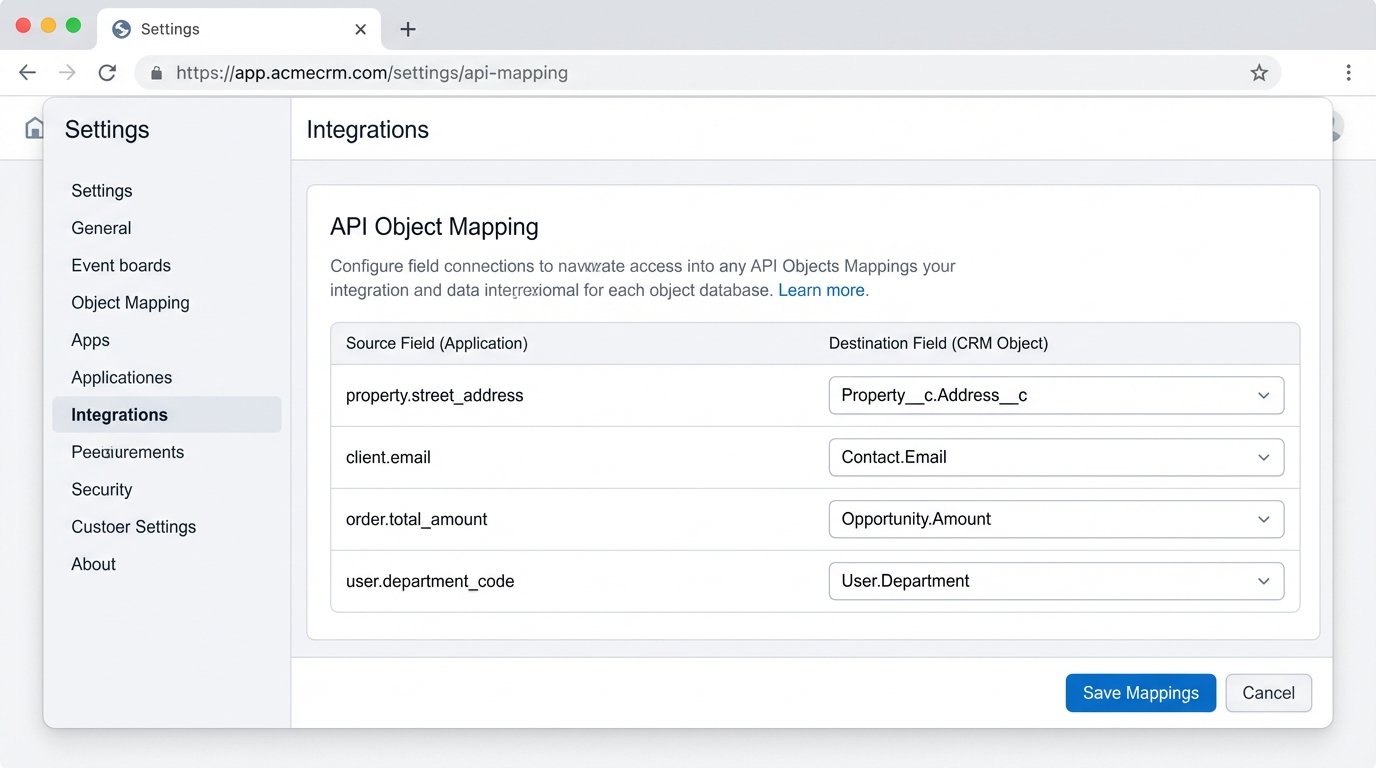
The CRM API allows your systems to talk to each other. When a form is submitted on your website, your backend can make a REST API call to create a new Contact and Deal object in the CRM. When a contract is signed via your e-signature integration, a webhook can trigger a call to update the deal stage in the CRM from “Prospect” to “Under Contract”.
The biggest challenge is object mapping. Your application’s concept of a “Property” or a “Client” will never perfectly align with the CRM’s standard and custom objects. You will spend hours in discovery, figuring out if your `property.street_address` field should map to the CRM’s `Account.BillingStreet` or a custom `Property__c.Address__c` field. This mapping logic is brittle and will break the moment a sales admin adds a new required field to an object without telling the engineering team.
7. The Local POI API: Answering “What’s Nearby?”
Buyers are not just purchasing a structure. They are buying access to a lifestyle. A local Point of Interest (POI) API from a source like Yelp or Foursquare lets you answer practical questions. How far is the nearest grocery store? Are there good coffee shops within walking distance? Where are the closest parks and dog runs? This data adds rich, tangible context to a listing.
Instead of just saying a property is in a “desirable neighborhood”, you can prove it with data. Generate a list of the top 10 highest-rated restaurants within a one-mile radius. Display the logos of the grocery stores within a five-minute drive. These small details build confidence and help a buyer imagine themselves living in the space.
Primary Use Cases:
- Listing Enrichment: Automatically generate a “What’s Nearby?” section for each property page, showing categories like Food, Nightlife, Shopping, and Parks.
- Walkability Scores: Calculate a custom walkability score by querying the number and type of amenities within a certain radius.
- Neighborhood Discovery Tools: Allow users to search for properties based on proximity to certain types of businesses, like “homes within walking distance of a brewery”.
Be prepared for noisy data and strict rate limits. You’ll get duplicate business listings, permanently closed locations, and inconsistent categorization. You must build a robust caching and filtering layer on your end. Query the API once for a given location, store and clean the results, and serve them from your own cache to avoid hitting the API on every single page load. It’s the only way to maintain performance and stay within the free or low-cost usage tiers.