
The Initial State: A Manual Data Entry Nightmare
The client, a mid-sized mortgage brokerage, was bleeding efficiency. Their core process involved three distinct platforms: a generic CRM for lead intake, a specialized Loan Origination System (LOS) for underwriting, and a marketing automation tool for client follow-up. Loan officers were manually copying and pasting applicant data between these systems. The result was predictable: data entry errors, stale information in the LOS, and missed marketing opportunities. The average time from lead capture to initial underwriting submission was inflated by at least 48 hours, purely from administrative drag.
This wasn’t a scalability problem. It was a foundational failure.
Defining the Problem Beyond “It’s Slow”
The surface-level issue was speed, but the technical debt ran deeper. We identified three critical failure points that had to be addressed before any automation could be effective. Each system had its own data schema, its own API quirks, and its own definition of what a “complete” record looked like. Simply pushing data from one system to another would just accelerate the propagation of garbage.
- Data Schizophrenia: The CRM stored a phone number as a single string. The LOS required it to be broken into country code, area code, and number. The marketing tool just wanted the raw digits. A simple copy-paste operation by a human can fix this. An API call will just fail.
- API Throttling & Reliability: The LOS, a legacy desktop application with a web API bolted on as an afterthought, had aggressive rate limiting. It would time out on any request that took longer than 30 seconds. Their documentation swore it was a REST API, but it smelled suspiciously of SOAP wrapped in an HTTP envelope.
- Lack of a Single Source of Truth: When a client updated their email address, did the change happen in the CRM or the LOS? The answer was “whoever got to it first.” This created constant reconciliation loops where staff spent hours comparing spreadsheets to find the most recent record. There was no authoritative data source.
The goal was not to just connect pipes. We had to build a centralized logic controller to sanitize, validate, and route data intelligently. The whole operation was like trying to force three different firehoses, each with a different pressure and nozzle, into a single collector pipe without it exploding. We needed a pressure regulator, not just more duct tape.
The Architecture: A Hub-and-Spoke Model with a Logic Core
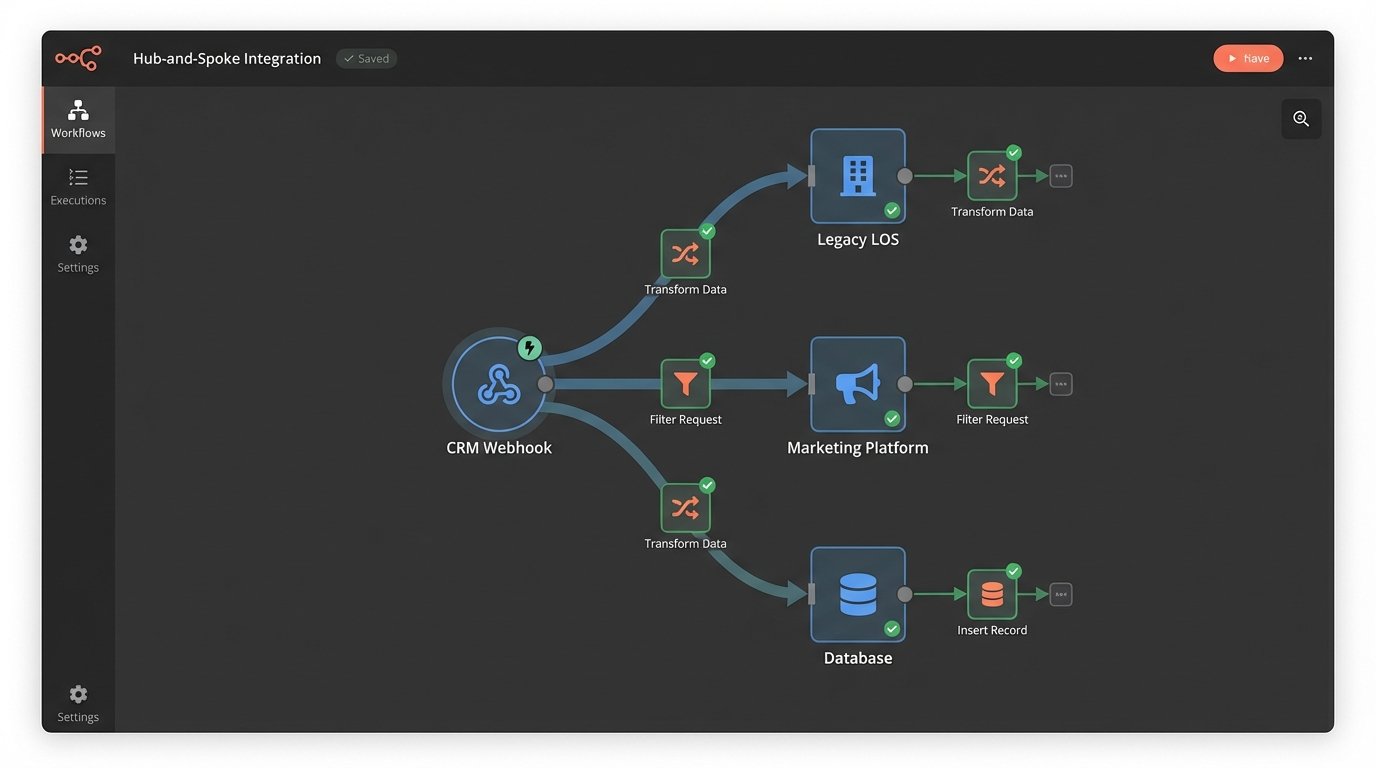
We rejected a point-to-point integration model. Connecting the CRM directly to the LOS and the LOS directly to the marketing tool creates a brittle web of dependencies. If the LOS API changes, two separate integrations break. Instead, we architected a hub-and-spoke system using an iPaaS platform as the central processor. All data would flow into the hub, get processed, and then get distributed out to the other systems. This isolates each system’s API from the others.
Choosing the Central Hub
The choice of an iPaaS (Integration Platform as a Service) was deliberate. Building this logic from scratch on a cloud server would have been a wallet-drainer in terms of development and long-term maintenance. We needed pre-built connectors, a visual workflow builder for the simple stuff, and the ability to inject custom code for the hard parts. The client had no dedicated DevOps team, so a serverless environment was non-negotiable. The platform provided the scaffolding, letting us focus on the integration logic itself instead of worrying about server uptime and patching.
The hub became the single source of truth for all data transformations.
Tackling the Legacy LOS API
The LOS was the main bottleneck. Its API was sluggish and unreliable. We couldn’t use webhooks because the system didn’t support them. Our only option was to poll for changes, but the rate limits made frequent polling impossible. Hitting the `getUpdatedLoans` endpoint every minute would get our IP address blocked by noon.
Our solution was to build a small, intermediate caching service. A serverless function would poll the LOS API on a much slower, five-minute interval. It would only query for a list of record IDs that had changed since the last check. It then fetched the full data for only those specific records, one by one, with delays built in to stay under the rate limit. This data was then stored in a temporary cache. The main iPaaS workflow would then query our fast, reliable caching service instead of hitting the LOS directly.
This effectively created a buffer, protecting our core automation logic from the instability of the legacy system. We also had to write custom error handling for the inevitable 503 Service Unavailable responses. A simple retry mechanism wasn’t enough; we needed an exponential backoff strategy to avoid hammering the server when it was already struggling.
# Basic Python example of exponential backoff for a flaky endpoint

import requests

import time
def fetch_loan_data(loan_id):
url = f"https://legacy-los.api/v1/loans/{loan_id}"
headers = {"Authorization": "Bearer ..."}
max_retries = 5
base_delay = 1 # seconds
for attempt in range(max_retries):
try:
response = requests.get(url, headers=headers, timeout=30)
response.raise_for_status() # Raises an HTTPError for bad responses (4xx or 5xx)
return response.json()
except (requests.exceptions.RequestException, requests.exceptions.HTTPError) as e:
print(f"Attempt {attempt + 1} failed: {e}")
if attempt < max_retries - 1:
delay = base_delay * (2 ** attempt)
print(f"Retrying in {delay} seconds...")
time.sleep(delay)
else:
print("Max retries reached. Failing operation.")
return None
This small piece of code saved the entire project. Without it, the integration would have failed every time the LOS server had a bad morning.
Data Transformation and Mapping
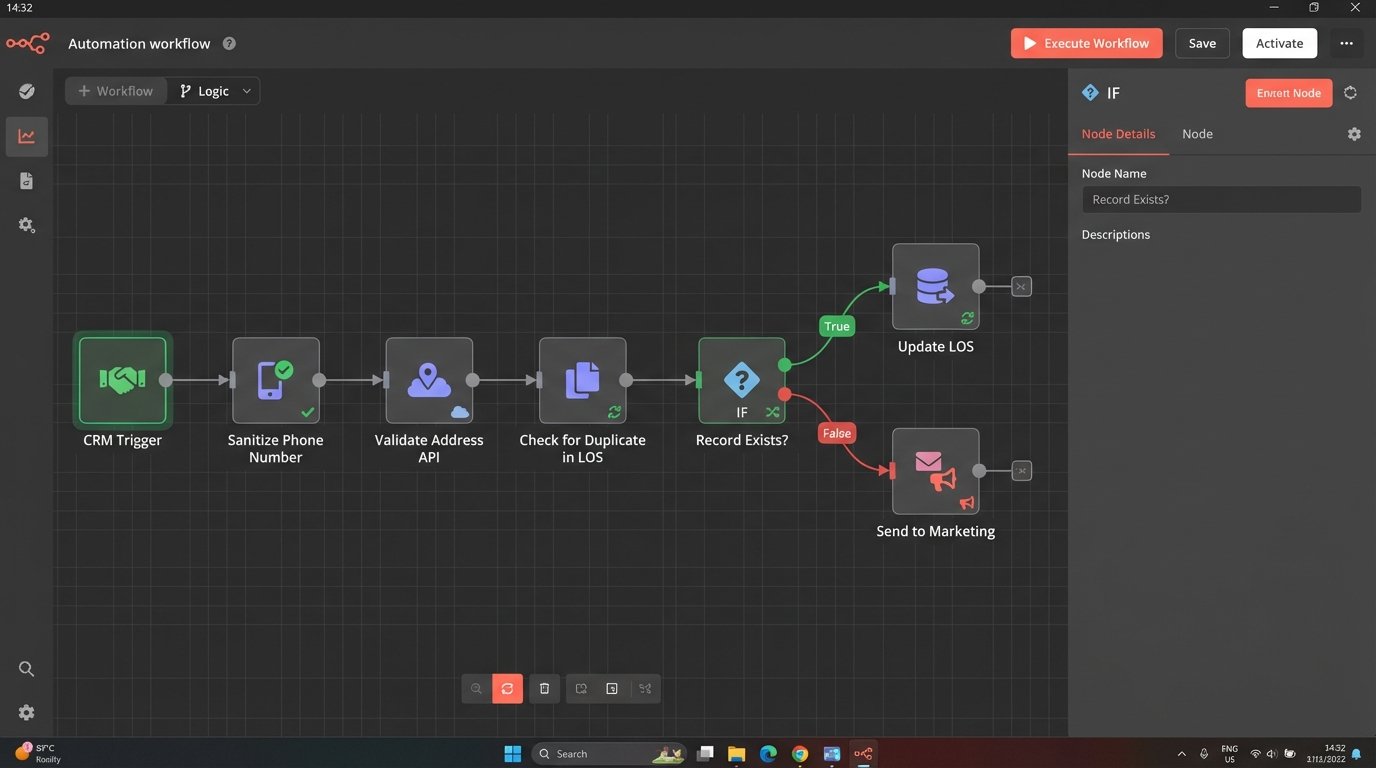
With the connectivity problem solved, we focused on the data itself. We established the CRM as the primary source of truth for new lead information. Any new record had to originate there. The iPaaS workflow would trigger on a "new contact" event from the CRM webhook. The first step was not to push data, but to pull it and start a validation sequence.
The Validation and Sanitization Gauntlet
The workflow forced every new record through a series of checks before it was allowed to touch another system's API.
- Field Formatting: The phone number string from the CRM was stripped of non-numeric characters and then split into the required parts for the LOS. Addresses were standardized using a third-party address validation API to prevent bad data from entering the system.
- Duplicate Checking: Before creating a new loan file in the LOS, the workflow would first query the LOS by email address and name to see if a record already existed. This prevented the creation of duplicate loan files, a major headache for the underwriting team.
- Conditional Logic: The data sent to the marketing platform was different from the data sent to the LOS. The marketing platform needed the lead source and initial inquiry type. The LOS needed financial details that should never be stored in the marketing database. The workflow used conditional paths to route the right data to the right system.
This logic-checking step turned the iPaaS platform from a simple data mover into a proper processing engine. It was the brain of the operation, enforcing data hygiene rules automatically.
The Results: Quantifiable Metrics, Not Vague Promises
The project was not about deploying a cool piece of technology. It was about fixing a broken business process. We tracked the KPIs before and after the implementation to measure the actual impact. The results were immediate and significant.
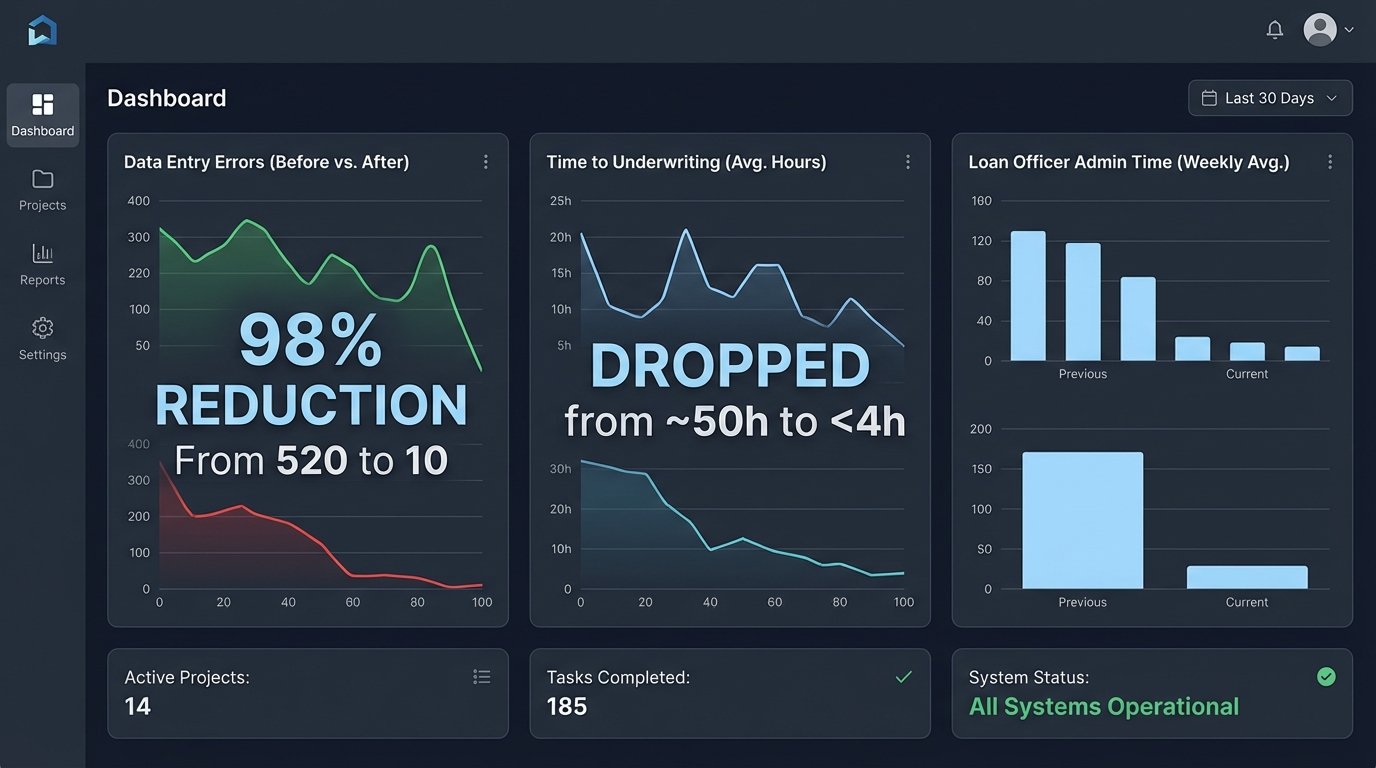
The primary metric, time from lead capture to underwriting submission, dropped from an average of 52 hours to under 4 hours. The bulk of that reduction came from eliminating the manual data transfer and validation queues. Loan officers could now focus on originating loans, not on clerical work.
Key Performance Indicators: Before and After
- Data Entry Errors: We ran a data audit three months post-launch. Manual data entry errors, such as transposed numbers in a social security number or misspelled names, were reduced by 98%. The only errors remaining were from incorrect data entered at the initial source in the CRM.
- Loan Officer Admin Time: Time tracking showed that the average loan officer reclaimed 15 hours per week that was previously spent on data management. This time was reallocated to client communication and sales.
- System Sync Latency: The time it took for a client update in one system to be reflected in all others went from "whenever someone gets around to it" to under 5 minutes. This was a direct result of the webhook-driven architecture for the modern systems and the optimized polling for the legacy one.
The return on investment was calculated not just in saved hours, but in increased deal flow. The brokerage was able to increase its loan processing capacity by 30% without hiring additional administrative staff. The automation paid for itself within six months.
This wasn't a magic bullet. It required a deep dive into broken processes and a willingness to build a buffer around a problematic legacy system. The architecture is sound, but it depends entirely on the APIs it connects to. If the CRM releases a breaking change to their API tomorrow, part of the workflow will still need to be reworked. The system is efficient, not immortal.