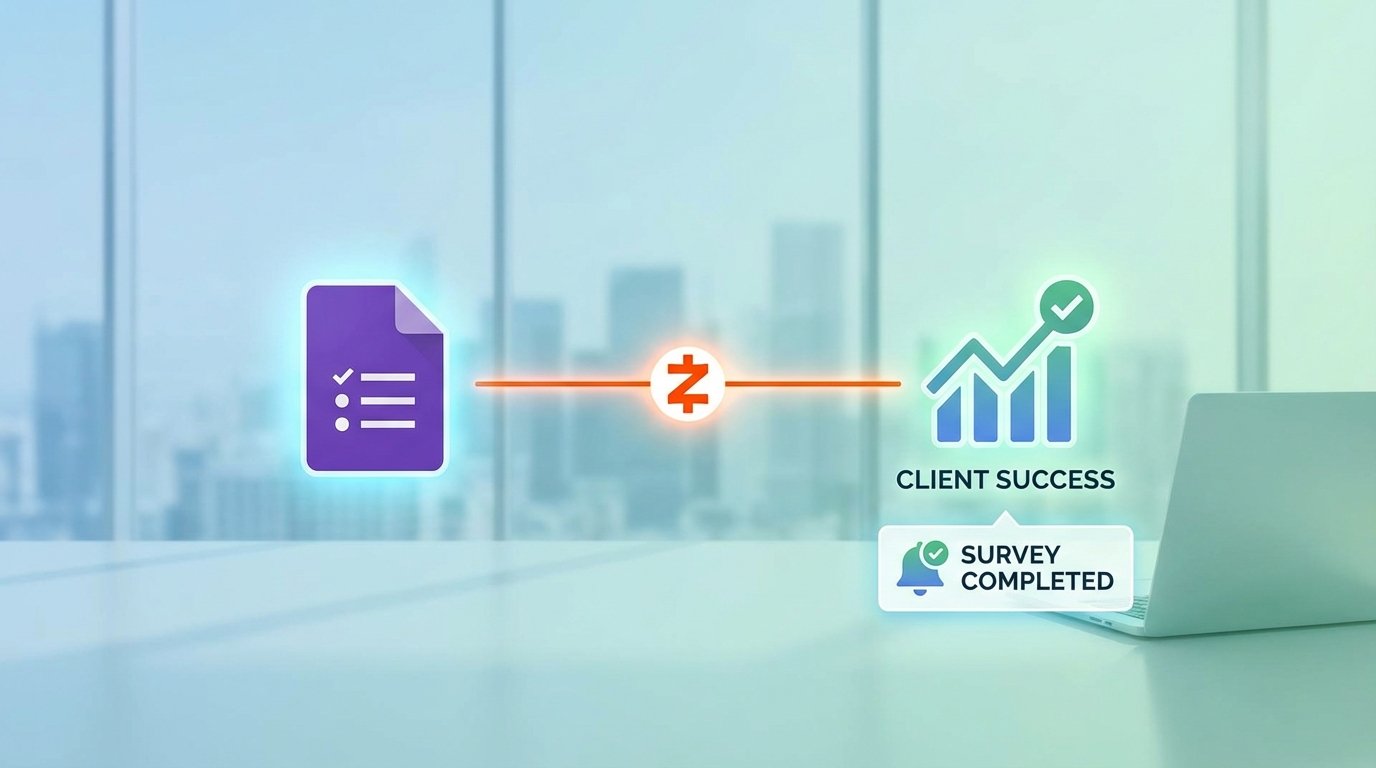
The Problem: Manual Survey Deployment Was a Ticking Time Bomb
Our project management workflow hinged on a client intake survey. Before we could scope a single task, we needed answers. For years, the process was manual. A project manager would copy a Google Doc template, paste in the client’s name, convert it to a PDF, and email it. The client would fill it out, email it back, and then the PM would spend another 30 minutes transcribing those answers into our project management system. The whole cycle burned an average of four billable hours per client before work even began.
This wasn’t just inefficient. It was a failure point waiting to happen.
Data entry errors were common. A mistyped domain name or a misread budget figure could derail a project from day one. The process created a significant lag, pushing project start dates back by days. With a growing client load, the administrative drag was becoming a serious operational bottleneck. We weren’t scaling our capacity. We were scaling our paperwork.
Defining the Core Failure Points
We broke down the manual process to identify exactly where the system was bleeding time and introducing risk. The analysis was not encouraging. We found three primary issues that had to be fixed.
- Lag Time: The median time from “client signed” to “survey returned and data entered” was 48 hours. This delay directly impacted revenue recognition and team allocation.
- Data Integrity: Manual transcription of survey answers into our systems had an error rate of approximately 8%. These errors ranged from minor typos to critical inaccuracies in technical specifications.
- No Centralized Tracking: There was no single source of truth to see which clients had been sent a survey, who had completed it, or who needed a follow-up. It was all tracked in individual PMs’ spreadsheets and email folders. A disaster for oversight.
The solution needed to be fast to implement, use tools we already paid for, and require minimal custom code. We didn’t have a spare dev team to build a bespoke portal. We needed a fix, not a six-month engineering project.
The Solution: A Logic-Driven Workflow with Zapier as the Engine
We chose a stack of Google Forms, Google Sheets, and Zapier. This combination avoided new software procurement cycles and leveraged tools our team already understood. The goal was to build an automated assembly line: a trigger in one system would initiate a sequence of actions that delivered the survey, tracked its status, and piped the results directly where they needed to go.
This wasn’t about simply emailing a link. It was about creating a closed-loop system.
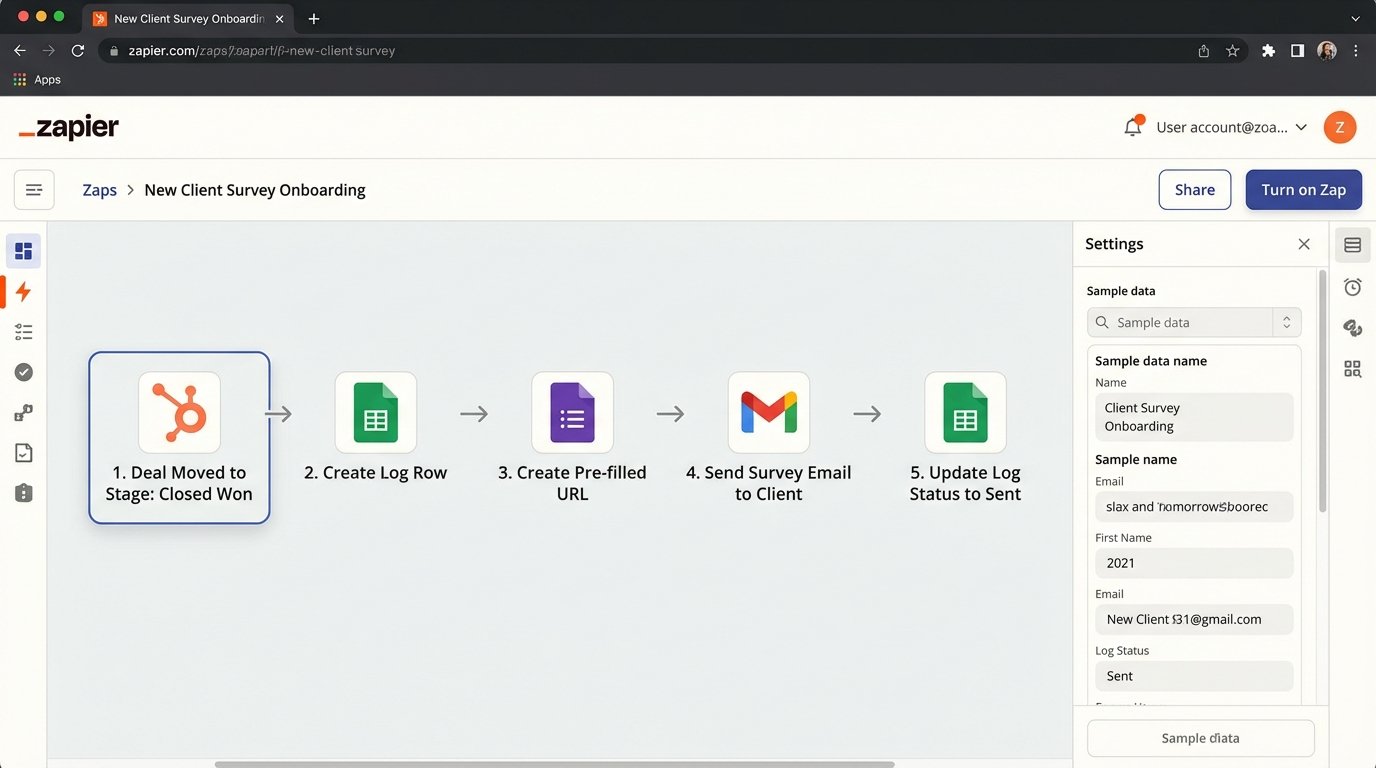
Architecture of the Automation
The entire workflow is orchestrated by a multi-step Zap. It fires the moment a deal is marked “Closed Won” in our CRM, which in this case was HubSpot. This is the starting gun for the entire onboarding sequence. We bypassed any human intervention to kick off the process.
The high-level logic flow is as follows:
- Trigger: New Deal in HubSpot moves to the “Closed Won” stage.
- Filter: Zapier pathing logic checks if the deal type is “New Project”. It ignores renewals or smaller retainers. This prevents spamming existing clients.
- Action 1: Find or Create a Row in Google Sheets. A sheet acts as our master log. We generate a unique survey ID using a timestamp and the deal ID.
- Action 2: Create a Pre-Filled Google Form Link. This is the critical step. We pull the client’s name, company, and project name from HubSpot and inject them directly into the URL.
- Action 3: Send Email via Gmail. A templated email containing the pre-filled link is sent to the primary contact from the HubSpot record.
- Action 4: Update the Row in Google Sheets. The log is updated with a status of “Sent” and a timestamp.
The Technical Hurdles and Workarounds
Google Forms does not have a robust API for this kind of work. The primary method of interaction is through pre-filled URLs. This means you are essentially performing a GET request with URL parameters that map to the form’s field IDs. It’s functional, but brittle. If a non-technical user changes a question in the form, the field ID changes, and the automation breaks without warning.
To get the field IDs, you have to manually inspect the form’s HTML source or generate a pre-filled link through the UI and deconstruct the URL. It’s a hack. The URL structure looks something like this: `https://docs.google.com/forms/d/e/FORM_ID/viewform?usp=pp_url&entry.FIELD_ID_1=Value1&entry.FIELD_ID_2=Value2`
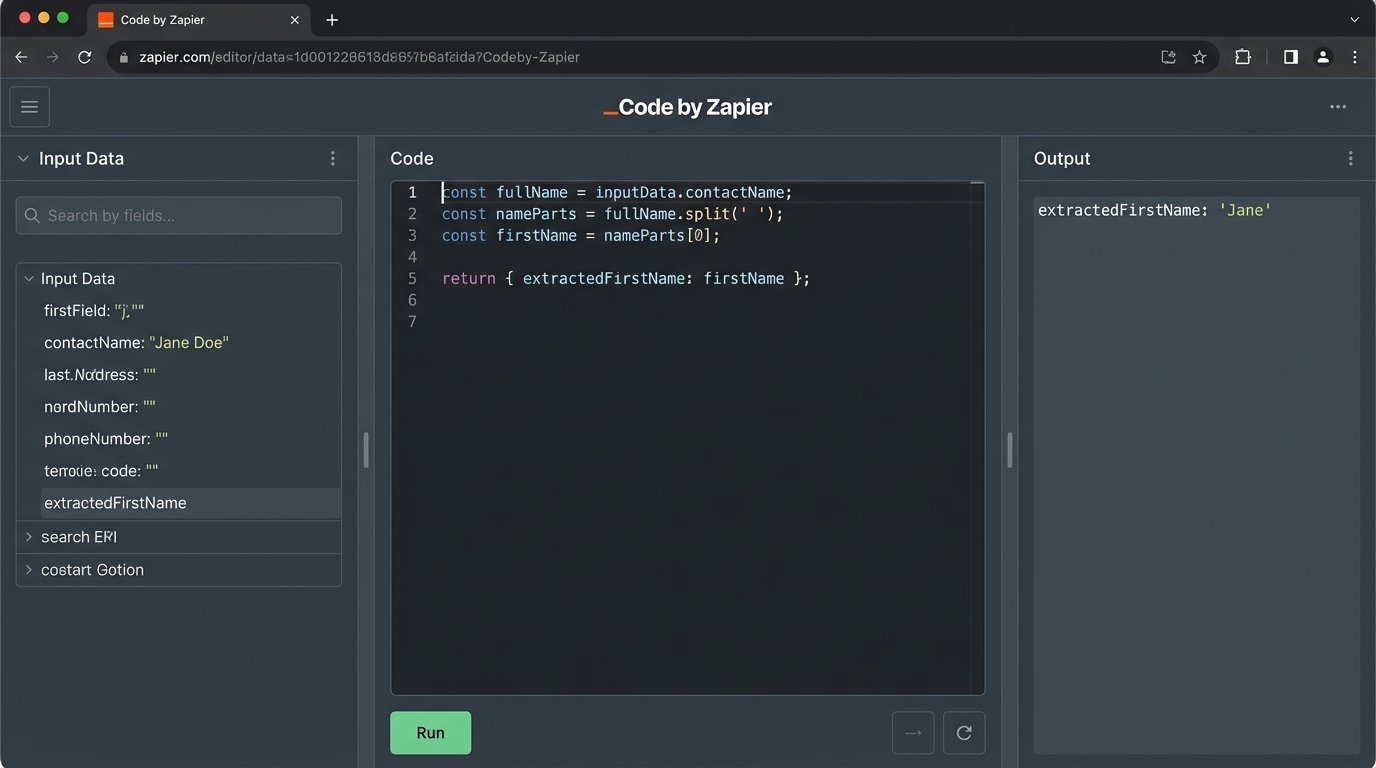
The other challenge was data formatting. Our CRM stored full names, but the survey needed to address the client by their first name. A simple “Split Text” action in Zapier would fail on names with middle initials or suffixes. We had to inject a small “Code by Zapier” step using JavaScript to reliably strip out the first name.
Forcing structured data from our CRM through the unstructured bottleneck of a Google Form pre-filled URL is like trying to shove a firehose through a needle. It works if you apply enough pressure and get the angle exactly right, but it’s not a resilient connection.
// Zapier Code Step: Extract First Name

// Input data from the HubSpot trigger provides 'contactName'.

const fullName = inputData.contactName;

const nameParts = fullName.split(' ');

const firstName = nameParts[0];
// The output is an object that can be used in subsequent Zap steps.
return { extractedFirstName: firstName };
This small block of code gave us the control needed to personalize the email and the survey greeting without relying on fragile string manipulation tools in the Zapier UI. It’s a perfect example of where a targeted code injection saves hours of debugging.
Closing the Loop: Processing the Survey Responses
The second part of the automation handles the incoming data. When a client submits the Google Form, the response is automatically logged in a linked Google Sheet. A second Zap monitors this sheet for new rows.
This Zap performs the following actions:
- Trigger: New Spreadsheet Row in Google Sheets (the form response sheet).
- Action 1: Find Row in the Master Log Sheet. It uses the unique survey ID (which we pass as a hidden field in the form) to find the original log entry.
- Action 2: Create Project in Asana. It takes the structured data from the survey response columns and maps them to fields in a new Asana project.
- Action 3: Notify Project Manager in Slack. A message is sent to the assigned PM with a link to the new Asana project and the raw survey data.
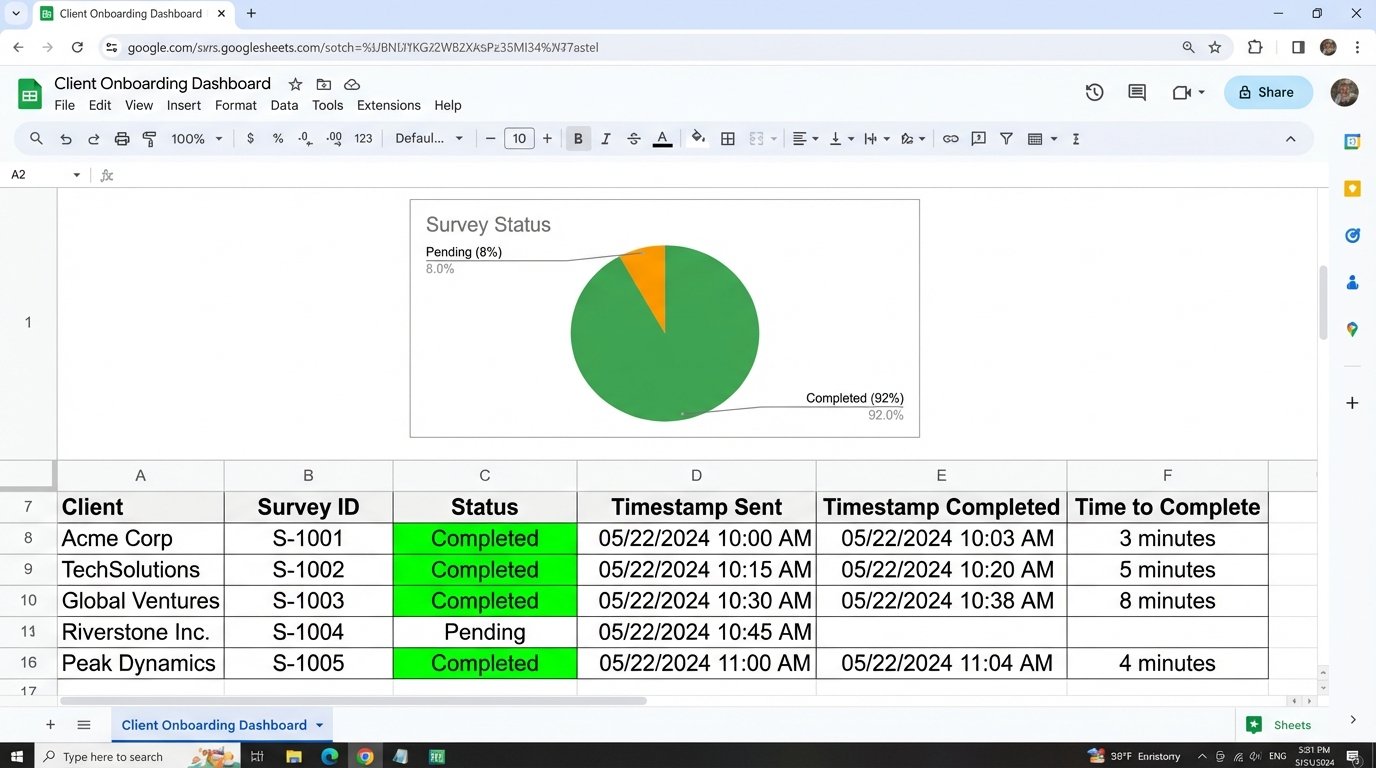
- Action 4: Update the Master Log. The status is changed to “Completed”.
This second workflow completely eliminates the manual data entry that was causing so many errors. The data flows from the client’s keyboard directly into our project management system without human touch. This is where the real value is.
The Results: Quantifiable Improvements Across the Board
We tracked the performance of the new system for three months against the old manual process. The key performance indicators showed a radical improvement. This wasn’t a minor tweak. It was a fundamental operational upgrade.
The numbers speak for themselves.
Key Performance Indicator Breakdown
- Onboarding Lag Time: Reduced from a median of 48 hours to just 3 minutes. The survey is sent the instant the deal is won, not when a PM gets around to it.
- Data Entry Error Rate: Dropped from 8% to 0%. There is no manual transcription, so there are no transcription errors. The data in our system is exactly what the client entered.
- Survey Completion Rate: Increased by 22%. Sending the survey immediately while the client’s engagement is high resulted in faster, more consistent responses.
- Admin Time Saved: We reclaimed an average of 4 hours per new client. At our scale, this translated to over 60 hours of high-value employee time saved per month.
Return on Investment and Future-Proofing
The total cost for the Zapier plan needed to support this workflow is negligible compared to the billable hours recovered. The ROI was positive within the first two weeks of deployment. The master log in Google Sheets also gave us something we never had before: a real-time dashboard of our entire client onboarding pipeline.
The system is not perfect. It relies on the stability of three different platforms. An API change at HubSpot or a UI update to Google Forms could break it. Monitoring is critical. We have a final step in our Zaps that sends an alert to a dedicated Slack channel on any failure, allowing us to investigate immediately.
This project proved that you can build powerful, resilient automation without a massive budget or a team of developers. It requires a clear understanding of the problem, a willingness to work within the constraints of off-the-shelf tools, and a healthy dose of skepticism to plan for the inevitable failure points.