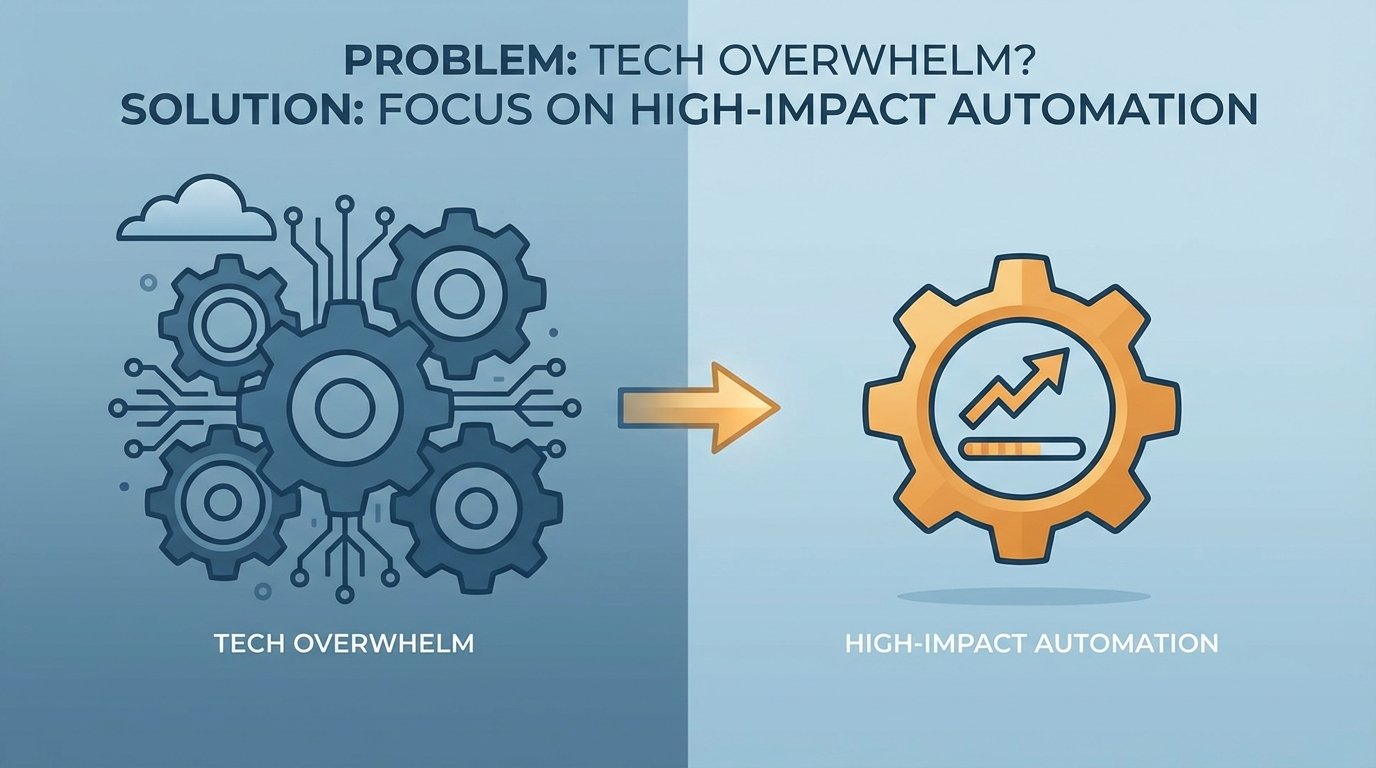
The Problem: The Illusion of Productivity Through Tool Acquisition
Every engineering team is drowning. The average enterprise stack now includes hundreds of SaaS applications. Each one was bought with a promise to solve a specific problem, yet the aggregate effect is a cognitive tax on every engineer. We spend our days clicking between UIs, authenticating with different SSO providers, and mentally mapping data from one system to another. The promise of efficiency is buried under the weight of the tools themselves.
This isn’t efficiency. This is a vendor-subsidized shell game.
Context switching is the most visible symptom. An engineer triaging an alert might jump from PagerDuty to Datadog for metrics, then to Splunk for logs, then to Jira to check for related tickets, and finally to a Git repo to see recent commits. Each jump requires a mental reset. This fragmentation forces engineers to hold a complex mental model of the system’s state, a model that shatters the moment they get pulled into a Slack message about a broken build.
The cost is measured in lost focus and delayed incident response.
Beneath the surface lies a more insidious problem: data silos bridged by brittle glue code. Every tool becomes its own island of information. To get a coherent picture, we write scripts. We pull data from a monitoring tool’s API, strip and reformat it, and then inject it into a ticketing system. This code is almost always a second-class citizen. It’s poorly documented, has no tests, and breaks silently when a vendor decides to deprecate an endpoint.
We’ve become full-time API plumbers for a house we didn’t build.
Finally, there is the raw financial bleed. Subscriptions for specialized tools add up. A security scanner bought to satisfy a compliance checkbox, a project management tool adopted by a single team, a log analytics platform with a pricing model that punishes you for success. The finance department sees a line item. We see shelfware that creates more process overhead than it removes. The tool stack expands endlessly because it’s easier to buy a new tool than to fix a broken process.
The Fix: A Brutal Prioritization Framework
The solution is not another dashboard that promises a “single pane of glass.” That’s just one more pane of glass to stare at. The real solution is to stop the bleeding by applying a ruthless filter to our automation efforts. We must stop writing “nice-to-have” scripts and focus exclusively on work that delivers a measurable impact. This requires a diagnostic approach, not a shopping spree.
Step 1: The Toil Audit
You cannot fix what you do not measure. The first step is to quantify the manual, repetitive, and automatable work that consumes your team’s time. This is toil. It’s work that tends to scale linearly with service growth and has no enduring value. Examples include manually provisioning cloud resources, resetting user passwords, generating weekly reports, or cycling application pools.
Create a simple ledger. For two weeks, have your team log the time they spend on these tasks. Be specific. “Manually parsing Nginx logs for 4xx errors” is a useful data point. “Dealing with tickets” is not. The goal is to identify concrete, repeatable procedures. The results will be horrifying and will provide all the political capital you need to justify dedicated automation time.
For example, you might find a recurring task is searching for a specific transaction ID across multiple log files from a distributed system. An engineer might be spending hours on this per week. The task is well-defined and a prime candidate for automation. A simple script could be built to perform this search in parallel, saving immense time.
import re

import concurrent.futures
LOG_FILES = ['service_a.log', 'service_b.log', 'service_c.log']
TRANSACTION_ID = 'xyz-123-abc-456'
def search_log_file(filename):
"""Searches a single log file for a transaction ID."""
found_lines = []
try:
with open(filename, 'r') as f:
for line in f:
if re.search(TRANSACTION_ID, line):
found_lines.append(line.strip())
except FileNotFoundError:
print(f"Warning: {filename} not found.")
return {filename: found_lines}
def find_transaction_in_logs():
"""Uses a thread pool to search log files concurrently."""
results = {}
with concurrent.futures.ThreadPoolExecutor(max_workers=len(LOG_FILES)) as executor:
future_to_file = {executor.submit(search_log_file, log_file): log_file for log_file in LOG_FILES}
for future in concurrent.futures.as_completed(future_to_file):
results.update(future.result())
for filename, lines in results.items():
if lines:
print(f"--- Found in {filename} ---")
for line in lines:
print(line)
if __name__ == '__main__':
find_transaction_in_logs()
This is a trivial example, but it demonstrates the principle. Identify the pain, quantify it, and build a targeted tool to eliminate it.
Step 2: The Impact vs. Effort Matrix
Once you have a list of potential automation targets from your toil audit, you need to prioritize them. A simple 2×2 matrix is the most effective tool for this. The Y-axis represents Impact, measured in hours saved, reduction in mean time to recovery (MTTR), or number of production incidents avoided. The X-axis represents Effort, measured in engineering hours to build, test, and deploy the automation.
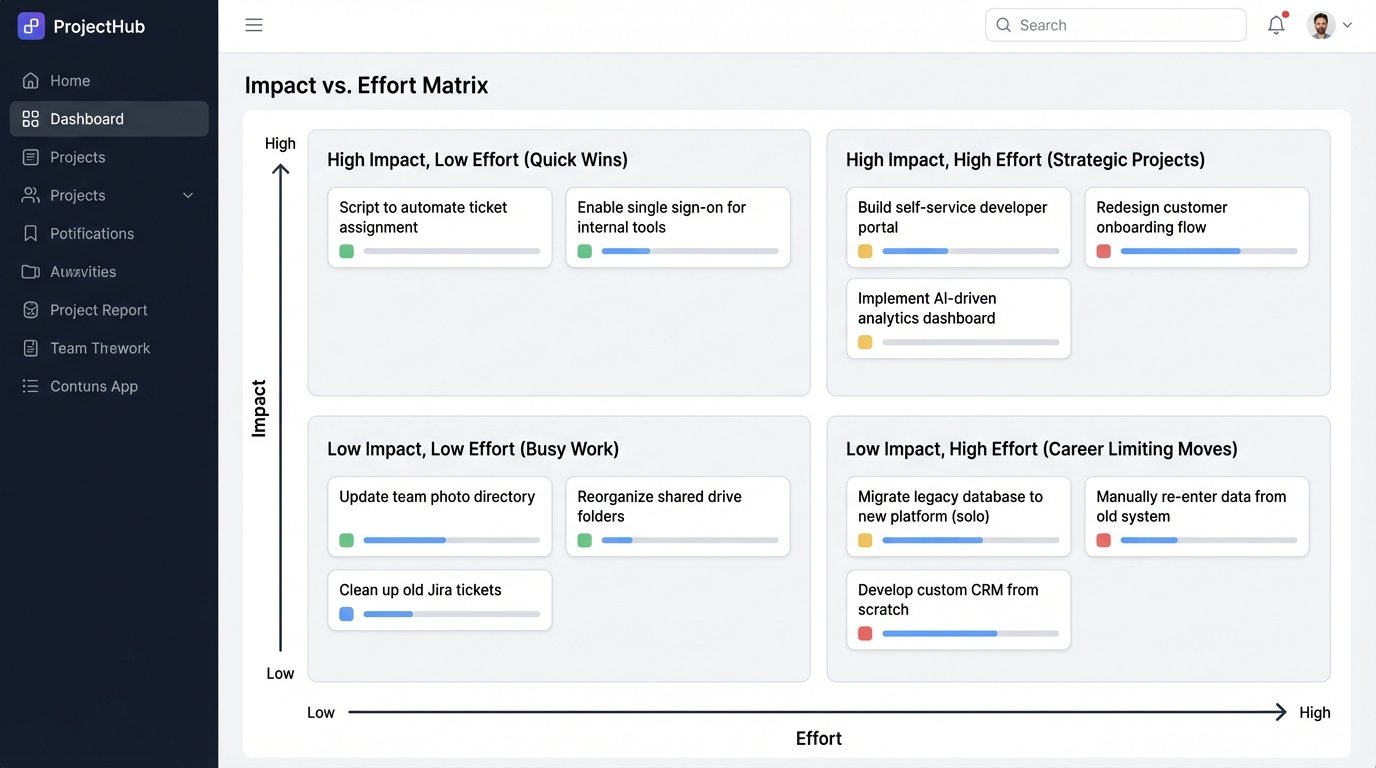
This matrix creates four distinct quadrants for your potential projects:
- High Impact, Low Effort (Quick Wins): These are your top priorities. They deliver immediate value with minimal investment. This could be a script that automates Jira ticket assignments based on component labels or a Slack bot that fetches system health status from an API endpoint. Do these now.
- High Impact, High Effort (Strategic Projects): These are the big, meaningful initiatives that change how your team operates. Examples include building a self-service developer portal for creating test environments or implementing a fully automated canary deployment system. These require careful planning, stakeholder buy-in, and dedicated project time. They are worth the investment.
- Low Impact, Low Effort (Busy Work): These are traps. They feel productive but deliver negligible value. Examples include automating a report nobody reads or building a fancy dashboard for a metric that isn’t actionable. These projects provide a false sense of accomplishment while consuming valuable time. Avoid them.
- Low Impact, High Effort (Career Limiting Moves): These projects are black holes. They consume enormous resources and deliver nothing of substance. This is often where attempts to automate highly complex, edge-case human processes end up. Flee from these projects. They will drain your budget and your will to live.
High-Impact Targets: Where to Point the Cannons
Applying the matrix will quickly reveal a few common areas ripe for high-impact automation. Instead of boiling the ocean, focus your initial efforts on these pressure points where you can force a significant improvement.
Target 1: Gutting the CI/CD Pipeline
Many CI/CD pipelines are little more than glorified build-and-test runners. A high-impact pipeline is a quality enforcement gate, not just a conveyor belt for code. You should be automating security, compliance, and dependency checks directly into the build process. A developer should get immediate feedback if their commit introduces a vulnerable library or violates a code quality standard. This shortens the feedback loop from weeks (during a security audit) to minutes.
The next level is to logic-check the infrastructure itself. Using tools like Terraform or Pulumi to define your environments as code is non-negotiable. The pipeline shouldn’t just deploy an application; it should provision and configure the entire stack the application needs to run. This eliminates configuration drift between environments, a primary source of “it worked on my machine” failures. Every manual change to a server is a future outage waiting to happen.
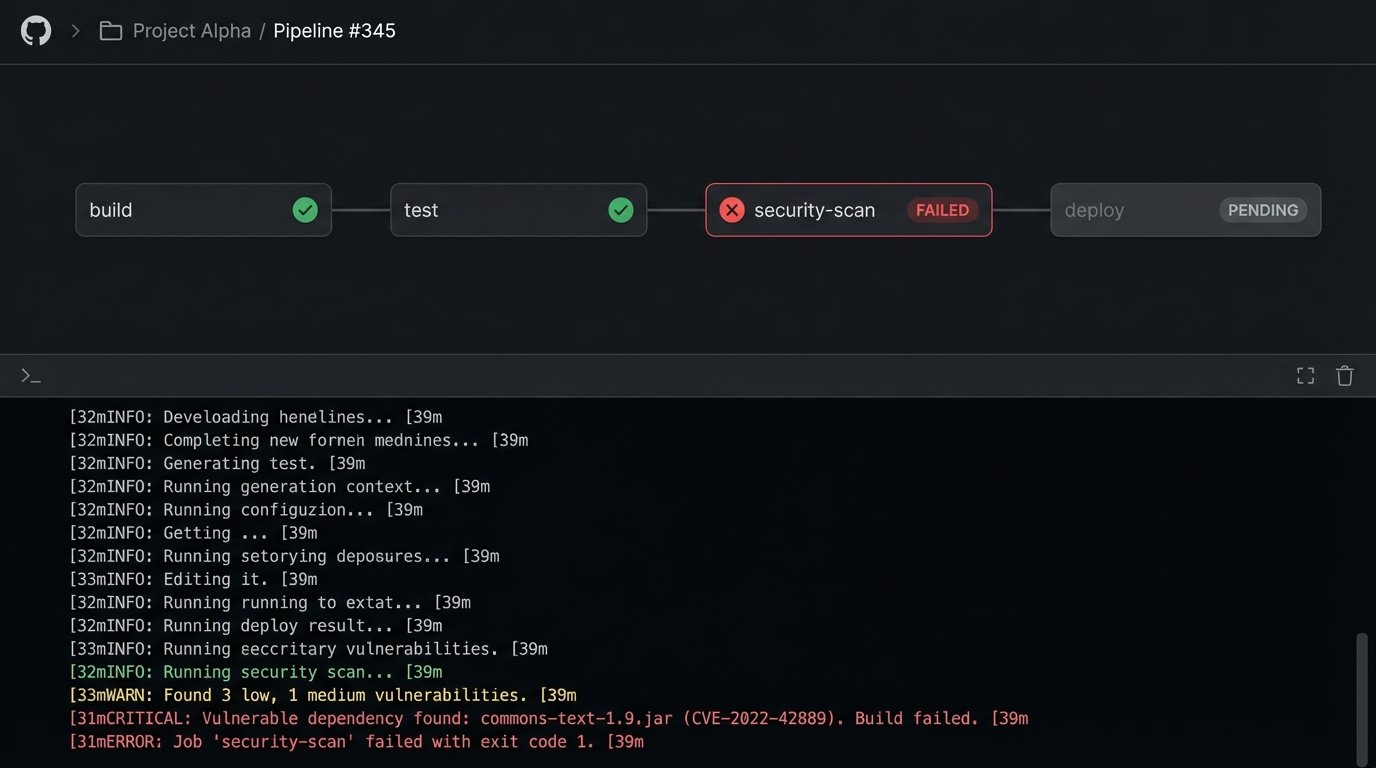
Trying to manage this with a collection of disparate tools connected by a web of fragile webhooks and shell scripts is a maintenance nightmare. It’s like trying to shove a firehose through a garden hose. The pressure will eventually break the weakest connection, and you’ll be left cleaning up the mess at 3 AM.
Target 2: Automated Incident Response Triage
When an alert fires at night, the on-call engineer’s first 15 minutes are a frantic scramble for context. What changed? Is this related to the last deployment? Are other systems showing signs of stress? Most of this initial investigation is a repeatable, automatable process. The goal of automation here is not to replace the human but to arm them with better information, faster.
Set up your monitoring to trigger a serverless function (e.g., AWS Lambda, Google Cloud Function) instead of just sending a notification. This function acts as a robotic first responder. It can query the deployment system’s API for recent releases, pull related metrics from your observability platform, check for anomalous error rates in the logs, and even run a few basic diagnostic tests against the affected service. The output of this function, a rich, context-filled message, is then sent to Slack or PagerDuty.
The engineer is no longer woken up by a cryptic “CPU Utilization > 90%” alert. They are woken up by a message that says: “CPU > 90% on web-prod-3. Correlates with release v2.5.1 deployed 10 minutes ago. Log service is reporting a 500% increase in authentication errors. [Link to Dashboard]”. This strips critical minutes off of MTTR.
Target 3: Self-Service Infrastructure
In most organizations, the infrastructure or operations team is a bottleneck. Developers need a new database, a new set of credentials, or a temporary test environment, so they file a ticket and wait. This is an enormous drain on productivity for both teams. The fix is to build a platform for self-service, exposing your infrastructure automation through a simple, usable interface.
This interface can be a simple internal web portal or, even better, a chatbot integrated into your team’s chat platform (ChatOps). A developer can type `/platform create database my-new-app` into Slack. A bot picks this up, authenticates the user, validates their request, and triggers a backend workflow that runs the necessary Terraform or Ansible scripts. The developer gets their database in minutes, not days, without an ops engineer ever touching a keyboard.
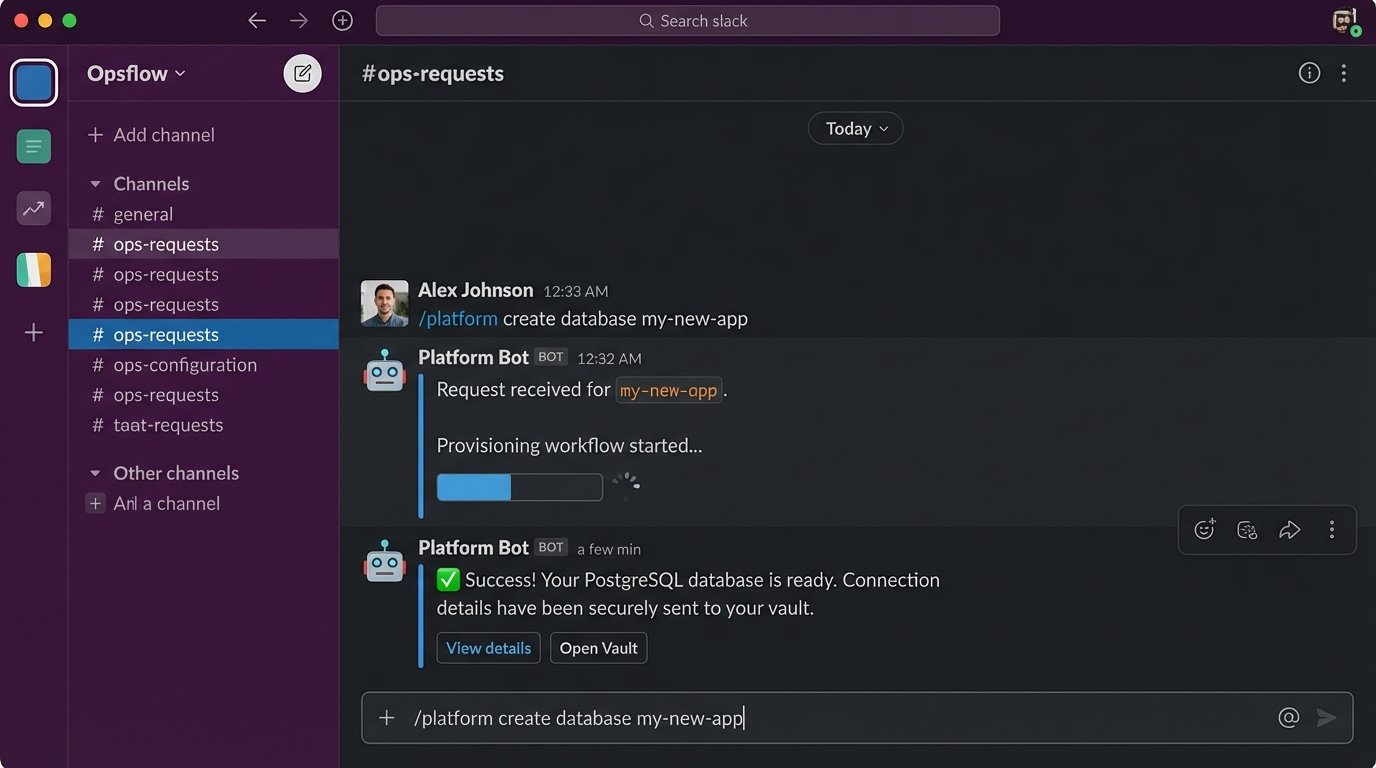
This is a high-effort, high-impact project. It requires a significant investment in building reliable and secure automation on the backend. The payoff is a fundamental shift in your operating model. The ops team moves from being ticket-takers to platform builders, and developers are empowered to move faster without sacrificing stability or security.
The Unspoken Costs and Hard Truths
Focusing on high-impact automation is not a panacea. It comes with its own set of problems that vendors rarely mention in their marketing materials. Acknowledging these realities is the only way to build a sustainable automation strategy.
First, maintenance is the silent killer of all internal software projects. The simple Python script you wrote to bridge two APIs will need to be updated. The vendor will change their authentication scheme, deprecate the endpoint you rely on, or change the data format. The libraries you used will have security vulnerabilities. The automation you build is code, and all code requires a maintenance budget. Factor this into your “Effort” calculation. A project is not “done” when it is deployed.
Second, vendor lock-in is a real and present danger. Building your core automation workflows on a single vendor’s proprietary platform is a massive strategic risk. When that vendor raises their prices, changes their product direction, or gets acquired, you are trapped. Whenever possible, choose tools that are built on open standards like OpenTelemetry for observability or CloudEvents for event-driven systems. Build your logic with portable tools and languages, using the vendor platform as the execution engine, not the source of truth.
Finally, understand that you will break things. When you give scripts the power to provision infrastructure or respond to production incidents, you are also giving them the power to cause catastrophic failures at machine speed. An automation bug can tear down an entire environment far faster than any human could. Build your automation defensively. Include dry-run modes, sanity checks, circuit breakers, and manual approval gates for high-stakes operations. The goal is to fail safely.