
The Off-the-Shelf System is a Trap
Every major real estate CRM or IDX platform sells the same story. A single, unified system to manage leads, listings, and closings. The reality is a rigid framework that forces your brokerage’s unique workflow into a generic box. The moment you need to sync commission data with accounting or inject leads from a non-standard portal, the whole system shows its cracks.
Customization through their “marketplace” is usually a collection of overpriced, under-supported widgets. Real control means building your own data bridges. You stop relying on the vendor’s roadmap and start forcing the software to work for your process, not the other way around.
Prerequisites Are Not Just API Keys
Getting an API key is the easy part. Before writing a line of code, you need to logic-check the vendor’s claims against reality. Demand access to a full sandbox environment that mirrors production. If they cannot provide one, that is a massive red flag for the stability of their platform.
Next, find the documentation on rate limiting. It is often buried or intentionally vague. You must know if you are limited to 100 calls per minute or 1000 per day. This constraint dictates your entire architecture, especially if you plan to poll for updates instead of using webhooks. Assume the documentation is at least two years old and that half the listed endpoints are deprecated.
Step 1: Authenticating Against the Machine
Most modern APIs are locked down with OAuth 2.0. This is not a simple bearer token. It is a multi-step process designed to grant scoped permissions without exposing raw credentials. You first exchange your client ID and secret for an authorization code, then exchange that code for an access token. This token is temporary and must be refreshed.
Your script must handle this token refresh logic automatically. Failure to do so means your integration will die every 60 minutes. You need to store the refresh token securely and build a function that checks the access token’s expiry before every API call.
Here is a bare-bones Python example using the `requests` library to manage the token exchange. This strips out the fluff and shows the core mechanical process.
import requests
import time

class ApiClient:
    def __init__(self, client_id, client_secret, token_url):
        self.client_id = client_id
        self.client_secret = client_secret
        self.token_url = token_url
        self.access_token = None
        self.token_expiry = 0

    def get_token(self):
        # Check if the token is still valid, with a 60-second buffer
        if self.access_token and time.time() < self.token_expiry - 60:
            return self.access_token

        payload = {
            'grant_type': 'client_credentials',
            'client_id': self.client_id,
            'client_secret': self.client_secret
        }
        headers = {'Content-Type': 'application/x-www-form-urlencoded'}

        try:
            response = requests.post(self.token_url, data=payload, headers=headers)
            response.raise_for_status() # Will raise an exception for 4xx/5xx status codes
            data = response.json()
            self.access_token = data['access_token']
            # Set expiry time based on 'expires_in' value from response
            self.token_expiry = time.time() + data['expires_in']
            return self.access_token
        except requests.exceptions.RequestException as e:
            # Log the actual error here
            print(f"Error fetching token: {e}")
            return None

    def make_request(self, endpoint, method='GET', data=None):
        token = self.get_token()
        if not token:
            return {"error": "Authentication failed."}

        headers = {'Authorization': f'Bearer {token}'}
        url = f"https://api.yourcrm.com/v1/{endpoint}"

        if method == 'GET':
            response = requests.get(url, headers=headers)
        elif method == 'POST':
            response = requests.post(url, headers=headers, json=data)

        return response.json()
Step 2: The Data Mapping Minefield
This is where most custom integrations fail. You cannot just pipe JSON from one system to another. System A's lead status `_hot_lead_prospect_` will not map to System B's status ID `7`. This impedance mismatch requires a dedicated transformation layer in your code. You are not just moving data; you are translating it.
The process is tedious. You must pull a sample record for every object type you plan to sync (Contacts, Listings, Agents) from both systems. Put them side-by-side and manually create a mapping dictionary or configuration file. For every single field, you must account for data types, formatting differences, and enumerations. This is like trying to shove a firehose of data through a needle; you have to shape the flow first.
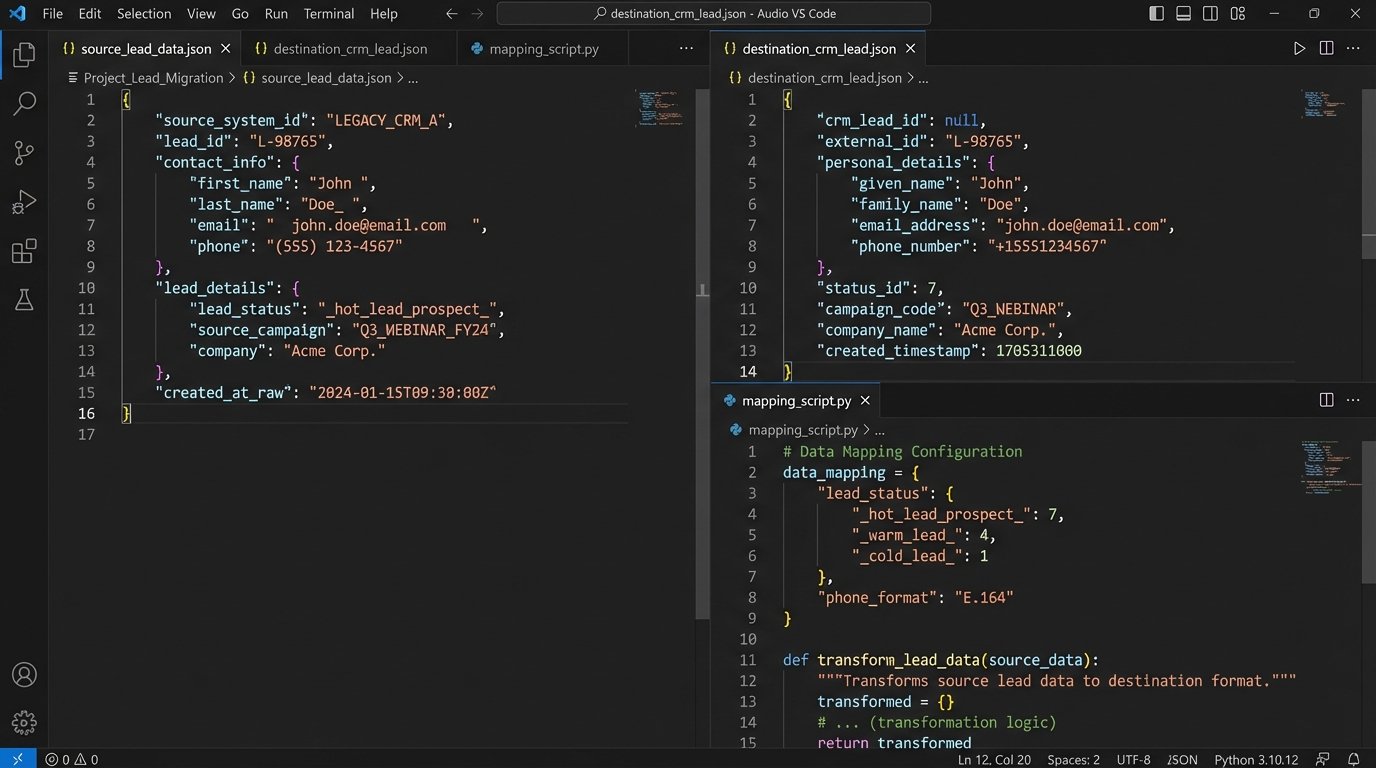
A common failure point is phone number formatting. One system might store `(555) 123-4567` while the other requires `+15551234567`. Your code must strip non-numeric characters and enforce the destination format. The same logic applies to dates, currency, and custom field IDs.
Your mapping logic should be isolated from your API connection logic. This makes it easier to update when a vendor inevitably changes their schema without notice.
Step 3: Choosing Your Trigger
Data has to move based on a trigger. You have two primary options: polling or webhooks. Each comes with significant architectural baggage.
Polling: The Brute Force Method
Polling means your script runs on a schedule, perhaps every five minutes, and asks the source system, "Anything new?" It fetches all records updated since the last check. This method is simple to implement as it requires no inbound network configuration. It is also a resource hog and incredibly inefficient.
You constantly hit the API, burning through your rate limit just to find out nothing has changed. It is the equivalent of repeatedly calling someone to ask if they have mailed a package yet. This approach works for low-volume, non-critical syncs, but it does not scale.
Webhooks: The surgical Approach
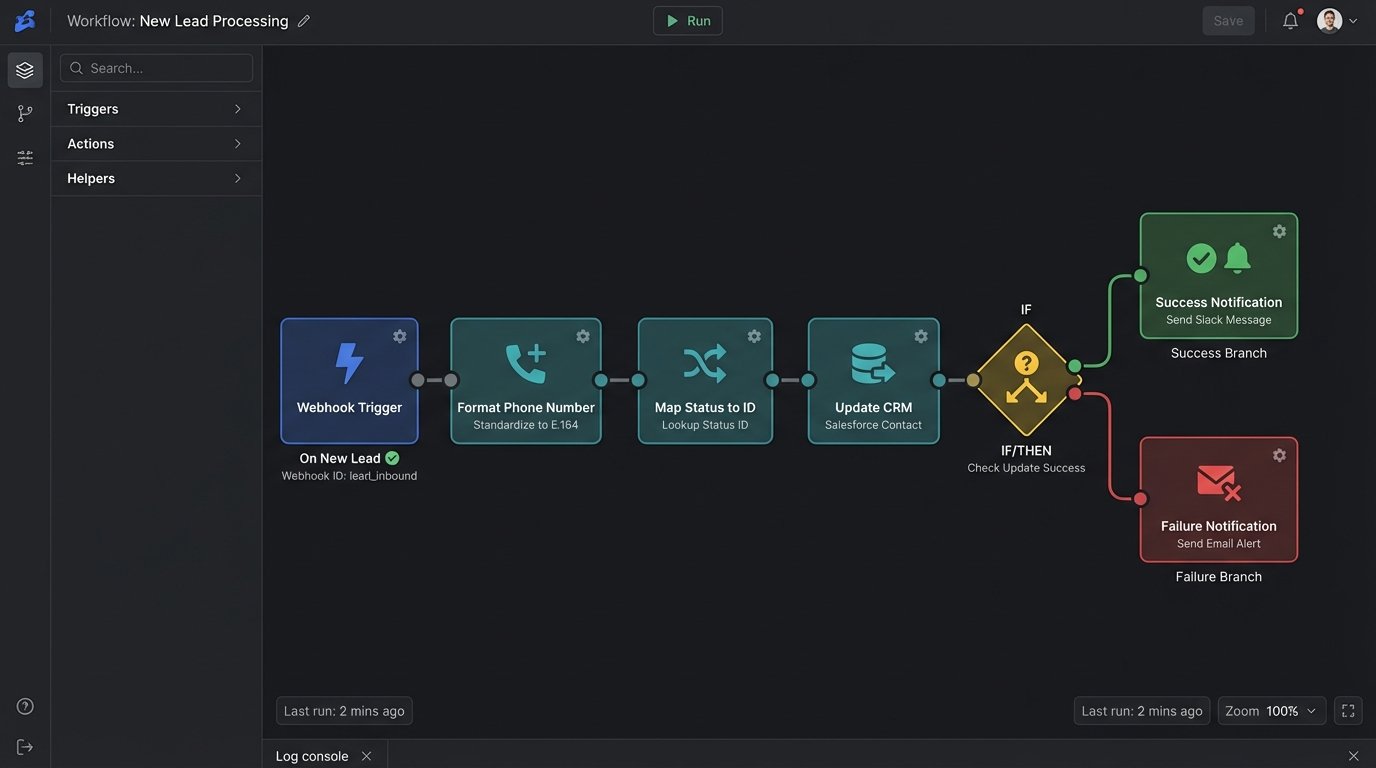
Webhooks reverse the communication flow. The source system sends a notification to an endpoint you control the moment an event happens, like a new lead being created. This is near real-time and extremely efficient on API usage. The cost is infrastructure complexity. You need a stable, publicly accessible web server to receive these incoming POST requests.
Your webhook receiver must be lean and fast. It should acknowledge the request immediately with a `200 OK` status and then hand off the payload to a separate background process or queue for processing. If your script takes too long to process the data, the source system's request will time out, and it may disable your webhook after several failed attempts.
A basic webhook receiver can be built with a lightweight web framework like Flask in Python.
from flask import Flask, request, jsonify
import json
# Assume 'process_lead_data' is your function that handles the actual work
# from your_background_processor import process_lead_data

app = Flask(__name__)

@app.route('/webhook/new-lead', methods=['POST'])
def handle_new_lead():
    # Basic security check: Validate a secret token or signature if provided by the source
    # vendor_signature = request.headers.get('X-Vendor-Signature')
    # if not is_valid_signature(request.data, vendor_signature):
    #     return jsonify({"status": "error", "message": "Invalid signature"}), 403

    if not request.is_json:
        return jsonify({"status": "error", "message": "Request must be JSON"}), 400

    payload = request.get_json()

    # Do not process here. Offload to a queue (e.g., Celery, RabbitMQ).
    # This ensures a fast response to the webhook sender.
    # For this example, we'll just log it.
    print(f"Received new lead payload: {json.dumps(payload)}")

    # In a real system, you would do this:
    # process_lead_data.delay(payload) # 'delay' sends it to a Celery worker

    return jsonify({"status": "received"}), 200

if __name__ == '__main__':
    # For production, use a real WSGI server like Gunicorn or uWSGI
    app.run(host='0.0.0.0', port=8080)
This code does one thing: it catches the data and confirms receipt. All the heavy lifting of data transformation and API calls to the destination system must happen elsewhere.
Step 4: Failure is Not an Option, It is a Guarantee
Your integration will fail. The network will drop, an API will be down for maintenance, or you will receive malformed data. Your code's value is not in its sunny-day performance but in how it handles these failures.
First, implement idempotency. If your script fails midway through processing a webhook and the source system resends it, you must not create a duplicate contact. Use a unique identifier from the source payload (like `lead_id`) and check if you have already processed it before taking any action. An unhandled duplicate API call is a silent data corruption time bomb.
Second, logging is not optional. Do not just print errors to the console. Use a structured logging library to output JSON-formatted logs. Include the request ID, the relevant payload snippet, and a precise timestamp. When an agent calls at 8 PM saying a lead from Zillow never appeared, these logs are your only hope of diagnosing the problem without guessing.
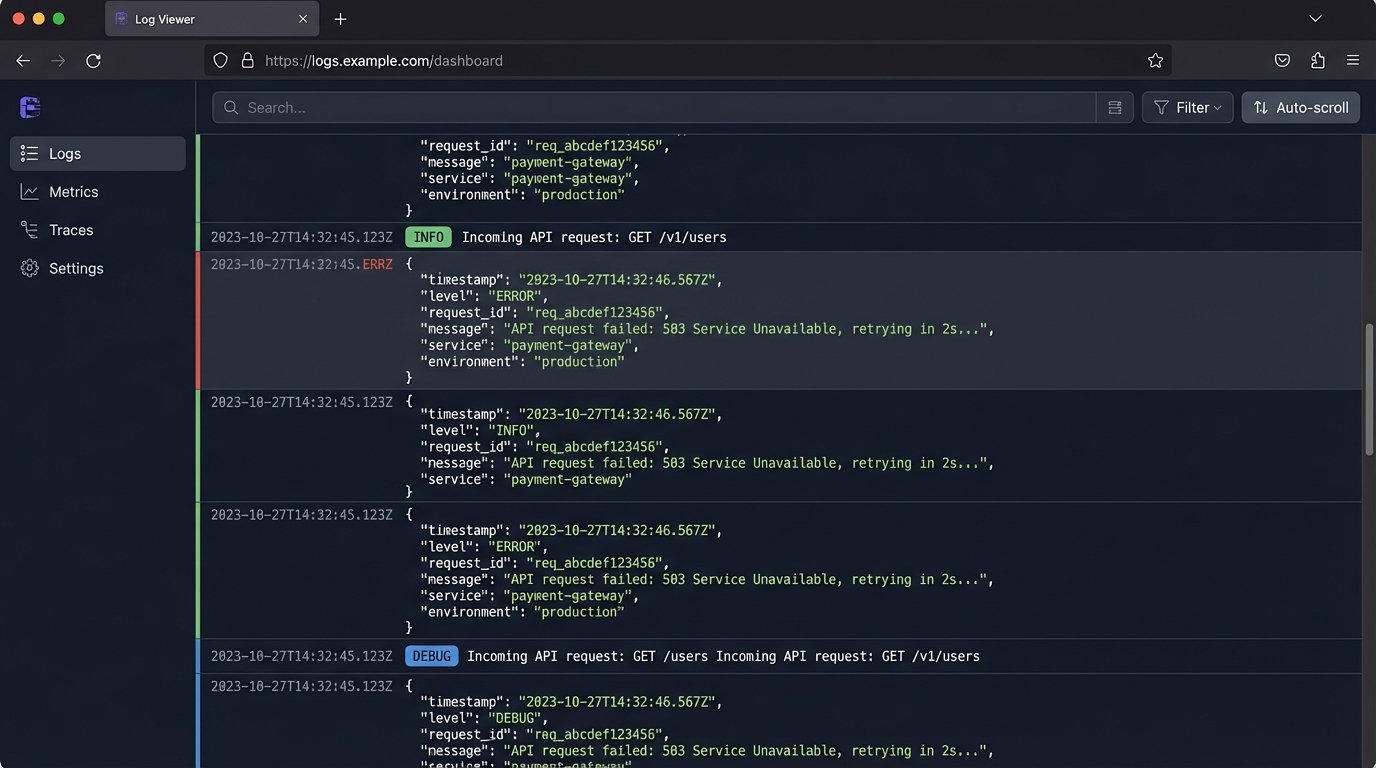
Finally, build a retry mechanism with exponential backoff. If an API call to the destination CRM fails with a `503 Service Unavailable` error, do not just give up. Wait two seconds, then try again. If it fails again, wait four seconds, then eight, and so on. After a certain number of retries, move the failed job to a dead-letter queue for manual inspection.
The True Cost of a Custom Plug-in
Building the integration is only half the battle. You are now responsible for its maintenance forever. When the source platform releases v2 of their API, you have to rewrite your code. When the destination CRM adds a required field to their contact object, your script breaks until you update your mapping.
This control comes at the price of vigilance. The alternative is being stuck with an inflexible system that dictates your business process. For brokerages that need a competitive edge, building these custom data bridges is not a luxury. It is a necessity.