The Digital Dead End of Real Estate Tech
Your lead generation platform does not speak to your CRM. Your CRM does not speak to your transaction management system. Your transaction manager has never heard of your accounting software. Each platform is a locked box, forcing agents and coordinators to act as low-paid data-entry clerks, manually porting information from one browser tab to the next. This manual bridging of systems is where data integrity dies and agent productivity goes to zero.
The average brokerage tech stack is a collection of best-in-class point solutions that collectively function as a worst-in-class workflow. A new lead from Realtor.com triggers a notification, which an agent then copies and pastes into LionDesk. When that lead becomes a client, the agent copies that same contact information into Dotloop to start a transaction. When the deal closes, an admin re-keys commission data from Dotloop into QuickBooks. Every step is a point of failure waiting to happen.
This is not a scalable model. It is a direct bottleneck on growth, creating a dependency on human intervention for routine digital tasks. The entire process is fragile, prone to typos, and guarantees that information is always out of date in at least one system.
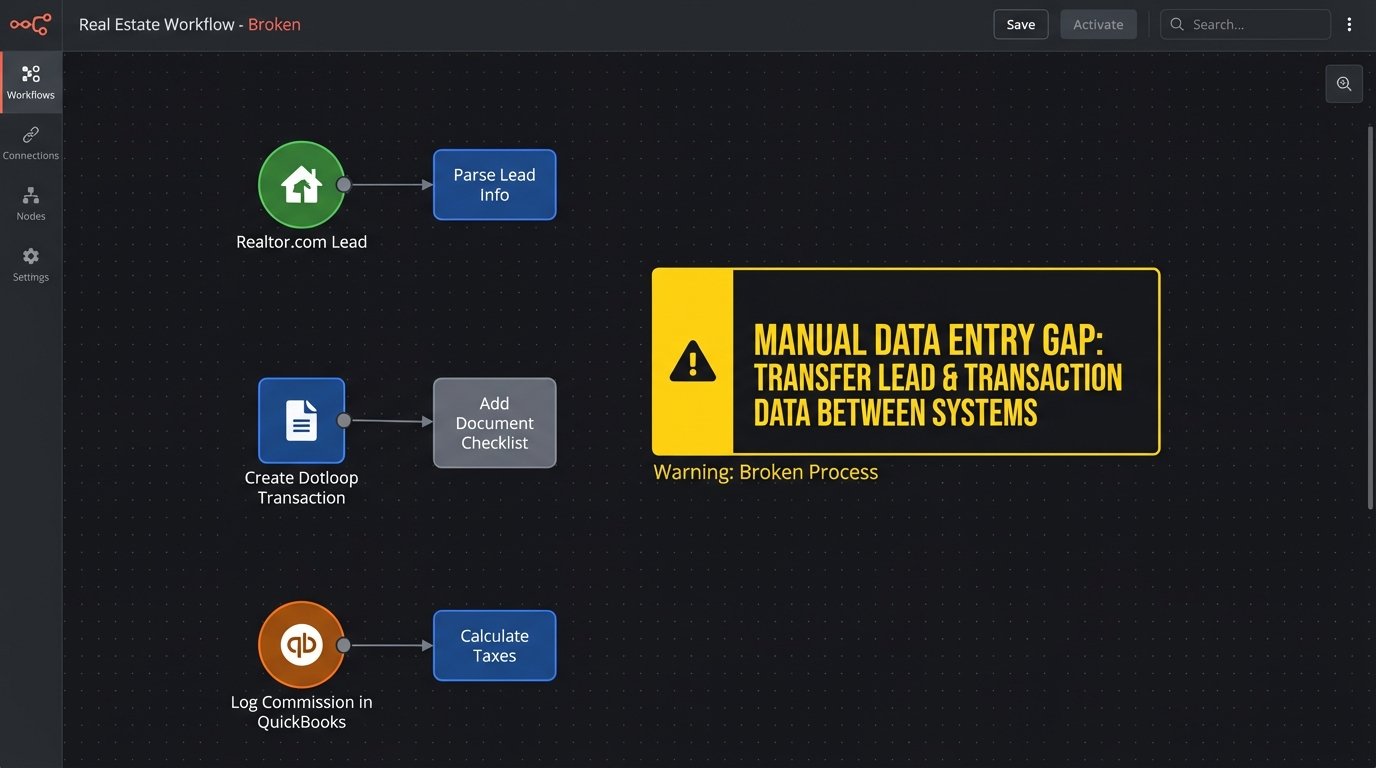
Common Failure Points in the Chain
The breakdown is not theoretical. It manifests in concrete operational drag. We see the same patterns repeatedly across different brokerages, regardless of their size or the specific software vendors they use. The core issue is the lack of a coherent data strategy that treats information as an asset to be moved, not a static record to be filed away.
- Lead Latency: The time between a lead arriving and an agent acting on it is directly inflated by manual entry. A five-minute delay caused by copy-pasting contact details is enough to lose a prospect to a competitor with a faster, automated response system.
- Data Desynchronization: A contact updates their phone number. They tell their agent, who updates it in the CRM. That update never makes it to the transaction management system, causing document signing failures and communication breakdowns with the title company. The data is now fractured.
- Inaccurate Reporting: Broker-owners try to calculate ROI on lead sources. They are forced to cross-reference reports from their lead gen platform, their CRM, and their accounting software. The numbers never match because closed deals in one system are not correctly attributed to the original lead source in another. The result is guesswork disguised as business intelligence.
Each of these failures stems from a single root cause. The software was purchased to solve an isolated problem, without any thought given to how it must function as part of a larger operational sequence.
Architecting a Central Nervous System
The fix is not to buy yet another all-in-one platform that does everything poorly. The fix is to build a lightweight, durable layer of automation that forces these disparate systems to communicate. This is not about finding the perfect software. It is about imposing order on the software you already have through a disciplined application of APIs and webhooks.
We are going to construct a simple, event-driven architecture. When something happens in one system (a new lead arrives), it triggers a process that updates other relevant systems automatically. The goal is to make manual data transfer obsolete. The agent’s job is to build relationships, not to be a human API.
Step 1: Ingest and Normalize the Data
Everything starts with the lead. Lead sources like Zillow or Realtor.com are the primary data entry point. Most offer two ways to get data out: email parsing or webhooks. Email parsing is a fragile, last-resort solution that breaks the moment the provider changes their template layout. We will use webhooks whenever possible. A webhook is a direct, machine-to-machine notification that a new lead has arrived, containing the data in a structured format like JSON.
The problem is that each lead source sends data in its own unique format. Zillow’s payload will have different field names than a lead from your own IDX website. The first job of our automation layer is to catch these webhooks and translate them into a single, standardized format. This process is called normalization. We create one clean, predictable data structure for what a “lead” is, regardless of its origin.
This is best handled by a small, serverless function, like an AWS Lambda or Google Cloud Function. It’s a piece of code that does one thing: it receives a webhook, strips and remaps the data into our standard format, and then passes it on. This is fundamentally cheaper and more scalable than running a full-time server just to listen for occasional webhooks.
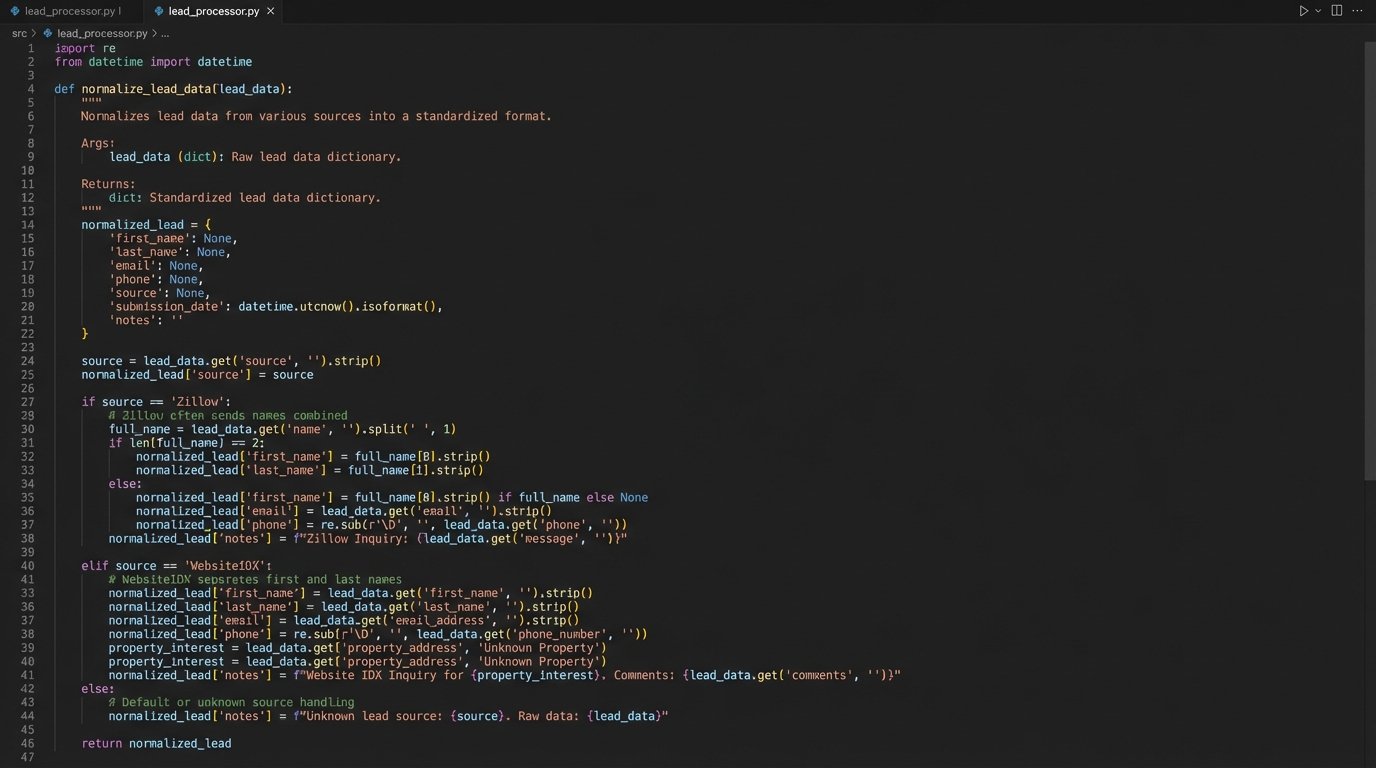
# Example Python snippet for a serverless function
# This is a highly simplified normalization logic

def normalize_lead_data(incoming_webhook_data, source):
    """
    Strips data from various sources into a standard format.
    """
    standard_lead = {
        'full_name': None,
        'email': None,
        'phone': None,
        'source_system': source,
        'raw_data': incoming_webhook_data
    }

    if source == 'Zillow':
        # Hypothetical Zillow field names
        standard_lead['full_name'] = incoming_webhook_data.get('contact_name')
        standard_lead['email'] = incoming_webhook_data.get('contact_email_address')
        standard_lead['phone'] = incoming_webhook_data.get('phone_number')

    elif source == 'WebsiteIDX':
        # Hypothetical IDX form field names
        standard_lead['full_name'] = f"{incoming_webhook_data.get('firstName')} {incoming_webhook_data.get('lastName')}"
        standard_lead['email'] = incoming_webhook_data.get('email')
        standard_lead['phone'] = incoming_webhook_data.get('phone')

    # Logic-check for essential data before returning
    if not standard_lead['email'] and not standard_lead['phone']:
        # Reject leads with no contact info
        return None

    return standard_lead
This normalization step is the most critical part of the entire architecture. Without it, you are just building brittle point-to-point connections, trying to shove a firehose of inconsistent data through the needle-sized hole of your CRM’s API. This is where you enforce data quality at the gate.
Step 2: Intelligent Distribution and Duplicate Prevention
Once the lead data is normalized, we need to push it into the primary system of record, which is almost always the CRM. This is not a simple data dump. Before creating a new contact, the automation must first query the CRM’s API to see if a contact with that email address or phone number already exists. Blindly injecting every lead as a new contact is how you end up with five duplicate records for the same person, fracturing their history across multiple entries.
The logic is straightforward:
- Receive the normalized lead object.
- Query the CRM API: `GET /contacts?email={lead_email}`.
- If a contact exists, post the new lead information as a note or activity on the existing record. Do not create a new contact.
- If no contact exists, post the data to create a new contact record.
This logic-check prevents database rot and ensures a single, coherent timeline for every prospect. We also have to respect the API’s rules. Most cloud software enforces rate limits, restricting how many API calls you can make per minute. If you get a sudden flood of 100 leads, trying to hit the CRM’s API 100 times in five seconds is a good way to get your access temporarily blocked. The solution is to use a queue (like Amazon SQS) to buffer incoming leads and process them at a sane, controlled pace.
Step 3: Propagating State Changes
Getting the lead into the CRM is only the beginning. The real value is in automating the transitions between stages of the client lifecycle. The next critical event is when a lead’s status in the CRM changes from “Prospect” to “Active Client.” This change in state must trigger the next leg of the automation.
Your CRM should be configured to fire its own webhook whenever a contact’s status field is updated. Our automation layer catches this webhook. The payload tells us the contact’s ID and their new status. The code then executes the next business process: creating a transaction in the transaction management system. It uses the contact ID to pull the full details from the CRM, then uses the API of Dotloop or SkySlope to create a new transaction shell, pre-populating it with the client’s name, email, and phone number.
The agent no longer creates the transaction. They simply change a dropdown field in their CRM. The system handles the tedious administrative work of setting up the workspace. This cuts down on errors and saves the agent 10-15 minutes of duplicated effort per client, which adds up to hours of productive time reclaimed each month.
Step 4: Closing the Loop with Financial Data
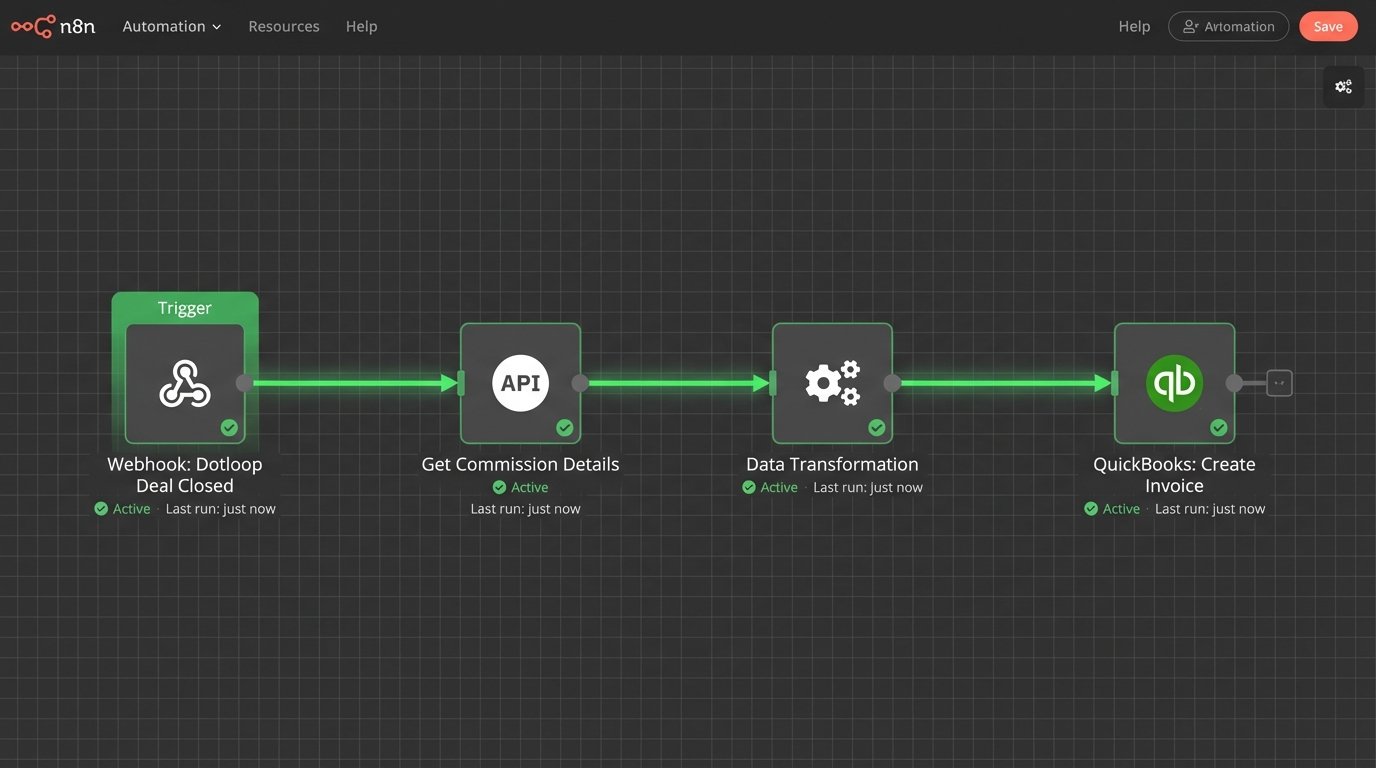
The final step in the chain is the transition from a closed transaction to a financial record. When a transaction’s status is updated to “Closed” in the TMS, it should fire the final webhook in our workflow. This webhook signals that commission data is now available.
The automation script receives this signal. It then makes a series of API calls. First, it calls the TMS API to get the final transaction details, including the gross commission income, agent splits, and any fees. Next, it formats this data into a structure that the accounting software understands. Finally, it pushes the data to the QuickBooks API to create an invoice or a sales receipt, attaching it to the correct agent and property record.
This single automation bridges the gap between sales operations and finance. It eliminates the need for an office administrator to manually hunt down commission disbursement forms and re-enter data into the accounting platform. The financial record is created the moment the deal closes, not at the end of the week when someone gets around to the paperwork. This provides the brokerage with a real-time view of revenue, not a week-old snapshot.
This is Not a One-Time Project
Building this system is not a fire-and-forget missile. It is a piece of living infrastructure that requires maintenance. APIs change, vendors update their authentication methods, and you will add new tools to your stack that need to be integrated. The person who builds this system must also be responsible for monitoring it.
You need logging and alerting. If an API call to the CRM fails, the system needs to retry a few times. If it continues to fail, it needs to send an alert to a specific person or channel detailing the point of failure and the data that failed to process. Without monitoring, you have a black box that works until it silently breaks, and you only find out a week later when agents complain that their new leads are missing.
The choice is between sustained, low-level technical effort to maintain this automation, or sustained, high-level manual effort from your entire staff to do the work by hand. One of these scales. The other leads to burnout.