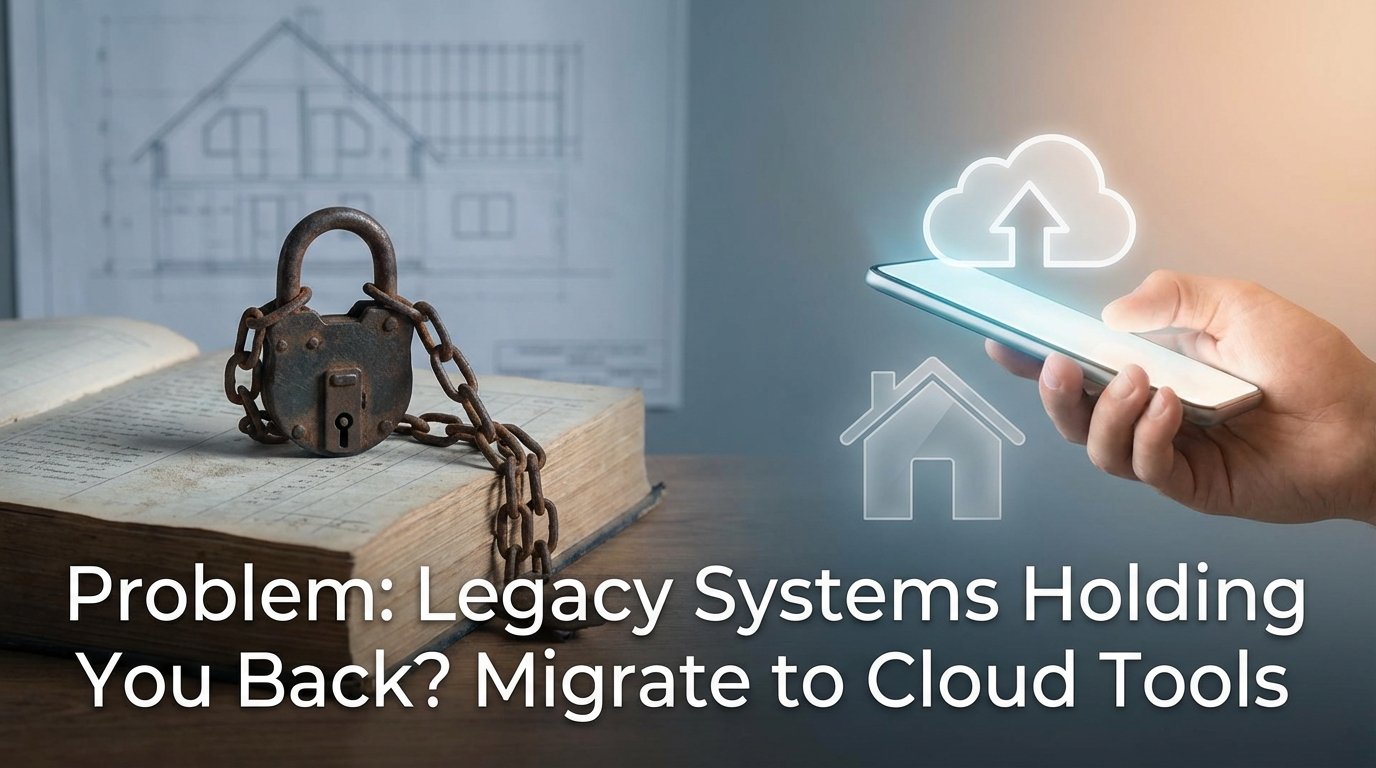
The On-Premise Anchor Dragging Your Brokerage Down
Your core real estate platform, likely a monolithic application running on a server in a closet, is a direct liability. It was built on a database schema designed fifteen years ago, before mobile-first indexing was a concern and when API access meant a nightly CSV export to an FTP server. The system probably handles transactions, agent commissions, and listing data through a brittle, stateful interface that requires a VPN just to access basic reports.
This isn’t a stable foundation. It’s a house of cards waiting for one Windows Server update to fail.
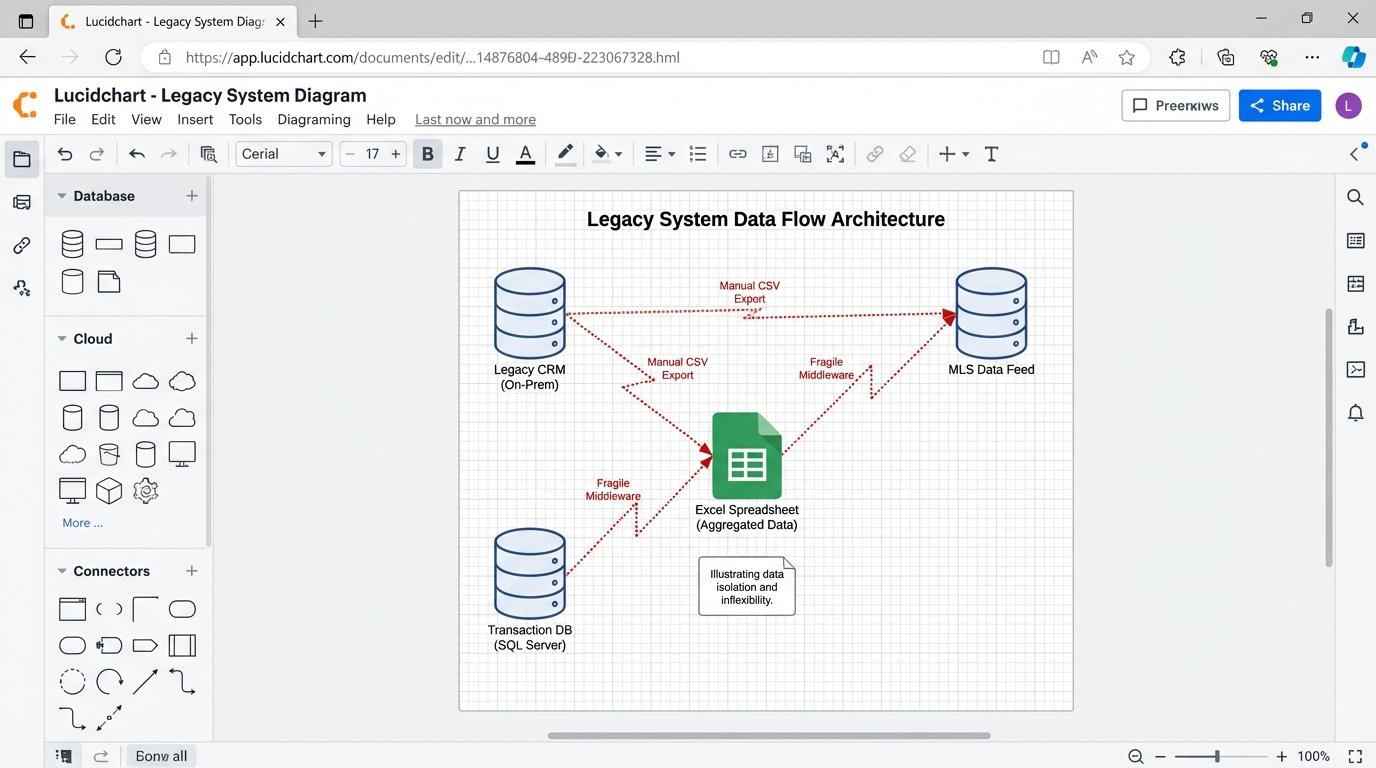
Every attempt to integrate a modern tool, like a digital transaction coordinator or an AI-powered lead nurturing system, becomes a massive engineering project. You end up building fragile middleware to bridge the gap between a RESTful API and a legacy SOAP endpoint that returns XML. The result is a sluggish, error-prone connection that breaks if a developer on either side changes a single data field without telling you.
Your agents are already bypassing the system, using their own tools because the official one is too slow and unusable on their phones.
Diagnosing the Core Failure: Data Silos and Inflexibility
The fundamental problem is data isolation. Your listing data is trapped in the MLS system. Your client data is locked in a CRM that has no public API. Your transaction records live in another database entirely. There is no single source of truth, only disconnected pools of information that are perpetually out of sync. This forces manual data entry, creating duplicates and errors that poison your analytics.
Trying to pull a simple report, like “show me the average lead-to-close time by property type for top-performing agents,” becomes a week-long manual exercise. You have to export three different spreadsheets and hire someone to stitch them together in Excel. The data is stale the moment you get it.
Vendor lock-in makes this worse. The company that built your on-premise system controls your data. Migrating away means paying exorbitant fees for a data dump, often in a proprietary format. They have no incentive to make it easy for you to leave. Their business model depends on your system being difficult to replace.
The security posture of these systems is also questionable. They often lack modern authentication mechanisms like OAuth 2.0, relying instead on static credentials stored in configuration files. They are rarely patched in a timely manner, leaving them vulnerable to exploits that were fixed years ago in the broader software world. Your client’s personal information is sitting on a box that might not survive a basic penetration test.
You can’t bolt on agility. It has to be part of the architecture.
The Fix: A Centralized, API-First Cloud Architecture
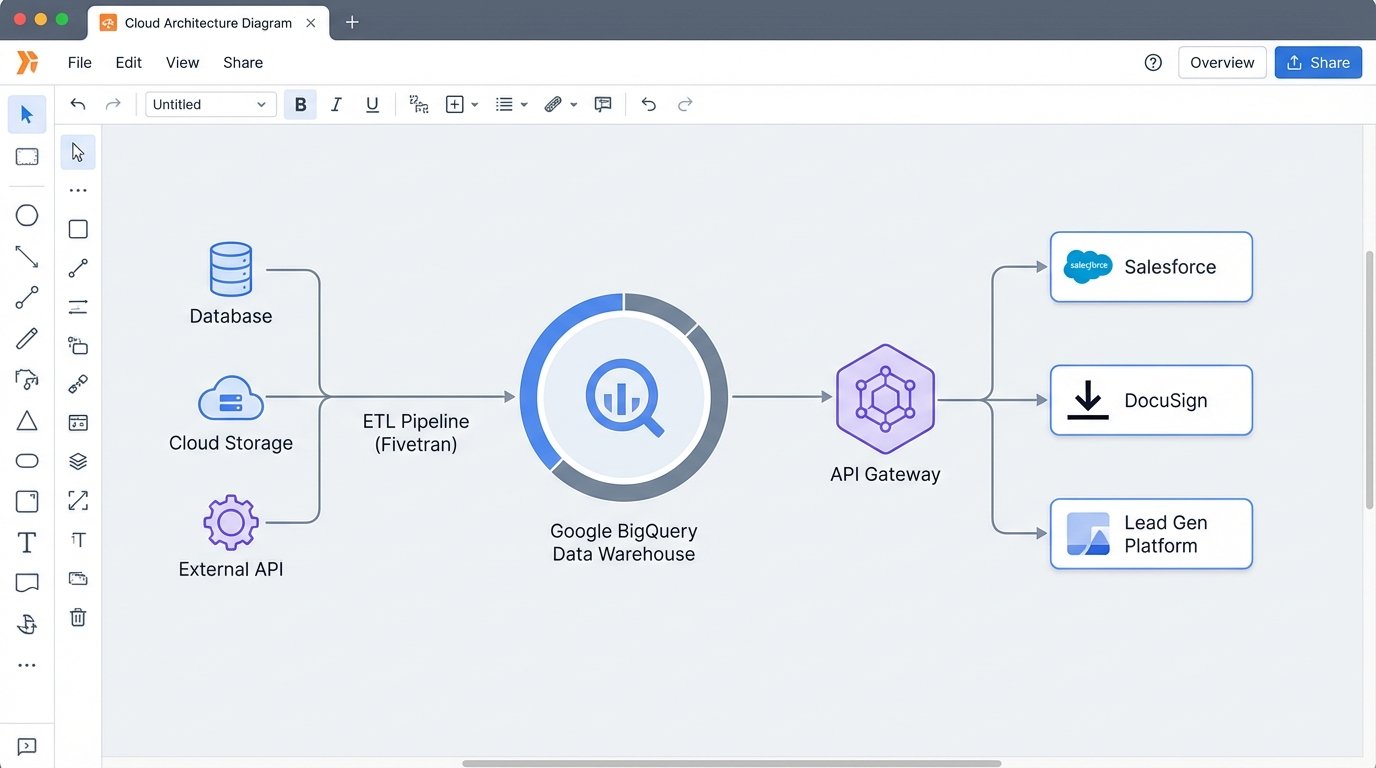
The solution is not to find a “better” all-in-one legacy system. The solution is to dismantle the monolith and migrate its functions to a distributed, cloud-native architecture. The goal is to own your data and control how different services interact with it. The core of this new architecture is a cloud data warehouse, such as Google BigQuery, Amazon Redshift, or Snowflake.
This warehouse becomes your single source of truth. All data from all sources, listings, transactions, leads, agent performance, gets ingested, cleaned, and stored here. It’s the central hub. Other applications don’t talk to each other directly. They talk to the data warehouse through a controlled API layer.
This design gives you control. You can swap out your CRM provider without losing your historical client data. You can test a new marketing automation tool by giving it read-only access to a specific dataset. You decouple the applications from the data, which is the most valuable asset you have.
Architectural Components of the Migration
The migration requires a clear plan and a few key pieces of technology. This isn’t a weekend project. It’s a strategic rebuild of your technical infrastructure.
- Data Warehouse: As mentioned, this is the core. BigQuery is often a good choice due to its serverless nature and powerful SQL interface. You pay for what you query, which can be cost-effective if managed properly.
- ETL/ELT Pipelines: You need a mechanism to extract data from legacy sources, transform it into a clean format, and load it into the warehouse. Tools like Fivetran or Stitch can automate connections to common sources. For your custom on-prem database, you will need to write your own extraction scripts.
- API Gateway: A service like Amazon API Gateway or Apigee sits in front of your data. It manages authentication, rate limiting, and routing. This prevents any single application from overwhelming your system and provides a secure, documented way for services to request data.
- Cloud-Native Applications: Replace legacy functions with best-in-class SaaS tools. Use Salesforce or HubSpot for CRM. Use DocuSign or SkySlope for transaction management. Use a modern IDX provider for website listings. The key is that these tools must have robust, well-documented APIs.
The beauty of this model is its modularity. If a better transaction management tool comes out next year, you just build a new connector to your data warehouse and decommission the old one. The core of your business data remains untouched and secure.
This is also not cheap. Initial cloud spend and development costs will be significant. The payoff is in operational agility and the elimination of technical debt, not immediate cost savings.
The Migration Playbook: A Phased Approach
A “big bang” cutover, where you switch everything at once, is a recipe for disaster. A phased migration, running the new and old systems in parallel, is the only sane way to approach this. It allows you to validate data, train users, and fix bugs without bringing the entire business to a halt.
Phase 1: Extraction and Data Warehousing
The first step is to get your data out. This is often the hardest part. You’ll need to connect directly to the legacy database. This might be an old version of Microsoft SQL Server, Oracle, or something even more obscure. You need to map out the existing schema, which is likely undocumented and full of cryptic column names.
Your goal is to build a reliable pipeline that pulls data from the legacy system and dumps it into your cloud data warehouse. This pipeline should run daily. At this stage, you are not transforming the data much. You are just creating a replica of the raw, messy data in the cloud. This gives your data scientists and analysts a sandbox to start exploring the data without touching the production legacy system.
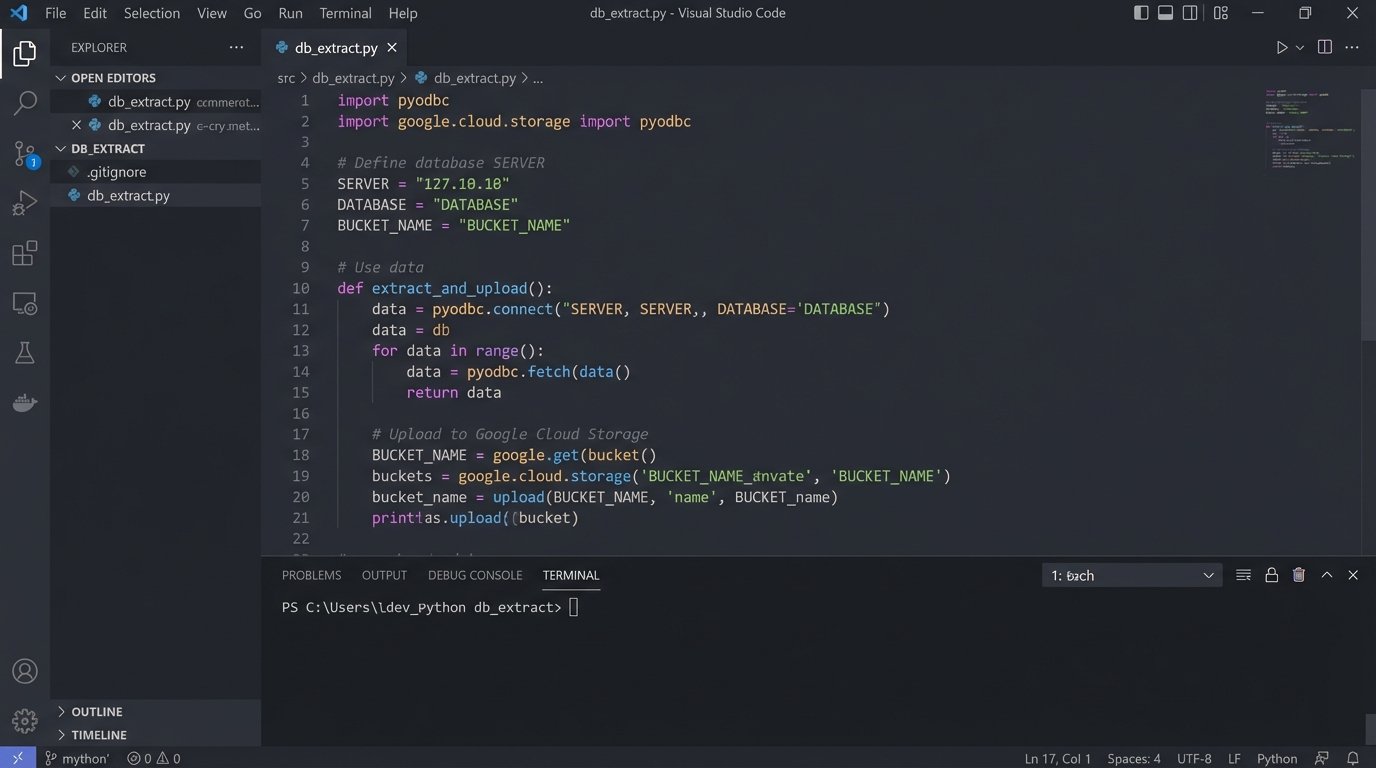
A simple Python script using `pyodbc` for SQL Server is often a starting point for the extraction logic. You connect, run a query, fetch the results, and upload them to a cloud storage bucket before loading into the warehouse.
import pyodbc

import os

from google.cloud import storage
# WARNING: For demonstration only. Do not store credentials in code.
SERVER = 'your_legacy_server.domain.local'
DATABASE = 'RealEstateDB'
USERNAME = 'readonly_user'
PASSWORD = os.environ.get('DB_PASSWORD')
TABLE_NAME = 'tbl_Transactions'
BUCKET_NAME = 'your-gcs-bucket-name'
connection_string = f'DRIVER={{ODBC Driver 17 for SQL Server}};SERVER={SERVER};DATABASE={DATABASE};UID={USERNAME};PWD={PASSWORD}'
try:
cnxn = pyodbc.connect(connection_string)
cursor = cnxn.cursor()
print(f"Successfully connected to {DATABASE}.")
# Extract all data from the target table
cursor.execute(f"SELECT * FROM {TABLE_NAME}")
rows = cursor.fetchall()
# Simple conversion to CSV string
# A real implementation would use a proper CSV library and stream results
csv_data = ""
column_names = [column[0] for column in cursor.description]
csv_data += ",".join(column_names) + "\\n"
for row in rows:
csv_data += ",".join([str(item) for item in row]) + "\\n"
# Upload to Google Cloud Storage
storage_client = storage.Client()
bucket = storage_client.bucket(BUCKET_NAME)
blob = bucket.blob(f'extracts/{TABLE_NAME}.csv')
blob.upload_from_string(csv_data)
print(f"Data from {TABLE_NAME} uploaded to {BUCKET_NAME}.")
except pyodbc.Error as ex:
sqlstate = ex.args[0]
print(f"Database connection or query failed. SQLSTATE: {sqlstate}")
finally:
if 'cnxn' in locals() and cnxn:
cnxn.close()
This script is a skeleton. A production version needs robust error handling, logging, proper credential management using a secret manager, and a way to handle incremental updates instead of full table dumps every time.
Phase 2: Transformation and Parallel Operation
Once the raw data is flowing into your warehouse, the real work begins. You need to build transformation models, typically using SQL, to clean and standardize the data. This is where you fix the sins of the past. You standardize addresses, normalize agent names, create consistent status fields, and join tables to create clean, usable data models.
This process is like shoving a firehose of unstructured data through the eye of a needle. You’re forcing years of inconsistent inputs into a rigid, well-defined schema.
With the clean data models in place, you can start connecting your new cloud applications. You might start with a new CRM. You set up a two-way sync. New leads from your website go into both the old CRM and the new one. Updates in one system are reflected in the other. This parallel operation is critical. It lets you validate that the new system works as expected using live data, without retiring the old one.
Phase 3: Deprecation and Cutover
You deprecate the old system one function at a time. First, you move all lead management to the new CRM. You train the agents, and once you confirm it’s stable, you switch the old CRM to read-only. Then you do the same for transaction management. You migrate active deals to the new platform and process them there. Old, closed deals remain archived in the legacy system for compliance.
This gradual process reduces risk. If a problem occurs with one module, it doesn’t take down your entire operation. The final step is the decommissioning of the on-premise server. This happens only after all critical functions have been migrated and validated over a period of several months. You keep a final backup of the legacy database, then you can finally turn off the old hardware.
The project is never truly “done.” The new cloud architecture is not static. It is a flexible platform that allows you to continuously adapt and integrate new tools as the market changes. You have traded a fragile, rigid system for a dynamic, controllable one.
The outcome is an infrastructure that supports growth instead of hindering it. You can now answer complex business questions in minutes, not weeks. You can integrate new tools without a six-month development cycle. You have successfully removed the technical anchor and can now navigate a changing market.