Your CRM is a data graveyard. New property listings, price changes, and status updates from the MLS are either missing or hopelessly out of date. The core of the problem is human intervention. We pay agents and assistants to be slow, error-prone APIs, manually copying data from one system to another. This isn’t just inefficient. It’s an active liability.
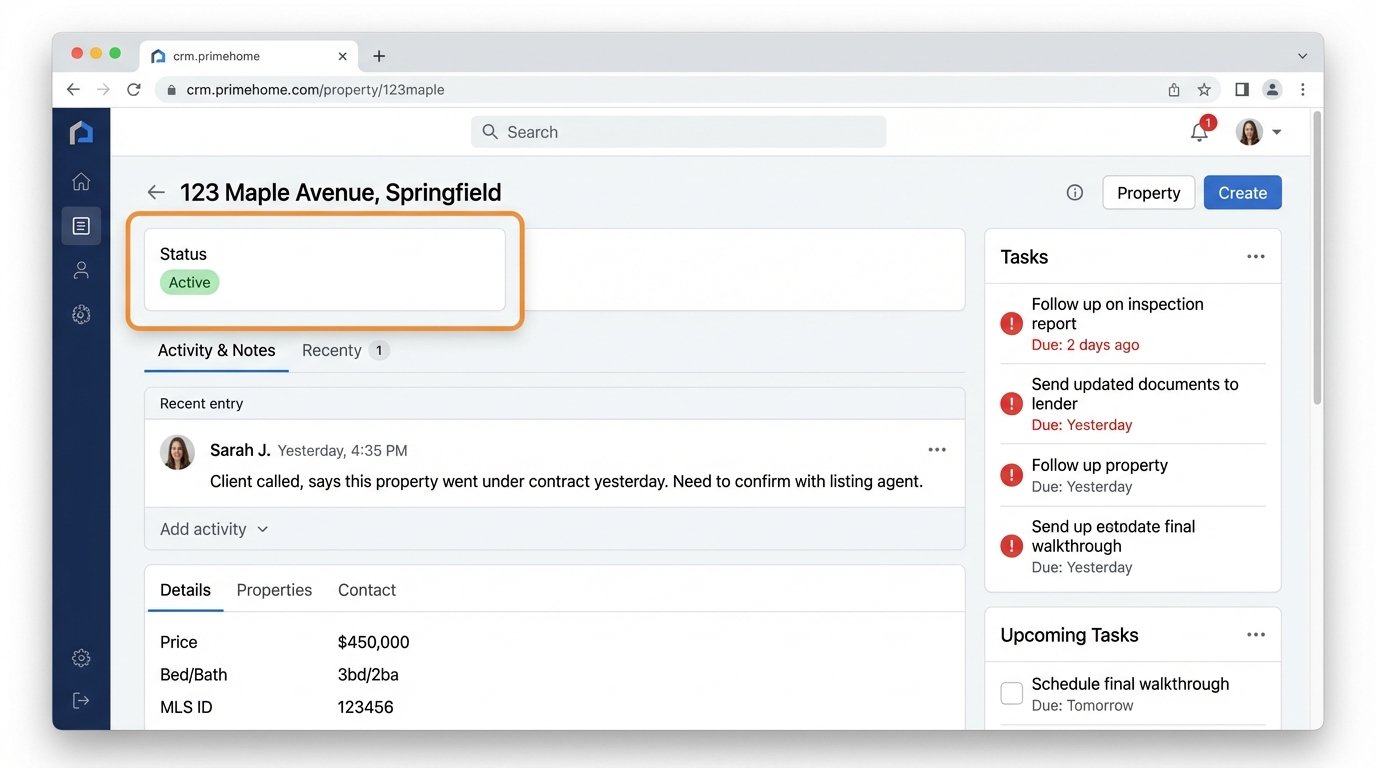
Every manual entry is a potential point of failure. A typo in a price, a wrong status, a missed lead from a portal. The lag between an event happening in the market and it being reflected in your system means your agents are working with stale information. They call on properties already sold. They send marketing for listings with incorrect details. This process is fundamentally broken.
Diagnosing the Core Failure: Data Latency and Human Bottlenecks
The root cause is a reliance on manual synchronization. An agent gets a notification, logs into the MLS, finds the data, logs into the CRM, and re-keys the information. This workflow might take ten minutes or ten hours, depending on their schedule. In that time, the data’s value decays. A new lead expects contact within five minutes, not five hours. A price reduction is a critical trigger for an automated marketing blast, not something to get to “when I have time.”
This creates a cascade of operational failures. Marketing campaigns are triggered based on faulty data. Sales forecasts are built on a foundation of sand. Client trust erodes when an agent provides information that contradicts public-facing portals. You are effectively trying to run a high-speed operation by sending messages via carrier pigeon.
The entire model rests on the assumption that a human can perform repetitive, detail-oriented tasks perfectly and instantly. This has never been true.
The Architectural Fix: Building a Data Pipeline, Not a To-Do List
Stop paying people to be bad robots. The solution is to build an automated pipeline that bridges these systems directly. This is not about a single piece of software. It is about an architecture that treats data as a fluid asset that flows between platforms based on defined triggers and logic. This architecture has three core components: the data source, the logic layer, and the action layer.
Stage 1: The Data Source Connection (The MLS Bridge)
The first step is to establish a direct, programmatic connection to your source of truth, which is almost always the MLS. Forget screen scraping. You need a stable API. Most modern MLS boards offer a RESO Web API, which is a RESTful interface that typically uses OAuth2 for authentication and returns data in a standardized JSON format. This is superior to older RETS systems, which were clunky and required specialized clients.
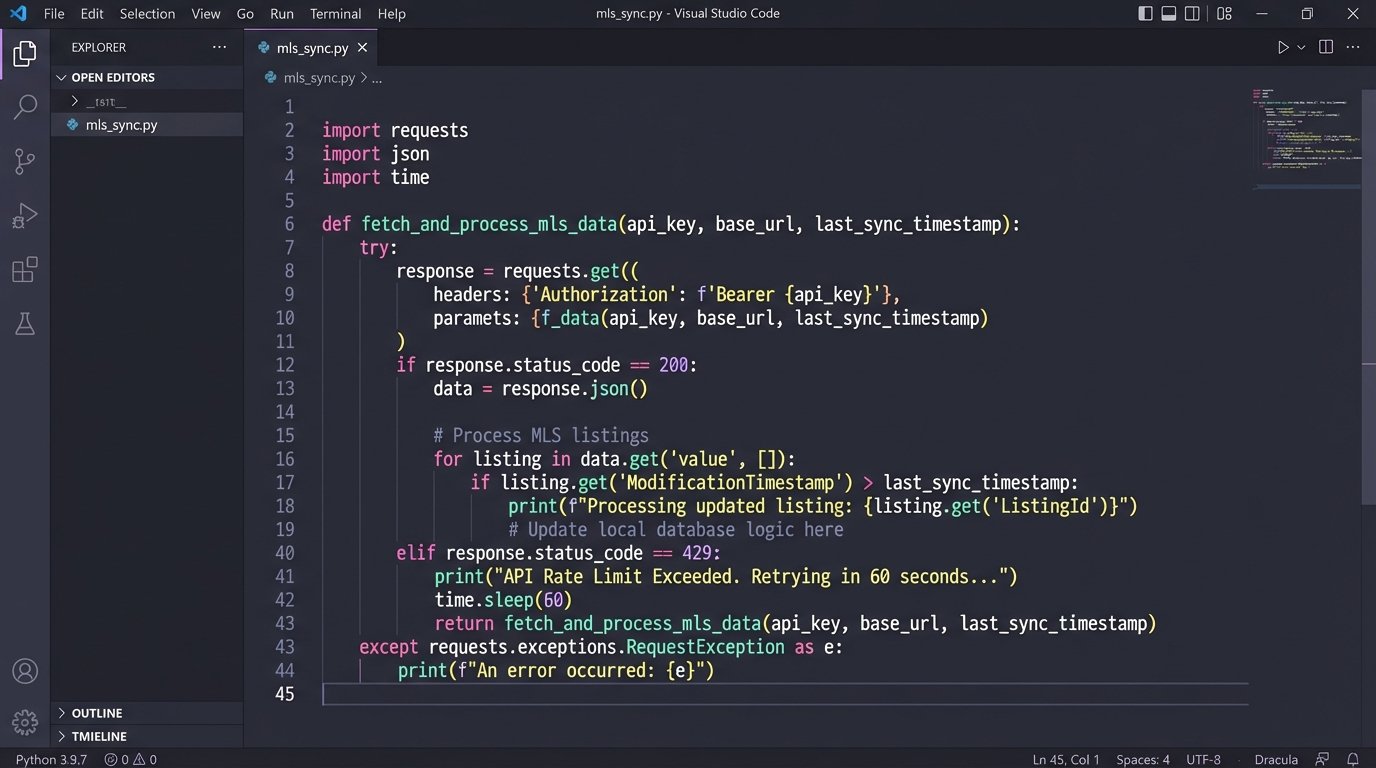
Your initial goal is to query for changes. You are not pulling the entire database every five minutes. That is a wallet-drainer and will get you rate-limited or blocked. Instead, you make targeted calls for listings that have been modified since your last check. You query based on a timestamp, like `ModificationTimestamp`. A typical request might look for new listings or status changes to `Pending` or `Sold`.
Here is a simplified example of the kind of JSON payload you would expect for a single property from a RESO Web API endpoint. Your job is not to consume the whole thing, but to identify the specific key-value pairs you need to drive actions in other systems.
{

  "value": [

    {

      "ListingKey": "1001",

      "MLSNumber": "ABC12345",

      "StreetNumber": "123",

      "StreetName": "Main St",

      "City": "Anytown",

      "StateOrProvince": "CA",

      "PostalCode": "90210",

      "ListPrice": 750000,

      "ListingContractDate": "2023-10-26T10:00:00Z",

      "ModificationTimestamp": "2023-10-27T14:30:00Z",

      "StandardStatus": "Active",

      "Photos": [

        {

          "MediaURL": "https://url.to/photo1.jpg",

          "Order": 1

        }

      ]

    }

  ]

}
The goal here is simple. Get the data out of the silo reliably. Once you have this connection, you have the raw material for automation.
Stage 2: The Logic Layer (The Brains of the Operation)
Getting the data is one thing. Knowing what to do with it is another. The logic layer is where you translate data events into business processes. This can be a custom application, but for speed and maintainability, an integration platform like Zapier, Make, or Workato is often sufficient. These platforms function as a universal translator for APIs.
You build workflows based on triggers and actions. A trigger is the event that starts the process, like “New record in MLS with `StandardStatus` of ‘Active’.” The subsequent steps are the actions. This is where you map the data. You must explicitly tell the system how fields from the source map to fields in the destination. The `ListPrice` from the MLS JSON payload gets mapped to the `Deal_Value` field in your CRM. The `StreetName` from the MLS maps to the `Property_Address` field.
This mapping is the most critical and failure-prone part of the entire setup. Systems rarely have matching schemas. One system might store an address in a single field, while another splits it into five. You will need to write transformation logic to concatenate strings, format dates, or perform conditional checks. For example, if the `PropertyType` is ‘Condo’, route it to one agent. If it is ‘SingleFamilyHome’, route it to another.
Treating this logic layer like a real application is key. You need version control on your workflows. You need to test them in a sandbox environment before pointing them at production data. One mistake in the mapping logic can corrupt thousands of CRM records in minutes. It is a powerful tool that demands discipline.
Stage 3: The Action Layer (Making Things Happen)
With a trigger defined and the data transformed, the final step is to execute an action in a destination system. This is more than just CRM data entry. You can chain multiple actions together to create a complete automated workflow.
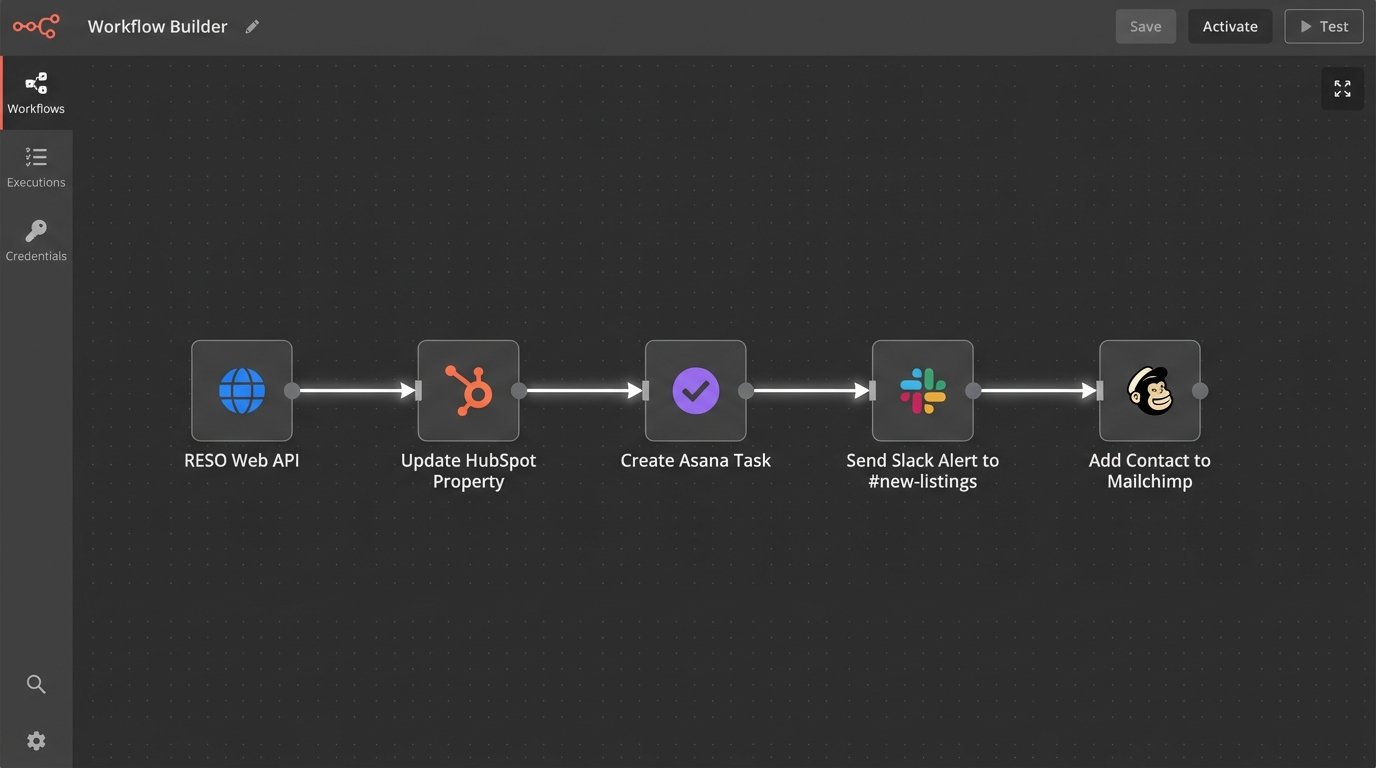
A practical example workflow for a new listing:
- Trigger: New ‘Active’ listing detected in the MLS feed.
- Action 1: Create or update a property record in the CRM (e.g., HubSpot, Follow Up Boss). Map MLS fields to CRM fields.
- Action 2: Create a new task in the CRM assigned to the listing agent, titled “Prepare Initial Marketing for [Property Address]”. Set the due date for 24 hours.
- Action 3: Send a message to a dedicated Slack channel (`#new-listings`) with the property address, price, and a link to the CRM record.
- Action 4: Add the property to a specific audience list in your email marketing platform (e.g., Mailchimp) to be included in the next “Just Listed” newsletter.
This entire chain executes in seconds, without a single human click. The marketing team knows about the listing at the same time as the agent. The agent gets an explicit task. The data is consistent across three different platforms. This is how you force operational efficiency.
Real-World Failure Points and How to Mitigate Them
This approach is not magic. An integration is just another system that can break, and it usually breaks at 3 AM. Presenting this as a perfect solution is a lie. Here are the things that will go wrong and what to do about it.
API Limits and Authentication Failures
Every API you call has a rate limit. If you poll the MLS API too aggressively, you will get a `429 Too Many Requests` error, and your connection will be throttled or temporarily banned. The fix is to implement intelligent polling with an exponential backoff strategy for retries. Also, your API keys and OAuth tokens will expire. Your script or integration platform needs a mechanism to automatically refresh tokens or, at a minimum, send a high-priority alert when authentication fails.
Your automation depends on credentials that someone can change without telling you.
Schema Drift and Unannounced API Changes
The vendor providing the API will eventually change it. They might add a new required field to an endpoint, rename an existing field, or change a data format. This is called schema drift, and it will silently break your data mapping. Your beautifully crafted workflow will start failing or, worse, start injecting malformed data into your CRM.
The only defense is monitoring and contract validation. You need health checks that not only confirm the API is up but also validate that the payload structure matches your expectations. If a key field like `ListPrice` is suddenly missing from the response, the workflow must halt and send an error alert. Do not let it proceed with incomplete data.
Building an automation without solid error handling is like building a car with an accelerator but no brakes. It runs great until it hits a wall.
The Problem of State
How do you know which records you have already processed? A naive script might pull the same 100 recent updates every five minutes and create duplicate tasks or records. You must manage state. This means storing the `ModificationTimestamp` or `ListingKey` of the last record you processed. On the next run, you query only for records newer than that timestamp. This prevents redundant processing and is fundamental to building a scalable integration.
This could be as simple as writing the last timestamp to a text file or a database record. The mechanism is less important than the principle. Never re-process data.
Measuring Success: Ditching Vanity Metrics for Operational KPIs
How do you prove this was worth the effort? You do not measure success in “integrations built.” You measure the operational impact. Focus on metrics that expose the cost of the old manual way.
- Time-to-Lead-Engagement: Measure the time from a lead being created in a portal (e.g., Zillow) to the first logged activity by an agent in the CRM. Automation should crush this metric from hours to minutes.
- Data Accuracy Rate: Conduct periodic audits. Compare 100 random CRM property records against the live MLS data. Track the percentage of records with zero discrepancies in key fields like price and status. This number should approach 100%.
- Manual Hours Reclaimed: Survey your administrative staff and agents. Estimate the hours spent per week on manual data entry between specific systems. Calculate the cost of that time and compare it to the cost of the integration platform and development. The return is usually obvious.
These are not flashy numbers, but they are the ones that reflect a healthier, more resilient operation. You are removing points of failure and freeing up skilled people to do work that requires a brain, not just the ability to copy and paste. The end goal is to build a system that is predictable, auditable, and less dependent on heroic human effort to function.