Mistakes to Avoid When Customizing Your CRM
Most custom CRM projects do not fail with a bang. They decay. The process is a slow rot of technical debt, accumulating from a series of seemingly small, pragmatic decisions made under pressure. The result is a system that the sales team works around, not with, and that engineers are afraid to touch. This is not about picking the right platform. It is about avoiding the architectural traps that turn a business asset into a liability.
Trap 1: Disregarding API Governance as “Someone Else’s Problem”
The API is not a magic data firehose. It is a governed, metered resource. Treating it like an unlimited buffet is the fastest way to get your integration throttled or blacklisted entirely. Every major CRM platform imposes strict API rate limits, often on a per-user or per-org basis, calculated over a rolling 24-hour window. Blowing past these limits does not just slow you down, it stops your operations cold with a `429 Too Many Requests` status code.
A common failure is building a real-time sync that makes one API call per record update. A real estate agency with a thousand new property listings from an MLS feed could exhaust its entire daily API quota in minutes. The correct architecture involves a queuing system and batch processing. Instead of a thousand individual `POST` requests, you bundle 200 records into a single call to a bulk endpoint. This requires more state management on your end, but it respects the server’s limits.
You must log every single API call, its response time, and the status code. Monitor the `X-RateLimit-Remaining` header, or its equivalent, that the CRM API sends back with each response. Use this data to dynamically adjust the speed of your integration. If the remaining call count drops below a certain threshold, your system should automatically slow down or pause its processing queue until the limit resets. Blindly firing requests is amateur hour.
Here is a dead simple, but critical, logic check you should build into any batch processor. It is not complex code, but its absence causes catastrophic data loss when an entire batch fails due to one bad record.
    // Pseudocode for a safer batch insertion

    function processBatch(records) {

      try {

        response = crmApi.bulkInsert(records);

        logSuccess(response);

      } catch (error) {

        // The entire batch failed. Don't give up.

        logBatchFailure(error, records);

        if (records.length > 1) {

          // Split the batch and retry recursively

          const half = Math.ceil(records.length / 2);

          const firstHalf = records.slice(0, half);

          const secondHalf = records.slice(half);

          processBatch(firstHalf);

          processBatch(secondHalf);

        } else {

          // This single record is the problem. Isolate and log it.

          logPoisonRecord(records[0]);

        }

      }

    }
This recursive split identifies the single corrupt record that would otherwise cause the entire batch of 199 valid records to fail. Without it, you are just throwing away data.
Trap 2: Polluting Standard Objects with Custom Fields
There is an impulse to add just one more field to the standard `Contact` or `Opportunity` object. A field for “Last Property Tour Date.” Another for “Mortgage Pre-Approval Status.” After a year, your standard `Contact` object has 150 custom fields. It is a bloated, unmanageable mess that breaks standard reporting, slows down page loads to a crawl, and makes future integrations a nightmare.
You have created a Frankenstein object. Third-party apps from the CRM’s marketplace expect the standard `Contact` object to have a predictable structure. When they encounter your hyper-customized version, they often fail silently or corrupt data. The correct approach is to use custom objects. Instead of adding twenty fields about a property transaction to the `Contact` record, you create a custom `Transaction` object.
This new `Transaction` object holds all the relevant fields: `Property_ID`, `Offer_Amount`, `Closing_Date`, `Agent_Commission`. Then you link it back to the standard `Contact` and `Account` objects via a lookup relationship. This maintains a clean, normalized data structure. It keeps the core objects lean and makes your data model intelligible to both humans and other applications.
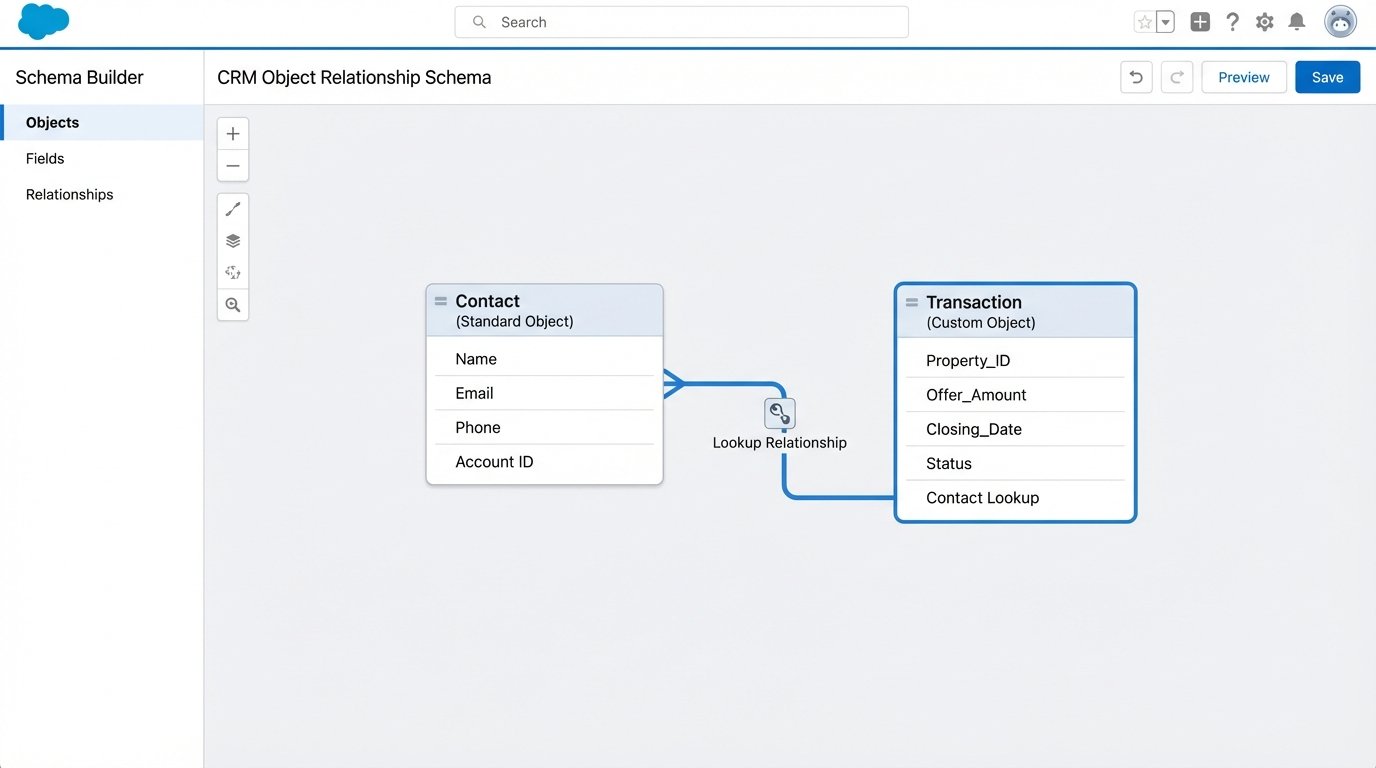
The benefits are immediate. Reports become simpler to build because you can report on “Transactions” as a standalone entity. You can apply specific security rules to the `Transaction` object that do not affect the `Contact` object. For instance, only agents can see commission fields, while front-desk staff can still see the contact’s name and phone number. This level of granular control is impossible when all the data is smashed together in one object.
Before adding any new field, ask one question: Does this data describe the core entity, or does it describe a related process? A contact’s phone number describes the contact. The date they toured a specific property describes a transaction. That distinction is the foundation of a scalable CRM architecture.
Trap 3: Executing a “Lift and Shift” Data Migration
A data migration is not a copy-paste operation. It is a full ETL (Extract, Transform, Load) process. Thinking you can just export a CSV from the old system and import it into the new one guarantees you will spend the next six months dealing with angry sales reps and corrupted data. The “transform” step is the one everyone underestimates, and it is where projects go to die.
The old system’s “Status” picklist had values like “New,” “Working,” and “Closed.” The new CRM has “Prospect,” “Engaged,” “Negotiating,” and “Closed – Won.” You cannot just map “Working” to “Engaged.” You need to write transformation logic. This logic often requires talking to the business to understand the intent behind the old data. What did a sales rep *mean* when they set the status to “Working”?
Another point of failure is data validation. The new CRM requires a valid email address format for every contact. Your old system had none, so you have 5,000 records with “tbd@test.com” or just “email unknown.” You must run a full data cleansing and validation script during the transformation phase. This script should identify and flag every record that will fail the new system’s validation rules. You then give this list to the business to fix *before* the final migration.
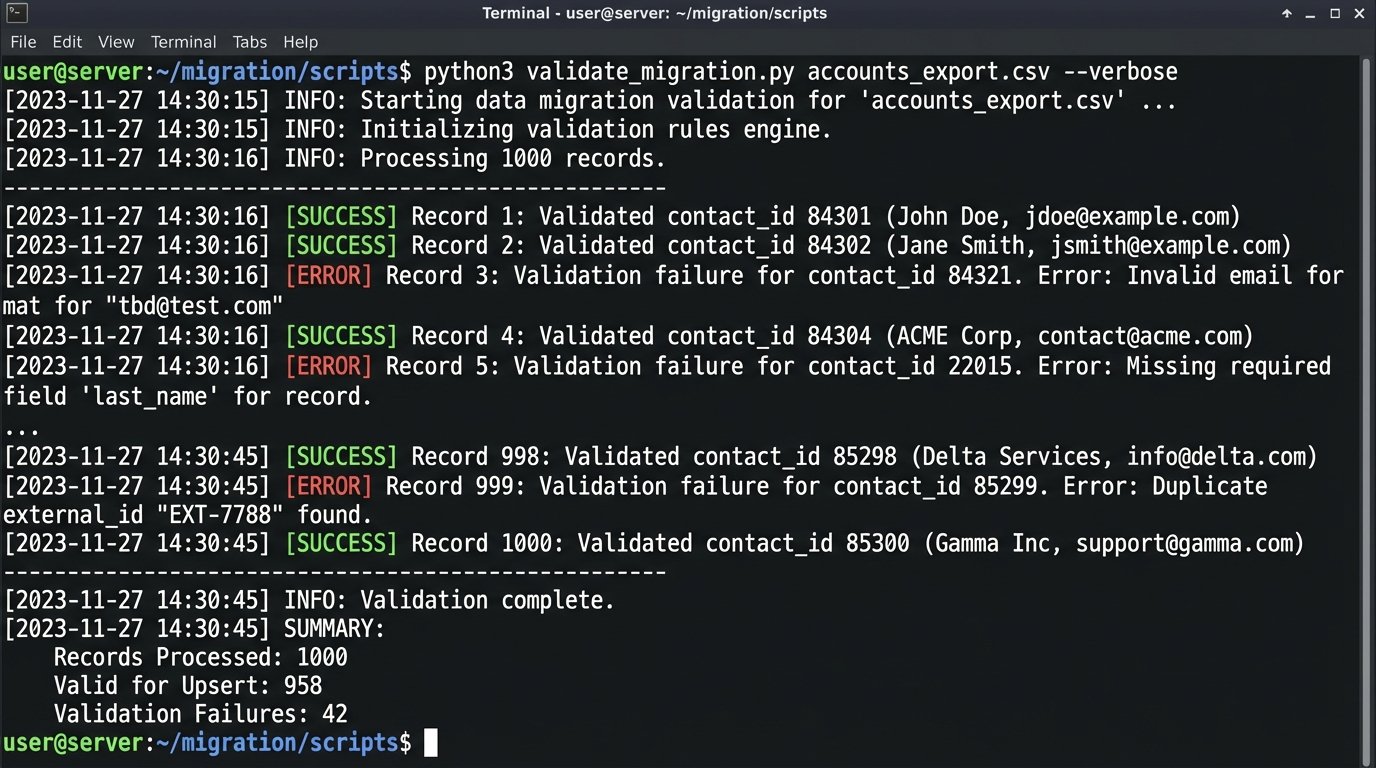
The load process itself must be idempotent. This means you can run the same import script multiple times without creating duplicate records. You achieve this using an external ID. Before you import anything, you create a custom field in the new CRM called `Legacy_System_ID`. You populate this field with the unique primary key from the old system. Your import script then uses an “upsert” command. For each row, it checks if a record with that `Legacy_System_ID` already exists. If it does, it updates it. If not, it creates it. This protects you during test runs and when the final migration inevitably has to be paused and restarted.
Relying on UI automation for a large-scale data sync is like trying to change a car’s oil through the exhaust pipe. It is a messy, indirect path that ignores the purpose-built engine ports. The API is the engine port. Use it. Scripts that click buttons on the screen are fragile. They break if a developer changes a button’s CSS class. An API call is a stable contract. It does not care what the interface looks like.
Trap 4: Building Point-to-Point Integration Spaghetti
Your CRM needs to talk to your marketing platform. Your marketing platform needs to talk to your analytics warehouse. Your analytics warehouse needs to send data back to the CRM. The knee-jerk solution is to build direct, point-to-point integrations for each one. This creates a brittle, unmanageable web of dependencies. When you need to replace the marketing platform, you have to rewrite code in three different systems.
This architecture is not scalable. A better model is a hub-and-spoke system, often implemented with an enterprise service bus (ESB) or a more modern integration platform as a service (iPaaS). In this model, the CRM does not talk directly to the marketing tool. Instead, the CRM publishes a generic “New Lead Created” event to a central message queue. Any other system that cares about new leads, like the marketing tool or a sales commission calculator, subscribes to that event.
When you swap out the marketing platform, you just build a new subscriber to that same event. The CRM integration does not change at all. You have decoupled the systems. This approach forces you to standardize your data events. You define a canonical `Lead` object structure for your organization, and every system that publishes or subscribes to lead events must adhere to it. This initial standardization is more work, but it saves thousands of hours in the long run.
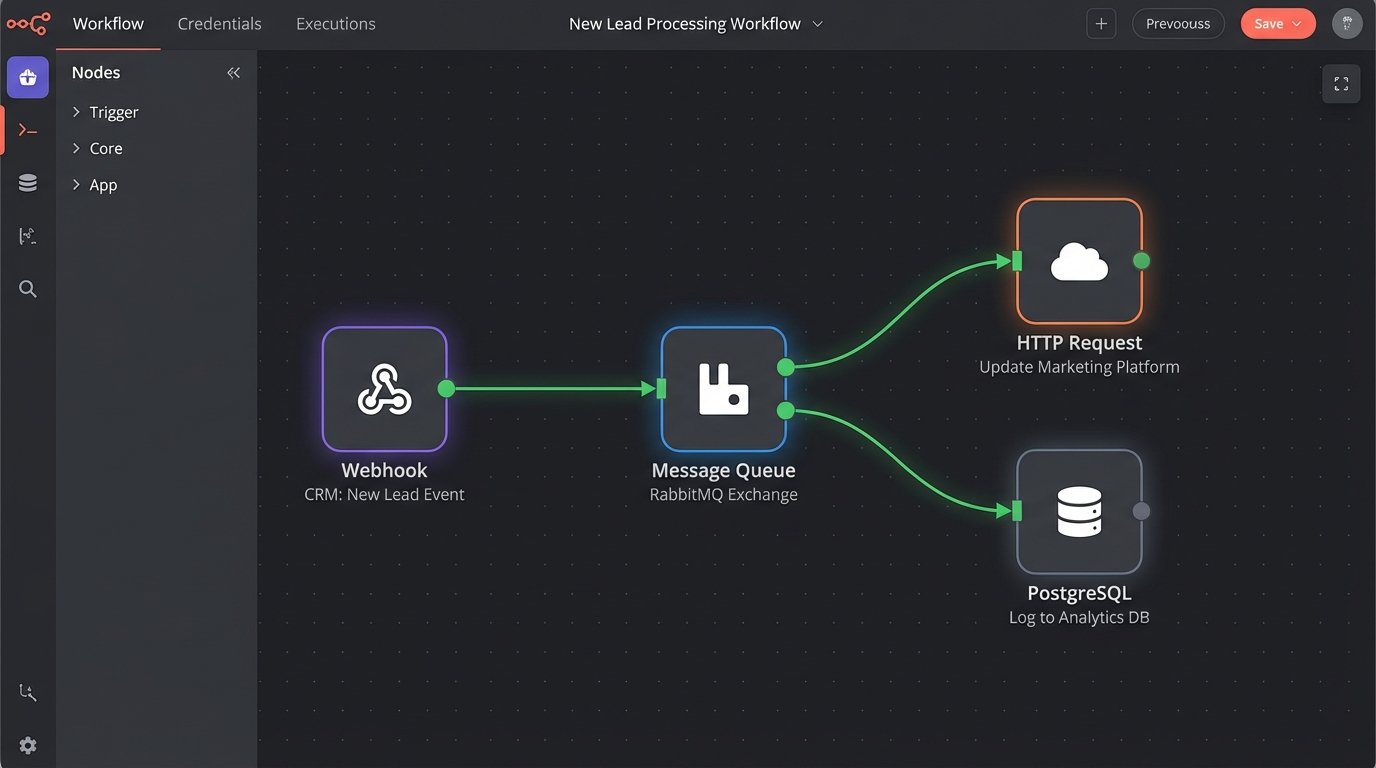
The other component of this is to push for event-driven workflows over polling. Do not write a script that asks the CRM “any new leads?” every five minutes. That is inefficient and burns API calls. Instead, configure a webhook in your CRM. When a new lead is created, the CRM should actively push a notification to an endpoint you control. This is a far more efficient and real-time architecture.
Trap 5: Letting the Business Logic Live in the User’s Head
The final, and most insidious, mistake is failing to codify business processes within the CRM. A senior real estate agent knows that when a property’s status changes to “Under Contract,” they need to email the transaction coordinator, create a task for the home inspection, and update the client’s record. They do this from memory. When that agent leaves, the process leaves with them.
These processes must be automated inside the system. Use the platform’s built-in process automation tools. When a record field is updated to a specific value, it should trigger a chain of actions. Send an email template, create three linked tasks with staggered due dates, and update related records. This forces consistency and creates an auditable trail of actions.
This is not just about efficiency. It is about data integrity. If reps are supposed to update five fields when a deal closes but they only remember three, your analytics are garbage. The system should be configured to enforce the process. You can use validation rules to prevent a user from moving an opportunity to “Closed – Won” unless required fields like “Final Sale Price” and “Commission Split” are populated. The system should make it impossible to do the job the wrong way.
The goal of customization is not to add more buttons. It is to inject your company’s operational logic directly into the software, creating a system that guides users toward the correct action. Anything less is just a glorified address book.