
The first invoice for that new CRM or listings management platform is always deceptively simple. Ten seats at ninety-nine dollars each. By the third quarter, you have forty seats, three different pricing tiers nobody can explain, and a finance department asking why the software budget has doubled. The core problem is treating subscription management as an accounting task when it is an engineering problem. Manual audits in spreadsheets are a recipe for failure.
Stop Relying on Vendor Dashboards
Vendor-provided admin dashboards are not built for forensic cost analysis. They are designed to encourage upgrades and obscure the data points you actually need, like last login date, feature usage frequency, or API call volume per user. They report on active seats, but their definition of “active” is often just “hasn’t been deleted yet.” This is a sales tool, not a diagnostic instrument.
To gain actual control, you must bypass the UI and interface directly with the vendor’s API. This is the only path to raw, unfiltered usage data. The goal is to build your own system of record for license allocation and activity, forcing the vendor’s platform to become a data source, not the single point of truth.
Without API access, you are flying blind.
Build a Usage-Auditing Engine
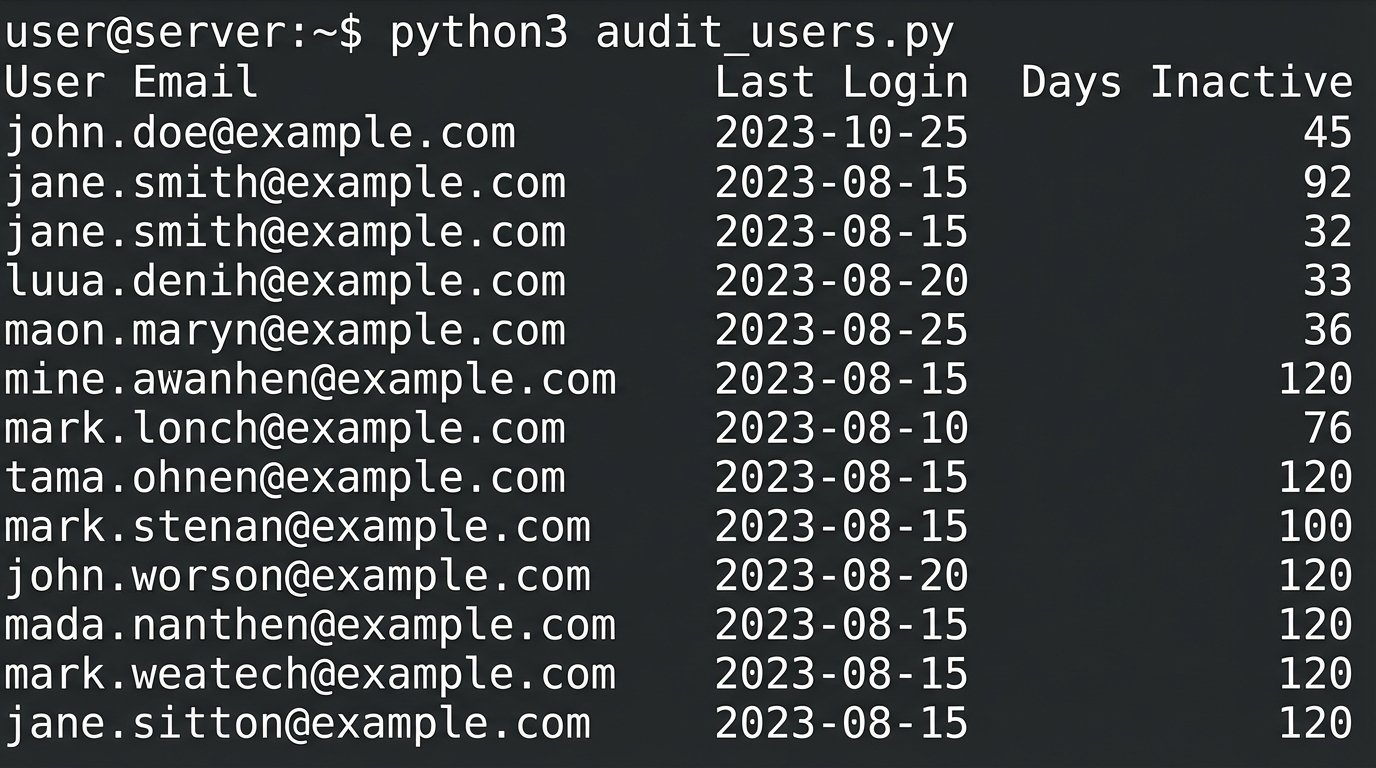
The foundation of any cost management automation is a script that polls your software stack for user activity. This is not a one-off task. It should be a scheduled job running weekly or even daily, depending on the volatility of your team structure. The script’s primary function is to pull a list of all provisioned users and their last activity timestamp. This single piece of data is more valuable than any report from the vendor’s dashboard.
Authentication and Key Management
Hardcoding API keys into a script is amateur hour. Use a proper secrets management system like AWS Secrets Manager, Azure Key Vault, or HashiCorp Vault. The script should authenticate to the vault, retrieve the necessary API token or key for the target service, and then execute its logic. This isolates credentials from the code, allowing you to rotate keys without redeploying the entire script.
This also creates an audit trail. If a key is compromised, you know exactly which service principal or role was using it.
Handling API Rate Limits
Every SaaS API has a rate limit. Hitting it repeatedly will get your IP blocked or your account throttled, usually in the middle of a critical run. Before writing a single line of code, find the rate limit documentation. It is often buried in their developer portal. Structure your script to respect these limits. Instead of fetching users one by one in a tight loop, use batch endpoints if available. If not, inject a sleep timer between calls.
A simple check on the HTTP response headers can tell you your remaining call quota. Logic-check this after every request and dynamically adjust your polling frequency. Treating API capacity as infinite is a design flaw.
import requests

import os

import time
# Example assumes API key is stored as an environment variable, not in the code.
API_KEY = os.environ.get('REAL_ESTATE_CRM_API_KEY')
API_ENDPOINT = "https://api.somecrm.com/v2/users"
HEADERS = {'Authorization': f'Bearer {API_KEY}'}
def get_inactive_users(days_inactive):
try:
response = requests.get(API_ENDPOINT, headers=HEADERS, params={'status': 'active'})
response.raise_for_status() # Will raise an exception for 4XX/5XX errors
# Logic to check rate limit headers from response
# if int(response.headers.get('X-RateLimit-Remaining', 1)) < 10:
# time.sleep(60) # Pause if rate limit is low
users = response.json().get('data', [])
inactive_list = []
for user in users:
last_login_str = user.get('last_login_timestamp')
# Further logic to parse timestamp and compare against threshold
# ...
return inactive_list
except requests.exceptions.HTTPError as err:
print(f"HTTP Error: {err}")
return None
except requests.exceptions.RequestException as e:
print(f"Request Error: {e}")
return None
This skeleton gives you a starting point. The real work is in the error handling and the timestamp parsing, which will be different for every quirky API you have to deal with.
Automate the Deprovisioning Workflow
Once you can reliably identify inactive accounts, the next step is to act on that information. Manually deleting users based on a script’s output is better than nothing, but it does not scale. The goal is to create a closed-loop system that flags, notifies, and ultimately deprovisions licenses without human intervention. This requires a clear, codified set of business rules.
Defining Inactivity That Matters
An “inactive” user is not just someone who has not logged in. What if they are a manager who only reviews a dashboard once a month? What about a user who consumes data via API calls but never touches the UI? Your definition of inactivity must be nuanced. A simple “last login > 90 days” rule will inevitably lead to deprovisioning a critical account for someone on leave.
A better approach involves tiers of inactivity.
- Tier 1 (30 days inactivity): Send an automated warning email to the user and their manager. No action taken.
- Tier 2 (60 days inactivity): Convert the user’s license to a “read-only” or cheaper tier if the software supports it. Send a second notification.
- Tier 3 (90 days inactivity): Deprovision the license. Add the user to an exception list so they can request reactivation with justification.
This multi-stage process prevents abrupt lockouts and gives people a chance to object before their access is torched.
Integrating with Identity Providers
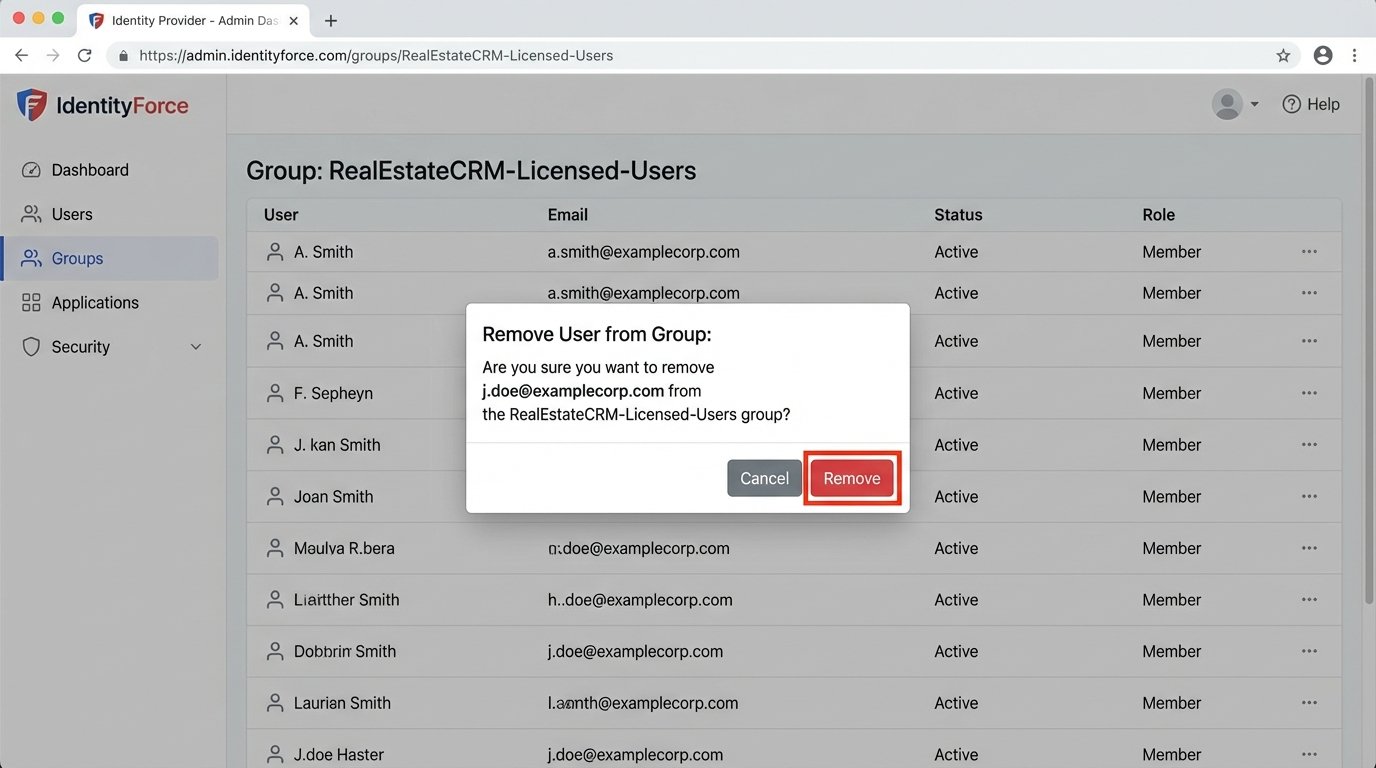
The most robust way to manage licenses is to tie them to your central Identity Provider (IdP) like Okta, Azure AD, or Google Workspace. Use group membership to control license allocation. Create a group called “RealEstateCRM-Licensed-Users.” The SaaS application should be configured for SAML or SCIM provisioning, automatically granting a license to anyone added to that group and revoking it upon removal.
Your inactivity script no longer deprovisions directly. Instead, it interacts with the IdP’s API to remove the inactive user from the specific group. This is a much cleaner architecture. It centralizes access control and ensures that when an employee is offboarded from the IdP, their expensive software licenses are immediately and automatically reclaimed.
You stop managing hundreds of users in ten different apps and start managing a few groups in one place.
Systematic Cost Allocation
Identifying waste is half the battle. The other half is attributing costs to the correct departments. Without this, there is no financial incentive for team leads to manage their own software bloat. The engineering goal is to generate a report that finance can actually use, mapping license consumption to internal cost centers.
This is often the messiest part of the project. Getting reliable department or team data associated with a user account can feel like pulling teeth. Pushing raw API data into a financial system without normalization is like connecting a firehose to a garden sprinkler. You get data everywhere, but none of it is useful.
Tagging and Metadata
Your IdP is again the best source for this data. Most IdPs allow you to store custom attributes for users, such as “Department,” “CostCenter,” or “Team.” When your audit script pulls the list of active users from a SaaS platform, it must then cross-reference each user’s email or ID with the IdP to enrich the data with these financial tags.
The final output should not be a simple list of inactive users. It should be a structured file (CSV or JSON) containing columns like `email`, `saas_platform`, `license_tier`, `last_login`, `cost_center`, and `manager`. This is a document that can be fed directly into a financial planning tool or simply pivoted in a spreadsheet to show exactly how much each department is spending on underused software.
Confronting Shadow IT
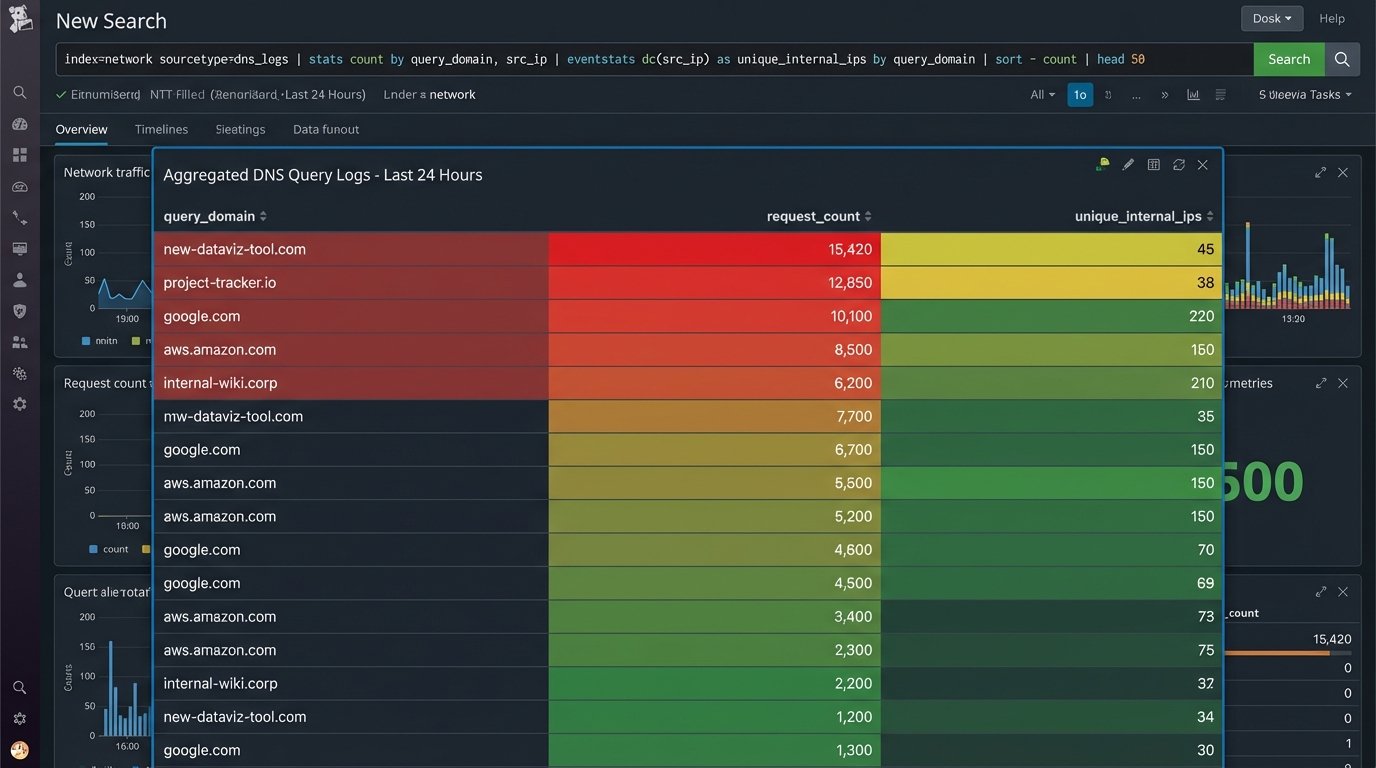
The systems described above work perfectly for software you know about. The real wallet-drainer is “Shadow IT,” where a team lead expenses a 10-seat subscription to a new data visualization tool on a corporate card. It never hits the central IT budget until it is an entrenched, business-critical application that costs a fortune.
There are two main technical approaches to hunting down these unmanaged subscriptions. The first is analyzing financial data. Write a script that parses corporate credit card expense reports, looking for recurring charges from known SaaS vendors. This is a crude but effective method for finding undeclared software.
The second, more sophisticated method is network traffic analysis. By inspecting DNS logs or firewall traffic, you can identify frequent connections from inside your network to the domains of cloud software providers. If you see dozens of employees making persistent connections to a service that is not on your approved software list, you have likely found a pocket of Shadow IT. This requires a level of network access that is not always available, but the data is definitive.
The Target State: A Self-Regulating System
The ultimate goal is to move from periodic cleanups to a state of continuous optimization. A fully mature system does not just report on waste, it prevents it. New employees are automatically provisioned with a starter set of licenses based on their role and department group in the IdP. Inactive licenses are automatically harvested and returned to the pool.
Requests for new software are routed through a workflow that requires justification and budget-holder approval before a license is ever purchased. The system tracks consumption against a forecasted budget, flagging overruns before the invoice arrives. This shifts the process from being reactive and painful to proactive and predictable.
It requires upfront engineering effort, but it replaces endless manual audits and financial surprises with cold, predictable logic.