
Stop Letting Hot Leads Go Cold Overnight
A lead submitted at 10 PM is effectively dead by 9 AM the next day. The standard “we received your message” auto-reply is digital garbage that trains prospects to ignore you. The objective is not to acknowledge the lead. The objective is to qualify, segment, and in some cases, trigger immediate human intervention before your competition even knows the lead exists. This is not about politeness. It is about speed and classification.
This tutorial outlines a serverless architecture to ingest, analyze, and act on leads in real time, long after your sales team has logged off. We will bridge a standard CRM webhook to a language model for intent classification, then route the lead based on the result. It is a direct, logical pipeline designed to filter signal from noise while everyone else is sleeping.
Prerequisites and The Bill
Before writing a single line of code, you need the keys to the kingdom. This includes an administrator-level account in your CRM, such as Salesforce or HubSpot, with permissions to create webhooks and API credentials. You will need an AWS account for Lambda and CloudWatch or a Cloudflare account for Workers. Finally, you need an API key from a provider like OpenAI. Do not proceed without these.
Let’s also talk about the cost. The serverless function itself costs fractions of a penny per run. The real wallet-drainer is the LLM call. A GPT-4 call can be orders of magnitude more expensive than a cheaper model. You are paying for accuracy. Your budget will dictate whether you get a genius analyst or a barely-capable intern classifying your leads.
Your CRM data must not be a complete mess. The automation hinges on predictable data structures. If you do not have a consistent “lead source” or “message” field, the entire system fails. Fix your data hygiene first.
Step 1: The Webhook Tripwire
The process starts inside your CRM. You need to configure a webhook that fires immediately upon the creation of a new lead or contact. This webhook is a simple HTTP POST request sent to an endpoint you control. The payload will contain the raw lead data, typically as a JSON object. This is your entry point.
Your first piece of infrastructure is the serverless function that will act as the webhook listener. This is where the CRM sends its data. The initial code for this function should do two things only: receive the request and log the entire payload. Nothing more. Do not attempt to parse or process anything until you have verified the exact structure of the data your CRM is sending. Documentation is frequently outdated.
Trusting the incoming payload is a rookie mistake. You must logic-check the data structure before you do anything with it. Does the email field exist? Is the message field populated? A function that assumes data integrity is a function that is waiting to crash. Build a simple validation gate at the very top of your script.
// A basic Node.js example for a Lambda or Cloudflare Worker
export default {
  async fetch(request, env) {
    if (request.method !== 'POST') {
      return new Response('Method Not Allowed', { status: 405 });
    }

    const payload = await request.json();

    // Log the entire raw payload for inspection
    console.log(JSON.stringify(payload, null, 2));

    // Basic validation gate
    const leadMessage = payload.properties?.message?.value;
    const leadEmail = payload.properties?.email?.value;

    if (!leadMessage || !leadEmail) {
      console.error('Validation failed: Missing required fields.');
      // Return a 200 OK to prevent CRM from retrying a bad request
      return new Response('OK', { status: 200 });
    }

    // ... subsequent processing logic goes here ...

    return new Response('Processing initiated', { status: 202 });
  }
};
This initial code is your foundation. Get this part wrong, and nothing else matters.
Step 2: Data Interrogation and Sanitization
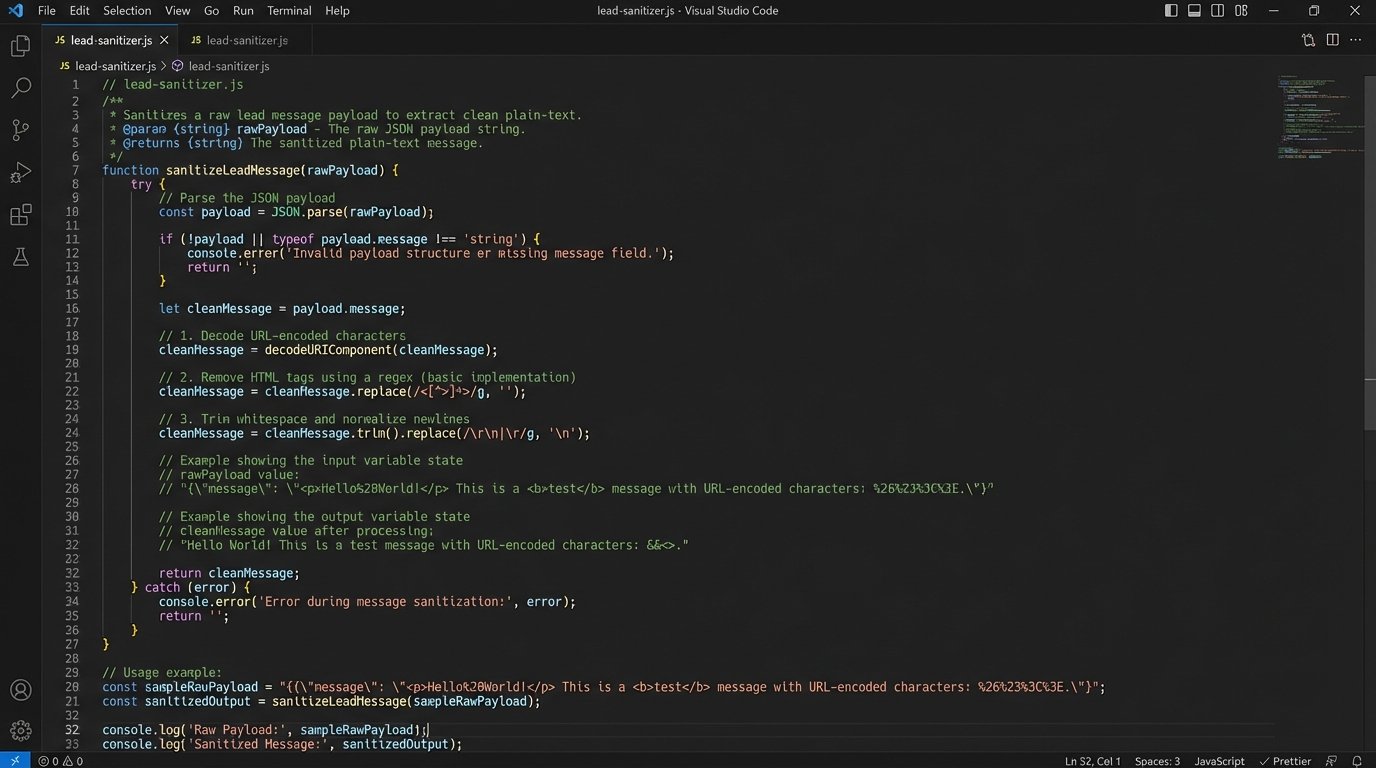
The JSON payload from the CRM is a raw data dump. It is often bloated with internal IDs, tracking parameters, and HTML formatting from a web form’s rich text editor. Your next task is to gut this payload, stripping it down to the bare essentials required for analysis. You are primarily interested in the prospect’s message, name, and contact information.
We are treating the incoming data payload like a hostile witness in a deposition. We only want the facts, not the emotional baggage. This means stripping HTML tags, decoding URL-encoded characters, and removing any boilerplate text injected by the web form itself, like “Sent from contact form:”. A clean input is critical for getting a reliable output from the language model.
Create a dedicated sanitization function that takes the raw message string and processes it. This function should be a brutal filter. Its only job is to return a clean, plain-text version of the prospect’s actual query. This step prevents garbage data from confusing the classification logic later on.
Step 3: Intent Classification with The Brain
This is the core of the system. We will now take the sanitized message and inject it into a carefully structured prompt for a large language model. The goal is not to have a conversation. It is to force the LLM to act as a classification engine, returning a single, predictable label that our code can parse.
The prompt design is everything. Do not be vague. Provide the model with the exact categories you want it to use. Give it clear instructions on the output format, such as a simple JSON object. This is not a creative writing exercise. You are programming the model’s response through your prompt.
- URGENT_BUYER: The prospect mentions specific timelines, budgets, or buying signals. Example: “I need a quote for 50 units by tomorrow.”
- TIRE_KICKER: The prospect is asking general questions or is clearly in an early research phase. Example: “How does your product compare to X?”
- SUPPORT_REQUEST: The user is an existing customer asking for help. Example: “I can’t log into my account.”
- SPAM: The message is irrelevant, a sales pitch, or nonsense.
Your API call to the LLM should wrap this prompt and the user’s message. Here is an example of what the core instruction block within your prompt might look like.
Analyze the following lead message. Classify it into ONE of the following categories: URGENT_BUYER, TIRE_KICKER, SUPPORT_REQUEST, SPAM.
Return ONLY a JSON object with a single key "classification".

Lead Message:
"""
{sanitized_message_content}
"""

JSON Response:
This structure forces a clean, machine-readable response and minimizes the risk of the model giving a conversational, unparsable answer.
Step 4: The Logic Switchboard
The LLM returns a classification label. Now, your serverless function needs to act as a switchboard, routing the lead based on that label. This is where the automation fulfills its purpose. A simple `switch` statement is the cleanest way to handle this conditional logic. Each case in the switch represents a distinct business process.
For an `URGENT_BUYER`, the action should be immediate and loud. This could involve making an API call to a service like Twilio to send an SMS directly to the on-call sales representative. Simultaneously, you will update the CRM to flag this lead with the highest priority. The goal is to get human eyes on it within minutes, not hours.
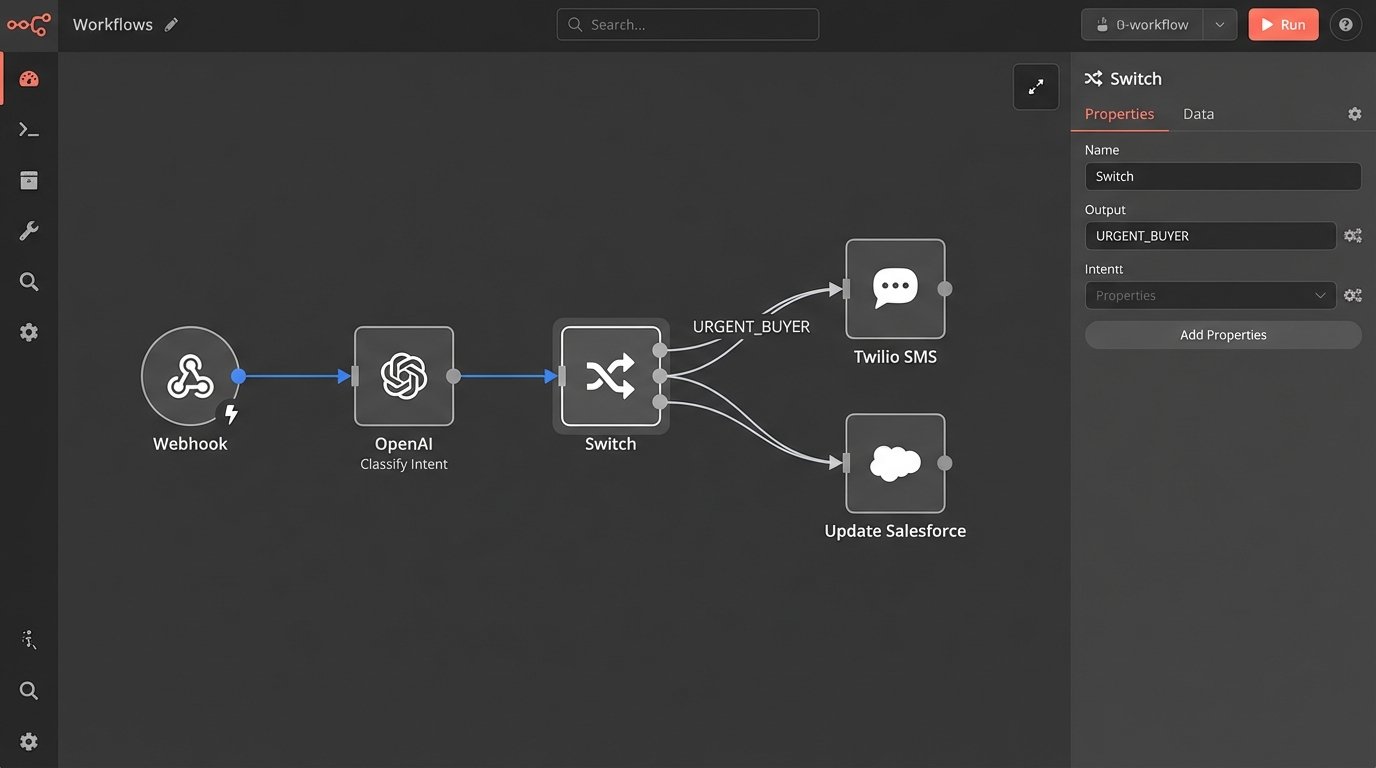
A `TIRE_KICKER` gets a different treatment. Here, you can afford to be less aggressive. The system should send a pre-written, but context-aware, email. This email can provide links to case studies, documentation, or a calendar link to schedule a call during business hours. This keeps the lead warm without wasting a salesperson’s time at midnight.
`SUPPORT_REQUEST` and `SPAM` classifications are about containment. A support request should be routed away from the sales queue entirely, perhaps by creating a ticket in a system like Zendesk or Jira via their respective APIs. Spam should simply be logged and then dropped. No reply. No action. Do not engage.
The serverless function acts as a digital bouncer, checking IDs and sending patrons to the right room or kicking them out entirely. It is a ruthless, efficient gatekeeper.
Step 5: Closing the Loop
Executing an action is only half the job. You must record what you did. The final step in the function’s logic is to make an API call back to the CRM to update the lead record. This provides a clear audit trail and gives the sales team critical context when they start their day.
At a minimum, you should update a custom field on the lead object with the classification label returned by the LLM (e.g., `auto_classification: URGENT_BUYER`). You should also add a note or task to the lead’s timeline detailing the exact automated actions taken, like “Sent SMS to on-call rep” or “Sent ‘Tire Kicker’ email sequence.” This prevents a human from repeating the work or being confused about what has already happened.
Be mindful of your CRM’s API rate limits. If you anticipate a high volume of leads, you cannot just fire off API calls indiscriminately. A poorly designed system can easily get throttled, causing updates to fail. This is a real risk in high-volume brokerage environments.
Step 6: Paranoia and Validation
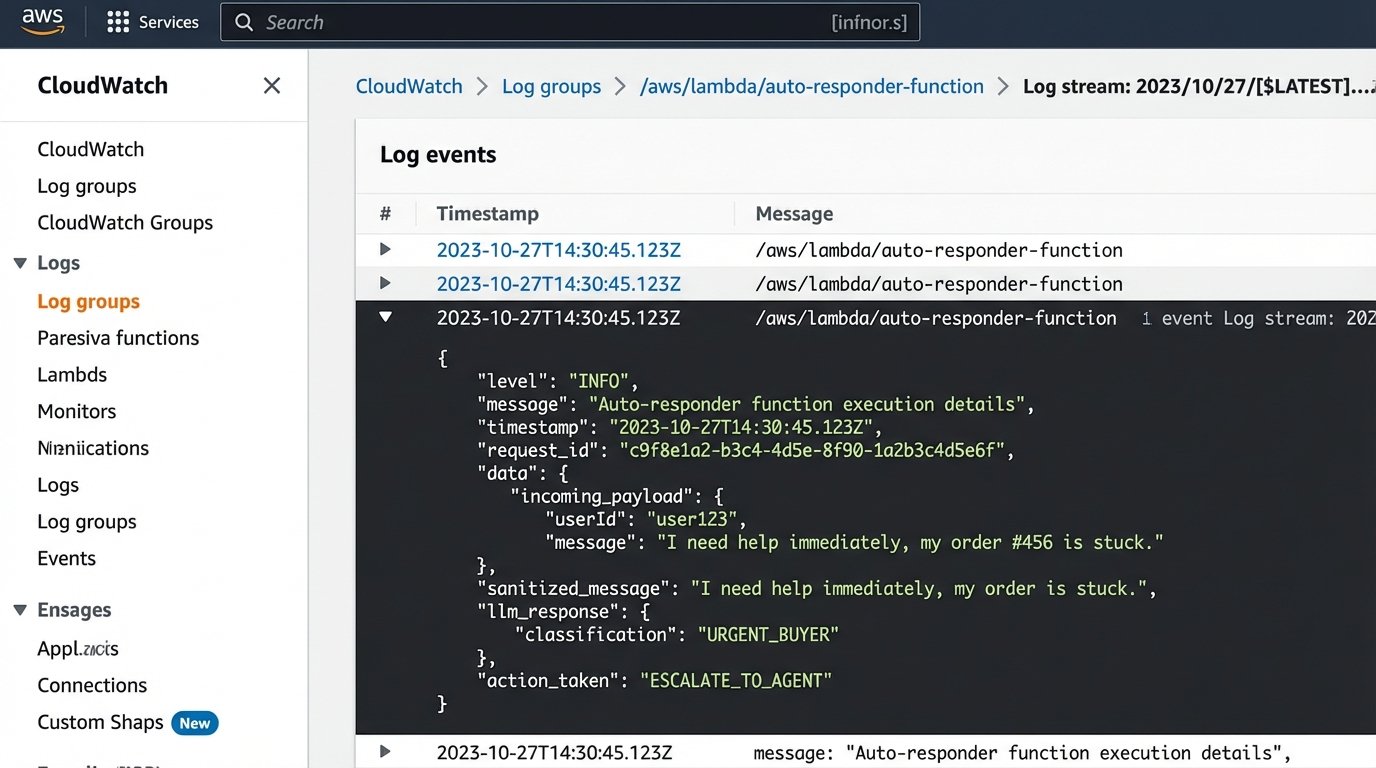
This system is not a black box you can set and forget. It will fail. The LLM API will go down. The CRM API will return a 500 error. A change in the webhook payload structure will break your parsing logic. Your only defense is obsessive logging and a plan for failure.
Configure your serverless function to log everything to a service like AWS CloudWatch or a dedicated logging platform. You need to log the incoming payload, the sanitized message, the exact prompt sent to the LLM, the raw response from the LLM, and the success or failure of the final CRM update call. Without these logs, you are debugging blind at 3 AM.
For critical failures, like the inability to contact the LLM or CRM APIs, implement a dead-letter queue (DLQ). A DLQ is a holding pen for failed function invocations. It captures the event that caused the failure so you can inspect it manually and re-process it if necessary. A system without a DLQ is a system that silently loses your most valuable leads.
This automation is not a replacement for a human. It is a force multiplier that filters, qualifies, and escalates. It buys your sales team the most valuable commodity there is: time. But it is a machine, and all machines require maintenance and monitoring.