Every high-performing sales agent eventually hits a ceiling. It’s not a skill ceiling. It’s an administrative one. The agent in this case was spending nearly a quarter of her work week manually summarizing meeting notes, drafting follow-up emails, and updating CRM records. The process was a slow, methodical grind of copy-pasting between Google Calendar, a notes app, and the company CRM. This wasn’t just inefficient. It was a direct drain on revenue-generating activity.
The core problem was context switching combined with low-value, repetitive tasks. Each thirty-minute meeting generated another fifteen minutes of administrative cleanup. With five to six meetings a day, the math gets ugly fast.
The Anatomy of the Bottleneck
Before we build anything, we map the failure points. The agent’s manual workflow was a sequence of potential errors and delays. First, she would finish a call. Then, she’d block out time later to process the follow-up. This delay meant context was lost and critical details could be forgotten. The CRM record update was often a separate action, sometimes happening a day later, which is poison for data integrity.
Her process looked like this:
- Manually copy meeting notes into a new email draft.
- Re-read notes to identify action items for the client and for internal teams.
- Manually update the opportunity stage in the CRM.
- Log the activity call in the CRM, pasting in a summary of the notes.
- Set a manual task reminder for the next follow-up.
Every step was a click. Every click was a few seconds. Those seconds bleed you dry over the course of a year.
Architecture of the Fix: A Trigger-Based Workflow
We decided to gut the entire manual process. The goal was to build a system that would trigger the moment a client meeting ended, handle 90% of the administrative load, and present the agent with a pre-built follow-up draft for a final sanity check.
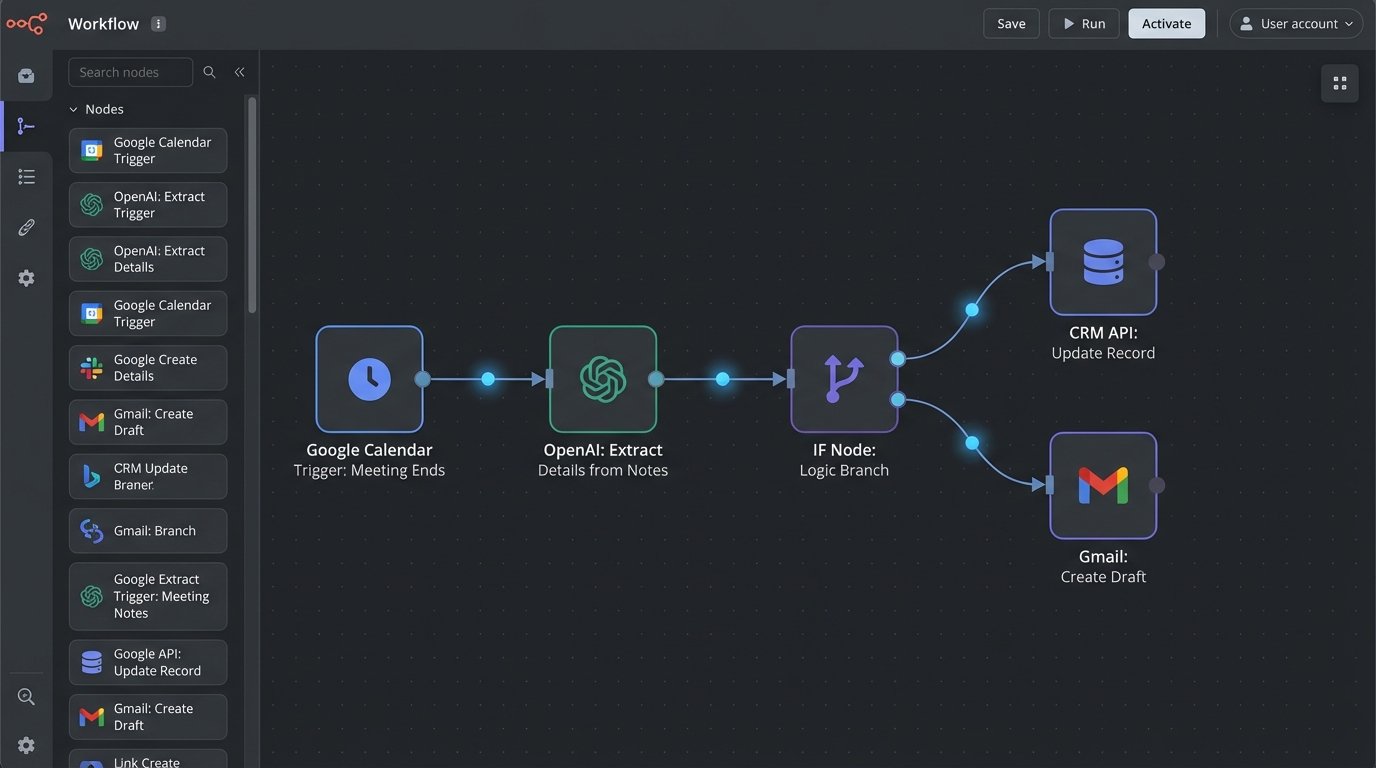
The stack we chose was direct: Google Calendar for the trigger, n8n for the orchestration logic, OpenAI’s API (GPT-4) for intelligent note summarization, the CRM’s API for record updates, and Gmail for the final action.
Step 1: The Trigger and Initial Data Grab
The entire sequence kicks off when a Google Calendar event ends. We set up a webhook in n8n that listens for events where our agent is an attendee and the event title contains a specific keyword like “[Client Call]”. This initial filter prevents the automation from firing for internal meetings or personal appointments.
Once triggered, the workflow immediately pulls the event details: attendees, title, and the description field, which is where the agent was instructed to keep her raw meeting notes. Grabbing this data is straightforward. The hard part is turning messy, free-text notes into structured information.
Step 2: Gutting the Notes with AI
This is where we inject some intelligence. Raw notes are useless for automation. We pipe the entire block of text from the calendar event description into an OpenAI node with a specific prompt. We don’t ask it to “summarize.” That’s too vague. We instruct it to extract specific entities.
The prompt engineers the model to return a clean JSON object. This is non-negotiable for reliable automation. Forcing a specific output structure prevents the model from getting creative and breaking the downstream steps.
{
  "summary": "A concise, two-sentence summary of the meeting's purpose and outcome.",
  "client_action_items": [
    "Send over the Q3 performance report.",
    "Provide access to the analytics dashboard."
  ],
  "internal_action_items": [
    "Legal team to review the draft MSA.",
    "Dev team to scope the custom integration."
  ],
  "next_step_date": "2024-09-15"
}
Getting this JSON back consistently is the lynchpin of the entire system. Sending unstructured text through a workflow is like trying to shove a firehose through a needle. It’s messy and it will fail.
Step 3: Logic Branching and CRM Updates
With structured data in hand, the workflow can make decisions. An IF node checks the meeting notes for keywords like “proposal” or “contract.” Based on the findings, it automatically updates the opportunity stage in the CRM via an API call. A “proposal discussed” meeting moves the deal stage to “Proposal Sent.” A “kick-off call” moves it to “Onboarding.”
This bypasses the need for the agent to ever manually update the pipeline after a call. The activity log is also updated automatically, with the AI-generated summary posted as a note. This keeps the rest of the team informed without the agent lifting a finger.
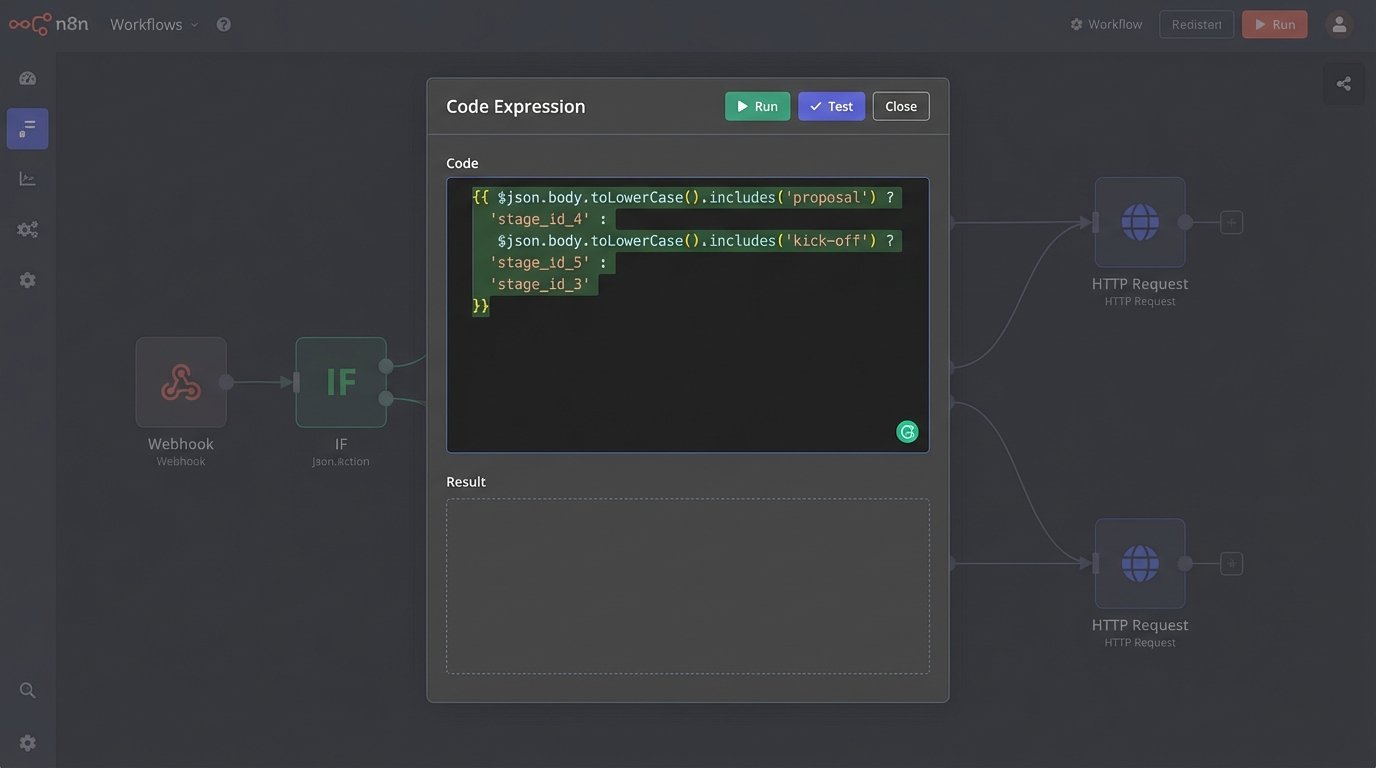
We used a simple n8n expression here to map keywords to the correct CRM stage ID. It’s not elegant, but it’s brutally effective.
{{
  $json.body.toLowerCase().includes('proposal') ? 'stage_id_4' :
  $json.body.toLowerCase().includes('kick-off') ? 'stage_id_5' :
  'stage_id_3'
}}
Step 4: Assembling the Email Draft
The final step is generating the follow-up. We pull a pre-written email template and inject the structured data from the JSON object: the summary, the bulleted lists of action items, and the proposed next step date. The system doesn’t send the email directly. That’s a level of trust we weren’t willing to extend.
Instead, it creates a draft in the agent’s Gmail account. The subject line is pre-filled, the body is perfectly formatted, and all the key details are present. All the agent has to do is give it a quick read-over, add any personal touches, and hit “Send.” This is the human-in-the-loop safeguard. It provides the efficiency of automation without sacrificing the critical element of human oversight.
The trade-off is clear: you sacrifice pure, hands-off automation for quality control. It’s a trade worth making every time when client communication is on the line.
The Results: Tangible and Immediate
The agent stopped doing administrative work for about two hours every single day. That’s 10 hours a week reclaimed. The time previously spent on tedious data entry and email formatting was reallocated to prospecting new clients and preparing for upcoming meetings. That’s time spent on activities that actually generate revenue.
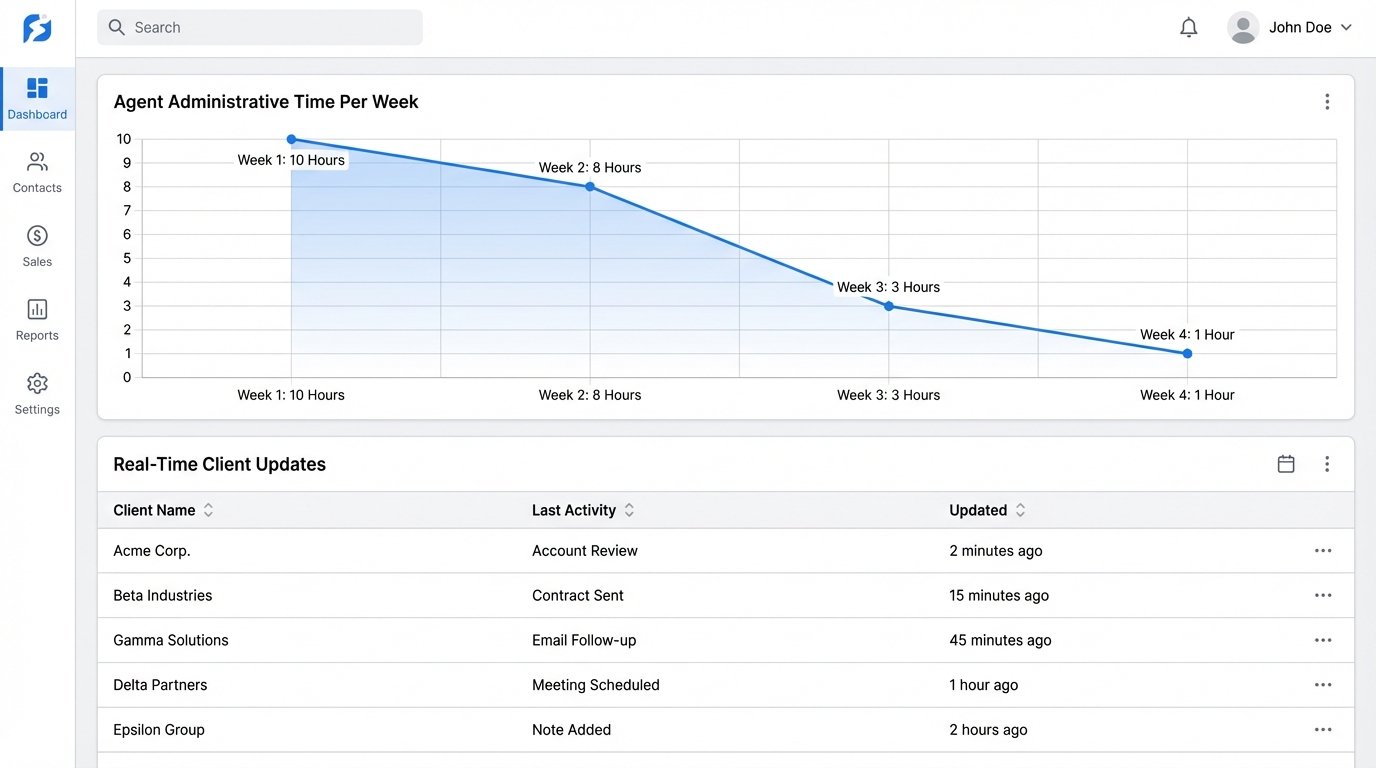
Beyond the time savings, the qualitative wins were significant:
- Zero Data Lag: The CRM is now updated in real-time, not hours or days later. This gives management an accurate view of the sales pipeline.
- Error Reduction: Manual data entry always introduces errors. The automation eliminated typos, forgotten action items, and incorrect CRM logging.
- Improved Client Experience: Clients receive prompt, professional, and detailed follow-ups within minutes of a meeting ending, not hours later. This signals efficiency and attentiveness.
A Note on Cost
This wasn’t a zero-cost solution. There’s the n8n hosting cost and the OpenAI API usage. The GPT-4 calls are the main wallet-drainer here, running a few dollars per day depending on meeting volume. But when you weigh that against the value of 10 hours of a senior agent’s time, the ROI isn’t just positive. It’s a rounding error.
Stop letting your best people drown in administrative quicksand. Isolate the repetitive tasks that clog their calendars and hammer them flat with targeted automation. The tools are there. The patterns are clear. The only thing missing is the will to build it.