
The Problem: Data Chaos and Dropped Leads
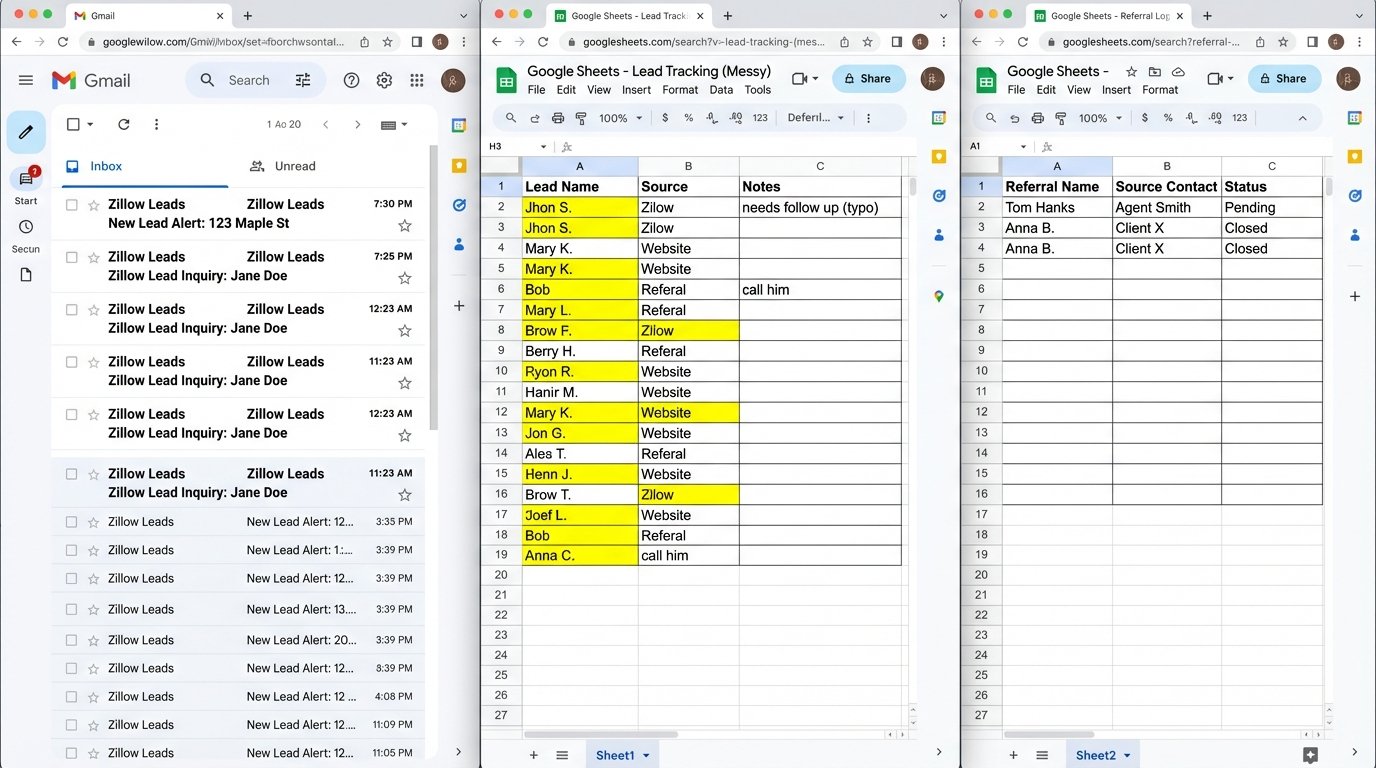
A mid-sized real estate team was bleeding money. Not from bad marketing or a weak sales pipeline, but from the operational friction of a disconnected tech stack. Their lead data was a disaster. Zillow leads went to one agent’s inbox, website form submissions landed in a Google Sheet, and referrals were tracked on a shared spreadsheet that looked like a crime scene.
Every morning, the office manager would manually scrape these sources, attempt to deduplicate contacts by eye, and assign them out. The process took hours. Worse, the lead response time was often north of 90 minutes. In real estate, a lead goes cold in five. Agents were stepping on each other’s toes, contacting the same prospect twice while other leads sat untouched for a full day.
Their old system wasn’t a workflow. It was a series of leaky pipes held together with duct tape, with valuable lead data spilling out all over the floor.
The Mandate: Forge a Single Source of Truth
The goal was simple to state but hard to execute: build a single, unified system where every lead, regardless of origin, would be captured, processed, and assigned to an agent in under two minutes. No more spreadsheets. No more manual data entry. We needed to build an automated engine that would become the team’s central nervous system.
We selected Follow Up Boss as the central CRM. It’s built for real estate teams and, most importantly, has a well-documented API that doesn’t lie to you (most of the time). The CRM is the destination. The real heavy lifting happens in the middle layer, which we built using n8n, a self-hosted workflow automation platform.
Step 1: Ingesting a Multi-Source Mess
The first task was to create a single entry point for all incoming leads. We set up a master webhook in n8n to act as the universal receiver. From there, we configured each lead source to fire data at this one endpoint.
- Zillow/Realtor.com: These platforms offer direct CRM integrations, but they are often rigid. We bypassed their native tools and pointed their lead notification emails to a dedicated parsing service (Mailparser.io) which then posted a clean JSON payload to our webhook. Email parsing is the digital equivalent of dumpster diving. It’s ugly, but it’s a necessary evil when a vendor’s API is locked down.
- Website Forms (Webflow): This was the easiest part. A direct webhook integration that fired on every form submission.
- Manual Entry: For walk-ins or phone calls, we built a simple internal form that, on submission, also hit the same master webhook.
Step 2: The Data Laundering Machine
Raw data from different sources is never uniform. Field names are inconsistent, phone numbers have garbage formatting, and names sometimes arrive in a single field. Before anything touches the CRM, it must be scrubbed clean. This is where most of the logic lives.
Inside our n8n workflow, we hammered the incoming data into shape:
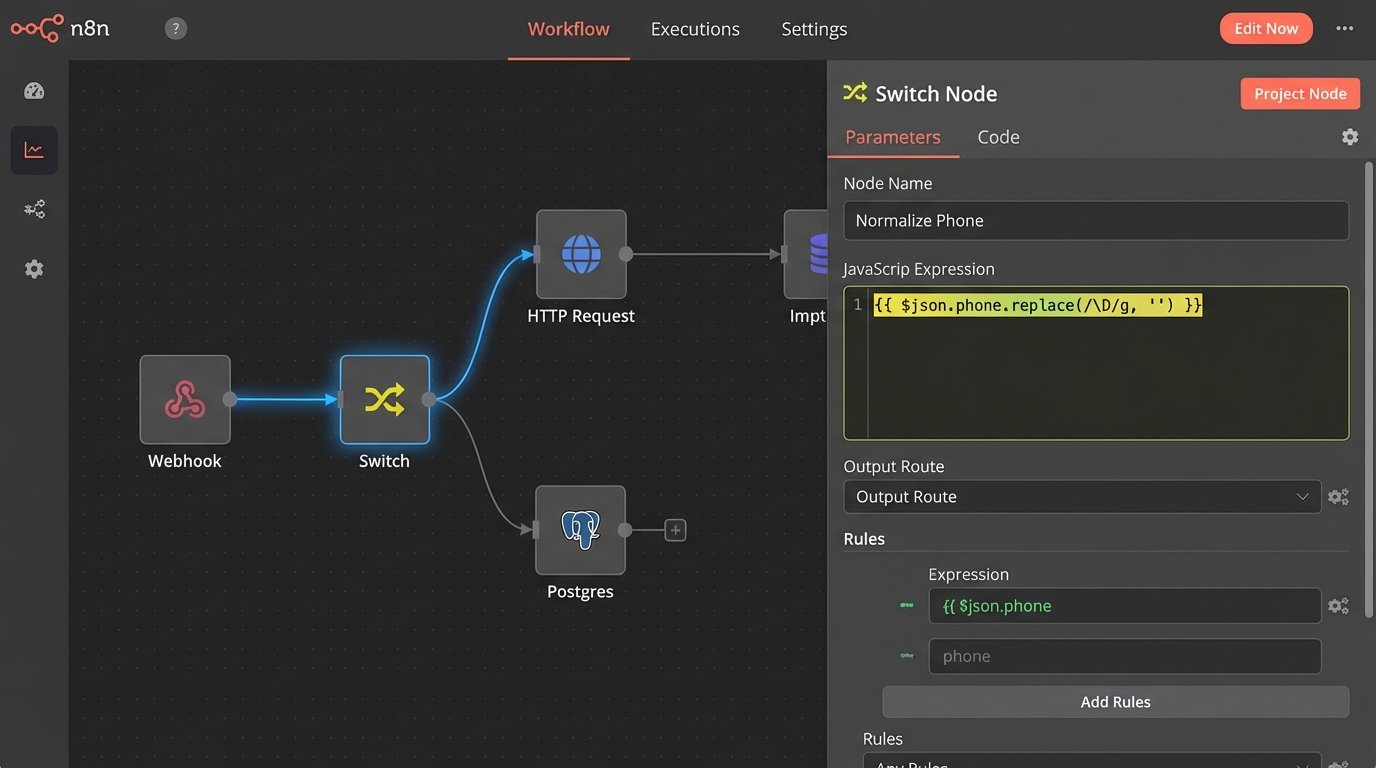
- Field Mapping: A Switch node routed the data based on its source, then a Set node mapped the source-specific fields (`lead_name`, `Full Name`, `name`) to our standardized internal schema (`contact.name`).
- Data Normalization: We used JavaScript expressions to clean the data. Phone numbers were stripped of parentheses and hyphens, and emails were forced to lowercase to prevent duplicate entries.
// n8n expression to strip non-numeric characters from a phone number
{{ $json.phone.replace(/\\D/g, '') }}
This single line of code saved hours of manual correction and prevented countless duplicate contact records from polluting the CRM.
Step 3: Deduplication and Smart Routing
Pushing a new lead into a CRM without checking for an existing record is malpractice. Before the `CREATE` call, our workflow runs a `SEARCH` operation against the Follow Up Boss API using the cleaned email address and phone number.
If a match is found, the workflow switches from “create new contact” to “update existing contact.” It adds the new lead source as a note or tag on the existing record and notifies the assigned agent. If no match is found, it proceeds to create a new contact. This logic check prevents the cardinal sin of an agent calling a client they’ve been working with for six months and asking, “So, are you looking to buy a home?”
Here’s a simplified JSON payload for creating a new person in the CRM. Notice the standardized fields.
{
  "person": {
    "firstName": "John",
    "lastName": "Doe",
    "emails": [
      {
        "isPrimary": true,
        "value": "johndoe@example.com"
      }
    ],
    "phones": [
      {
        "isPrimary": true,
        "value": "5551234567"
      }
    ],
    "stage": "Lead",
    "source": "Website Form",
    "tags": ["New Lead", "Buyer"]
  }
}
Once the contact is in the system, the final step is routing. We built a Python function node to handle the round-robin logic. It checks a Google Sheet that lists the active agents, finds who is next in line, assigns them the lead via the API, and then updates the sheet to put that agent at the bottom of the list. It then fires a message into a dedicated Slack channel, tagging the agent with a direct link to the new lead in the CRM.
# Simplified Python for round-robin logic
agents = items[0].json["agents"] # Pull agent list from an input
last_assigned_index = int(items[0].json["last_index"])

next_index = (last_assigned_index + 1) % len(agents)
assigned_agent = agents[next_index]

# Set the output for the next node
return [{
    "json": {
        "assigned_agent_id": assigned_agent["id"],
        "next_index_to_save": next_index
    }
}]
The Results: Measurable and Immediate
The switch from manual chaos to automated workflow produced a direct impact on the team’s core metrics. This wasn’t a marginal improvement. it was a fundamental shift in their operational capacity.
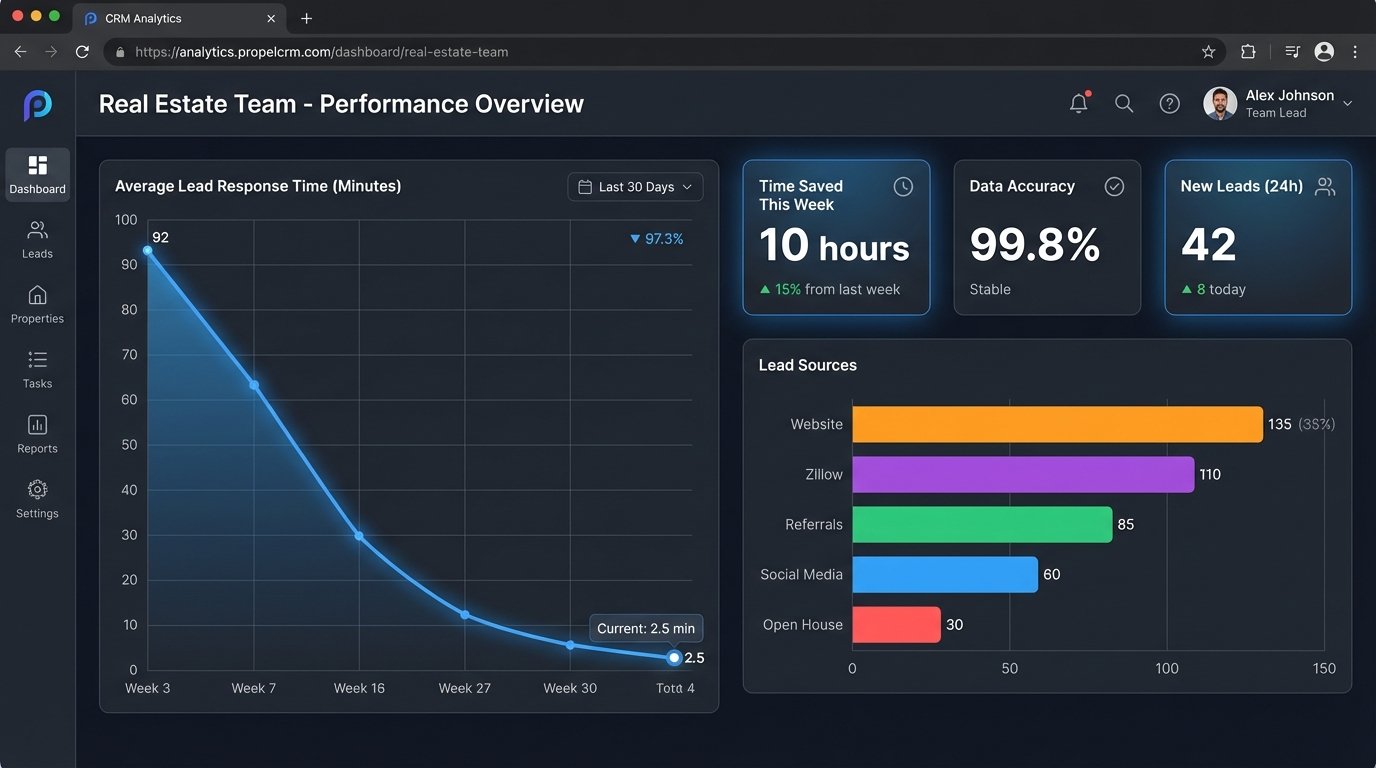
- Lead Response Time: Dropped from an average of 94 minutes to under 3 minutes. This was the single biggest driver of their conversion rate increase.
- Agent Time Saved: We calculated that the automation saves the office manager approximately 10 hours per week of manual data entry and lead assignment. Each agent saves an additional 2-3 hours per week by not having to hunt for lead information.
- Data Accuracy: Duplicate contacts were virtually eliminated. With clean, standardized data, CRM adoption and trust skyrocketed among the agents.
- Lead Leakage: By instrumenting the workflow with error handling that reported failures to a monitoring channel, we identified that one of their paid lead sources had a faulty integration that was silently failing 20% of the time. This problem was invisible before. Plugging that hole alone paid for the entire automation build in two months.
The total cost for the supporting software (n8n hosting, Mailparser.io subscription) runs under $100 a month. By closing just one extra deal that would have otherwise been lost to slow response times, the system provides a massive return. It’s a clear example of how a targeted automation architecture isn’t a cost center but a revenue multiplier.
The system works. It removes human error from the most critical part of the sales funnel and frees up agents to do what they are paid to do: build relationships and close deals.