
The manual review of contracts is a structural bottleneck in legal operations. It consumes high-value attorney hours on low-value, repetitive tasks. Automating this process is not about buying a single piece of software, but about building a logical pipeline that strips documents down to their constituent parts, analyzes them against a defined ruleset, and flags deviations for human review. This is an engineering discipline applied to a legal problem.
Success depends entirely on the quality of your inputs. Attempting to automate review on a chaotic collection of ad-hoc agreements is a fool’s errand. You are just algorithmically processing garbage. The process will fail.
Prerequisites: Foundational Data and Logic
Before writing a single line of code, you must impose order on your data. The core prerequisite is a standardized clause library. This is your firm’s approved, vetted language for every conceivable contract provision, from indemnification to governing law. Without this baseline, any deviation analysis is meaningless because you have nothing to measure against. This is the most labor-intensive, non-technical part of the project, and it’s the point where most initiatives stall.
Your firm’s playbook must be converted into a machine-readable format. This means taking your Word documents and policy memos and structuring them, likely in JSON or a database table. Each entry should contain the standard clause text, associated risk levels, and fallback positions. This structured playbook becomes the ground truth for the entire system.
System Access and Tooling
Verify you have API access to your core systems. This includes your Document Management System (DMS) and any Contract Lifecycle Management (CLM) platform. Check the documentation for rate limits, authentication methods, and data schemas. Be prepared for the documentation to be outdated or flat-out wrong. A test run with a tool like Postman to fetch a document and its metadata is a mandatory first step.
The technical stack for this work is straightforward. Python is the dominant language due to its extensive libraries for data processing and natural language processing. Key libraries include:
- python-docx: For parsing and manipulating Microsoft Word documents.
- spaCy or NLTK: For NLP tasks like sentence segmentation and entity recognition.
- Scikit-learn: For building machine learning models to classify clauses if you go beyond simple rule-based matching.
- Flask or FastAPI: For building a lightweight API to expose your review service to other systems.
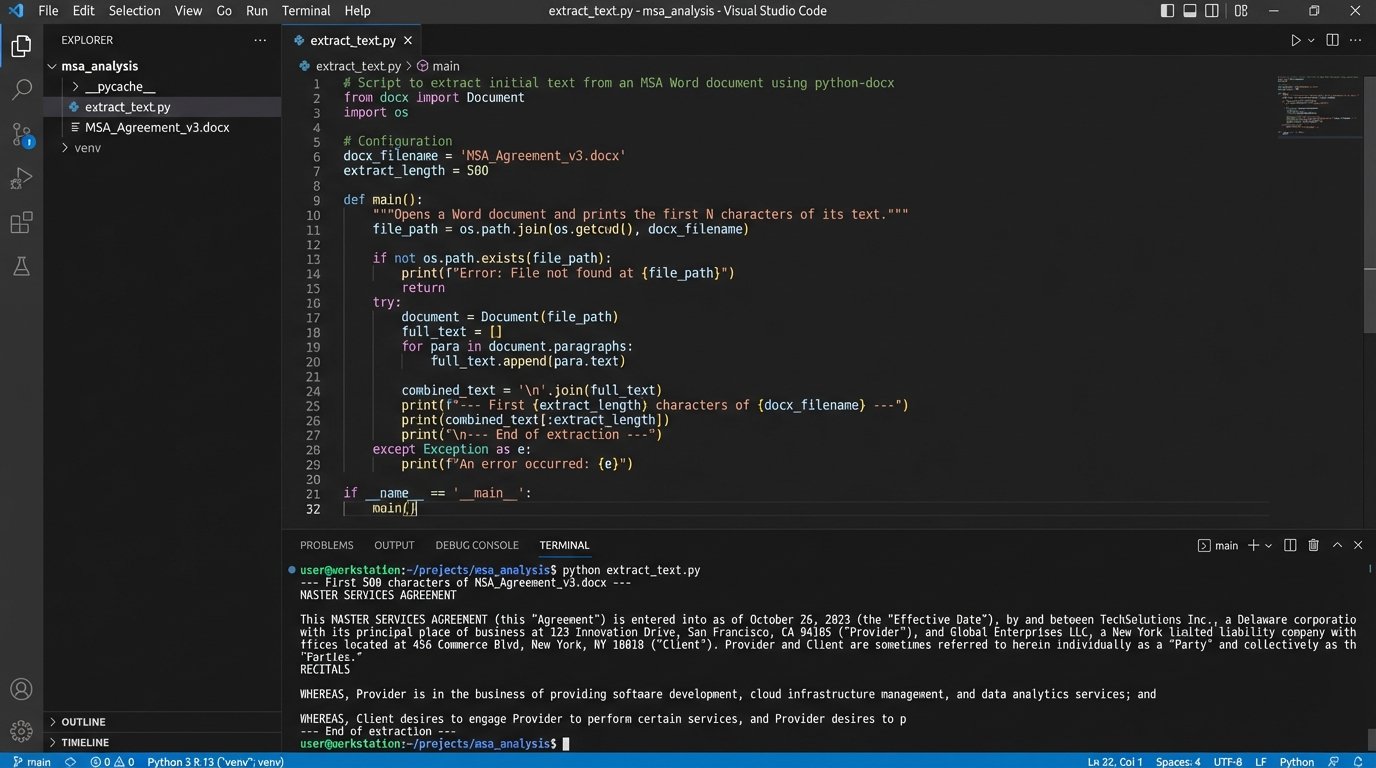
Do not start by trying to build a full-featured application. Start with a script that can successfully extract the text from a .docx file. That is your first victory.
Phase 1: Clause Extraction and Identification
The first technical challenge is to break a monolithic contract document into a list of individual clauses. A common but brittle approach is to use regular expressions (regex) to identify clause headings, which are often numbered or in all caps. For example, a regex pattern can hunt for lines that start with a number followed by a period, like `^(\d{1,2}\.\s)`. This is fast but breaks easily with nested numbering or unconventional formatting.
This method is a good starting point for well-structured templates but is not resilient enough for third-party paper. Relying on it exclusively is a recipe for silent, catastrophic failures where entire sections of a contract are missed.
import re
import docx

def extract_clauses_by_heading(doc_path):
    """
    Extracts clauses from a .docx file based on a simple numeric heading pattern.
    WARNING: This is a brittle method and for demonstration only.
    """
    try:
        document = docx.Document(doc_path)
        clauses = {}
        current_clause_title = None
        current_clause_text = []

        # A very basic regex to find headings like "1. ", "12. ", etc.
        heading_pattern = re.compile(r'^\d{1,2}\.\s+[A-Z\s]+')

        for para in document.paragraphs:
            if heading_pattern.match(para.text.strip()):
                if current_clause_title:
                    clauses[current_clause_title] = "\n".join(current_clause_text)

                # Start a new clause
                current_clause_title = para.text.strip()
                current_clause_text = []
            elif current_clause_title:
                current_clause_text.append(para.text.strip())

        # Add the last clause to the dictionary
        if current_clause_title:
            clauses[current_clause_title] = "\n".join(current_clause_text)

        return clauses
    except Exception as e:
        print(f"Error processing document {doc_path}: {e}")
        return None

# Example usage:
# contract_clauses = extract_clauses_by_heading('path/to/your/contract.docx')
# if contract_clauses:
#     for title, text in contract_clauses.items():
#         print(f"--- {title} ---\n{text[:100]}...\n")
The code above provides a rudimentary function to pull content based on numbered headings. It is a starting point. It will fail on contracts with complex formatting. It demonstrates the concept, not a production-ready solution.
A More Resilient Approach: NLP
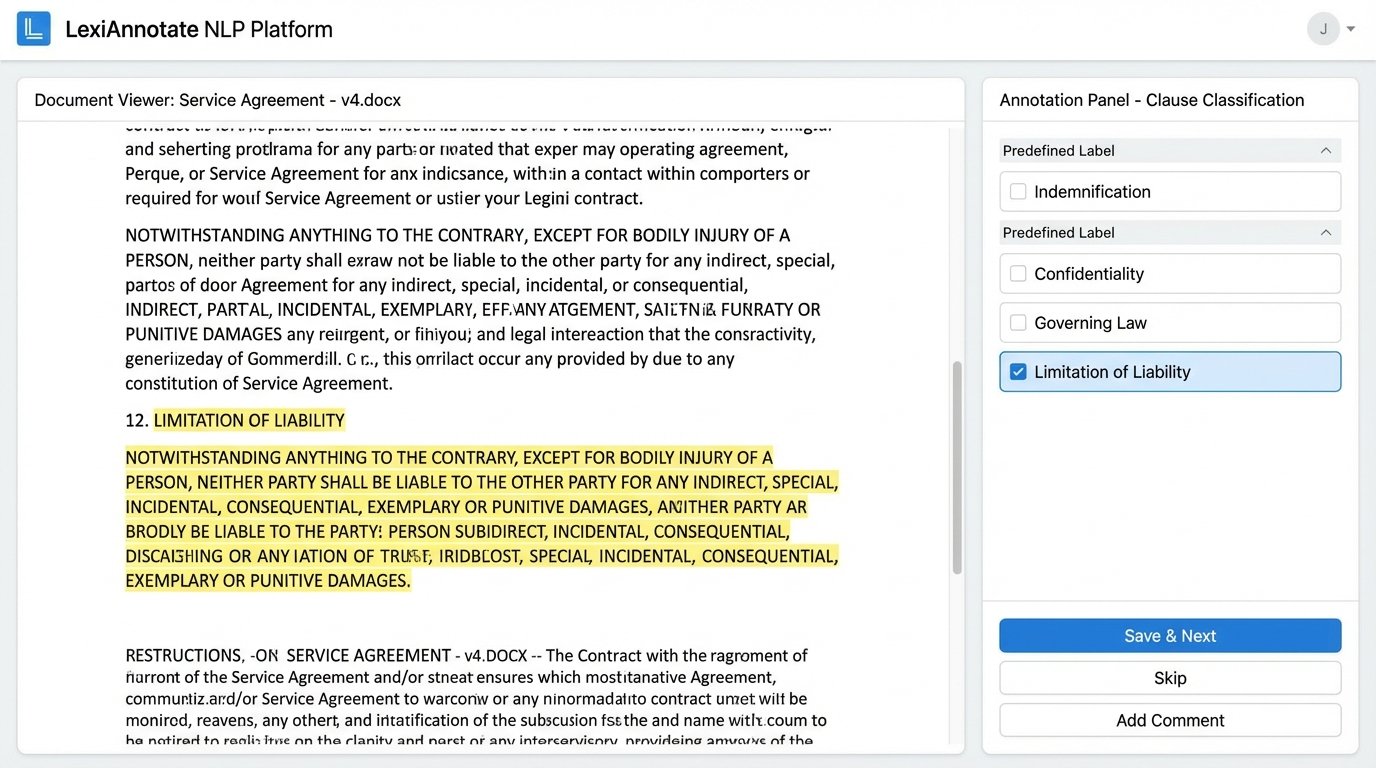
A more robust method uses NLP for semantic understanding. Instead of just looking for patterns, you train a model to recognize the characteristics of different clauses. This involves a technique called text classification. You feed a model hundreds or thousands of examples of “Limitation of Liability” clauses, “Confidentiality” clauses, and so on, until it can identify them in a new, unseen document.
This path requires a significant upfront investment in data labeling. An attorney or paralegal must manually tag clauses in a large set of existing contracts to create a training dataset. This process is tedious but essential. Building a custom NLP model without a properly labeled dataset is like trying to build a house with no foundation. The result is an expensive collapse.
Many commercial CLM tools have pre-trained models for this, which can be a massive accelerator. The trade-off is that their models are generic. They may not recognize the specific, niche clauses your practice group deals with. You often need to fine-tune these commercial models with your own data.
Phase 2: Deviation Analysis and Risk Scoring
Once you have isolated the clauses, the next phase is to compare them against your firm’s standard language from the playbook. This is the core of the automation. The goal is to determine if a clause is:
- Standard: Matches the approved text exactly or with minor, acceptable variations.
- Non-Standard: Contains significant differences from the approved text.
- Missing: An expected clause is not present in the document.
- Unrecognized: A clause exists in the document but does not match any known type in your playbook.
A simple way to perform this comparison is using a text similarity algorithm. A basic approach is the Levenshtein distance, which counts the number of edits (insertions, deletions, substitutions) needed to change one string into the other. More advanced methods use vector embeddings, where the text of the contract clause and the standard clause are converted into numerical vectors. The system then calculates the cosine similarity between these vectors to measure how close they are in meaning, not just wording.
Implementing a Risk Score
Every deviation must be assigned a risk value. This moves the output from a simple list of changes to an actionable, prioritized report for the attorney. A missing “Indemnification” clause might be assigned a high risk score of 10. A slightly modified “Notice” provision might get a low score of 2. These scores must be defined in your structured playbook, tied directly to your legal team’s risk tolerance.
The system aggregates these individual scores to produce a total risk score for the entire contract. This single number allows for quick triage. An agreement with a score of 5 can be fast-tracked, while one with a score of 85 is immediately flagged for senior partner review. This converts abstract legal risk into a concrete metric that can be used for workload balancing and management reporting.
The logic is simple. The system iterates through the extracted clauses, compares each to the playbook standard, and appends a risk value to a report. This report is the primary artifact of the automation. It tells the attorney exactly where to focus their attention.
Phase 3: Integration and Reporting
The analysis is useless if it stays trapped in a script. The final phase is to push the results back into the attorney’s workflow. This means integrating with the systems they already use. A common method is to generate a new version of the Word document with comments programmatically inserted for each identified issue. Using the `python-docx` library, you can add comments to specific paragraphs, highlighting the risky clause and explaining the deviation based on your playbook rules.
This creates a self-contained work product. The attorney receives a pre-redlined document where the first pass of the review is already complete. They are not starting from scratch. They are validating the output of the machine.
Connecting to Practice Management Systems
A more advanced integration involves pushing data directly into your CLM or practice management software via an API. The risk score, a list of non-standard clauses, and a link to the annotated document can be attached to the relevant matter. This creates a structured, searchable record of contract risk across the entire firm.
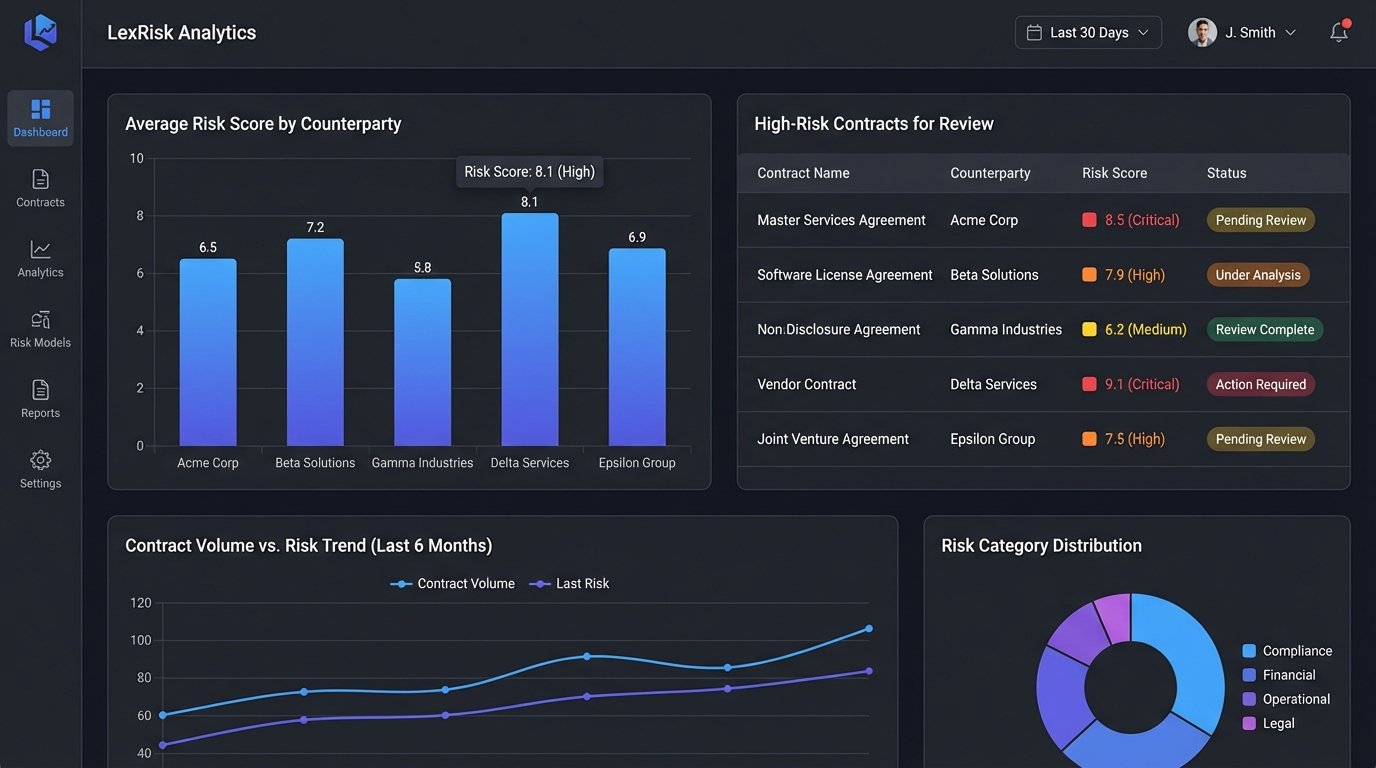
You can then build dashboards that visualize this data. Imagine a dashboard showing the average contract risk score by counterparty, or a chart tracking the most frequently negotiated clauses. This data moves the legal department from a reactive cost center to a proactive business partner that can identify systemic risks in its commercial agreements. This is often an afterthought but provides the most long-term value.
Maintenance and The Feedback Loop
An automation system is not a static object. It is a dynamic process that requires continuous maintenance. Your playbook will evolve. Laws change. New business needs will require new clause variations. The system must be designed to accommodate these changes easily. This means your structured playbook should be stored in a system that is easy for legal professionals to update, not hardcoded into scripts.
The most critical component of a successful system is the feedback loop. When the system misclassifies a clause or incorrectly flags a deviation, the reviewing attorney needs a simple mechanism to correct it. This correction must not be a one-off fix. It must be captured as data and used to retrain and improve the underlying model. Without this loop, the system’s accuracy will degrade over time as it fails to learn from its own mistakes.
This is the hardest part of building a production-grade system. It requires a tight collaboration between the technical team and the legal team. The attorneys must be disciplined about providing feedback, and the engineers must build the infrastructure to ingest that feedback and use it to improve the system. This ongoing cycle of review, correction, and retraining is what separates a short-lived proof-of-concept from a durable piece of legal infrastructure.