The central failure of most contract automation projects is not the software. The failure is a direct result of trying to automate contract generation from a data source that is fundamentally broken. You cannot produce a clean, executable agreement from a CRM filled with null values, inconsistent data types, and free-text fields that look like a Jackson Pollock painting. Before you evaluate any platform, you must first gut your data architecture and enforce a rigid schema. Otherwise, you are just buying a faster way to generate garbage.
These tools are not magic wands. They are complex engines that require clean fuel. Here is a technical breakdown of five common engines, their performance characteristics, and the specific types of pain you will encounter with each.
1. Ironclad: The API-First Workflow Engine
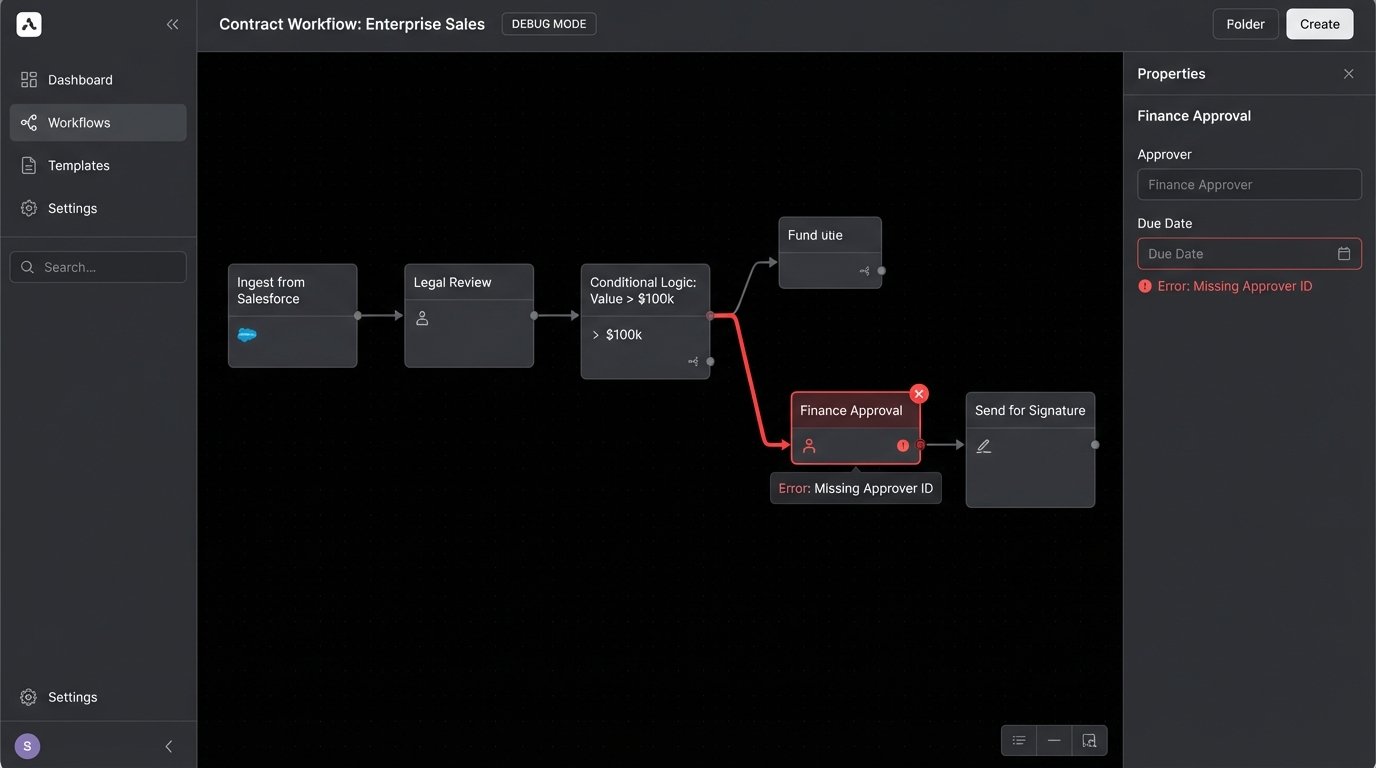
Ironclad sells itself as a workflow platform, and that is exactly what it is. The document generation is a feature, not the core product. Its primary strength is the Workflow Designer, a visual UI for building complex, multi-stage approval chains with conditional logic. You can route an MSA to Legal, then Finance, then a specific VP based on the contract value extracted from your Salesforce Opportunity object. The entire process is API-driven, which means you can trigger workflows from external systems or pull workflow status data back into a custom dashboard.
This API-first approach is its best and worst feature.
Technical Benefits
The REST API is well-documented, a rare compliment. You can programmatically launch a workflow by sending a JSON payload to the /v1/workflows endpoint, pre-populating the contract template with data from any system you can script against. This allows you to bypass its native integrations if they are too rigid. We once had to bridge Ironclad with a legacy AS/400 billing system. The native connectors were useless, so we wrote a Python service that polled the mainframe, formatted the data, and injected it directly into the Ironclad workflow via the API.
Its click-to-accept and signing integrations with DocuSign are baked in deeply. The metadata mapping is also strong. You can define a field like “Renewal Term (Months)” in an Ironclad template and ensure that value is not only inserted into the contract text but also written back to a corresponding field on the Salesforce Account record upon execution. This bi-directional data flow is critical for maintaining a single source of truth.
You avoid the data drift that plagues systems where post-signature data is a manual entry afterthought.
The Real-World Problems
Ironclad is a wallet-drainer. The pricing model is steep, and they charge for every feature module and integration connector you need. Getting the full power of the platform requires a significant budget, and their sales team knows it. Beyond cost, the template management syntax, while powerful, has a learning curve. It uses a proprietary logic syntax that feels like a stripped-down version of Jinja2. You will spend your first month just figuring out how to render a conditional clause without breaking the entire document parser.
The system’s rigidity is also a factor. While the visual workflow builder is easy for business users to grasp, making a small logic change can have cascading, non-obvious impacts. Debugging a failed workflow feels like untangling a ball of yarn in the dark. You are stuck clicking through a UI to trace the data flow, wishing you could just attach a debugger and step through some code.
Relying on their support team for complex integration problems is a slow-motion disaster. You will get a first-line support agent who asks you to clear your cache before escalating you to an engineer three days later.
2. ContractPodAi: The Metadata Extraction Machine
ContractPodAi bets heavily on its AI layer. The marketing material promises a future where you upload a third-party paper and the system automatically identifies every key date, obligation, and non-standard clause. The reality is more complicated. Its AI is a powerful pattern-matching and named-entity recognition engine, but it is not sentient. It is a statistical model trained on a massive corpus of legal documents.
It performs best when it is working with document types it has seen thousands of times before, like standard NDAs or Master Services Agreements.
Technical Benefits
The core value is turning unstructured contract text into structured, searchable metadata. When you ingest a portfolio of 10,000 legacy contracts, ContractPodAi can strip out the governing law, termination for convenience clauses, and limitation of liability caps. This data is then indexed and made available for reporting. You can finally answer the question, “Show me all active agreements with an uncapped liability clause governed by New York law” without having a team of paralegals spend six weeks reading documents.
For drafting, its clause library is the main attraction. You can build templates that pull from a pre-approved library of clauses. The system can be configured to flag any deviation from standard language, forcing a review from a senior attorney. This enforces consistency and reduces the risk of a junior associate inserting a poorly worded indemnity clause from a Google search into a multi-million dollar agreement.
The template logic is less about complex programming and more about assembling pre-built, vetted components.
The Real-World Problems
The AI is only as good as its training data and the clarity of the source document. If you feed it a blurry, scanned PDF with weird formatting, its accuracy plummets. Expect to implement a significant human-in-the-loop validation process. The AI proposes the metadata tags, but a human must logic-check the output. For a while, our instance consistently tagged the “Effective Date” as the “Signature Date” because of how our legacy templates were formatted. We had to build a post-processing script to fix it.
Its document generation capabilities are not as flexible as other platforms. It is designed around its clause library model. If you need to generate highly dynamic documents where entire sections are constructed based on complex business logic, you will hit a wall. It is built for standardization, not for generating the kind of bespoke agreements required in complex M&A or finance deals. Trying to force it to handle hyper-variable outputs is like shoving a firehose through a needle.
3. DocuSign CLM: The Entrenched Behemoth
DocuSign bought SpringCM and rebranded it as DocuSign CLM. It is a powerful, feature-rich platform that suffers from a severe case of architectural baggage. It was built in a different era of enterprise software, and it shows. The user interface is dense, the configuration is buried in nested menus, and it can feel sluggish compared to more modern, cloud-native applications.
You choose this tool for its deep integration with the DocuSign eSignature ecosystem and its raw power, not for a pleasant user experience.
Technical Benefits
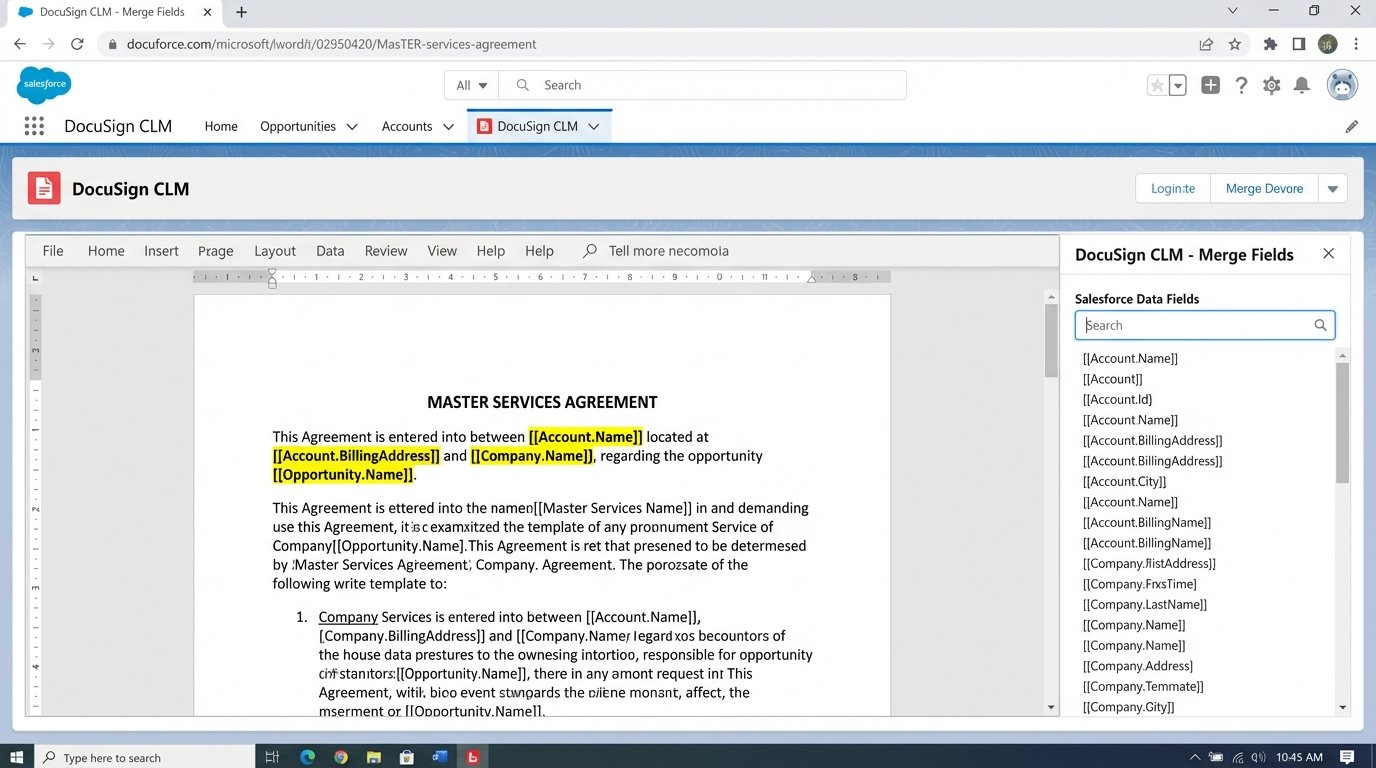
Its workflow engine is incredibly granular. You can configure multi-step, parallel approval processes with custom routing rules that would be difficult to build in other systems. The document generation engine is also mature. It uses Microsoft Word as the templating environment, which is a massive benefit for adoption by legal teams. Lawyers do not have to learn a new syntax. They just add specially formatted tags like [[Opportunity.Name]] directly into the .docx file they already know how to use.
The integration with Salesforce is one of the deepest on the market. It is not a superficial connector. You can map data bi-directionally between dozens of standard and custom objects, trigger contract generation from a button click on an Opportunity, and automatically store the final executed PDF back to the correct Salesforce record. For organizations living inside Salesforce, this tight coupling is a major selling point.
The Real-World Problems
This platform is a beast to configure and maintain. The administration panel is a labyrinth. Setting up a new document generation template with dynamic clauses requires navigating a dozen different screens. It is not intuitive. You will need a dedicated administrator, and likely expensive professional services, to get it running. Do not think your legal operations manager can set this up on a Friday afternoon.
The API, while extensive, feels dated. It leans heavily on SOAP for some functions and has a REST API that doesn’t always follow modern conventions. Authentication can be clumsy, and error messages are often cryptic. We once spent two days debugging an integration that was failing because the API expected a date field in MM/DD/YYYY format, but our source system was sending ISO 8601. The API documentation made no mention of this constraint.
Performance can also be an issue, particularly with complex document generation jobs. Generating a 100-page agreement with hundreds of conditional clauses can take several minutes. Users will complain.
4. Agiloft: The No-Code Construction Kit
Agiloft is not just a contract automation tool. It is a no-code platform for building complex business applications, and it has a very strong contract lifecycle management implementation. Its core philosophy is extreme adaptability. Every table, field, workflow, and user interface element can be customized without writing code. This is its greatest strength and its most dangerous weakness.
You are not buying a finished car. You are buying a pallet of high-performance engine parts and a box of wrenches.
Technical Benefits
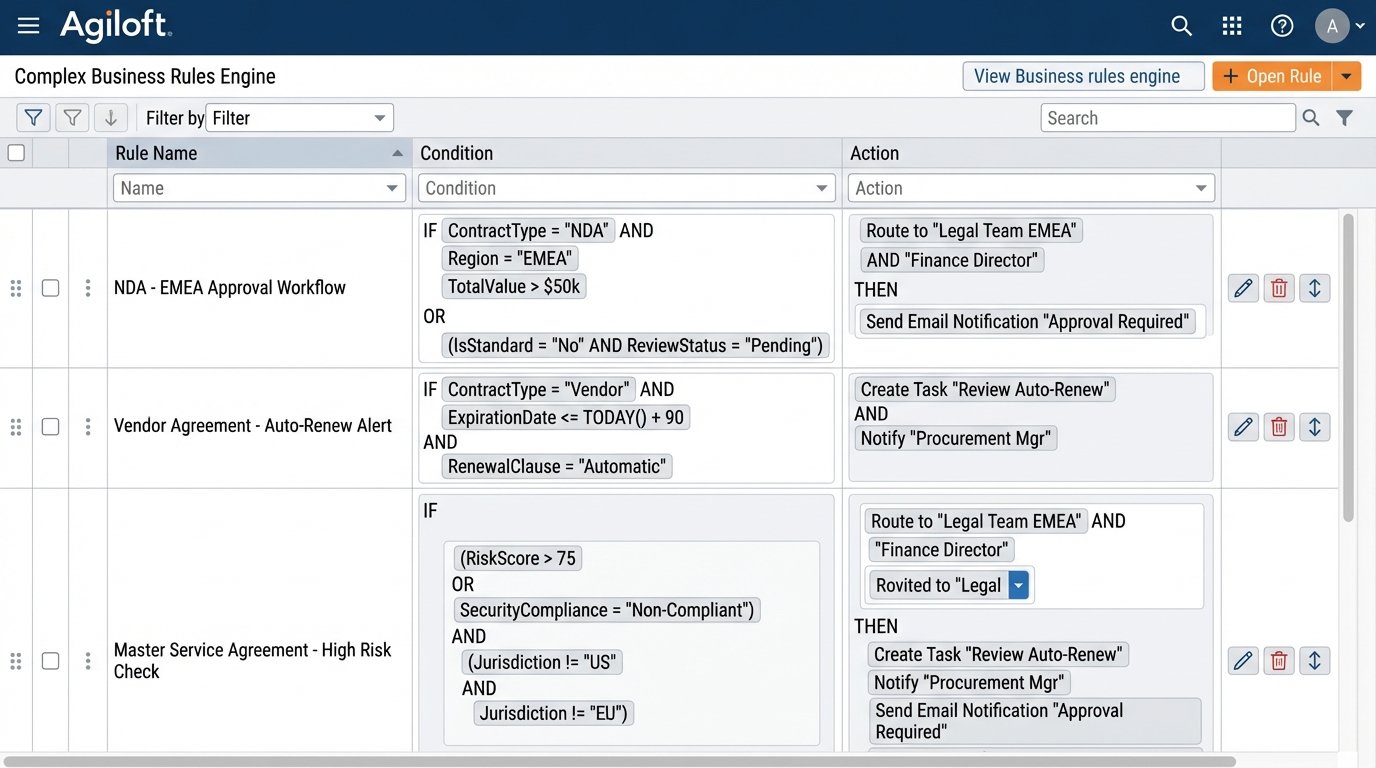
The customization is total. If you need a specific, non-standard workflow for a niche contract type, you can build it. If you need to integrate with a bizarre homegrown database, you can probably make it work. The rules engine is powerful, allowing you to define complex conditional logic for everything from document approvals to email notifications. You can build a system that perfectly mirrors your organization’s unique, and perhaps strange, business processes.
Because it is a unified platform, you can extend it beyond contracts. You can manage legal intake, track litigation matters, and handle IP portfolios all in the same system, with data flowing seamlessly between modules. This avoids the “swivel chair” problem of having to re-key data between multiple disconnected systems. Its reporting engine is also highly configurable, allowing you to build detailed dashboards tracking cycle times, clause deviations, and risk exposure.
The Real-World Problems
With great power comes great responsibility to not build an unmaintainable nightmare. Because everything is customizable, it is easy for an inexperienced administrator to create a tangled mess of conflicting rules and workflows. It requires a disciplined, architectural approach. You must document every customization and have a clear governance model, or you will end up with a system that no one understands and everyone is afraid to touch.
The user interface, while functional, lacks the polish of newer platforms. It can feel utilitarian and cluttered. This can be a hurdle for user adoption. Furthermore, the initial implementation is a heavy lift. It is not a plug-and-play solution. Expect a multi-month project involving extensive requirements gathering, configuration, data migration, and testing. It is a serious commitment of internal resources.
Upgrades can be painful. If you have heavily customized the system, you have to carefully test each major new release to ensure it does not break your bespoke configurations. This creates a maintenance burden that does not exist with more opinionated, less flexible SaaS products.
5. Docassemble: The Open-Source Power Tool
For teams with in-house development talent, sometimes the best tool is the one you control completely. Docassemble is an open-source platform for building guided interviews that generate documents. It is not a CLM. It has no built-in workflow engine, no CRM integration, and no fancy dashboard. It is a raw, powerful document assembly engine powered by Python.
This is the expert-level option. There is no support hotline to call when your code breaks at 2 AM.
Technical Benefits
You have absolute control over the logic. The interviews are defined in YAML files, and you can embed Python code directly to handle complex calculations, conditional logic, and data transformations. You can pull data from any API, connect to any database, and perform operations that would be impossible in a constrained, proprietary platform. For example, you could build a contract that pulls real-time stock prices or calculates a complex vesting schedule based on user inputs.
---

objects:

  - client: Individual

  - opposing_party: Individual

---

question: |

  What is the total contract value?

fields:

  - Contract Value: currency

    datatype: currency

---

code: |

  if currency(Contract_Value) > 100000:

    contract_terms.requires_vp_approval = True

  else:

    contract_terms.requires_vp_approval = False

---
The templating is done in Jinja2, a standard and powerful templating language. You are not locked into a proprietary tag format. You can use loops, macros, and includes to construct highly modular and maintainable document templates. Because it is open source, the cost is zero for the software license. You only pay for the hosting infrastructure, which can be a simple cloud server.
The Real-World Problems
You are responsible for everything. Security, scalability, maintenance, backups, and bug fixes are all on you. There is no vendor to blame. The learning curve is steep if you are not already a Python developer. You are not just configuring a system; you are writing and debugging code. A simple typo in a YAML file can bring down an entire interview.
Building a full-featured solution requires significant development effort. You will need to build your own user management, your own dashboard, and your own integrations. Docassemble is a component, a powerful one, but it is not a complete application out of the box. It is a path you choose only if your document generation needs are so complex and unique that no off-the-shelf product can meet them, and you have the engineering resources to commit to a long-term development project.
Choosing a tool is the last step, not the first. The first step is to diagram your process. The second is to clean your data. The third is to define a rigid data governance model. Only then should you start evaluating the engine that will run on those tracks. Any other order of operations is a recipe for a very expensive failure.