
Your CRM Is a Garbage Dump
Let’s be direct. The default state of any actively used CRM is chaos. Sales reps manually enter contact info riddled with typos. Marketing dumps leads from a dozen different ad platforms, each with its own field naming convention. Support tickets create duplicate contacts because an email address was entered in lowercase instead of uppercase. The result is a fragmented, unreliable data source that actively works against the business.
This isn’t a failure of the CRM. It’s a failure of architecture. Relying on humans to be the integration layer between your website, your payment processor, your social media lead forms, and your email platform is a guaranteed path to data rot. Every manual entry is a potential point of failure. The problem isn’t the individual sources. It’s the lack of a coherent, automated ingestion pipeline to sanitize and standardize the data before it ever touches the CRM database.
We are not aiming for a pretty dashboard. We are building a machine to enforce data integrity at the entry point, not trying to clean up the mess weeks later with CSV exports and VLOOKUP. The goal is to make correct data entry the only possible path.
The Architectural Fix: A Centralized Ingestion Pipeline
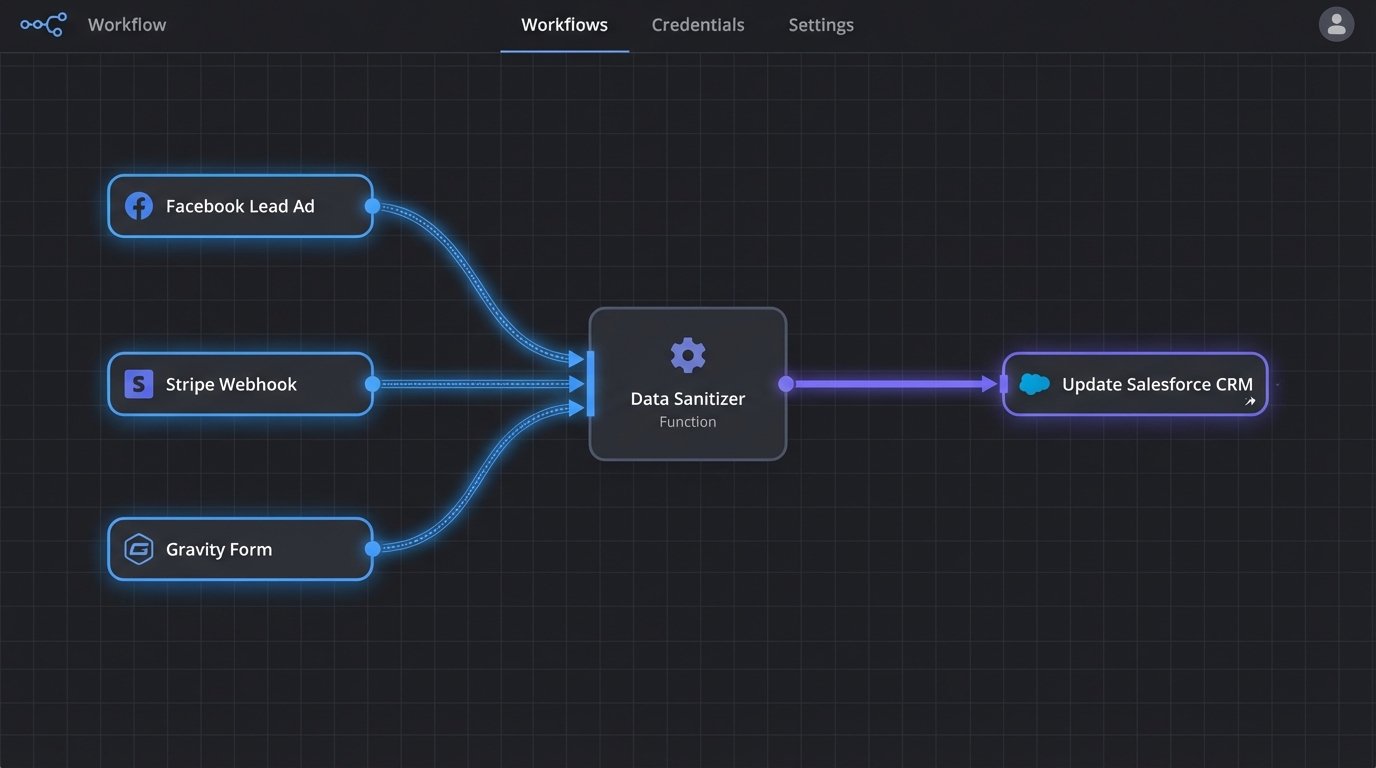
The solution is to stop thinking of data sources as discrete channels that point directly to your CRM. Instead, they must all feed into a single, centralized processing layer. This layer is responsible for three critical jobs: receiving the data, transforming it into a standard format, and then injecting it into the CRM via its API. This abstracts the CRM from the chaos of the sources.
This pipeline forces every piece of incoming data through the same set of logic checks and transformations. A lead from a Facebook Lead Ad and a contact from a Stripe purchase event should look identical by the time they hit the processing layer. Both are stripped of junk, validated, and mapped to your CRM’s required schema before being sent on their way.
Building this isn’t a weekend project. It requires choosing your poison: speed, cost, or control. You get to pick two.
Option 1: The Brute-Force Webhook Approach
Most modern SaaS platforms can fire a webhook on a specific event. A new form submission, a completed sale, a new subscriber. This is a simple HTTP POST request sent to a URL you specify, containing a JSON payload with the event data. It’s the simplest, most direct way to get data out of a source system in near real-time.
The upside is that it’s fast and cheap. There’s no polling, no waiting. The data arrives the moment the event happens. The downside is that you are now responsible for managing a fleet of incoming data structures. The JSON from Stripe looks nothing like the JSON from Gravity Forms. You need a listener endpoint smart enough to parse these different structures.
Consider a simple payload from a web form:
{

  "form_id": 101,

  "submission_id": "sub_a4b1c2d3",

  "submitted_at": "2023-10-27T10:00:00Z",

  "fields": [

    {

      "id": "first_name",

      "label": "First Name",

      "value": "John"

    },

    {

      "id": "last_name",

      "label": "Last Name",

      "value": "Doe"

    },

    {

      "id": "email_address",

      "label": "Email",

      "value": "john.doe@example.com"

    }

  ]

}
Your listener has to parse that nested array, map `email_address` to your CRM’s `email` field, and handle the fact that another form might call it `user_email`. This approach can get brittle fast if you don’t build a robust mapping and transformation layer.
It’s a quick fix that creates long term maintenance debt.
Option 2: The Wallet-Drainer Middleware (iPaaS)
Platforms like Zapier, Make.com, or Workato are built for this. They provide a graphical interface to connect the APIs of hundreds of different services. You connect your Facebook Lead Ads account, connect your CRM account, and visually map the fields. They handle the authentication, the listener endpoint, and some basic transformation logic.
The clear advantage is deployment speed. You can have a connection running in minutes without writing a line of code. They are perfect for non-technical users and for prototyping a connection. They also handle some basic error retries automatically, which is a nice feature to have when an API momentarily blips out of existence.
The disadvantages are cost and opacity. These services charge by the “task” or “operation.” As you scale up your lead volume, the costs can become absurd. We are talking thousands of dollars a month for a high-volume operation. You are also at the mercy of their pre-built connectors. If they don’t support a specific field or endpoint you need, you’re stuck. You’re renting a solution, not owning it.
These platforms are great until you hit a volume that makes their billing department smile and your finance team cry.
Option 3: The Custom Script Pipeline
This is the engineer’s answer. You build your own ingestion service. This typically involves a lightweight web framework like Flask or Express running on a server or as a serverless function. This single service provides a URL that all your data sources will send their webhooks to. It is the gatekeeper for your CRM.
You gain absolute control. You can implement complex validation logic, chain multiple API calls, enrich data from other sources, and format the final object exactly as your CRM needs it. You also own the infrastructure, so costs are tied to compute usage, which is usually far cheaper at scale than an iPaaS subscription. This is where you earn your salary. It’s not glamorous, but it’s bulletproof if you build it right.
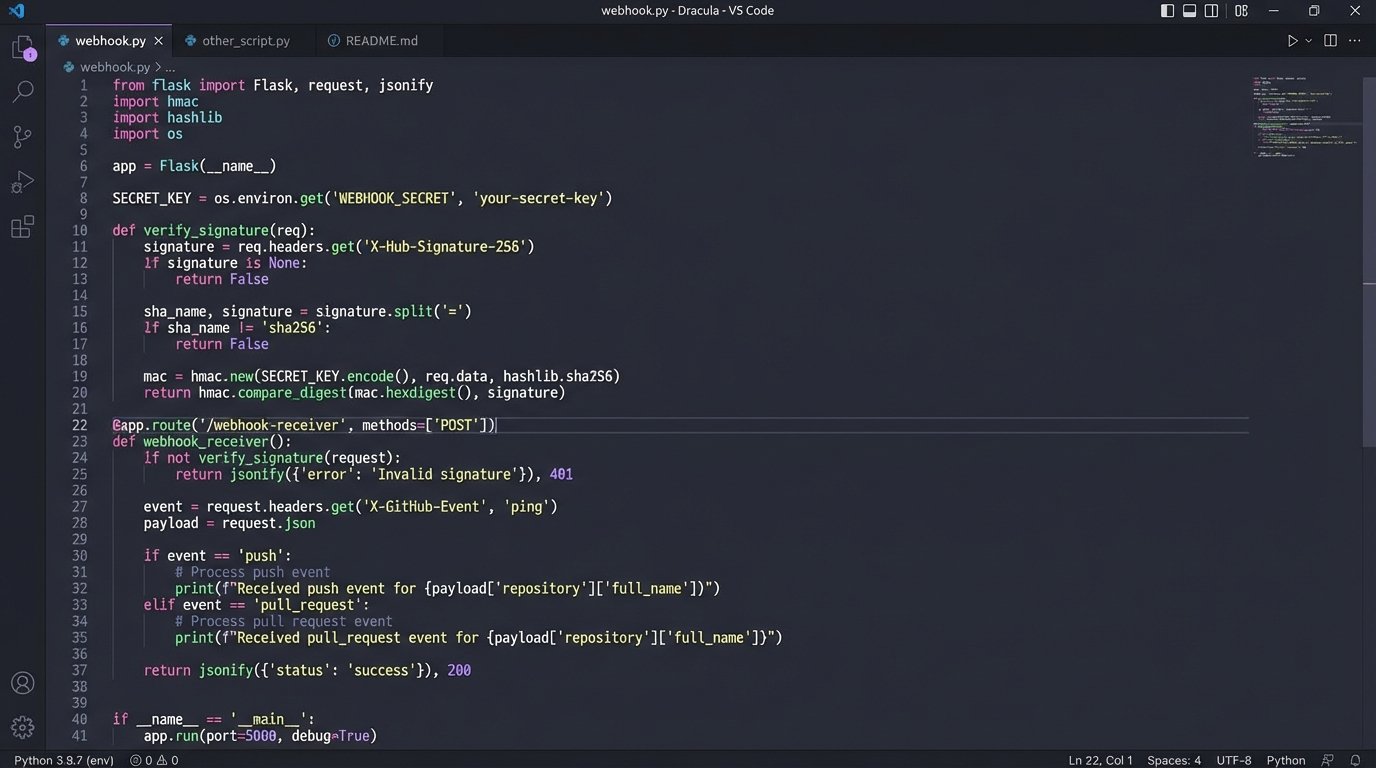
Here is a dead simple listener built with Python and Flask. It does nothing but catch a webhook and print its JSON payload. This is the starting point.
from flask import Flask, request, jsonify

import json
app = Flask(__name__)
@app.route('/webhook-receiver', methods=['POST'])
def webhook_receiver():
if request.is_json:
data = request.get_json()
# In a real application, you would put this data into a queue
# for processing instead of just printing it.
print("Received data:")
print(json.dumps(data, indent=2))
# Add to a processing queue (e.g., RabbitMQ, SQS) here
# process_data.delay(data)
return jsonify({"status": "success", "message": "Data received"}), 200
else:
return jsonify({"status": "error", "message": "Request must be JSON"}), 400
if __name__ == '__main__':
# For development only. Use a proper WSGI server in production.
app.run(debug=True, port=5000)
The obvious trade-off is maintenance. You own the code, the server, the security, and the logging. When it breaks at 3 AM, you are the one getting the alert. This is not a set-it-and-forget-it solution. It is a piece of critical infrastructure.
Critical Subsystems: Transformation and Validation
Getting the data is only the first step. The raw data from your sources is dirty. Your custom pipeline or middleware configuration must be responsible for cleaning it before it gets passed to the CRM. This is the “T” in ETL (Extract, Transform, Load).
Transformation logic handles the inevitable differences between systems. A common task is mapping field names. Your web form might send `first_name`, but your CRM API expects `FirstName`. You need a simple mapping dictionary or logic to bridge this gap. You’ll also handle data formatting, like ensuring all phone numbers are stripped of parentheses and dashes and conform to the E.164 standard.
Validation is even more important. You must logic-check the data to prevent garbage from getting in.
- Presence Check: Is the email field present? If not, the record is useless. Reject it.
- Format Check: Does the email address actually look like an email address? A simple regex check can prevent nonsense strings from being saved.
- Type Check: If your CRM expects an integer for “company size,” ensure you’re not trying to inject the string “about 50”. Coerce the type or reject the record.
Trying to manage all of this inside the CRM with its own internal automation rules is like trying to shove a firehose through a needle. The CRM’s job is to store and relate data, not to be a complex data-sanitization engine. Do the hard work before the data arrives.
Don’t Forget the Failure States
A pipeline that only works on the happy path is a liability. Your architecture must be resilient to failure, because failure is the normal state of distributed systems. APIs go down. Networks get slow. Rate limits get hit. Your code needs to anticipate this.
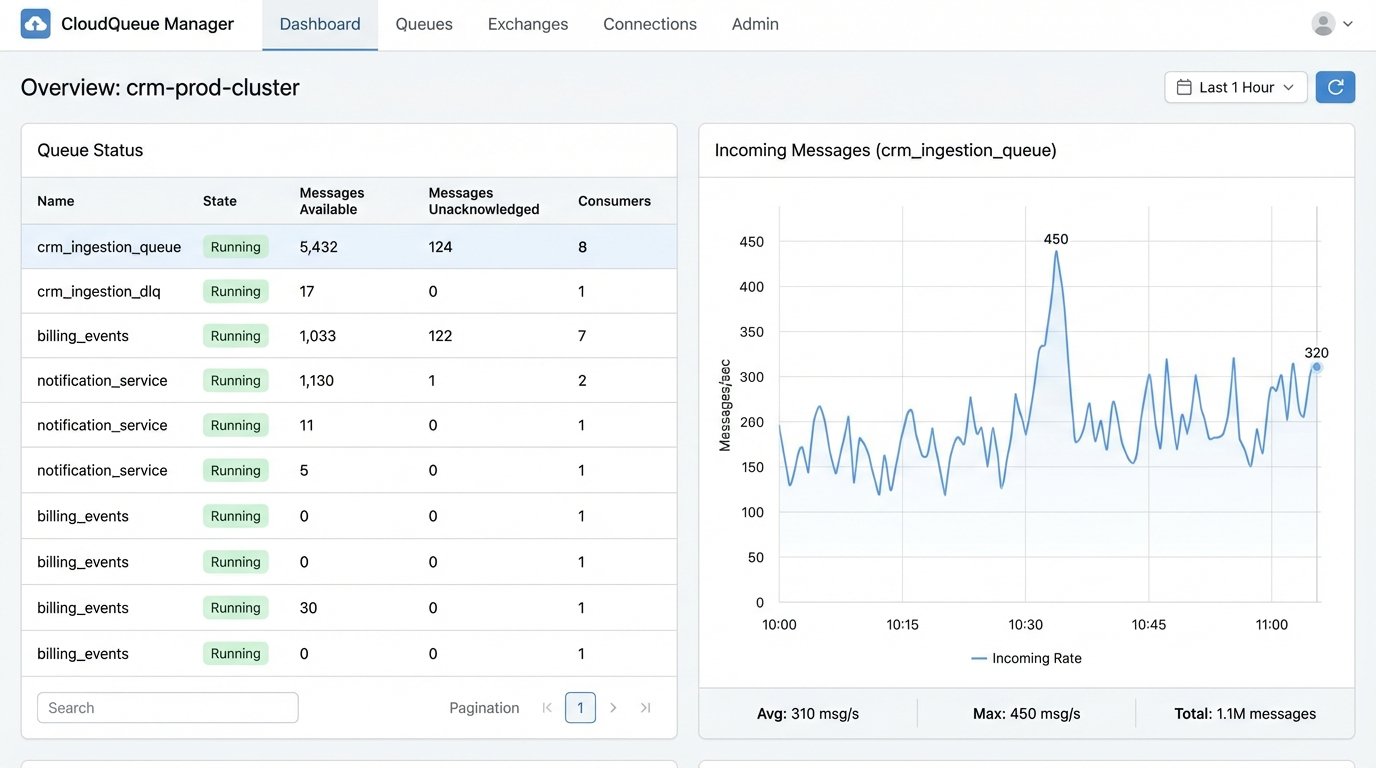
The most critical component here is a queue. When your webhook listener receives data, it should not try to process it and call the CRM API immediately in the same process. This is a fragile design. A momentary CRM API outage would cause your listener to return an error to the source system, and you could lose the data forever.
A better architecture is for the listener to do one thing: accept the data and place it into a persistent queue like RabbitMQ or AWS SQS. A separate fleet of “worker” processes can then pull messages from this queue, attempt to process them, and send them to the CRM. If the CRM API call fails, the worker can place the message back on the queue to be retried later, perhaps with an exponential backoff delay.
You also need a dead-letter queue (DLQ). If a message fails processing multiple times, maybe due to malformed data that your validation logic missed, you don’t want it to clog up the main queue forever. After a set number of retries, the worker should move the message to a DLQ. This gets it out of the way and provides you with a list of failed jobs to investigate manually. A system that fails silently is a data-loss machine. You need to know when things break.
The choice between a managed iPaaS solution and a custom-built pipeline boils down to a fundamental trade-off. iPaaS gives you speed at the cost of control and money. A custom solution gives you total control and lower operational costs at the expense of your own engineering time and maintenance overhead. There is no right answer, only the answer that fits your team’s skill set, budget, and required scale.
What is not an option is doing nothing. Sticking with manual data entry is a slow, expensive march toward an unusable CRM. Automating the ingestion is not a luxury. It is a foundational requirement for building a reliable system of record.