
Contract automation platforms are sold as push-button solutions. They are not. The core of any functional system is a ruthlessly standardized template and a clean, structured data source. Without these, you are just automating the creation of garbage. The primary failure point is never the software, it is the refusal to deconstruct and logic-check the source documents before writing a single line of code.
Deconstructing the Source: The Prerequisite No One Does
Before evaluating a single vendor, lock the legal team in a room with your existing contract templates. The goal is to tear them apart into static text, variables, and conditional blocks. Every piece of text that changes based on circumstance must be identified and mapped. This is not a technical task, it is a brutal exercise in legal and logical precision. If your team cannot agree on the specific conditions that trigger an alternative clause, the project is dead on arrival.
The output of this process should be a specification document, not a Word file with comments. It should list every variable, its data type (text, number, date, boolean), and the exact business rule that governs its insertion into the document. For example, a simple “Governing Law” clause requires more than just a state name. It requires a rule: “IF Counterparty_Address_Country IS ‘USA’, THEN Governing_Law_Clause_Selector IS ‘Delaware’. ELSE, Governing_Law_Clause_Selector IS ‘England and Wales’.” This level of granularity is non-negotiable.
Building the Data Model First
Your contract is a reflection of your data. The automation process simply injects that data into a predefined structure. Therefore, your first technical task is to define the data model. Where will the values for `Counterparty_Name`, `Effective_Date`, and `Indemnification_Cap` come from? The potential sources are typically a CRM, a user-input form, or another database.
A fatal error is to build the data model around the document. You must build the document around a central, validated data model. This means your data source, like Salesforce or a SharePoint list, must be the single source of truth. If an attorney has to manually type the counterparty’s registered address into a form for every contract, you have not built an automation system. You have built a glorified typewriter with an API.
This data model is best defined as a JSON schema. It forces you to think in terms of data types, required fields, and nested structures before you even think about document layout. It serves as the contract between your data source and your document generation engine.
{
  "$schema": "http://json-schema.org/draft-07/schema#",
  "title": "MasterServicesAgreementData",
  "type": "object",
  "required": [
    "clientName",
    "clientAddress",
    "effectiveDate",
    "serviceScope"
  ],
  "properties": {
    "clientName": {
      "type": "string",
      "description": "The full legal name of the client entity."
    },
    "clientAddress": {
      "type": "object",
      "properties": {
        "street": { "type": "string" },
        "city": { "type": "string" },
        "state": { "type": "string" },
        "zipCode": { "type": "string" }
      },
      "required": ["street", "city", "state"]
    },
    "effectiveDate": {
      "type": "string",
      "format": "date"
    },
    "isHighRisk": {
      "type": "boolean",
      "description": "Determines inclusion of advanced liability clauses."
    },
    "serviceScope": {
      "type": "string"
    }
  }
}
A schema like this is your blueprint. It tells developers what data to pull and it tells the document engine what to expect. Without it, you are just guessing.
Tooling: Choosing Your Engine of Pain
No platform is perfect. They all involve a compromise between ease of use, logical power, and API accessibility. Your choice dictates the type of problems you will be solving at 3 AM. Broadly, they fall into three categories.
Template-Centric Platforms
These tools (think Contract Express, HotDocs) let you build logic directly into a Word or text template using proprietary syntax. You upload a document, tag it with special fields, and define conditional logic inside the document itself. This is fast for lawyers who want to control the template and logic without writing code. The problem is that debugging becomes a nightmare. The logic is buried inside a binary `.docx` file, making version control difficult and collaborative editing a source of constant file corruption.
They are powerful for complex documents where the logic is self-contained. They start to break down when you need to pull data from multiple external systems or perform complex data transformations before generation. Their APIs are often just a thin wrapper around the core template-filling engine, offering little control.
API-First Engines
Systems like Docmosis or platforms with strong generation APIs give you a simple templating language (often based on XML or simple placeholders like `{{clientName}}`) and a REST API endpoint. You are responsible for gathering and structuring the data yourself, then POSTing a JSON payload to the API, which returns a finished PDF or DOCX.
This approach gives you maximum control and flexibility. You can build your data-gathering workflow using any front-end or back-end language. You can pull from Salesforce, a SQL database, and a user form, aggregate the data, and then call the generation service. The document template itself is kept “dumb,” containing only placeholders, while all the business logic lives in your application code. This makes the logic testable and version-controlled. The downside is it requires developer resources. There is no user-friendly interface for an attorney to tweak a conditional clause.

This separation of concerns is the architecturally superior model. Logic should live in code, not in a Word document.
The All-in-One CLM Suite
Contract Lifecycle Management (CLM) platforms (Icertis, Agiloft, etc.) bundle document generation as one feature among many. The generation is often a weaker, less flexible version of the specialized tools. They force you to use their internal data model, which may not align with your organization’s sources of truth. Getting data into and out of their walled gardens often relies on sluggish, poorly documented APIs.
These are wallet-drainers sold to General Counsels, not engineers. You are paying for a dozen features you will not use, while the one feature you need, document generation, is an underpowered afterthought. Approach with extreme skepticism and demand a technical deep-dive on their API performance and data integration capabilities before signing anything.
Assembly: Injecting Logic and Data
Once you have a deconstructed template, a data model, and a tool, the real work begins. This is the process of binding your data to the template and implementing the conditional rules you defined at the start.
Implementing Conditional Clauses
Every platform has its own syntax for this. In a template-centric tool, it might look like this inside your Word document:
[IF isHighRisk = 'true']
10.1 Limitation of Liability. IN NO EVENT SHALL SERVICE PROVIDER BE LIABLE FOR ANY LOST PROFITS, CONSEQUENTIAL, OR PUNITIVE DAMAGES.
[ENDIF]
In an API-first world, your application code would handle this logic. You would prepare the data payload, and the logic would determine which text block to insert.
import requests

# Data fetched from CRM and user form
contract_data = {
    "clientName": "ACME Corp",
    "effectiveDate": "2024-08-01",
    "isHighRisk": True
}

# Application logic decides which clause to use
if contract_data["isHighRisk"]:
    contract_data["liabilityClause"] = "The full, scary liability text for high-risk clients."
else:
    contract_data["liabilityClause"] = "The standard, friendlier liability text."

# POST to the document generation API
response = requests.post(
    "https://api.docengine.com/v2/generate",
    json={"templateId": "MSA-v3", "data": contract_data},
    headers={"Authorization": "Bearer YOUR_API_KEY"}
)

with open("generated_contract.pdf", "wb") as f:
    f.write(response.content)
The second approach is far easier to test and debug. You can write unit tests for your logic without ever generating a document. The first approach requires you to generate a dozen documents just to verify one clause works correctly.
Handling Dynamic Tables and Loops
This is where many projects fail. Your contract might need a table of client affiliates, a list of software to be licensed, or a schedule of deliverables. This requires looping over an array of data in your JSON payload and generating a table row for each item.
The process feels like forcing a firehose through a needle. You are trying to fit structured JSON data into the rigid, unforgiving XML schema of a Word document table. The syntax is often arcane and highly sensitive to formatting within the template. A single extra space in a loop tag can break the entire table generation.
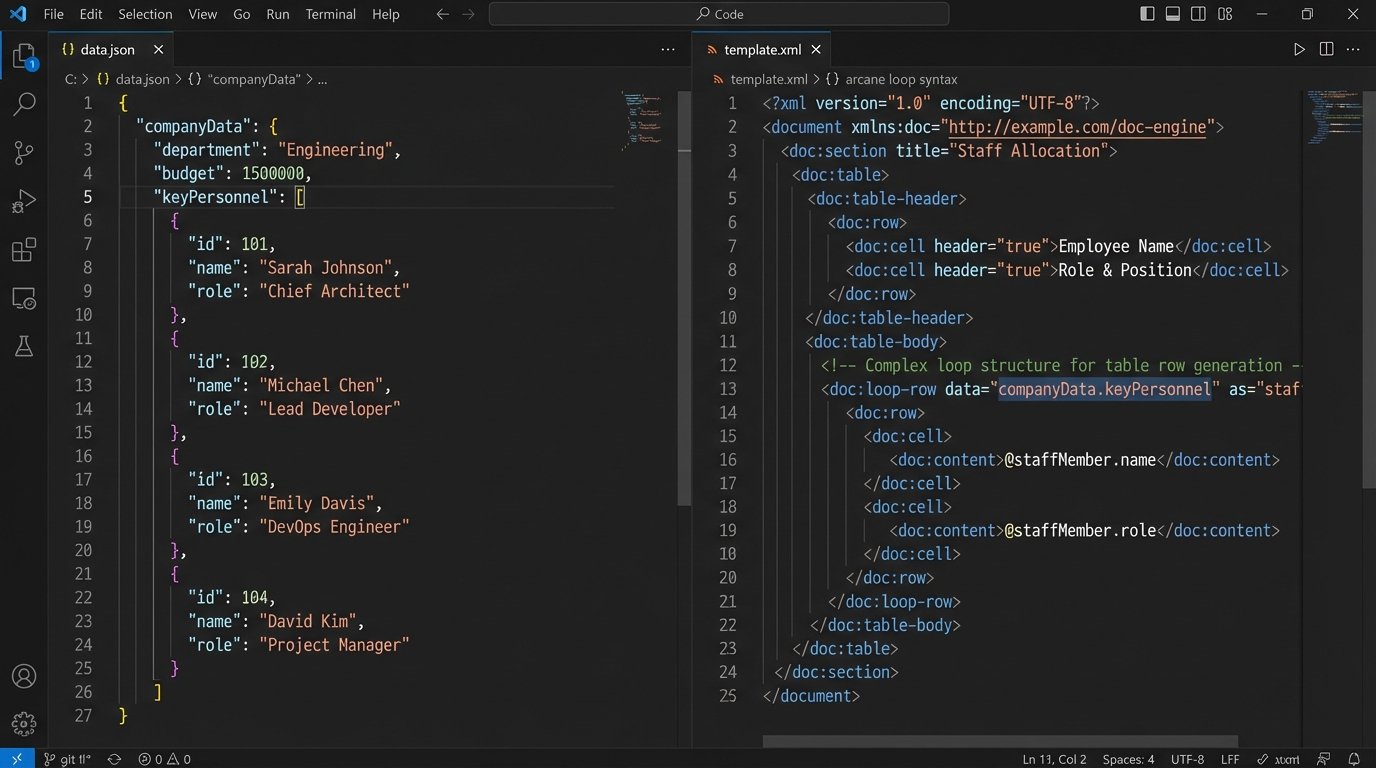
Your JSON needs to be structured with arrays of objects. For example, a list of key personnel:
"keyPersonnel": [
    { "name": "Alice Johnson", "role": "Project Manager" },
    { "name": "Bob Williams", "role": "Lead Engineer" }
]
Your template then needs corresponding loop syntax to iterate over the `keyPersonnel` array and populate the rows of a pre-formatted table. Get this wrong, and you will get one row with broken tags or a completely mangled document. Test this functionality exhaustively with zero, one, and many items in the array.
Validation and Deployment: Trust Nothing
A generated document is a legal instrument. “It looked right” is not an acceptable validation strategy. You need a systematic way to test every possible output.
Unit Testing Clause Permutations
Do not test the entire 20-page document at once. Create stripped-down test templates that contain only one or two conditional clauses. Write a test script that feeds the engine every possible combination of input data for those clauses and verifies the output. For a clause that depends on two boolean flags (`isHighRisk`, `isInternational`), you have four combinations to test. For three flags, you have eight. This scales exponentially.
The script should not just check for generation success. It needs to check the content of the output file. A simple text search can confirm if `”Limitation of Liability”` is present when it should be and absent when it should not. This is tedious but catches errors that a visual inspection will miss.
The Pre-Flight Checklist
Before deploying, you need a pre-flight checklist. This is not optional.
- Version Control: All templates must be in a Git repository. Changes must be reviewed via pull requests. No exceptions.
- API Key Management: Keys should be stored in a secure vault (like AWS Secrets Manager or HashiCorp Vault), not hardcoded in application config files. They should be rotated regularly.
- Environment Separation: You must have separate development, staging, and production environments, each with its own API keys and template versions. Testing happens in staging, never in production.
- Error Logging: If a document fails to generate, where does the error go? It needs to be logged to a centralized system (like Datadog or Splunk) with the full request payload that caused the failure. Without this, debugging is impossible.
- Rollback Plan: If you deploy a broken template, how quickly can you revert to the previous working version? With templates in Git, it should be a one-command rollback.
Skipping any of these steps is a guarantee of a production failure.
Maintenance: The System Is Never Done
Deployment is not the end. It is the beginning of a long maintenance cycle. The legal team will constantly request changes to the “standard” language.
Managing Template Updates
A defined process for template updates is critical. An attorney cannot just email you a new Word document. The change request must be filed as a ticket. The engineer must implement the change on a separate Git branch, test it in the staging environment, and then get sign-off from the legal team before merging to production. This process prevents ad-hoc changes from breaking the entire system.
The goal is to treat your contract templates with the same rigor as application code. They are executable assets that produce legally binding output. Their integrity is paramount.
Monitoring Performance and Health
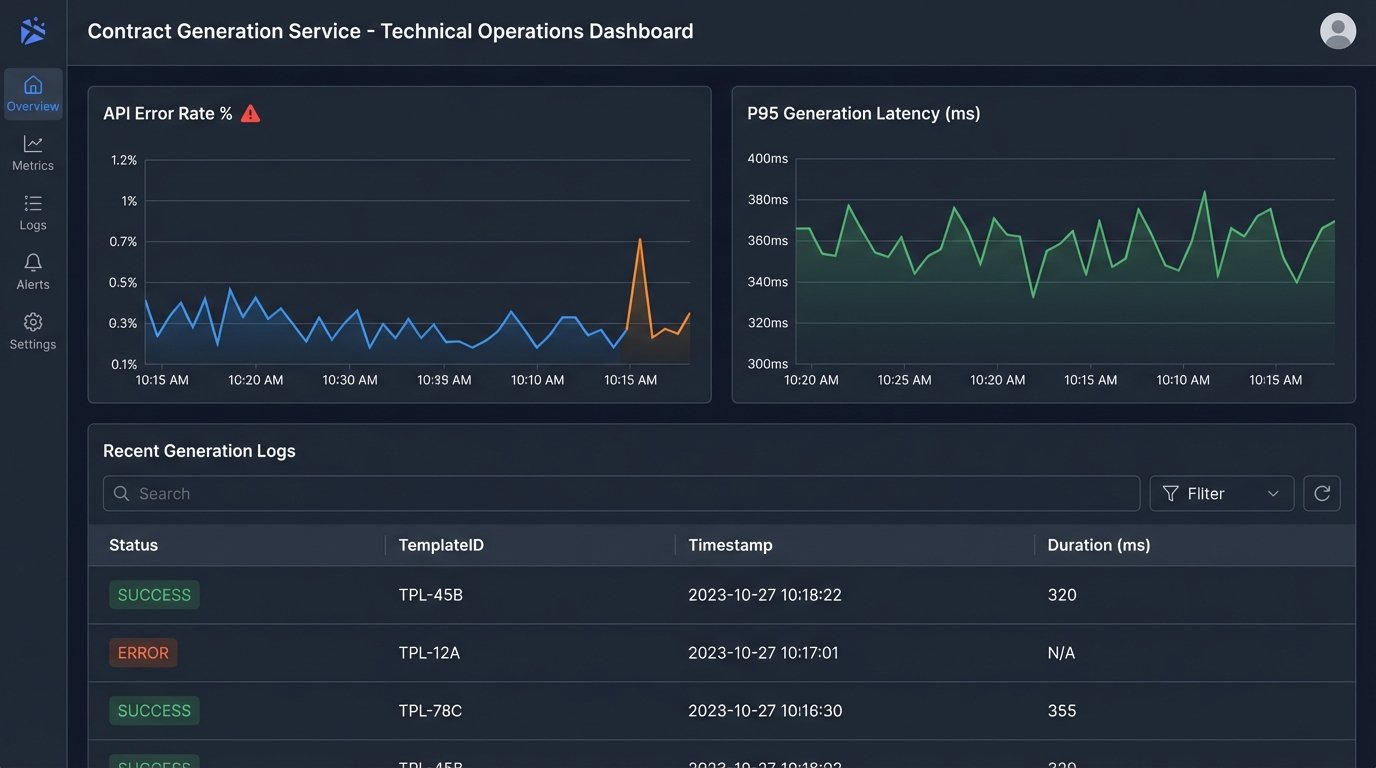
The system needs to be monitored. How long does an average document take to generate? A complex MSA might take 5-10 seconds, a simple NDA should be under 2 seconds. If generation times start to creep up, it could indicate a problem with the generation engine or the underlying infrastructure. Set up alerts for API error rates. A spike in 500 errors from the generation service means you have a problem that needs immediate attention.
Ultimately, contract automation is a data plumbing and logic problem. It requires an engineering discipline that is often foreign to legal departments. Success depends on enforcing structure, process, and validation at every step, from the initial template deconstruction to post-deployment maintenance. There are no shortcuts.