
Manual document drafting is a known failure point. Every copy-paste action from a prior matter introduces the risk of metadata contamination, phantom clauses, and incorrect party names. The process isn’t just slow. It is an active generator of unbillable, corrective work. Automating document assembly is not about replacing lawyers. It is about building a system that prevents these predictable, costly errors from happening in the first place.
This is not a theoretical exercise. It is a direct guide to building a functional document assembly engine. We will bypass the marketing slides and focus on the architecture required to map raw data to a finished, executable legal document.
Prerequisites: Data Structure and Process Mapping
Before writing a single line of logic, you must define your data model. The quality of your automated document is a direct function of the quality of your input data. If your intake process collects ambiguous or unstructured information, your automation will either fail or, worse, produce a document that is subtly and dangerously wrong. Garbage in, garbage out is the first law of automation.
Start with the source of truth. Is it a Salesforce object, a NetDocuments workspace, a SharePoint list, or a custom intake form? The origin dictates the structure. We need to define a clear, unambiguous schema for every data point that will be injected into the template. This means defining field types, validation rules, and required statuses at the data source level.
Consider a basic Non-Disclosure Agreement. The required data points are not just strings of text. They have specific constraints.
- Disclosing Party Name: String, max 255 characters, required.
- Disclosing Party Jurisdiction: Picklist (e.g., Delaware, California, New York), required.
- Receiving Party Name: String, max 255 characters, required.
- Term of Agreement (Years): Integer, min 1, max 10, required.
- Governing Law State: Picklist, required.
- Is Unilateral: Boolean, required.
Mapping this out forces a conversation about the actual legal and business logic. It exposes process gaps long before you are debugging a broken template at 2 AM. Treating your data model as a formal specification is the only way to build a stable system.
Trying to pull this data directly from a legacy case management system without a clean API is like shoving a firehose through a needle. You will spend more time writing custom parsers and data cleaning scripts than you will on the actual document logic.
The Data Object: Your Single Source of Truth
All collected data should be consolidated into a single, structured object before it ever touches the document template. A JSON object is the standard for this. It is human-readable and machine-parsable. All systems involved, from the intake form to the templating engine, must agree on this exact structure.
Here is a minimal JSON payload for our NDA example:
{

  "case_id": "NDA-2024-0341",

  "disclosing_party": {

    "name": "Innovate Corp.",

    "entity_type": "a Delaware corporation",

    "address": "123 Innovation Drive, Palo Alto, CA 94301"

  },

  "receiving_party": {

    "name": "Synergy Solutions LLC",

    "entity_type": "a California limited liability company",

    "address": "456 Market Street, San Francisco, CA 94105"

  },

  "agreement_details": {

    "effective_date": "2024-07-15",

    "term_years": 5,

    "is_unilateral": false,

    "governing_law": "California",

    "confidential_info_definition": "Standard"

  }

}
This object is the contract. Not the Word document, but this structured data. The final document is merely a presentation layer for this data. This mental shift is critical.
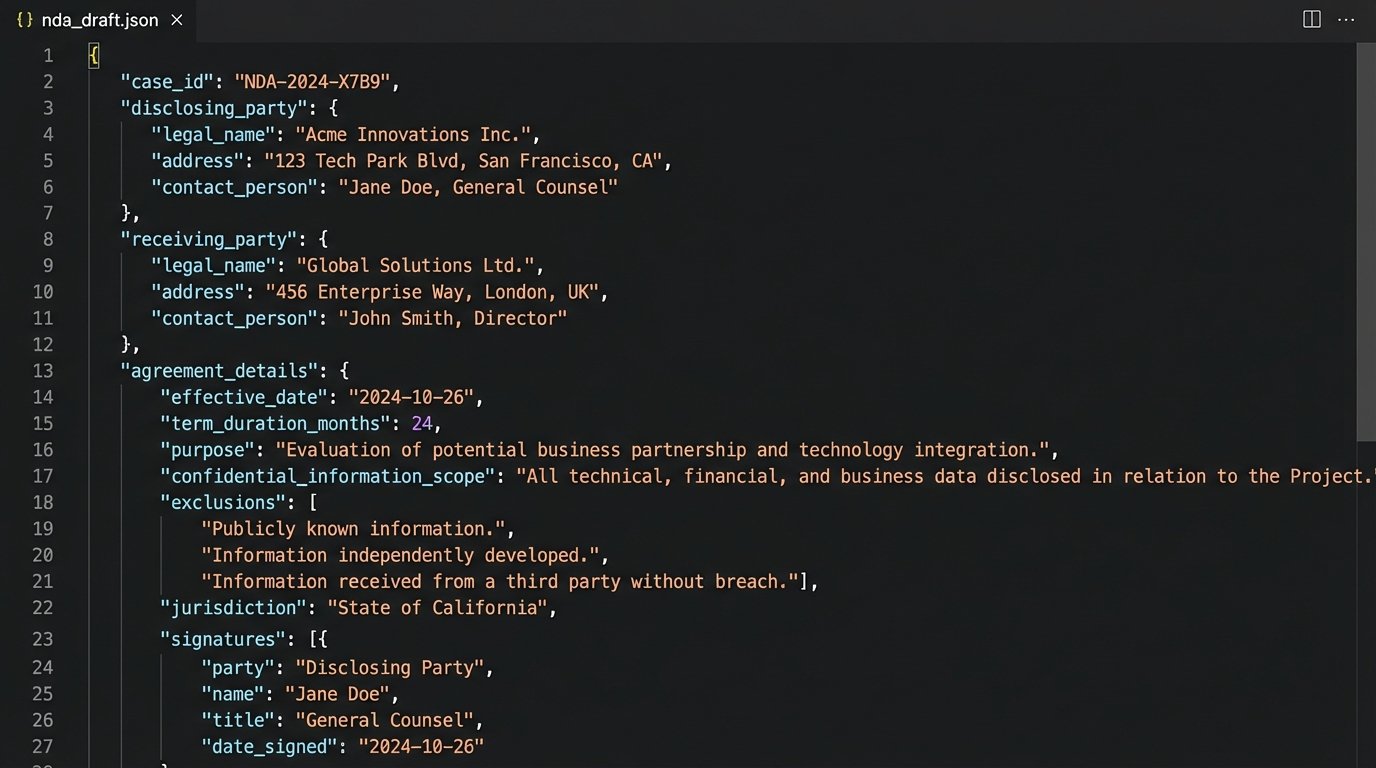
Once you have this payload, the actual document generation becomes a deterministic, repeatable process. You can feed this same JSON to the engine a thousand times and get the exact same output every time. This is the foundation of reliable validation and testing.
Templating: Injecting Logic into Static Text
Your firm’s document templates are not just static text. They are collections of business rules and conditional logic. An effective automation strategy externalizes this logic from the document body and places it into a templating engine. We are not just doing a mail merge. We are building a document from logical blocks.
The core components are placeholders, conditionals, and loops. Most modern templating engines use a simple syntax for this, such as Handlebars, Jinja2, or Liquid. The syntax is not as important as the principle: separate your presentation (the static text) from your logic (the rules) and your data (the JSON object).
Placeholders and Conditionals
Simple placeholders insert data directly from the JSON object. For example, `{{ disclosing_party.name }}` would inject “Innovate Corp.” into the document.
Conditionals are where the real power lies. They allow you to swap entire clauses or modify phrasing based on the input data. In our NDA, the agreement might be unilateral or mutual. Instead of maintaining two separate templates, we can use a single template with a conditional block.
Here is how that logic might look in a Jinja2-style syntax:
{% if agreement_details.is_unilateral %}

This Agreement is entered into by and between {{ disclosing_party.name }} ("Disclosing Party") and {{ receiving_party.name }} ("Receiving Party"). The Disclosing Party may disclose certain Confidential Information to the Receiving Party for the Permitted Purpose.

{% else %}

This Mutual Non-Disclosure Agreement is entered into by and between {{ disclosing_party.name }} ("Party A") and {{ receiving_party.name }} ("Party B"). The parties may disclose certain Confidential Information to each other for the Permitted Purpose.

{% endif %}
This single block replaces the need for a paralegal to choose between two different forms and manually edit the party designations. The logic is encoded. The risk of human error is gutted from that specific step.
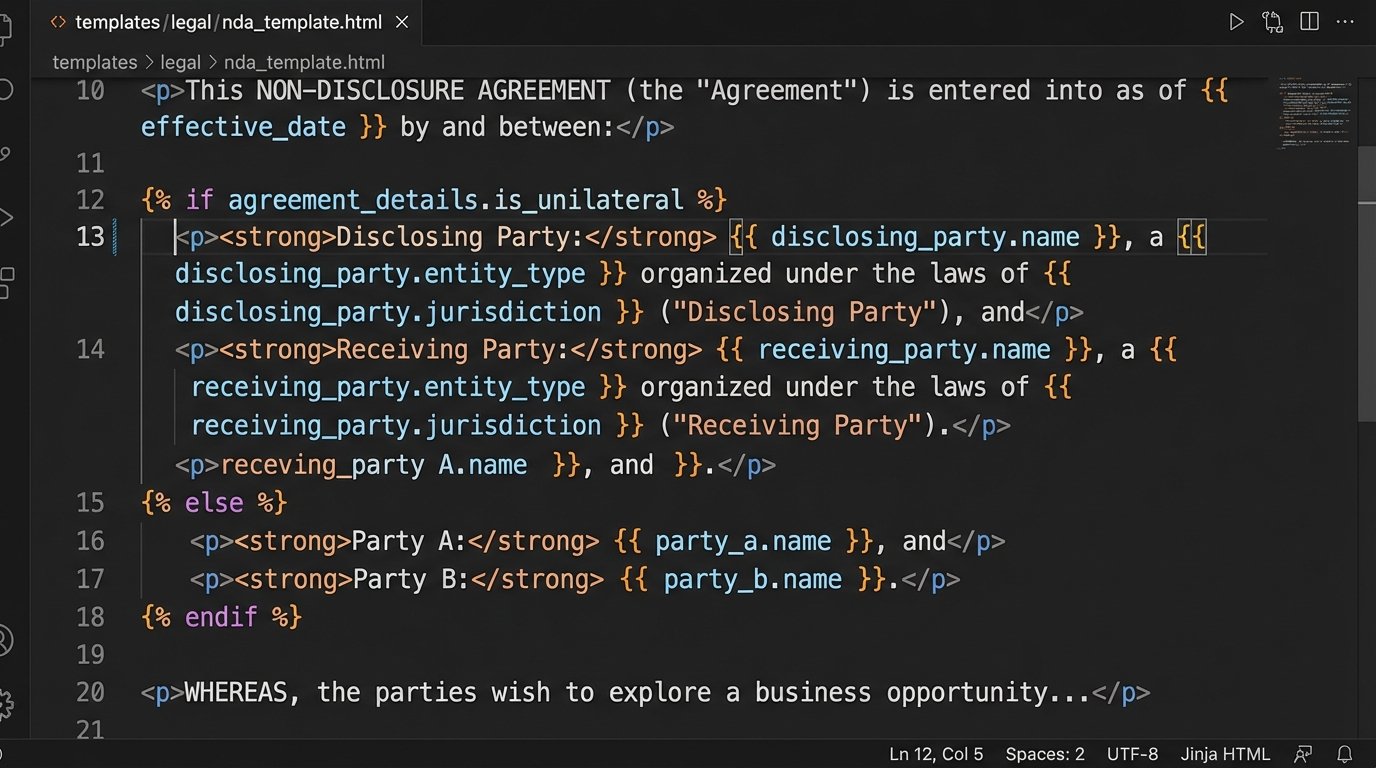
You can chain these conditions to handle complex scenarios. For instance, the definition of “Confidential Information” might change based on the jurisdiction and the type of deal. This is handled by nesting `if/elif/else` blocks that reference the `governing_law` and a custom `deal_type` field in the JSON payload.
Loops for Repetitive Data
Loops are essential for documents with variable-length lists. Think of exhibits, lists of subsidiaries, or multiple signatories for a single party. Instead of creating a fixed number of placeholder fields and hoping it is enough, you pass an array of objects in your JSON and iterate over it in the template.
Imagine a list of permitted representatives for the receiving party.
The JSON would include an array:
"receiving_party": {

    "name": "Synergy Solutions LLC",

    ...

    "representatives": [

      { "name": "Alice Johnson", "title": "Project Manager" },

      { "name": "Bob Williams", "title": "Lead Engineer" }

    ]

}
The template would then use a `for` loop to generate a formatted list:
The Receiving Party may disclose Confidential Information only to its employees and the following named representatives:

<ul>

{% for rep in receiving_party.representatives %}

  <li>{{ rep.name }}, {{ rep.title }}</li>

{% endfor %}

</ul>
This approach scales. Whether there are two representatives or twenty, the template handles it correctly without modification. The document structure adapts to the data, not the other way around.
Validation and Error Handling
Automating document creation without a validation strategy is just a way to generate incorrect documents faster. The goal is not just speed. It is correctness. A robust validation layer is non-negotiable. It has two primary components: data validation upstream and content validation downstream.
Upstream Data Validation
This occurs before the data is ever sent to the templating engine. Your intake form or data entry system should be responsible for this. It is far cheaper and safer to catch a missing `governing_law` field at the point of entry than it is to debug a half-generated document full of empty clauses.
Implement strict validation rules:
- Required Fields: The system should refuse to proceed if a critical piece of data is missing.
- Data Types: Ensure integers are integers and booleans are booleans. Prevent users from entering “Two” in a field expecting the number `2`.
- Pattern Matching: Use regular expressions to validate formats for things like dates, email addresses, and case numbers.
- Range Checks: Enforce business rules, like an agreement term cannot be negative or exceed a certain number of years.
This initial gatekeeping prevents a huge class of potential errors. It is the first line of defense.
Downstream Content Validation
After a document is generated, you need a way to verify its integrity. This is more complex than just checking for typos. We need to confirm the logical structure is correct. This is where you treat your documents like software builds. You run tests.
A simple but effective technique is a keyword or phrase checksum. After generation, your script can scan the document for expected phrases based on the input JSON. For example, if `is_unilateral` was `true`, the script should verify that the phrase “Disclosing Party” is present and the phrase “Party A” is absent.
A more advanced approach involves generating a hash of the final document. You can build a library of test cases, each with a specific JSON input and a corresponding known-good document hash. Your automation pipeline generates the document from the test JSON and compares the output hash to the expected hash. If they do not match, the build fails. This is exactly how continuous integration works in software development, and the principle applies directly to document assembly.
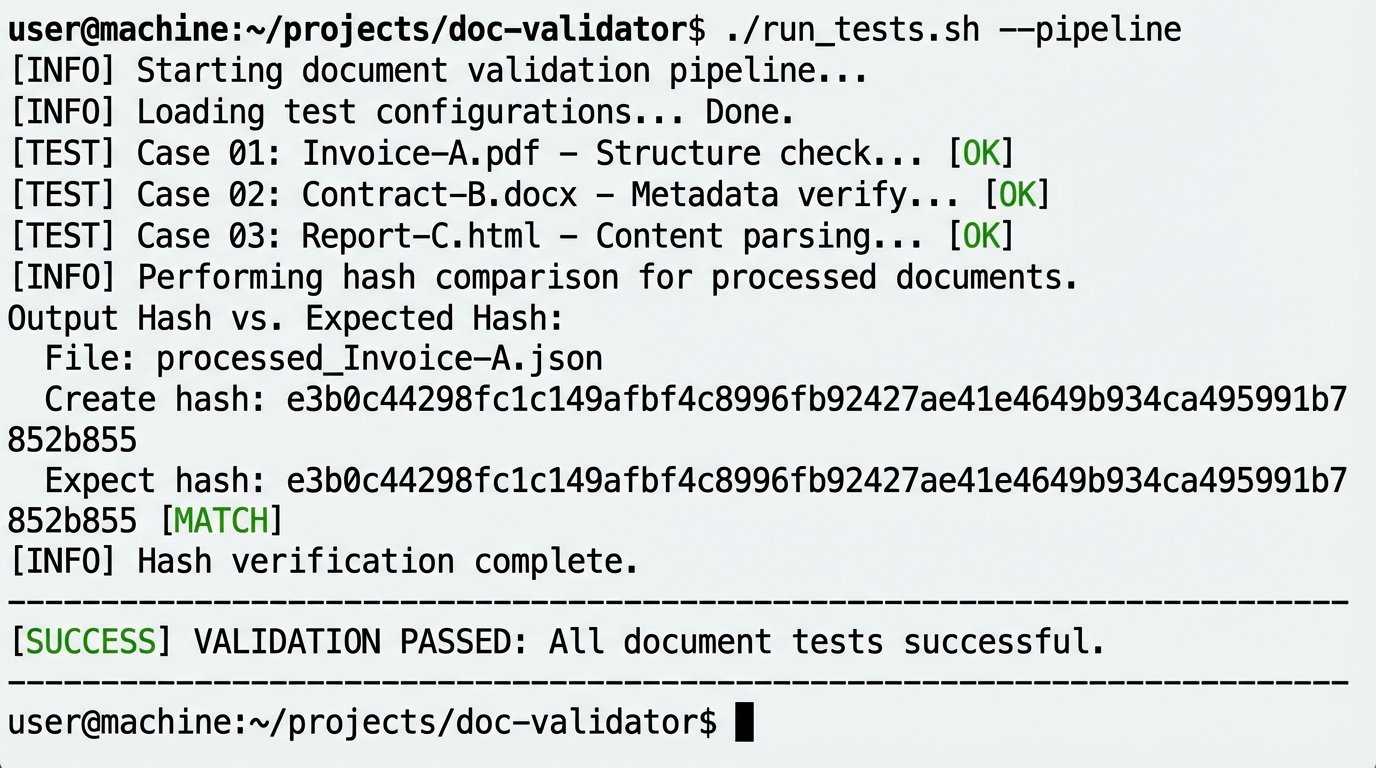
The final validation step is still human review, but it is a transformed process. The attorney is no longer checking for copy-paste errors or correct party names. The system guarantees that. Instead, their review is focused entirely on the high-level legal substance of the agreement. They are auditing the output of the machine, not performing the rote mechanical labor themselves.
Without this validation, you have just built a black box. You have no auditable proof that the document reflects the input data, and you will eventually be forced to defend that in front of a very unhappy partner or client.