
Most document automation platforms market themselves as a one-click solution. They are not. The core engineering challenge is rarely the template logic itself. It is the thankless, brutal work of sanitizing source data and bridging the gap between a legacy Case Management System and the document engine’s rigid API. Get the data mapping wrong, and you generate a thousand perfectly formatted, yet factually incorrect, documents. The tool is just the final assembly line. The real work is in the supply chain.
This is not a review of user interfaces or pricing tiers. This is a breakdown of the underlying architecture of five common tools, their integration points, and the specific types of production failures you can expect from each. We are looking at the engine, not the paint job.
1. HotDocs
HotDocs is the institutional standard, which means it carries significant technical debt. Its strength lies in the desktop-based Author tool, a powerful environment for building complex templates with nested logic, repeat loops, and custom computations. Lawyers who learn its markup language can construct incredibly sophisticated documents without writing a line of code. The platform handles intricate dependency chains, like clauses that must appear based on the intersection of three different data points, with stability.
This power comes at a cost. The authoring environment is a Windows-only desktop application, creating a deployment and versioning headache. Managing a library of 500 templates across 20 authors is a manual, error-prone process. Getting the templates into the server environment for generation requires a deliberate deployment cycle. It is not a modern CI/CD workflow.
Integration and API Mechanics
The HotDocs Server API is functional but feels dated. It is a SOAP XML-based service that requires verbose, carefully structured requests. You are not just sending a JSON object. You are constructing a full XML answer file, mapping each variable from your system to a corresponding HotDocs variable. This process is rigid. A single mismatched data type or field name will cause the entire generation job to fail without a particularly descriptive error message.
Connecting to a modern system, like a cloud-based CRM, requires a middleware component. You will build a service that fetches data from a REST API, transforms the JSON response into the required XML answer file format, and then POSTs it to the HotDocs Server endpoint. Getting the data model right is like framing a house. Get it wrong, and you are just hanging drywall on a crooked structure. You spend more time on the data transformation layer than on the document logic itself.
The on-premise nature of many HotDocs deployments gives you control over security but also saddles you with server maintenance, patching, and uptime responsibility. The cloud version abstracts this away but offers less control over the environment and can be sluggish during peak loads.
2. Contract Express
Contract Express, now part of Thomson Reuters, positions itself as a more enterprise-focused competitor to HotDocs. Its primary authoring environment is a Microsoft Word add-in, which lowers the initial learning curve for legal staff. They can mark up templates directly in a familiar interface. The underlying logic engine is robust, capable of handling complex conditional logic, calculations, and external data lookups via integrations.
The platform’s real strength is its questionnaire generation. It automatically builds a dynamic web-based interview from the variables defined in the template. This questionnaire guides the user through the data entry process, using show/hide logic to only present relevant questions. This is a critical feature for self-service automation where the end-user is not a lawyer.
Data Flow and System Architecture
Integration is more modern than HotDocs, offering a RESTful API that accepts and returns JSON. This simplifies the process of connecting it to other cloud services. A typical workflow involves a primary system, like Salesforce or a proprietary database, making a POST request to the Contract Express API. The request body contains the data needed to pre-populate the questionnaire. The API returns a URL to the pre-populated session, which can be embedded in an iframe or opened in a new tab.
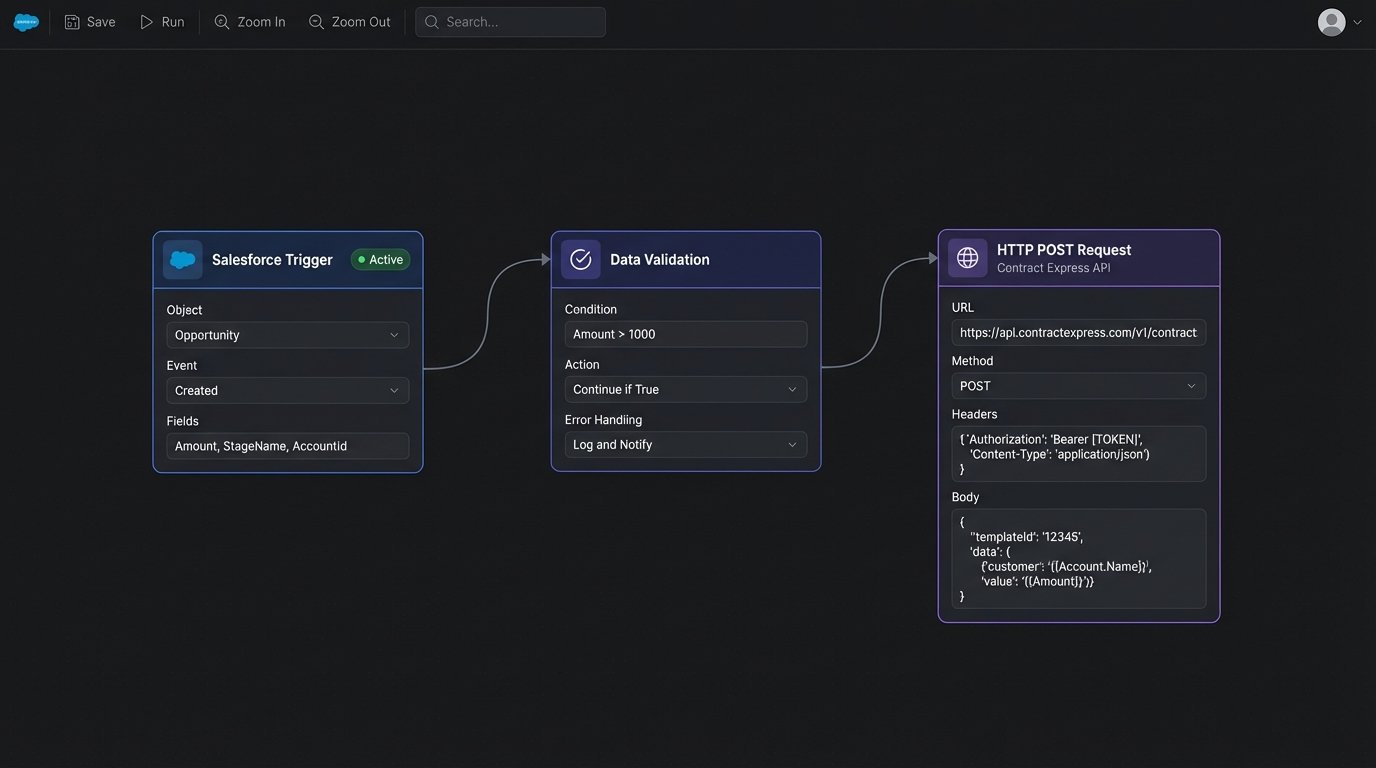
The failure point here is data validation. The API will accept the data you send it, but if that data is incomplete or in the wrong format, the end-user is left stranded in a half-populated, confusing questionnaire. You must build pre-flight checks in your source application to logic-check the data *before* you call the Contract Express API. Do not rely on the questionnaire to be your only validation layer.
Template management is also a significant operational concern. As the library grows, ensuring consistency in variable naming conventions, styles, and clause language becomes a full-time job. Without strict governance, you end up with five different ways to name the “Effective Date” variable, breaking any attempt at systemic integration.
3. DocuSign Gen for Salesforce
This tool is not a general-purpose document engine. It is a specialized component designed to do one job: generate documents from Salesforce data. Its entire existence is predicated on deep, native integration with the Salesforce object model. If your firm runs on Salesforce, this is the lowest-friction option available. You build templates directly within Salesforce, using a Word-based editor to place merge fields that map directly to Salesforce object fields, both standard and custom.
The logic capabilities are basic. You can implement conditional sections based on field values using simple IF/THEN/ELSE syntax. For example, you can show a specific indemnity clause only if the `Account.BillingState` is “California”. It handles related lists, allowing you to insert a table of all `OpportunityLineItems` associated with an `Opportunity`. Anything more complex, like nested conditional logic or complex calculations, requires you to first create formula fields in Salesforce and then merge those calculated results into the template.
You are not buying a document engine. You are buying a Salesforce extension.
API and Workflow Limitations
Because Gen lives inside Salesforce, you do not call an external API to generate a document. You typically trigger the generation process using a custom button on a page layout, an Apex trigger, or a Flow. The process is asynchronous. You initiate the job, and Salesforce handles the generation in the background, eventually attaching the finished document to the source record.
This creates a debugging nightmare. When a generation fails, the error messages are often generic Salesforce platform errors, not specific feedback about your template. The problem could be a permissions issue, a SOQL query governor limit, or an invalid merge field. The debugging process involves checking debug logs, validating field-level security, and repeatedly testing minor template variations. It is slow and painful.
The hard dependency on Salesforce is the tool’s biggest weakness. If your data lives anywhere else, you must first import it into Salesforce to use Gen. This means you are architecting your entire data flow around the limitations of a single document generation tool, which is a classic anti-pattern. It is forcing a firehose of data through the needle of a specific platform’s API.
4. PandaDoc
PandaDoc comes from the sales and marketing world, and its DNA shows. The platform excels at creating visually appealing documents with a strong focus on user experience, analytics, and e-signatures. Its web-based editor is intuitive, allowing for drag-and-drop content blocks, embedded images, and videos. For sales agreements, proposals, and client onboarding packets, it is very effective.
The template logic is token-based. You define variables (tokens) and then populate them via an API or a user-entry form. Conditional logic is present but limited compared to HotDocs or Contract Express. It is designed to handle basic personalization, not complex legal clause construction. Its “Content Library” feature allows you to store pre-approved clauses and content blocks, but managing a large library of legal text requires strict organizational discipline.
Integration via REST API
PandaDoc provides a well-documented REST API that is a clear improvement over legacy SOAP services. You can programmatically create documents from templates, send them for signature, and track their status via webhooks. A typical integration involves your application sending a POST request to the `/documents` endpoint with a JSON payload containing the template UUID, recipient information, and a dictionary of field/value pairs.
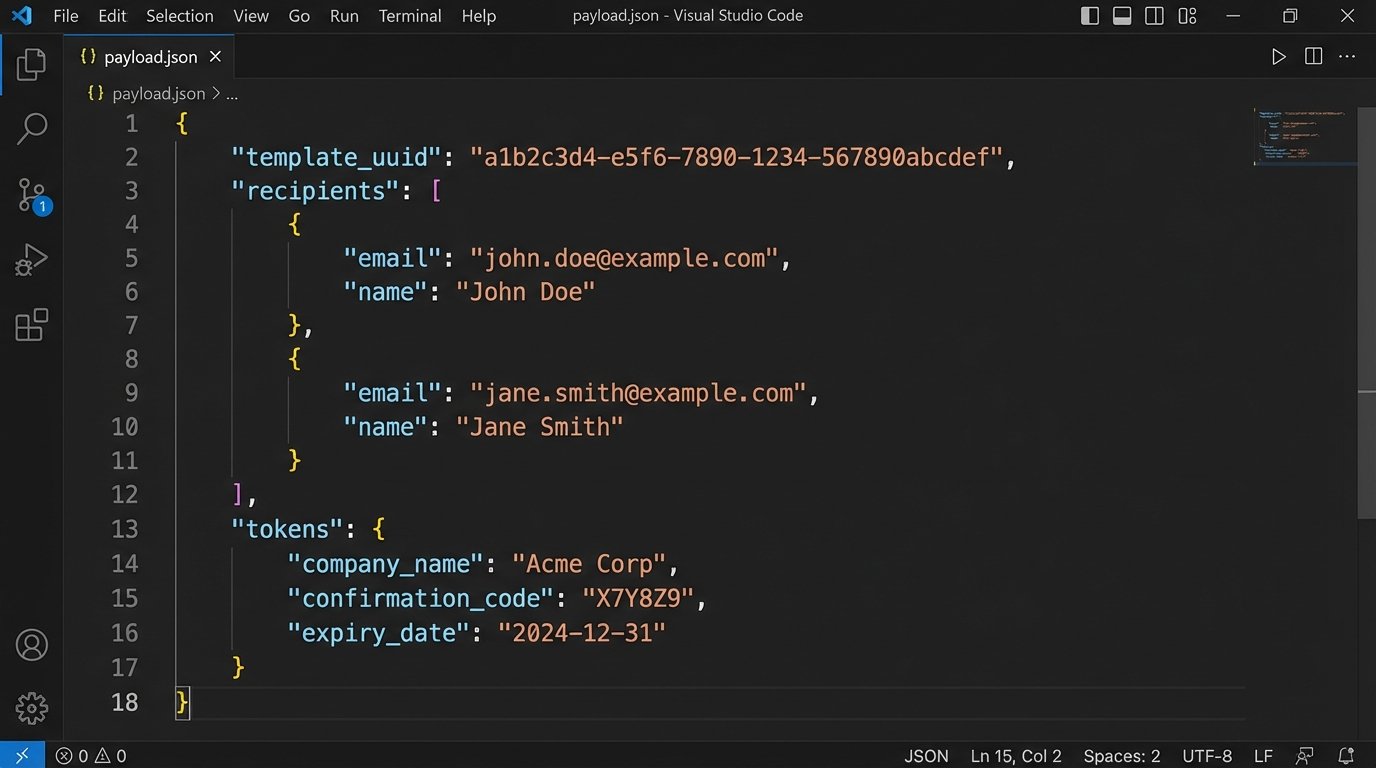
Here is a simplified example of the JSON payload for creating a document from a template:
{
  "template_uuid": "AbCdEfGhIjKlMnOpQrStUvWxYz",
  "recipients": [
    {
      "email": "client@example.com",
      "first_name": "Jane",
      "last_name": "Doe",
      "role": "Client"
    }
  ],
  "tokens": [
    {
      "name": "Agreement.EffectiveDate",
      "value": "2023-10-27"
    },
    {
      "name": "Service.Description",
      "value": "Legal Automation Consulting"
    }
  ]
}
The main challenge is error handling and state management. When you send a document out for signature, its status changes multiple times (sent, viewed, completed, etc.). You need to configure webhooks and build a listener service in your application to process these status updates. If your listener service goes down, you lose visibility into the document lifecycle and have to build a reconciliation process to poll the PandaDoc API for status updates.
5. Gavel (formerly Documate)
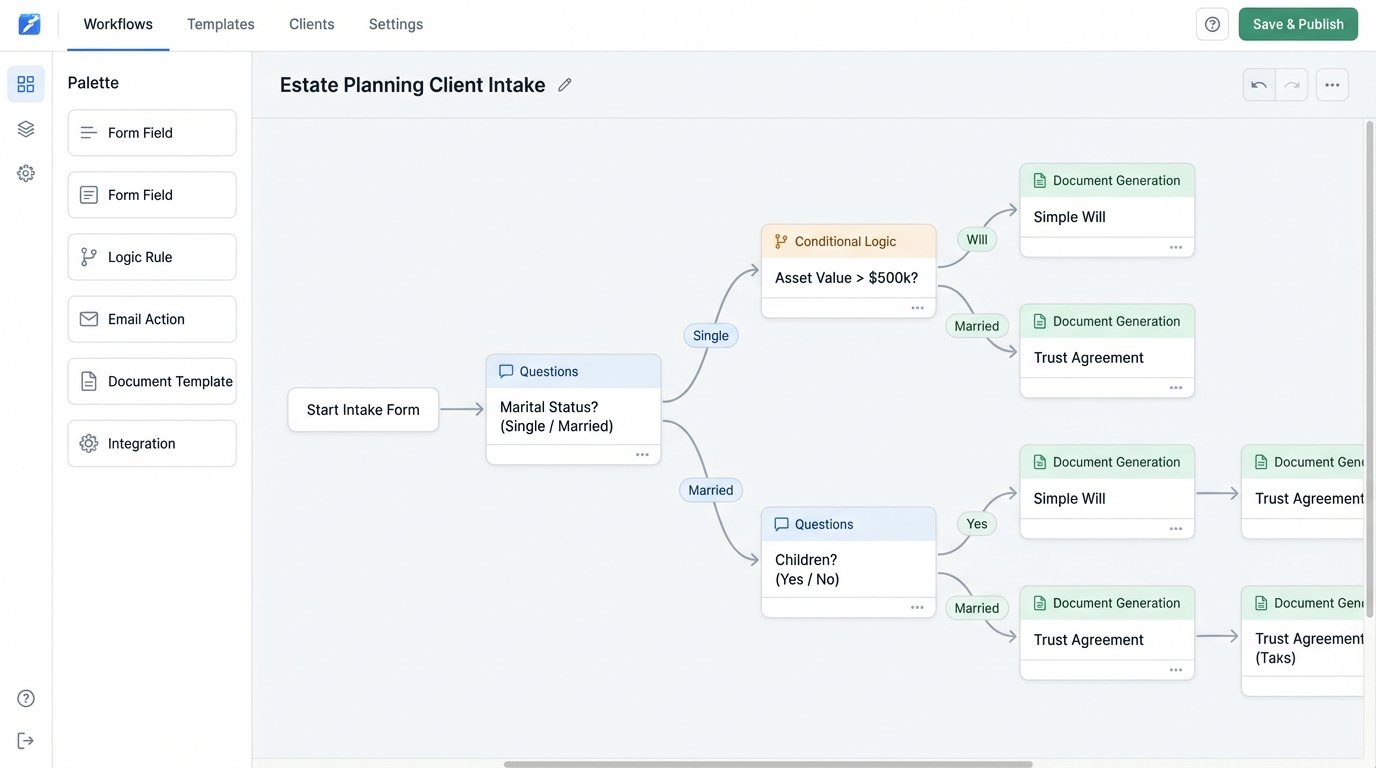
Gavel is a newer player focused on making automation accessible directly to lawyers. It is a no-code platform that allows users to build complex, logic-based workflows that generate documents. The entire authoring process happens in a web-based interface, guiding the creator through building questions, adding conditional logic, and uploading underlying template files (usually .docx).
Its power is in its ability to chain logic and build multi-step workflows that feel like a custom application. You can create branching paths, score inputs, and perform calculations, all without writing code. This is ideal for practice areas like family law or estate planning, where client intake involves a long and complex series of questions. The final output is a populated document, or a set of documents, based on the user’s journey through the workflow.
Architectural Considerations and API
Gavel offers a public API for launching workflows and retrieving generated documents. You can trigger a “session” and pre-populate answers by passing them as URL parameters or in a JSON body. This allows you to start a Gavel workflow from another system, like a client portal or practice management platform, creating a more seamless user experience.
The primary constraint is that Gavel is its own universe. The logic engine and data model are self-contained. Integrating it means pushing data *into* a workflow and pulling documents *out*. It is not designed for deep, bidirectional data synchronization. You cannot easily have a Gavel workflow update a record in your CRM in real-time. This makes it better for discrete, self-contained processes rather than as a deeply embedded component of a larger system.
Maintenance is another concern. Because the logic is built using a graphical interface, it can be difficult to version control or audit. A complex workflow can become a tangled web of dependencies that is hard for anyone but the original author to debug. A simple change to an early question can have cascading, unexpected effects on downstream logic and document outputs.