
Document automation is not about buying software. It is about imposing discipline on unstructured data and chaotic workflows. Most firms buy a platform thinking it will solve their drafting problems, only to discover the core issue is their lack of a coherent data model. The tool is irrelevant if the input is garbage. The process begins with data hygiene, not with a vendor demo.
The fundamental architecture is simple. You strip a document of its variable parts, replacing them with placeholders. The static text, the boilerplate legal language that has been vetted for decades, remains untouched. The variable parts, client names, dates, jurisdictions, monetary amounts, are injected at the moment of generation from a structured data source. This separation is the entire foundation.
Failure to respect it means you are not automating. You are just creating a more complicated mail merge.
Deconstructing the Core: Template-Based Automation
A template is a scaffold. It contains the legal logic and structure, but it is inert without data. Think of it as an executable file that requires specific input arguments to run. The engine that merges the data and the template is the processor. Most of the work in legal automation engineering is not in writing the template’s prose, but in architecting the data pipeline that feeds it.
This process forces attorneys to decide what is truly standard versus what is negotiated. That internal debate is often more valuable than the final automated document itself, as it exposes inconsistencies in the firm’s own legal reasoning.
Static vs. Dynamic Content
Static content is the bedrock of the document. It is the language that has been approved by partners and survives legal challenges. In a well-designed template, this content should rarely change. It is locked down to prevent junior associates from making creative and legally perilous modifications. Every word is fixed for a reason.
Dynamic content is represented by tokens, often wrapped in curly braces or square brackets, like `{{client_name}}` or `[agreement_date]`. These are not just text fields. A robust system treats them as typed variables. A date token should only accept a date, a currency token should only accept a number with two decimal places. This type-enforcement is a basic but critical guardrail against faulty output.
Prerequisite One: Data Discipline
Automation dies without a single source of truth. If your client data lives in three different systems, an Excel sheet, the practice management software, and a partner’s private contacts, you have already failed. The first step is to centralize or build a service that can aggregate this data into a consistent, predictable model. You cannot automate chaos.
We often spend weeks just digging through legacy case management APIs, trying to find the correct field for a client’s registered address, only to find three different fields used for the same purpose. The documentation is usually a fantasy novel written a decade ago. The real work is reverse-engineering the firm’s own broken information architecture.
Mapping Your Data Source
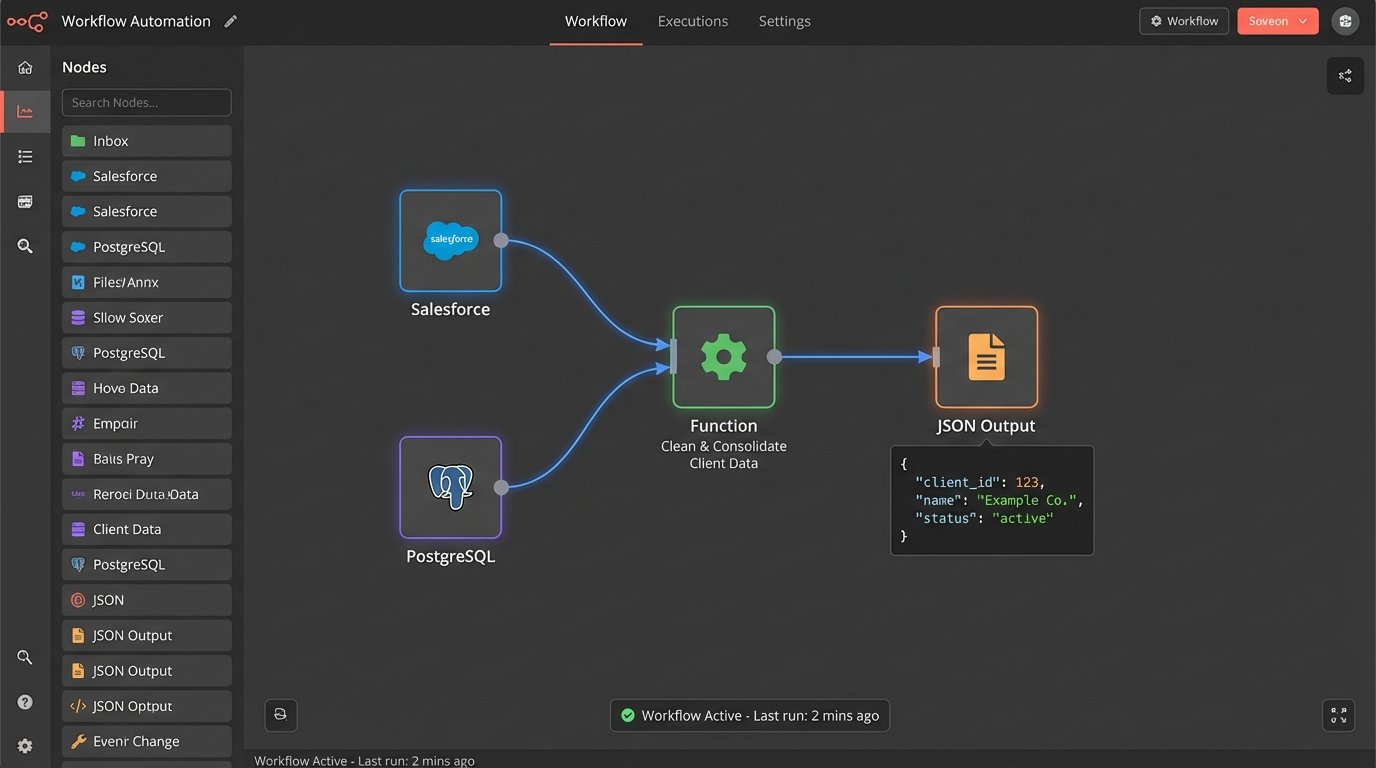
The data map is the bridge between your source system and your template. It is a simple key-value definition that tells the engine, “The field `primary_contact_name` from our CRM corresponds to the `{{client_name}}` token in the template.” This mapping can be a simple JSON object or a more complex transformation layer that cleans and formats the data before injection.
For example, you might pull raw data from a database and need to format it for the document. Your data source might store a date as a UNIX timestamp, but your template requires it in “Month Day, Year” format. The mapping layer handles that transformation logic, keeping the template itself clean of presentation code.
{

  "document_request": {

    "template_id": "nda_v3.1",

    "output_format": "pdf",

    "data_payload": {

      "client_name": "InoTech Corporation",

      "client_address": "123 Innovation Drive, Suite 400, Techville, CA 90210",

      "effective_date": "2024-10-26",

      "jurisdiction": "Delaware",

      "is_mutual": true,

      "term_months": 24

    }

  }

}
Of course, the data payload you get from the production environment will never look this clean.
The Mechanics of Templating Logic
Simple find-and-replace of tokens like `{{client_name}}` is just the first layer. The real power comes from embedding conditional logic and loops directly into the template. This allows a single template to generate dozens of variations, eliminating the need to maintain separate documents for every possible scenario. This is also where the complexity and risk increase exponentially.
This is less about drafting and more about programming. You are building a small application inside your document. Treating it as anything less is professional negligence.
Conditional Blocks: The If/Then/Else of Law
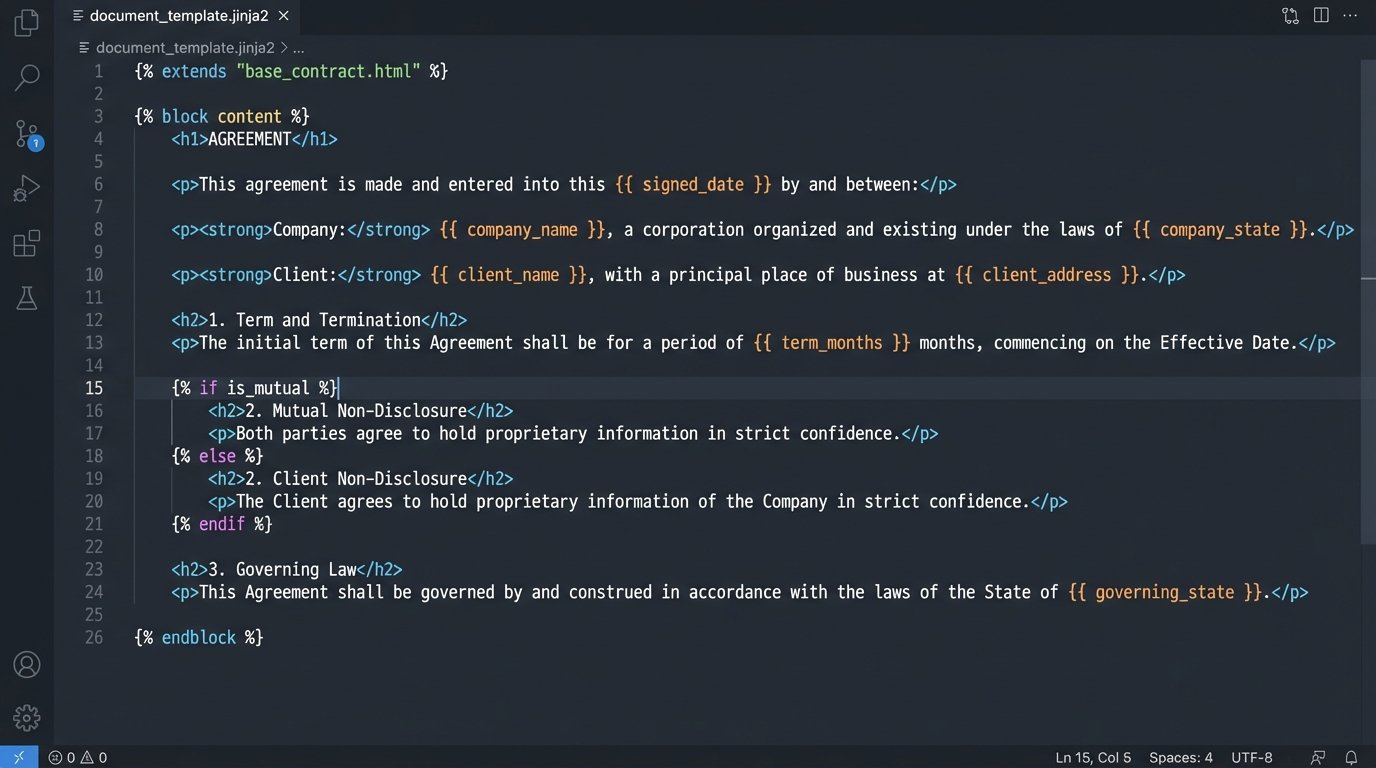
Conditional logic uses `IF`, `ELSE`, and `ENDIF` statements to wrap entire paragraphs or clauses. The engine evaluates a boolean data point, `is_mutual` for example, and includes the corresponding text block only if the condition is met. An NDA template might use this to include a whole section on mutual obligations if the `is_mutual` flag is set to `true` in the input data.
A mistake in this logic, a missing `ENDIF` tag or a wrong variable name, can cause the system to generate a nonsensical or legally unenforceable contract. The engine will not throw an error. It will just produce a broken document that gets sent to a client. The testing and validation of this logic is not optional.
<p>This Non-Disclosure Agreement is entered into by {{client_name}} ("Receiving Party") and Our Firm ("Disclosing Party").</p>
{% if is_mutual == true %}
<p>For the purposes of this Agreement, both parties shall be considered both a "Disclosing Party" and a "Receiving Party" with respect to Confidential Information exchanged.</p>
{% endif %}
<p>The term of this agreement shall be {{term_months}} months.</p>
One typo in the variable `is_mutual` and the entire meaning of the agreement changes. Syntax matters.
Loops and Repeating Sections
Loops are used to iterate over an array of data. Instead of creating a template with space for three company directors and hoping that is enough, you provide an array of director objects in your data. The template then loops through that array, generating a formatted entry for each one. This allows the document to dynamically grow based on the data.
This is critical for shareholder agreements, wills with multiple beneficiaries, or any document that deals with lists of people, assets, or entities. It is the only way to build a template that is both scalable and maintainable. Hardcoding slots for list items is a brittle, amateurish approach that is guaranteed to break.
Tooling: Choosing Your Weapon
The market is saturated with document automation tools, ranging from lightweight Word add-ins to massive, enterprise-grade platforms. The former are easy to start with but impossible to integrate at scale. The latter are wallet-drainers that often require an army of consultants to implement. The choice depends entirely on your integration needs and tolerance for being locked into a vendor’s ecosystem.
The core decision is whether you need a system for lawyers to use directly or an engine for developers to build on top of. Trying to make one tool do both jobs is a recipe for frustration.
Embedded vs. API-Driven Engines
Embedded tools, like plugins for Microsoft Word or Google Docs, feel familiar to lawyers. They build the logic directly inside the `.docx` file. This is fine for simple templates but creates a maintenance nightmare. The logic is hidden within the document’s proprietary binary format, making it impossible to version control, audit, or integrate with other systems. It is a dead-end architecture.
API-driven engines are headless services. You send them a template file and a JSON data object via a REST API call, and they return the generated document. This approach decouples your logic from the template format. It allows you to store your templates in Git, version them, and run automated tests against them. You can force data validation before ever calling the generation endpoint. It requires a developer, but it is the only professional way to build a scalable system.
Validation and Output Control: Preventing Malpractice-as-a-Service
Generating a document is easy. Generating the *correct* document is hard. An automation system with no validation layer is just a high-speed malpractice machine. The goal of automation is not just to be faster, but to be more correct and consistent than a human. This requires multiple layers of checks.
You have to assume the input data is wrong. You have to assume the user will make mistakes. Your system’s primary job is to catch those mistakes before they become a signed contract.
Pre-Generation Sanity Checks
Before the data payload is sent to the template engine, it must be run through a validation schema. This is a set of rules that define the required shape of the data. Does the `jurisdiction` field contain a valid state? Is the `effective_date` after the `signature_date`? Are all required fields for a specific clause present? If the data fails validation, the request is rejected with a clear error message. You never even attempt to generate the document.
This is like trying to shove a firehose of data through a needle. The validation schema is the needle. It forces the data into the correct shape before it can proceed. It is the most important component in the entire stack.
Post-Generation Audits
No system is perfect. The first hundred documents generated from a new, complex template must be manually reviewed by a human with legal expertise. There is no substitute for this. You compare the generated output against the input data to ensure the logic executed as expected. You are testing the template, not the lawyer.
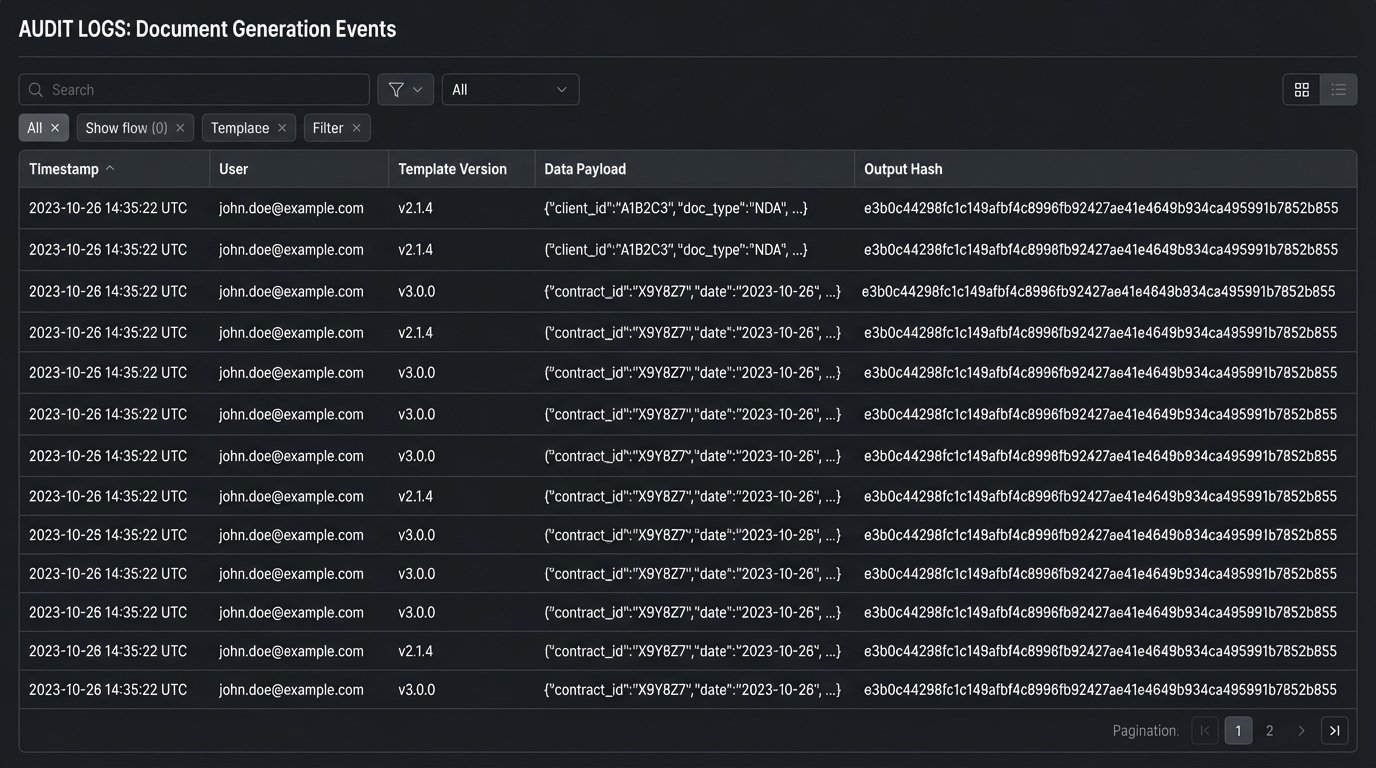
Every single generation event must be logged. The log should capture a timestamp, the user who initiated the request, the exact data payload used, the version of the template that was called, and a hash of the resulting document. When a client calls six months later claiming a contract contains the wrong clause, this audit log is your only defense.
The Real Cost: Maintenance Overhead
A template is not a project with an end date. It is a living product that requires constant maintenance. Case law evolves, statutes change, and partners refine boilerplate language. A template that is not actively maintained becomes a liability. The legal reasoning embedded within it begins to decay the moment it is deployed.
The firm must assign clear ownership for each template. When a law changes, there must be a defined process to identify all affected templates, update them, test the changes, and deploy them. Without this governance, your template library will quickly become a collection of outdated and dangerous documents.
The person who architects the automation must be deeply involved in its long-term maintenance. Handing off a complex system to someone without the context of its construction is asking for failure. This is not a one-time build, it is a long-term commitment.