
Most litigation preparation is a feedback loop of manual data entry and human error. Lawyers and paralegals spend countless hours logging evidence in spreadsheets, a method that offers zero data integrity and scales poorly. The entire process is fragile, dependent on meticulous attention from overworked staff. We are not aiming to eliminate the lawyer, we are aiming to eliminate the spreadsheet.
This is a blueprint for building a semi-automated evidence management pipeline. It’s not about buying a subscription to a cloud platform that promises AI magic. It’s about writing targeted scripts and chaining together existing tools to force structure onto the chaos of discovery. The goal is to ingest, hash, and log evidence automatically, then use that structured data to generate case timelines. This requires some command-line comfort and a healthy skepticism of marketing brochures.
Establishing the Foundation: Prerequisites for Automation
Before writing a single line of code, you must address the operational and data hygiene issues. Automating a broken manual process just gets you to the wrong answer faster. The first step is to impose a rigid, non-negotiable data standard. This is a political battle, not a technical one.
Every piece of potential evidence must conform to a standardized naming convention. A good starting point is `[YYYY-MM-DD]_[Document-Type]_[Brief-Description]_[Bates-Number].pdf`. This structure makes the document sortable by date and provides immediate context without opening the file. Forcing this discipline is half the work, and if you cannot win this argument with the case team, you should not proceed.
API Access and Tooling
You need programmatic access to your firm’s case management system (CMS). Whether it’s Litify, Filevine, Clio, or some ancient in-house SQL database, you need an API key and documentation. This is your entry point for injecting structured data. If your CMS provider doesn’t have a REST API, you are already facing a significant hurdle that will require ugly workarounds.
The core toolkit for this work is straightforward. We will use Python for its powerful data manipulation libraries and simple syntax. You will need:
- Python 3.8+: The engine for our scripts.
- `watchdog` library: To monitor a file system directory for new files.
- `hashlib` library: For generating cryptographic hashes to ensure file integrity.
- `requests` library: To communicate with the CMS API.
- Libraries for file parsing: `PyPDF2` for PDFs, `python-docx` for Word documents, and `extract_msg` for Outlook files.
This setup assumes you have the authority to install Python packages and run scripts on a server or a dedicated machine that has access to the firm’s network storage. Without that, you’re just writing theoretical code.
Phase 1: Automating Evidence Ingestion and Logging
The first automated workflow tackles the most tedious part of litigation prep: logging newly received evidence. We will create a “hot folder” on a network drive. Any file dropped into this folder will be automatically processed, logged, and copied to a secure evidence locker.
The script uses `watchdog` to monitor this folder. When a new file is detected, a multi-step process begins. First, the script generates a SHA-256 hash of the file. This hash acts as a unique fingerprint, providing a bulletproof way to verify that the file has not been altered. It is the cornerstone of a defensible chain of custody. Any process that skips this step is forensically unsound.
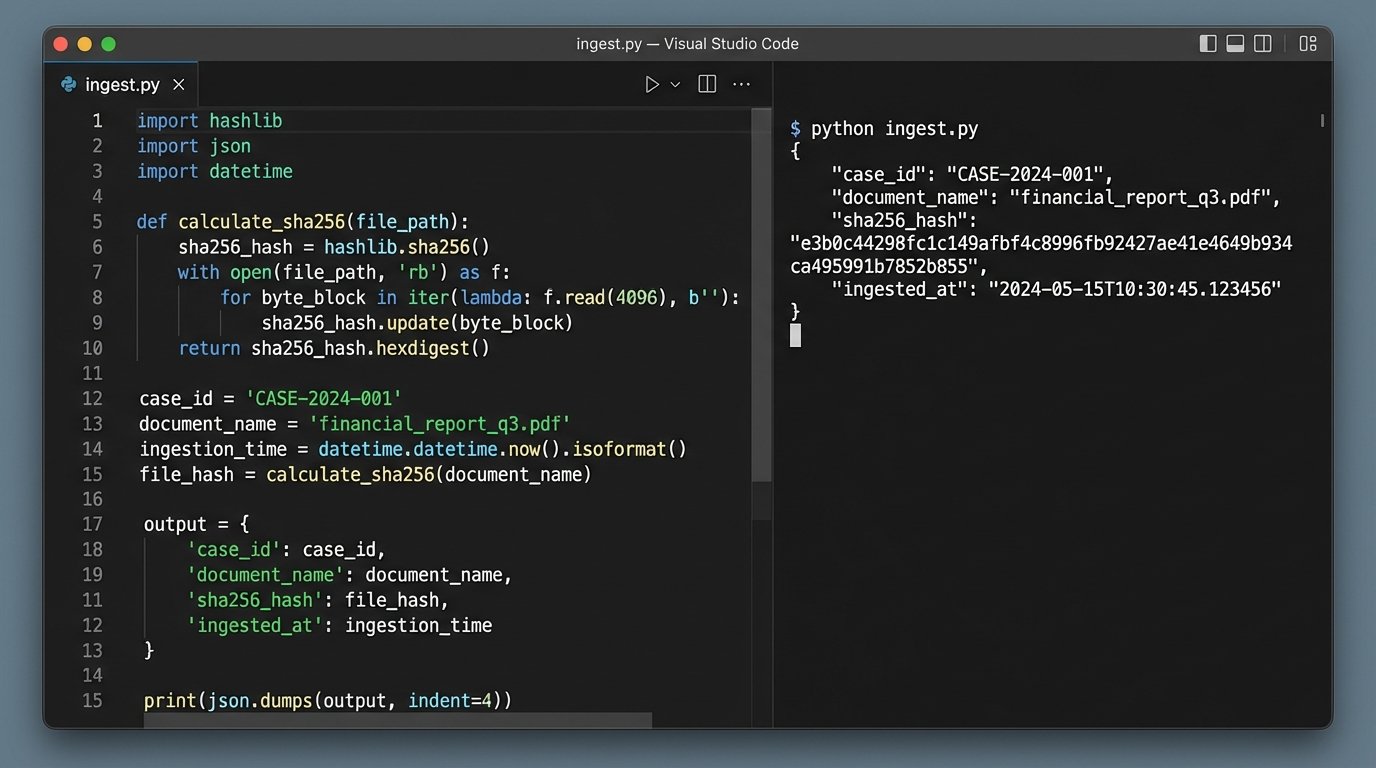
Next, the script attempts to strip metadata from the file. It opens the file to extract properties like creation date, author, and modification date. This data is often valuable but should be treated as supplemental, not primary, due to its unreliability. The primary date should come from the file name itself, as per our enforced convention. The entire metadata extraction process is like shoving a firehose through a needle; you’re forcing a massive, unstructured binary file through a small parser hoping to get a few clean drops of data.
Finally, the script constructs a JSON payload containing the filename, file path, SHA-256 hash, and extracted metadata. It then injects this payload into the CMS via a `POST` request to the appropriate API endpoint. The file itself is then moved from the hot folder to a permanent, read-only storage location. This prevents accidental modification and keeps the intake directory clean.
A failed API call must trigger an alert. The script cannot fail silently. If the CMS endpoint is down or the authentication token has expired, the file should be moved to a quarantine folder and an email or Slack notification must be sent to the Legal Ops team. An unlogged piece of evidence is a potential malpractice claim waiting to happen.
Sample Ingestion Payload
The data you send to your CMS should be structured and predictable. A simple Python dictionary converted to a JSON object is the standard method. Your script will gather the necessary information and build an object like this before sending it to the API.
import json

import hashlib

import os

from datetime import datetime
def hash_file(filepath):
"""Generates a SHA-256 hash for a given file."""
sha256_hash = hashlib.sha256()
with open(filepath, "rb") as f:
for byte_block in iter(lambda: f.read(4096), b""):
sha256_hash.update(byte_block)
return sha256_hash.hexdigest()
def create_evidence_payload(filepath):
"""Creates a JSON payload for the CMS API."""
file_stat = os.stat(filepath)
payload = {
"case_id": "CASE-00123",
"document_name": os.path.basename(filepath),
"sha256_hash": hash_file(filepath),
"source_path": filepath,
"file_size_bytes": file_stat.st_size,
"ingested_at": datetime.utcnow().isoformat(),
"metadata": {
"created_date": datetime.fromtimestamp(file_stat.st_ctime).isoformat(),
"modified_date": datetime.fromtimestamp(file_stat.st_mtime).isoformat()
}
}
return json.dumps(payload, indent=2)
# Example usage:
# new_file = "/path/to/hot-folder/2023-10-27_Contract_Redline_ACME-v-Jones_BATES001.pdf"
# api_payload = create_evidence_payload(new_file)
# print(api_payload)
# # Next step would be: requests.post(CMS_API_URL, data=api_payload, headers=AUTH_HEADER)
This code is a basic framework. A production version would require robust error handling, especially around file access and API communication. It also assumes the `case_id` is known; a real-world implementation might parse this from the folder structure or require a manifest file.
Phase 2: Generating Dynamic Case Timelines
With evidence being logged in a structured format, we can now automate the creation of case timelines. Manually plotting events on a timeline is slow and guarantees that you will miss something. A script, however, can query the entire evidence log in seconds and build a comprehensive timeline from the available data.
The key is a “timeline date” field associated with each evidence record in your CMS. This date represents the actual time the event occurred, not when the document was created or received. The automation pipeline gets the evidence *into* the system, but a human must still provide this critical piece of context. The goal is to build a simple interface within your CMS or a separate web form where a paralegal can quickly review a newly ingested document and assign its timeline date and a short description.
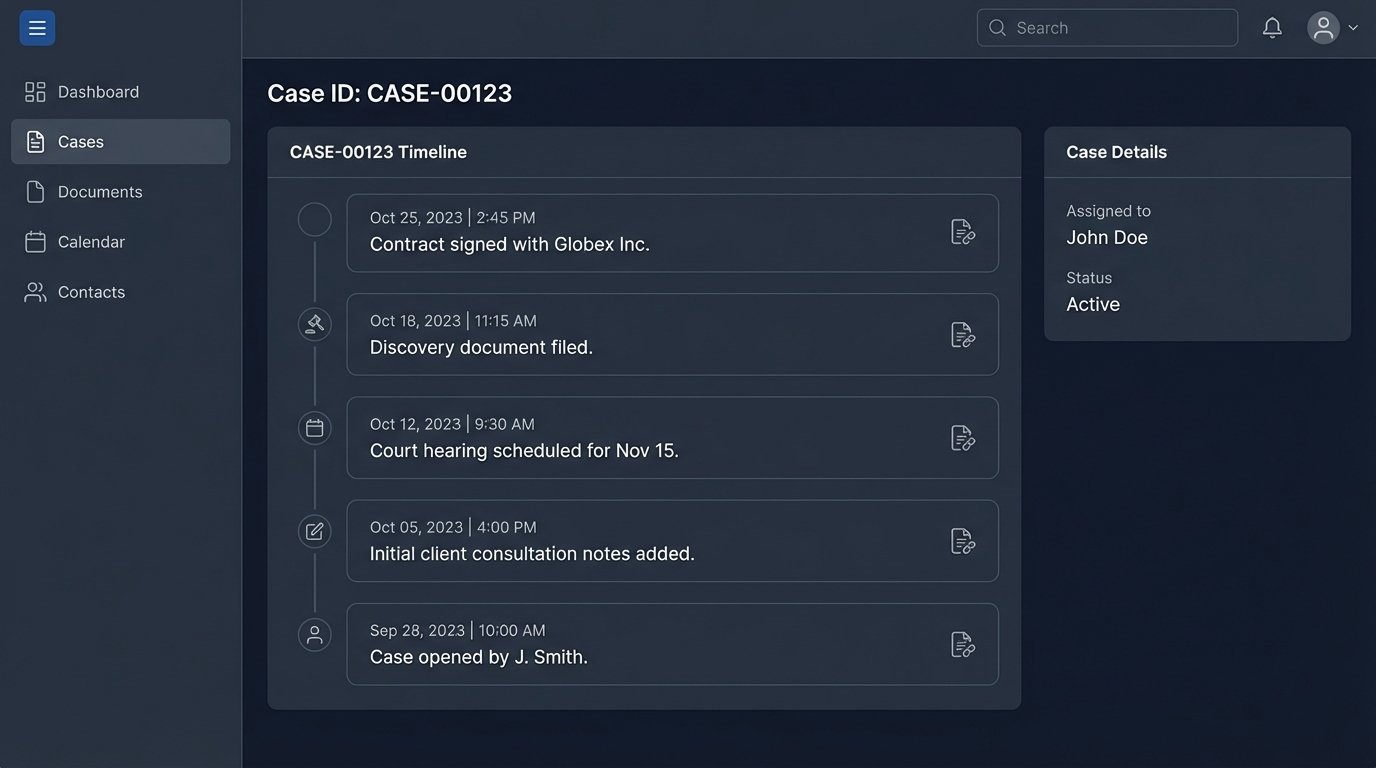
Once this data exists, a nightly or on-demand script can be run. The script authenticates with the CMS API, fetches all evidence records for a specific case that have a valid timeline date, and sorts them chronologically. The output can be formatted in multiple ways:
- CSV File: A simple, portable format that can be opened in any spreadsheet program. Columns would include `Date`, `Time`, `Event Description`, and `Link to Evidence`.
- JSON for Visualization Libraries: Output data structured for tools like TimelineJS or Vis.js, which can render interactive, web-based timelines.
- Direct PDF/Image Generation: Use a library like `matplotlib` or `reportlab` in Python to generate a static, distributable visual of the timeline.
This process transforms the timeline from a static, manually created artifact into a dynamic report that is always up-to-date with the latest logged evidence. It directly bridges the gap between raw discovery data and high-level case strategy.
Advanced Implementations: Entity and Concept Extraction
Once the basic ingestion and timeline pipeline is stable, you can layer on more advanced text analysis techniques. Using Natural Language Processing (NLP) libraries, you can build scripts that automatically read the content of ingested documents to extract key information. This moves beyond simple metadata and into the substance of the evidence itself.
Named Entity Recognition (NER) is a powerful technique for this. A tool like spaCy can scan a document and identify people, organizations, locations, and dates. This information can be used to auto-populate fields in your CMS, linking a piece of evidence to the key players in the case without manual review. This is not a replacement for a paralegal reading the document, but it gives them a massive head start.
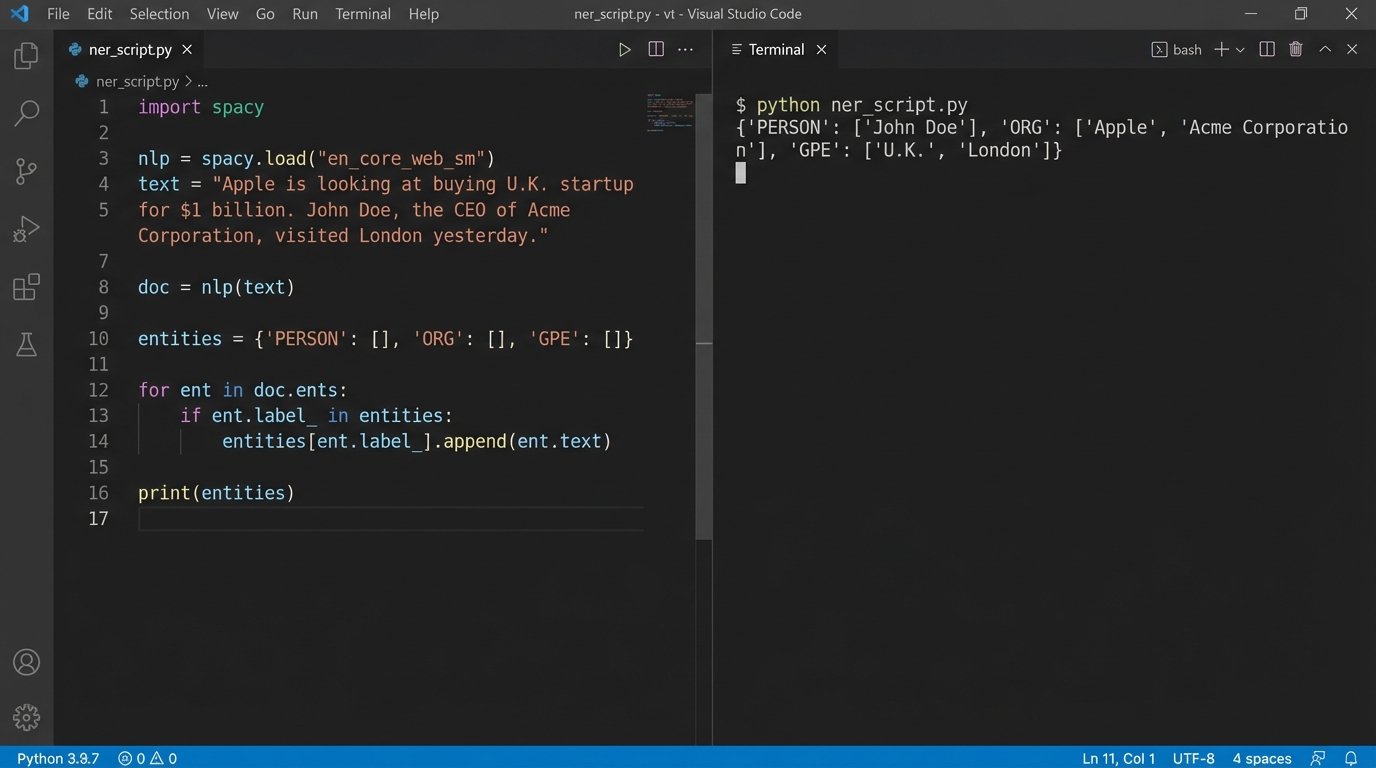
Consider a simple function using spaCy to pull entities from text.
import spacy
# Load the English NLP model
nlp = spacy.load("en_core_web_sm")
def extract_entities(text):
"""Extracts named entities from a block of text."""
doc = nlp(text)
entities = {
"PERSON": [],
"ORG": [],
"GPE": [] # Geopolitical Entity (locations)
}
for ent in doc.ents:
if ent.label_ in entities:
entities[ent.label_].append(ent.text)
# Remove duplicates
for key in entities:
entities[key] = list(set(entities[key]))
return entities
# Example usage with text extracted from a hypothetical document
document_text = """
On October 26, 2023, John Doe of Acme Corporation met with Jane Smith from Globex Inc. in New York.
The agreement was later reviewed by their legal team in London.
"""
extracted_data = extract_entities(document_text)
print(extracted_data)
# Output: {'PERSON': ['John Doe', 'Jane Smith'], 'ORG': ['Globex Inc.', 'Acme Corporation'], 'GPE': ['New York', 'London']}
The output of such a script can be added as tags or related records to the evidence log. Imagine every document being automatically tagged with the names of every person mentioned within it. This enables powerful searching and helps uncover connections that would otherwise remain buried in thousands of pages of text.
The Reality of Implementation
Building these systems is not a fire-and-forget process. APIs change, file formats evolve, and users will always find creative ways to break your naming conventions. These automated workflows require ongoing maintenance and monitoring. The initial build might take a few weeks of focused effort, but the real cost is in the long-term ownership.
The systems described here reduce manual labor and decrease the risk of human error in litigation preparation. They force a level of discipline and structure that is often absent in the high-pressure environment of a complex case. The result is not a fully autonomous legal machine, but a more efficient hybrid where technology handles the repetitive, low-value tasks, freeing up legal professionals to focus on analysis and strategy. It’s about building a better data assembly line, not replacing the skilled workers who run it.