
Most litigation automation platforms sell a fantasy. They present a clean dashboard where case files, witnesses, and deadlines exist in perfect harmony. The reality is a spaghetti junction of disconnected systems held together by paralegals performing high-speed data entry. The core problem isn’t a lack of tools. The problem is a lack of data mobility. Your case management system, your document management system, and your e-discovery platform are data silos, and the manual processes to bridge them are a direct tax on efficiency.
True automation doesn’t add another layer. It guts the manual connections between the layers you already own. We are not talking about buying another subscription. We are talking about building the connective tissue that forces your existing stack to communicate directly, bypassing the human error inherent in swivel-chair integration.
Gutting Manual Case File Management
The lifecycle of a case document is needlessly complex. An attorney receives a discovery production via email. A paralegal downloads the attachment, logs into the DMS, navigates to the correct matter workspace, uploads the file, and then manually enters metadata. They then pivot to the case management system to create a task for review. This multi-step, multi-system process is a breeding ground for version control errors and misplaced files.
An event-driven architecture crushes this inefficiency. Instead of manual uploads, we build listeners. The goal is to make the document’s arrival the trigger for a chain of automated actions. This starts by treating your firm’s document intake points, like a dedicated email inbox or an SFTP folder, as hot zones. When a new file lands, a service should immediately fire.
Building an Intake Watcher Service
We can deploy a lightweight Python service or a Power Automate flow that monitors a specific Microsoft 365 inbox folder. Its only job is to detect new attachments. Upon detection, it doesn’t just move the file. It initiates a workflow. The service first strips the document from the email and uses regular expressions to parse the subject line or body for a matter number. This is the primary key for all subsequent actions.
With the matter number identified, the service authenticates against the DMS API. It performs a logic-check to confirm the matter workspace exists. If it does, it injects the document directly into the correct subfolder, for example, “Discovery Productions.” The API call can also be used to apply default metadata, like “Document Type: Production” and “Source: Opposing Counsel,” data that is otherwise typed by hand. This completely removes the manual download, login, navigate, and upload cycle.
The process is fast, but it relies on the consistency of the DMS API. Many legacy systems have sluggish, poorly documented endpoints that can become a performance bottleneck. You have to build in robust error handling and retry logic for when the API inevitably times out during business hours.
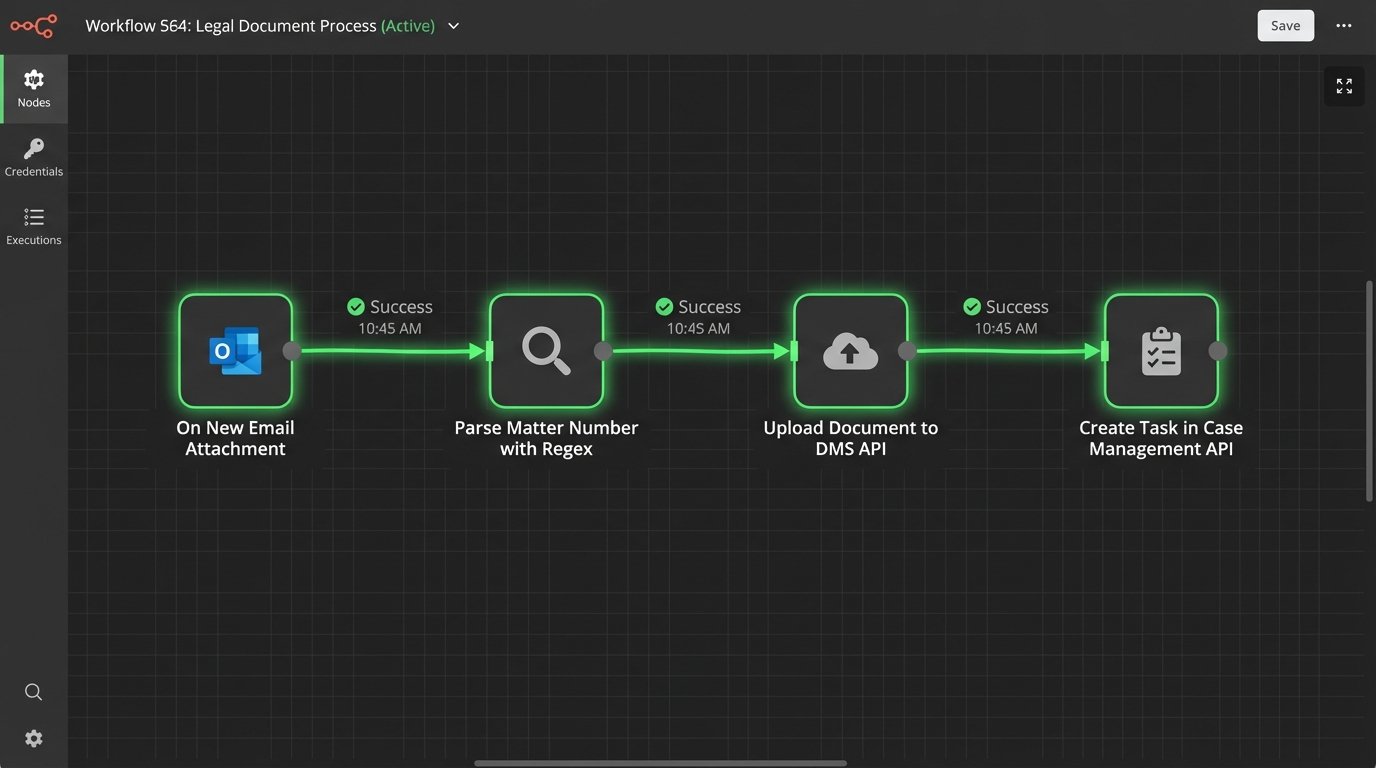
The automation does not stop at the file drop. After a successful DMS upload, the service’s next step is to call the case management system’s API. It creates a new task, “Review discovery production,” assigns it to the lead associate on the matter, sets a due date for three days out, and includes a direct link to the document in the DMS. The associate never has to hunt for the file. The work is pushed directly to them.
This is how you turn a 15-minute manual task into a 15-second background process. It requires initial development, but the compounded time savings across hundreds of documents per case is substantial. The real win is data integrity. The document’s location and the associated task are programmatically linked, eliminating the risk of a paralegal pasting the wrong link or forgetting to create the task entirely.
Engineering a Single Source of Truth for Witnesses
Witness coordination is a chaos of spreadsheets, email threads, and outdated contact information. Keeping track of availability, contact attempts, and deposition schedules for dozens of witnesses is a full-time job. The core failure is data fragmentation. The official witness list lives in a Word document, contact info is in Outlook contacts, and scheduling notes are buried in emails.
The solution is to centralize this data. We don’t need a wallet-drainer of a new software platform. A well-structured SharePoint Online list or a simple SQL database can serve as the single source of truth. This central repository holds all witness data: name, role, contact information, availability status, deposition date, and a log of all communication attempts. This isn’t just storage. It’s an active database that drives the automation.
Automating Coordination and Communication
With a central list, we can build automations that read and write to it. A paralegal updates a witness’s status from “Contact Pending” to “Available for Deposition” in the SharePoint list. This change triggers a Power Automate flow. The flow parses the witness’s availability notes and cross-references them with the case team’s calendars via the Graph API to identify potential deposition slots.
It then generates a professional scheduling request email using a predefined template. The email is sent to the witness, CC’ing the paralegal. Once the witness confirms a date, the paralegal updates the SharePoint list, which triggers a second flow. This one creates the calendar event, invites all required parties, attaches the deposition notice from the DMS, and updates the witness’s status to “Scheduled.”
We can also automate the painful process of tracking down current contact information. An automation can be built to periodically query a data service like LexisNexis or Thomson Reuters PeopleMap via their APIs to validate and update addresses and phone numbers in the central list. This requires budget for the data service, but it prevents hours of wasted time trying to serve a subpoena to an old address.
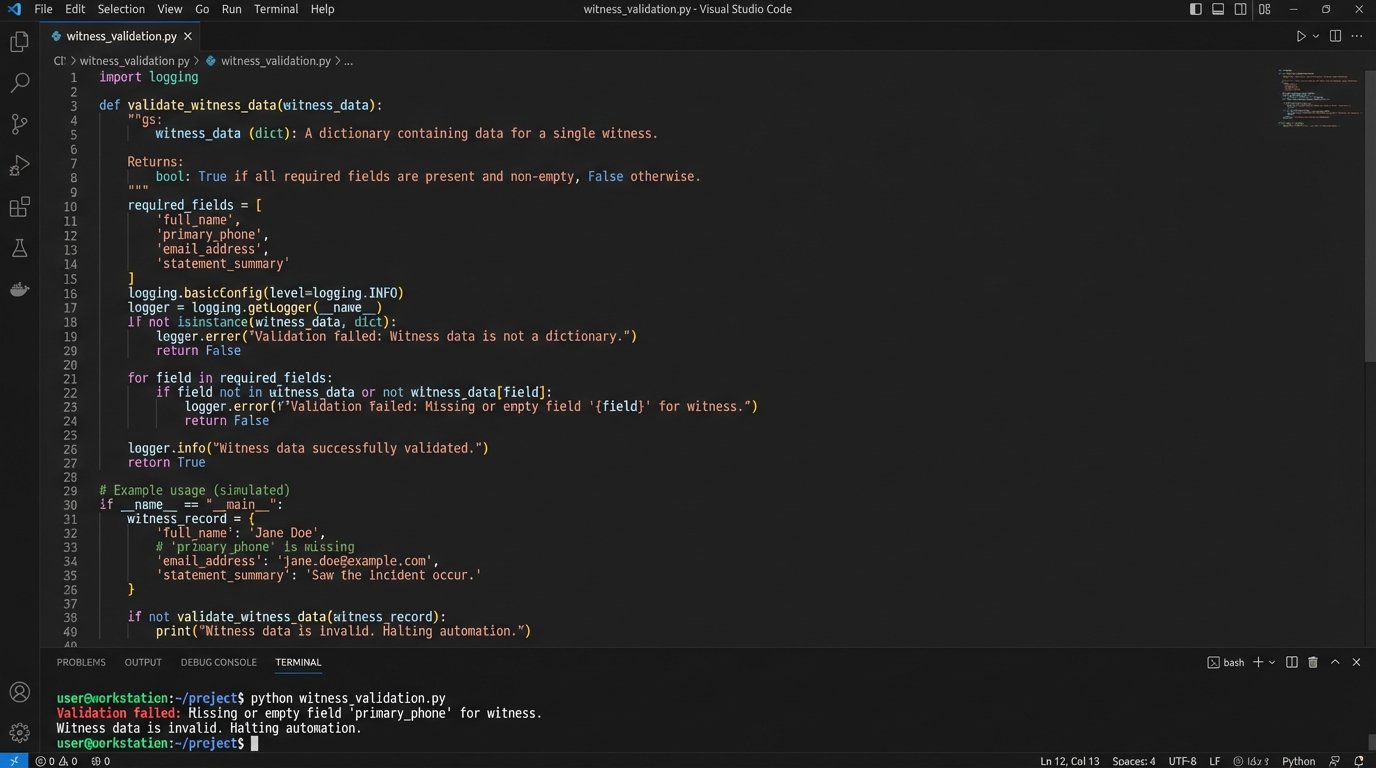
Here is a simplified example of a data validation function in Python that you might use as part of a larger script to check for data completeness before triggering a scheduling action.
def validate_witness_data(witness_record):

    """

    Performs a basic logic-check on a witness data dictionary.

    Returns True if essential fields are present, False otherwise.

    """

    required_fields = ['full_name', 'primary_email', 'primary_phone', 'status']
for field in required_fields:
if field not in witness_record or not witness_record[field]:
print(f"Validation failed: Missing or empty field '{field}' for witness.")
return False
if witness_record['status'] not in ['Pending', 'Available', 'Scheduled', 'Do Not Contact']:
print(f"Validation failed: Invalid status value '{witness_record['status']}'.")
return False
return True
# Example Usage
witness = {
'full_name': 'John Doe',
'primary_email': 'j.doe@example.com',
'primary_phone': '', # Intentionally left empty to fail validation
'status': 'Available'
}
if validate_witness_data(witness):
print("Witness data is valid. Proceeding with automation.")
else:
print("Witness data is invalid. Halting automation.")
This type of server-side validation prevents an automation from firing with incomplete data, which would only create more work for the legal team. It forces data discipline at the point of entry.
This entire workflow is about transforming a static list into a dynamic coordination engine. The paralegal’s job shifts from being a switchboard operator to being a manager of the system. They are confirming data, not manually drafting every email and calendar invite. The challenge is enforcing the discipline to use the central list exclusively. If attorneys start operating out of their email inboxes again, the entire system collapses.
Hardening Deadline and Docket Tracking
Missed deadlines are malpractice. Relying on humans to manually read court notices and create calendar entries is an unacceptable risk. The complexity of different court rules and the sheer volume of PDF notices make manual docketing one of the most error-prone back-office functions in a law firm. The goal is to get the human out of the data entry loop and into a data validation role.
This requires building a processing pipeline. When a court filing notification arrives in a dedicated docketing inbox, an automation should immediately grab the attached PDF. Expecting an automation to perfectly parse every court document is like trying to shove a firehose through a needle. You need a multi-stage approach to extract the critical data points: event name, date, and time.
Building a Rules-Based Parsing Engine
The first stage is Optical Character Recognition (OCR). We use a service like Azure Form Recognizer or AWS Textract to convert the PDF image into machine-readable text. The raw text output is often a mess of broken lines and misplaced headers. It’s unusable on its own.
The second stage is where the real work happens. We build a rules engine that uses a cascade of regular expressions to search the OCR text for keywords and patterns. The engine looks for phrases like “Hearing is set for,” “Response due on or before,” or “Motion must be filed by.” It then looks for date and time formats nearby. We have to account for dozens of variations, such as “May 5, 2024,” “05/05/2024,” and “the 5th day of May.”
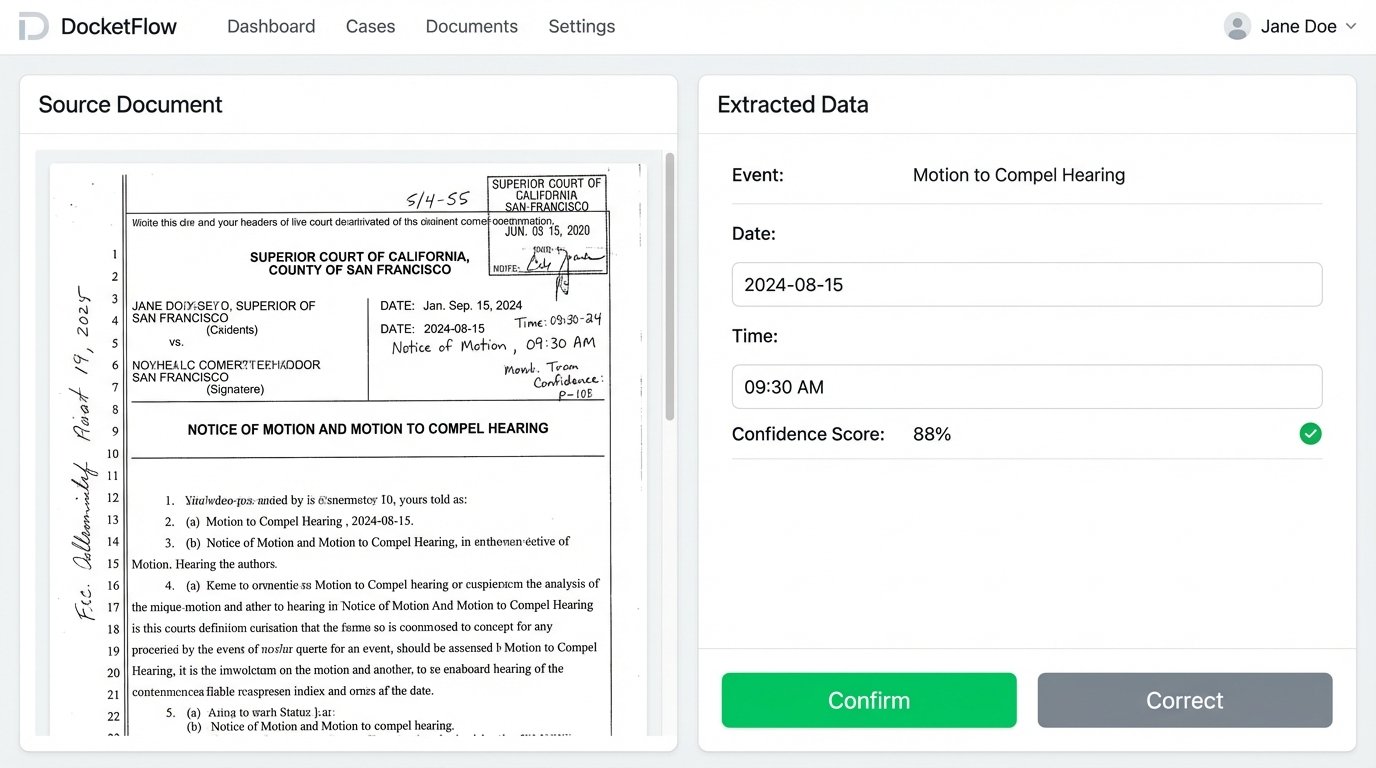
Once the engine identifies a potential date and event, it does not automatically create the calendar entry. That would be reckless. The OCR and regex combination is maybe 90% accurate on a good day. Instead, the automation creates a draft entry in a validation queue. This could be a simple interface where a docketing clerk sees the original PDF on one side and the extracted data on the other.
- Extracted Event: Motion to Compel Hearing
- Extracted Date: 2024-08-15
- Extracted Time: 09:30 AM
- Confidence Score: 88%
The clerk’s job is reduced to a simple “confirm” or “correct” click. They are no longer typing. They are validating. Once confirmed, a service calls the APIs for the firm’s calendaring system and the case management system to inject the deadline into all relevant places. It also calculates and creates reminders for 14 days, 7 days, and 1 day before the deadline.
This human-in-the-loop system provides the safety net that a fully automated approach lacks, while still eliminating the most tedious part of the process, the initial data entry. The architecture is more complex to build than an off-the-shelf tool, but it is tailored to the specific document formats of the jurisdictions your firm operates in. It is a more durable and precise solution than any generic docketing software that claims to “read” all court documents perfectly.
The system’s intelligence grows over time. Each time a clerk corrects an extraction, the system can log the failure. This data allows developers to refine the regular expressions and improve the engine’s accuracy for specific courts or document types. The system learns, reducing the number of corrections required over the long term.