The concept of push-button billing automation in a law firm is a fantasy sold by vendors. The core failure isn’t a lack of software. The problem is that the source data, the time entries themselves, are a toxic asset. Before any system can generate an invoice, it has to ingest data that is frequently incomplete, improperly coded, and riddled with narrative ambiguity. Fixing the billing process means fixing the timekeeping discipline first.
Automation simply accelerates the existing process. If the process is to manually fix every time entry before an invoice goes out, then automation will only present you with a thousand broken drafts faster than before. The project is not about technology. It is about data sanitation and process enforcement.
Deconstructing the Time Entry Mess
Every automated billing cycle begins with a data pull from the firm’s practice management system. The system queries for all unbilled time and expense entries associated with a specific matter. This initial dataset is the foundation for everything that follows. A weak foundation guarantees the entire structure will collapse. The most common point of failure is the time entry narrative, where attorneys use block billing or vague descriptions.
An entry that just says “Document Review” for 6.5 hours is computationally useless. Automation cannot determine if that work is compliant with the client’s billing guidelines. It cannot assign the correct UTBMS task codes. We are forced to build regex parsers and keyword-matching rules to try and dissect these narratives, a brittle and ultimately futile exercise. The system is guessing, and guesses lead to client disputes and write-downs.
The only real fix is to enforce structured timekeeping at the point of entry. This involves configuring the PMS to require specific fields or using pre-bill validation scripts that reject non-compliant entries before they are even saved. This is a political battle, not a technical one.
The Nightmare of Rate Logic
Rate management is the second major failure point. A mature firm doesn’t have one rate card. It has dozens. There are standard rates, client-specific rates, matter-specific discounts, tiered rates based on timekeeper seniority, and blended rates for project work. These rules are often stored in disconnected spreadsheets or as institutional knowledge in a billing manager’s head.
Pulling these rules into an automated system requires gutting those spreadsheets and building a structured rate hierarchy. The logic must be absolute. For any given time entry, the system must be able to resolve a single, correct rate without ambiguity. This often involves building a custom logic engine that sits between the PMS and the accounting system.
Consider this common scenario. A client has a 15% discount for partners but a 10% discount for associates, which does not apply to paralegal time, and all rates are capped on a specific matter. An automated system has to execute this logic flawlessly for thousands of line items. Most out-of-the-box PMS APIs are not equipped to handle this level of conditional complexity. You end up pulling raw data and applying the logic yourself.
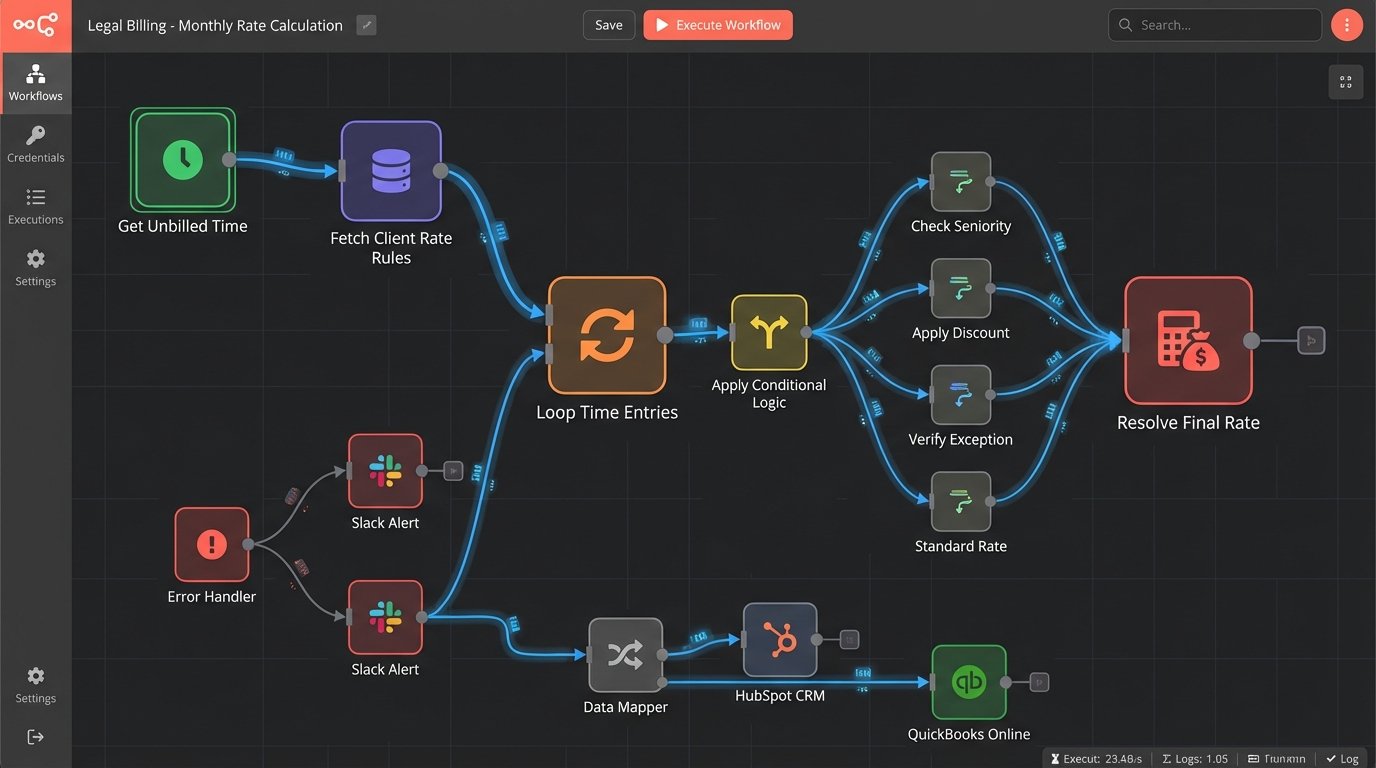
A simplified JSON object representing this might look like this, which your script then has to parse and apply correctly. Notice how the logic is nested, making simple API calls insufficient.
{

  "client_id": "C789",

  "matter_id": "M456",

  "rate_rules": [

    {

      "timekeeper_level": "Partner",

      "discount_percent": 15,

      "applies_to": ["all"]

    },

    {

      "timekeeper_level": "Associate",

      "discount_percent": 10,

      "applies_to": ["all"]

    },

    {

      "timekeeper_level": "Paralegal",

      "discount_percent": 0,

      "applies_to": ["all"]

    }

  ],

  "matter_overrides": {

    "rate_cap_usd": 450

  }

}
The code has to fetch this ruleset, iterate through each time entry, check the timekeeper’s level, apply the correct discount, and then check against the matter-level cap. This is not configuration. This is development.
Forcing the Approval Workflow
Generating a perfect draft invoice is useless if it sits in a partner’s inbox for three weeks. The human approval loop is the biggest bottleneck in the entire cash cycle. Effective automation doesn’t just create the invoice. It manages the approval workflow with aggressive follow-ups and escalations.
A proper workflow is a state machine. A draft invoice is in a “Pending Review” state. The system sends an initial notification to the billing partner. If the state does not change to “Approved” or “Rejected” within 72 hours, the system triggers a second action. This could be a high-priority reminder email or a notification to the partner’s assistant and the practice group leader.
The goal is to make ignoring the invoice draft more painful than approving it. We build dashboards that show practice group leaders exactly which partners are holding up revenue. This transparency creates peer pressure, which is a far more effective motivator than a polite email reminder. The system must be configured to be a nuisance to procrastinators.
The Integration Chasm
The final stage is getting the approved invoice data from the legal PMS into the firm’s accounting system, like QuickBooks or NetSuite. This is rarely a clean transfer. Legal systems are matter-centric. Accounting systems are customer-centric. The object models do not align, and forcing them to communicate is like trying to translate circuit diagrams into poetry. The core concepts are incompatible.
A single client in the PMS might need to be represented as multiple customers in QuickBooks to handle different billing entities. The PMS has a concept of a “matter,” which does not exist in a standard accounting package. We are forced to map the matter ID to a custom field or sub-customer in the accounting system, creating a brittle link that can break if anyone changes the configuration.
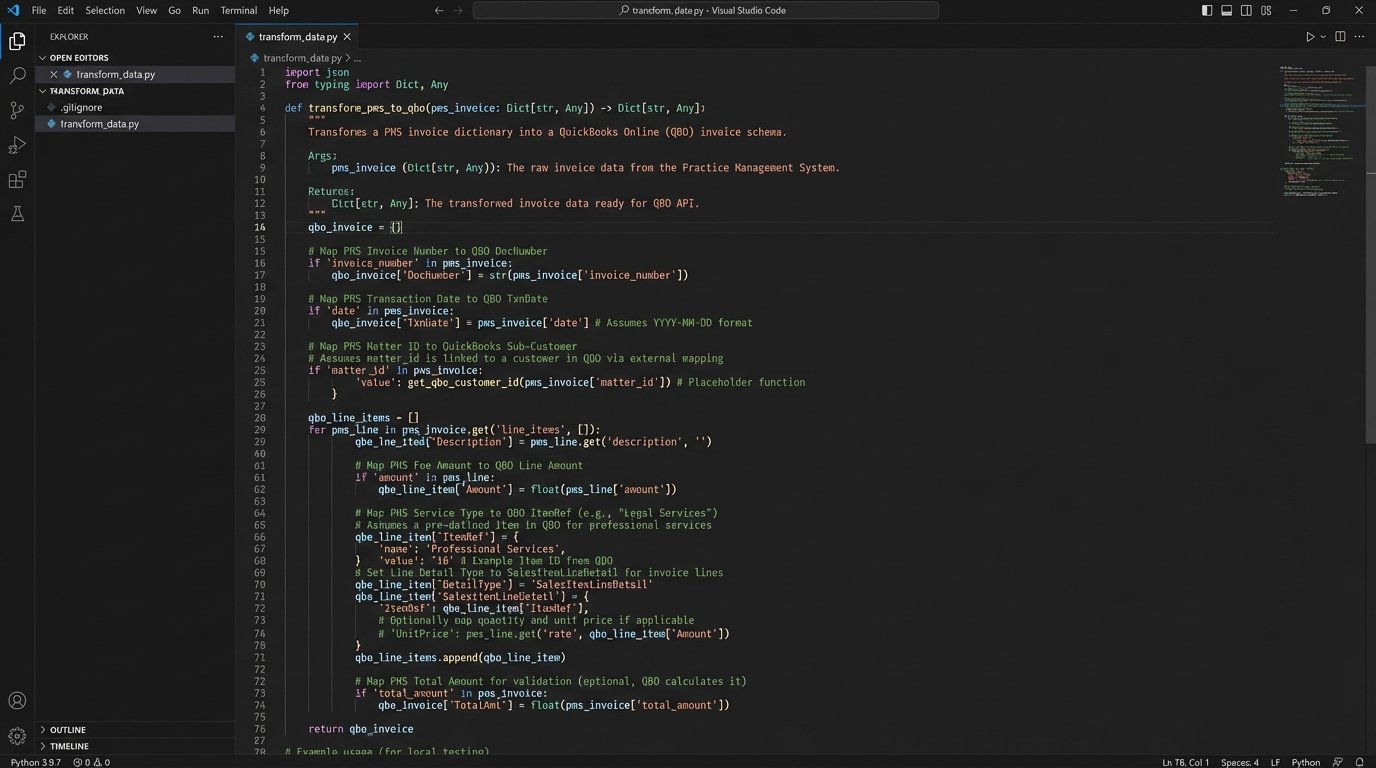
This is where most projects get bogged down. You are building a custom data transformation layer. Your script pulls an invoice object from the PMS API, strips out the unnecessary legal-specific data, reformats the client and line item details to match the accounting system’s schema, and then injects it via the destination API. Every field must be mapped, validated, and error-checked.
A Practical Example: PMS to QuickBooks Online
Let’s walk through a concrete data mapping problem. Your PMS, let’s say Clio, generates an invoice. The API output for a line item might contain `matter.id`, `matter.display_number`, and `client.id`. Your target system, QuickBooks Online, expects a line item to be associated with a `CustomerRef`. There is no “matter” field.
The mapping logic must decide how to represent the Clio matter in QuickBooks. A common approach is to create QuickBooks sub-customers for each matter, parented under the main client. So, “ABC Corp – Matter 123” becomes a sub-customer of “ABC Corp.” Your integration script is responsible for this logic. Before posting the invoice, it must first check if the sub-customer exists in QuickBooks. If not, it must create it. Only then can it post the invoice with the correct `CustomerRef`.
- Step 1: Pull invoice data from Clio API.
- Step 2: For each invoice, extract Client Name and Matter Display Number.
- Step 3: Query QuickBooks API: Does a Customer named “Client Name” exist? If not, create it.
- Step 4: Query QuickBooks API: Does a sub-customer named “Client Name – Matter Display Number” exist under the parent customer? If not, create it.
- Step 5: Transform the Clio invoice JSON into the QuickBooks invoice JSON format, using the ID of the sub-customer as the `CustomerRef`.
- Step 6: POST the transformed invoice to QuickBooks.
- Step 7: Log the resulting QuickBooks invoice ID back into a custom field in Clio for traceability.
This seven-step process must run without error for every single invoice. A failure at any step, perhaps due to an API rate limit or a temporary network issue, requires robust error handling and retry logic. This is far from a simple “sync.”
The Maintenance Tax
An automated billing system is not a static object you build once. It is a living system that requires constant upkeep. The APIs you depend on will change. The PMS vendor will release an update that deprecates the endpoint you use for pulling rates. QuickBooks will change its authentication method. These are not possibilities. They are certainties.
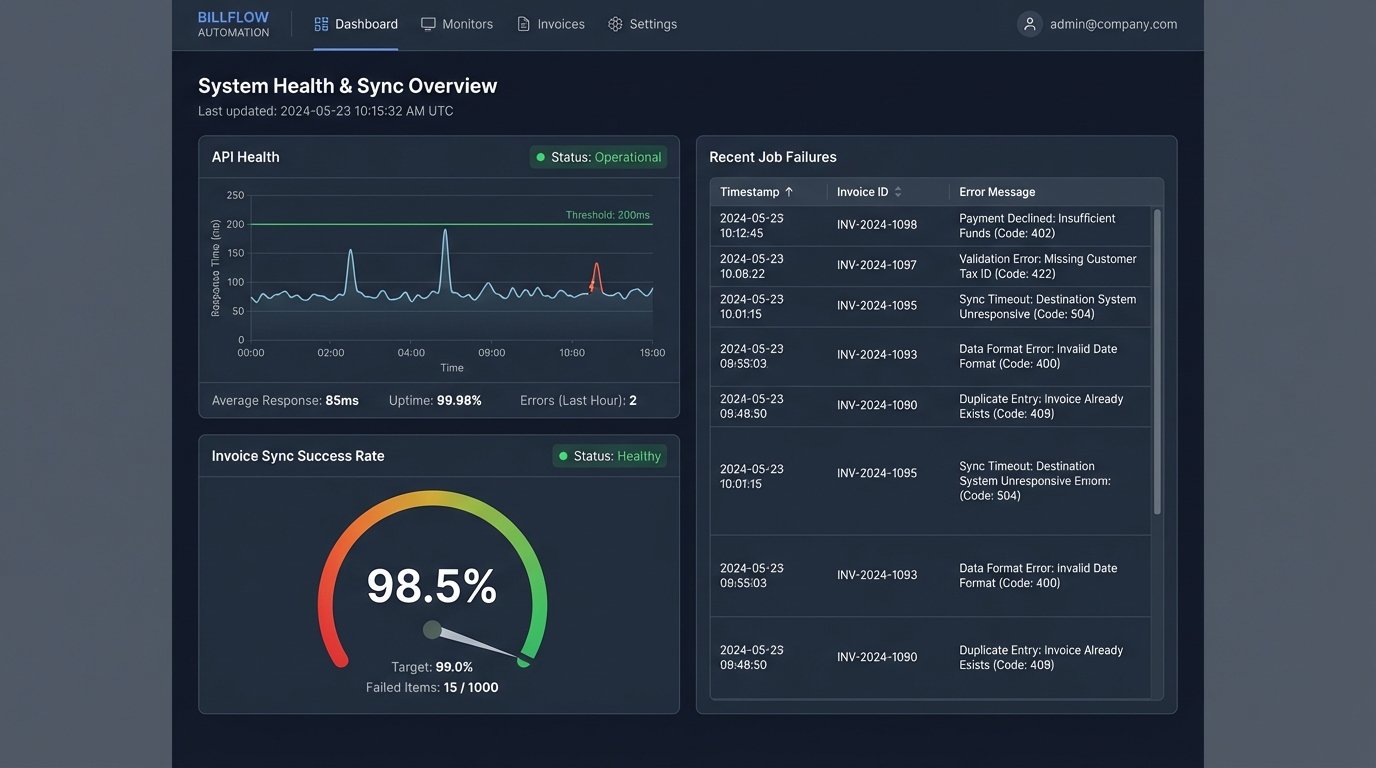
Your team must have a monitoring and alerting system in place. Logs must be piped to a central location and scanned for anomalies. When an API call fails more than X times in an hour, an alert must be sent. When an invoice syncs but the totals do not match between the two systems, an alert must be sent. The maintenance of the automation becomes a permanent operational cost.
Furthermore, the firm’s needs will evolve. A new lateral partner will bring a book of business with a completely novel rate structure. The firm will decide to adopt a new e-billing standard. Each of these business changes requires a modification to the automation logic. The work is never finished. The reward is not “streamlined operations” but rather controlled, predictable, and auditable operations. The goal is to trade chaotic manual work for structured technical maintenance.