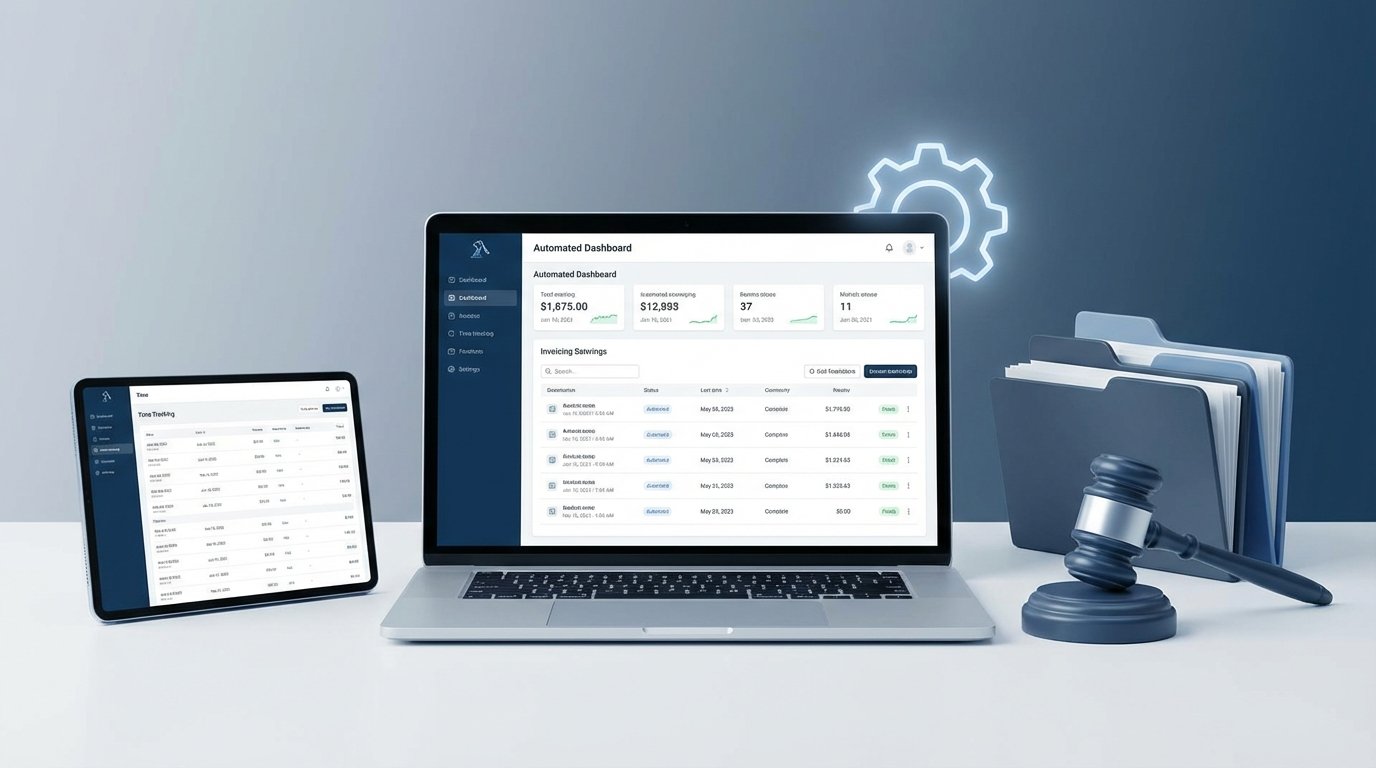
Manual time entry is where firm profitability goes to die. It’s a tedious, error-prone process that directly converts attorney hours into clerical waste. The typical justification is that existing Practice Management Systems handle it, but they rarely do it well. Their native automation is often rigid, forcing workflows that don’t map to reality. A proper automated billing system is not a single product. It is an assembly of components you control.
This guide bypasses the marketing gloss and shows you the raw mechanics of constructing a billing automation pipeline. We will focus on data capture, logical processing, and invoice generation through direct API manipulation. This is not a point-and-click tutorial. It’s a blueprint for building a system that doesn’t break when a partner forgets to add a matter ID to a time entry.
Prerequisites: Data Discipline Before Code
Before you write a single line of code, you must fix your data. Automation chokes on inconsistency. Trying to build a billing workflow on top of messy, non-standardized data is like building a house on a foundation of mud. It will collapse, and you’ll be the one debugging it on a Sunday night. Your first job is to enforce structure.
Standardize Your Core Identifiers
Every piece of data in your system needs a unique, predictable key. The two most critical are Matter IDs and Client IDs. These cannot be free-text fields where a paralegal can enter “Smith, John” one day and “Smith, J.” the next. They must be system-generated, alphanumeric, and immutable.
- Matter IDs: Should follow a consistent pattern, for example, `[ClientAcronym]-[Year]-[MatterNumber]`, resulting in something like `ABC-2024-0012`.
- Client IDs: A simple integer or a UUID is best. The key is that it is unique and never changes.
- Task and Activity Codes: Get your partners to agree on a finite list of UTBMS or internal activity codes. Enforce their use with dropdown menus, not text fields. Eliminate “Miscellaneous” as a billable category.
You enforce this at the point of data entry. If your Practice Management System (PMS) allows it, use field validation rules. If not, you build a pre-processing script that flags any non-compliant entries before they enter the billing pipeline. Garbage in, garbage out is the first law of automation.
API Access and Authentication
Identify your core systems and confirm they have usable APIs. A “usable” API has documentation that isn’t five years out of date and provides authentication tokens that don’t expire every 30 minutes. You will likely need access to:
- Your PMS: To pull time entries, matter details, and client information. (e.g., Clio, PracticePanther, Filevine).
- Your Accounting Software: To create draft invoices, push line items, and update payment statuses. (e.g., QuickBooks Online, Xero, Sage).
Get your API keys and store them securely. Do not hardcode them into your scripts. Use environment variables or a secrets management tool like HashiCorp Vault or AWS Secrets Manager. Committing an API key to a Git repository is a fireable offense.
Step 1: The Capture Layer – Pulling Time Entries
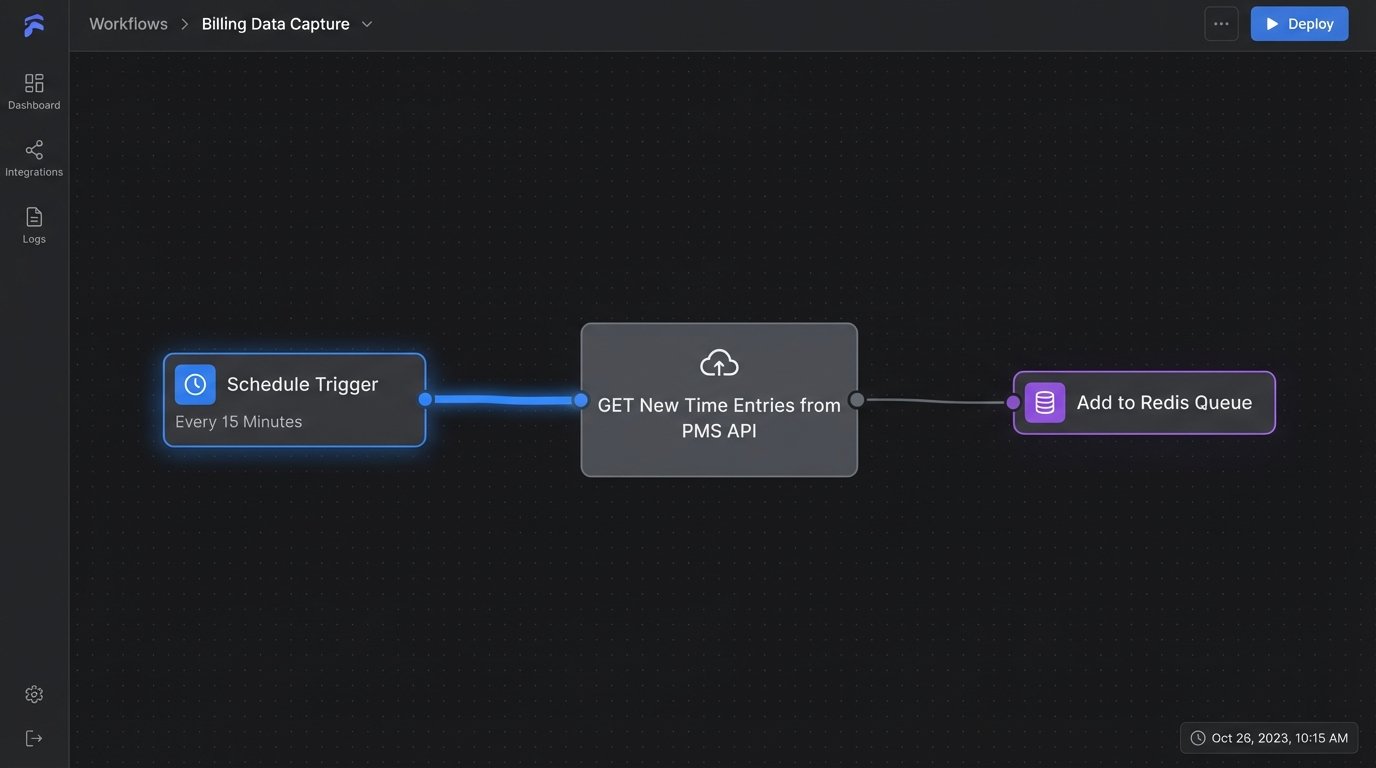
The first active step is to extract billable time data from its source. This usually means polling the PMS API on a set schedule, like every 15 minutes. The goal is to get all new or updated time entries created since the last check. Most modern APIs support filtering by a `created_at` or `updated_at` timestamp, which is far more efficient than pulling the entire database every time.
Your query should pull a structured data object for each time entry. A typical JSON response for a single entry might look something like this. Note the clean, standardized IDs.
{

  "id": "te_1a2b3c4d5e",

  "user_id": "usr_9f8g7h6j",

  "user_name": "Alice Attorney",

  "matter_id": "MEGA-2024-0115",

  "client_id": "CLI-8872",

  "date": "2024-05-20",

  "duration_hours": 1.25,

  "activity_code": "L110",

  "description": "Drafted initial motion to compel discovery; reviewed client documents related to production request.",

  "is_billable": true,

  "rate_usd": 450.00,

  "status": "unbilled"

}
This is your raw material. The script’s job is to fetch these records and place them into a processing queue. This queue could be a simple database table, a Redis list, or a message queue service like RabbitMQ. Using a queue decouples the capture process from the logic process. If your invoicing logic fails, you don’t lose the captured time entries. They just wait in the queue until the downstream system is fixed.
Connecting these disparate, often legacy systems is less like building a modern API bridge and more like operating a ferry on a storm-tossed sea. You have to account for latency, unexpected downtime, and malformed data payloads.
Step 2: The Logic Engine – Transforming Data for Invoicing
This is where the actual automation happens. A script or a serverless function pulls an entry from the queue and prepares it for invoicing. This isn’t just a copy-paste operation. It involves enrichment, validation, and calculation.
Data Enrichment and Validation
The time entry object gives you IDs, but an invoice needs names and details. Your logic engine must:
- Fetch Matter Details: Using the `matter_id`, call the PMS API again to get the full matter name, billing address, and responsible attorney.
- Fetch Client Details: Using the `client_id`, get the client’s billing contact information.
- Calculate Line Item Total: Multiply `duration_hours` by `rate_usd` to get the line item total. Do not trust this calculation to the accounting software. Own your numbers.
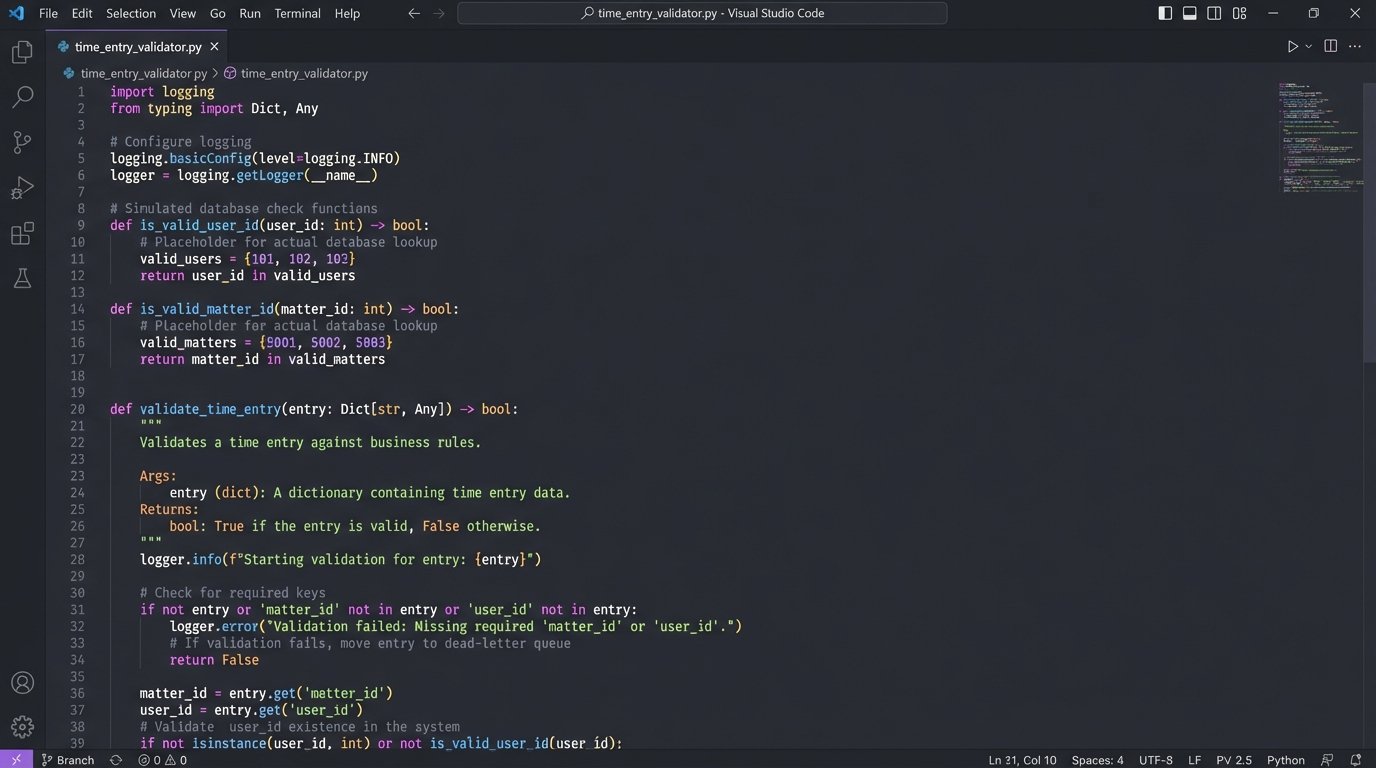
- Logic-Check Everything: This is the critical step. Before pushing data anywhere, you must validate it. Does the `matter_id` exist and is it in an “Open” state? Is the `user_id` a valid timekeeper? Is the `duration_hours` a positive number? A missing matter ID is a logic bomb in your billing run. Your error handling is the bomb disposal unit.
If any validation step fails, the entry is shunted to a separate “dead-letter” queue or error table. An alert is then sent to a human for manual review. Do not let bad data proceed. It will contaminate your entire billing run and force a painful reconciliation process later.
Step 3: The Generation Layer – Creating Draft Invoices
Once a time entry is validated and enriched, it’s ready to be pushed to your accounting platform. The goal here is almost always to create a draft invoice, not a final, sent invoice. This provides a crucial air gap for a final human review before anything goes to a client.
Most accounting APIs like QuickBooks Online (QBO) have endpoints for creating invoice objects. You’ll construct a JSON payload that maps your enriched data to the fields QBO expects. The process typically involves finding the correct customer, then creating a new invoice object with one or more line items.
Here is a simplified Python example showing how to post a new line item to a hypothetical invoice endpoint using the `requests` library. This is a bare-bones illustration; a production script would have far more robust error handling and authentication.
import requests

import os
# API key should be stored as an environment variable, not in the code.
API_KEY = os.environ.get("QUICKBOOKS_API_KEY")
API_URL = "https://api.accounting.com/v1/invoices"
def create_draft_invoice(customer_id, line_items):
"""
Creates a draft invoice in the accounting system.
`line_items` should be a list of dicts.
"""
headers = {
"Authorization": f"Bearer {API_KEY}",
"Content-Type": "application/json"
}
invoice_payload = {
"customer_id": customer_id,
"status": "draft", # CRITICAL: Always create as draft first.
"line_items": line_items
}
try:
response = requests.post(API_URL, json=invoice_payload, headers=headers)
response.raise_for_status() # Raises an exception for 4xx or 5xx status codes.
print(f"Successfully created draft invoice: {response.json()['invoice_id']}")
return response.json()
except requests.exceptions.RequestException as e:
print(f"Error communicating with accounting API: {e}")
# Add logic here to send the failed payload to a retry queue.
return None
# Example usage:
line_item_data = [{
"description": "L110: Drafted initial motion to compel",
"quantity": 1.25, # Hours
"unit_price": 450.00
}]
create_draft_invoice("cust_12345", line_item_data)
After successfully pushing the data to the accounting API, the final step is to update the status of the original time entry in your PMS. You call its API to change the entry’s `status` from “unbilled” to “billed”. This prevents the same entry from being pulled and processed a second time in the next run. This two-way communication is non-negotiable.
Step 4: Monitoring and Maintenance
An automated system is not a “set it and forget it” machine. It’s an engine that requires fuel, oil, and regular inspection. Your job shifts from manual data entry to system supervision.
Build a Dashboard
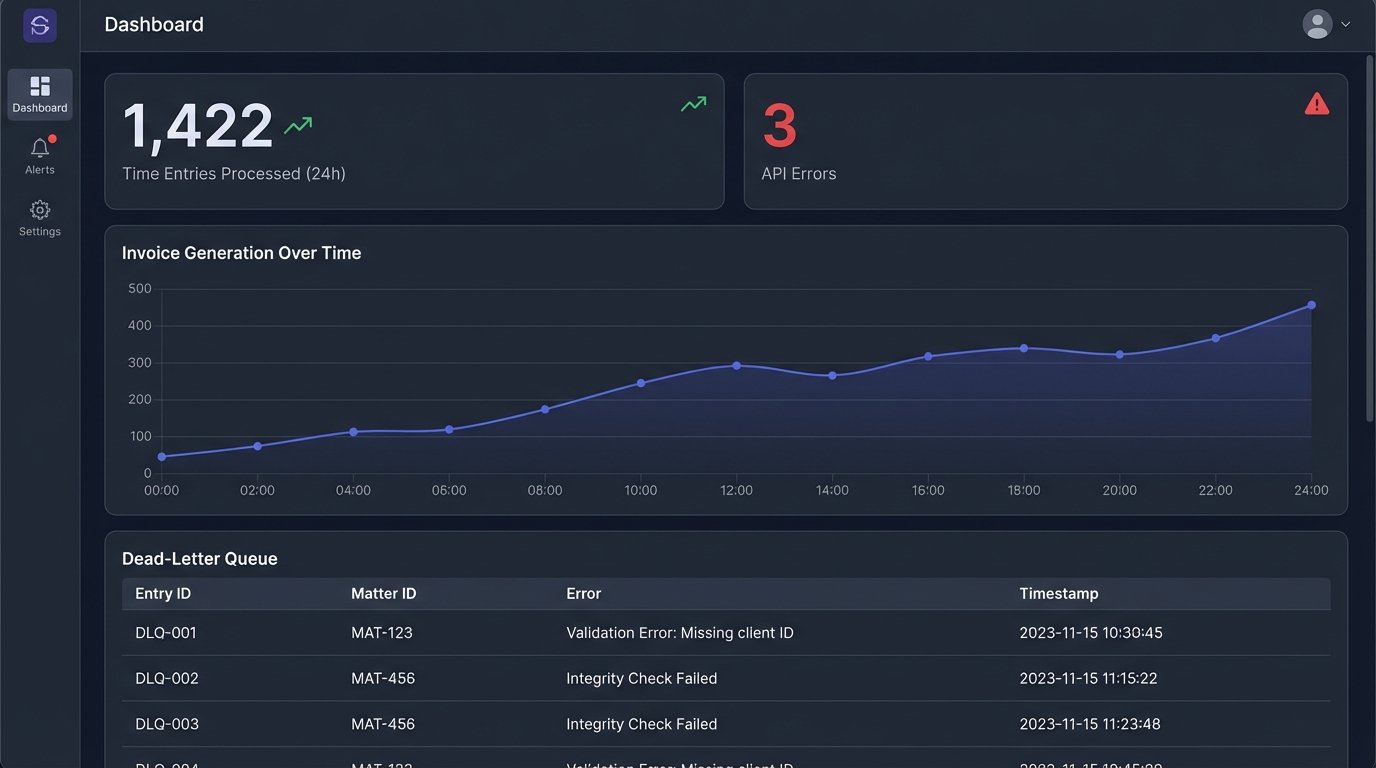
You need visibility. A simple dashboard, even if it’s just a shared spreadsheet populated by your scripts, is mandatory. It should show key operational metrics:
- Time entries processed in the last 24 hours.
- Successful invoices created.
- Entries in the dead-letter queue requiring review.
- API error rates from your PMS and accounting software.
This dashboard is your early warning system. A sudden spike in errors means an API changed, a service is down, or a new type of bad data has entered the system. Pushing unvalidated time entries to accounting is like shipping code to production without running a single unit test. You will break things.
The Human-in-the-Loop
Automation handles the 99% of clean, predictable entries. The 1% of exceptions, like block-billed flat fees or entries with convoluted descriptions, still need a human. The system’s job is to isolate these exceptions and present them cleanly for review. The dead-letter queue is the primary mechanism for this.
A designated person, likely in the billing department, should be responsible for clearing this queue daily. Their job is to fix the underlying data error in the PMS and then re-inject the corrected entry back into the start of the automation pipeline. This creates a feedback loop that gradually improves overall data quality.
This initial script is a rowboat, capable of getting you from one shore to the other. Scaling it for the whole firm requires building a container ship, and that means thinking about architecture, concurrency, and fault tolerance, not just the code for a single API call.