
Manual billing is not a process problem. It is a data integrity failure waiting to happen at scale. Every time a paralegal copies time entries from a spreadsheet into an accounting system, you are injecting risk. The core issue is the number of human touchpoints between time capture and invoice delivery, each one a potential vector for delay, error, and client disputes. This isn’t about saving a few hours. It is about ripping out the rot in your firm’s financial data pipeline.
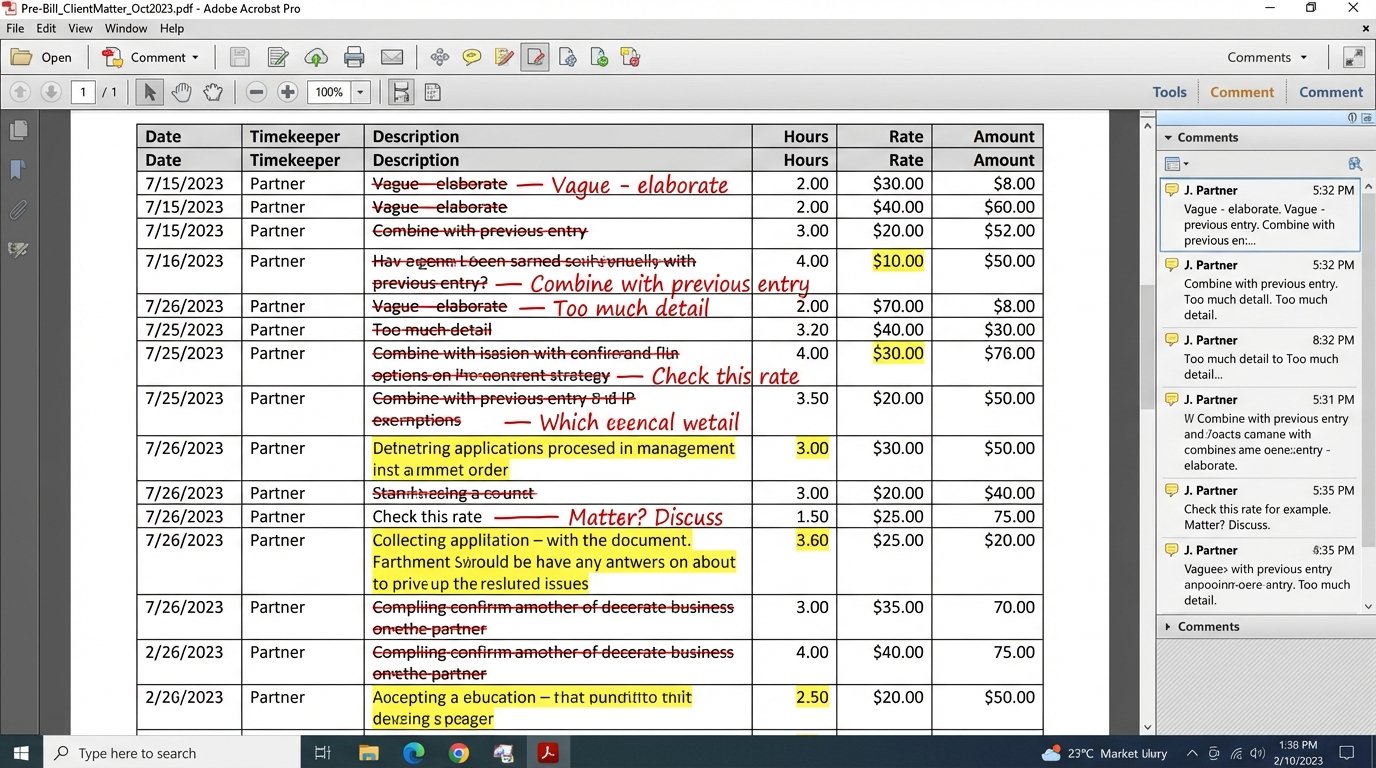
The entire manual pre-bill and review cycle is a monument to operational drag. It begins with dumping raw time data into a document, followed by a chain of emails and PDF markups that have no audit trail. This review process, often the biggest bottleneck, relies on partners scanning for errors that a machine could catch in milliseconds. The final invoice is a manually reconciled artifact of a broken conversation.
We are not fixing a workflow. We are architecting a system that bypasses the points of failure.
Deconstructing the Manual Process Bottlenecks
The latency in a manual billing system is predictable. It compounds at each stage. Timekeepers submit entries late. Billing coordinators chase them. Pre-bills sit in a partner’s inbox for a week. Edits are misinterpreted, forcing a second revision cycle. Each step adds days or weeks to the billing velocity, directly impacting cash flow. The system rewards delay and punishes efficiency.
Data consistency is the first casualty. One partner prefers one narrative style for time entries, another prefers a different one. The firm’s billing guidelines become a suggestion, not a rule. This creates invoices that are a patchwork of different formats, confusing the client and inviting scrutiny. Automated systems force a single standard at the point of entry, not after the fact.
The Review Cycle as a Single Point of Failure
Partner review is the sacred cow of legal billing, and it is also the primary bottleneck. The manual review of hundreds of line items is an inefficient use of a partner’s time and an unreliable method for quality control. They are looking for duplicates, block billing, and entries that violate client guidelines, all tasks that can be codified into a rules engine.
The feedback loop is broken. A partner redlines a PDF, emails it back, and the billing coordinator manually inputs the changes. There is no mechanism to systematically track common errors to retrain timekeepers. The same mistakes are corrected month after month, creating a permanent cycle of rework. Automation logs these exceptions, giving the firm data to fix the root cause.
This entire process is brittle. If a key billing coordinator is out sick, the entire invoicing run for a practice group can grind to a halt. It concentrates institutional knowledge in a few individuals instead of embedding it into a resilient system. An automated workflow runs 24/7, managed by a system, not a person’s inbox.
The Architectural Fix: An API-First Approach
The only durable solution is to gut the manual connections between your Practice Management System (PMS) and your accounting platform. This requires treating your internal systems as a set of services that communicate through APIs. The goal is to have time and expense data flow from the point of capture to the final invoice with zero manual data entry. Everything else is just a temporary patch.
This means your PMS must be the single source of truth for all billable activity. Time entries are not created in spreadsheets or Word documents. They are created in the system of record. From there, a service layer pulls the data, validates it, and pushes it to the accounting system’s endpoints. This architecture makes the data flow traceable and repeatable.
The challenge is that many legal tech APIs are sluggish and poorly documented. You will spend a significant amount of time mapping fields and handling authentication quirks. Assume the official documentation is at least two versions behind what is in production.
Building the Data Bridge
The connection is built on API calls. A scheduled job, often a Python script or a middleware application like Workato or MuleSoft, queries the PMS for new, unbilled time entries within a given date range. It pulls this data, typically as a JSON object, and begins the transformation process needed for the accounting system.
Here is a simplified look at a time entry object you might get from a PMS API. Notice the structured fields for matter ID, user ID, and activity codes. This structure is what enables automation. Unstructured text blobs are the enemy.
{

  "entries": [

    {

      "entry_id": "TKE-98172",

      "matter_id": "MAT-0154",

      "user_id": "USR-JSMITH",

      "activity_date": "2023-10-26",

      "hours": 1.5,

      "rate": 650.00,

      "description": "Draft motion to compel discovery; confer with client regarding strategy.",

      "task_code": "L230",

      "is_billable": true,

      "status": "pending"

    }

  ]

}
The script then maps these fields to the corresponding fields in the accounting system’s API. This is where the real work is. You might need to enrich the data, for example, by pulling the full client name from another system using the `matter_id`. This data transformation logic is the core of the automation.
Injecting a Rules Engine for Validation
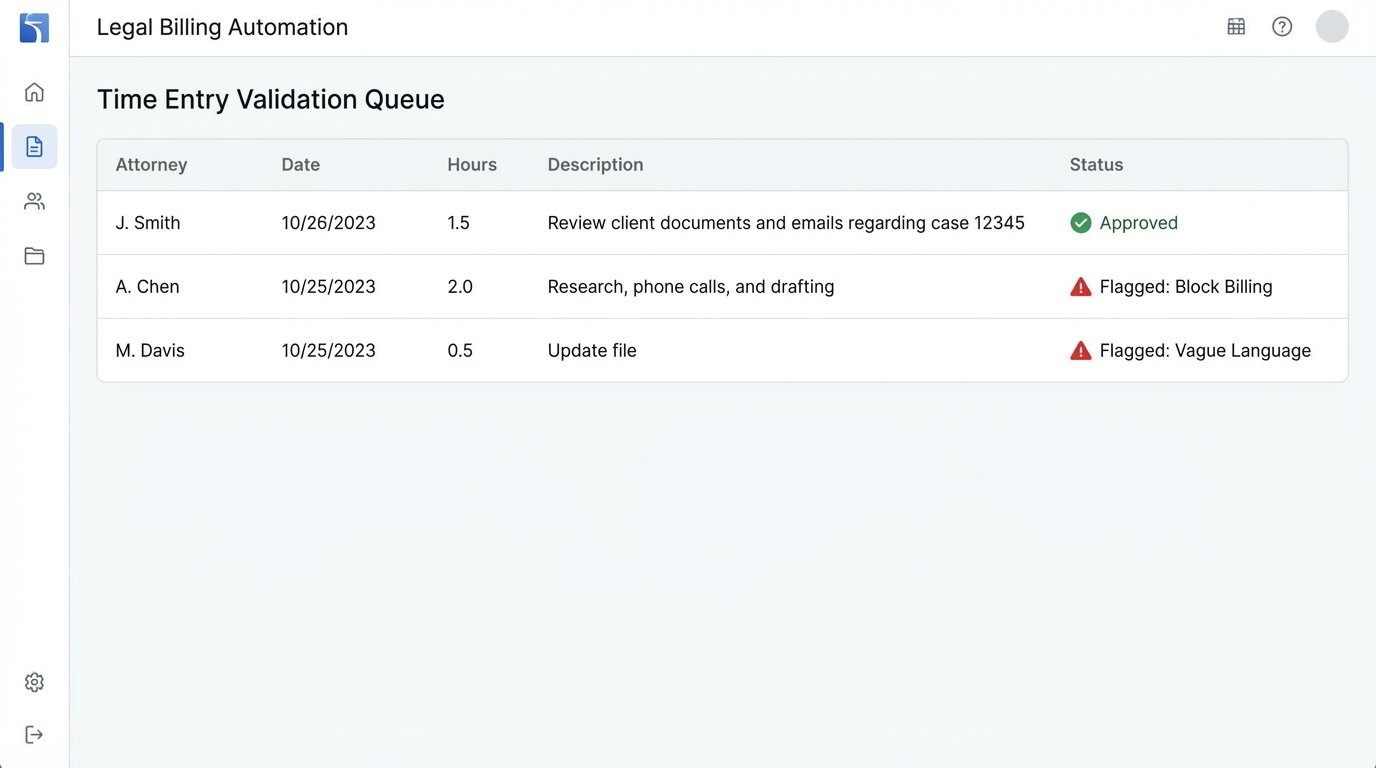
Before pushing the data to accounting, you inject a validation layer. This is a rules engine that programmatically performs the checks a partner would do manually. You can build this yourself or use a dedicated rules engine. It logic-checks each time entry against a set of configurable rules.
Common rules include:
- Block Billing Detection: Flags entries with multiple distinct tasks joined by semicolons or “and.”
- Vague Word Filter: Rejects entries containing words like “review,” “analysis,” or “work on” without further specification.
- Guideline Adherence: Checks if the entry violates any specific client billing guidelines stored against the matter, such as “no billing for inter-office communications.”
- Duplicate Check: Hashes the entry details (user, date, hours, description) to detect potential duplicates submitted on the same day.
Entries that pass all checks are flagged as `status: “approved”` and sent to the accounting system. Entries that fail are routed to an exception queue for human review. The partner no longer reviews 100% of entries. They review the 5% that are flagged as problematic. This is a fundamental shift in the review process.
Implementation Pain Points You Will Encounter
Connecting the systems is the easy part. The hard part is forcing data discipline on the attorneys. You cannot automate a garbage data source. The project’s success depends entirely on your ability to enforce structured data entry at the source. This is a political battle, not a technical one.
You will need to configure your PMS to make certain fields mandatory. UTBMS task codes cannot be optional. The description field needs character limits and potentially keyword validation. Trying to clean up free-form text entries with AI or regex after the fact is like trying to shove a firehose through a needle. It is messy, unreliable, and expensive. Fix the input, not the output.
Handling the Legacy Data Mess
When you switch the system on, you will have years of inconsistent legacy data. You must decide on a cutoff point. Do not attempt to retroactively clean all historical billing data. It is a resource drain with diminishing returns. Draw a line in the sand and declare that all entries moving forward must adhere to the new, stricter standards. Grandfather in the old data for reporting purposes but build your automation for the new, clean data stream.
Your initial validation rule set will be wrong. You will have too many false positives, flagging correct entries and frustrating timekeepers. Plan for an iterative tuning period of at least two to three months. Work with a pilot group of attorneys and billing staff to refine the rules based on real-world exceptions. Log every exception and the reason for its override to inform your tuning.
The Downstream Impact on Firm Operations
Automated billing is not an end goal. It is an enabling technology. Once your billing data is clean, structured, and flowing through an automated pipeline, you can begin to build other valuable systems on top of it. The primary benefit is not faster invoicing, but access to reliable financial data for the first time.
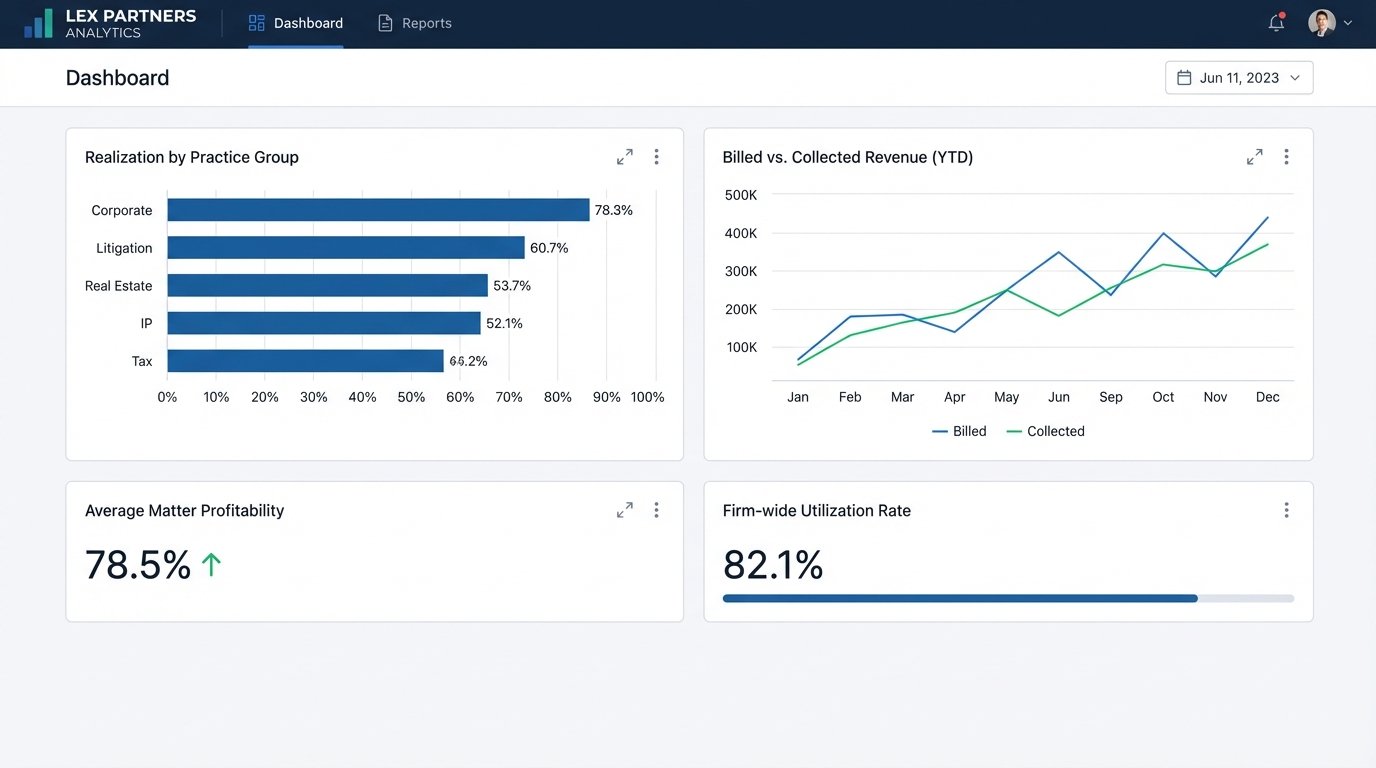
You can finally generate accurate, real-time reports on matter profitability, lawyer utilization, and realization rates. When data was trapped in spreadsheets and manual workflows, these reports were speculative at best. Now, they are derived directly from the system of record, giving firm leadership a clear view of financial performance without a three-week reconciliation delay.
Client Transparency and Reduced Disputes
Clean billing data can be exposed to clients through a secure portal. By giving clients a near-real-time view of their unbilled time and expenses, you eliminate the sticker shock of a large, unexpected invoice. They can question an entry the day after it is made, not a month later when context is lost. This drastically reduces the back-and-forth of invoice disputes.
This requires an API endpoint that can serve up approved, unbilled time entries for a given matter. The front-end portal is simple. The backend work of ensuring the data is clean and approved via the rules engine is what makes it possible. It shifts the client conversation from a reactive argument over a past invoice to a proactive discussion about ongoing work.
Ultimately, automating the billing process forces a level of operational discipline that most firms lack. It converts an error-prone, manual administrative task into a strategic data asset. The initial setup is a heavy lift, requiring technical expertise and the political will to change ingrained behaviors. But the alternative is to continue running the firm’s financial core on a foundation of manual data entry and operational friction.