
Most firms believe time leakage is a discipline problem. It is a data problem. Attorneys are not accountants, and asking them to reconstruct their day in six-minute increments is an invitation for inaccuracy. The solution is not more nagging, but a system that passively captures digital activity and presents it for validation. Automating time tracking is about building a data pipeline that bridges the gap between an attorney’s work and the firm’s billing system, stripping out the guesswork.
The entire project fails without a solid foundation. Before writing a single line of code, you must have clean, accessible data sources and a clear target schema for your time entries. This means getting non-negotiable access to the firm’s core systems through APIs, not CSV exports emailed on the first of the month. If your practice management system’s API documentation was last updated during the Obama administration, you have a political problem to solve first, not a technical one.
Prerequisites for a Functional Automation Pipeline
First, identify your activity sources. The richest data streams come from calendars, emails, and the document management system (DMS). For most firms, this points directly to the Microsoft Graph API or the Google Workspace API. These are the event triggers that will feed your entire system. You need authenticated, service-level access, which often means getting IT to approve an Azure App Registration or a Google Cloud Service Account with the correct permissions scoped to read calendar events and email metadata.
Second, establish a universal identifier for matters. If one system calls it a “Matter ID” and another calls it an “Engagement Number,” you will spend half your time building lookup tables to translate between them. The goal is to have a single, authoritative source, usually the practice management system, that assigns a unique ID to every matter. This ID becomes the primary key for every time entry you generate. Without it, you are just creating more data chaos.
Defining the Target Data Model
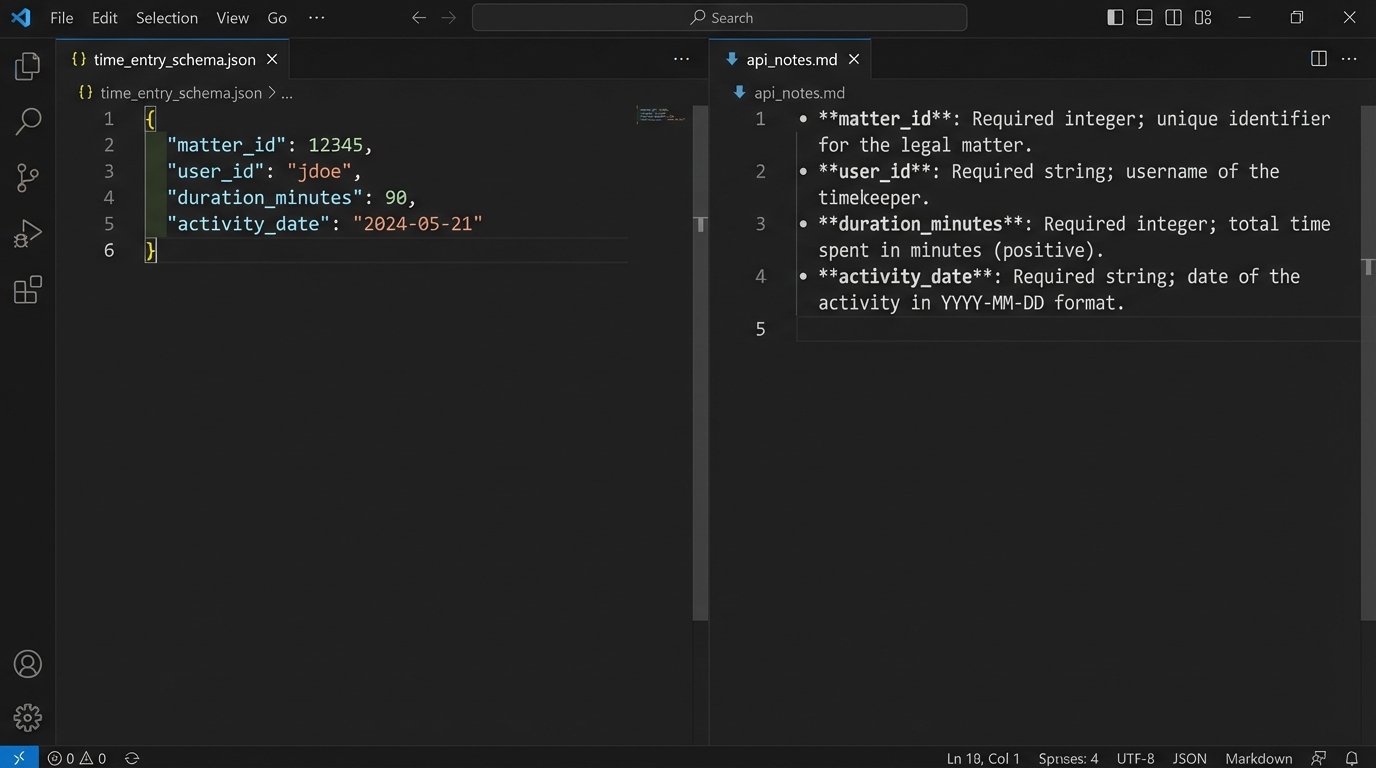
Your destination is a time entry record in your billing system. You need to know exactly what that record requires. Map out the mandatory and optional fields. A typical time entry object will contain fields like `matter_id`, `user_id`, `duration_minutes`, `activity_date`, `description`, and `task_code`. Get a sample JSON payload for a successful API POST request to your billing system. This is your template. Every piece of data you extract will be forced into this structure.
This data modeling phase is tedious but critical. A mismatch here, like providing a user’s email instead of their internal `user_id`, will cause the API endpoint to reject your entry. It is far cheaper to fix this on a whiteboard than in a production error log at 2 AM.
Core Architecture: Event-Driven vs. Scheduled Polling
You have two primary architectural patterns for capturing activity: event-driven webhooks or scheduled polling. Webhooks are superior. A webhook provides a real-time push notification from the source system (e.g., Microsoft Outlook) to your automation platform whenever a specific event occurs, like the end of a calendar meeting. This is efficient and immediate.
Your automation endpoint receives a payload of data about the event that just happened. You can then immediately process it, transform it, and create a draft time entry. This approach is lightweight and scales well, as your system only does work when there is work to do.
Scheduled polling is the brute-force alternative. Every five minutes, your script queries the source API and asks, “Anything new happened?” This is API-intensive, sluggish, and can lead to rate-limiting issues if you are polling too aggressively. You use this pattern only when the source system is a dinosaur and does not support webhooks. Trying to build a real-time system by constantly hammering an old API is like shoving a firehose through a needle. It’s messy and something will break.
Building the Initial Data Capture Trigger
Let’s use a concrete example: capturing a calendar meeting. The process begins by subscribing to the Microsoft Graph API for calendar event notifications. When a meeting on an attorney’s calendar concludes, Microsoft sends an HTTP POST request to an endpoint you control. The body of that request contains the meeting details.
Your first job is to ingest and acknowledge this payload immediately. Do not perform heavy processing synchronously. A good pattern is to drop the raw JSON payload into a message queue like AWS SQS or Azure Service Bus and return a `202 Accepted` response to Microsoft. This makes your webhook endpoint resilient. The actual data transformation happens asynchronously in a separate process that consumes messages from the queue.
This decoupling prevents data loss. If your processing logic fails, the message is not lost. it remains in the queue and can be reprocessed after you fix the bug.
Data Extraction and Transformation Logic
Once the event data is in your queue, a worker function pulls it for processing. This is where you gut the JSON payload for the useful bits. For a calendar event, you will extract the event summary, start time, end time, and attendees. The duration is a simple calculation: `end_time – start_time`.
The most difficult part is reliably extracting the matter ID from unstructured text, like the meeting title or body. A simple regex looking for a pattern like `(Matter: \d{6})` might work for compliant attorneys. For everyone else, you need more advanced logic. You might need to cross-reference attendee email domains with a client list or use natural language processing to identify keywords. This part of the system is never perfect and requires constant tuning.
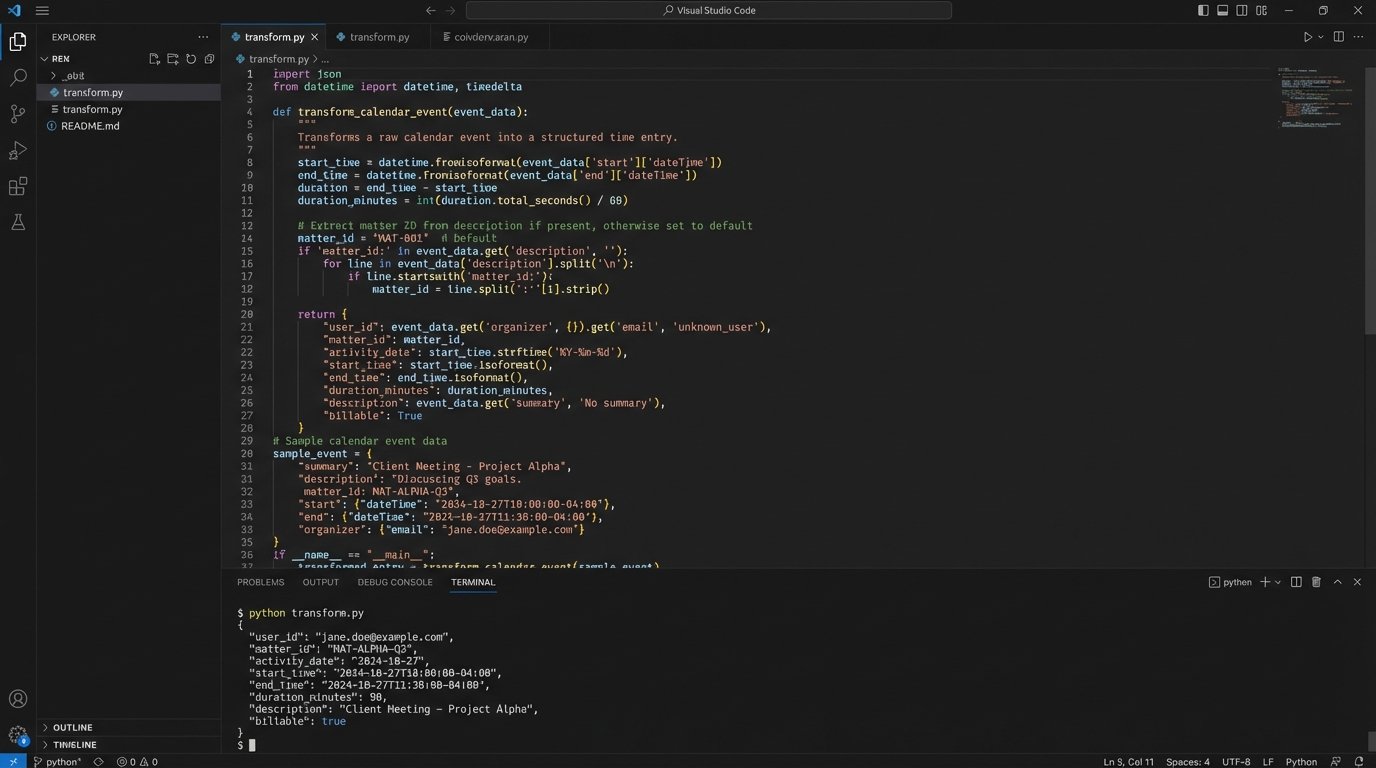
After extracting the raw data, you transform it into the target schema you defined earlier. This involves mapping extracted values to the fields required by your billing system’s API. This is a perfect place for a simple Python function.
def transform_calendar_event(event_payload, user_id):

    """

    Transforms a raw Microsoft Graph API calendar event into a

    standardized time entry dictionary.

    """

    start_time = event_payload.get('start', {}).get('dateTime')

    end_time = event_payload.get('end', {}).get('dateTime')
# Basic duration calculation, assumes UTC format
duration_minutes = (parse(end_time) - parse(start_time)).total_seconds() / 60
# Crude matter ID extraction - requires improvement
description = event_payload.get('subject', 'No Subject')
matter_id_match = re.search(r'(\d{5,8})', description)
matter_id = matter_id_match.group(1) if matter_id_match else None
time_entry = {
"user_id": user_id,
"matter_id": matter_id,
"activity_date": start_time.split('T')[0],
"duration_minutes": round(duration_minutes),
"description": description,
"source_system": "Calendar"
}
return time_entry
This code snippet is a starting point. Notice the crude matter ID extraction. It is a known point of failure that you would need to harden with more sophisticated validation logic.
Validation, Enrichment, and the Human-in-the-Loop
A generated time entry is a draft, not a final record. Before it is shown to an attorney, it must be validated and enriched. The validation step involves a series of logic checks against your firm’s authoritative data sources.
For each draft entry, you must perform these checks:
- Matter Validation: Does the extracted `matter_id` exist and is it an active matter? A call to the practice management system’s `/matters/{id}` endpoint can verify this.
- User Validation: Is the `user_id` valid and is that user assigned to this matter? This prevents a time entry from being logged against a matter the attorney is not working on.
- Duplicate Detection: Does a time entry for this user, on this matter, for this activity already exist? This requires checking for existing entries within a certain time window.
If any validation check fails, the draft entry is flagged and routed for manual review or discarded. If the checks pass, you can enrich the entry. For example, you can add the client name and matter name by pulling that data from the practice management system using the `matter_id`. This provides helpful context for the reviewing attorney.
The Attorney Review Interface
The final step is not to inject the time entry directly into the billing system. The goal is to reduce friction, not remove human oversight. The validated, enriched draft entries should be pushed to a simple dashboard. This could be a custom web page, a view within the firm’s intranet, or even a daily summary email with “Approve” or “Reject” buttons.
The interface should present a list of suggested time entries. For each one, the attorney can approve it as is, edit the description or duration, or delete it entirely. An approval action triggers the final API call that posts the time entry to the billing system. This human-in-the-loop approach builds trust and ensures accuracy. Full automation without review is a recipe for billing errors.
Error Handling and Maintenance Realities
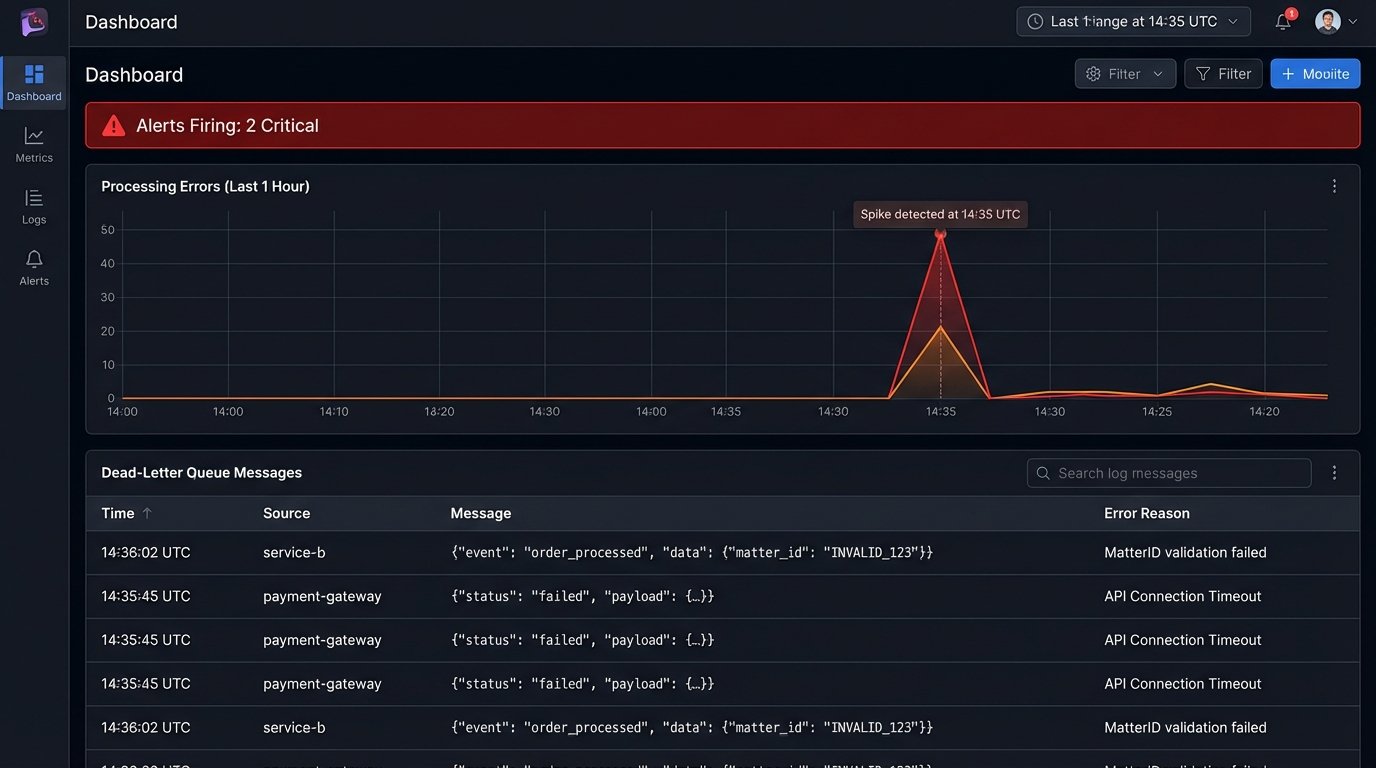
This system will break. APIs will change, authentication tokens will expire, and users will find creative new ways to format their meeting titles. Robust logging is not optional. Every step of the process, from webhook ingestion to final API submission, must be logged. When a validation check fails, you need to log the entire data object that caused the failure for debugging.
Implement a dead-letter queue (DLQ) for your message processing. If your worker function fails to process a message after several retries, the message should be automatically moved to the DLQ. This isolates the problematic data and prevents it from blocking the processing of valid messages. An alert should fire when a message lands in the DLQ, notifying your team that a manual investigation is required.
Maintenance is an ongoing cost. You are now responsible for maintaining the connections between multiple systems. When your practice management vendor releases a new API version, you have to update your code. If Microsoft changes a data object in the Graph API, you have to adapt your transformation logic. This is not a one-time project. It is a living system that requires care and feeding.
The return on this investment is found in recovered billable hours. Capturing just one or two forgotten six-minute entries per attorney per day adds up quickly across a large firm. It plugs the financial leaks caused by flawed human memory and makes the entire timekeeping process less of a painful administrative burden.