
Manual time tracking is not a discipline problem. It is a data architecture failure. The expectation that a professional can accurately reconstruct a fragmented eight-hour day into perfect six-minute increments is absurd. The latency between an action and its documentation guarantees signal loss and data corruption. Every hour that passes degrades the integrity of the entry.
This isn’t about laziness. It’s about asking a human brain to function as a transactional database log, which it was never designed to do. The result is predictable: block billing, reconstructed narratives, and significant revenue leakage from uncaptured, billable work.
The Foundational Flaw in Retrospective Time Entry
Most firms attack this with policy hammers. They enforce deadlines, threaten compensation, and implement annoying pop-up reminders. These tactics force compliance but do not generate accuracy. They compel attorneys to submit *a* timesheet, not a factually correct one. This creates a downstream data pollution problem for financial analytics and client invoicing.
The core issue is the capture method itself. It’s retrospective, relying on memory. Trying to rebuild a day from memory is like rebuilding a server from corrupted log files. You might get the major events, but the granular, critical details are gone or fabricated. This leads directly to vague billing narratives which invite client scrutiny and write-downs.
Event-Driven Capture as the Alternative
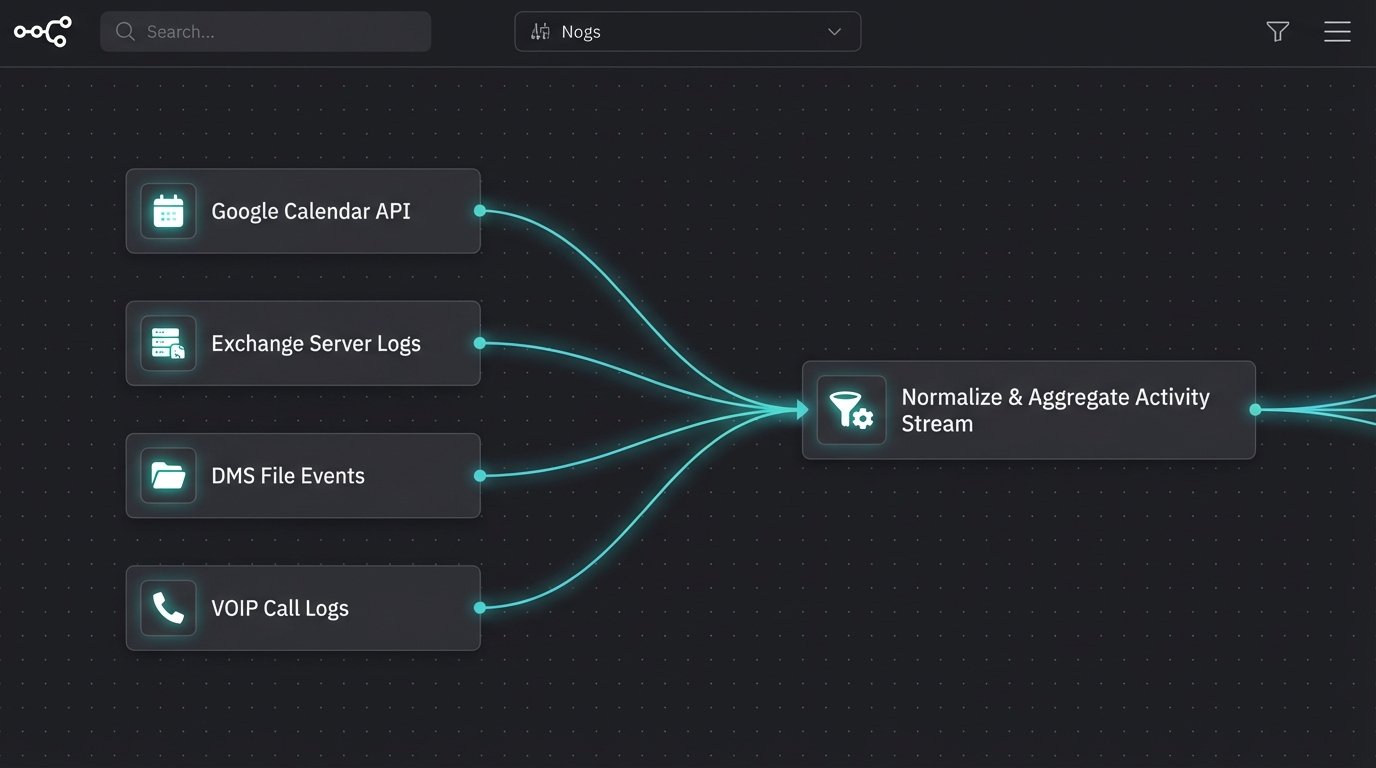
The solution is to gut the manual-entry model and replace it with a system of passive, event-driven data capture. Time isn’t “tracked” actively. It is inferred from the digital exhaust of a lawyer’s workflow. We stop relying on memory and start listening to the machine-generated events that are already being logged with perfect timestamps and metadata.
The primary data sources for this model include:
- Calendar APIs: Microsoft Graph or Google Calendar APIs provide rich data on scheduled events. We can pull attendee lists, event duration, and subject lines, which often contain client or matter identifiers.
- Email Metadata: We don’t need to parse the body of an email and tangle with privilege issues. The headers are enough. Sender, recipient, and timestamp data from an Exchange server can be correlated with client contact information to infer communication activity.
- Document Management System (DMS) Logs: Every action in a modern DMS generates a log entry. Document creation, edits, and views are all timestamped events tied to a specific user and, if the system is configured correctly, a matter workspace.
- Phone System APIs: VOIP and unified communications platforms log all call data. Outgoing and incoming calls, duration, and the target phone number can be mapped back to client contacts.
These systems are already recording the work. We just need to aggregate the signals.
The Logic Engine: From Raw Data to Billable Suggestions
Aggregating event logs is the easy part. The difficult engineering challenge is transforming that firehose of raw, disconnected data into coherent, billable time entries. This requires a logic engine that can parse, enrich, and associate each event with a specific client and matter. This is not a simple if-then script. It’s a multi-stage processing pipeline.
First, the engine ingests event data from various APIs. Each event is normalized into a standard format. A calendar appointment and a document edit look very different in their raw state but need to be processed as a generic “activity” with a user, timestamp, duration, and associated metadata.
Next comes the enrichment and association phase. The system attempts to map an activity to a matter ID. This is done by cross-referencing metadata against the firm’s practice management system (PMS) database. A common technique is using regular expressions to find matter numbers in email subject lines or calendar invites. It also involves mapping email addresses or phone numbers to known client contacts.
A Simple Association Logic Example
The logic to link an event can be visualized with some basic pseudo-code. This isn’t production-ready code, but it illustrates the decision tree for processing a single calendar event.
function processCalendarEvent(event) {

    let matterID = null;
// 1. Direct regex match on event title for matter number
matterID = event.title.match(/(\d{4}-\d{5})/);
if (matterID) {
createSuggestedEntry(event, matterID[0]);
return;
}
// 2. Look up attendees in CRM/PMS
for (const attendee of event.attendees) {
let associatedMatter = findMatterByContactEmail(attendee.email);
if (associatedMatter) {
matterID = associatedMatter;
createSuggestedEntry(event, matterID);
return;
}
}
// 3. If no match, send to manual review queue
sendToUnassignedQueue(event);
}
This is a simplified model. A real production system would have more complex weighting and confidence scoring. The goal is not 100% autonomous mapping. The goal is to get to 90% accuracy and dump the ambiguous 10% into a queue for human review.
Integration: The API Minefield
Connecting this automation layer to the firm’s existing tech stack is where most projects get bogged down. The primary obstacle is the sorry state of APIs in legacy legal tech. Many practice management systems that form the financial core of a law firm offer brittle, poorly documented, or non-existent APIs for third-party integration.
Bridging a modern event-stream architecture with a decade-old PMS SOAP endpoint is like shoving a firehose of data through a rusty, pinhole-sized needle. You need a robust intermediary layer with queuing, retry logic, and extensive error handling to prevent the entire system from backing up or losing data when the legacy endpoint inevitably fails. Rate limiting is another gotcha. A burst of activity can easily trigger API rate limits, forcing you to build throttling mechanisms into your data collectors.
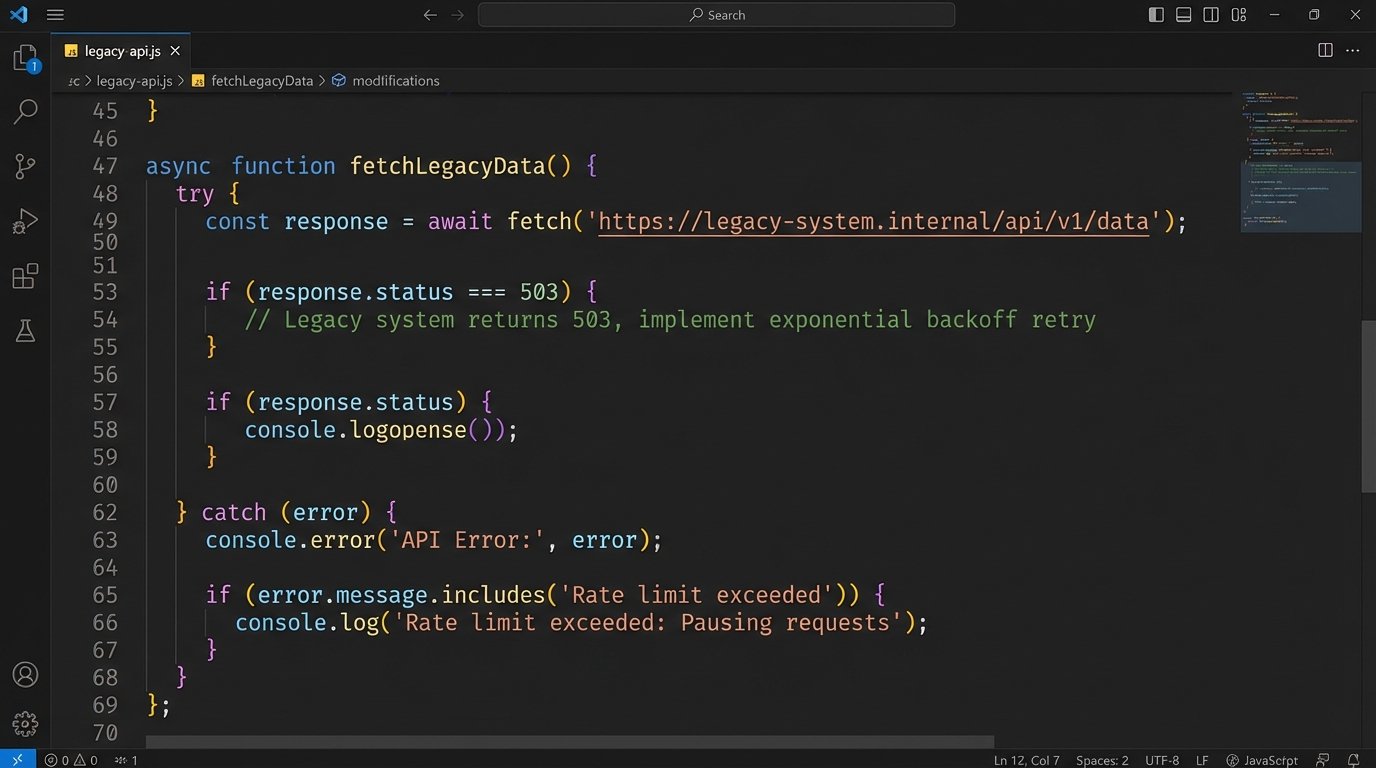
Before committing to a project like this, a thorough API audit of the firm’s core systems is not optional. It is the single most important prerequisite. If the PMS vendor offers a “read-only” API or one that requires manual token refreshes every few hours, the project is a non-starter until that foundational problem is fixed.
The Human-in-the-Loop Imperative
Full, “lights-out” automation of time entry is a fantasy. It is also legally and ethically indefensible. The final billing record is the professional responsibility of the attorney. The role of automation is not to replace their judgment but to eliminate the administrative drudgery that precedes it.
The optimal architecture presents the attorney with a pre-populated, draft timesheet at the end of each day. It contains suggested entries, complete with durations and draft narratives generated from event metadata. The attorney’s job is reduced from data entry clerk to that of a reviewer and editor. They approve, correct, or delete the suggestions. This “human-in-the-loop” model respects professional oversight while capturing the vast majority of the efficiency gains.
Building a Feedback Mechanism
A smart system learns from these corrections. When an attorney re-assigns a suggested entry from Matter A to Matter B, that’s a valuable training signal. The system should log that correction and use it to adjust its association logic. Over time, this feedback loop fine-tunes the mapping engine, progressively increasing its accuracy and reducing the number of exceptions that require manual intervention.
This requires building a feedback data model where corrections are stored and periodically analyzed to identify patterns. For example, the system might learn that emails from a specific contact person at a large corporate client always relate to a particular standing matter, even if the matter number isn’t in the subject line.
Downstream Analytics: The Real Prize
The immediate benefit of automated time capture is increased revenue through reduced leakage. That alone often provides the ROI to justify the project. But the long-term strategic value comes from the high-fidelity data it produces. Manual time data is a blurry photograph. Event-driven data is a high-resolution CAT scan of the firm’s operational anatomy. You can perform surgery with one, not the other.
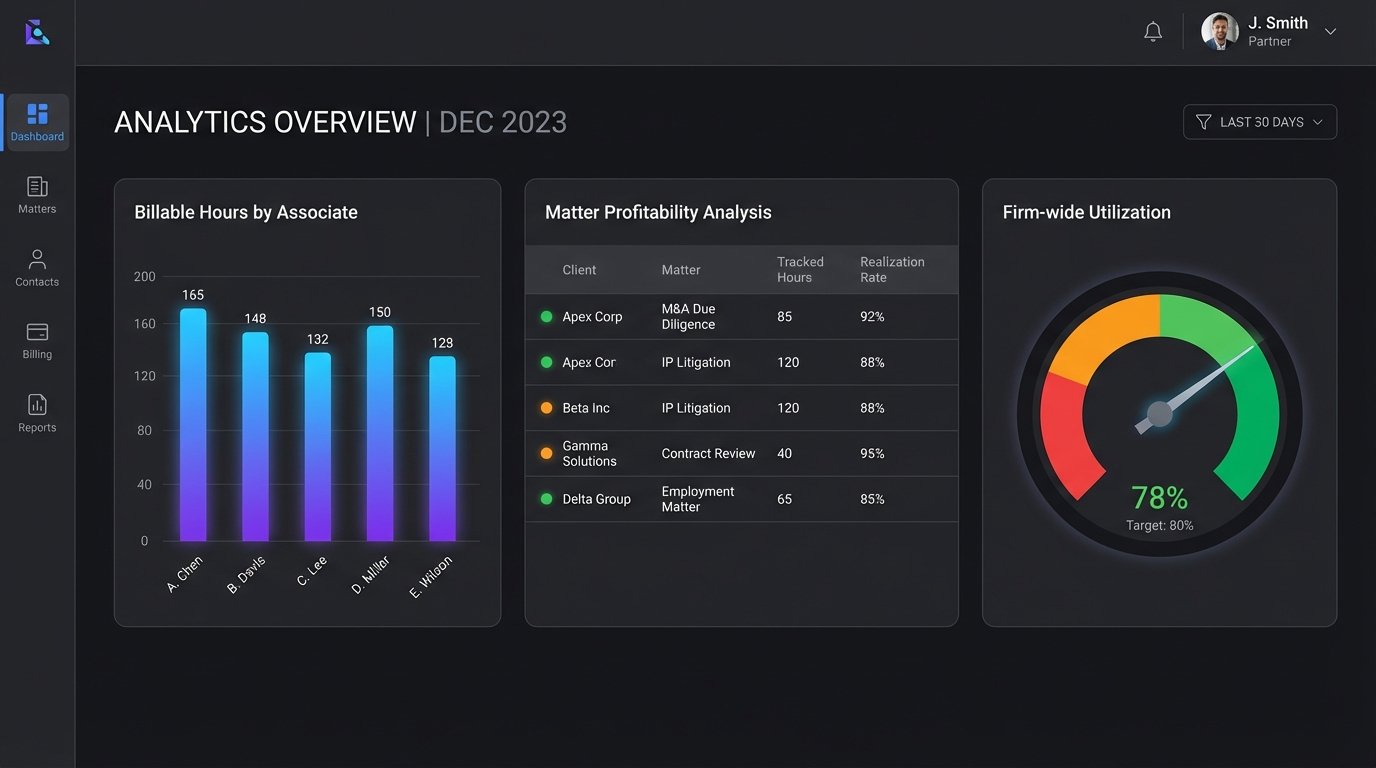
With clean, granular, and consistently captured time data, you can move beyond simple billing and into true operational intelligence:
- Pricing and Profitability Analysis: You can finally see the true cost to deliver a specific type of legal work product. This allows for the confident construction of fixed-fee arrangements and other alternative fee models that are based on data, not guesswork.
- Resource Management: Dashboards can show, in near real-time, which practice groups or individual lawyers are over-utilized and which have capacity. This enables more agile work allocation and proactive management of burnout risk.
- Client Transparency: Instead of providing a vague, block-billed invoice, you can give clients a detailed ledger of activity. This transparency builds trust and drastically reduces the back-and-forth arguments over invoices that erode both profit margins and client relationships.
Automating time capture is not just an efficiency play. It’s a foundational step toward becoming a data-driven law firm. It’s a difficult engineering lift, fraught with integration risks and requiring a significant cultural shift. But refusing to address the broken architecture of manual time entry is to accept running the firm’s financial engine on dirty, unreliable fuel.