
Most time tracking automation projects fail. They don’t fail because the technology is flawed. They fail because the premise is wrong. The goal isn’t to magically create timesheets from thin air. The goal is to capture activity data, map it to a matter with reasonable accuracy, and present it to a lawyer for confirmation. Anything else is a fantasy sold by vendors who have never had to support a system in production.
The core problem is signal versus noise. Your firm generates terabytes of activity data: emails, calendar appointments, document edits, phone calls. Most of it is useless for billing. The real work is building a system that can intelligently filter this firehose of data down to a trickle of billable moments. Without this brutal filtering, you just build a faster way to generate bad data.
Ground Zero: The Data Source Audit
Before writing a single line of code, you must identify your sources of truth. The most common are Exchange/Google Workspace for email and calendar, the firm’s document management system (DMS), and the VOIP phone system. Each one presents its own unique brand of pain. You must audit each source for data structure, accessibility via API, and reliability.
Exchange, for instance, offers a rich data source through the Graph API. You can pull metadata on emails sent and received, calendar entries, and meeting attendees. The challenge is that the raw data is context-free. An email with the subject “Quick Question” is meaningless without a logic engine to connect it to a specific client and matter. Your first step is simply to establish a stable connection and start logging the raw output to see what you’re dealing with.
Don’t boil the ocean. Start with one source, likely email, and prove the concept before you start trying to integrate call logs. Trying to hook everything up at once is how you end up with a six-month project that delivers nothing.
Building the Matter-Mapping Logic
This is the heart of the machine. The system’s entire value depends on its ability to take a raw data point, like an email from `jane.doe@megacorp.com`, and map it to `MegaCorp // IP Litigation // Matter #12345`. This mapping is never perfect and requires a multi-layered approach. The most primitive method is a direct lookup table matching email domains to client IDs.
A simple Python dictionary gives you a baseline. It’s crude, but it works for your largest clients and builds a foundation.
client_domain_map = {

    "megacorp.com": "CLI001",

    "globaltech.io": "CLI002",

    "startup.ai": "CLI003"

}
def get_client_from_email(email_address):
domain = email_address.split('@')[1]
return client_domain_map.get(domain, "UNMAPPED")
This is obviously fragile. What happens when MegaCorp acquires another company with a new domain? Or when a new client comes on board? The system breaks. Your next layer must be more intelligent, parsing email subjects or body content for matter numbers or specific keywords. This requires a rules engine that can be updated by a paralegal, not a developer. This engine becomes the brain, constantly being fed new patterns to recognize.
The entire effort is like trying to assemble a complex engine in the dark. You have all the parts, but no blueprint. You have to feel your way through it, connecting one piece at a time and testing constantly, because one wrong connection causes the whole thing to seize up.
The API Nightmare: Integrating with the PMS
Every practice management system (PMS) brochure will show you a slide about its “modern, RESTful API.” In reality, you’re often dealing with a poorly documented, rate-limited endpoint that’s an afterthought for the vendor. Before you commit to a platform, demand access to its developer sandbox and run load tests. Check the error codes. See how it behaves under pressure.
The first point of failure is authentication. Many legacy systems still use static API keys instead of a proper OAuth2 flow, creating a security risk. The second is rate limiting. Your automation might generate thousands of API calls an hour, and the PMS will likely throttle or block you without warning. You must build your own queuing and throttling mechanism to meter out requests and avoid overwhelming their server.
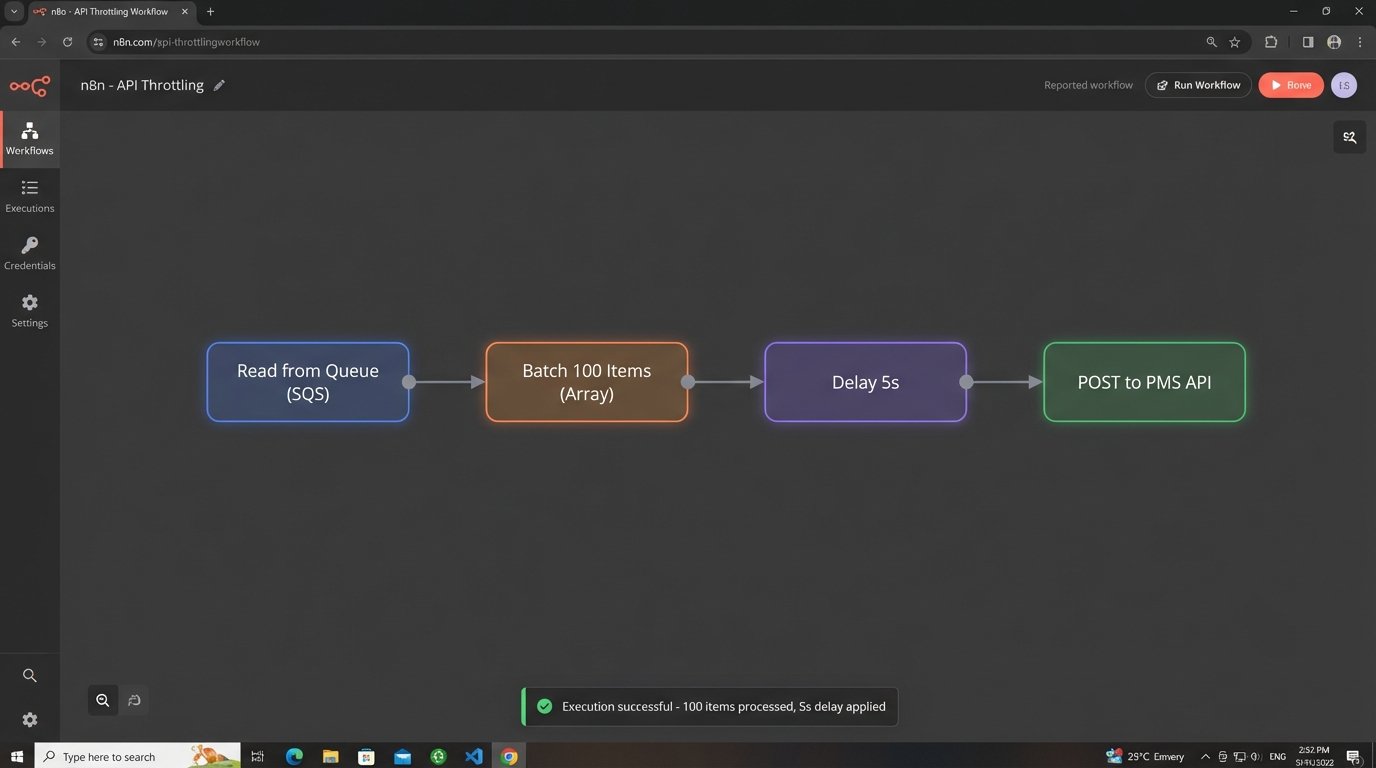
This is non-negotiable.
Never code directly against the PMS API. Build an abstraction layer, a small service that sits between your automation logic and their endpoint. This “anti-corruption layer” translates your clean, internal data models into the messy, inconsistent format the PMS expects. When the vendor inevitably changes their API, you only have to update your one translation layer, not your entire application.
Their support team will not be helpful.
User Adoption: The Final Boss
You can build a technically perfect system, but it’s worthless if lawyers refuse to use it. Attorney buy-in is the most critical and most frequently ignored part of the project. The key is to understand their workflow and psychology. They are audited on their time, and they want absolute control over what gets submitted.
The user interface must be designed for minimal friction. Do not present them with a complex form to fill out. Instead, build a “suggestion tray.” This is a simple list of captured activities: “Sent email to Jane Doe (MegaCorp),” “Edited document ‘Merger Agreement.docx’,” “30-minute call with John Smith.” Each entry should have three buttons: `Confirm (0.2)`, `Edit`, `Dismiss`.
The one-click confirm is vital. The system should pre-populate the time entry with the correct matter, a suggested narrative, and a default time increment based on practice group rules. The lawyer’s job is reduced from data entry to simple validation. You are not replacing their judgment. You are removing the drudgery of recall.

This distinction is what separates a successful project from a hated one.
Force nothing. If a lawyer dismisses a suggestion, let it go. The system should learn from this, perhaps down-weighting that type of activity in the future. The moment the system feels like a mandate instead of an assistant, you’ve lost.
Designing for Failure: Maintenance and Monitoring
This system will break. Data formats will change, APIs will go down, and mapping rules will become stale. A launch without a long-term maintenance plan is professional malpractice. Your architecture must include robust logging, monitoring, and error handling from day one.
Every unmappable activity, every failed API call, every unexpected data structure needs to be shunted to an exception queue. This isn’t just a log file. It’s a dashboard that a Legal Ops analyst reviews daily. This queue is the feedback loop that makes the system better. It highlights new client domains that need to be added, or changes in the DMS metadata that broke your parser.
A sample error object in a queue might look like this:
{

  "timestamp": "2023-10-27T10:00:00Z",

  "source": "exchange_ingestor",

  "error_type": "MAPPING_FAILURE",

  "payload": {

    "activity_type": "email",

    "from": "new.contact@globaltech.io",

    "subject": "Re: Project Phoenix"

  },

  "error_message": "Domain 'globaltech.io' found for client 'CLI002', but no active matter found matching keywords."

}
This structured error data allows your support team to diagnose and fix problems without digging through gigabytes of raw logs. You need alerts tied to this queue. If the failure rate spikes above a certain threshold, it should trigger an automated alert to the support channel. Assume it will be on fire and build the fire extinguisher first.
Configuration Over Code
The needs of a litigation practice are different from a corporate M&A team. They use different billing codes, different narrative styles, and have different expectations for time increments. Hard-coding these rules into the application is a path to madness. Every change will require a developer and a new deployment cycle.
Build a configuration layer that is accessible to the Legal Ops team. This should be a simple admin interface where they can manage the core logic without writing code. This interface should allow them to:
- Manage the client-to-domain mapping tables.
- Define keyword rules for mapping activities to matters (e.g., if an email subject contains “Project Phoenix,” map to matter #67890).
- Set default time increments for different activity types (e.g., email = 0.1 hours, call = 0.25 hours).
- Create exclusion rules (e.g., never suggest time for emails sent to internal domains or containing the word “lunch”).
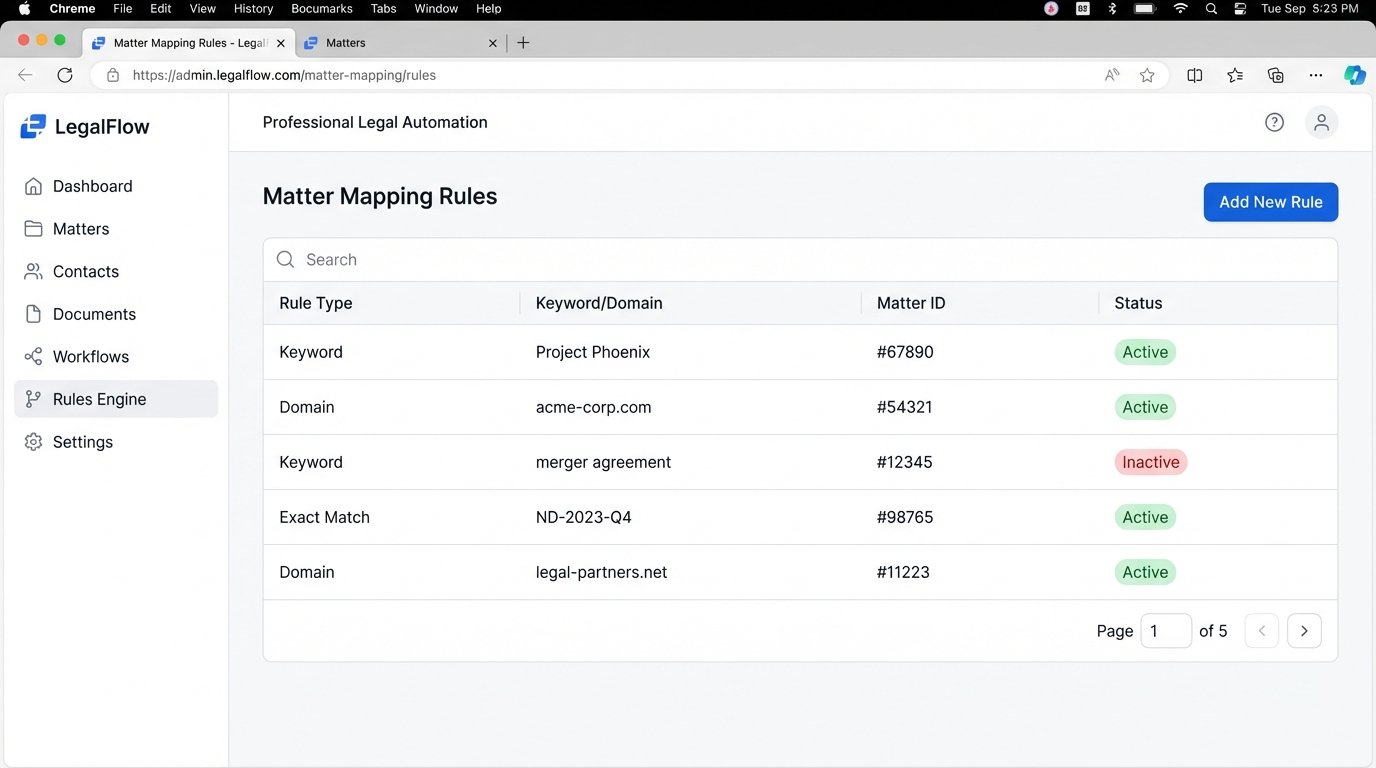
Exposing this configuration empowers the people who actually understand the firm’s business logic to fine-tune the system. It separates the operational rules from the core application code, making the entire platform more resilient and adaptable. This turns the system from a rigid black box into a flexible tool.
The initial investment in building this configuration UI pays for itself within the first few months. It’s the difference between a system that adapts to the firm and a firm that is forced to adapt to a broken system.
Ultimately, automating time tracking is less a technical challenge and more an exercise in systems thinking and human psychology. The code is the easy part. The hard part is building a machine that respects the user, anticipates failure, and can be maintained by non-engineers. Get that right, and you might just build something that works.