Manual calendar entry is a direct path to malpractice. Every time a paralegal re-keys a date from a court notice into the firm’s calendar, they are creating a single point of failure. A typo on a statute of limitations is not an operational inefficiency. It is a terminal event for the case and a significant liability for the firm. The only way to systematically address this risk is to remove the human data entry component entirely.
Automated calendaring systems operate on a simple principle. They ingest a single trigger date from a reliable source of truth, apply a predefined set of jurisdictional rules, and then populate every related deadline directly into the attorneys’ calendars. This is not about convenience. It is about injecting logic and consistency into a process riddled with human error.
The Anatomy of a Calendaring Failure
The failure points in manual calendaring are predictable. First is the simple transcription error, where a date like the 25th becomes the 26th. Second is the miscalculation of dependent deadlines. An associate calculates 30 days forward from a service date but forgets to account for a court holiday, placing the deadline on a day the court is closed. The court’s rules of civil procedure might push that deadline to the next business day, but the manual entry does not account for this logic.
A third failure mode involves communication breakdown. An attorney receives an updated scheduling order via email but fails to forward it to the paralegal responsible for the calendar. The old deadlines remain active, creating a false sense of security. These are not edge cases. They are the routine, systemic flaws of a process that relies on humans acting as data transfer agents between disparate systems.
Core Architecture: The Source, The Engine, The Destination
A durable scheduling automation system is built on three components. First, a Source of Truth provides the initial trigger dates. This could be an e-filing notification service like PACER, an API feed from a docketing provider, or even a designated field within your case management system (CMS) where a single, critical date is entered manually.
Second is the Rules Engine. This is the logical core of the system. It houses the jurisdictional rule sets that dictate date calculations. For example, it contains the logic that an Answer to a Complaint in California Superior Court is due 30 calendar days after the date of service, with extensions for mail service. The engine processes the trigger date from the source against the relevant rule set.
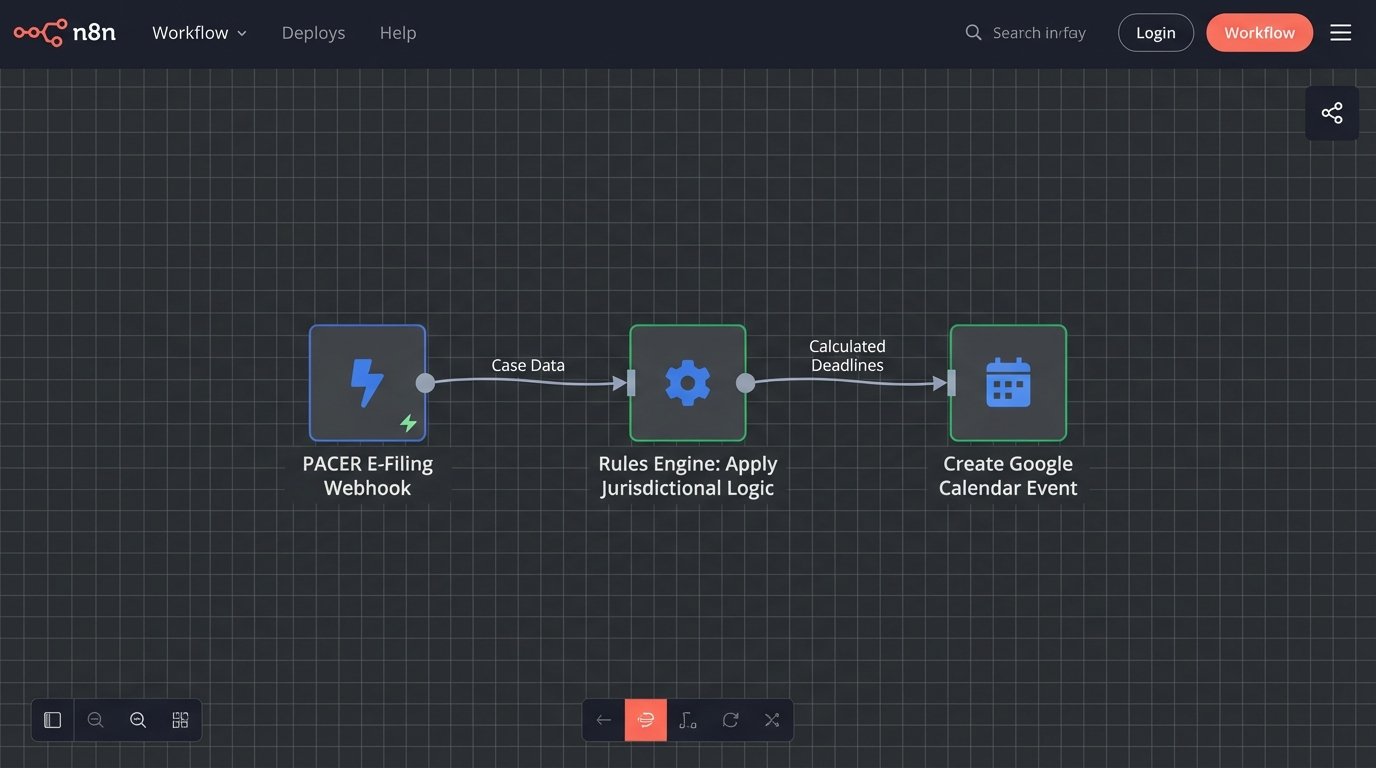
Third is the Destination, which is the firm’s primary calendaring platform, typically Microsoft 365 or Google Workspace. The rules engine calculates the deadlines and then uses an API to push these events directly into the calendars of the assigned legal team. The goal is a one-way data flow from a verified source to the end user’s calendar, bypassing manual entry completely.
This architecture decouples the source of the date from the calculation and distribution. It isolates the risk to the initial data ingestion point, which can be heavily audited and controlled, instead of spreading it across every paralegal in the firm.
Building the Rules Engine: Logic Over Labor
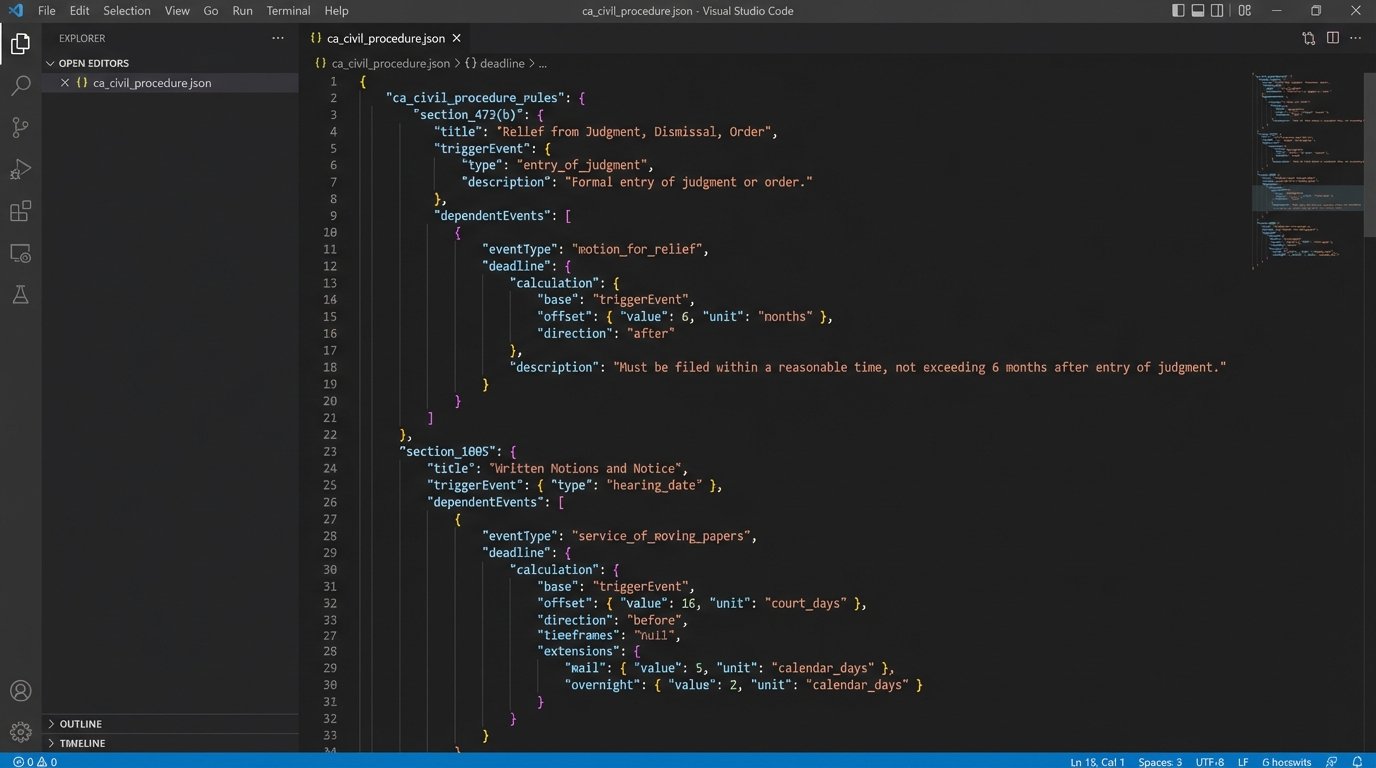
The rules engine is where the real work gets done. It is essentially a database of procedural formulas. For each event type, such as “Complaint Filed,” the engine stores a series of dependent events and the logic to calculate their due dates. This logic must account for calendar days versus court days, state and federal holidays, and specific procedural nuances of a given jurisdiction.
A simple rule might be expressed in a format like JSON. This allows for both machine readability and human auditing. A rule for a response to discovery requests could be structured to define the trigger event, the time period, the unit of time, and any modifiers for holidays.
{

  "jurisdiction": "USDC_CAND",

  "triggerEvent": "FRCP_34_Request_Served",

  "dependentEvents": [

    {

      "eventName": "Response to FRCP 34 Request Due",

      "calculation": {

        "add": 30,

        "unit": "days",

        "holidayRule": "pushToNextBusinessDay",

        "serviceMethodModifier": {

          "mail": { "add": 3, "unit": "days" }

        }

      },

      "calendarTarget": "LitigationTeam",

      "alertConfig": ["-7d", "-2d", "-1d"]

    }

  ]

}
This structure forces a systematic approach. It is not just about adding 30 days. It is about defining the entire lifecycle of a deadline, from its calculation method to the specific alert notifications that must be generated. Building out these rule sets is a front-loaded effort, but it pays for itself by preventing a single blown deadline.
Complexity and the Human Factor
The real challenge is not writing the code, but accurately translating the convoluted text of civil procedure into machine-executable logic. This requires a tight feedback loop between the developers and experienced paralegals or attorneys. You are not just automating a task. You are codifying decades of institutional knowledge and procedural expertise.
The entire system becomes a logical backstop for the legal team. It stops an associate from scheduling a deposition on a court holiday or miscalculating a response deadline after a long weekend. The engine does not get tired or distracted. It just executes the logic.
Data Ingestion: The Unreliable Entry Point
The most fragile part of this entire system is getting the initial trigger date into it. An automated system is only as good as its source data. Relying on scraping public court websites is a wallet-drainer in terms of maintenance. These sites change their HTML structure without warning, breaking your scrapers and forcing late-night debugging sessions to fix them before deadlines are missed.
A far better, though more expensive, solution is to pull data from a commercial docketing provider via an API. These services aggregate court data and provide it in a structured format. This shifts the maintenance burden from your team to the vendor. The connection is still a potential failure point, and their APIs can be sluggish, but it is a more stable foundation than web scraping.
The most common approach is a hybrid model. The firm ingests data from an API where available but falls back to a single, controlled manual entry point for the initial trigger date, such as the date a complaint was filed or served. This single entry is then audited and verified, and all subsequent deadlines are generated automatically from it. This contains the risk of human error to a single, verifiable action instead of dozens of them.
Trying to achieve 100% automation of data ingestion is like shoving a firehose through a needle. The sheer variance in court procedures and data availability across jurisdictions makes it an impractical goal. The focus should be on automating the calculation and distribution, while heavily controlling the initial input.
Error Handling and Required Auditing
No automated system is perfect. An API can go down. A rule set might not account for a judge’s specific standing order. A robust system must therefore have a transparent error handling and logging mechanism. When a calculation fails or an API call to the calendar service does not return a success code, the system must trigger an immediate alert to a designated administrator.
The alert should contain the source data, the rule that was being applied, and the specific error message. This allows for rapid diagnosis and manual intervention. The goal is not to eliminate human oversight, but to elevate it. Instead of having paralegals perform repetitive date calculations, you have them auditing the exceptions generated by the automated system.
A weekly audit report is a mandatory component. This report should list all new trigger events processed and the corresponding deadlines that were created in the firm’s calendars. A senior paralegal or docketing clerk should be responsible for spot-checking this report against the source documents to ensure the system is operating as expected. Trust, but verify, especially when dealing with client-critical deadlines.
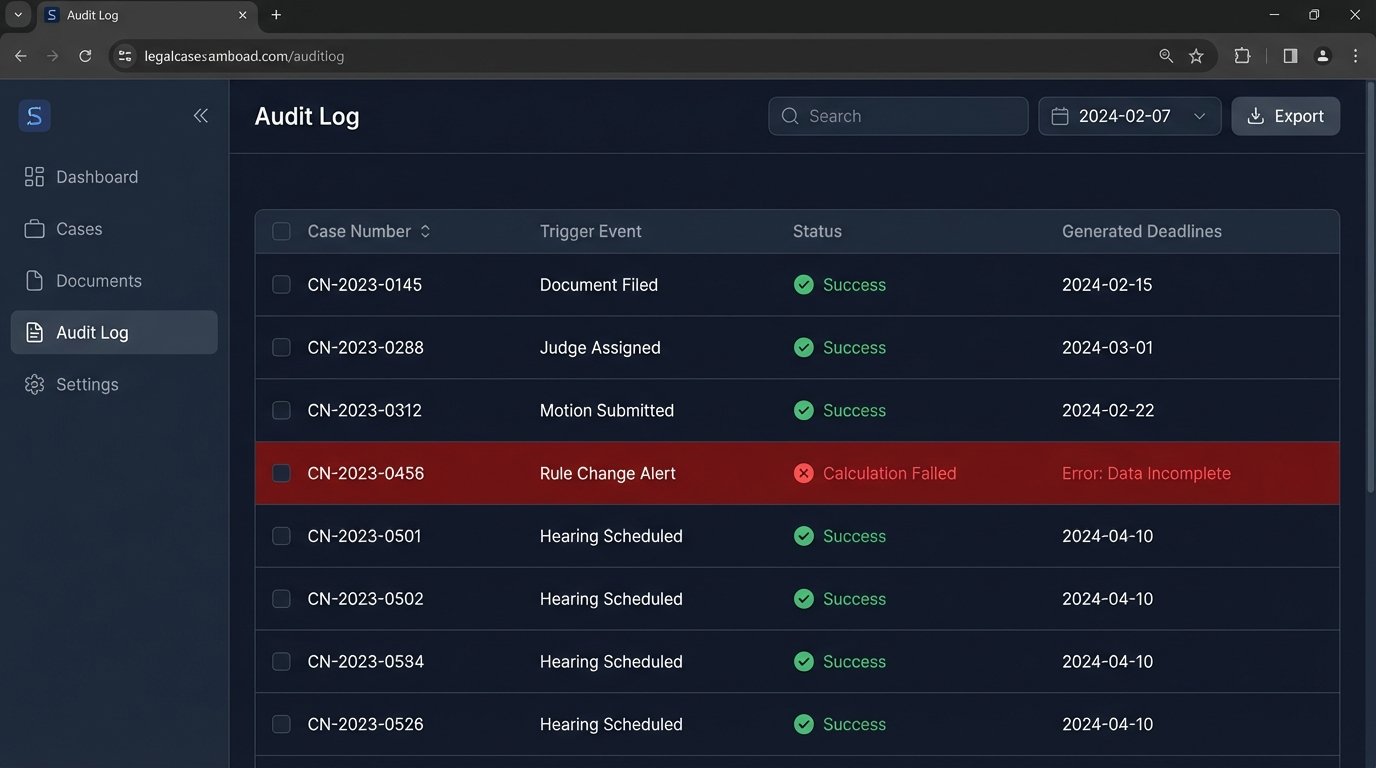
This creates a feedback loop. If the audit reveals a consistent error, like a misinterpretation of a local court rule, the rules engine can be updated to correct the logic for all future cases. The system learns and improves, reducing the number of exceptions over time.
The Build vs. Buy Calculation
Firms face a choice between building a custom solution or buying an off-the-shelf practice management tool with a calendaring module. Commercial tools offer faster implementation but often come with rigid, unchangeable rule sets. You are forced to adapt your firm’s workflow to the software’s opinionated design. Customization is either impossible or prohibitively expensive.
Building a custom solution provides complete control over the logic and integrations. You can bridge it directly to your ancient, home-grown case management system and tailor the rules to the specific nuances of your primary jurisdictions. The upfront cost in development hours is significant, and it requires ongoing maintenance. However, for firms with specialized practice areas or a high volume of litigation, the long-term benefit of a purpose-built system often outweighs the initial investment.
The decision hinges on the complexity of your needs. If your practice involves a few simple, recurring deadline types, a commercial product might suffice. If you operate in multiple jurisdictions with convoluted procedural rules, a custom-built rules engine is likely the only way to achieve true, reliable automation. A cheap tool that gets a deadline wrong is more dangerous than no tool at all.