
The entire premise of legal calendaring is broken. It’s a distributed system with no central controller, managed by humans making manual API calls via email. A partner’s Outlook, a paralegal’s Google Calendar, and the official docket in the Case Management System (CMS) exist as three separate, often conflicting, sources of truth. The cost of this desynchronization isn’t just wasted time. It’s a missed statute of limitations.
Stop pretending that a shared calendar subscription is a solution. It’s a patch that papers over the fundamental architectural flaw. Real automation requires you to gut the existing workflow and enforce a single, authoritative source for all date-based events.
Deconstructing the Manual Failure
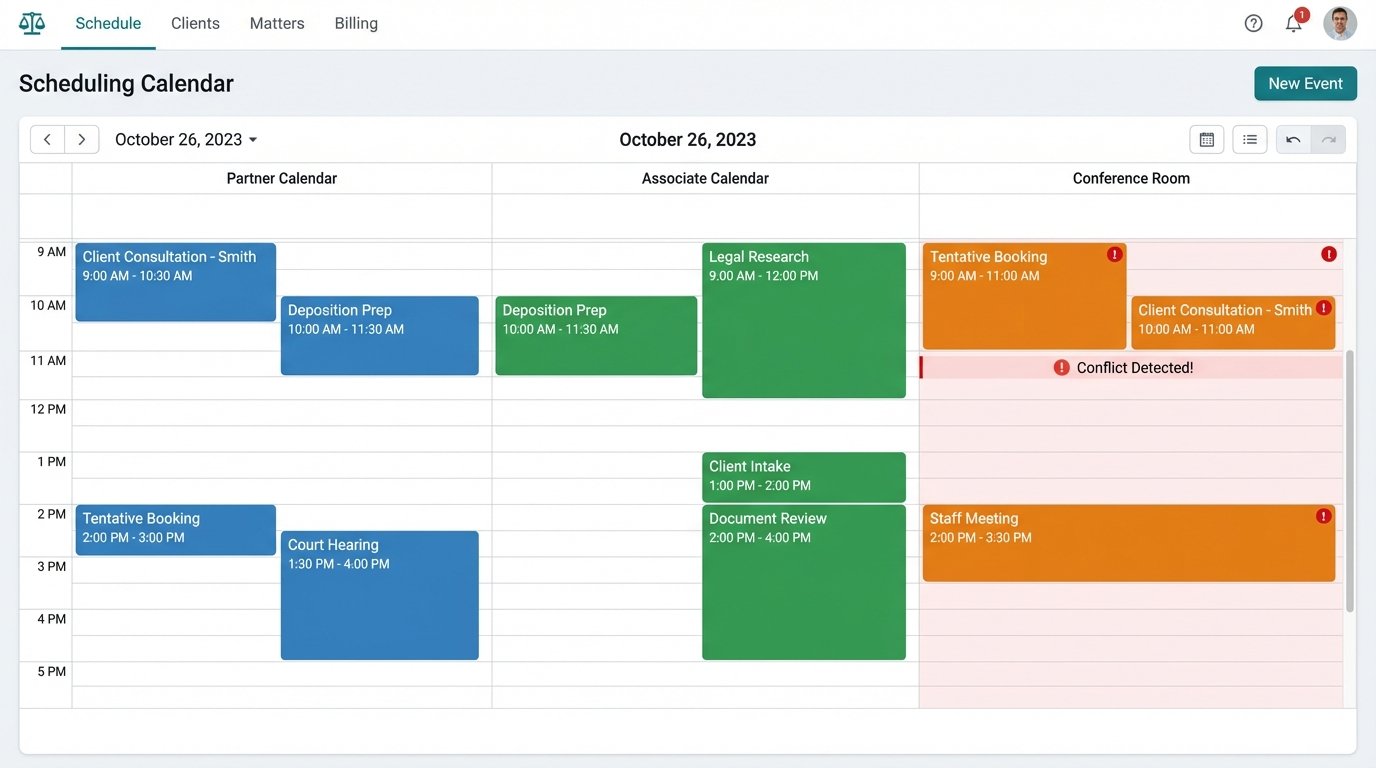
A typical scheduling request for a client consultation triggers a cascade of inefficiency. The intake coordinator receives a web form submission. They open three browser tabs: the partner’s calendar, the associate’s calendar, and the conference room booking system. They find a potential slot, then draft an email with three optional times, BCC’ing the legal assistant.
The client replies six hours later, picking a time that has since been booked by the associate for a deposition. The entire cycle repeats. This is not a workflow. It is a denial-of-service attack on your firm’s productivity, executed by your own staff.
The Latency Tax
Every manual step introduces latency. The time between checking availability and confirming the booking is a window for data corruption. The calendars you checked are stale the moment you look away from the screen. Multiplying this by dozens of events per day across hundreds of cases creates a drag on the firm that is both invisible and crippling.
This isn’t about saving a few minutes. It’s about eliminating the cognitive overhead of constant context switching and verification.
Architecting a Centralized Event Ledger
The fix begins with declaring one system as the master event ledger. This is non-negotiable. For most firms, this should be the CMS, like Clio, MyCase, or PracticePanther. The calendars in Outlook and Google Calendar must be demoted to read-only displays of the master ledger’s data. The user interface for creating or modifying an event should, in a perfect world, be the CMS itself.
Of course, the world is not perfect. Attorneys will not stop adding events directly to their Outlook calendar on their phones. The architecture must account for this reality by aggressively polling those external calendars and forcing a reconciliation with the master ledger. This is a synchronization problem, and it is notoriously difficult to get right.
Building the API Bridge
Your CMS, your email server (Exchange or Google Workspace), and any external rules-based calendaring systems (like court docketing services) do not speak the same language. You need middleware to act as a universal translator and logic controller. This can be a pre-built integration platform (iPaaS) like Workato or a custom application running as a serverless function in AWS Lambda or Azure Functions.
The middleware’s job is to poll each system’s API, fetch new or updated events, normalize the data into a standard format, and then determine where that data needs to go. This is more complex than it sounds. You’re trying to shove a firehose of inconsistent event data through the needle of a structured, reliable system.
You will immediately run into authentication issues. One service uses OAuth2 with short-lived refresh tokens, another needs a static API key in the header, and the legacy court system exposes a SOAP endpoint that hasn’t been updated since 2008. Your middleware must manage this authentication complexity and handle token refreshes and error states gracefully.
Enforcing Data Integrity with a Logic Engine
A simple one-to-one sync is a recipe for disaster. Your middleware needs a rules engine to prevent data corruption. What happens when an attorney deletes a court-mandated deadline from their Google Calendar? A dumb sync would see the deletion and push it to the CMS, effectively erasing a critical deadline. This is malpractice territory.
The logic engine must be able to distinguish between event types. A “Client Consultation” can be moved or deleted by the attorney. A “Motion to Compel Hearing” event, created by an automated docket sync, should be immutable or trigger an alert if a modification is attempted from a non-authoritative source. You have to tag events with metadata indicating their source and level of importance.
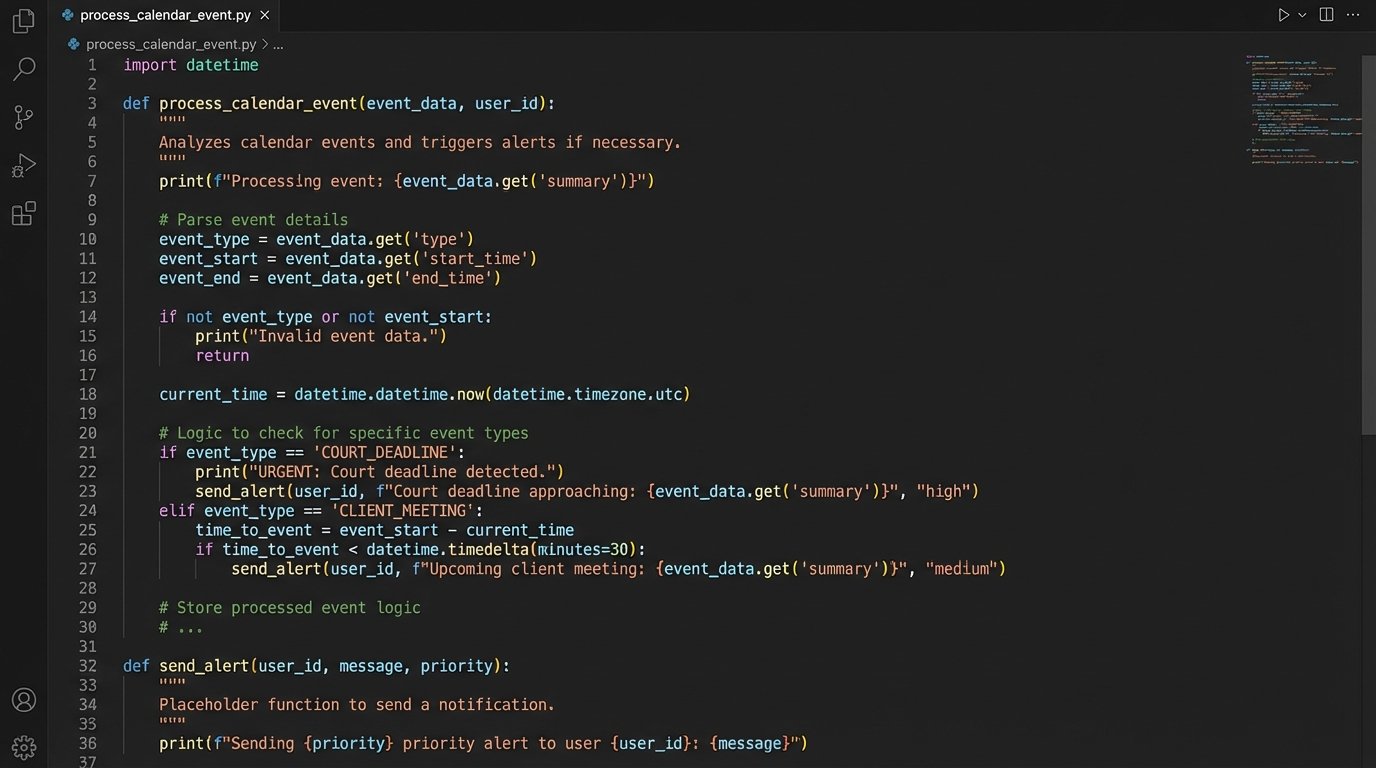
Here is a simplified Python function showing what this logic might look like inside an Azure Function triggered by a calendar webhook:
def process_calendar_event(event_data):

    # Strip event data from the incoming webhook payload

    event_id = event_data.get('id')

    source_system = event_data.get('source')

    event_type = get_event_metadata_from_cms(event_id).get('type')

    action = event_data.get('action') # e.g., 'created', 'updated', 'deleted'
# Logic-check for protected event types
if event_type == 'COURT_DEADLINE' and action == 'deleted':
# Force a revert by re-creating the event in the source system
revert_event_deletion(event_id, source_system)
# Inject an alert into the practice management Slack channel
send_alert(f"Critical Alert: Attempt to delete court deadline {event_id} was blocked.")
return {'status': 'reverted'}
# If the event is not protected, proceed with standard sync
if action == 'updated':
sync_event_to_cms(event_id, event_data)
return {'status': 'synced'}
return {'status': 'no_action_needed'}
This code forces a specific behavior. It doesn’t ask for permission. It detects a dangerous action and immediately reverts it, then notifies the team. That’s the difference between a simple connector and a true automation architecture.
Practical Automation Scenarios
With a central ledger and a logic-driven bridge, you can build specific, high-value automations that address the most common points of failure.
Zero-Touch Consultation Booking
This is the first workflow to attack. The lead intake form on your website should not send an email. It should make a direct API call to your middleware. The middleware then executes a series of actions in real-time:
- Query Calendars: It fetches the real-time free/busy status for all attorneys in the relevant practice group from Exchange or Google Calendar.
- Apply Rules: It filters the available slots based on predefined rules. No consultations before 9 AM, no more than three per day per attorney, and leave a 15-minute buffer between meetings.
- Present Availability: It passes a list of valid, available time slots back to the web form. The client chooses a time.
- Create Tentative Events: Upon submission, the middleware creates a tentative “hold” event on the attorney’s calendar and in the CMS. It also creates a placeholder client/matter record in the CMS.
- Send Confirmations: It fires off a confirmation email to the client with a calendar invite and an internal notification to the attorney and their assistant.
The entire process takes less than two seconds. The coordinator’s involvement is reduced to reviewing the new matter record. This isn’t about convenience. It’s about capturing a client before they click to a competitor’s website.
Rules-Based Deadline Generation
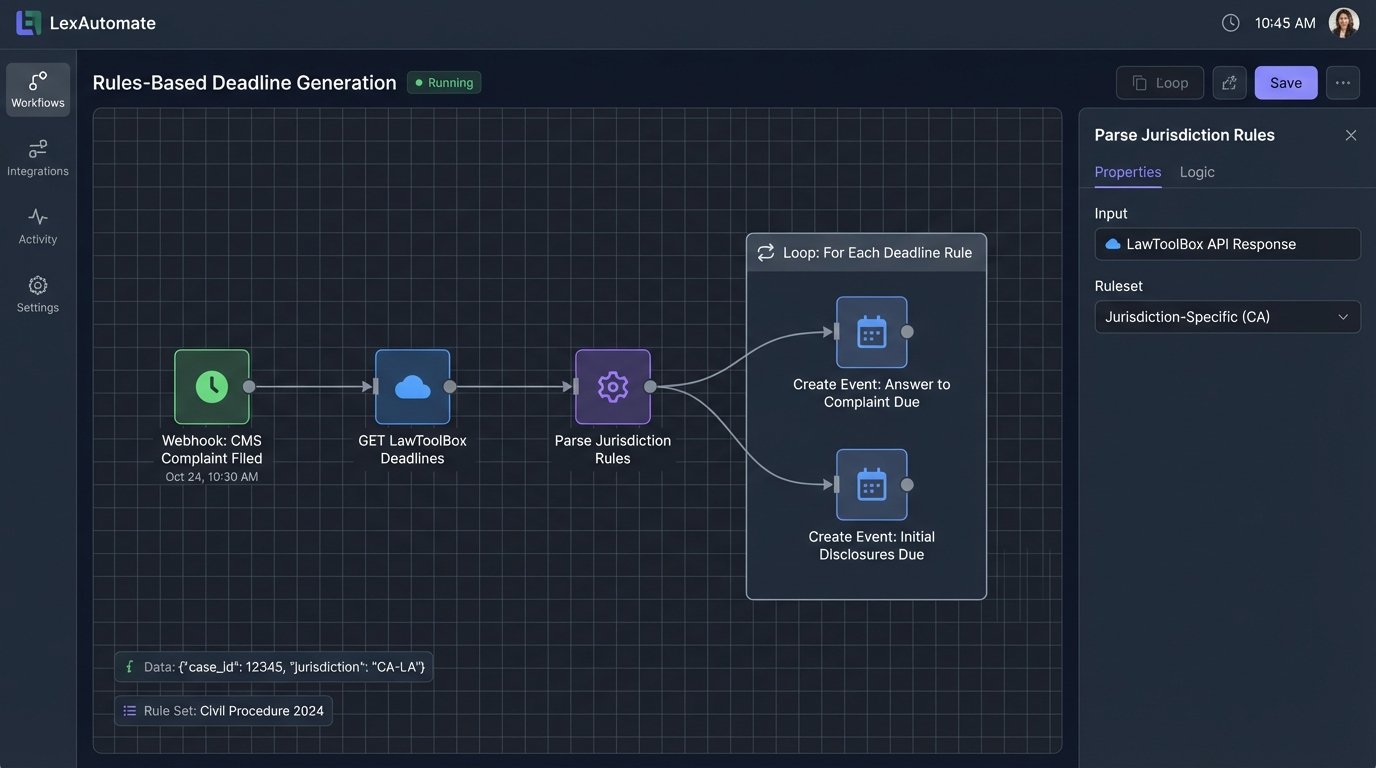
For litigation practices, managing deadlines is a massive risk. You can automate this by integrating a rules service like the American LegalNet (ALN) API or LawToolBox. When a user in the CMS tags a document as “Complaint Filed” and enters the date, a webhook fires.
Your middleware catches the webhook, takes the “complaint filed” date, and makes an API call to the rules service, passing the case jurisdiction and event type. The service returns a list of all related statutory deadlines: “Answer to Complaint Due,” “Initial Disclosures Due,” etc. The middleware then iterates through this list and creates each deadline as a locked, immutable event in the CMS master calendar. Those events are then synced out to the attorneys’ personal calendars.
You have just replaced a paralegal’s manual, error-prone calculation with a machine-driven process that is verifiable and auditable. You have systematically reduced the risk of malpractice.
The Hidden Costs and Necessary Fights
This level of automation is not a plug-and-play product you buy off the shelf. It is an infrastructure project with significant overhead and operational risks.
API Instability and Vendor Negligence
Many legal tech vendors treat their APIs as an afterthought. You will find that the endpoints are slow, the documentation is five years out of date, and rate limits are aggressively low. Building a mission-critical process on a brittle API is a constant source of anxiety. You must architect your middleware for failure, with retry logic, dead-letter queues, and robust monitoring to alert you when a vendor’s service inevitably goes down.
Expect to spend a substantial amount of time on the phone with vendor support, escalating tickets past the first-level technicians to get to an engineer who actually understands their own API. This is a political and technical battle.
The Maintenance Drain
This is not a system you build once and walk away from. APIs get deprecated. Authentication methods change. The business decides to switch from Google Workspace to Microsoft 365, requiring a complete rewrite of one of your core connectors. You need to budget for the ongoing maintenance and assign clear ownership of the system to a technical resource.
Without a dedicated owner, the system will slowly decay as its external dependencies change, a concept known as software rot. What worked perfectly last year will fail silently next quarter, and you won’t know until a client calls asking why their consultation was never confirmed.
Automating scheduling is not about deploying a tool like Calendly. It is about fundamentally re-architecting how your firm treats time-based data. It requires you to force a single source of truth, build resilient bridges between siloed systems, and write explicit rules to protect data integrity. The initial build is expensive and the maintenance is perpetual, but it’s cheaper than a malpractice suit.