
Manual calendaring is not an administrative inconvenience. It is a malpractice risk generator. Every time a paralegal manually transcribes a date from a court notice into a case management system (CMS) and then into Outlook, you introduce a vector for a clerical error that can lead to a blown deadline. The fix is not a better checklist or more training. The fix is to remove the human hands from the data transfer process entirely.
This isn’t about saving a few minutes of administrative time. It’s about building a system of record that is programmatically verifiable and less susceptible to the single misplaced digit that nullifies a multi-million dollar filing.
Gutting the Manual Process: API-First Architecture
The foundation of any defensible calendaring automation is a direct, API-level integration between your core systems. This typically means your CMS, your document management system (DMS), and your firm’s calendar platform, which is almost always Microsoft 365 or Google Workspace. Relying on CSV imports or third-party sync tools that run on a batch schedule is an outdated and fragile model. These methods create data latency, where the calendar you see is not the real-time state of the case.
A true API-first approach means your automation platform speaks directly to the Microsoft Graph API or the Google Calendar API. It performs create, read, update, and delete (CRUD) operations in real time, triggered by events within your CMS. A new case matter is opened, a trigger fires, and the necessary calendar events are injected directly into the assigned attorneys’ calendars. There is no middleman and no delay.
Anything less is just a digital version of the same broken, manual workflow.
The Single Source of Truth Doctrine
Your CMS must be the absolute, undisputed source of truth for all case dates. An attorney’s Outlook calendar is merely a subscribed view of that truth, not a separate, editable database. If an attorney drags and drops a meeting to reschedule it, that action cannot be the final word. It must be treated as a change request that is sent back to the source for validation.
This is managed through webhooks. The calendar platform (Microsoft/Google) is configured to fire a webhook to your automation endpoint whenever an event is modified. Your code receives this payload, extracts the unique event ID, cross-references it with the master record in the CMS, and runs a logic check. If the change is permissible under the case rules, the CMS is updated. If not, the change is reverted, and the user is notified of the conflict.
This architecture prevents data drift, where the calendar and the CMS slowly fall out of sync, creating two competing versions of reality. One of which is always wrong.
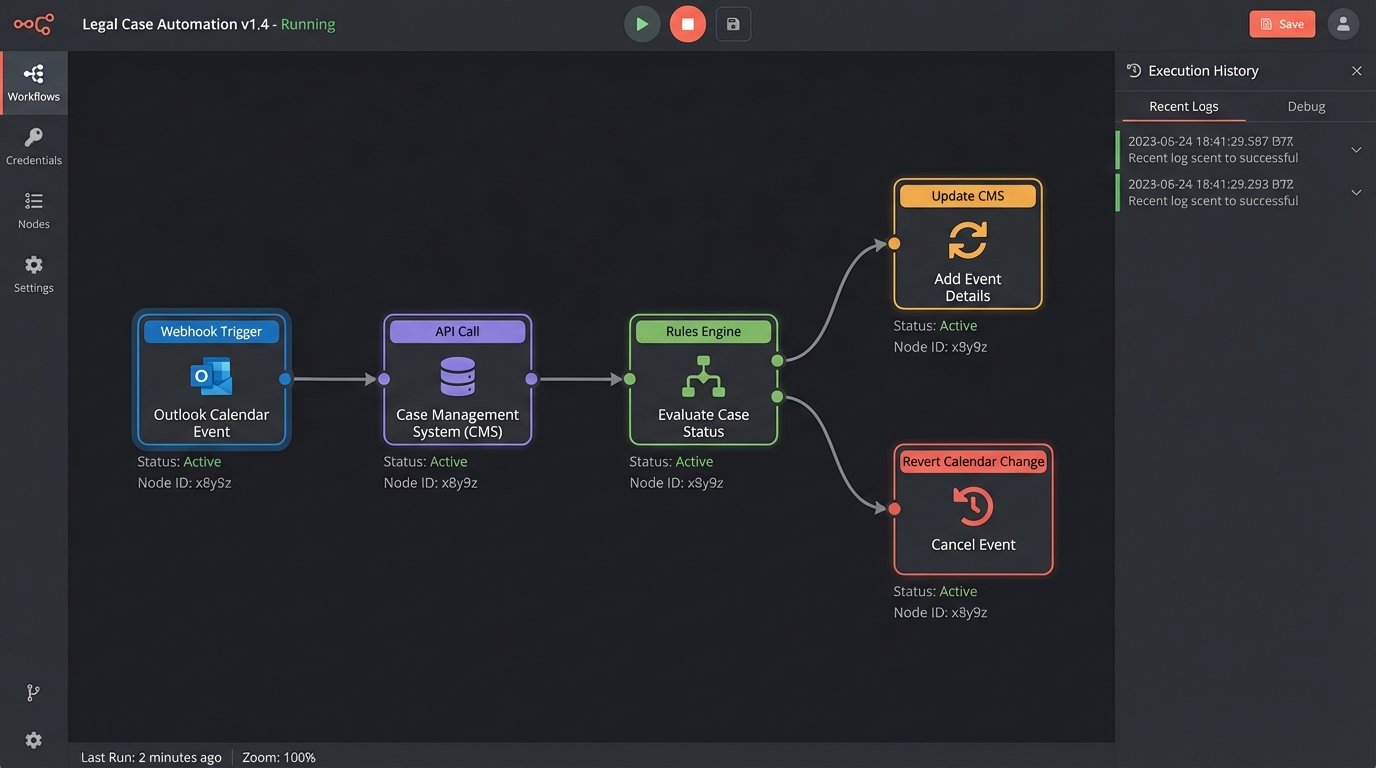
Building a Rules Engine That Doesn’t Implode
The real intelligence in this system is not the calendar integration itself but the rules engine that calculates the deadlines. This cannot be a monolithic script with hundreds of hardcoded `if/else` statements. That approach is unmaintainable and impossible to debug. A proper rules engine externalizes the logic into a format, like JSON or YAML, that can be managed by legal operations staff without requiring a developer to change application code.
Each rule defines a trigger event (e.g., `complaint.filed`), a set of conditions (e.g., `jurisdiction == ‘CA’`), and a series of actions (e.g., `create_event(‘Answer Due’, trigger.date + 30 days)`). The engine ingests case data, finds the matching rule, and executes the defined actions. This structure isolates the complex, ever-changing legal logic from the stable, underlying integration code.
You must also build a robust calculator for business days that accounts for court holidays in every relevant jurisdiction. Failing to pull from an up-to-date holiday API is a rookie mistake that guarantees off-by-one errors on critical deadlines.
Trying to manage this logic inside a single, complex function is like shoving a firehose through a needle. You need to break the logic out into small, testable, independent units.
Idempotency and State Management
Network requests fail. Webhooks can fire twice. A user might click a button repeatedly. Your automation must be built to withstand these realities without creating duplicate calendar entries or deadlines. The key principle here is idempotency: an operation, if performed multiple times, produces the same result as if it were performed only once.
When creating a calendar event, you don’t just push the data. First, you query the calendar for an event that already matches a unique identifier from your CMS, like a `matterID-deadlineType` composite key stored in the event’s extended properties. If the event exists, you perform an update. If it does not exist, you perform a create. This prevents a temporary network glitch from littering calendars with duplicate “Statute of Limitations” warnings.
This check-before-write pattern is fundamental to building a reliable system.

Code Example: A Basic Idempotency Check in Python
This is a simplified example using pseudocode for the API calls. It demonstrates the core logic of searching for an existing event based on a unique ID before creating a new one. The `get_cms_unique_id` function would generate a consistent, unique string for each specific deadline on a case.
import calendar_api
def create_or_update_deadline(event_details):
# Generate a unique, persistent ID from the case management system data.
unique_id = get_cms_unique_id(event_details['matter_id'], event_details['deadline_type'])
# Check if an event with this unique ID already exists.
existing_event = calendar_api.find_event_by_unique_id(unique_id)
if existing_event:
# Event found, so we update it.
print(f"Event {unique_id} found. Updating.")
calendar_api.update_event(existing_event['id'], event_details)
else:
# No event found, so we create a new one.
print(f"Event {unique_id} not found. Creating.")
# Inject the unique_id into the event payload before creation.
event_details['extendedProperties']['private']['cmsUniqueId'] = unique_id
calendar_api.create_event(event_details)
# Example Usage:
new_deadline = {
'matter_id': 'MAT-2024-01138',
'deadline_type': 'motion_to_compel_response',
'summary': 'Response to Motion to Compel Due',
'due_date': '2024-09-15T17:00:00-07:00'
}
create_or_update_deadline(new_deadline)
The critical element is the `cmsUniqueId` stored in a custom or extended property of the calendar event. This bridges the two systems and allows your code to maintain state without a complex external database.
Logging and Failure Modes: Your 3 AM Lifeline
This system will fail. The court’s API will go down. Microsoft will change a Graph API endpoint with minimal notice. A rule will be configured with a logical flaw that creates an impossible date. Expecting 100% uptime is naive. Planning for failure is professional. Your automation cannot fail silently. Every failed API call, every malformed data payload, every rule that executes without a valid outcome must be logged.
Use structured logging, writing logs as JSON objects rather than plain text strings. This allows you to ship them to a service like Datadog, Splunk, or an ELK stack where you can build dashboards and, more importantly, alerts. An alert should automatically create a ticket or page the on-call engineer when the rate of 5xx server errors from an external API exceeds a certain threshold, or when a specific critical deadline calculation fails for any reason.
Without this level of monitoring, you have a black box that works until, one day, it doesn’t. And you won’t know until a partner is calling about a missed court date.
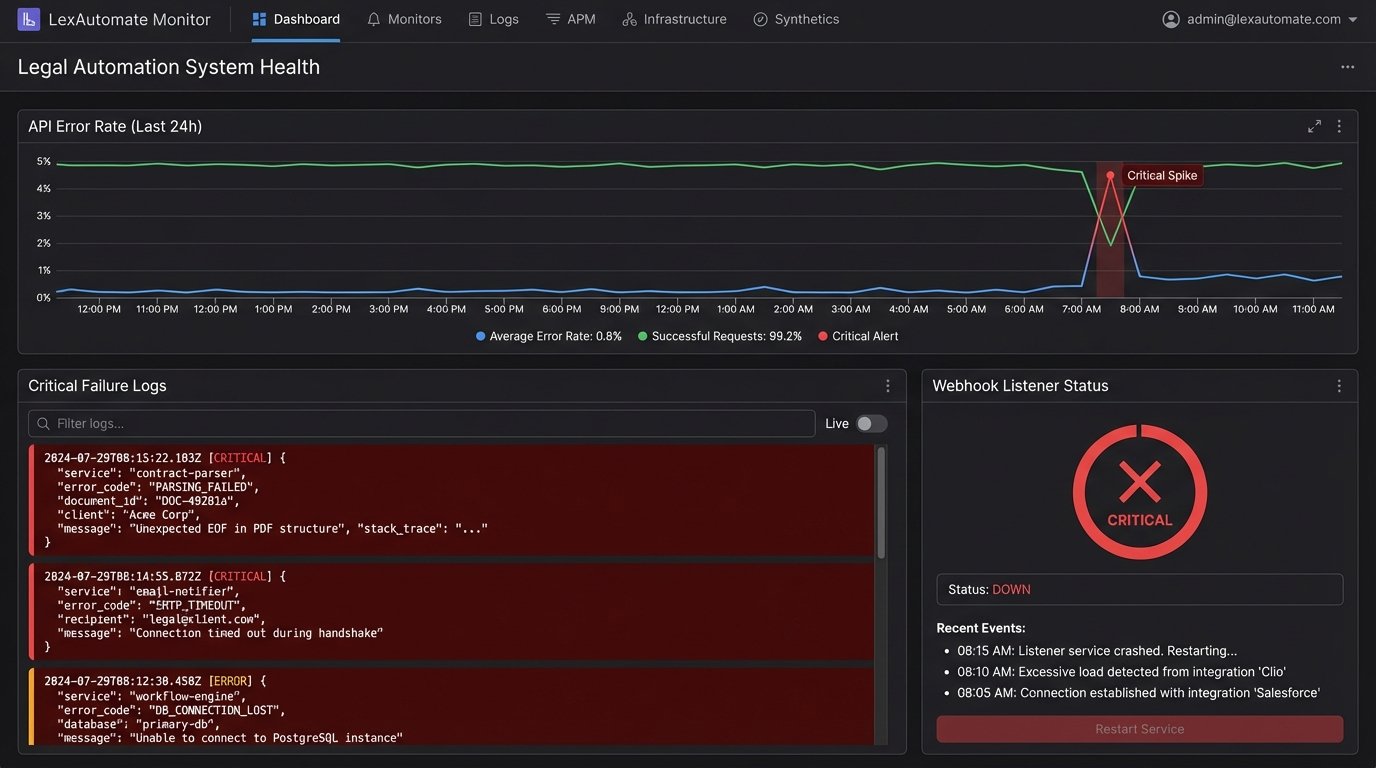
The Human Override: A Necessary Failsafe
For the most critical dates, like statutes of limitations or final appeal deadlines, full “lights-out” automation can be irresponsible. The risk of an unmonitored edge case causing a catastrophic error is too high. The solution is to build a human-in-the-loop workflow for these specific event types.
The automation can calculate the date and create a “tentative” or “unconfirmed” event on the calendar. This action also triggers a notification, often via email or a Teams/Slack message, to a designated paralegal or responsible attorney. The message contains a link to an approval interface. Only after a human has reviewed the date and its basis and clicked “Confirm” does the system elevate the event to a “confirmed” state and lock the record in the CMS.
This final manual gatekeeper doesn’t negate the benefits of the automation. It simply forces a cognitive checkpoint for events that carry terminal risk, combining the speed and consistency of the machine with the judgment of an experienced legal professional.