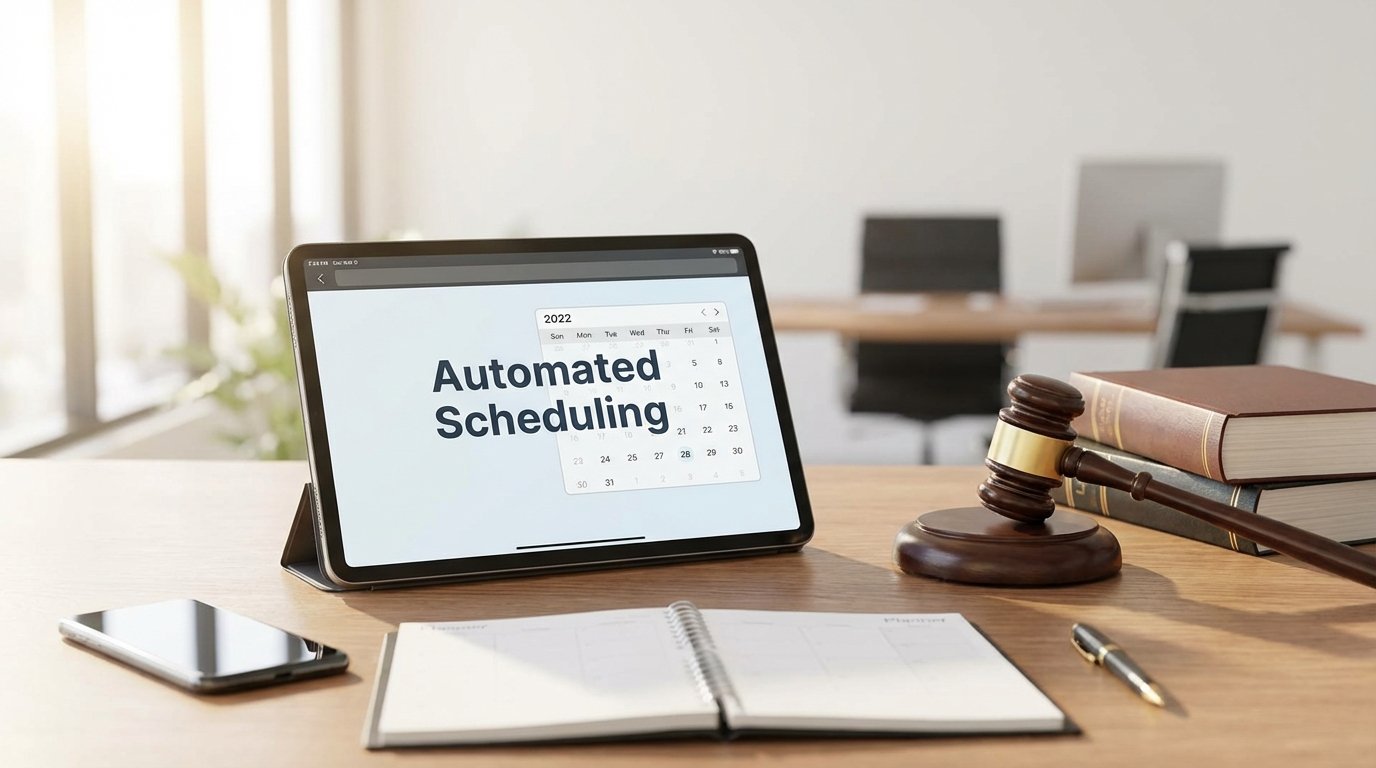
The core failure of legal calendaring isn’t user error. It is a fundamental data architecture problem. Every firm operates on a distributed ledger of appointments stored across Outlook, practice management systems, and third-party scheduling tools. Without a single source of truth and rigid sync logic, you are architecting for failure. Double-bookings are not accidents, they are the expected outcome of a broken system.
Most off-the-shelf scheduling tools are built for sales teams, not legal practice. They prioritize ease of booking over the chain of custody for an event. We have to bolt on the necessary logic to make them functional in a legal context, where a missed deposition can lead to sanctions.
Establishing the Calendar’s Source of Truth
Before you touch a single line of code or subscribe to any SaaS platform, you must designate a master calendar system. For 99% of firms, this will be the Microsoft 365 or Google Workspace environment. This is your system of record. All other calendars are replicas, and they must be treated as subordinate data stores. Any attempt to build a multi-master sync system will collapse under the weight of its own race conditions and conflict resolution failures.
The first step is a data audit. You need to gut the existing calendars of legacy cruft. We’re talking about recurring appointments from former employees, undefined all-day events, and duplicate entries from failed sync attempts years ago. You cannot build a stable automation on a foundation of corrupt data.
This audit process is manual and brutal. There’s no magic script. It involves exporting calendar data, analyzing it in a spreadsheet or a database, and systematically purging junk entries directly on the server. Only after this cleanup can you define the rules for what constitutes a valid, syncable event.
Prerequisites for Stable Synchronization
Synchronization logic requires clear boundaries. We establish rules before we write code. A common ruleset for a law firm looks something like this:
- Ownership: Every event must have a single, defined internal owner. Events without an owner are ignored by the sync engine.
- Categorization: Events must be categorized. A simple set like ‘Client Meeting’, ‘Court Appearance’, ‘Internal’, ‘Deposition’ is sufficient. Uncategorized events are flagged and not synced to external systems.
- Required Fields: An event must contain the owner, at least one other attendee (internal or external), and a start and end time. Events missing this data are invalid.
- Conflict Policy: The source of truth (e.g., the partner’s M365 calendar) always wins. If a third-party tool tries to book a conflicting time, the API call should be rejected or the event should be flagged for manual review. Automatic conflict resolution is a myth.
Enforcing these rules often requires training, but it’s better to force compliance at the human level than to try and program around unpredictable data entry habits.
The Synchronization Engine: APIs and Webhooks
Once you have a clean source of truth, you can connect other systems. This is not about using the flimsy built-in “sync” buttons in your SaaS tools. This is about controlling the data flow via APIs. The two primary mechanisms are polling and webhooks. Polling involves asking the server for updates at a set interval. Webhooks are HTTP callbacks, where the server notifies you when an event occurs.
Webhooks are superior for near real-time updates, but they can fail. You must build a fallback system. A typical architecture uses webhooks for instant updates and a nightly polling job to catch anything the webhooks missed. This is your belt-and-suspenders approach to data integrity.
Let’s look at a basic payload from the Google Calendar API for a new event. Your service would receive this JSON blob via a webhook push notification.
{
"kind": "calendar#event",
"etag": "\"31245981320000\"",
"id": "a4b1c2d3e4f5g6h7",
"status": "confirmed",
"htmlLink": "https://www.google.com/calendar/event?eid=...",
"created": "2023-10-27T10:30:00.000Z",
"updated": "2023-10-27T10:30:00.000Z",
"summary": "Deposition: John Doe",
"description": "Case Matter: JD-2023-451\nLocation: Conference Room 3",
"start": {
"dateTime": "2023-11-15T09:00:00-05:00",
"timeZone": "America/New_York"
},
"end": {
"dateTime": "2023-11-15T11:00:00-05:00",
"timeZone": "America/New_York"
},
"attendees": [
{
"email": "partner@lawfirm.com",
"organizer": true,
"responseStatus": "accepted"
},
{
"email": "associate@lawfirm.com",
"responseStatus": "needsAction"
},
{
"email": "client@email.com",
"responseStatus": "needsAction"
}
],
"reminders": {
"useDefault": false,
"overrides": [
{ "method": "email", "minutes": 1440 },
{ "method": "popup", "minutes": 60 }
]
}
}
Your job is to write a listener service that ingests this. The service must parse the description to extract the Case Matter ID, validate the attendees, and then push a corresponding entry into your practice management system. This is about shoving a firehose of raw event data through the needle of your firm’s specific business logic.
Implementing Client Self-Scheduling Tools
Tools like Calendly, Acuity Scheduling, or Microsoft Bookings allow clients to schedule appointments directly. This is efficient but introduces risk. You are exposing a slice of your firm’s availability to the public internet. The configuration must be locked down.
Never sync a lawyer’s primary calendar directly to a public booking tool. This is a security and privacy nightmare. Instead, create a secondary, dedicated “booking calendar” for each attorney. Your sync engine’s job is to read the attorney’s primary calendar and create “busy” blocks on the public-facing booking calendar. This abstracts the underlying details of their schedule. The client sees availability, not the specifics of the attorney’s other appointments.
Hardening the Booking Page
The public booking page is an attack surface. We must harden it.
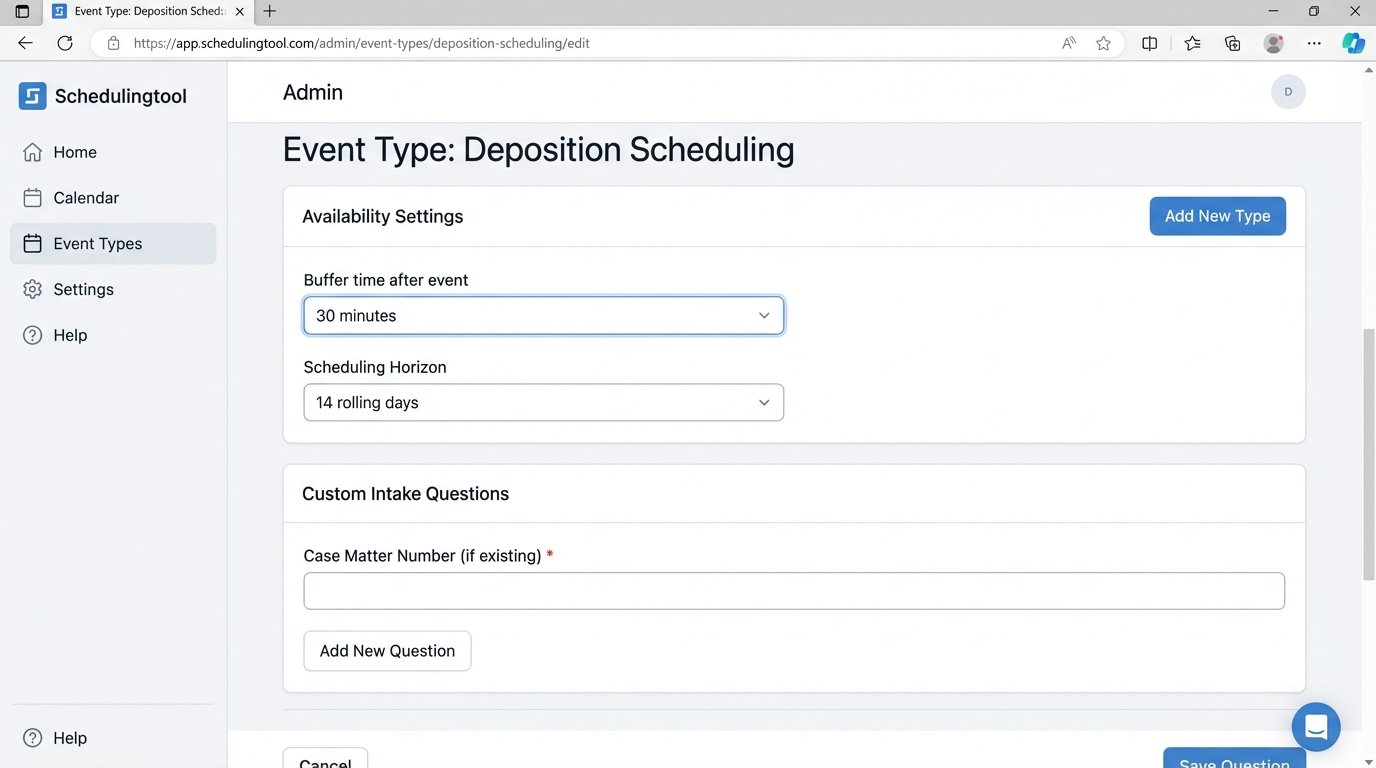
- Buffer Times: Always enforce automated buffer times before and after appointments. A 15-minute buffer prevents back-to-back meetings and gives the system time to process the calendar syncs without creating race conditions.
- Scheduling Horizon: Limit how far in the future clients can book. A 14 or 30-day rolling window is typical. This prevents a single client from locking up an attorney’s schedule months in advance.
- Custom Questions: Use the intake form on the booking page to collect critical information upfront. Make “Case Matter Number (if existing)” a required field. This data can be used to route the appointment and link it to the correct record in your PMS.
- API Injection: Use URL parameters to pre-fill information for existing clients. When you send a client a booking link, append their client ID to the URL. Use JavaScript on your website to read this parameter and pre-populate the form, reducing friction and ensuring data accuracy.
A booking confirmation is not just an email. It should trigger a cascade of events. The webhook from the scheduling tool should fire your listener service. That service then creates the event on the attorney’s primary calendar, logs the activity in the case management system, and potentially assigns a task to a paralegal to prepare for the meeting. The booking is the start of a workflow, not the end of one.
Connecting Calendars to the Practice Management System
The final piece is bridging the calendar to your Practice Management System (PMS). Most modern PMS platforms like Clio, MyCase, or Litify have REST APIs. The goal is to ensure that every billable event on a calendar has a corresponding entry in the PMS. This is critical for billing and case history.
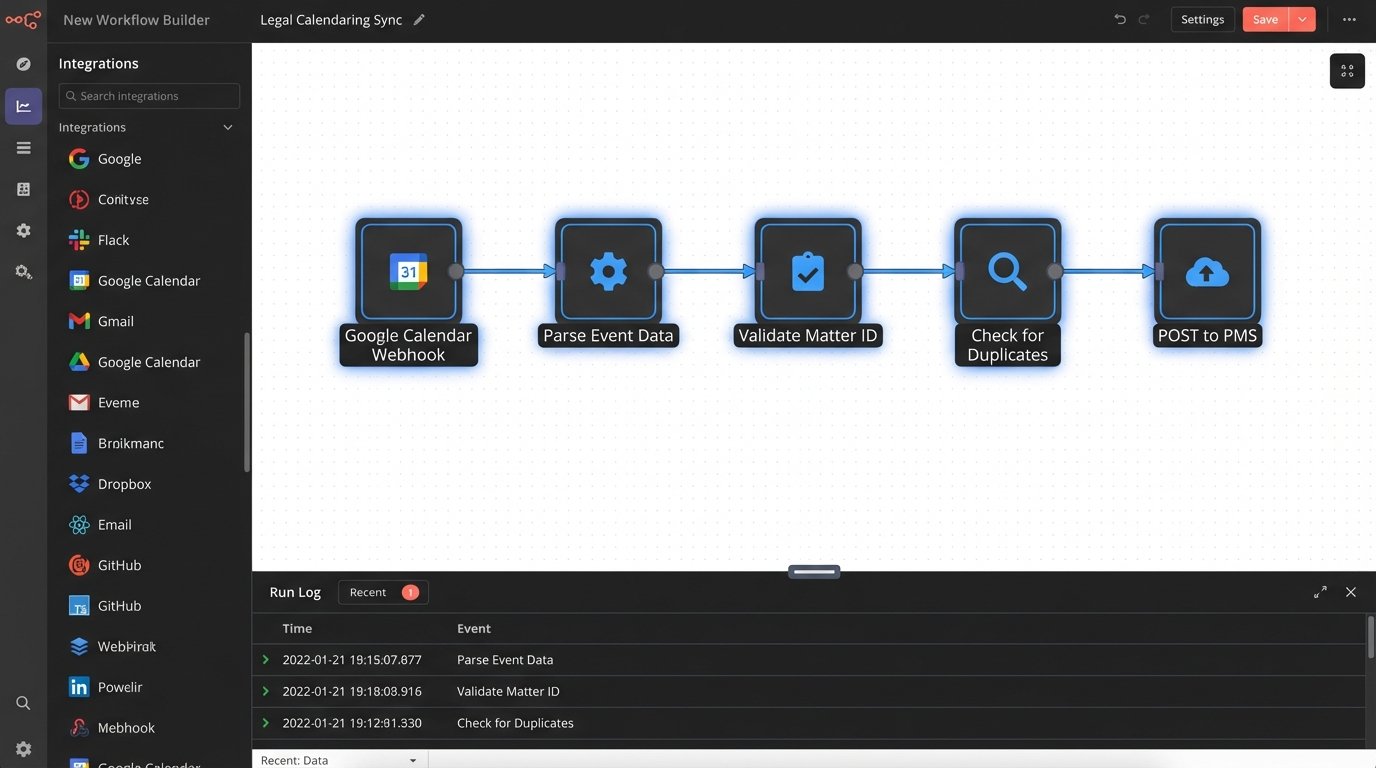
When your listener service receives a new event webhook, it needs to perform a series of actions:
- Parse the Event: Extract the Case Matter ID from the event title or description. If no ID is present, flag the event for manual review. Do not guess.
- Lookup the Matter: Make a GET request to the PMS API to validate that the Matter ID exists and is active.
- Check for Duplicates: Query the PMS for existing calendar entries linked to this Matter ID within the same time window to prevent duplicate entries from failed webhook retries.
- Create the Record: Make a POST request to the PMS API to create the new calendar entry, linking it to the matter and the attendees.
Here is a simplified example of what that POST request might look like, using a cURL command format for a hypothetical PMS API.
curl -X POST https://api.firm-pms.com/v2/matters/JD-2023-451/events \
-H "Authorization: Bearer [YOUR_API_KEY]" \
-H "Content-Type: application/json" \
-d '{
"title": "Deposition: John Doe",
"start_time": "2023-11-15T09:00:00-05:00",
"end_time": "2023-11-15T11:00:00-05:00",
"event_type": "Deposition",
"location": "Conference Room 3",
"attendees": [
{"user_id": "p-jones", "role": "organizer"},
{"user_id": "a-smith", "role": "attendee"}
],
"source_calendar_id": "a4b1c2d3e4f5g6h7"
}'
The `source_calendar_id` is critical. It’s the unique ID from the original Google or Microsoft event. Storing this allows you to create a mapping between the two systems. When the event is updated or deleted in the source calendar, you can use this ID to find and modify the corresponding entry in the PMS.
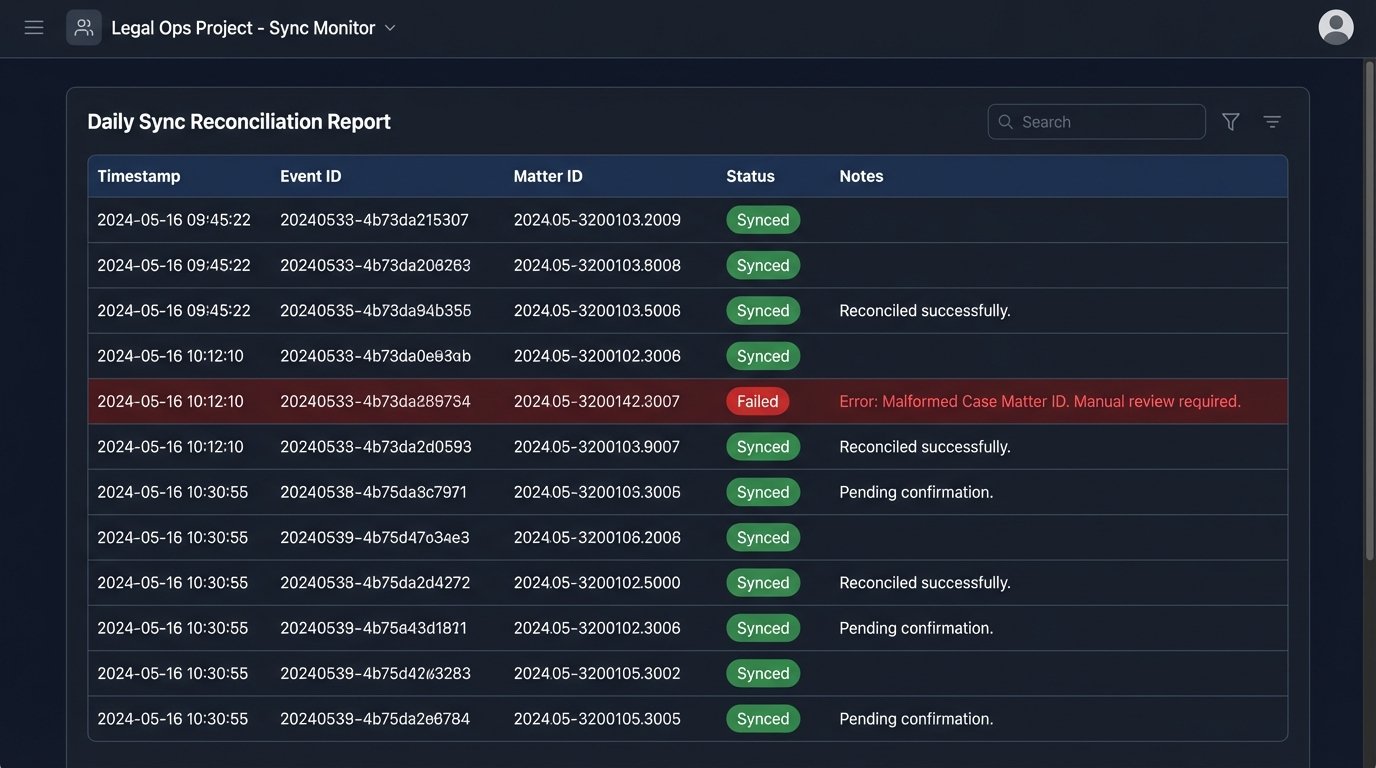
This is not a set-it-and-forget-it system. It requires logging and monitoring. Your service must log every successful sync, every failed API call, and every piece of data it couldn’t parse. You need a dashboard or a daily email report that shows sync health. Expecting these integrations to run perfectly without observation is professional negligence.
Validation, Auditing, and Error Handling
The system will break. An API will become deprecated. A user will enter a malformed case number. Your code must be defensive and your process must include regular audits. The worst kind of failure is a silent one, where syncs stop working and no one notices for weeks.
Build a daily reconciliation script. This script should pull all events for the next day from the source of truth (M365/Google) and compare them against the entries in the PMS and any other connected systems. It generates a report of discrepancies: events that exist in one system but not the other. An administrator gets this report every morning and is responsible for manually fixing the inconsistencies.
This audit loop is non-negotiable. It is the only way to maintain trust in the automation. Without it, attorneys will stop relying on the system calendars and revert to their own private spreadsheets and paper diaries. Once that happens, you’ve lost the war.