
The partners at a 50-attorney litigation firm were burning cash on non-billable hours. Their primary drain was calendar management. Four paralegals spent a collective 30 hours per week manually inputting court deadlines, scheduling depositions, and reconciling conflicts across Outlook calendars. The process was a predictable failure point, riddled with human error that led to two near-missed statutory deadlines in a single quarter. The existing system relied on email chains and a shared spreadsheet, a setup practically designed for data corruption.
Their case management system (CMS) had a calendar module, but it was an island. It didn’t sync with Outlook, creating two sources of truth that were perpetually out of alignment. This data schism was the core technical problem we were hired to fix. The goal was not just to automate scheduling but to forge a single, authoritative calendar view for every case, enforced by logic, not by frantic paralegals.
Diagnostic: Mapping the Failure Points
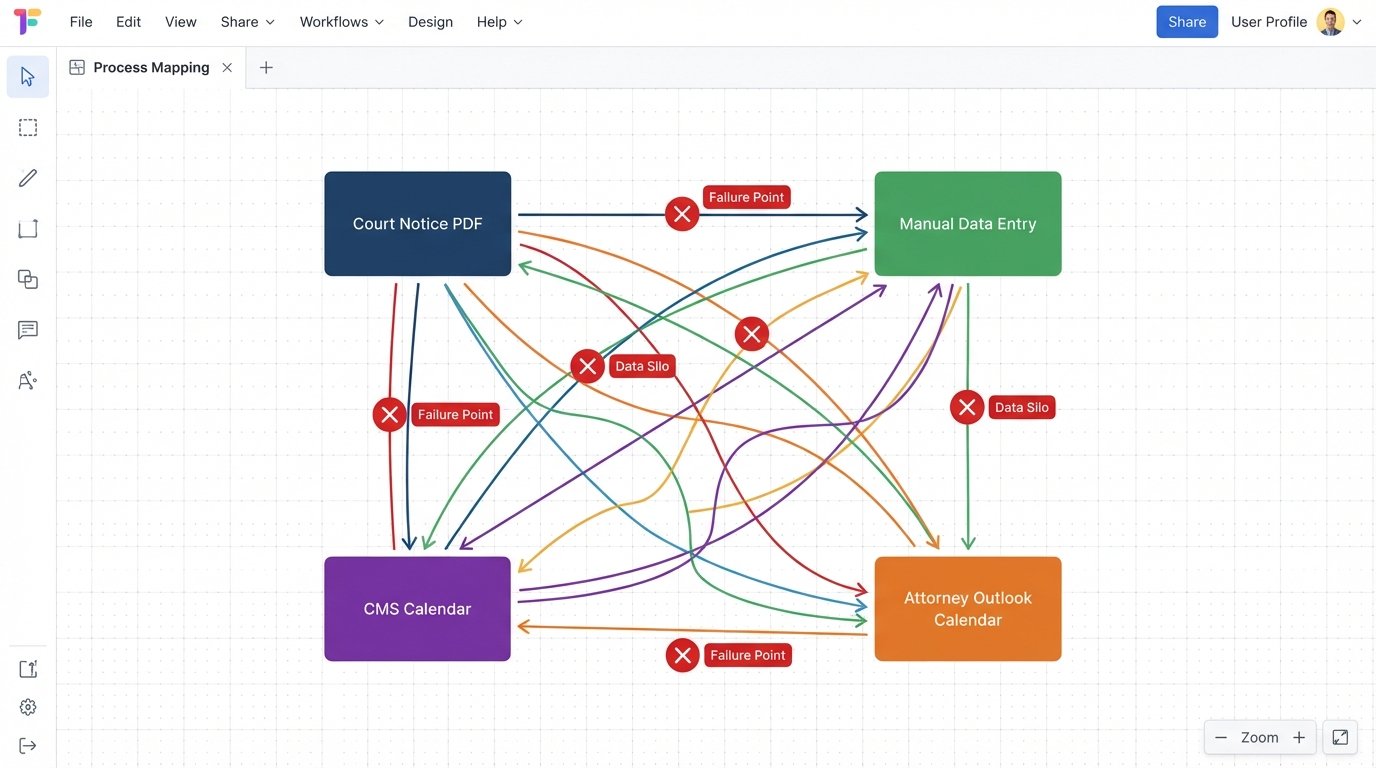
Before touching a line of code, we mapped the existing data flow. It was a mess. A court notice would arrive as a PDF via email. A paralegal would open it, manually identify the key dates, and create entries in the CMS calendar. Then, they would swivel their chair and create separate, nearly identical entries in the Outlook calendars of the assigned attorneys. Any change, like a rescheduled hearing, required updating multiple systems manually. The risk of one of those updates being missed was nearly 100% over a long enough timeline.
The primary points of failure were identified as:
- Manual Data Entry: The direct cause of typos, incorrect dates, and missed events.
- Data Silos: The CMS and Outlook calendars had no automated connection, forcing redundant work and creating conflicting information.
- Lack of Rule-Based Logic: There was no automated way to calculate related deadlines. For example, a trial date should automatically trigger a cascade of preceding deadlines based on state civil procedure rules.
- Reactive Conflict Resolution: Scheduling conflicts were discovered by humans, usually at the last minute, instead of being prevented by software during the booking process.
This manual workflow was not just inefficient. It was a significant source of operational risk. A single fat-fingered date could lead to a malpractice claim. The firm understood the danger, but lacked the in-house expertise to architect a proper fix.
The Solution Architecture: A Centralized Scheduling Hub
We rejected off-the-shelf solutions that promised a one-click fix. Those products often introduce a third system to the mix, further complicating the data landscape. Instead, we proposed building a lightweight middleware service to act as a traffic cop between their public-facing booking tools, their internal CMS, and their Microsoft 365 environment. The design philosophy was simple: one authoritative source for all calendared events, the CMS. All other systems would read from or write to it through a controlled process.
The stack components were chosen for reliability and integration capability:
- Public Booking Interface: We embedded Calendly on the firm’s website for client consultations and on a private portal for opposing counsel to schedule depositions. This choice was pragmatic. Calendly has a stable API and handles the complexities of time zone conversions and booking buffers out of the box.
- Middleware: A small Python Flask application hosted on Azure Functions. It was designed to be stateless and cheap to run. Its sole job was to catch webhooks from Calendly, transform the data, and push it to the appropriate systems.
- Primary Integration Point: The firm’s cloud-based CMS API. This was the most challenging component. The API documentation was three years old and certain endpoints for creating calendar events were poorly documented and sluggish.
- Secondary Integration Point: Microsoft Graph API. Used to push a synchronized, read-only version of the CMS calendar events to the individual attorneys’ Outlook calendars. This gave them the native Outlook experience they were used to, without letting them edit the authoritative event data directly in Outlook.
The core logic was to force all new events through this single pipeline. A client booking a meeting on the website would trigger a webhook. Our Azure function would catch it, parse the payload, and create the event in the CMS first. Only after receiving a success confirmation from the CMS API would the middleware then push the event to the Outlook calendars of the involved staff via the Graph API.
Wrangling the CMS API
The biggest hurdle was the CMS. Its API required a custom-formatted date string that was inconsistent with ISO 8601 standards. We had to write specific parsing functions to handle this translation. Furthermore, the API lacked a dedicated endpoint for “tentative” events. We had to create all events as confirmed and then build a separate logic layer in our middleware to handle cancellations, which involved a second API call to delete the event rather than just updating its status. This doubled the API traffic for any rescheduled meeting.
We had to inject custom data into the event descriptions. The CMS had a generic “description” field, but we needed to embed structured information like the case number, client ID, and event type (e.g., “Deposition,” “Initial Consultation”) for reporting purposes. We formatted this information as a JSON object within the description field itself, which felt like a hack but was the only viable path. This meant our middleware also had to parse this JSON block when reading events back from the CMS.
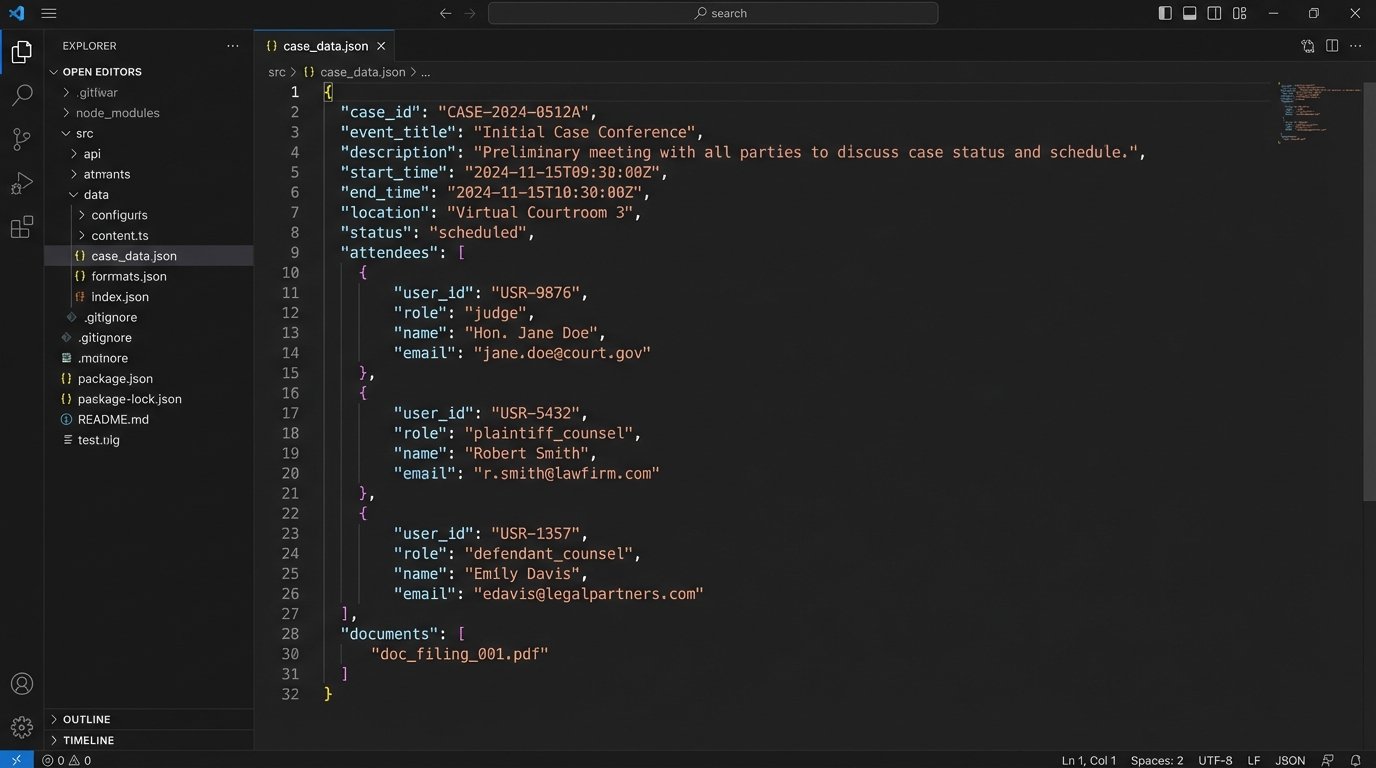
Here’s a simplified look at the JSON payload we had to construct to create a new deposition event in the CMS, after reformatting the data received from the Calendly webhook.
{
  "api_key": "YOUR_SECURE_API_KEY",
  "event_details": {
    "case_id": "CIV-2023-4815",
    "event_title": "Deposition: John Smith",
    "start_time": "2024-09-15 10:00:00 AM EST",
    "end_time": "2024-09-15 12:00:00 PM EST",
    "attendees": [
      {"user_id": "attorney_01", "role": "lead_counsel"},
      {"user_id": "paralegal_02", "role": "support"}
    ],
    "location": "Virtual via Zoom",
    "custom_fields": {
      "internal_event_type": "DEPOSITION",
      "source_system": "Calendly_Webhook_v1.2"
    }
  }
}
This structure had to be rigorously validated by our middleware before being sent. A single missing field would cause the CMS API to return an unhelpful 500 Internal Server Error instead of a specific validation error. We built a validation schema to logic-check every payload before attempting the API call, with automated alerting to our support channel in case of repeated failures.
Automating Court Deadline Calculation
Beyond simple appointment scheduling, the firm needed to automate the calculation of statutory deadlines. This is where the real value was. We integrated a third-party rules-based calendaring service (in this case, a specialized legal tech provider with an API) that maintained up-to-date procedural rules for all relevant jurisdictions.
The workflow was straightforward but powerful:
- A paralegal enters a single “trigger” event into the CMS, for example, “Complaint Filed” with today’s date.
- The CMS, via a custom plugin we developed, sends the event type and date to our middleware.
- The middleware queries the rules engine API with the jurisdiction (e.g., “California Superior Court”) and the trigger event.
- The API returns a list of all subsequent deadlines. For example, “Answer to Complaint Due” (30 days later), “Initial Disclosures Due” (60 days later), etc.
- Our middleware loops through this list and creates each deadline as a separate calendar event in the CMS, automatically linked back to the parent case.
This process turned a 45-minute manual task prone to miscalculation into a 5-second automated one. We were effectively shoving a firehose of complex legal rules through the needle of a simple API call. The key was ensuring the initial trigger date was correct. All downstream accuracy depended on that single point of data entry.
Results: From Manual Grind to Managed Workflow
The system went live after a three-week pilot phase with the litigation support team. The results were immediate and measurable. We tracked the key performance indicators we established at the project’s outset.
The outcomes six months post-implementation were stark:
- Reduction in Manual Labor: Time spent on calendar management by the four paralegals dropped from a combined 30 hours per week to less than 5. Their work shifted from data entry to exception handling and strategy.
- Error Rate Annihilation: The number of scheduling errors, such as double bookings or incorrect dates entered, fell to zero. The system’s logic prevented these mistakes from happening.
- Deadline Integrity: No court or statutory deadlines were missed. The automated rules-based calculation provided a safety net that manual processes could never match.
- Improved Client Experience: Clients could book meetings 24/7 through the website without back-and-forth emails. Feedback indicated a significant improvement in perceived firm efficiency.
The return on investment was clear. The firm calculated that the project paid for itself in just under seven months based on the reclaimed billable hours and the elimination of overtime for paralegals. The larger, unquantifiable benefit was the reduction of risk. The partners could now be certain that their calendaring system was a strength, not a liability.
Ongoing Maintenance and Future State
The system is not “fire and forget.” We have monitoring in place that checks the health of the API endpoints and the Azure Function’s execution logs. An API change by the CMS provider or Calendly requires a code update. We have a standing agreement for 5 hours of monthly maintenance, which is mostly spent on proactive dependency updates and performance checks.
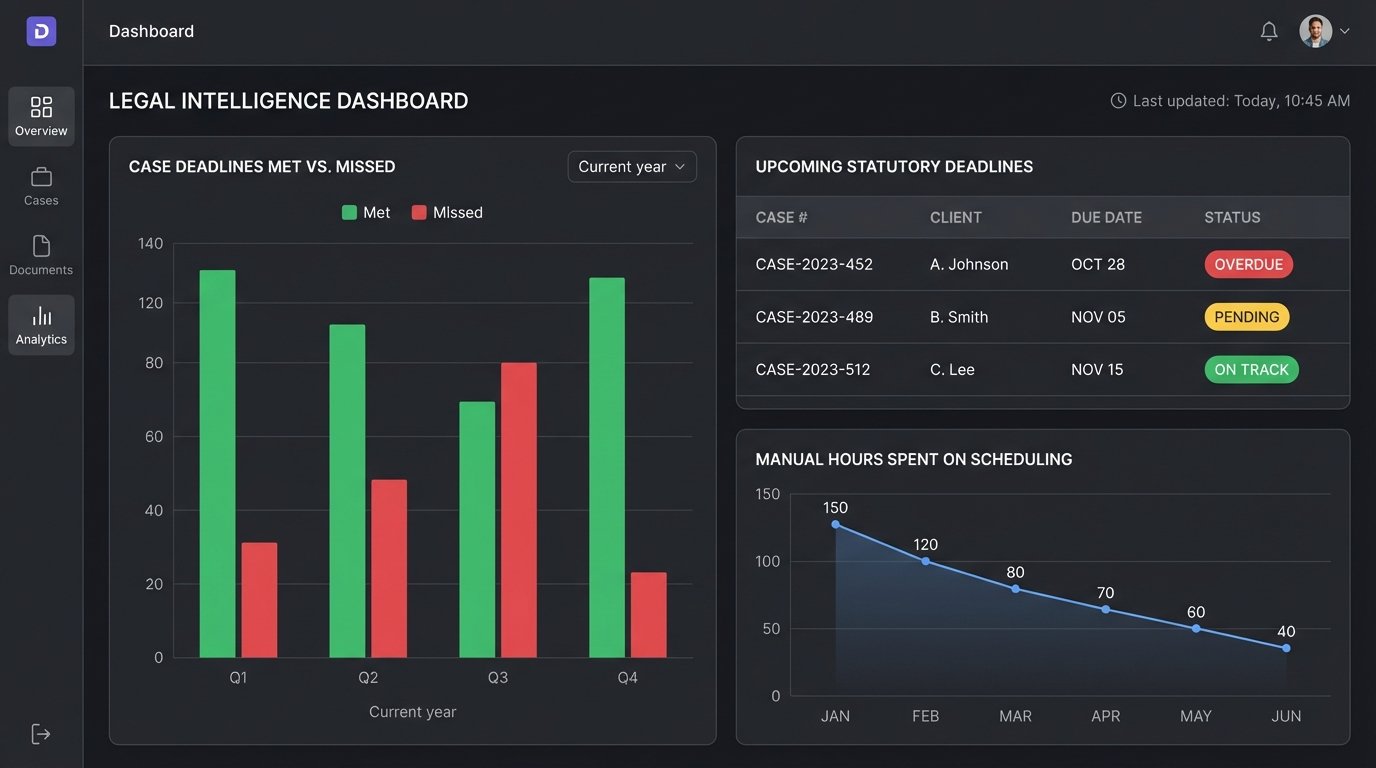
The next phase involves building a more sophisticated dashboard for the managing partners. It will pull data from the CMS via the API to visualize caseloads, track key deadline milestones across all cases, and provide analytics on meeting types and durations. The automation work created a foundation of structured data that simply did not exist before, enabling a level of business intelligence the firm previously thought impossible.