The client intake process is not a workflow. It is a data pipeline that is almost always broken. Potential new client data originates from an unstructured source, gets manually transcribed into a system of record, and then requires human intervention to trigger the next step. Each stage introduces latency and a high probability of data corruption. The goal is not to find a single perfect tool, but to architect a system that minimizes manual data entry and logic-gates progression based on verifiable data points, not a paralegal’s to-do list.
Most off-the-shelf solutions are marketed as a magic button for efficiency. They are not. They are rigid frameworks that force your firm’s unique intake process into a shape it was not designed for. The correct approach is to select components that offer robust APIs and webhooks, allowing you to force them to conform to your needs. What follows is a technical assessment of five common components in an automated intake stack, evaluated on their integration potential and operational liabilities.
The Legal-Specific Platform
These platforms are walled gardens. They offer a tightly integrated environment where the intake module speaks the same language as the case management module. This is their primary and, in some cases, only strength. They are designed for firms that want a turnkey solution and lack the internal resources or will to build a custom data pipeline. They front-load the convenience but introduce significant long-term constraints.
1. Clio Grow
Clio Grow is the front porch to the main house of Clio Manage. Its job is to capture leads, qualify them through forms, and convert them into matters inside Manage with a single click. The integration is native, meaning the data mapping is pre-configured and requires minimal setup. Field mapping between a Grow intake form and a Manage matter contact card is straightforward. It works reliably for standard data types like text, dates, and currency.
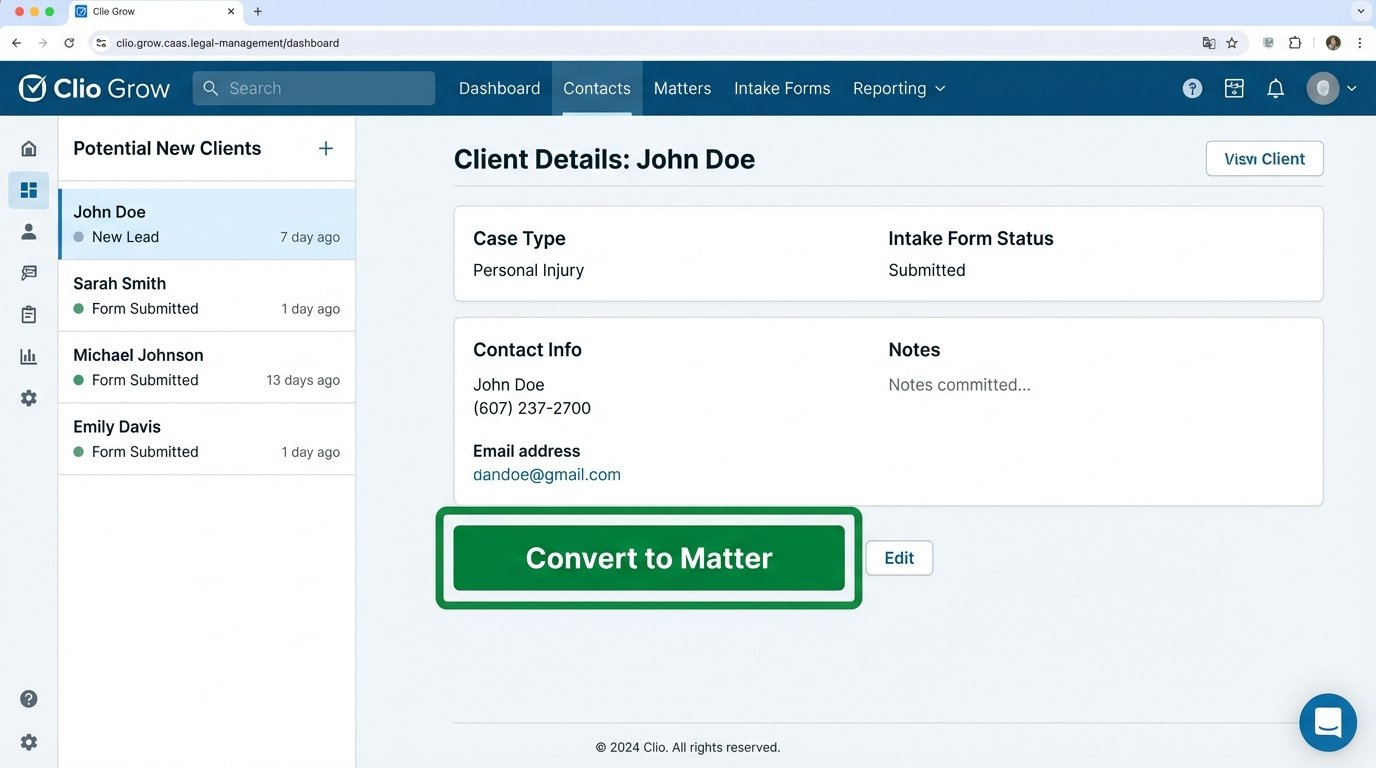
Technical Strengths: The primary benefit is the native data sync. When a potential client is converted, Grow pushes the contact information, intake form data, and any attached notes directly to a new matter in Clio Manage. This bypasses the need for a third-party integration tool like Zapier for the core conversion step. It also handles e-signatures for fee agreements and can trigger task templates within Manage, creating a predictable onboarding sequence for your staff. Its API, while not as extensive as a true enterprise CRM, allows for programmatic creation of leads if you have an alternative lead source.
Operational Weaknesses: Customization is superficial. You can add your logo and change colors, but the underlying structure of the forms and workflows is rigid. Conditional logic is basic, often limited to showing or hiding a single subsequent field. Complex, multi-path logic trees are impossible. This forces you to either create dozens of separate forms for different practice areas or present clients with a monolithic form containing irrelevant questions. It is also a wallet-drainer; you are paying a premium for the convenience of the native integration, a task that could be replicated with more flexible tools for a lower long-term cost.
- Use Case: High-volume, low-complexity practices like personal injury or family law where intake questions are highly standardized.
- Gotcha: Migrating data out of Grow is a significant pain point. If you ever decide to leave the Clio ecosystem, extracting your historical intake data and its linkage to matters requires manual effort or a costly migration service. You are building on rented land.
The Generalist Form Builder
These tools do one thing: build web forms. They do it with more flexibility and power than any legal-specific platform. They are agnostic systems, which is a strength. They output clean data to any destination you can point a webhook at. Adopting one means you are taking direct responsibility for the data pipeline, but it also gives you total control over its construction.
2. Jotform
Jotform is a workhorse for data capture. Its form builder is superior to any legal CRM’s native tool, offering granular control over conditional logic, input validation, and layout. You can construct complex, multi-page forms that guide a potential client through a dynamic questionnaire, showing only relevant questions based on their previous answers. This prevents the form fatigue that kills conversion rates.
Technical Strengths: Webhooks are the main reason to use a tool like this. Upon form submission, Jotform can send a POST request with the entire submission payload in JSON format to a specified endpoint URL. This is the starting gun for your automation. That endpoint could be a custom script running on a server, a cloud function, or an iPaaS platform. You get immediate, structured data to begin your process. The level of form customization is also a critical factor. You can inject custom CSS, use a wide array of widgets for things like appointment booking or address verification, and build pixel-perfect forms that match your firm’s branding.
Here is a simplified look at the JSON payload you might receive. Your endpoint has to parse this to extract the relevant data.
{

  "submissionID": "541309887654321",

  "formID": "230123456789050",

  "ip": "192.168.1.1",

  "formTitle": "New Client Intake - PI",

  "rawRequest": {

    "q3_clientName": "John Doe",

    "q4_clientEmail": "john.doe@example.com",

    "q5_incidentDate": {

      "month": "03",

      "day": "15",

      "year": "2023"

    },

    "q7_caseDescription": "Rear-end collision on I-5."

  }

}
Operational Weaknesses: You own the entire downstream workflow. Jotform just delivers the package; it does not care what happens next. You must build the logic to parse the JSON, map the fields to your case management system’s object model, handle error checking, and provide feedback if the process fails. Without a tool like Zapier or a developer, the data will just sit in a receiving script. This approach turns your intake process into a development project, which many firms are not equipped to manage. Relying on this is like having a powerful engine with no chassis or transmission. It has potential, but it goes nowhere on its own.
- Use Case: Firms with technical staff or an integration partner who can build a robust connection between the form and the firm’s other systems. Perfect for creating highly specific intake flows for niche practice areas.
- Gotcha: Security and data residency. Ensure the plan you choose aligns with your firm’s data governance policies, especially regarding where submission data is stored. HIPAA compliance, for instance, requires a specific tier of service.
The Enterprise CRM
Using an enterprise CRM for legal intake is like using a sledgehammer to hang a picture. It is overkill for most firms, but for those operating at a certain scale, its power is undeniable. These platforms are not just for intake; they are for managing the entire client lifecycle, from initial marketing touchpoint to post-matter follow-up. This is the most expensive and complex route.
3. Salesforce
Salesforce is a platform for building applications, and one of those applications can be a client intake system. Using its standard Lead and Opportunity objects, you can model the entire journey from potential client to active matter. Web-to-Lead forms can capture initial interest, but the real power comes from custom-building your intake logic using Apex code, Process Builder, or Flows. You can automate conflict checks against existing Account and Contact records, generate complex fee agreements with variable clauses, and route tasks to specific paralegals based on case type and capacity.
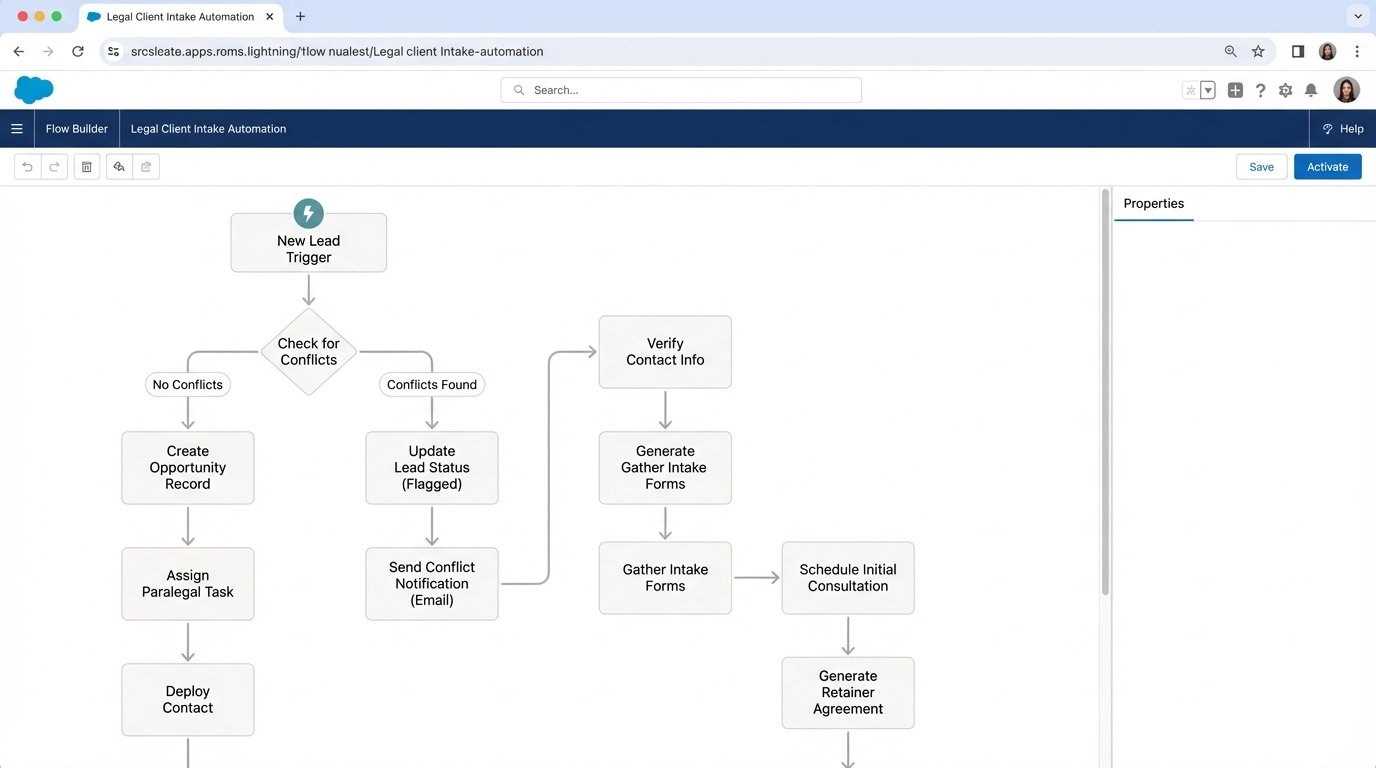
Technical Strengths: The API is the gold standard. Anything you can do in the user interface, you can do programmatically via the REST or SOAP APIs. This allows for deep integration with every other system in your firm, from accounting to document management. The data model is also completely extensible. You can create custom objects and fields to track any piece of information unique to your practice, something impossible in rigid legal-specific software. You can build validation rules that force data integrity at the point of entry, preventing garbage data from ever polluting your system.
Operational Weaknesses: The cost is astronomical, not just in licensing but in implementation and maintenance. You cannot run Salesforce effectively without a certified administrator or a team of developers. Customization is a double-edged sword; it is easy to build a fragile, unmaintainable system of spaghetti code and conflicting automation rules. A poorly implemented Salesforce instance is worse than a manual process because it fails in opaque and unpredictable ways. It is a full-time job to keep it running properly.
- Use Case: Large law firms with dedicated legal operations teams and complex, multi-stage intake processes that require sophisticated reporting and business intelligence.
- Gotcha: Governor limits. Salesforce operates in a multi-tenant environment and strictly limits the resources your code can consume, such as the number of database queries or the total execution time. An inefficiently written intake process can easily hit these limits, causing transactions to fail without warning.
The Digital Duct Tape (iPaaS)
Integration Platform as a Service (iPaaS) tools are the glue for the modern tech stack. They are not intake tools themselves but are essential for connecting the best-in-class form builder to your legacy case management system. They operate on a simple trigger-and-action model, but their capabilities for data transformation and conditional logic are surprisingly powerful.
4. Zapier
Zapier democratizes integration. It provides a visual interface for building workflows (“Zaps”) that connect thousands of applications. In an intake context, a common pattern is: Trigger (New Jotform submission) -> Action (Create contact in Clio) -> Action (Add row to a Google Sheet for reporting) -> Action (Send a Slack notification to the intake team). It requires no code, only a clear understanding of the data flow.
Technical Strengths: Speed of deployment. You can build a multi-step intake automation in an afternoon. Its strength lies in connecting systems that do not have native integrations. Zapier maintains the authentication and API clients for all its supported apps, saving you the headache of managing tokens and endpoints. For more complex needs, its “Code by Zapier” module lets you inject small Python or JavaScript snippets to perform data manipulation that the standard tools cannot handle, like reformatting dates or splitting a full name into first and last.
Operational Weaknesses: Zapier is brittle. If one of the connected applications changes its API, your Zap will break without warning. Debugging can be a nightmare of checking task history logs to figure out which step failed and why. It is also a potential performance bottleneck; polling triggers can have delays of up to 15 minutes on lower-tier plans, which is unacceptable for a client-facing process. The cost scales with volume. A high-volume firm will quickly find its monthly bill running into the hundreds or thousands of dollars just to keep the lights on. It is a fantastic prototyping tool that too often becomes permanent, fragile infrastructure.
- Use Case: Connecting a modern web form to a legacy case management system with a clunky or non-existent API. Ideal for firms that need a working solution now without a development cycle.
- Gotcha: Chaining Zaps. A common mistake is to create a chain reaction where one Zap’s output triggers a second Zap, which triggers a third. This creates an unmanageable and impossible-to-debug dependency web. Keep workflows contained within a single Zap whenever possible.
The Document-Centric Trigger
Sometimes the most important event in intake is not the initial data collection, but the execution of the fee agreement. Document automation platforms are evolving to become triggers for downstream workflows. The moment a client signs, a cascade of events can be initiated automatically.
5. DocuSign
While known for e-signatures, DocuSign’s real power for automation is in its Connect module. Connect is a webhook system that sends real-time updates on an “envelope’s” status. When a document is completed (i.e., all parties have signed), Connect can push the final signed PDF and all the form field data to a pre-defined endpoint. This is a powerful and reliable trigger for officially opening a matter.
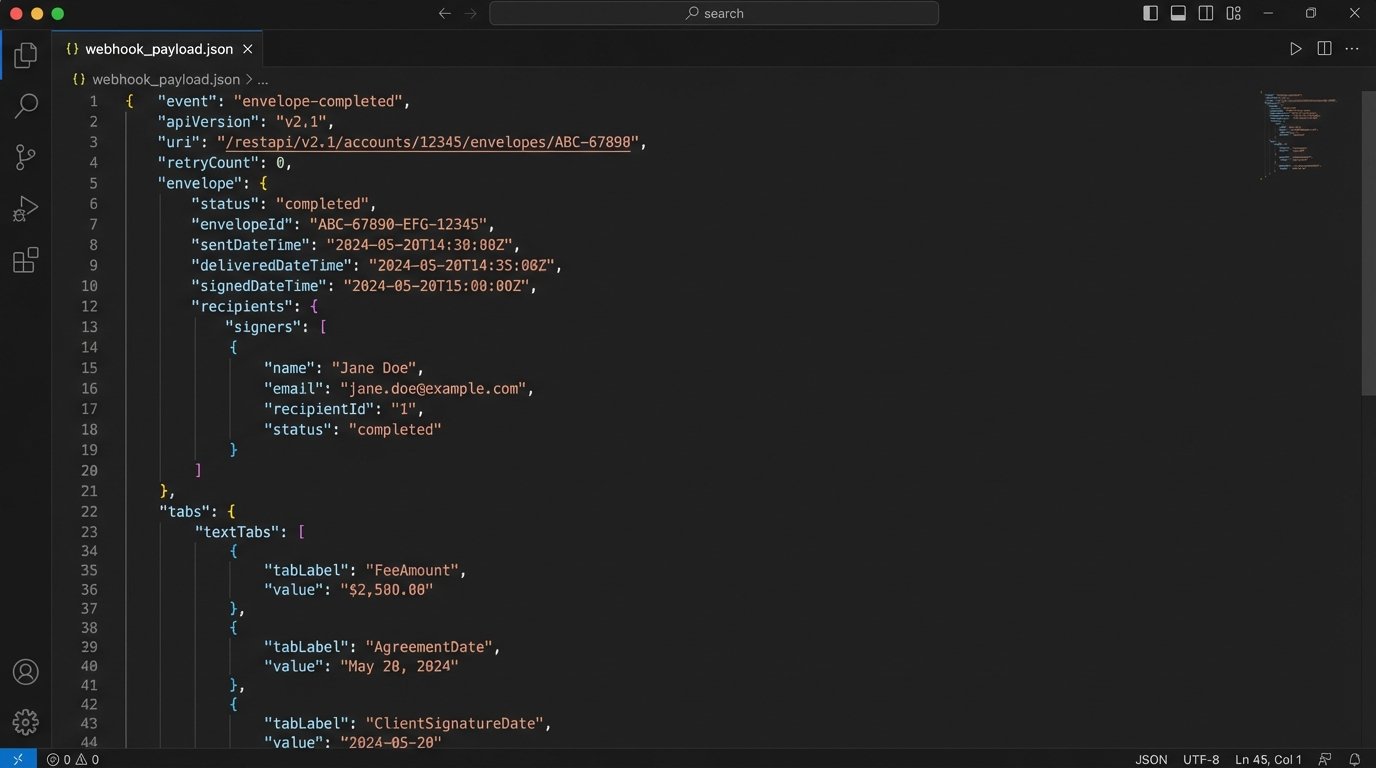
Technical Strengths: The event-driven trigger is rock solid. You know with certainty that the workflow is only starting after you have a signed retainer. This is a far more reliable business trigger than a simple form submission. The Connect service can send a massive XML or JSON payload containing not just the field data but extensive metadata about the signers, timestamps, and the document itself. You can use this data to create a contact and a matter, save the signed agreement to your document management system, and even trigger an initial invoice in your accounting software, all from a single event.
Operational Weaknesses: It is not a true intake form. The data entry experience within a DocuSign document is poor compared to a dedicated form builder. It is designed for signing, not for extensive data collection. This means you often need a two-step process: an initial form for data gathering, then using that data to pre-populate the DocuSign envelope via its API. This adds another layer of complexity and another potential point of failure. The configuration of Connect and the parsing of its dense XML payloads also require a developer; it is not a plug-and-play solution.
- Use Case: For practices where the signed fee agreement is the official start of the engagement. It is perfect for creating a post-signature onboarding sequence automatically.
- Gotcha: API rate limits. On standard plans, DocuSign enforces strict API call limits per hour. A poorly designed integration that makes too many polling calls to check a document’s status, instead of relying on the Connect webhook, can easily get your application throttled.
The correct tool is the one that best fits the capabilities of your team and the quirks of your existing software. A native platform offers simplicity at the cost of control. A custom-built pipeline using a form builder and an iPaaS offers control at the cost of complexity and maintenance. Choosing a path requires an honest audit of your firm’s technical debt and operational discipline. The marketing materials will not tell you that.