
The firm was losing leads. Not because their attorneys were inept, but because their client intake process was a manually-driven nightmare built on Outlook folders and a sprawling Excel sheet. A potential client would fill out a basic website contact form, triggering an email to a general inbox. A paralegal, juggling five other tasks, would then manually transcribe that data into the spreadsheet, a document with no validation rules and a dozen different date formats. The delay between initial contact and a meaningful response was often over 24 hours. In the world of personal injury law, that’s an eternity.
This data entry bog consumed an estimated 10 paralegal hours per week. That’s 10 hours of non-billable, error-prone work that created downstream problems. Incorrect phone numbers stalled follow-ups. Misspelled names forced corrections deep inside their case management system. The process wasn’t just slow; it was actively injecting bad data into their core records. They were paying skilled staff to perform a function that a simple script could execute in milliseconds. The cost wasn’t just in wasted wages, but in the opportunity cost of leads who went to a competitor who answered first.
Diagnostic: Pinpointing the Failure Cascade
The root of the problem was a fragmented, “human-in-the-loop” architecture for what should be a straightforward data pipeline. The existing tech stack was a relic. The firm’s website ran on a locked-down WordPress build managed by a marketing agency that charged for every minor change. The “database” was the aforementioned Excel file, hosted on a shared drive with zero access control. The final destination was a clunky, on-premise case management system (CMS) with an API whose documentation appeared to be last updated during the Bush administration.
Every step was a point of failure. The email parser could miss a submission. The paralegal could introduce a typo. The shared spreadsheet could be accidentally overwritten or incorrectly filtered. Getting data from the initial form submission into the CMS required three separate instances of a human reading and re-typing information. This isn’t a workflow; it’s a game of telephone with critical client data. The entire system relied on sustained, perfect human attention, a resource that simply doesn’t exist in a busy law practice.
Attempting to fix this by adding more people is like trying to fix a leaky pipe by hiring more janitors with bigger buckets. You aren’t solving the structural flaw; you’re just managing the mess it creates. The only viable solution was to gut the manual process entirely and force data to flow through a controlled, automated channel.
The New Architecture: A Pragmatic Assembly of Off-the-Shelf Tools
We didn’t propose a multi-year, six-figure custom software project. The firm needed a fix that could be deployed in weeks, not years. The strategy was to bridge their existing systems using modern, API-driven tools. The goal was to build a robust data-moving machine with minimal custom code, relying on a logic engine to do the heavy lifting that was previously bogging down their paralegals.
The solution consisted of three core components:
- Data Capture: A smart web form capable of conditional logic and, crucially, firing webhooks. We opted for Gravity Forms on their WordPress site, as it provided the required functionality without needing a complete site overhaul.
- The Logic Core (Middleware): Make.com (formerly Integromat) was selected as the central hub. While Zapier is more common, Make’s visual scenario builder and more granular control over API calls gave us the flexibility needed to wrestle with the firm’s ancient CMS. This is the digital duct tape holding the operation together.
- The Endpoints: The existing on-prem CMS, Microsoft Teams for internal notifications, and PandaDoc for automated retainer generation and e-signature.
This setup creates a straight path. Data is entered once by the potential client and then programmatically pushed and transformed as it moves through the system. Humans are shifted from data entry clerks to reviewers and decision-makers, intervening only when the automation flags an exception.
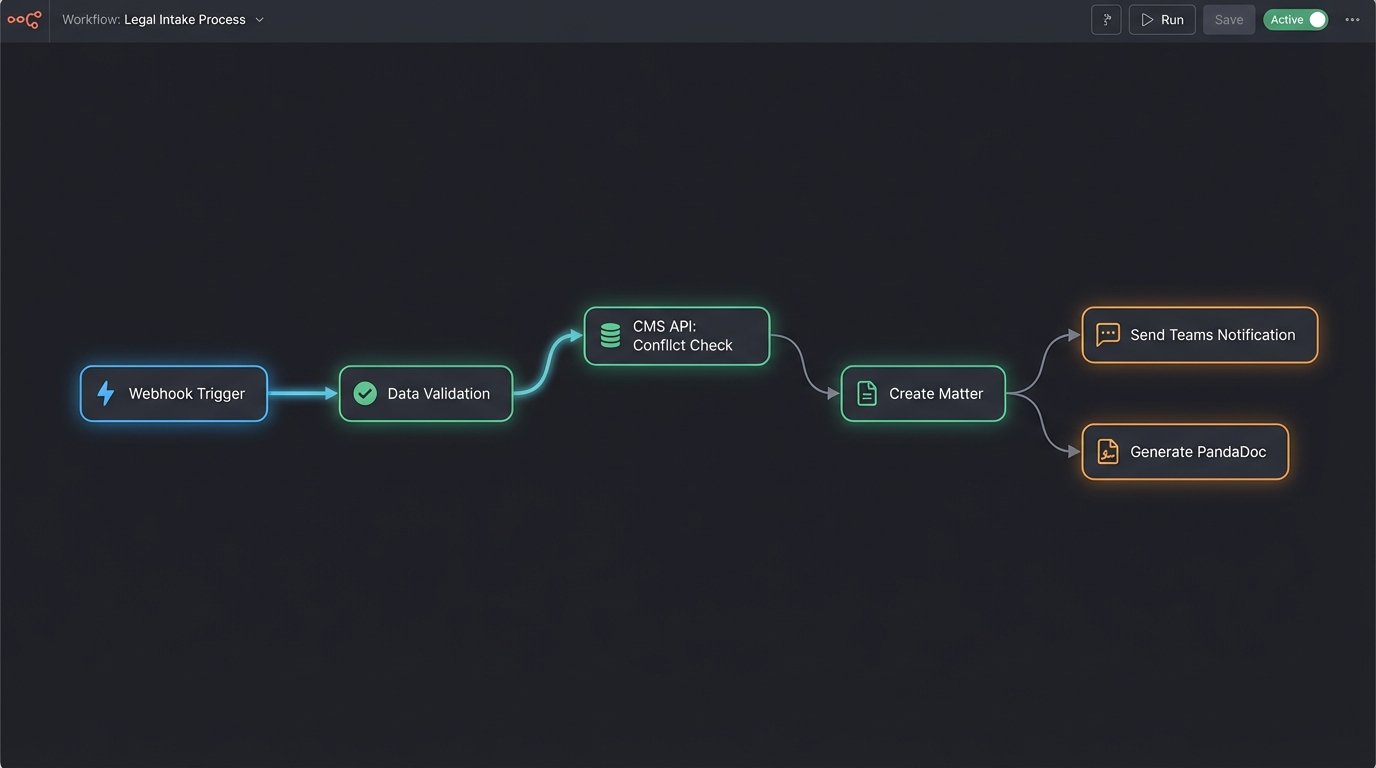
The entire architecture is designed around the principle of a single source of truth. The form submission is the atomic unit of data. Everything that follows is a direct, unaltered child of that initial input, which eliminates the risk of transcription errors. It’s a fundamental shift from manual data wrangling to automated data orchestration.
Implementation: Forcing the API to Cooperate
Building the bridge between a modern tool like Make.com and a legacy CMS API is rarely clean. The first challenge was authentication. The CMS used a dated SOAP API that required a multi-step token exchange, a process that modern webhook-based systems are not natively built for. We had to construct a preliminary HTTP request module in Make just to fetch the authentication token, store it as a variable, and then inject it into the header of every subsequent `POST` and `GET` request. It’s a clumsy but necessary workaround.
The core logic of the intake scenario was structured as follows:
Step 1: The Form and the Webhook Trigger
The Gravity Form was designed to be more than a simple contact form. We used conditional logic to ask qualifying questions based on the type of case selected. For example, a motor vehicle accident inquiry would prompt for the date of the incident and whether a police report was filed. This pre-segmentation allows for more intelligent routing later. Upon submission, the form doesn’t just send an email. It fires its entire payload as a JSON object to a unique Make.com webhook URL. This is the starting gun for the entire automation.
Step 2: Data Validation and Conflict Check
The first action in Make is to sanitize and validate the inputs. We strip any special characters from phone numbers and force email fields into lowercase to ensure data consistency. The most critical step here is the conflict check. The scenario performs a `GET` request to the CMS API, searching for the potential client’s name and the names of any opposing parties they listed in the form. The system is just shoving a firehose of data through the tiny needle of an old API endpoint.
If a potential match is found, the automation halts and posts a high-priority message to a specific channel in Microsoft Teams with a link to the existing record. This immediately alerts the intake team to a potential conflict, requiring manual review. This single step prevents the firm from inadvertently creating a conflict of interest, a catastrophic failure for any legal practice.
Step 3: Record Creation and Document Generation
If no conflict is found, the scenario proceeds. It bundles the sanitized data into a structured JSON object that matches the CMS API’s requirements for creating a new contact and an associated matter. This mapping is the most tedious part of the build, requiring a careful, field-by-field translation from the form’s output to the CMS’s expected input.
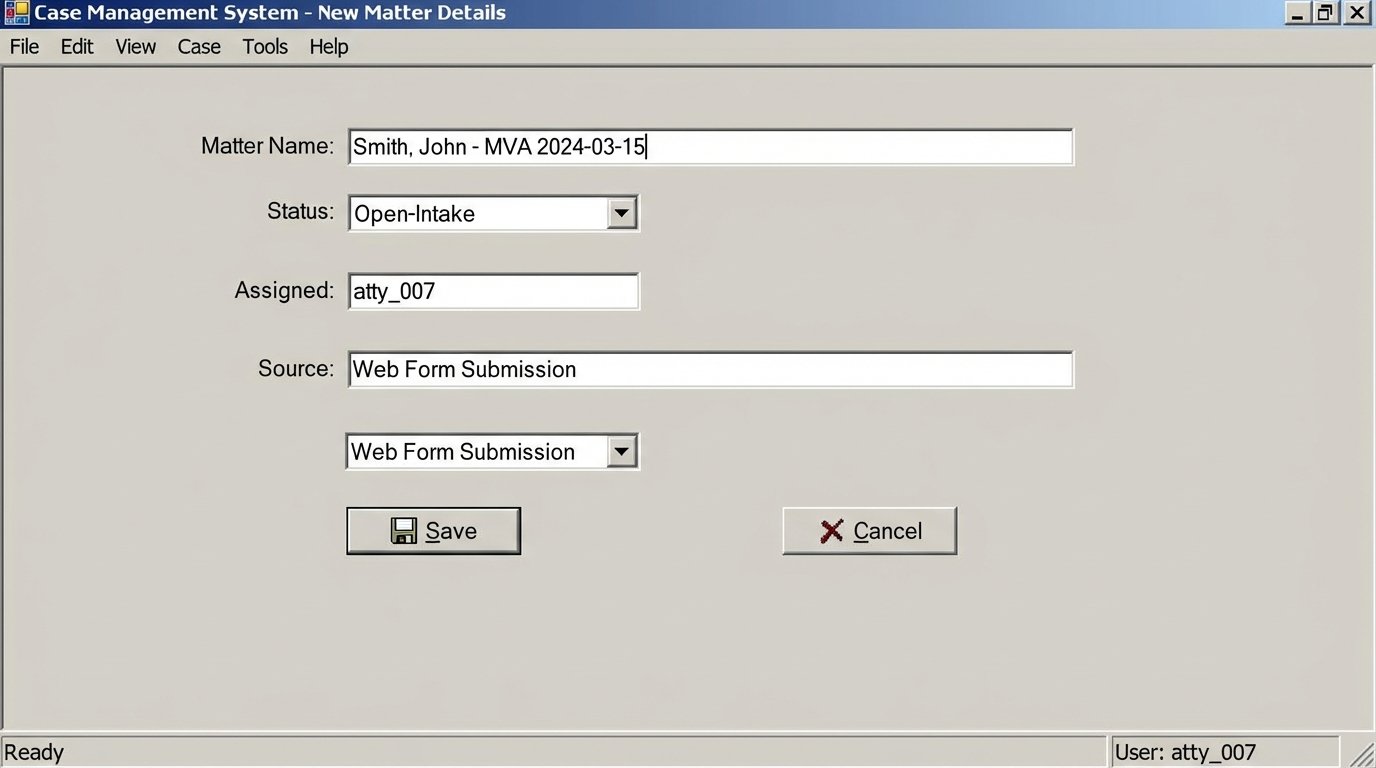
Here is a simplified example of the JSON payload sent to the CMS API to create the matter:
{
"client_id": "con_1138",
"matter_name": "Smith, John - MVA 2024-03-15",
"matter_type": "PI-MVA",
"assigned_attorney_id": "atty_007",
"origin_source": "Web Form Submission",
"incident_date": "2024-03-15T00:00:00Z",
"status": "Open-Intake"
}
Once the CMS responds with a success message and the new matter ID, the automation triggers the next stage. It pushes the client’s name and email to PandaDoc, which uses a template to generate the standard retainer agreement. The document is then automatically emailed to the client for e-signature. The entire process, from form submission to the client receiving the retainer, takes about 90 seconds.
Step 4: Internal Notification and Error Handling
Simultaneously, a detailed message is posted to the intake team’s channel in Microsoft Teams. This message includes the new client’s name, case type, a summary of their submission, and a direct link to the newly created matter in the CMS. The paralegal’s job is no longer to type this data but to see the notification and know the initial file is ready for their expert review.
Error handling is built in at every step. If the CMS API fails to respond or returns an error code, the scenario doesn’t just fail silently. It triggers a separate error path that immediately notifies the IT team with the specific error message and the raw data payload that caused it. This prevents data loss and allows for rapid debugging without having to dig through server logs at 3 AM.
Measurable Results: Shifting from Hours to Minutes
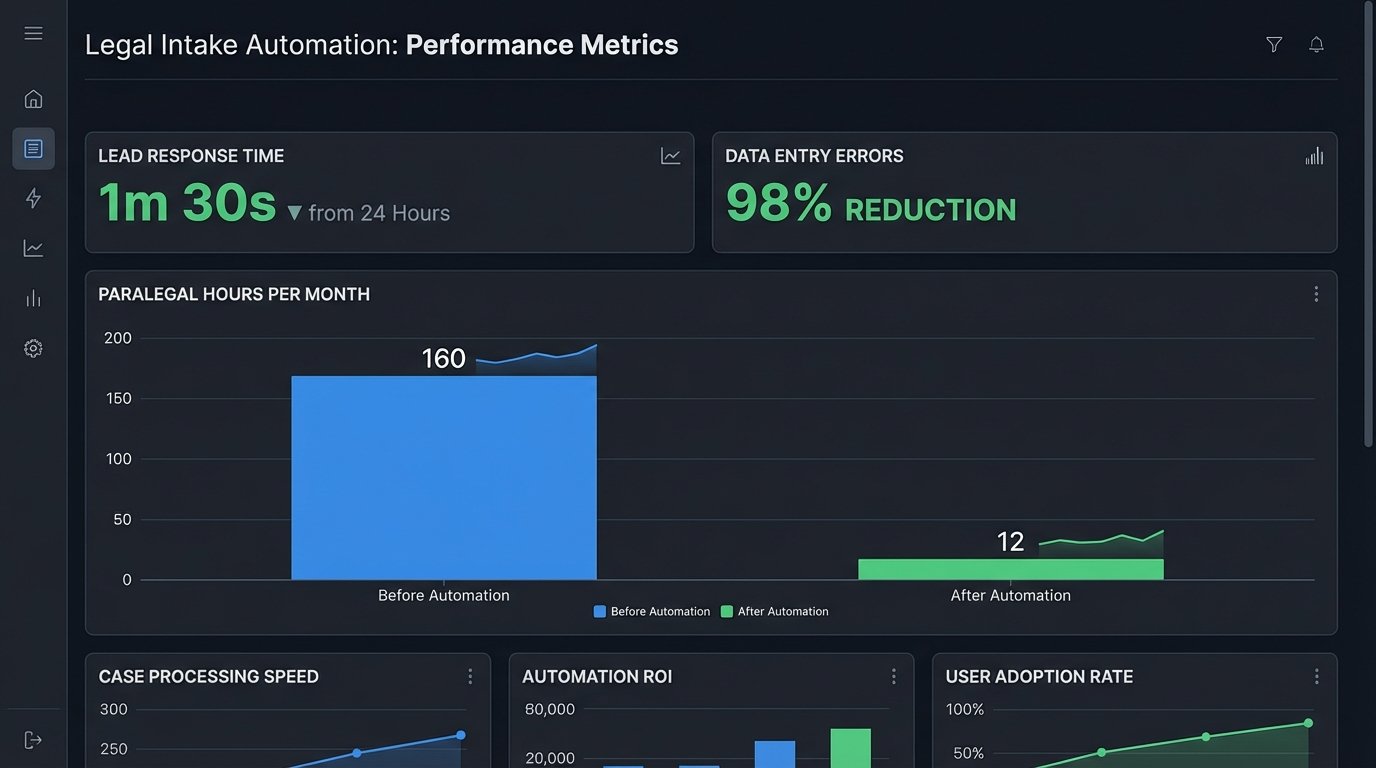
The impact was immediate and quantifiable. We tracked metrics before and after the rollout to measure the precise effect on the firm’s operations. The results removed any doubt about the project’s return on investment.
- Average Lead Response Time: This dropped from over 24 hours to under two minutes. Potential clients now receive the retainer agreement almost instantly after submitting their information, dramatically increasing the capture rate.
- Manual Intake Time Per Client: This was reduced from an average of 30 minutes of active work (data entry, file creation, document prep) to less than 5 minutes of review.
- Paralegal Time Reclaimed: The firm reclaimed approximately 40 hours of paralegal time per month previously spent on administrative intake tasks. This time is now allocated to more substantive, billable work.
- Data Entry Errors: Errors related to manual transcription, such as misspelled names or incorrect phone numbers, were effectively eliminated. This has had a cascading effect, improving the reliability of all subsequent reporting and communications.
The financial argument was clear. The monthly cost for the Make.com and PandaDoc subscriptions was a fraction of the cost of the 40 hours of paralegal time it saved. The firm was not just faster; it was more profitable. They were converting more leads and using their expensive human resources more effectively.
Remaining Friction and Future Iterations
This system is not a perfect, final-state solution. It is a highly effective bridge built on a foundation that is still partially flawed. The primary dependency is the middleware. If Make.com has an outage, the intake process stops dead. This is an accepted risk for the speed and low cost of implementation, but it represents a single point of failure.
The performance of the legacy CMS API remains a bottleneck. While the automation itself is nearly instantaneous, the process is often waiting on a sluggish response from the firm’s on-premise server. The API calls can sometimes take 10-15 seconds to complete, which feels slow in an otherwise rapid system. This proves that you can build a high-performance engine, but its top speed will always be limited by the slowest part of the track.
The next logical step is to address these core issues. A future iteration could involve developing a small, dedicated microservice hosted on AWS Lambda to replace the Make.com dependency. This would provide more robust error handling and remove the reliance on a third-party platform. The ultimate goal, however, should be to pressure the firm to finally migrate away from their wallet-draining legacy CMS to a modern, cloud-native platform with a fast, well-documented REST API. Automation can fix a broken process, but it can’t fix a broken foundation.